Att hantera hundratals – eller tusentals – QR-koder över kampanjer, platser och produktlinjer är svårare än det ser ut. Utan ett tydligt system slutar teamen med trasiga länkar, inkonsekvent varumärkesprofilering och ingen verklig insyn i vad som fungerar. Denna guide täcker de praktiska strategier och verktyg som håller storskaliga QR-kodimplementeringar organiserade, spårbara och lätta att uppdatera.
Välj rätt typ av QR-kod innan du skalar
Det viktigaste beslutet du kommer att fatta innan du skalar något QR-kodprogram är att välja mellan dynamiska och statiska koder – eftersom det valet avgör vad du kan ändra, spåra och automatisera senare.
Dynamiska QR-koder använd en kort omdirigerings-URL som du kontrollerar. Eftersom den tryckta koden bara pekar på den omdirigeringen kan du uppdatera destinationen, byta innehåll eller ändra spårningsparametrar när som helst utan att trycka om något. De låser också upp spårningsfunktioner inklusive antal skanningar, tidsstämplar, geografisk plats, enhetstyp och operativsystem. Detta gör dem till det rätta valet för marknadsföringskampanjer, kampanjer, restaurangmenyer, evenemangsmaterial och alla användningsfall där innehåll ändras eller prestandadata är viktigt.
Statiska QR-koder koda en destination direkt i själva mönstret. När den väl är utskriven är den informationen permanent – du kan inte uppdatera länken eller spåra skanningar utan att generera en ny kod. De är väl lämpade för information som verkligen aldrig ändras: ett fast Wi-Fi-lösenord, ett permanent regelverk eller en museiutställning med stabilt innehåll.
| FUNKTION | Dynamiska QR-koder | Statiska QR-koder |
|---|---|---|
| Redigerbar efter utskrift | ✅ Ja | ❌ Nej |
| Skanningsspårning | ✅ Ja | ❌ Nej |
| Geografisk analys | ✅ Ja | ❌ Nej |
| Statistik i realtid | ✅ Ja | ❌ Nej |
| Kostnad | Prenumeration krävs | Fri |
| 9. Bäst för | Kampanjer, menyer, erbjudanden | Fast, permanent innehåll |
För en djupare titt på hur dessa två alternativ jämförs, se den fullständiga uppdelningen av statiska vs. dynamiska QR-koder.
Börja hantera dynamiska QR-koder idag Behöver du redigerbara koder med inbyggd spårning och en centraliserad instrumentpanel? Den Dynamisk QR-kodgenerator låter dig skapa, uppdatera och övervaka alla dina koder på ett ställe.
Bygg ett namngivnings- och organisationssystem som skalar
När du hanterar dussintals koder är lösa namngivningskonventioner en olägenhet. Vid hundratals eller tusentals blir de ett allvarligt operativt problem. En konsekvent namngivningsstruktur, kombinerat med en logisk mapphierarki, håller ditt team samstämmigt och dina koder hittbara i alla skeden av en kampanj.
Använd en standardiserad namngivningskonvention
Ett pålitligt namngivningsformat fångar allt du behöver för att identifiera en kod utan att öppna den. En praktisk struktur:
`Avd-KampanjKanal-GeoMål-TillgångstypVersionStatus`
Till exempel: `MKT-Sommar25OOH-USKampanj-Affischv2AKTIV`
Ange datum i formatet ÅÅÅÅ-MM, använd versionsnummer (v1, v2) för att skilja iterationer, och inkludera alltid en statusindikator (AKTIV, PAUSAD, ARKIVERAD). Detta förhindrar förvirring när flera versioner av samma kampanj är live samtidigt.
Registrera strukturerad metadata för varje kod
Utöver namnet bör varje QR-kod bära strukturerad metadata som vem som helst i ditt team kan referera till. Fält att inkludera:
- Ägare (ansvarig person eller team)
- Affärsenhet eller produktlinje
- Mål-URL och reserv-URL
- Kodtyp (dynamisk eller statisk)
- Startdatum och slutdatum
- Uppmaningstext
- Åtkomst- eller säkerhetsnivå
Slutdatum och reserv-URL:er är särskilt viktiga i stor skala – de förhindrar skanningar som leder till återvändsgränder efter att en kampanj avslutats, och en reserv-URL säkerställer att användare fortfarande hamnar någonstans användbart om den primära destinationen slutar fungera.
Organisera med mappar och taggar
En tvåskiktad mappstruktur fungerar bra för de flesta team: mappar på toppnivå för affärsenheter eller produktlinjer, och undermappar för enskilda kampanjer eller platser. Taggar lägger till ett andra lager av filtrering – markera koder efter region (USA, EU), kanal (e-post, utomhusreklam, förpackning), placeringstyp (affisch, flaska, skärm) och status (aktiv, arkiverad).
Pageloots Funktion för QR-kodmappar stöder teambaserad mappdelning med rollbaserade behörigheter, så att du kan ge nya teammedlemmar läsbehörighet till analyser samtidigt som du begränsar vem som kan redigera eller radera koder. Detta är särskilt användbart för byråer som hanterar flera kunder eller företag som använder koder över olika avdelningar.
Generera koder i bulk utan att förlora kontrollen
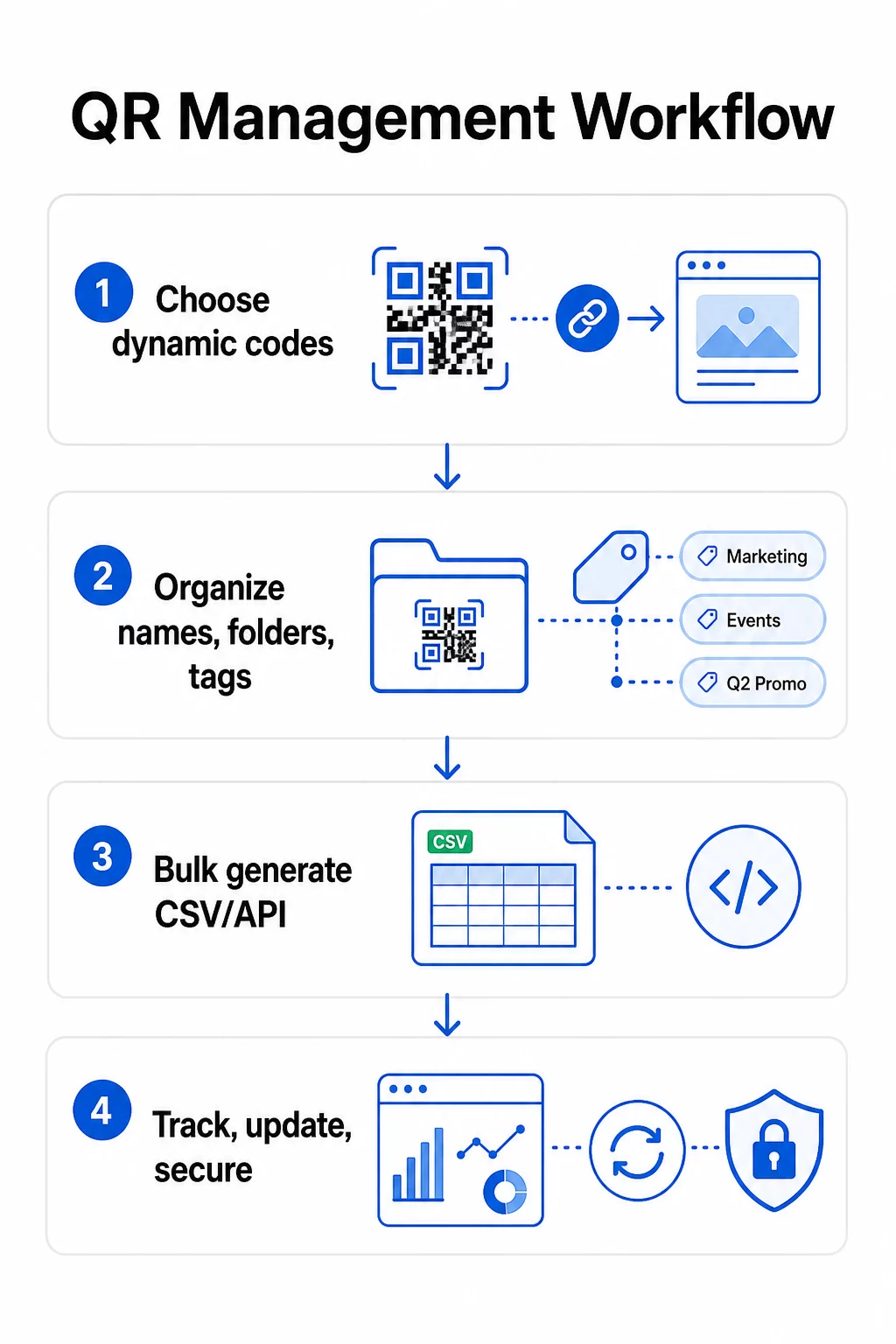
När din namngivnings- och mappstruktur är på plats blir massgenerering enkel – förutsatt att din indata är ren och din process inkluderar ett valideringssteg innan du genererar i volym.
Använd CSV-filer för batchgenerering
CSV-baserad massgenerering är den mest praktiska metoden för att effektivt skapa stora volymer koder. En välstrukturerad CSV-fil för QR-kodgenerering bör inkludera:
- `unique_id` – din interna identifierare
- `qr_typ` – URL, PDF, vCard, formulär, etc.
- `destinations-URL` – måldestinationen
- `kampanjnamn` – för rapportering och filtrering
- `mapp` – där koden ska finnas i din kontrollpanel
- `mallnamn` – den varumärkesanpassade designen att tillämpa
- `utm-parametrar` – källa, medium, kampanj, innehåll
- `startdatum` / `slutdatum` – kampanjperiod
- `status` – aktiv eller pausad
- `ägare` – ansvarig teammedlem
Innan du laddar upp, validera CSV-filen: bekräfta att alla obligatoriska fält är ifyllda, kontrollera att URL:er är aktiva och korrekt formaterade, och kör en testomgång med fem till tio koder på olika enheter för att upptäcka fel innan de sprids genom hela körningen.
För automatiserad massgenerering i företagsskala, API-baserad QR-kodshantering gör det möjligt att programmatiskt skicka parametrar, utlösa masskapande från dina egna system, och uppdatera destinations-URL:er för tusentals koder samtidigt med hjälp av PATCH- eller PUT-förfrågningar.
Lägg till UTM-parametrar konsekvent
UTM-parametrar är det som kopplar QR-kodsskanningar till din bredare analysstack. Utan dem kan du se att någon skannade en kod, men du kan inte enkelt tillskriva den skanningen till en specifik kampanj, kanal eller placering i Google Analytics.
Följ dessa konventioner för att hålla din data ren:
- Använd gemener genomgående – UTM-spårning är skiftlägeskänslig, och blandad versalisering skapar fragmenterad rapportering
- Håll parametervärden beskrivande men koncisa: `utmsource=butikdisplay`, `utmmedium=qrkod`, `utmcampaign=sommarrea_2025`
- Använd `utmcontent` för att skilja mellan placeringar inom samma kampanj (t.ex. `fönsteraffisch` vs. `kassa_disk`)
- Dokumentera din namngivningstaxonomi i ett delat referensdokument så att varje teammedlem följer samma regler
För en fullständig genomgång av UTM-inställningar och rapportering i Google Analytics 4, se UTM-parametrar för QR-koder.
Koppla dina QR-skanningar till kampanjanalys Pageloots byrå- och teamplattform stöder automatisk UTM-tillägg, rollbaserad åtkomstkontroll och delbara klientrapporter – vilket gör spårning av attribuering betydligt enklare över stora utrullningar.
Håll varumärket konsekvent över varje kod
I stor skala är visuell konsekvens viktig av två skäl: det bygger igenkänning och förtroende hos de som skannar dina koder, och det förhindrar att ett lapptäcke av felmatchade designer späder ut din varumärkesidentitet.
Innan du genererar en stor sats, definiera och lås dina designstandarder:
- Logotypens placering och minimistorlek
- Varumärkets färgpalett (mörk förgrund på ljus bakgrund förblir det mest pålitliga mönstret för skanning)
- Hörn- och modulstil
- Krav på tyst zon (minst fyra moduler med fritt utrymme på alla sidor)
- Minsta utskriftsstorlek (minst 2 × 2 cm för skanning på nära håll; skala upp med 10:1-regeln – kodens bredd bör vara minst en tiondel av det förväntade skanningsavståndet)
- Filformat: SVG eller PDF för tryckmaterial (300+ DPI), PNG för digital användning
Dynamiska QR-koder erbjuder en praktisk fördel här: eftersom de kodar en kort omdirigerings-URL snarare än en lång destination, är det underliggande mönstret mindre tätt. Detta ger mer utrymme att inkludera logotyper och anpassade färger utan att kompromissa med skanningsbarheten.
Spara dessa standarder som återanvändbara varumärkesmallar i din QR-kodplattform. Pageloot låter dig skapa mallar för olika sammanhang – ett kompakt format för visitkort, en djärvare version för storformatsskyltar – och tillämpa dem konsekvent över varje massgenerering.
Innan du beställer en stor utskriftsserie, testa ett urval av fysiska utskrifter på flera enheter och i olika ljusförhållanden. Om några koder inte skannas tillförlitligt, öka den fysiska storleken, förstärk färgkontrasten eller bredda den tysta zonen.
Spåra prestanda med rätt mätvärden
Att generera koder effektivt är bara halva jobbet. Att förstå hur de presterar – och agera utifrån den datan – är det som driver kontinuerlig förbättring.
De viktigaste mätvärdena att övervaka för storskaliga utrullningar är:
- Totala skanningar och unika skanningar: Totala skanningar visar övergripande engagemang; unika skanningar avslöjar din faktiska räckvidd. Ett högt förhållande mellan totala och unika skanningar kan indikera starkt upprepat engagemang eller, i vissa fall, en dåligt optimerad landningssida som får användare att skanna flera gånger.
- Geografisk fördelning: Pageloots analysverktyg tillhandahåller platsbaserad skanningsdata, noggrann ner till ungefär stadsnivå. Använd detta för att identifiera vilka regioner eller placeringar som presterar bättre än andra och omfördela resurser därefter.
- Enhet och operativsystem: Om majoriteten av dina skanningar kommer från en specifik enhetstyp, prioritera att testa dina landningssidor på den plattformen. Mobil-först-optimering är avgörande för de flesta QR-drivna kampanjer.
- Tidsbaserade trender: Skanningsdata över tid avslöjar toppar i engagemang. För tidskänsliga kampanjer – butikskampanjer, evenemang – hjälper denna data dig att schemalägga innehållsförändringar vid rätt tidpunkt.
- Konverteringsspårning: Skanningsvolym ensam indikerar inte kampanjframgång. Sätt tydliga efterföljande mål (formulärinlämningar, köp, appnedladdningar) och använd UTM-data plus din analysplattform för att mäta om skanningar leder till de åtgärder du önskar.
För en detaljerad metod för att bygga rapporteringsvyer kring dessa mätvärden, se guiden till att använda en analyspanel för QR-koder.
Bygg instrumentpaneler som visar handlingsbara insikter
Rå skanningsdata från hundratals koder blir ohanterlig utan strukturerade vyer. Organisera din rapportering i:
- Instrumentpaneler på kampanjnivå: Jämför prestanda över aktiva kampanjer, filtrerat efter tidsperiod. Spåra kostnad per skanning, konverteringsfrekvens och ROI mot kampanjriktmärken.
- Platsbaserade vyer: Kartlägg skanningsdistribution geografiskt för att identifiera högpresterande placeringar och informera framtida utplaceringsbeslut.
- Målgruppssegmentering: Gruppera användare efter enhetstyp, skanningsfrekvens eller beteendemönster för att skräddarsy uppföljningsinnehåll.
Ställ in automatiska varningar för betydande avvikelser – en plötslig ökning av skanningar från en ovanlig geografisk källa kan indikera en trasig omdirigering eller bedräglig aktivitet, medan ett kraftigt fall kan signalera en trasig länk som behöver omedelbar uppmärksamhet.
Uppdatera och underhåll koder utan att trycka om
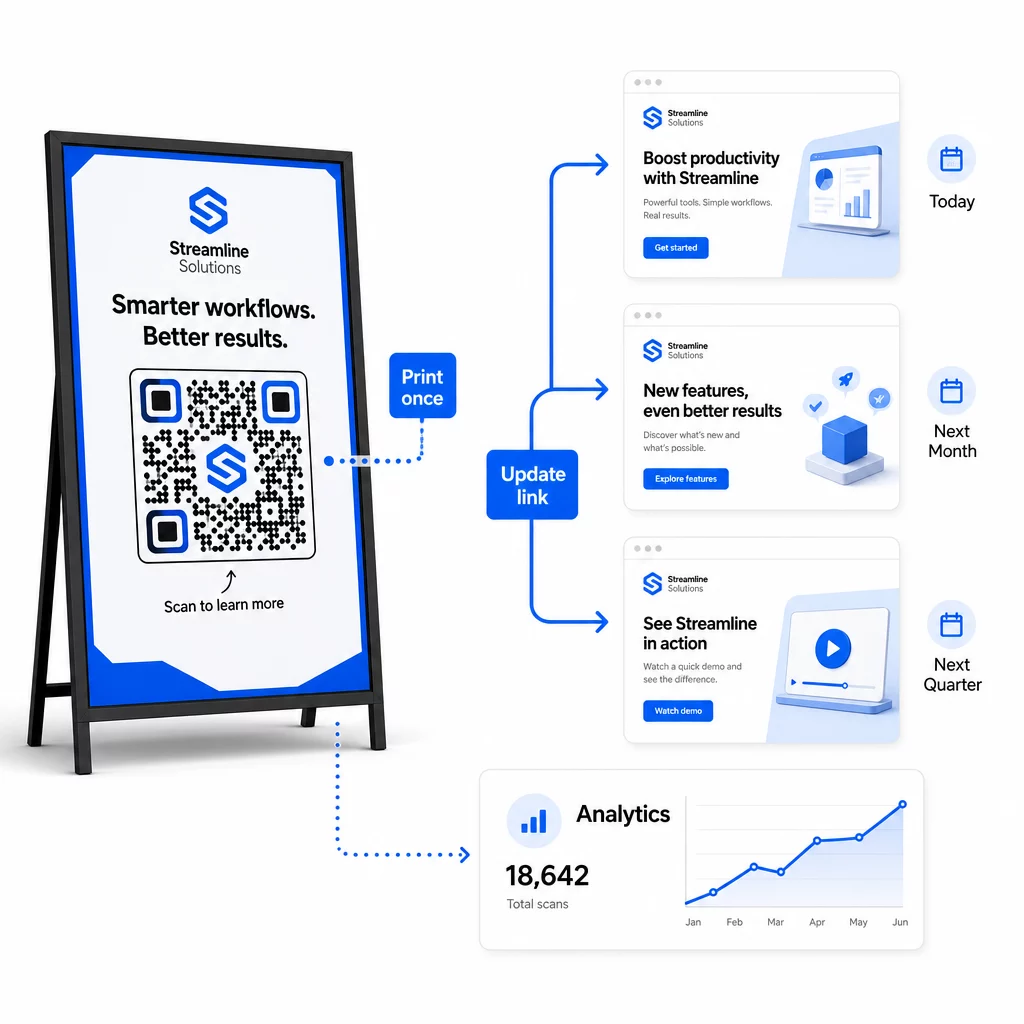
En av de viktigaste operativa fördelarna med dynamiska QR-koder är möjligheten att redigera destinations-URL:er efter utskrift – inga nya koder, inga nya tryckningar, ingen avbrott i aktiva material. I stor skala blir denna förmåga avgörande.
Implementera versionskontroll för destinationsändringar
Varje gång du uppdaterar en dynamisk QR-kods destination, logga ändringen med:
- Datum och tid för uppdatering
- Tidigare destinations-URL
- Ny destinations-URL
- Anledning till ändringen
- Vem som godkände det
Använd ett versionsschema – v1.0 för första lanseringen, v1.1 för mindre justeringar, v2.0 för en betydande destinationsändring – så att ditt team alltid vet vilken version som är aktiv och kan återställa om något går fel. För team med flera bidragsgivare säkerställer rollbaserade behörigheter att endast auktoriserade användare kan göra ändringar i aktiva koder.
Automatisera tidsbaserade omdirigeringar
För kampanjer med förutsägbara innehållsscheman eliminerar tidsinställda omdirigeringar behovet av manuell intervention. En restaurang kan servera frukost-, lunch- och middagsmenyer från en enda tryckt QR-kod genom att schemalägga destinationsändringar vid bestämda tider. En återförsäljare kan konfigurera en kod för att omdirigera till en kampanjsida under en försäljningsperiod och automatiskt återgå till standardsidan när kampanjen avslutas.
Detta tillvägagångssätt är särskilt värdefullt när QR-koder trycks på material med långa ledtider. Du kan slutföra den fysiska produktionen i god tid, säker på att koden kommer att visa rätt innehåll när kampanjen lanseras.
Övervaka länkar automatiskt
I stor skala är det inte praktiskt att manuellt kontrollera om varje destinations-URL är aktiv. Ställ in automatisk länkövervakning för att varna ditt team när en destination returnerar ett fel, så att du kan omdirigera skanningar till en backup-URL innan användare stöter på en trasig upplevelse. Att dokumentera backup-URL:er i din metadata – som beskrivs i avsnittet om namngivningskonventioner ovan – innebär att ditt team alltid har en reserv redo.
Säkra ditt QR-kodprogram när det växer
Operativ effektivitet i stor skala kräver styrning – tydligt ägarskap, lämpliga åtkomstkontroller och proaktiv övervakning för att skydda din data och dina användare.
Rollbaserad åtkomstkontroll är grunden för ett säkert, välstyrt QR-kodprogram. Tilldela behörigheter som matchar varje teammedlems ansvarsområden: analysvisare kan se skanningsdata men inte redigera koder; kampanjchefer kan uppdatera destinationer men inte radera koder; administratörer har full åtkomst. Denna struktur förhindrar oavsiktliga eller obehöriga ändringar samtidigt som den möjliggör samarbete mellan stora team.
För företag som hanterar QR-koder över flera avdelningar stöder Pageloot åtkomstkontroller på arbetsyte-nivå och delning av teammappar, vilket gör att decentraliserade team kan hantera sina egna koder utan insyn i andra gruppers kampanjer.
Utöver åtkomstkontroll, håll utkik efter avvikande skanningsmönster – oväntade volymtoppar, höga koncentrationer av skanningar från ett enda IP-intervall, eller geografiska fördelningar som är inkonsekventa med dina kampanjplaceringar. Dessa mönster kan indikera botaktivitet eller annan bedräglig skanning som skulle korrumpera din analysdata. Automatisk övervakning som flaggar dessa mönster tidigt skyddar både din dataintegritet och dina insikter om kampanjprestanda.
Upprätthåll en granskningslogg över alla ändringar av aktiva koder: vem ändrade vad, när och varför. När ett kampanjproblem uppstår är denna post den snabbaste vägen till diagnos och lösning.
Vanliga frågor
Dynamiska QR-koder låter dig uppdatera destinations-URL:en eller innehållet efter att koden har skrivits ut, utan att generera eller skriva ut något på nytt. I stor skala innebär detta att du kan korrigera trasiga länkar, uppdatera säsongskampanjer, eller omdirigera användare till nytt innehåll över tusentals utplacerade koder från en enda kontrollpanel – vilket eliminerar omkostnader för omtryck och driftstopp.
Använd gemener genomgående, håll värdena beskrivande och koncisa, och standardisera din parameterstruktur i ett delat referensdokument. Ett pålitligt mönster är: `utmsource` för den specifika placeringen (t.ex. `storedisplay`), `utmmedium=qrcode` konsekvent över alla koder, `utmcampaign` för kampanjnamnet med datum (t.ex. `summersale2025`), och `utmcontent` för att skilja enskilda placeringar inom samma kampanj. Undvik interna UTM-länkar, och kör QA-kontroller före lansering för att bekräfta att alla parametrar skickas korrekt till din analysplattform.
Definiera dina designstandarder – logoplacering, varumärkesfärger, storlek på tyst zon, minsta utskriftsmått och filformat – innan du genererar någon batch, spara sedan dessa som återanvändbara varumärkesmallar i din QR-kodplattform. Tillämpa samma mall för varje kod i en batchkörning. Dynamiska QR-koder gör detta enklare eftersom deras kortare kodade data producerar mindre täta mönster, vilket lämnar mer utrymme för logotyper och anpassade färger utan att kompromissa med skanningsbarheten.