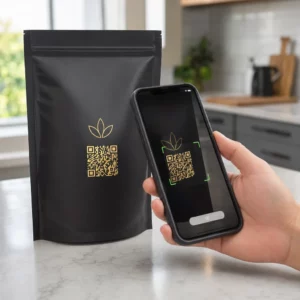
Jak wiesz, czy Twoje reklamy drukowane faktycznie działają? Bez sposobu na mierzenie odpowiedzi, zgadujesz – a zmarnowane wydatki na reklamy szybko się kumulują. Kody QR rozwiązują ten problem, zamieniając każde umieszczenie reklamy drukowanej w cyfrowy punkt styku, który można śledzić, dając Ci konkretne dane o tym, kto się zaangażował, kiedy i co zrobił dalej.
Dlaczego reklamy drukowane są trudne do zmierzenia bez kodów QR
Tradycyjna reklama drukowana – magazyny, mailing bezpośredni, plakaty, ulotki – zawsze cierpiała na lukę w atrybucji. Możesz oszacować zasięg na podstawie nakładu, ale nie ma natywnego sposobu, aby dowiedzieć się, ilu czytelników faktycznie odpowiedziało na konkretną reklamę, nie mówiąc już o tym, co zrobili później.
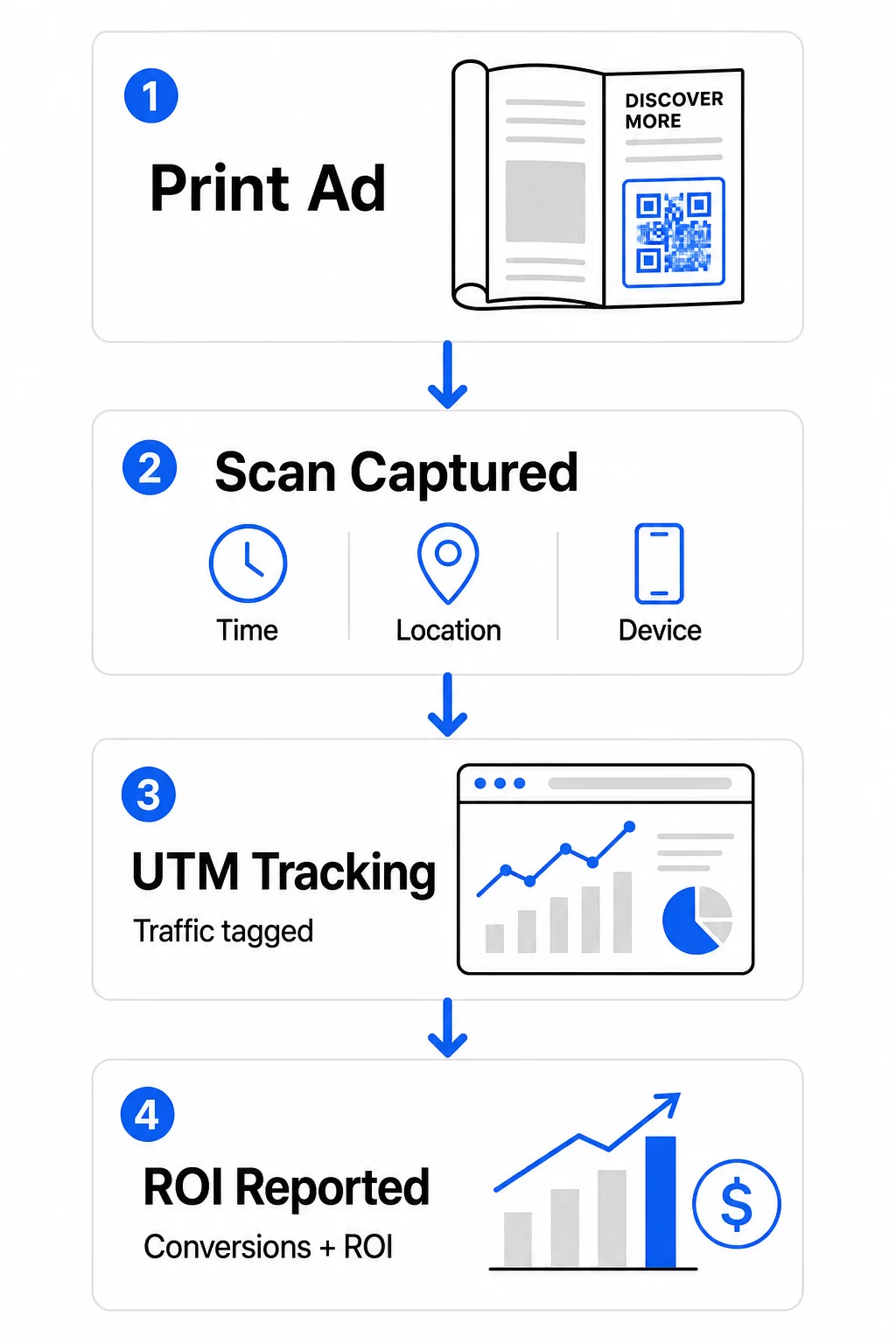
Kody QR zamykają tę lukę. Kiedy czytelnik skanuje kod w Twoim materiale drukowanym, ta akcja jest rejestrowana cyfrowo. Rejestrujesz zdarzenie skanowania, lokalizację, typ urządzenia i czas – a jeśli docelowy adres URL zawiera parametry UTM, możesz śledzić tego użytkownika aż do zakupu, rejestracji lub pobrania. Wrażenie offline staje się mierzalną konwersją cyfrową.
Dlatego kody QR stały się standardowym narzędziem do atrybucji kampanii drukowanych. Używając unikalnych kodów QR w różnych miejscach – jeden dla każdego magazynu, jeden dla każdej partii mailingu bezpośredniego, jeden na lokalizację billboardu – możesz porównywać wydajność między kanałami w ten sam sposób, w jaki porównywałbyś płatne kampanie cyfrowe.
Zmień miejsca umieszczenia reklam drukowanych w mierzalne kampanie Użyj Generator dynamicznych kodów QR aby tworzyć unikalne, śledzalne kody dla każdego miejsca umieszczenia reklamy drukowanej i zacząć zbierać rzeczywiste dane o zaangażowaniu.
Statyczne vs. Dynamiczne kody QR do śledzenia
Nie wszystkie kody QR obsługują śledzenie. Zrozumienie różnicy między kodami statycznymi a dynamicznymi jest podstawą każdej strategii pomiaru druku.
Statyczne kody QR kodują docelowy adres URL bezpośrednio w wzorze kodu. Po wydrukowaniu, miejsce docelowe nie może być zmienione i nie ma mechanizmu do rejestrowania zdarzeń skanowania. Działają dobrze do linkowania do stałej treści, ale nie oferują żadnych analiz.
Dynamiczne kody QR kodują zamiast tego krótki adres URL przekierowania. Po zeskanowaniu, przekierowanie prowadzi do wybranego miejsca docelowego – a platforma rejestruje zdarzenie skanowania z datą i godziną, lokalizacją i danymi urządzenia. Ponieważ adres URL przekierowania pozostaje stały, podczas gdy miejsce docelowe może się zmieniać, możesz aktualizować połączoną treść w dowolnym momencie bez ponownego drukowania materiałów.
Do śledzenia reklam drukowanych, dynamiczne kody QR są jedyną praktyczną opcją. Dostarczają danych o skanowaniu, których potrzebujesz do mierzenia wydajności kampanii oraz elastyczności w dostosowywaniu stron docelowych na podstawie tego, co pokazują dane.
Konfigurowanie kodów QR do śledzenia kampanii drukowanych
Twórz unikalne kody dla każdego miejsca umieszczenia
Najważniejszą zasadą śledzenia druku jest jeden kod QR na jedno miejsce umieszczenia. Jeśli umieścisz tę samą reklamę w trzech różnych magazynach, używając jednego wspólnego kodu QR, zobaczysz zagregowane liczby skanowań, ale nie będziesz wiedzieć, która publikacja przyniosła rezultaty.
Przypisz osobny kod QR do każdego:
- Publikacji lub kanału (np. każdy tytuł magazynu)
- Obszaru dystrybucji geograficznej (np. przesyłki z Północnego Wschodu vs. Zachodniego Wybrzeża)
- Formatu lub rozmiaru reklamy (np. cała strona vs. pół strony)
- Okresu trwania kampanii lub przedziału czasowego
Takie podejście pozwala bezpośrednio porównywać wyniki w różnych miejscach docelowych i alokować przyszłe wydatki na to, co działa. Pageloot’s narzędzia do zarządzania kampaniami pozwalają organizować kody według kampanii, przypisywać je do subkont dla różnych zespołów i zarządzać wszystkimi miejscami docelowymi z jednego pulpitu nawigacyjnego.
Dodaj parametry UTM do swoich docelowych adresów URL
Dane skanowania z platformy kodów QR informują, ile osób zaangażowało się w Twoją reklamę drukowaną. Parametry UTM mówią, co te osoby zrobiły po zeskanowaniu. Razem dają pełny obraz atrybucji.
Parametry UTM to tagi dołączane do docelowego adresu URL, które identyfikują źródło ruchu w Google Analytics. Prawidłowo otagowany adres URL dla kampanii drukowanej może wyglądać następująco:
`https://yourwebsite.com/landing-page?utmsource=voguemagazine&utmmedium=qrkod&utmcampaign=falllaunch_2025`
Dzięki tej konfiguracji każda sesja pochodząca ze skanu kodu QR pojawia się w Google Analytics oznaczona dla tej konkretnej lokalizacji. Możesz następnie mierzyć dalsze działania – zakupy, wypełnienia formularzy, pobrania treści – i przypisywać je do reklamy drukowanej, która wygenerowała skan.
Aby uzyskać pełny przewodnik po konwencjach nazewnictwa i raportowaniu GA4, przewodnik na temat parametrów UTM dla kodów QR szczegółowo opisuje konfigurację.
Połącz skany drukowane z Google Analytics Pageloot funkcje analityczne umożliwiają dodawanie parametrów UTM podczas tworzenia kodu QR, dzięki czemu każdy skan jest automatycznie przypisywany w GA4.
Projektuj kody, które faktycznie są skanowane
Śledzenie działa tylko wtedy, gdy ludzie skanują Twoje kody. Kilka wymagań technicznych dotyczy w szczególności materiałów drukowanych:
- Minimalny rozmiar: 0,8 × 0,8 cala dla standardowych materiałów drukowanych, takich jak wizytówki lub ulotki; skaluj proporcjonalnie dla plakatów i oznakowania, stosując zasadę 10:1 – co najmniej jeden cal szerokości kodu QR na każde dziesięć cali oczekiwanej odległości skanowania
- Kontrast: Wysoki kontrast między ciemnymi modułami a jasnym tłem jest niezbędny; unikaj par o niskim kontraście, takich jak jasnoszary na białym, i nigdy nie odwracaj kolorów
- Rozmieszczenie: Poziom oczu jest idealny dla plakatów i oznakowania, zazwyczaj między 3,5 a 5,5 stopy od ziemi; unikaj zakrzywionych powierzchni, takich jak etykiety butelek lub zagięcia magazynów, gdzie zniekształcenie może uniemożliwić skanowanie
- Format pliku: Używaj formatów wektorowych (EPS lub SVG) do druku wielkoformatowego; PNG lub JPEG jest wystarczający dla mniejszych materiałów
Dodanie ramki z wezwaniem do działania – “Skanuj, aby uzyskać ekskluzywną ofertę” lub “Uzyskaj natychmiastowy dostęp” – w pobliżu kodu daje czytelnikom jasny powód do zaangażowania. Markowe kody QR, które zawierają Twoje logo i kolory, również budują rozpoznawalność i zaufanie. Szczegółowe wytyczne dotyczące rozmiaru i umiejscowienia znajdziesz w przewodniku po używaniu kodów QR w mediach drukowanych.
Metryki, które mają znaczenie dla atrybucji reklam drukowanych
Gdy Twoje kody są aktywne, zebrane dane dzielą się na dwie kategorie: metryki zaangażowania, które mierzą, ile osób odpowiedziało na Twoją reklamę drukowaną, oraz metryki konwersji, które mierzą, co te osoby zrobiły dalej.
Oto zestawienie kluczowych metryk do monitorowania:
| Metryka | Co mierzy | Dlaczego to ważne |
|---|---|---|
| ŁĄCZNIE SKANÓW | Każde zdarzenie skanowania, w tym powtórne skanowania | Pokazuje ogólny zasięg kampanii |
| Unikalne skany | Poszczególne urządzenia, które skanowały | Odzwierciedla rzeczywistą wielkość odbiorców |
| Współczynnik skanowania | Skanowania w stosunku do szacowanej ekspozycji na reklamę | Ocenia skuteczność kreacji i umiejscowienia |
| Lokalizacja skanowania | Rozkład geograficzny skanowań | Identyfikuje regiony o wysokiej wydajności |
| Typ urządzenia | iOS, Android, desktop | Wskazuje optymalizację mobilną dla stron docelowych |
| Szczytowe godziny skanowania | Kiedy skanowania występują w ciągu dnia lub tygodnia | Informuje o strategii czasowej dla przyszłych kampanii |
| Współczynnik konwersji | Działania podjęte po zeskanowaniu (zakupy, rejestracje) | Mierzy rzeczywisty wpływ na biznes |
Całkowita liczba skanów vs. unikalne skany jest ważnym rozróżnieniem. Całkowita liczba skanów zlicza każde uruchomienie kodu, w tym wielokrotne skanowania przez tę samą osobę. Unikalne skany wykorzystują identyfikację na poziomie urządzenia do zliczania pojedynczych użytkowników, dając dokładniejszy obraz rzeczywistego zasięgu odbiorców. W przypadku kampanii drukowanych, unikalne skany są zazwyczaj bardziej znaczącą liczbą.
Plik współczynnik skanowania jest drukowanym odpowiednikiem współczynnika klikalności – mówi, jaki procent osób, które zetknęły się z Twoją reklamą, faktycznie zareagował. Możesz to oszacować, dzieląc unikalne skany przez nakład druku lub szacowaną liczbę czytelników dla danego miejsca.
Aby uzyskać głębsze spojrzenie na analitykę na poziomie przedsiębiorstwa, artykuł na temat kluczowych wskaźników analitycznych kodów QR omawia, jak wyjść poza liczbę skanów, aby mierzyć rzeczywisty wpływ na biznes.
Wykorzystanie analityki w czasie rzeczywistym do optymalizacji kampanii w trakcie jej trwania
Jedną z istotnych zalet dynamicznych kodów QR w porównaniu z tradycyjnymi metodami pomiaru w druku jest możliwość działania na podstawie danych, gdy kampania jest jeszcze aktywna. Dzięki analityce w czasie rzeczywistym nie czekasz do zakończenia kampanii, aby dowiedzieć się, co zadziałało.
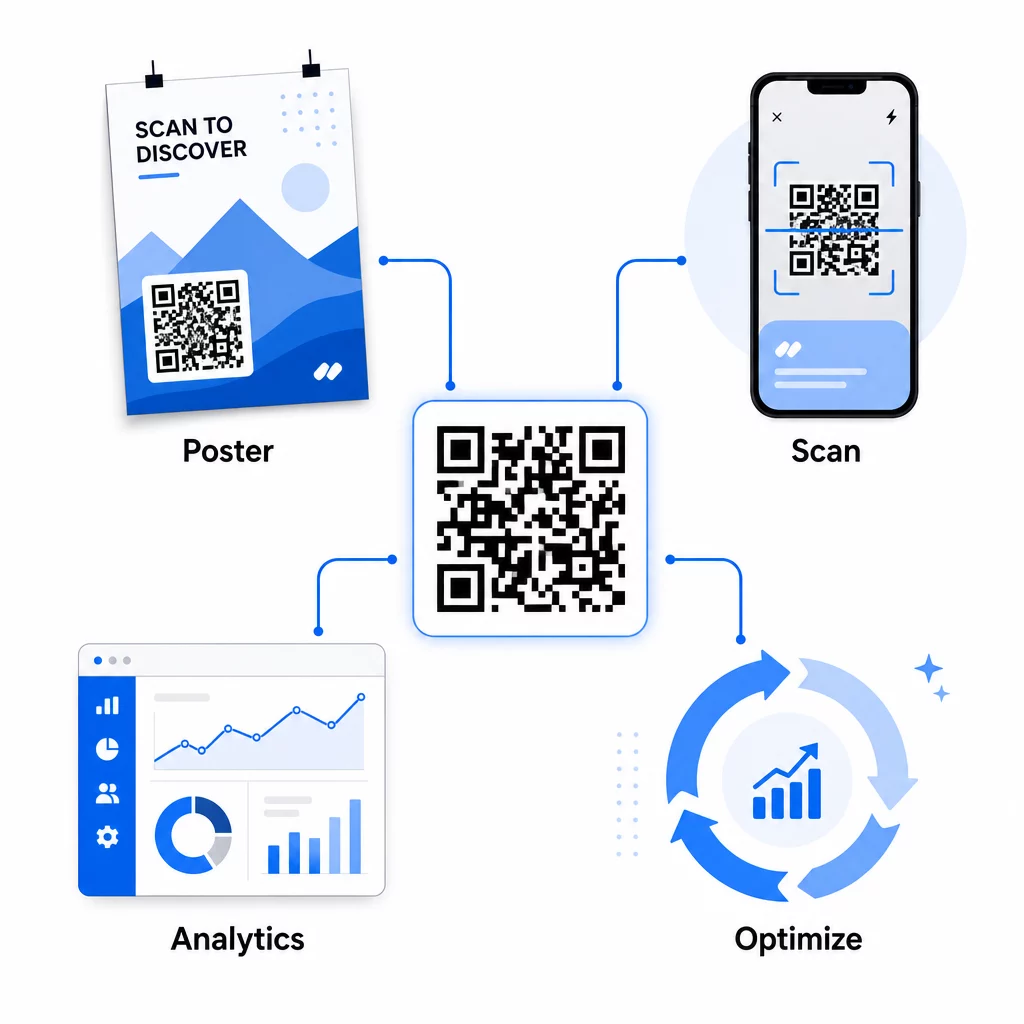
Praktyczne optymalizacje w trakcie kampanii obejmują:
- Aktualizacja docelowego adresu URL jeśli oryginalna strona docelowa nie konwertuje dobrze – bez ponownego drukowania jakichkolwiek materiałów
- Dostosowanie alokacji wydatków poprzez wstrzymywanie miejsc o niskich wskaźnikach skanowania i zwiększanie inwestycji w kanały o wysokiej wydajności
- Testowanie A/B stron docelowych poprzez kierowanie ruchu z tego samego kodu QR do różnych miejsc docelowych w różnym czasie
- Identyfikowanie wzorców geograficznych w danych skanowania i dostosowywanie komunikatów uzupełniających dla regionów o wysokiej responsywności
Panel analityczny Pageloot w czasie rzeczywistym integruje się z Google Analytics, dzięki czemu możesz przeglądać ruch generowany przez kody QR obok innych kanałów cyfrowych. Daje to pełny obraz tego, jak Twoje kampanie drukowane przyczyniają się do ogólnej ścieżki klienta – od momentu, gdy ktoś zobaczy reklamę, do ostatecznej konwersji.
Monitoruj swoją kampanię w czasie rzeczywistym Chcesz dokładnie zobaczyć, gdzie i kiedy Twoi klienci skanują Twoje materiały drukowane? Użyj narzędzi Pageloot do analizy kodów QR aby uzyskać dostęp do pełnego panelu wydajności i optymalizować kampanie, gdy są jeszcze aktywne.
Dynamiczne kody QR dla elastycznych, ciągłych kampanii
W przypadku kampanii prowadzonych w wielu miejscach lub okresach, dynamiczne kody QR zapewniają poziom elastyczności, którego statyczne kody nie są w stanie dorównać. Możesz testować oferty sezonowe, aktualizować strony docelowe, aby odzwierciedlały aktualne promocje, i przekierowywać ruch bez dotykania materiałów drukowanych.
Ta elastyczność jest szczególnie cenna dla:
- Długoterminowych kampanii drukowanych gdzie oferty się zmieniają (np. promocje sezonowe na opakowaniach lub oznakowaniach)
- Kampanii wielolokalizacyjnych gdzie regionalne strony docelowe muszą się różnić
- Optymalizacji budżetu gdzie chcesz przekierować ruch z mniej efektywnych miejsc docelowych na te silniejsze
Ponieważ sam kod QR nigdy się nie zmienia – zmienia się tylko miejsce docelowe, do którego prowadzi – Twoje materiały drukowane pozostają ważne bezterminowo. Eliminuje to koszty ponownego drukowania, jednocześnie utrzymując aktualność treści kampanii.
Połączenie kodów QR z narzędziami automatyzacji marketingu rozszerza to jeszcze bardziej. Kiedy skan wyzwala wejście do sekwencji e-maili lub przepływu pracy CRM, każda interakcja z reklamą drukowaną może zainicjować ustrukturyzowaną podróż klienta – a nie tylko jednorazową wizytę na stronie internetowej. Pageloot obsługuje integracje z platformami takimi jak HubSpot i Zapier, aby umożliwić te zautomatyzowane przepływy pracy.
Udowodnienie ROI z kampanii drukowanych
Ostatecznym celem śledzenia kodów QR w druku jest udowodnienie zwrotu z inwestycji. Przy odpowiedniej konfiguracji możesz to obliczyć bezpośrednio.
Jeśli znasz koszt swojej kampanii drukowanej i możesz przypisać konwersje – zakupy, leady, rejestracje – do konkretnych skanów kodów QR za pomocą parametrów UTM i Google Analytics, możesz obliczyć koszt pozyskania dla każdego miejsca docelowego. Daje to taką samą odpowiedzialność, jakiej oczekiwałbyś od reklamy cyfrowej, zastosowaną do mediów offline.
Kluczowe kroki, aby to zadziałało:
- Używaj unikalnych kodów QR dla każdego miejsca docelowego, aby atrybucja była czysta
- Oznaczaj docelowe adresy URL parametrami UTM, aby GA4 przechwytywało pełną ścieżkę konwersji
- Ustaw cele konwersji w GA4 dla działań, które są ważne dla Twojej firmy
- Użyj pulpitu analitycznego Pageloot, aby porównać dane skanowania z danymi konwersji
Dla zespołów zarządzających wieloma klientami lub kampaniami jednocześnie, narzędzia dla agencji marketingowych w Pageloot pozwalają śledzić wydajność kampanii w jednym miejscu i przedstawiać przejrzyste raporty atrybucji interesariuszom. Kody QR nie tylko sprawiają, że reklamy drukowane są interaktywne – sprawiają, że są mierzalne. Łącząc dynamiczne kody QR, docelowe adresy URL oznaczone parametrami UTM i platformę z analizą w czasie rzeczywistym, możesz przypisać zaangażowanie w druku offline do wyników cyfrowych z taką samą precyzją, jaką zastosowałbyś do dowolnego kanału cyfrowego. Zacznij od stworzenia unikalnych kodów dla każdego z Twoich obecnych miejsc docelowych w druku i zobacz, które z nich faktycznie przynoszą rezultaty.
Rozpocznij z Darmowy generator kodów QR lub eksploruj dynamiczne śledzenie kodów QR aby zobaczyć pełne możliwości dostępne dla Twoich kampanii drukowanych.
Najczęściej zadawane pytania
Tak, jeśli używasz dynamicznych kodów QR. Kody dynamiczne wskazują na adres URL przekierowania, który kontrolujesz. Możesz zaktualizować miejsce docelowe – czy to nową stronę docelową, ofertę sezonową, czy zmieniony adres URL z tagami UTM – bez zmiany wydrukowanego kodu QR. Materiały fizyczne pozostają ważne, a Twoje śledzenie trwa nieprzerwanie.
Całkowita liczba skanów zlicza każde uruchomienie kodu, w tym wielokrotne skanowania przez tę samą osobę. Unikalne skany zliczają pojedyncze urządzenia, dając jaśniejszy obraz tego, ile różnych osób odpowiedziało na Twoją reklamę. Do mierzenia zasięgu reklamy drukowanej i obliczania współczynników skanowania, unikalne skany są zazwyczaj bardziej znaczące.
Dodaj parametry UTM do docelowego adresu URL osadzonego w Twoim kodzie QR. Kiedy ktoś zeskanuje kod i trafi na Twoją stronę internetową, Google Analytics zarejestruje sesję z tymi tagami UTM. Jeśli skonfigurowałeś cele konwersji w GA4 – zakupy, przesłane formularze, pobrania – możesz dokładnie zobaczyć, ile konwersji pochodziło z każdego miejsca druku. To jest rdzeń atrybucji offline-do-cyfrowej dla kampanii drukowanych.