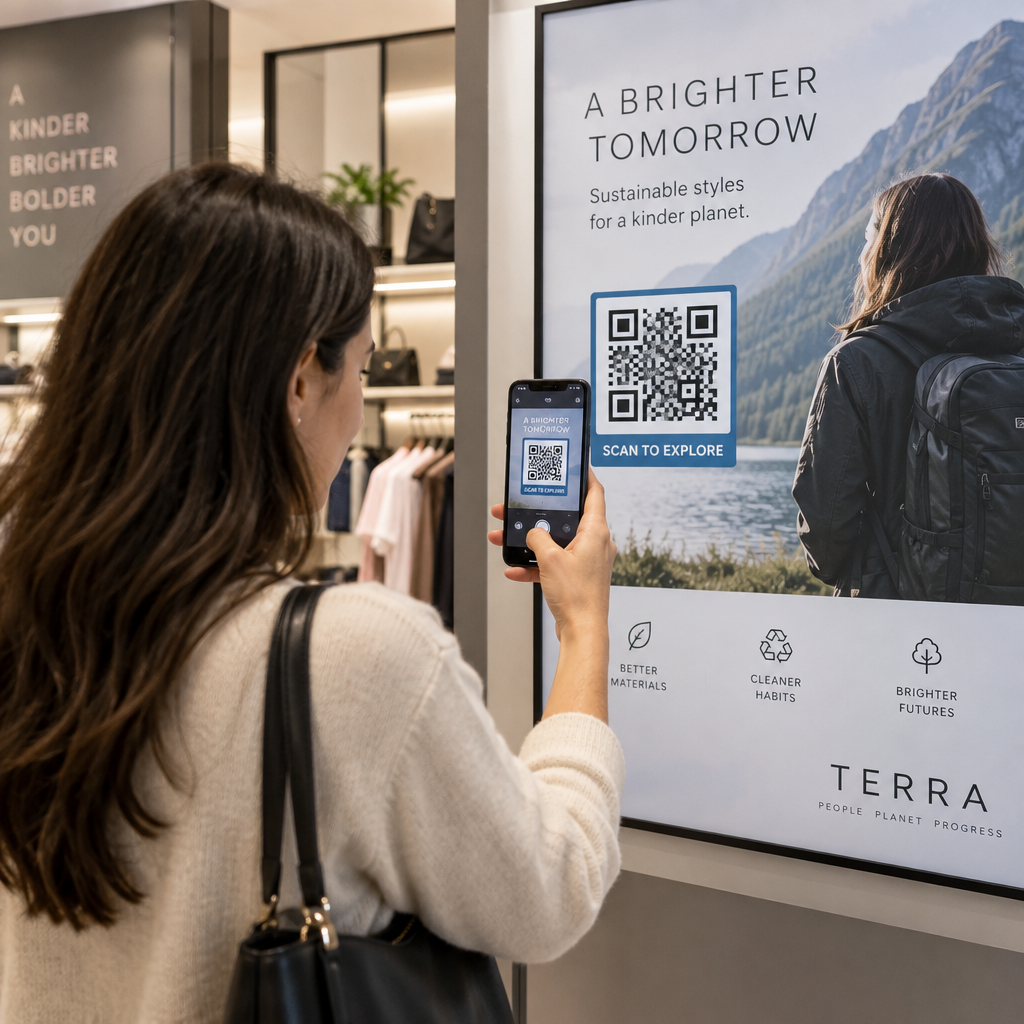
Basılı reklamlarınızın gerçekten işe yarayıp yaramadığını nasıl anlarsınız? Yanıtları ölçmenin bir yolu olmadan tahmin yürütürsünüz – ve boşa harcanan reklam bütçesi hızla artar. QR kodları, her basılı yerleşimi izlenebilir bir dijital temas noktasına dönüştürerek bu sorunu çözer ve size kimin ne zaman etkileşim kurduğu ve sonra ne yaptığı hakkında somut veriler sunar.
QR Kodları Olmadan Basılı Reklamları Ölçmek Neden Zordur?
Geleneksel basılı reklamcılık – dergiler, doğrudan postalar, posterler, el ilanları – her zaman bir atıf boşluğundan muzdarip olmuştur. Tiraj rakamlarına göre erişimi tahmin edebilirsiniz, ancak belirli bir reklama kaç okuyucunun gerçekten yanıt verdiğini, hatta sonrasında ne yaptıklarını bilmenin doğal bir yolu yoktur.
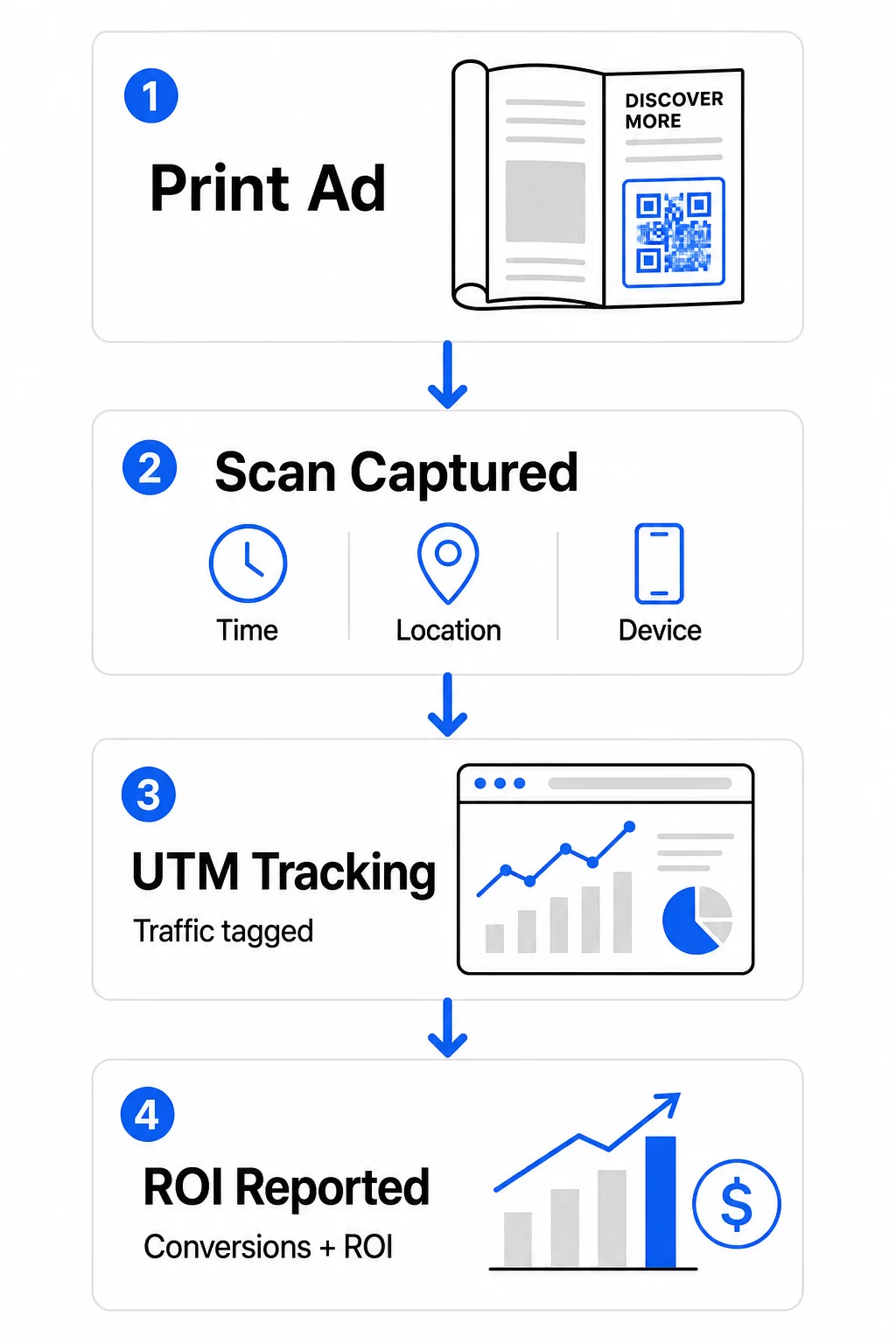
QR kodları bu boşluğu kapatır. Bir okuyucu basılı materyalinizdeki bir kodu taradığında, bu eylem dijital olarak kaydedilir. Tarama olayını, konumu, cihaz türünü ve zamanı yakalarsınız – ve hedef URL UTM parametreleri içeriyorsa, o kullanıcıyı bir satın alma, kaydolma veya indirme işlemine kadar takip edebilirsiniz. Çevrimdışı gösterim, ölçülebilir bir dijital dönüşüme dönüşür.
Bu nedenle QR kodları, basılı kampanya atfı için standart bir araç haline gelmiştir. Farklı yerleşimlerde benzersiz QR kodları kullanarak – her dergi için bir tane, her doğrudan posta grubu için bir tane, her billboard konumu için bir tane – kanallar arası performansı, ücretli dijital kampanyaları karşılaştırdığınız gibi karşılaştırabilirsiniz.
Basılı Yerleşimleri Ölçülebilir Kampanyalara Dönüştürün Kullan Dinamik QR Kod Oluşturucu her basılı yerleşim için benzersiz, izlenebilir kodlar oluşturmak ve gerçek etkileşim verilerini yakalamaya başlamak için.
İzleme İçin Statik ve Dinamik QR Kodları
Tüm QR kodları izlemeyi desteklemez. Statik ve dinamik kodlar arasındaki farkı anlamak, herhangi bir basılı ölçüm stratejisinin temelidir.
Statik QR kodları hedef URL'yi doğrudan kod desenine kodlar. Bir kez basıldıktan sonra hedef değiştirilemez ve tarama olaylarını kaydetmek için bir mekanizma yoktur. Kalıcı içeriğe bağlantı vermek için iyi çalışırlar, ancak analiz sunmazlar.
Dinamik QR kodları bunun yerine kısa bir yönlendirme URL'si kodlar. Tarandığında, yönlendirme seçtiğiniz hedefe çözümlenir – ve platform tarama olayını zaman damgası, konum ve cihaz verileriyle kaydeder. Yönlendirme URL'si sabit kalırken hedef değişebileceğinden, bağlantılı içeriği materyallerinizi yeniden basmadan istediğiniz zaman güncelleyebilirsiniz.
Basılı reklam takibi için, dinamik QR kodları tek pratik seçenektir. Kampanya performansını ölçmek için ihtiyacınız olan tarama verilerini ve verilerin gösterdiklerine göre açılış sayfalarını ayarlama esnekliğini sağlarlar.
Basılı Kampanya Takibi İçin QR Kodlarını Kurma
Her Yerleşim İçin Benzersiz Kodlar Oluşturun
Basılı takip için en önemli kural, yerleşim başına bir QR kodudur. Aynı reklamı üç farklı dergide tek bir ortak QR kodu kullanarak yayınlarsanız, toplam tarama sayılarını görürsünüz ancak hangi yayının sonuç getirdiğini bilemezsiniz.
Her birine ayrı bir QR kodu atayın:
- Yayın veya kanal (örn. her bir dergi başlığı)
- Coğrafi dağıtım alanı (örn. Kuzeydoğu vs. Batı Yakası postaları)
- Reklam formatı veya boyutu (örn. tam sayfa vs. yarım sayfa)
- Kampanya dönemi veya zaman aralığı
Bu yaklaşım, yerleşimler arasındaki performansı doğrudan karşılaştırmanıza ve gelecekteki harcamaları işe yarayanlara yönlendirmenize olanak tanır. Pageloot'un kampanya yönetim araçları kodları kampanyaya göre düzenlemenize, farklı ekipler için alt hesaplara atamanıza ve tüm yerleşimleri tek bir kontrol panelinden yönetmenize olanak tanır.
Hedef URL'lerinize UTM Parametreleri Ekleyin
QR kod platformunuzdan gelen tarama verileri, basılı reklamınızla kaç kişinin etkileşim kurduğunu söyler. UTM parametreleri ise bu kişilerin taramadan sonra ne yaptığını söyler. Birlikte, size tam bir ilişkilendirme tablosu sunarlar.
UTM parametreleri, Google Analytics'te trafik kaynağını tanımlayan, hedef URL'nize eklenen etiketlerdir. Bir basılı kampanya için doğru şekilde etiketlenmiş bir URL şöyle görünebilir:
`https://yourwebsite.com/landing-page?utm``source=vogue``magazine&utm`medium=qrkodu&utm`campaign=fall``launch_2025`
Bu kurulumla, o QR kodu taramasından kaynaklanan her oturum, Google Analytics'te o belirli yerleşime etiketlenmiş olarak görünür. Daha sonra sonraki eylemleri – satın almalar, form doldurmalar, içerik indirmeleri – ölçebilir ve bunları taramayı oluşturan basılı reklama atfedebilirsiniz.
Adlandırma kuralları ve GA4 raporlamasının tam bir incelemesi için, şu konudaki kılavuz QR kodları için UTM parametreleri kurulumu ayrıntılı olarak ele alır.
Basılı Taramaları Google Analytics'e Bağlayın Pageloot'un analiz özellikleri QR kodu oluşturma sırasında UTM parametreleri eklemenize olanak tanır, böylece her tarama GA4'te otomatik olarak ilişkilendirilir.
Gerçekten Taranan Kodlar Tasarlayın
Takip yalnızca insanlar kodlarınızı tararsa çalışır. Basılı materyaller için özel olarak geçerli birkaç teknik gereksinim vardır:
- Minimum boyut: Kartvizitler veya el ilanları gibi standart basılı materyaller için 0,8 × 0,8 inç; posterler ve tabelalar için 10:1 kuralını kullanarak orantılı olarak büyütün – beklenen tarama mesafesinin her on inçi için en az bir inç QR kodu genişliği
- Kontrast: Koyu modüller ile açık arka plan arasındaki yüksek kontrast esastır; açık gri beyaz gibi düşük kontrastlı eşleştirmelerden kaçının ve renkleri asla ters çevirmeyin
- Yerleştirme: Göz hizası, posterler ve tabelalar için idealdir, genellikle yerden 3,5 ila 5,5 fit arasındadır; bozulmanın taramayı engelleyebileceği şişe etiketleri veya dergi katlamaları gibi kavisli yüzeylerden kaçının
- Dosya formatı: Büyük formatlı baskı için vektör formatlarını (EPS veya SVG) kullanın; PNG veya JPEG daha küçük materyaller için yeterlidir
Kodun yakınına bir harekete geçirici mesaj çerçevesi – “Özel Teklif İçin Tara” veya “Anında Erişim Sağla” – eklemek, okuyuculara etkileşim için net bir neden sunar. Logonuzu ve renklerinizi içeren markalı QR kodları da tanınma ve güven oluşturur. Ayrıntılı boyutlandırma ve yerleştirme yönergelerini şurada bulabilirsiniz: basılı medyada QR kodlarını kullanma kılavuzu.
Basılı Reklam İlişkilendirmesi İçin Önemli Metrikler
Kodlarınız yayına girdikten sonra, topladığınız veriler iki kategoriye ayrılır: basılı reklamınıza kaç kişinin yanıt verdiğini ölçen etkileşim metrikleri ve bu kişilerin daha sonra ne yaptığını ölçen dönüşüm metrikleri.
İşte izlenmesi gereken temel metriklerin bir dökümü:
| Metrik | Ne Ölçer | Neden Önemli |
|---|---|---|
| TOPLAM TARAMA | Tekrarlanan taramalar dahil her tarama olayı | Genel kampanya erişimini gösterir |
| Benzersiz tarama sayısı | Tarama yapan bireysel cihazlar | Gerçek hedef kitle boyutunu yansıtır |
| Tarama oranı | Tahmini reklam gösterimine göre taramalar | Yaratıcı ve yerleşim etkinliğini değerlendirir |
| Tarama konumu | Taramaların coğrafi dağılımı | Yüksek performanslı bölgeleri belirler |
| Cihaz türü | iOS, Android, masaüstü | Açılış sayfaları için mobil optimizasyona rehberlik eder |
| Yoğun tarama saatleri | Gün veya hafta boyunca taramaların ne zaman gerçekleştiği | Gelecek kampanyalar için zamanlama stratejisini bilgilendirir |
| Dönüşüm oranı | Tarama sonrası yapılan eylemler (satın almalar, kayıtlar) | Gerçek iş etkisini ölçer |
Toplam tarama sayısı ve benzersiz tarama sayısı önemli bir ayrımdır. Toplam taramalar, aynı kişi tarafından yapılan birden fazla tarama dahil olmak üzere bir kodun her tetiklendiğinde sayılır. Benzersiz taramalar, bireysel kullanıcıları saymak için cihaz düzeyinde tanımlama kullanır ve size gerçek hedef kitle erişiminin daha doğru bir resmini sunar. Basılı kampanyalar için benzersiz taramalar genellikle daha anlamlı bir sayıdır.
Bu tarama oranı tıklama oranı'nın basılı eşdeğeridir – reklamınıza maruz kalan kişilerin yüzde kaçının gerçekten yanıt verdiğini gösterir. Bunu, benzersiz taramaları baskı adedine veya o yerleşim için tahmini okuyucu sayısına bölerek tahmin edebilirsiniz.
Kurumsal düzeyde analitiklere daha derinlemesine bir bakış için, temel QR kodu analitik metrikleri tarama sayılarının ötesine geçerek gerçek iş etkisini nasıl ölçeceğinizi kapsar.
Kampanyaları Devam Ederken Optimize Etmek İçin Gerçek Zamanlı Analitik Kullanımı
Dinamik QR kodlarının geleneksel basılı ölçümlemeye göre önemli bir avantajı, bir kampanya devam ederken veriler üzerinde hareket edebilme yeteneğidir. Gerçek zamanlı analitik ile, neyin işe yaradığını öğrenmek için bir kampanyanın bitmesini beklemezsiniz.
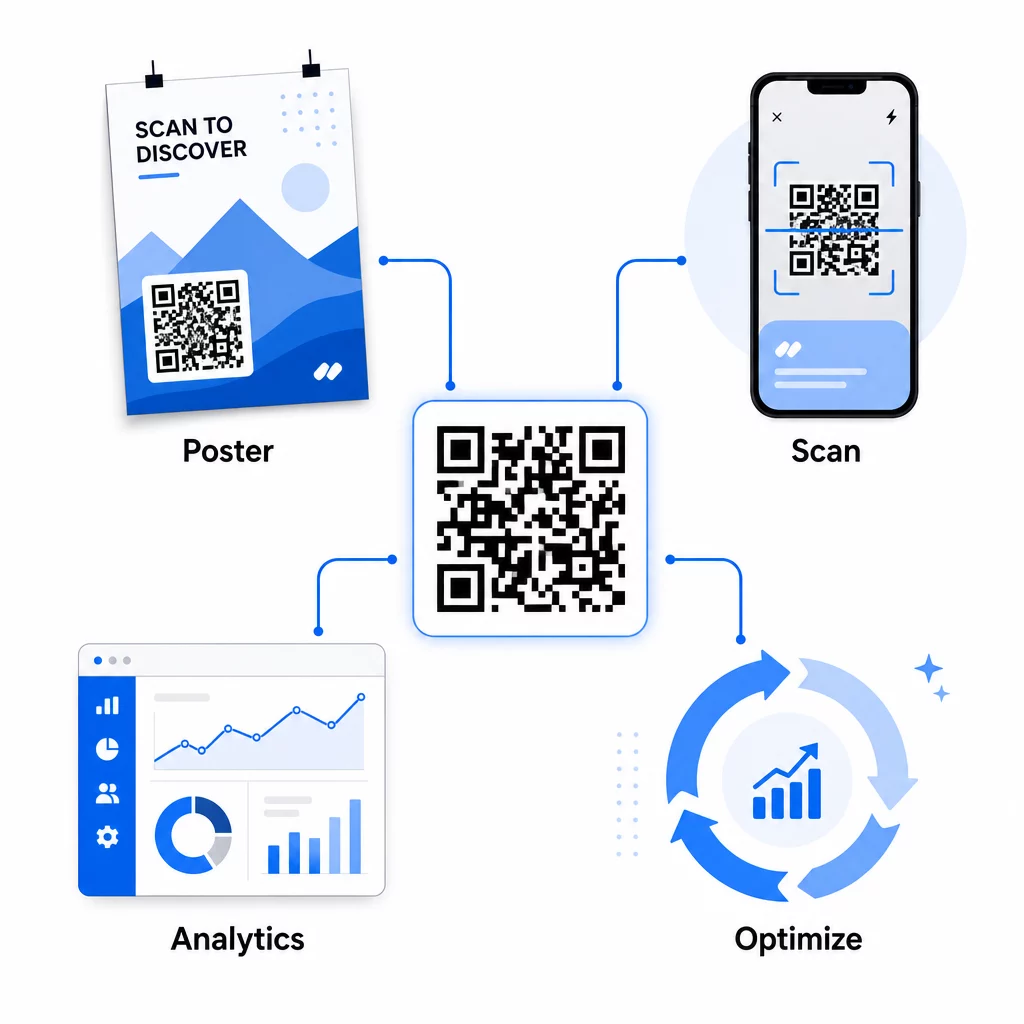
Pratik kampanya ortası optimizasyonları şunları içerir:
- Hedef URL'yi güncelleme eğer orijinal açılış sayfası iyi dönüşüm sağlamıyorsa – herhangi bir materyali yeniden basmadan
- Harcama tahsisini ayarlama düşük tarama oranına sahip yerleşimleri duraklatarak ve yüksek performanslı kanallara yatırımı artırarak
- Açılış sayfalarında A/B testi yapma aynı QR kodundan gelen trafiği farklı zamanlarda farklı hedeflere yönlendirerek
- Coğrafi desenleri belirleme tarama verilerinde ve yüksek yanıt veren bölgeler için takip mesajlarını uyarlama
Pageloot'un gerçek zamanlı analiz paneli Google Analytics ile entegredir, böylece QR kaynaklı trafiği diğer dijital kanallarınızla birlikte görüntüleyebilirsiniz. Bu size, birinin reklamı gördüğü andan nihai dönüşüme kadar, basılı kampanyalarınızın genel müşteri yolculuğuna nasıl katkıda bulunduğuna dair eksiksiz bir görünüm sunar.
Kampanyanızı Gerçek Zamanlı İzleyin Müşterilerinizin basılı materyallerinizi tam olarak nerede ve ne zaman taradığını görmek ister misiniz? Pageloot'un QR kodu analiz araçlarını tam bir performans paneline erişmek ve kampanyaları hala çalışırken optimize etmek için kullanın.
Esnek, Sürekli Kampanyalar için Dinamik QR Kodları
Birden fazla yerleşimde veya zaman diliminde yürütülen kampanyalar için dinamik QR kodları, statik kodların eşleşemeyeceği bir esneklik düzeyi sağlar. Mevsimlik teklifleri test edebilir, mevcut promosyonları yansıtacak şekilde hedef sayfalarını güncelleyebilir ve basılı materyallere dokunmadan trafiği yeniden yönlendirebilirsiniz.
Bu esneklik özellikle şunlar için değerlidir:
- Uzun süreli basılı kampanyalar tekliflerin değiştiği yerlerde (örn. ambalaj veya tabelalardaki mevsimlik promosyonlar)
- Çok konumlu kampanyalar bölgesel açılış sayfalarının farklılık göstermesi gereken yerlerde
- Bütçe optimizasyonu düşük performanslı yerleşimlerden daha güçlü olanlara trafik yönlendirmek istediğiniz yer
Çünkü QR kodun kendisi asla değişmez – sadece işaret ettiği hedef değişir – basılı materyalleriniz süresiz olarak geçerli kalır. Bu, yeniden basım maliyetlerini ortadan kaldırırken kampanya içeriğinizi güncel tutar.
QR kodlarını pazarlama otomasyon araçlarıyla bağlamak bunu daha da ileriye taşır. Bir tarama, bir e-posta dizisine veya CRM iş akışına girişi tetiklediğinde, her basılı reklam etkileşimi, sadece tek seferlik bir web sitesi ziyareti değil, yapılandırılmış bir müşteri yolculuğu başlatabilir. Pageloot, bu otomatik iş akışlarını etkinleştirmek için HubSpot ve Zapier gibi platformlarla entegrasyonları destekler.
Basılı Kampanyalardan ROI Kanıtlama
Basılı materyallerde QR kod takibinin nihai amacı yatırım getirisini kanıtlamaktır. Doğru kurulumla bunu doğrudan hesaplayabilirsiniz.
Basılı kampanya maliyetinizi biliyorsanız ve dönüşümleri – satın almalar, potansiyel müşteriler, kayıtlar – UTM parametreleri ve Google Analytics aracılığıyla belirli QR kod taramalarına atfedebiliyorsanız, her yerleşim için edinme başına maliyeti hesaplayabilirsiniz. Bu size, dijital reklamcılıktan beklediğiniz aynı hesap verebilirliği çevrimdışı medyaya uygulanmış olarak sunar.
Bunu sağlamak için temel adımlar:
- Her yerleşim için benzersiz QR kodları kullanın, böylece atıf net olur
- Hedef URL'leri UTM parametreleriyle etiketleyin, böylece GA4 tam dönüşüm yolunu yakalar
- İşletmeniz için önemli olan eylemler için GA4'te dönüşüm hedefleri ayarlayın
- Tarama verilerini dönüşüm verileriyle karşılaştırmak için Pageloot'un analiz panosunu kullanın
Aynı anda birden fazla müşteri veya kampanyayı yöneten ekipler için, pazarlama ajansı araçları Pageloot'ta, kampanyalar arası performansı tek bir yerden izlemenize ve paydaşlara net atıf raporları sunmanıza olanak tanır. QR kodları sadece basılı reklamları etkileşimli hale getirmekle kalmaz – onları ölçülebilir hale getirir. Dinamik QR kodlarını, UTM etiketli hedef URL'lerini ve gerçek zamanlı analitik özellikli bir platformu birleştirerek, çevrimdışı basılı etkileşimi herhangi bir dijital kanala uygulayacağınız aynı hassasiyetle dijital sonuçlara atfedebilirsiniz. Mevcut basılı yerleşimlerinizin her biri için benzersiz kodlar oluşturarak başlayın ve hangilerinin gerçekten sonuç verdiğini görün.
ile başlayın Ücretsiz QR Kod Oluşturucu veya keşfedin dinamik QR kodu takibi basılı kampanyalarınız için mevcut tüm özellikleri görmek için.
Sıkça sorulan sorular
Evet, dinamik QR kodları kullanırsanız. Dinamik kodlar, kontrol ettiğiniz bir yönlendirme URL'sine işaret eder. Hedefi – ister yeni bir açılış sayfası, ister mevsimlik bir teklif veya revize edilmiş UTM etiketli bir URL olsun – basılı QR kodunu değiştirmeden güncelleyebilirsiniz. Fiziksel materyaller geçerliliğini korur ve takibiniz kesintisiz devam eder.
Toplam tarama sayısı, kod her tetiklendiğinde sayılır; buna aynı kişi tarafından yapılan birden fazla tarama da dahildir. Benzersiz taramalar, bireysel cihazları sayar ve reklamınıza kaç farklı kişinin yanıt verdiğine dair daha net bir resim sunar. Basılı reklam erişimini ölçmek ve tarama oranlarını hesaplamak için benzersiz taramalar genellikle daha anlamlıdır.
QR kodunuza gömülü hedef URL'ye UTM parametreleri ekleyin. Biri kodu tarayıp web sitenize geldiğinde, Google Analytics oturumu bu UTM etiketleriyle kaydeder. GA4'te dönüşüm hedefleri (satın almalar, form gönderimleri, indirmeler) ayarladıysanız, her bir basılı yerleştirmeden tam olarak kaç dönüşümün kaynaklandığını görebilirsiniz. Bu, basılı kampanyalar için çevrimdışıdan dijitale atfın temelidir.