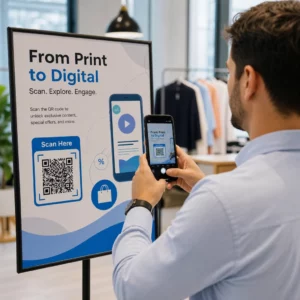
Hur vet du om dina tryckta annonser faktiskt fungerar? Utan ett sätt att mäta svar gissar du – och slösade annonsutgifter ackumuleras snabbt. QR-koder löser detta genom att förvandla varje tryckt placering till en spårbar digital kontaktpunkt, vilket ger dig konkret data om vem som engagerade sig, när och vad de gjorde härnäst.
Varför tryckta annonser är svåra att mäta utan QR-koder
Traditionell tryckt reklam – tidningar, direktreklam, affischer, flygblad – har alltid lidit av en attribueringslucka. Du kan uppskatta räckvidden baserat på upplagesiffror, men det finns inget inbyggt sätt att veta hur många läsare som faktiskt svarade på en specifik annons, än mindre vad de gjorde efteråt.
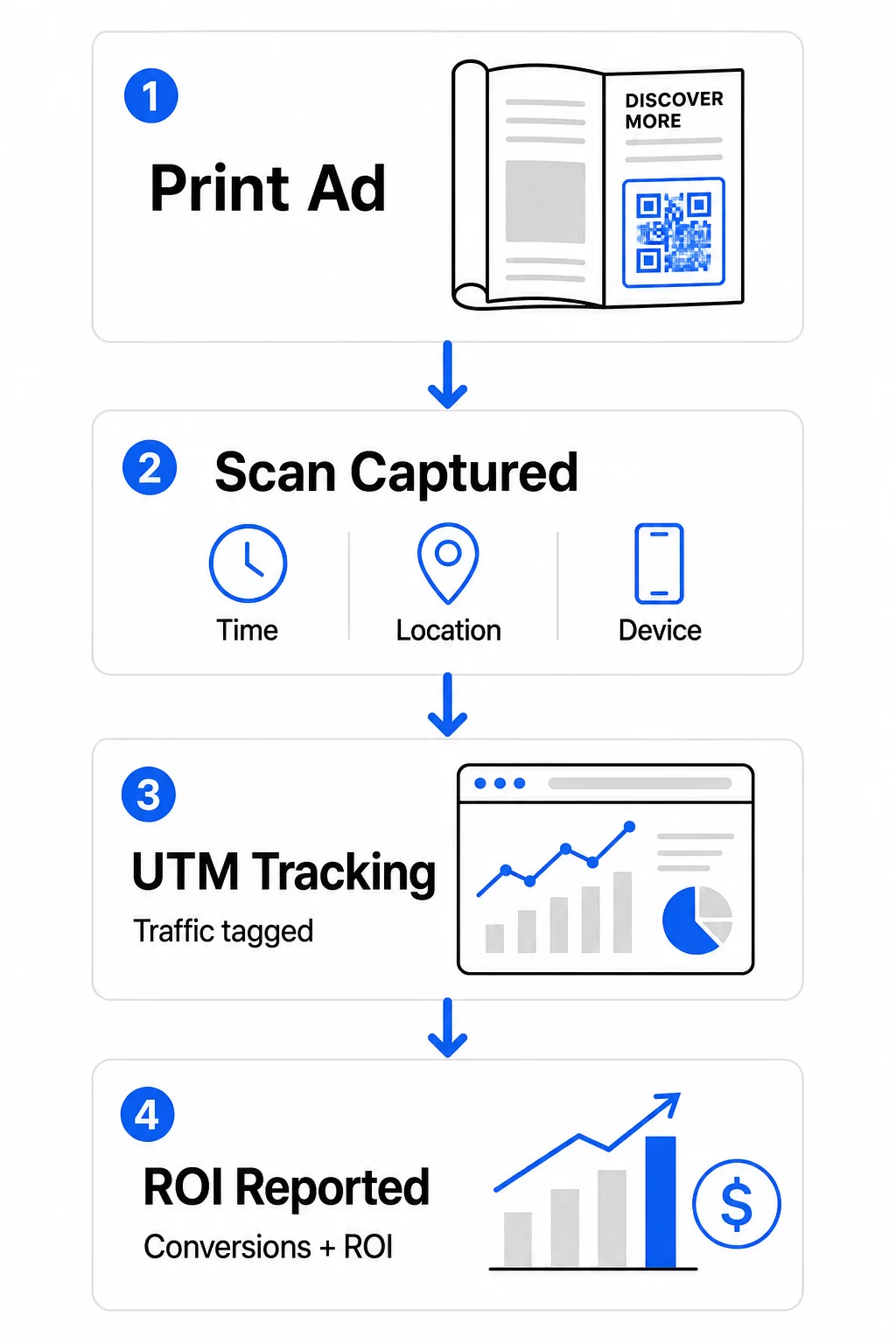
QR-koder täpper till den luckan. När en läsare skannar en kod i ditt tryckta material loggas den åtgärden digitalt. Du fångar skanningshändelsen, platsen, enhetstypen och tiden – och om destinations-URL:en inkluderar UTM-parametrar kan du följa användaren hela vägen till ett köp, en registrering eller en nedladdning. Det offline-intrycket blir en mätbar digital konvertering.
Det är därför QR-koder har blivit ett standardverktyg för attribuering av tryckta kampanjer. Genom att använda unika QR-koder över olika placeringar – en för varje tidning, en för varje direktreklamutskick, en per skyltplats – kan du jämföra prestanda över kanaler på samma sätt som du skulle jämföra betalda digitala kampanjer.
Förvandla tryckta placeringar till mätbara kampanjer Använd Dynamisk QR-kodgenerator för att skapa unika, spårbara koder för varje tryckt placering och börja samla in verklig engagemangsdata.
Statiska vs. dynamiska QR-koder för spårning
Alla QR-koder stöder inte spårning. Att förstå skillnaden mellan statiska och dynamiska koder är grunden för varje strategi för mätning av tryckt material.
Statiska QR-koder kodar destinations-URL:en direkt i kodmönstret. När den väl är utskriven kan destinationen inte ändras, och det finns ingen mekanism för att logga skanningshändelser. De fungerar bra för att länka till permanent innehåll, men de erbjuder ingen analys.
Dynamiska QR-koder kodar istället en kort omdirigerings-URL. När den skannas, löser omdirigeringen till din valda destination – och plattformen loggar skanningshändelsen med tidsstämpel, plats och enhetsdata. Eftersom omdirigerings-URL:en förblir fast medan destinationen kan ändras, kan du uppdatera det länkade innehållet när som helst utan att trycka om ditt material.
För spårning av tryckta annonser, dynamiska QR-koder är det enda praktiska alternativet. De ger dig den skanningsdata du behöver för att mäta kampanjprestanda och flexibiliteten att justera landningssidor baserat på vad datan visar.
Ställa in QR-koder för spårning av tryckta kampanjer
Skapa unika koder för varje placering
Den viktigaste regeln för spårning av tryckt material är en QR-kod per placering. Om du kör samma annons i tre olika tidningar med en delad QR-kod, kommer du att se aggregerade skanningsantal men kommer inte att veta vilken publikation som drev resultat.
Tilldela en separat QR-kod till varje:
- Publikation eller kanal (t.ex. varje tidningstitel)
- Geografiskt distributionsområde (t.ex. nordost kontra västkustens utskick)
- Annonsformat eller storlek (t.ex. helsida kontra halvsida)
- Kampanjperiod eller tidsperiod
Detta tillvägagångssätt låter dig jämföra prestanda mellan placeringar direkt och allokera framtida utgifter till det som fungerar. Pageloots verktyg för kampanjhantering låter dig organisera koder efter kampanj, tilldela dem till underkonton för olika team och hantera alla placeringar från en enda instrumentpanel.
Lägg till UTM-parametrar till dina destinations-URL:er
Skanningsdata från din QR-kodplattform berättar hur många personer som interagerade med din tryckta annons. UTM-parametrar berättar vad dessa personer gjorde efter skanningen. Tillsammans ger de dig den fullständiga attribueringsbilden.
UTM-parametrar är taggar som läggs till din destinations-URL och som identifierar trafikkällan i Google Analytics. En korrekt taggad URL för en tryckt kampanj kan se ut så här:
`https://yourwebsite.com/landing-page?utmsource=voguemagazine&utmmedium=qrkod&utmcampaign=falllaunch_2025`
Med denna inställning visas varje session som härrör från den QR-kodsskanningen i Google Analytics taggad till den specifika placeringen. Du kan sedan mäta efterföljande åtgärder – köp, formulärifyllningar, nedladdningar av innehåll – och tillskriva dem till den tryckta annonsen som genererade skanningen.
För en fullständig genomgång av namngivningskonventioner och GA4-rapportering, guiden om UTM-parametrar för QR-koder täcker installationen i detalj.
Koppla tryckta skanningar till Google Analytics Pageloots analysfunktioner låter dig lägga till UTM-parametrar under skapandet av QR-koden så att varje skanning automatiskt tillskrivs i GA4.
Designa koder som faktiskt blir skannade
Spårning fungerar bara om folk skannar dina koder. Några tekniska krav gäller specifikt för tryckt material:
- Minsta storlek: 0,8 × 0,8 tum för standardtryckt material som visitkort eller flygblad; skala upp proportionerligt för affischer och skyltar med 10:1-regeln – minst en tums QR-kodsbredd för varje tio tums förväntat skanningsavstånd
- Kontrast: Hög kontrast mellan de mörka modulerna och den ljusa bakgrunden är avgörande; undvik lågkontrastpar som ljusgrått på vitt, och invertera aldrig färgerna
- Placering: Ögonhöjd är idealiskt för affischer och skyltar, typiskt mellan 3,5 och 5,5 fot från marken; undvik böjda ytor som flasketiketter eller tidningsveck där distorsion kan förhindra skanning
- Filformat: Använd vektorformat (EPS eller SVG) för storformatstryck; PNG eller JPEG räcker för mindre material
Att lägga till en uppmaningsram – “Skanna för exklusivt erbjudande” eller “Få omedelbar åtkomst” – nära koden ger läsarna en tydlig anledning att engagera sig. Varumärkta QR-koder som innehåller din logotyp och dina färger bygger också igenkänning och förtroende. Du hittar detaljerade riktlinjer för storlek och placering i guide för att använda QR-koder i tryckta medier.
De mätvärden som är viktiga för attribuering av tryckta annonser
När dina koder är live faller den data du samlar in i två kategorier: engagemangsmätvärden som mäter hur många människor som svarade på din tryckta annons, och konverteringsmätvärden som mäter vad dessa människor gjorde härnäst.
Här är en uppdelning av de viktigaste mätvärdena att övervaka:
| Mätvärde | Vad den mäter | Varför det är viktigt |
|---|---|---|
| TOTALT ANTAL SKANNINGAR | Varje skanningsevenemang, inklusive upprepade skanningar | Visar kampanjens totala räckvidd |
| Unika skanningar | Enskilda enheter som skannade | Återspeglar den faktiska publikstorleken |
| Skanningsfrekvens | Skanningar i förhållande till uppskattad annonsexponering | Utvärderar kreativitet och placeringseffektivitet |
| Skanningsplats | Geografisk fördelning av skanningar | Identifierar högpresterande regioner |
| Enhetstyp | iOS, Android, dator | Vägleder mobiloptimering för landningssidor |
| Toppskanningstider | När skanningar sker under dagen eller veckan | Informerar tidsstrategin för framtida kampanjer |
| Konverteringsgrad | Åtgärder vidtagna efter skanning (köp, registreringar) | Mäter verklig affärspåverkan |
Totalt antal skanningar vs. unika skanningar är en viktig distinktion. Totalt antal skanningar räknar varje gång en kod utlöses, inklusive flera skanningar av samma person. Unika skanningar använder enhetsbaserad identifiering för att räkna enskilda användare, vilket ger dig en mer exakt bild av den faktiska publikräckvidden. För tryckta kampanjer är unika skanningar vanligtvis det mer meningsfulla antalet.
De skanningsfrekvens är tryckets motsvarighet till klickfrekvens – det berättar vilken procentandel av de personer som exponerades för din annons som faktiskt svarade. Du kan uppskatta detta genom att dividera unika skanningar med upplagan eller den uppskattade läsekretsen för den placeringen.
För en djupare titt på analys på företagsnivå, artikeln om viktiga analysmått för QR-koder täcker hur man går bortom antalet skanningar för att mäta verklig affärspåverkan.
Använda realtidsanalys för att optimera kampanjer under pågående drift
En betydande fördel med dynamiska QR-koder jämfört med traditionell tryckmätning är förmågan att agera på data medan en kampanj fortfarande pågår. Med realtidsanalys behöver du inte vänta tills en kampanj avslutas för att lära dig vad som fungerade.
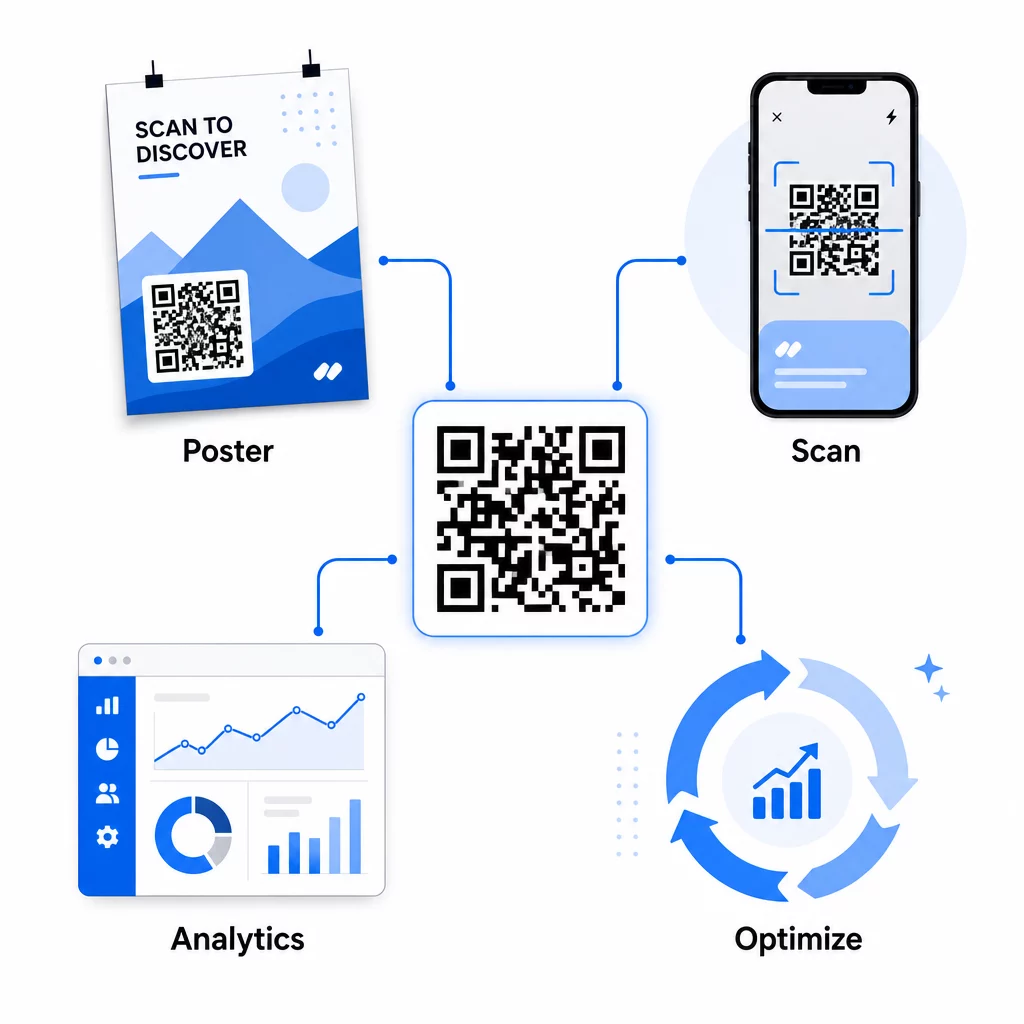
Praktiska optimeringar under kampanjens gång inkluderar:
- Uppdatera destinations-URL:en om den ursprungliga målsidan inte konverterar bra – utan att trycka om något material
- Justera utgiftsfördelningen genom att pausa placeringar med låga skanningsfrekvenser och öka investeringarna i högpresterande kanaler
- A/B-testa landningssidor genom att dirigera trafik från samma QR-kod till olika destinationer vid olika tidpunkter
- Identifiera geografiska mönster i skanningsdata och anpassa uppföljningsmeddelanden för regioner med hög respons
Pageloots analyspanel i realtid integreras med Google Analytics, så att du kan se QR-driven trafik tillsammans med dina andra digitala kanaler. Detta ger dig en komplett bild av hur dina tryckta kampanjer bidrar till den övergripande kundresan – från det ögonblick någon ser annonsen till den slutliga konverteringen.
Övervaka din kampanj i realtid Vill du se exakt var och när dina kunder skannar ditt tryckta material? Använd Pageloots verktyg för QR-kodanalys för att få tillgång till en komplett prestandapanel och optimera kampanjer medan de fortfarande pågår.
Dynamiska QR-koder för flexibla, pågående kampanjer
För kampanjer som körs över flera placeringar eller tidsperioder erbjuder dynamiska QR-koder en flexibilitetsnivå som statiska koder inte kan matcha. Du kan testa säsongserbjudanden, uppdatera destinationssidor för att återspegla aktuella kampanjer och omdirigera trafik utan att röra det tryckta materialet.
Denna flexibilitet är särskilt värdefull för:
- Långvariga tryckta kampanjer där erbjudanden ändras (t.ex. säsongskampanjer på förpackningar eller skyltar)
- Kampanjer på flera platser där regionala landningssidor behöver variera
- Budgetoptimering där du vill omdirigera trafik från underpresterande placeringar till starkare
Eftersom QR-koden i sig aldrig ändras – bara destinationen den pekar på – förblir ditt tryckta material giltigt på obestämd tid. Detta eliminerar omkostnader för omtryck samtidigt som ditt kampanjinnehåll hålls aktuellt.
Att koppla QR-koder till verktyg för marknadsautomatisering utökar detta ytterligare. När en skanning utlöser en post i en e-postsekvens eller CRM-arbetsflöde kan varje interaktion med en tryckt annons initiera en strukturerad kundresa – inte bara ett engångsbesök på en webbplats. Pageloot stöder integrationer med plattformar som HubSpot och Zapier för att möjliggöra dessa automatiserade arbetsflöden.
Bevisa ROI från tryckta kampanjer
Det yttersta målet med QR-kodspårning i tryck är att bevisa avkastning på investeringen. Med rätt inställning kan du beräkna detta direkt.
Om du känner till din tryckta kampanjkostnad och kan tillskriva konverteringar – köp, leads, registreringar – tillbaka till specifika QR-kodsskanningar via UTM-parametrar och Google Analytics, kan du beräkna kostnad per förvärv för varje placering. Detta ger dig samma ansvarsskyldighet som du skulle förvänta dig från digital annonsering tillämpad på offline-media.
De viktigaste stegen för att få detta att fungera:
- Använd unika QR-koder för varje placering så att attribueringen är tydlig
- Tagga destinations-URL:er med UTM-parametrar så att GA4 fångar hela konverteringsvägen
- Ställ in konverteringsmål i GA4 för de åtgärder som är viktiga för ditt företag
- Använd Pageloots analyspanel för att korsreferera skanningsdata med konverteringsdata
För team som hanterar flera kunder eller kampanjer samtidigt, är marknadsföringsbyråverktygen i Pageloot gör att du kan spåra prestanda över kampanjer på ett ställe och presentera tydliga attribueringsrapporter för intressenter. QR-koder gör inte bara tryckta annonser interaktiva – de gör dem mätbara. Genom att kombinera dynamiska QR-koder, UTM-taggade destinations-URL:er och en plattform med realtidsanalys kan du tillskriva offline-tryckt engagemang till digitala resultat med samma precision som du skulle tillämpa på vilken digital kanal som helst. Börja med att skapa unika koder för var och en av dina nuvarande tryckta placeringar och se vilka som faktiskt driver resultat.
Kom igång med Gratis QR-kodgenerator eller utforska dynamisk QR-kodspårning för att se alla funktioner som är tillgängliga för dina tryckta kampanjer.
Vanliga frågor
Ja, om du använder dynamiska QR-koder. Dynamiska koder pekar på en omdirigerings-URL som du kontrollerar. Du kan uppdatera destinationen – oavsett om det är en ny landningssida, ett säsongserbjudande eller en reviderad UTM-taggad URL – utan att ändra den tryckta QR-koden. De fysiska materialen förblir giltiga och din spårning fortsätter oavbrutet.
Totalt antal skanningar räknar varje gång koden utlöses, inklusive flera skanningar av samma person. Unika skanningar räknar enskilda enheter, vilket ger dig en tydligare bild av hur många unika personer som svarade på din annons. För att mäta räckvidden för tryckta annonser och beräkna genomskanningsfrekvenser är unika skanningar vanligtvis mer meningsfulla.
Lägg till UTM-parametrar till destinations-URL:en inbäddad i din QR-kod. När någon skannar koden och landar på din webbplats, registrerar Google Analytics sessionen med dessa UTM-taggar. Om du har ställt in konverteringsmål i GA4 – köp, formulärinlämningar, nedladdningar – kan du se exakt hur många konverteringar som härstammar från varje tryckt placering. Detta är kärnan i offline-till-digital attribuering för tryckta kampanjer.