首页 > 博客 > 二维码如何追踪印刷广告参与度
QR print tracking

二维码如何追踪印刷广告参与度

Turn every print placement into a trackable digital touchpoint. Learn how to use dynamic QR codes and UTM parameters to measure engagement and campaign ROI.
Updated on 6 月 10, 2026
目录

How do you know if your print ads are actually working? Without a way to measure responses, you’re guessing – and wasted ad spend adds up fast. QR codes solve this by turning every print placement into a trackable digital touchpoint, giving you concrete data on who engaged, when, and what they did next.

Why Print Ads Are Hard to Measure Without QR Codes

Traditional print advertising – magazines, direct mail, posters, flyers – has always suffered from an attribution gap. You can estimate reach based on circulation numbers, but there’s no native way to know how many readers actually responded to a specific ad, let alone what they did afterward.

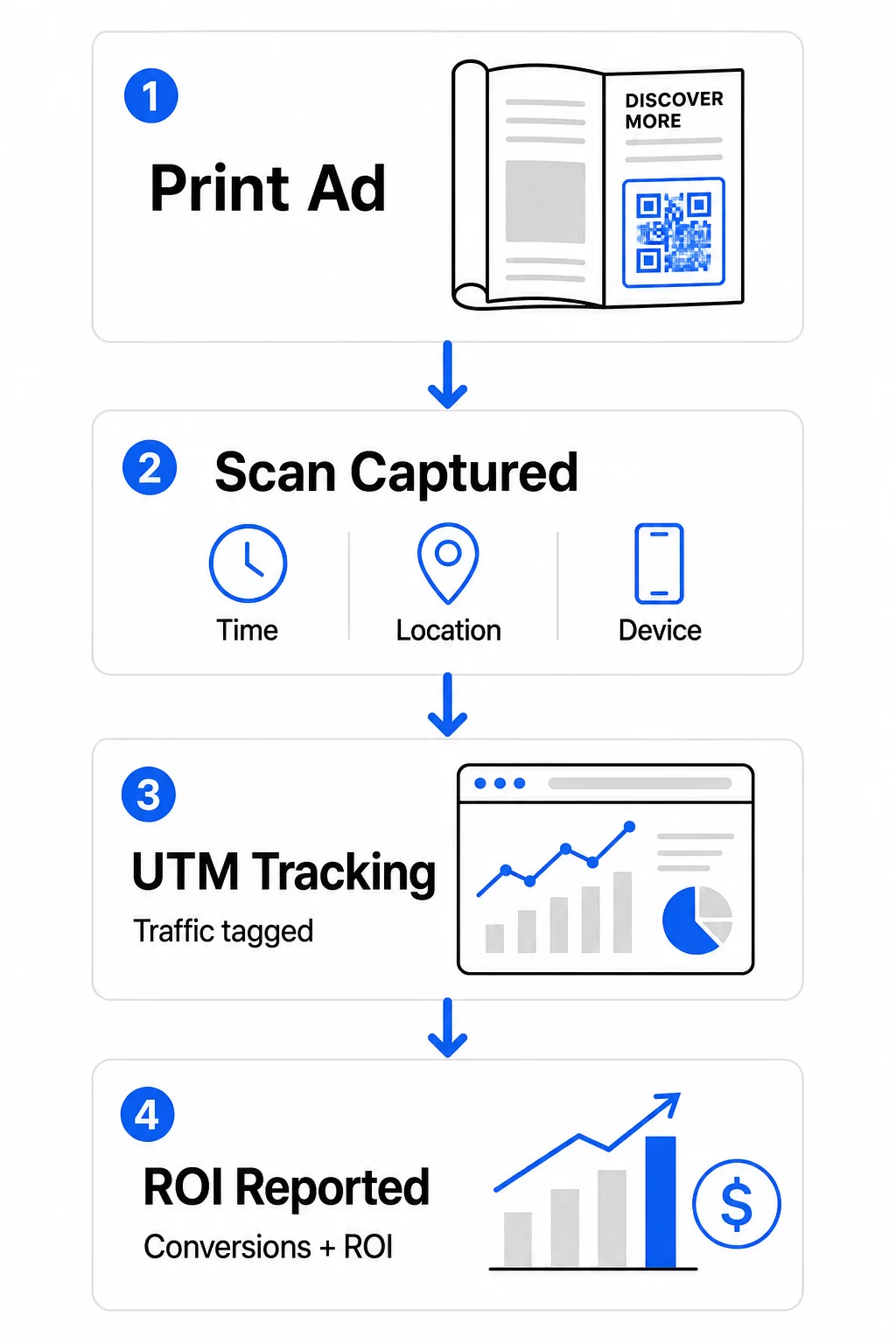
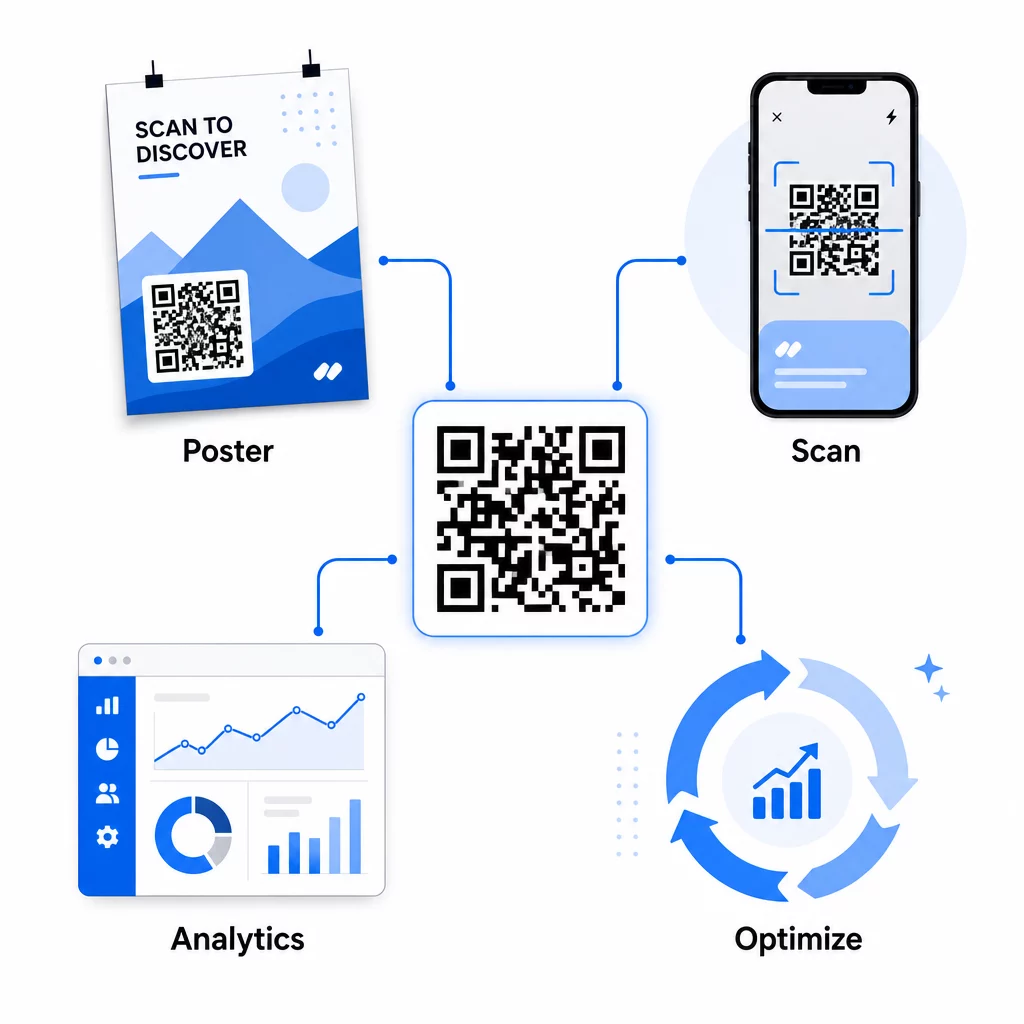
QR codes close that gap. When a reader scans a code in your print material, that action is logged digitally. You capture the scan event, the location, the device type, and the time – and if the destination URL includes UTM parameters, you can follow that user all the way through to a purchase, sign-up, or download. The offline impression becomes a measurable digital conversion.

This is why QR codes have become a standard tool for print campaign attribution. By using unique QR codes across different placements – one for each magazine, one for each direct mail batch, one per billboard location – you can compare performance across channels the same way you’d compare paid digital campaigns.

Turn Print Placements Into Measurable Campaigns 使用 动态二维码生成器 to create unique, trackable codes for every print placement and start capturing real engagement data.

Static vs. Dynamic QR Codes for Tracking

Not all QR codes support tracking. Understanding the difference between static and dynamic codes is the foundation of any print measurement strategy.

静态二维码 encode the destination URL directly into the code pattern. Once printed, the destination cannot be changed, and there is no mechanism to log scan events. They work fine for linking to permanent content, but they offer no analytics.

动态 QR 码 encode a short redirect URL instead. When scanned, the redirect resolves to your chosen destination – and the platform logs the scan event with timestamp, location, and device data. Because the redirect URL stays fixed while the destination can change, you can update the linked content at any time without reprinting your materials.

For print ad tracking, 动态二维码 are the only practical option. They give you the scan data you need to measure campaign performance and the flexibility to adjust landing pages based on what the data shows.

Setting Up QR Codes for Print Campaign Tracking

Create Unique Codes for Each Placement

The most important rule for print tracking is one QR code per placement. If you run the same ad in three different magazines using one shared QR code, you’ll see aggregate scan counts but won’t know which publication drove results.

Assign a separate QR code to each:

  • Publication or channel (e.g., each magazine title)
  • Geographic distribution area (e.g., Northeast vs. West Coast mailers)
  • Ad format or size (e.g., full-page vs. half-page)
  • Campaign flight or time period

This approach lets you compare performance across placements directly and allocate future spend toward what works. Pageloot’s campaign management tools let you organize codes by campaign, assign them to sub-accounts for different teams, and manage all placements from a single dashboard.

Add UTM Parameters to Your Destination URLs

Scan data from your QR code platform tells you how many people engaged with your print ad. UTM parameters tell you what those people did after scanning. Together, they give you the full attribution picture.

UTM parameters are tags appended to your destination URL that identify the traffic source in Google Analytics. A properly tagged URL for a print campaign might look like:

`https://yourwebsite.com/landing-page?utmsource=voguemagazine&utm媒介=二维码code&utmcampaign=falllaunch_2025`

With this setup, every session that originates from that QR code scan appears in Google Analytics tagged to that specific placement. You can then measure downstream actions – purchases, form completions, content downloads – and attribute them to the print ad that generated the scan.

For a full walkthrough of naming conventions and GA4 reporting, the guide on 二维码的UTM参数 covers setup in detail.

Connect Print Scans to Google Analytics Pageloot 的 analytics features let you add UTM parameters during QR code creation so every scan is automatically attributed in GA4.

Design Codes That Actually Get Scanned

Tracking only works if people scan your codes. A few technical requirements apply specifically to print materials:

  • 最小尺寸: 0.8 × 0.8 inches for standard print materials like business cards or flyers; scale up proportionally for posters and signage using the 10:1 rule – at least one inch of QR code width for every ten inches of expected scanning distance
  • 对比度: High contrast between the dark modules and the light background is essential; avoid low-contrast pairings like light gray on white, and never invert the colors
  • 放置: Eye level is ideal for posters and signage, typically between 3.5 and 5.5 feet from the ground; avoid curved surfaces like bottle labels or magazine folds where distortion can prevent scanning
  • 文件格式: Use vector formats (EPS or SVG) for large-format printing; PNG or JPEG is sufficient for smaller materials

Adding a call-to-action frame – “Scan for Exclusive Offer” or “Get Instant Access” – near the code gives readers a clear reason to engage. Branded QR codes that incorporate your logo and colors also build recognition and trust. You can find detailed sizing and placement guidelines in the guide to using QR codes in print media.

The Metrics That Matter for Print Ad Attribution

Once your codes are live, the data you collect falls into two categories: engagement metrics that measure how many people responded to your print ad, and conversion metrics that measure what those people did next.

Print ad metrics

Here’s a breakdown of the key metrics to monitor:

指标 What It Measures 重要性
Total scans Every scan event, including repeat scans Shows overall campaign reach
Unique scans Individual devices that scanned Reflects actual audience size
Scan-through rate Scans relative to estimated ad exposure Evaluates creative and placement effectiveness
Scan location Geographic distribution of scans Identifies high-performing regions
Device type iOS, Android, desktop Guides mobile optimization for landing pages
Peak scan times When scans occur during the day or week Informs timing strategy for future campaigns
Conversion rate Actions taken after scanning (purchases, sign-ups) Measures real business impact

Total scans vs. unique scans is an important distinction. Total scans count every time a code is triggered, including multiple scans by the same person. Unique scans use device-level identification to count individual users, giving you a more accurate picture of actual audience reach. For print campaigns, unique scans are typically the more meaningful number.

scan-through rate is the print equivalent of click-through rate – it tells you what percentage of people who were exposed to your ad actually responded. You can estimate this by dividing unique scans by the print run or estimated readership for that placement.

For a deeper look at enterprise-level analytics, the article on key QR code analytics metrics covers how to move beyond scan counts to measure genuine business impact.

Using Real-Time Analytics to Optimize Campaigns Mid-Flight

One significant advantage of dynamic QR codes over traditional print measurement is the ability to act on data while a campaign is still running. With real-time analytics, you’re not waiting until a campaign ends to learn what worked.

实时分析

Practical mid-campaign optimizations include:

  • Updating the destination URL if the original landing page isn’t converting well – without reprinting any materials
  • Adjusting spend allocation by pausing placements with low scan rates and increasing investment in high-performing channels
  • A/B testing landing pages by routing traffic from the same QR code to different destinations at different times
  • Identifying geographic patterns in scan data and tailoring follow-up messaging for high-response regions

Pageloot’s real-time analytics dashboard integrates with Google Analytics, so you can view QR-driven traffic alongside your other digital channels. This gives you a complete view of how your print campaigns contribute to the overall customer journey – from the moment someone sees the ad to the final conversion.

实时监测您的营销活动 Want to see exactly where and when your customers are scanning your print materials? Use Pageloot’s QR code analytics tools to access a full performance dashboard and optimize campaigns while they’re still running.

Dynamic QR Codes for Flexible, Ongoing Campaigns

For campaigns that run across multiple placements or time periods, dynamic QR codes provide a level of flexibility that static codes can’t match. You can test seasonal offers, update destination pages to reflect current promotions, and redirect traffic without touching the printed materials.

This flexibility is especially valuable for:

  • Long-running print campaigns where offers change (e.g., seasonal promotions on packaging or signage)
  • Multi-location campaigns where regional landing pages need to vary
  • Budget optimization where you want to redirect traffic from underperforming placements to stronger ones

Because the QR code itself never changes – only the destination it points to – your printed materials remain valid indefinitely. This eliminates reprinting costs while keeping your campaign content current.

Connecting QR codes with marketing automation tools extends this further. When a scan triggers an entry into an email sequence or CRM workflow, every print ad interaction can initiate a structured customer journey – not just a one-time website visit. Pageloot supports integrations with platforms like HubSpot and Zapier to enable these automated workflows.

Proving ROI from Print Campaigns

The ultimate goal of QR code tracking in print is proving return on investment. With the right setup, you can calculate this directly.

If you know your print campaign cost and you can attribute conversions – purchases, leads, sign-ups – back to specific QR code scans via UTM parameters and Google Analytics, you can calculate cost per acquisition for each placement. This gives you the same accountability you’d expect from digital advertising applied to offline media.

The key steps to make this work:

  • Use unique QR codes for each placement so attribution is clean
  • Tag destination URLs with UTM parameters so GA4 captures the full conversion path
  • Set up conversion goals in GA4 for the actions that matter to your business
  • Use Pageloot’s analytics dashboard to cross-reference scan data with conversion data

For teams managing multiple clients or campaigns simultaneously, the marketing agency tools in Pageloot allow you to track performance across campaigns in one place and present clean attribution reports to stakeholders. QR codes don’t just make print ads interactive – they make them measurable. By combining dynamic QR codes, UTM-tagged destination URLs, and a platform with real-time analytics, you can attribute offline print engagement to digital outcomes with the same precision you’d apply to any digital channel. Start by creating unique codes for each of your current print placements and see which ones are actually driving results.

Get started with the 免费的二维码生成器 or explore dynamic QR code tracking to see the full capabilities available for your print campaigns.

常见问题

Can I track print ad performance without reprinting materials if I change my campaign?

Yes, if you use dynamic QR codes. Dynamic codes point to a redirect URL that you control. You can update the destination – whether that’s a new landing page, a seasonal offer, or a revised UTM-tagged URL – without changing the printed QR code. The physical materials stay valid and your tracking continues uninterrupted.

What’s the difference between total scans and unique scans, and which should I focus on?

Total scans count every time the code is triggered, including multiple scans by the same person. Unique scans count individual devices, giving you a clearer picture of how many distinct people responded to your ad. For measuring print ad reach and calculating scan-through rates, unique scans are typically more meaningful.

How do I connect QR code scans to actual conversions like purchases or sign-ups?

Add UTM parameters to the destination URL embedded in your QR code. When someone scans the code and lands on your website, Google Analytics records the session with those UTM tags. If you’ve set up conversion goals in GA4 – purchases, form submissions, downloads – you can see exactly how many conversions originated from each print placement. This is the core of offline-to-digital attribution for print campaigns.

关于作者

Siim Kostabi 是 Pageloot 的内容主管,负责撰写关于我们创新型二维码生成器服务的文章。凭借五年多来在二维码领域积累的深厚专业知识,Siim 是该领域的专家。他致力于利用二维码技术简化和增强数字交互,并取得了显著的成果。.

类别
了解更多关于
Marketing QR code scan
QR码如何 促进您的营销
QR QR码的#1解决方案

如果您需要在线创建QR码,则可以 制作二维码 就在这里免费!
Pageloot是 #1转到解决方案 创建和扫描QR码。

BL-0012

博客生成器

受到超过 20,000 个品牌的信赖,可获得更多销售、评论和关注者。

客户徽标
受到顶级品牌的信赖
评分为 4.8(共 5)

4.86 / 5 星评级

雨果·劳伦特
雨果·劳伦特
餐馆老板
有史以来最容易和最可靠的QR码生成器。PDF文件可以立即上传。我们的餐厅菜单现在是数字化的。
卢卡斯-詹森
卢卡斯-詹森
房地产开发商
这是一个很好的工具,二维码带你到你想要的地方。我们只使用位置二维码,但有许多有用的功能。
艾玛-莫雷蒂
艾玛-莫雷蒂
零售产品
易于使用和快速。它工作得很好,创造了一个完美的图像,所以员工可以下载我的vCard。
雨果·劳伦特
雨果·劳伦特
餐馆老板
有史以来最容易和最可靠的QR码生成器。PDF文件可以立即上传。我们的餐厅菜单现在是数字化的。
卢卡斯-詹森
卢卡斯-詹森
房地产开发商
这是一个很好的工具,二维码带你到你想要的地方。我们只使用位置二维码,但有许多有用的功能。
艾玛-莫雷蒂
艾玛-莫雷蒂
零售产品
易于使用和快速。它工作得很好,创造了一个完美的图像,所以员工可以下载我的vCard。
查看更多QR码
Shopper scans QR code
的QR码 零售商
二维码社交
制作二维码 联系信息
手机扫描二维码
二维码 常见错误
将一切转化为数字体验 不到3分钟。

免费试用 14 天。

无需信用卡。

首次购买可享受 30% 折扣

使用代码:

分享您的 MP3 文件

注册以创建 PDF QR 码

上传和显示你需要的一切。

  • 音频文件
  • 播客
  • 音乐

注册即可享 14 天免费试用。.
试用期结束后,二维码将失效。.

注册以创建音频 mp3 二维码

使用边框获得更多扫描

注册以向您的二维码添加更多框架

呼叫行动框架帮助您的客户与QR码轻松互动。试试吧!

注册即可享 14 天免费试用。.
试用期结束后,二维码将失效。.

注册以向您的二维码添加更多框架

使用形状添加更多样式

注册以创建更多形状

二维码不一定是方形的。试着改变它以适应你的品牌形象。

注册即可享 14 天免费试用。.
试用期结束后,二维码将失效。.

注册以创建更多形状

为您的二维码添加徽标

注册以将您的徽标添加到二维码中

通过在二维码上添加你的标志和品牌,使你的二维码脱颖而出。

注册即可享 14 天免费试用。.
试用期结束后,二维码将失效。.

注册以将您的徽标添加到二维码中

智能应用商店重定向

注册以创建应用商店二维码

将您的应用程序链接添加到我们的智能应用程序商店QR码。用户会根据他们的设备被重新定向。

注册即可享 14 天免费试用。.
试用期结束后,二维码将失效。.

注册以创建应用商店二维码

将图片上传到二维码

注册以创建图像二维码

轻松分享你的图像。在几秒钟内动态地改变任何图像。

注册即可享 14 天免费试用。.
试用期结束后,二维码将失效。.

注册以创建图像二维码

分享您的 PDF 文件

注册以创建 PDF QR 码

上传和显示你需要的一切。

  • 菜单和价格表
  • 使用说明
  • 任何文件

注册即可享 14 天免费试用。.
试用期结束后,二维码将失效。.

注册以创建 PDF QR 码

稍后编辑,无需打印

注册即可编辑您的二维码,无需再次打印

动态QR码让你改变你的QR码的内容,而不需要打印新的QR码。

注册即可享 14 天免费试用。.
试用期结束后,二维码将失效。.

注册即可编辑您的二维码,无需再次打印

何时?何地?追踪您的二维码扫描

注册以追踪您的二维码

发现你的哪些二维码收到了最多的扫描,以及什么最能让你的客户兴奋。

注册即可享 14 天免费试用。.
试用期结束后,二维码将失效。.

注册以追踪您的二维码

提供可打印文件

注册以创建 PDF 和 SVG 等矢量二维码

.EPS, .PDF, .SVG

想下载高清分辨率的QR码吗?获得矢量或像素格式,可随时打印。

注册即可享 14 天免费试用。.
试用期结束后,二维码将失效。.

注册以创建 PDF 和 SVG 等矢量二维码

请等待。您的二维码是 正在加载... 正在加载...

打造专属

注册以保存您的二维码以供日后使用

通过创建具有不同颜色、标识和行动呼吁框架的出色的QR码,获得更多的扫描。

注册即可享 14 天免费试用。.
试用期结束后,二维码将失效。.

注册以保存您的二维码以供日后使用