Bagaimana Anda tahu apakah iklan cetak Anda benar-benar berfungsi? Tanpa cara untuk mengukur respons, Anda hanya menebak-nebak – dan pengeluaran iklan yang terbuang akan menumpuk dengan cepat. Kode QR memecahkan masalah ini dengan mengubah setiap penempatan cetak menjadi titik sentuh digital yang dapat dilacak, memberi Anda data konkret tentang siapa yang terlibat, kapan, dan apa yang mereka lakukan selanjutnya.
Mengapa Iklan Cetak Sulit Diukur Tanpa Kode QR
Iklan cetak tradisional – majalah, surat langsung, poster, pamflet – selalu mengalami kesenjangan atribusi. Anda dapat memperkirakan jangkauan berdasarkan angka sirkulasi, tetapi tidak ada cara asli untuk mengetahui berapa banyak pembaca yang benar-benar merespons iklan tertentu, apalagi apa yang mereka lakukan setelahnya.
Kode QR menutup kesenjangan itu. Ketika pembaca memindai kode di materi cetak Anda, tindakan itu dicatat secara digital. Anda menangkap peristiwa pemindaian, lokasi, jenis perangkat, dan waktu – dan jika URL tujuan menyertakan parameter UTM, Anda dapat mengikuti pengguna tersebut hingga pembelian, pendaftaran, atau unduhan. Impresi offline menjadi konversi digital yang terukur.
Inilah mengapa kode QR telah menjadi alat standar untuk atribusi kampanye cetak. Dengan menggunakan kode QR unik di berbagai penempatan – satu untuk setiap majalah, satu untuk setiap batch surat langsung, satu per lokasi papan reklame – Anda dapat membandingkan kinerja di seluruh saluran dengan cara yang sama seperti Anda membandingkan kampanye digital berbayar.
Ubah Penempatan Cetak Menjadi Kampanye yang Terukur Menggunakan Generator QR Code Dinamis untuk membuat kode unik yang dapat dilacak untuk setiap penempatan cetak dan mulai menangkap data keterlibatan nyata.
Kode QR Statis vs. Dinamis untuk Pelacakan
Tidak semua kode QR mendukung pelacakan. Memahami perbedaan antara kode statis dan dinamis adalah dasar dari setiap strategi pengukuran cetak.
Kode QR statis mengkodekan URL tujuan langsung ke dalam pola kode. Setelah dicetak, tujuan tidak dapat diubah, dan tidak ada mekanisme untuk mencatat peristiwa pemindaian. Mereka berfungsi dengan baik untuk menautkan ke konten permanen, tetapi mereka tidak menawarkan analitik.
Kode QR dinamis mengkodekan URL pengalihan singkat sebagai gantinya. Saat dipindai, pengalihan mengarah ke tujuan pilihan Anda – dan platform mencatat peristiwa pemindaian dengan stempel waktu, lokasi, dan data perangkat. Karena URL pengalihan tetap, sementara tujuan dapat berubah, Anda dapat memperbarui konten yang ditautkan kapan saja tanpa mencetak ulang materi Anda.
Untuk pelacakan iklan cetak, kode QR dinamis adalah satu-satunya pilihan praktis. Mereka memberi Anda data pemindaian yang Anda butuhkan untuk mengukur kinerja kampanye dan fleksibilitas untuk menyesuaikan halaman arahan berdasarkan apa yang ditunjukkan data.
Menyiapkan Kode QR untuk Pelacakan Kampanye Cetak
Buat Kode Unik untuk Setiap Penempatan
Aturan terpenting untuk pelacakan cetak adalah satu kode QR per penempatan. Jika Anda menjalankan iklan yang sama di tiga majalah berbeda menggunakan satu kode QR bersama, Anda akan melihat jumlah pemindaian agregat tetapi tidak akan tahu publikasi mana yang menghasilkan hasil.
Tetapkan kode QR terpisah untuk setiap:
- Publikasi atau saluran (misalnya, setiap judul majalah)
- Area distribusi geografis (misalnya, pengirim surat Pantai Timur Laut vs. Pantai Barat)
- Format atau ukuran iklan (misalnya, satu halaman penuh vs. setengah halaman)
- Periode kampanye atau waktu
Pendekatan ini memungkinkan Anda membandingkan kinerja di berbagai penempatan secara langsung dan mengalokasikan pengeluaran di masa mendatang untuk apa yang berhasil. Pageloot’s alat manajemen kampanye memungkinkan Anda mengatur kode berdasarkan kampanye, menetapkannya ke sub-akun untuk tim yang berbeda, dan mengelola semua penempatan dari satu dasbor.
Tambahkan Parameter UTM ke URL Tujuan Anda
Data pemindaian dari platform kode QR Anda memberi tahu Anda berapa banyak orang yang berinteraksi dengan iklan cetak Anda. Parameter UTM memberi tahu Anda apa yang dilakukan orang-orang tersebut setelah memindai. Bersama-sama, keduanya memberi Anda gambaran atribusi lengkap.
Parameter UTM adalah tag yang ditambahkan ke URL tujuan Anda yang mengidentifikasi sumber lalu lintas di Google Analytics. URL yang diberi tag dengan benar untuk kampanye cetak mungkin terlihat seperti:
`https://yourwebsite.com/landing-page?utm``source=vogue``magazine&utm`media=qrcode&utm`campaign=fall``launch_2025`
Dengan pengaturan ini, setiap sesi yang berasal dari pemindaian kode QR tersebut muncul di Google Analytics yang ditandai dengan penempatan spesifik itu. Anda kemudian dapat mengukur tindakan selanjutnya – pembelian, pengisian formulir, unduhan konten – dan mengaitkannya dengan iklan cetak yang menghasilkan pemindaian.
Untuk panduan lengkap tentang konvensi penamaan dan pelaporan GA4, panduan di parameter UTM untuk kode QR mencakup pengaturan secara rinci.
Hubungkan Pemindaian Cetak ke Google Analytics Pageloot fitur analitik memungkinkan Anda menambahkan parameter UTM selama pembuatan kode QR sehingga setiap pemindaian secara otomatis diatribusikan di GA4.
Rancang Kode yang Benar-benar Dipindai
Pelacakan hanya berfungsi jika orang memindai kode Anda. Beberapa persyaratan teknis berlaku khusus untuk materi cetak:
- Ukuran minimum: 0,8 × 0,8 inci untuk materi cetak standar seperti kartu nama atau pamflet; skalakan secara proporsional untuk poster dan papan nama menggunakan aturan 10:1 – setidaknya satu inci lebar kode QR untuk setiap sepuluh inci jarak pemindaian yang diharapkan
- Kontras: Kontras tinggi antara modul gelap dan latar belakang terang sangat penting; hindari pasangan kontras rendah seperti abu-abu muda di atas putih, dan jangan pernah membalikkan warna
- Penempatan: Ketinggian mata ideal untuk poster dan papan nama, biasanya antara 3,5 dan 5,5 kaki dari tanah; hindari permukaan melengkung seperti label botol atau lipatan majalah di mana distorsi dapat mencegah pemindaian
- Format file: Gunakan format vektor (EPS atau SVG) untuk pencetakan format besar; PNG atau JPEG cukup untuk materi yang lebih kecil
Menambahkan bingkai ajakan bertindak – “Pindai untuk Penawaran Eksklusif” atau “Dapatkan Akses Instan” – di dekat kode memberikan pembaca alasan yang jelas untuk terlibat. Kode QR bermerek yang menggabungkan logo dan warna Anda juga membangun pengenalan dan kepercayaan. Anda dapat menemukan panduan ukuran dan penempatan terperinci di panduan penggunaan kode QR di media cetak.
Metrik yang Penting untuk Atribusi Iklan Cetak
Setelah kode Anda aktif, data yang Anda kumpulkan terbagi menjadi dua kategori: metrik keterlibatan yang mengukur berapa banyak orang yang menanggapi iklan cetak Anda, dan metrik konversi yang mengukur apa yang dilakukan orang-orang tersebut selanjutnya.
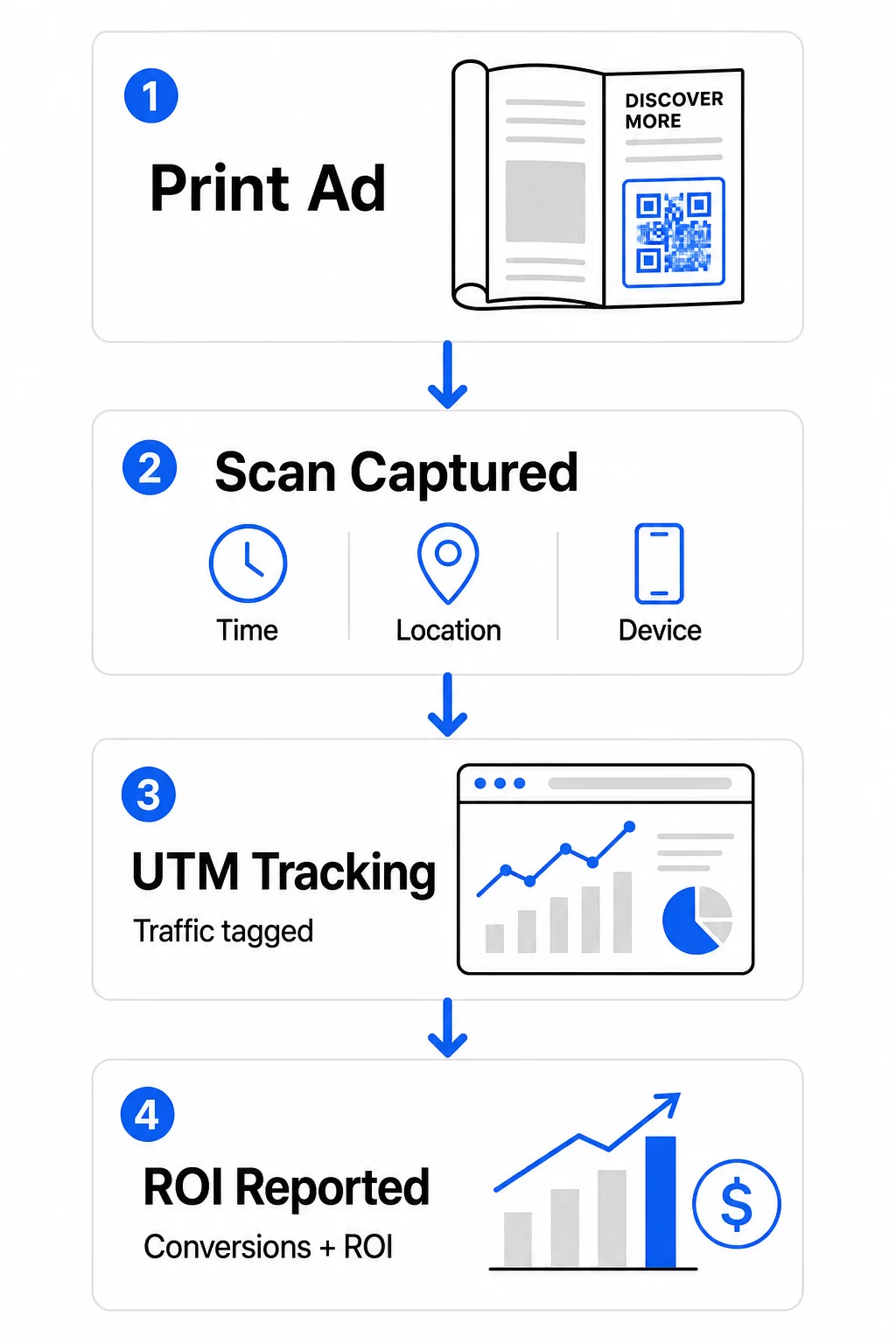
Berikut adalah rincian metrik utama yang perlu dipantau:
| Metrik | Apa yang Diukurnya | Mengapa Ini Penting |
|---|---|---|
| TOTAL PEMINDAIAN | Setiap peristiwa pemindaian, termasuk pemindaian berulang | Menunjukkan jangkauan kampanye secara keseluruhan |
| Pemindaian unik | Perangkat individual yang memindai | Mencerminkan ukuran audiens yang sebenarnya |
| Tingkat pemindaian | Pemindaian relatif terhadap perkiraan paparan iklan | Mengevaluasi efektivitas materi iklan dan penempatan |
| Lokasi pemindaian | Distribusi geografis pemindaian | Mengidentifikasi wilayah berkinerja tinggi |
| Jenis perangkat | iOS, Android, desktop | Memandu optimasi seluler untuk halaman arahan |
| Waktu pemindaian puncak | Kapan pemindaian terjadi selama sehari atau seminggu | Menginformasikan strategi waktu untuk kampanye mendatang |
| Tingkat konversi | Tindakan yang diambil setelah memindai (pembelian, pendaftaran) | Mengukur dampak bisnis nyata |
Total pemindaian vs. pemindaian unik adalah perbedaan penting. Total pemindaian menghitung setiap kali kode dipicu, termasuk beberapa pemindaian oleh orang yang sama. Pemindaian unik menggunakan identifikasi tingkat perangkat untuk menghitung pengguna individu, memberi Anda gambaran yang lebih akurat tentang jangkauan audiens yang sebenarnya. Untuk kampanye cetak, pemindaian unik biasanya merupakan angka yang lebih bermakna.
Itu tingkat pemindaian-tayang adalah padanan cetak dari tingkat klik-tayang – ini memberi tahu Anda berapa persentase orang yang terpapar iklan Anda benar-benar merespons. Anda dapat memperkirakannya dengan membagi pemindaian unik dengan jumlah cetakan atau perkiraan pembaca untuk penempatan tersebut.
Untuk melihat lebih dalam analitik tingkat perusahaan, artikel tentang metrik analitik kode QR utama mencakup cara melampaui jumlah pemindaian untuk mengukur dampak bisnis yang sebenarnya.
Menggunakan Analitik Waktu Nyata untuk Mengoptimalkan Kampanye di Tengah Jalan
Salah satu keuntungan signifikan dari kode QR dinamis dibandingkan pengukuran cetak tradisional adalah kemampuan untuk bertindak berdasarkan data saat kampanye masih berjalan. Dengan analitik waktu nyata, Anda tidak perlu menunggu hingga kampanye berakhir untuk mengetahui apa yang berhasil.
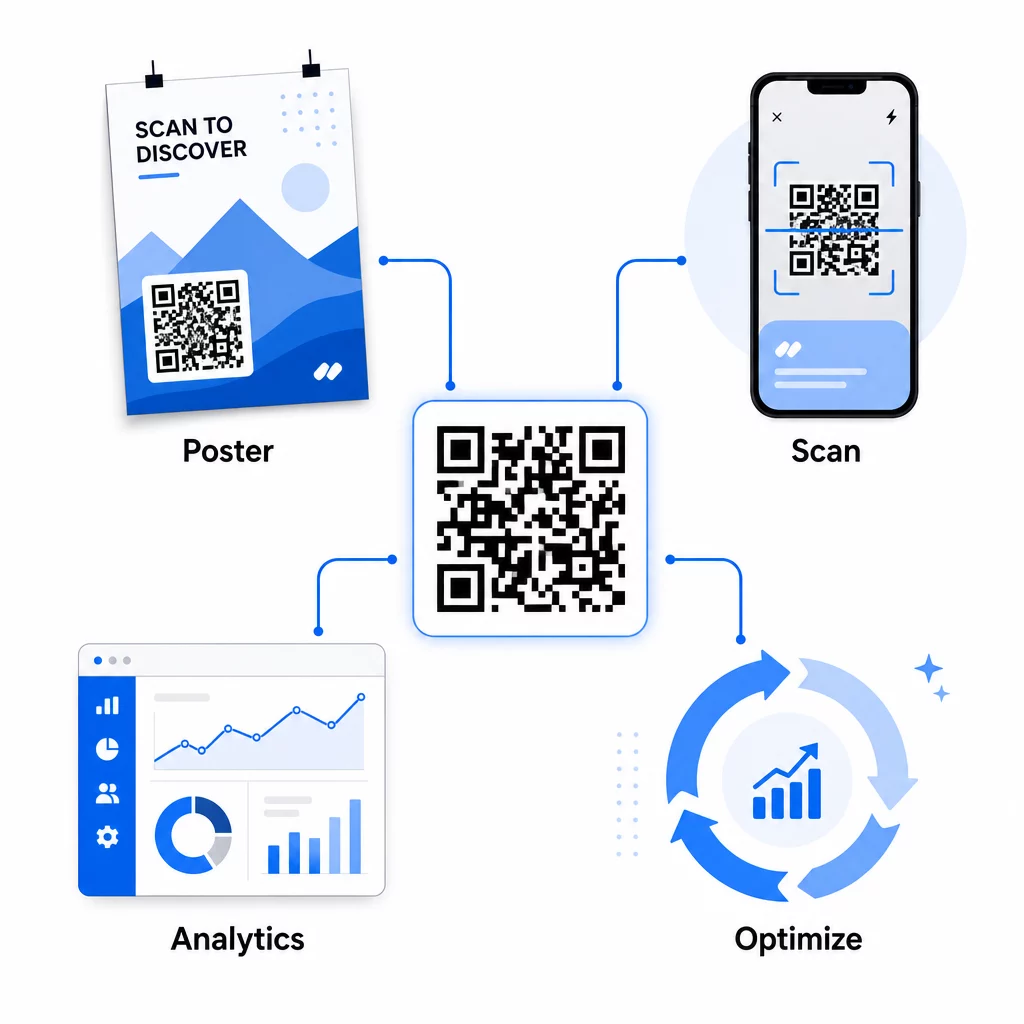
Optimalisasi praktis di tengah kampanye meliputi:
- Memperbarui URL tujuan jika halaman arahan asli tidak berkonversi dengan baik – tanpa mencetak ulang materi apa pun
- Menyesuaikan alokasi pengeluaran dengan menjeda penempatan dengan tingkat pemindaian rendah dan meningkatkan investasi pada saluran berkinerja tinggi
- Pengujian A/B halaman arahan dengan mengarahkan lalu lintas dari kode QR yang sama ke tujuan berbeda pada waktu berbeda
- Mengidentifikasi pola geografis dalam data pemindaian dan menyesuaikan pesan tindak lanjut untuk wilayah dengan respons tinggi
Dasbor analitik real-time Pageloot terintegrasi dengan Google Analytics, sehingga Anda dapat melihat lalu lintas yang didorong oleh QR bersama saluran digital Anda yang lain. Ini memberi Anda gambaran lengkap tentang bagaimana kampanye cetak Anda berkontribusi pada perjalanan pelanggan secara keseluruhan – dari saat seseorang melihat iklan hingga konversi akhir.
Pantau Kampanye Anda secara Real-Time Ingin melihat dengan tepat di mana dan kapan pelanggan Anda memindai materi cetak Anda? Gunakan Pageloot alat analitik kode QR untuk mengakses dasbor kinerja lengkap dan mengoptimalkan kampanye saat masih berjalan.
Kode QR Dinamis untuk Kampanye yang Fleksibel dan Berkelanjutan
Untuk kampanye yang berjalan di berbagai penempatan atau periode waktu, kode QR dinamis memberikan tingkat fleksibilitas yang tidak dapat ditandingi oleh kode statis. Anda dapat menguji penawaran musiman, memperbarui halaman tujuan untuk mencerminkan promosi saat ini, dan mengarahkan ulang lalu lintas tanpa menyentuh materi cetak.
Fleksibilitas ini sangat berharga untuk:
- Kampanye cetak jangka panjang di mana penawaran berubah (misalnya, promosi musiman pada kemasan atau papan nama)
- Kampanye multi-lokasi di mana halaman arahan regional perlu bervariasi
- Optimalisasi anggaran di mana Anda ingin mengarahkan lalu lintas dari penempatan yang berkinerja buruk ke yang lebih kuat
Karena kode QR itu sendiri tidak pernah berubah – hanya tujuan yang ditunjuknya – materi cetak Anda tetap berlaku tanpa batas waktu. Ini menghilangkan biaya pencetakan ulang sambil menjaga konten kampanye Anda tetap terkini.
Menghubungkan kode QR dengan alat otomatisasi pemasaran memperluas hal ini lebih jauh. Ketika pemindaian memicu entri ke dalam urutan email atau alur kerja CRM, setiap interaksi iklan cetak dapat memulai perjalanan pelanggan yang terstruktur – bukan hanya kunjungan situs web satu kali. Pageloot mendukung integrasi dengan platform seperti HubSpot dan Zapier untuk mengaktifkan alur kerja otomatis ini.
Membuktikan ROI dari Kampanye Cetak
Tujuan utama pelacakan kode QR dalam cetak adalah membuktikan laba atas investasi. Dengan pengaturan yang tepat, Anda dapat menghitungnya secara langsung.
Jika Anda mengetahui biaya kampanye cetak Anda dan Anda dapat mengaitkan konversi – pembelian, prospek, pendaftaran – kembali ke pemindaian kode QR tertentu melalui parameter UTM dan Google Analytics, Anda dapat menghitung biaya per akuisisi untuk setiap penempatan. Ini memberi Anda akuntabilitas yang sama seperti yang Anda harapkan dari iklan digital yang diterapkan pada media offline.
Langkah-langkah utama agar ini berhasil:
- Gunakan kode QR unik untuk setiap penempatan agar atribusi bersih
- Tandai URL tujuan dengan parameter UTM agar GA4 menangkap jalur konversi penuh
- Siapkan sasaran konversi di GA4 untuk tindakan yang penting bagi bisnis Anda
- Gunakan dasbor analitik Pageloot untuk membandingkan data pemindaian dengan data konversi
Untuk tim yang mengelola banyak klien atau kampanye secara bersamaan, alat agensi pemasaran di Pageloot memungkinkan Anda melacak kinerja di seluruh kampanye di satu tempat dan menyajikan laporan atribusi yang jelas kepada pemangku kepentingan. Kode QR tidak hanya membuat iklan cetak interaktif – tetapi juga membuatnya terukur. Dengan menggabungkan kode QR dinamis, URL tujuan yang ditandai UTM, dan platform dengan analitik waktu nyata, Anda dapat mengaitkan keterlibatan cetak offline dengan hasil digital dengan presisi yang sama seperti yang Anda terapkan pada saluran digital mana pun. Mulailah dengan membuat kode unik untuk setiap penempatan cetak Anda saat ini dan lihat mana yang benar-benar mendorong hasil.
Mulai dengan Generator kode QR gratis atau jelajahi pelacakan kode QR dinamis untuk melihat kemampuan penuh yang tersedia untuk kampanye cetak Anda.
Pertanyaan yang sering diajukan
Ya, jika Anda menggunakan kode QR dinamis. Kode dinamis mengarah ke URL pengalihan yang Anda kendalikan. Anda dapat memperbarui tujuan – apakah itu halaman arahan baru, penawaran musiman, atau URL berlabel UTM yang direvisi – tanpa mengubah kode QR yang dicetak. Materi fisik tetap berlaku dan pelacakan Anda berlanjut tanpa gangguan.
Jumlah pemindaian total menghitung setiap kali kode dipicu, termasuk beberapa pemindaian oleh orang yang sama. Jumlah pemindaian unik menghitung perangkat individual, memberi Anda gambaran yang lebih jelas tentang berapa banyak orang berbeda yang menanggapi iklan Anda. Untuk mengukur jangkauan iklan cetak dan menghitung tingkat pemindaian, pemindaian unik biasanya lebih bermakna.
Tambahkan parameter UTM ke URL tujuan yang tertanam dalam kode QR Anda. Ketika seseorang memindai kode dan mendarat di situs web Anda, Google Analytics mencatat sesi tersebut dengan tag UTM tersebut. Jika Anda telah menyiapkan sasaran konversi di GA4 – pembelian, pengiriman formulir, unduhan – Anda dapat melihat dengan tepat berapa banyak konversi yang berasal dari setiap penempatan cetak. Ini adalah inti dari atribusi offline-ke-digital untuk kampanye cetak.