Kako znate rade li vaši tiskani oglasi zapravo? Bez načina za mjerenje odgovora, nagađate – a bačeni troškovi oglašavanja brzo se zbrajaju. QR kodovi to rješavaju pretvarajući svako tiskano mjesto u digitalnu dodirnu točku koja se može pratiti, dajući vam konkretne podatke o tome tko se angažirao, kada i što je sljedeće učinio.
Zašto je tiskane oglase teško mjeriti bez QR kodova
Tradicionalno tiskano oglašavanje – časopisi, izravna pošta, plakati, letci – uvijek je patilo od nedostatka atribucije. Možete procijeniti doseg na temelju broja naklade, ali ne postoji izvorni način da saznate koliko je čitatelja zapravo odgovorilo na određeni oglas, a kamoli što su učinili nakon toga.
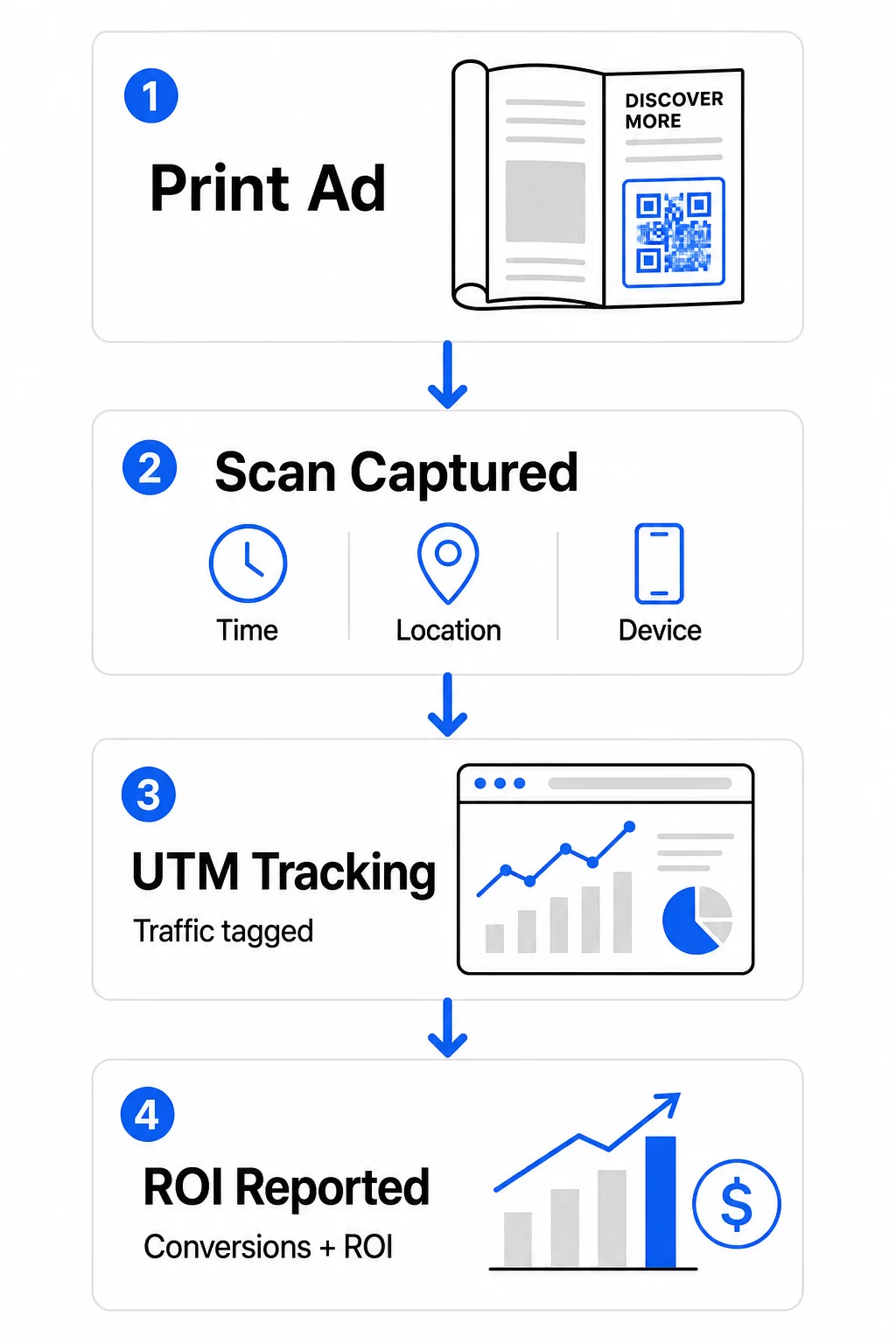
QR kodovi zatvaraju taj jaz. Kada čitatelj skenira kod u vašem tiskanom materijalu, ta se radnja digitalno bilježi. Bilježite događaj skeniranja, lokaciju, vrstu uređaja i vrijeme – a ako odredišni URL uključuje UTM parametre, možete pratiti tog korisnika sve do kupnje, prijave ili preuzimanja. Izvanmrežni dojam postaje mjerljiva digitalna konverzija.
Zato su QR kodovi postali standardni alat za atribuciju tiskanih kampanja. Korištenjem jedinstvenih QR kodova na različitim mjestima – jedan za svaki časopis, jedan za svaku seriju izravne pošte, jedan po lokaciji jumbo plakata – možete usporediti izvedbu među kanalima na isti način na koji biste uspoređivali plaćene digitalne kampanje.
Pretvorite tiskana mjesta u mjerljive kampanje Koristiti Dinamični QR kod generator za stvaranje jedinstvenih kodova koji se mogu pratiti za svako tiskano mjesto i početak prikupljanja stvarnih podataka o angažmanu.
Statični naspram dinamičkih QR kodova za praćenje
Ne podržavaju svi QR kodovi praćenje. Razumijevanje razlike između statičnih i dinamičkih kodova temelj je svake strategije mjerenja tiska.
Statički QR kodovi izravno kodiraju odredišni URL u uzorak koda. Jednom ispisano, odredište se ne može promijeniti i ne postoji mehanizam za bilježenje događaja skeniranja. Dobro funkcioniraju za povezivanje s trajnim sadržajem, ali ne nude analitiku.
Dinamički QR kodovi umjesto toga kodiraju kratki URL za preusmjeravanje. Kada se skenira, preusmjeravanje se rješava na vaše odabrano odredište – a platforma bilježi događaj skeniranja s vremenskom oznakom, lokacijom i podacima o uređaju. Budući da URL za preusmjeravanje ostaje fiksan dok se odredište može mijenjati, možete ažurirati povezani sadržaj u bilo kojem trenutku bez ponovnog ispisa materijala.
Za praćenje tiskanih oglasa, dinamični QR kodovi su jedina praktična opcija. Daju vam podatke o skeniranju koji su vam potrebni za mjerenje izvedbe kampanje i fleksibilnost za prilagodbu odredišnih stranica na temelju onoga što podaci pokazuju.
Postavljanje QR kodova za praćenje tiskanih kampanja
Stvorite jedinstvene kodove za svako mjesto
Najvažnije pravilo za praćenje tiska je jedan QR kod po mjestu. Ako objavite isti oglas u tri različita časopisa koristeći jedan zajednički QR kod, vidjet ćete ukupni broj skeniranja, ali nećete znati koja je publikacija donijela rezultate.
Dodijelite zaseban QR kod svakom:
- Publikaciji ili kanalu (npr. svakom naslovu časopisa)
- Geografskom području distribucije (npr. pošiljke za sjeveroistok naspram zapadne obale)
- Formatu ili veličini oglasa (npr. cijela stranica naspram pola stranice)
- Trajanju kampanje ili vremenskom razdoblju
Ovaj pristup omogućuje vam izravnu usporedbu izvedbe na različitim mjestima i dodjeljivanje budućih troškova onome što funkcionira. Pagelootovi alati za upravljanje kampanjama omogućuju vam organiziranje kodova po kampanjama, dodjeljivanje podračunima za različite timove i upravljanje svim plasmanima s jedne nadzorne ploče.
Dodajte UTM parametre svojim odredišnim URL-ovima
Podaci o skeniranju s vaše platforme za QR kodove govore vam koliko je ljudi stupilo u interakciju s vašim tiskanim oglasom. UTM parametri govore vam što su ti ljudi učinili nakon skeniranja. Zajedno, oni vam daju potpunu sliku atribucije.
UTM parametri su oznake dodane vašem odredišnom URL-u koje identificiraju izvor prometa u Google Analyticsu. Pravilno označen URL za tiskanu kampanju mogao bi izgledati ovako:
`https://yourwebsite.com/landing-page?utmsource=voguemagazine&utmmedium=qrkod&utmcampaign=falllaunch_2025`
S ovim postavljanjem, svaka sesija koja potječe od skeniranja tog QR koda pojavljuje se u Google Analyticsu označena za to specifično mjesto. Zatim možete mjeriti naknadne radnje – kupnje, ispunjavanja obrazaca, preuzimanja sadržaja – i pripisati ih tiskanom oglasu koji je generirao skeniranje.
Za potpuni pregled konvencija imenovanja i GA4 izvještavanja, vodič na UTM parametara za QR kodove detaljno pokriva postavljanje.
Povežite skeniranja ispisa s Google Analyticsom Pagelootov analitičke značajke omogućuju vam dodavanje UTM parametara tijekom izrade QR koda tako da se svako skeniranje automatski pripisuje u GA4.
Dizajnirajte kodove koji se stvarno skeniraju
Praćenje funkcionira samo ako ljudi skeniraju vaše kodove. Nekoliko tehničkih zahtjeva primjenjuje se specifično na tiskane materijale:
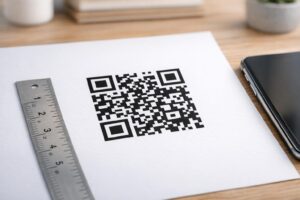
- Minimalna veličina: 0,8 × 0,8 inča za standardne tiskane materijale poput posjetnica ili letaka; proporcionalno povećajte za plakate i signalizaciju koristeći pravilo 10:1 – najmanje jedan inč širine QR koda za svakih deset inča očekivane udaljenosti skeniranja
- Kontrast: Visok kontrast između tamnih modula i svijetle pozadine je ključan; izbjegavajte kombinacije niskog kontrasta poput svijetlosive na bijeloj, i nikada ne invertirajte boje
- Plasman: Razina očiju je idealna za plakate i signalizaciju, obično između 3,5 i 5,5 stopa od tla; izbjegavajte zakrivljene površine poput etiketa boca ili preklopa časopisa gdje izobličenje može spriječiti skeniranje
- Format datoteke: Koristite vektorske formate (EPS ili SVG) za ispis velikog formata; PNG ili JPEG je dovoljan za manje materijale
Dodavanje okvira s pozivom na akciju – “Skenirajte za ekskluzivnu ponudu” ili “Dobijte trenutni pristup” – blizu koda daje čitateljima jasan razlog za angažman. Brendirani QR kodovi koji uključuju vaš logotip i boje također grade prepoznatljivost i povjerenje. Detaljne smjernice za veličinu i postavljanje možete pronaći u vodiču za korištenje QR kodova u tiskanim medijima.
Metrike koje su važne za atribuciju tiskanih oglasa
Nakon što su vaši kodovi aktivni, podaci koje prikupljate spadaju u dvije kategorije: metrike angažmana koje mjere koliko je ljudi odgovorilo na vaš tiskani oglas, i metrike konverzije koje mjere što su ti ljudi učinili sljedeće.
Evo pregleda ključnih metrika za praćenje:
| Metrika | Što mjeri | Zašto je važno |
|---|---|---|
| UKUPNO SKENIRANJA | Svaki događaj skeniranja, uključujući ponovljena skeniranja | Prikazuje ukupan doseg kampanje |
| Jedinstvena skeniranja | Pojedinačni uređaji koji su skenirali | Odražava stvarnu veličinu publike |
| Stopa proskeniranosti | Skeniranja u odnosu na procijenjenu izloženost oglasu | Procjenjuje učinkovitost kreativnog rješenja i postavljanja |
| Lokacija skeniranja | Geografska distribucija skeniranja | Identificira regije s visokim učinkom |
| Vrsta uređaja | iOS, Android, stolno računalo | Vodi optimizaciju za mobilne uređaje za odredišne stranice |
| Vrhunci skeniranja | Kada se skeniranja događaju tijekom dana ili tjedna | Informira strategiju tempiranja za buduće kampanje |
| Stopa konverzije | Poduzete radnje nakon skeniranja (kupnje, prijave) | Mjeri stvarni poslovni utjecaj |
Ukupna skeniranja naspram jedinstvenih skeniranja je važna razlika. Ukupna skeniranja broje svaki put kada se kod aktivira, uključujući višestruka skeniranja iste osobe. Jedinstvena skeniranja koriste identifikaciju na razini uređaja za brojanje pojedinačnih korisnika, dajući vam precizniju sliku stvarnog dosega publike. Za tiskane kampanje, jedinstvena skeniranja su obično značajniji broj.
The stopa skeniranja je tiskani ekvivalent stope klikanja – govori vam koliki je postotak ljudi koji su bili izloženi vašem oglasu zapravo reagirao. To možete procijeniti dijeljenjem jedinstvenih skeniranja s nakladom ili procijenjenim brojem čitatelja za to postavljanje.
Za dublji uvid u analitiku na razini poduzeća, članak o ključnim analitičkim metrikama QR kodova pokriva kako prijeći s broja skeniranja na mjerenje stvarnog poslovnog utjecaja.
Korištenje analitike u stvarnom vremenu za optimizaciju kampanja tijekom trajanja
Jedna značajna prednost dinamičkih QR kodova u odnosu na tradicionalno mjerenje u tisku je mogućnost djelovanja na podatke dok kampanja još traje. S analitikom u stvarnom vremenu, ne čekate kraj kampanje da biste saznali što je funkcioniralo.
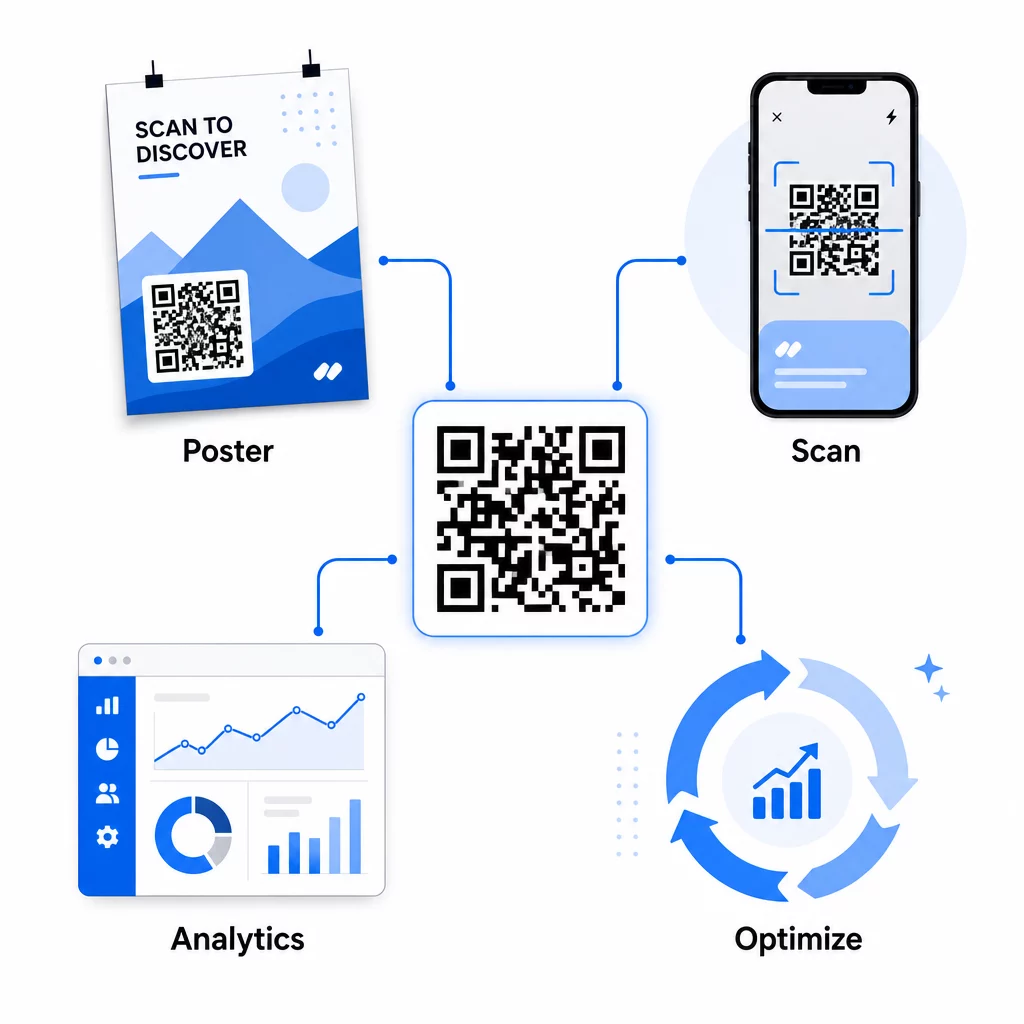
Praktične optimizacije tijekom kampanje uključuju:
- Ažuriranje odredišnog URL-a ako izvorna odredišna stranica ne konvertira dobro – bez ponovnog tiskanja materijala
- Prilagodba raspodjele potrošnje zaustavljanjem postavljanja s niskim stopama skeniranja i povećanjem ulaganja u kanale visokih performansi
- A/B testiranje odredišnih stranica preusmjeravanjem prometa s istog QR koda na različita odredišta u različito vrijeme
- Identificiranje geografskih obrazaca u podacima o skeniranju i prilagođavanje naknadnih poruka za regije s visokim odazivom
Pagelootova nadzorna ploča za analitiku u stvarnom vremenu integrira se s Google Analyticsom, tako da možete pregledavati promet generiran QR kodovima uz vaše druge digitalne kanale. To vam daje potpun uvid u to kako vaše tiskane kampanje doprinose cjelokupnom putovanju korisnika – od trenutka kada netko vidi oglas do konačne konverzije.
Pratite svoju kampanju u stvarnom vremenu Želite vidjeti točno gdje i kada vaši kupci skeniraju vaše tiskane materijale? Koristite Pagelootove alate za analitiku QR kodova za pristup potpunoj nadzornoj ploči performansi i optimizaciju kampanja dok su još aktivne.
Dinamički QR kodovi za fleksibilne, tekuće kampanje
Za kampanje koje se provode na više mjesta ili u više vremenskih razdoblja, dinamički QR kodovi pružaju razinu fleksibilnosti koju statički kodovi ne mogu postići. Možete testirati sezonske ponude, ažurirati odredišne stranice kako bi odražavale trenutne promocije i preusmjeravati promet bez dodirivanja tiskanih materijala.
Ova fleksibilnost je posebno vrijedna za:
- Dugotrajne tiskane kampanje gdje se ponude mijenjaju (npr. sezonske promocije na ambalaži ili natpisima)
- Kampanje na više lokacija gdje se regionalne odredišne stranice moraju razlikovati
- Optimizacija proračuna gdje želite preusmjeriti promet s manje učinkovitih pozicija na jače
Budući da se sam QR kod nikada ne mijenja – samo odredište na koje pokazuje – vaši tiskani materijali ostaju valjani neograničeno. To eliminira troškove ponovnog tiskanja, a sadržaj vaše kampanje ostaje aktualan.
Povezivanje QR kodova s alatima za marketinšku automatizaciju dodatno proširuje ovu mogućnost. Kada skeniranje pokrene ulazak u niz e-poruka ili CRM radni tijek, svaka interakcija s tiskanim oglasom može pokrenuti strukturirano putovanje korisnika – a ne samo jednokratni posjet web stranici. Pageloot podržava integracije s platformama poput HubSpota i Zapiera kako bi omogućio ove automatizirane radne tijekove.
Dokazivanje povrata ulaganja iz tiskanih kampanja
Krajnji cilj praćenja QR kodova u tisku je dokazivanje povrata ulaganja. Uz pravilnu postavku, to možete izračunati izravno.
Ako znate troškove svoje tiskane kampanje i možete pripisati konverzije – kupnje, potencijalne klijente, prijave – određenim skeniranjima QR kodova putem UTM parametara i Google Analyticsa, možete izračunati trošak po akviziciji za svaku poziciju. To vam daje istu odgovornost koju biste očekivali od digitalnog oglašavanja primijenjenog na izvanmrežne medije.
Ključni koraci za uspjeh:
- Koristite jedinstvene QR kodove za svaku poziciju kako bi atribucija bila jasna
- Označite odredišne URL-ove s UTM parametrima kako bi GA4 uhvatio cijeli put konverzije
- Postavite ciljeve konverzije u GA4 za radnje koje su važne za vaše poslovanje
- Koristite Pagelootovu analitičku nadzornu ploču za unakrsno uspoređivanje podataka o skeniranju s podacima o konverzijama
Za timove koji istovremeno upravljaju s više klijenata ili kampanja, alati za marketinške agencije u Pagelootu omogućuju vam praćenje performansi svih kampanja na jednom mjestu i predstavljanje jasnih izvješća o atribuciji dionicima. QR kodovi ne samo da čine tiskane oglase interaktivnima – oni ih čine mjerljivima. Kombiniranjem dinamičkih QR kodova, odredišnih URL-ova označenih UTM-om i platforme s analitikom u stvarnom vremenu, možete pripisati izvanmrežni angažman u tisku digitalnim ishodima s istom preciznošću koju biste primijenili na bilo koji digitalni kanal. Započnite stvaranjem jedinstvenih kodova za svaku od vaših trenutnih tiskanih pozicija i pogledajte koje zapravo donose rezultate.
Započnite s QR kod generator: besplatno ili istražite dinamičko praćenje QR kodova kako biste vidjeli sve mogućnosti dostupne za vaše tiskane kampanje.
Često postavljana pitanja
Da, ako koristite dinamičke QR kodove. Dinamički kodovi upućuju na URL za preusmjeravanje koji vi kontrolirate. Možete ažurirati odredište – bilo da se radi o novoj odredišnoj stranici, sezonskoj ponudi ili revidiranom URL-u s UTM oznakama – bez promjene ispisanog QR koda. Fizički materijali ostaju valjani, a vaše praćenje se nastavlja neprekinuto.
Ukupan broj skeniranja broji se svaki put kada se kod aktivira, uključujući višestruka skeniranja iste osobe. Jedinstvena skeniranja broje pojedinačne uređaje, dajući vam jasniju sliku o tome koliko je različitih osoba odgovorilo na vaš oglas. Za mjerenje dosega oglasa u tisku i izračunavanje stopa prolaznosti skeniranja, jedinstvena skeniranja su obično značajnija.
Dodajte UTM parametre odredišnom URL-u ugrađenom u vaš QR kod. Kada netko skenira kod i dođe na vašu web stranicu, Google Analytics bilježi sesiju s tim UTM oznakama. Ako ste postavili ciljeve konverzije u GA4 – kupnje, slanja obrazaca, preuzimanja – možete točno vidjeti koliko je konverzija poteklo iz svakog tiskarskog plasmana. To je srž atribucije izvanmrežnog u digitalno za tiskane kampanje.