¿Cómo sabes si tus anuncios impresos realmente funcionan? Sin una forma de medir las respuestas, estás adivinando, y el gasto publicitario desperdiciado se acumula rápidamente. Los códigos QR resuelven esto al convertir cada ubicación impresa en un punto de contacto digital rastreable, brindándote datos concretos sobre quién interactuó, cuándo y qué hicieron a continuación.
Por qué los anuncios impresos son difíciles de medir sin códigos QR
La publicidad impresa tradicional –revistas, correo directo, carteles, folletos– siempre ha sufrido una brecha de atribución. Puedes estimar el alcance basándote en los números de circulación, pero no hay una forma nativa de saber cuántos lectores respondieron realmente a un anuncio específico, y mucho menos qué hicieron después.
Los códigos QR cierran esa brecha. Cuando un lector escanea un código en tu material impreso, esa acción se registra digitalmente. Capturas el evento de escaneo, la ubicación, el tipo de dispositivo y la hora, y si la URL de destino incluye parámetros UTM, puedes seguir a ese usuario hasta una compra, un registro o una descarga. La impresión offline se convierte en una conversión digital medible.
Por eso los códigos QR se han convertido en una herramienta estándar para la atribución de campañas impresas. Al usar códigos QR únicos en diferentes ubicaciones –uno para cada revista, uno para cada lote de correo directo, uno por ubicación de valla publicitaria– puedes comparar el rendimiento entre canales de la misma manera que compararías campañas digitales pagadas.
Convierte las ubicaciones impresas en campañas medibles Use el Generador de códigos QR dinámicos para crear códigos únicos y rastreables para cada ubicación impresa y comenzar a capturar datos de interacción reales.
Códigos QR estáticos vs. dinámicos para el seguimiento
No todos los códigos QR admiten el seguimiento. Comprender la diferencia entre códigos estáticos y dinámicos es la base de cualquier estrategia de medición impresa.
Códigos QR estáticos codifican la URL de destino directamente en el patrón del código. Una vez impreso, el destino no se puede cambiar y no hay ningún mecanismo para registrar eventos de escaneo. Funcionan bien para enlazar a contenido permanente, pero no ofrecen análisis.
Códigos QR dinámicos codifican una URL de redirección corta en su lugar. Cuando se escanea, la redirección se resuelve en el destino elegido, y la plataforma registra el evento de escaneo con marca de tiempo, ubicación y datos del dispositivo. Debido a que la URL de redirección permanece fija mientras el destino puede cambiar, puedes actualizar el contenido enlazado en cualquier momento sin reimprimir tus materiales.
Para el seguimiento de anuncios impresos, códigos QR dinámicos son la única opción práctica. Te proporcionan los datos de escaneo que necesitas para medir el rendimiento de la campaña y la flexibilidad para ajustar las páginas de destino según lo que muestren los datos.
Configuración de códigos QR para el seguimiento de campañas impresas
Crea códigos únicos para cada ubicación
La regla más importante para el seguimiento impreso es un código QR por ubicación. Si publicas el mismo anuncio en tres revistas diferentes usando un código QR compartido, verás recuentos de escaneos agregados pero no sabrás qué publicación generó resultados.
Asigne un código QR separado a cada:
- Publicación o canal (por ejemplo, cada título de revista)
- Área de distribución geográfica (por ejemplo, correos del noreste vs. costa oeste)
- Formato o tamaño del anuncio (por ejemplo, página completa vs. media página)
- Período de campaña o tiempo
Este enfoque le permite comparar el rendimiento entre ubicaciones directamente y asignar el gasto futuro a lo que funciona. Las herramientas de Pageloot para la gestión de campañas le permiten organizar códigos por campaña, asignarlos a subcuentas para diferentes equipos y gestionar todas las ubicaciones desde un único panel.
Añada parámetros UTM a sus URL de destino
Los datos de escaneo de su plataforma de códigos QR le indican cuántas personas interactuaron con su anuncio impreso. Los parámetros UTM le dicen qué hicieron esas personas después de escanear. Juntos, le dan la imagen completa de la atribución.
Los parámetros UTM son etiquetas añadidas a su URL de destino que identifican la fuente de tráfico en Google Analytics. Una URL correctamente etiquetada para una campaña impresa podría verse así:
`https://yourwebsite.com/landing-page?utmsource=voguemagazine&utmmedio=qrcódigo&utmcampaign=falllaunch_2025`
Con esta configuración, cada sesión que se origina a partir de ese escaneo de código QR aparece en Google Analytics etiquetada con esa ubicación específica. Luego puedes medir las acciones posteriores – compras, formularios completados, descargas de contenido – y atribuirlas al anuncio impreso que generó el escaneo.
Para una explicación completa de las convenciones de nomenclatura y los informes de GA4, la guía sobre parámetros UTM para códigos QR cubre la configuración en detalle.
Conecta Escaneos Impresos a Google Analytics De Pageloot funciones de análisis te permiten añadir parámetros UTM durante la creación del código QR para que cada escaneo se atribuya automáticamente en GA4.
Diseña Códigos Que Realmente Se Escaneen
El seguimiento solo funciona si la gente escanea tus códigos. Se aplican algunos requisitos técnicos específicamente a los materiales impresos:
- Tamaño mínimo: 0.8 × 0.8 pulgadas para materiales impresos estándar como tarjetas de visita o folletos; escala proporcionalmente para carteles y señalización usando la regla 10:1 – al menos una pulgada de ancho de código QR por cada diez pulgadas de distancia de escaneo esperada
- Contraste: El alto contraste entre los módulos oscuros y el fondo claro es esencial; evita combinaciones de bajo contraste como gris claro sobre blanco, y nunca inviertas los colores
- Colocación: La altura de los ojos es ideal para carteles y señalización, típicamente entre 3.5 y 5.5 pies del suelo; evita superficies curvas como etiquetas de botellas o pliegues de revistas donde la distorsión puede impedir el escaneo
- Formato de archivo: Utiliza formatos vectoriales (EPS o SVG) para impresión de gran formato; PNG o JPEG es suficiente para materiales más pequeños
Añadir un marco de llamada a la acción – “Escanea para Oferta Exclusiva” o “Obtén Acceso Instantáneo” – cerca del código da a los lectores una razón clara para interactuar. Los códigos QR de marca que incorporan tu logotipo y colores también construyen reconocimiento y confianza. Puedes encontrar pautas detalladas de tamaño y ubicación en la guía para usar códigos QR en medios impresos.
Las Métricas Que Importan para la Atribución de Anuncios Impresos
Una vez que tus códigos estén activos, los datos que recopilas se dividen en dos categorías: métricas de engagement que miden cuántas personas respondieron a tu anuncio impreso, y métricas de conversión que miden qué hicieron esas personas a continuación.
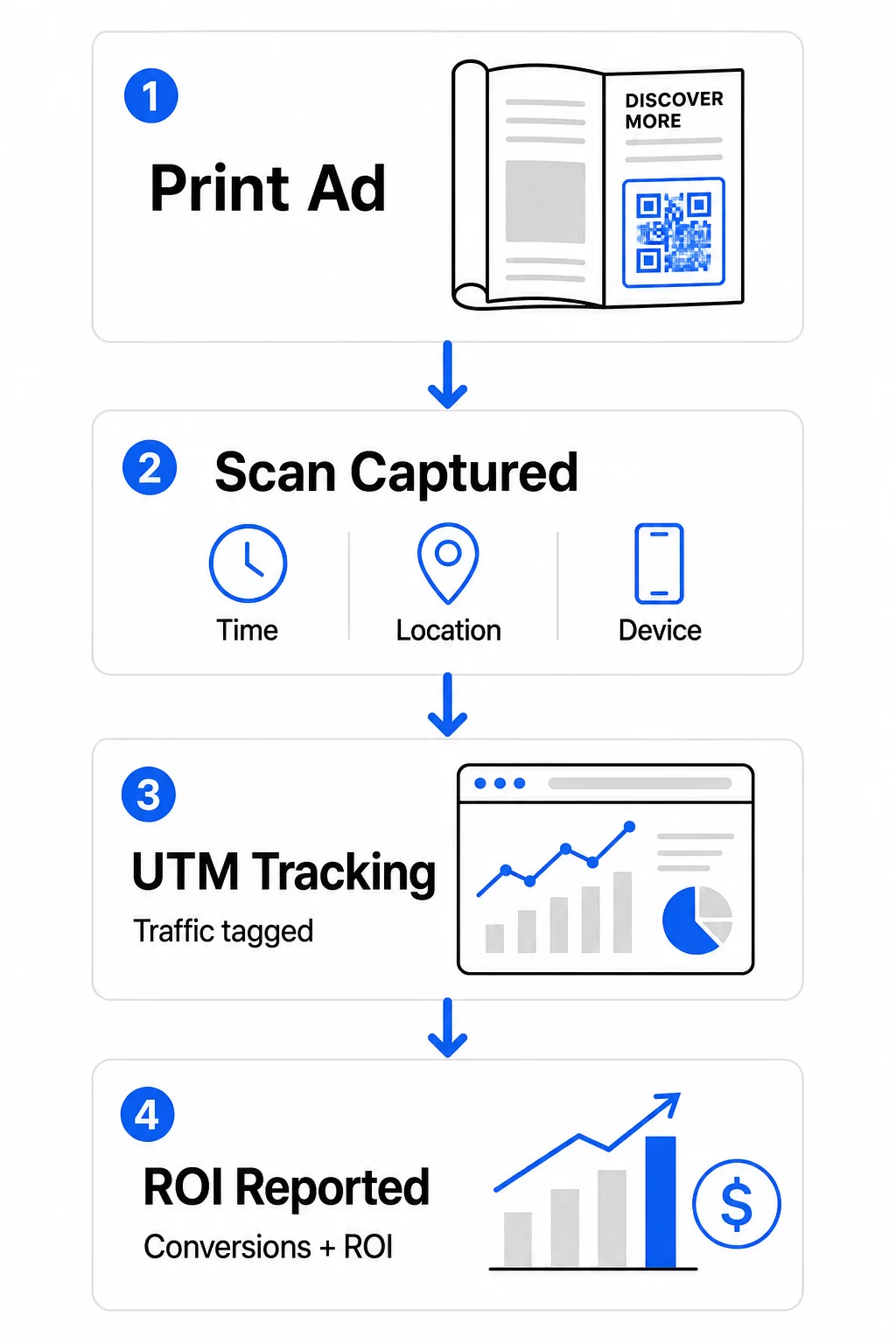
Aquí tienes un desglose de las métricas clave a monitorear:
| Métrica | Qué Mide | Por qué es importante |
|---|---|---|
| ESCANEOS TOTALES | Cada evento de escaneo, incluyendo escaneos repetidos | Muestra el alcance general de la campaña |
| Escaneos únicos | Dispositivos individuales que escanearon | Refleja el tamaño real de la audiencia |
| Tasa de escaneo | Escaneos en relación con la exposición estimada del anuncio | Evalúa la efectividad de la creatividad y la ubicación |
| Ubicación del escaneo | Distribución geográfica de los escaneos | Identifica regiones de alto rendimiento |
| Tipo de dispositivo | iOS, Android, escritorio | Guía la optimización móvil para páginas de destino |
| Horas pico de escaneo | Cuándo ocurren los escaneos durante el día o la semana | Informa la estrategia de temporización para futuras campañas |
| Tasa de conversión | Acciones realizadas después de escanear (compras, registros) | Mide el impacto real en el negocio |
Escaneos totales vs. escaneos únicos es una distinción importante. Los escaneos totales cuentan cada vez que se activa un código, incluyendo múltiples escaneos por la misma persona. Los escaneos únicos utilizan la identificación a nivel de dispositivo para contar usuarios individuales, lo que le da una imagen más precisa del alcance real de la audiencia. Para las campañas impresas, los escaneos únicos suelen ser el número más significativo.
El tasa de escaneo es el equivalente impreso de la tasa de clics: le indica qué porcentaje de personas expuestas a su anuncio realmente respondieron. Puede estimarlo dividiendo los escaneos únicos por la tirada de impresión o la audiencia estimada para esa ubicación.
Para una mirada más profunda a la analítica a nivel empresarial, el artículo sobre métricas clave de análisis de códigos QR cubre cómo ir más allá del recuento de escaneos para medir el impacto empresarial genuino.
Uso de análisis en tiempo real para optimizar campañas en curso
Una ventaja significativa de los códigos QR dinámicos sobre la medición impresa tradicional es la capacidad de actuar sobre los datos mientras una campaña aún está en curso. Con el análisis en tiempo real, no tiene que esperar a que termine una campaña para saber qué funcionó.
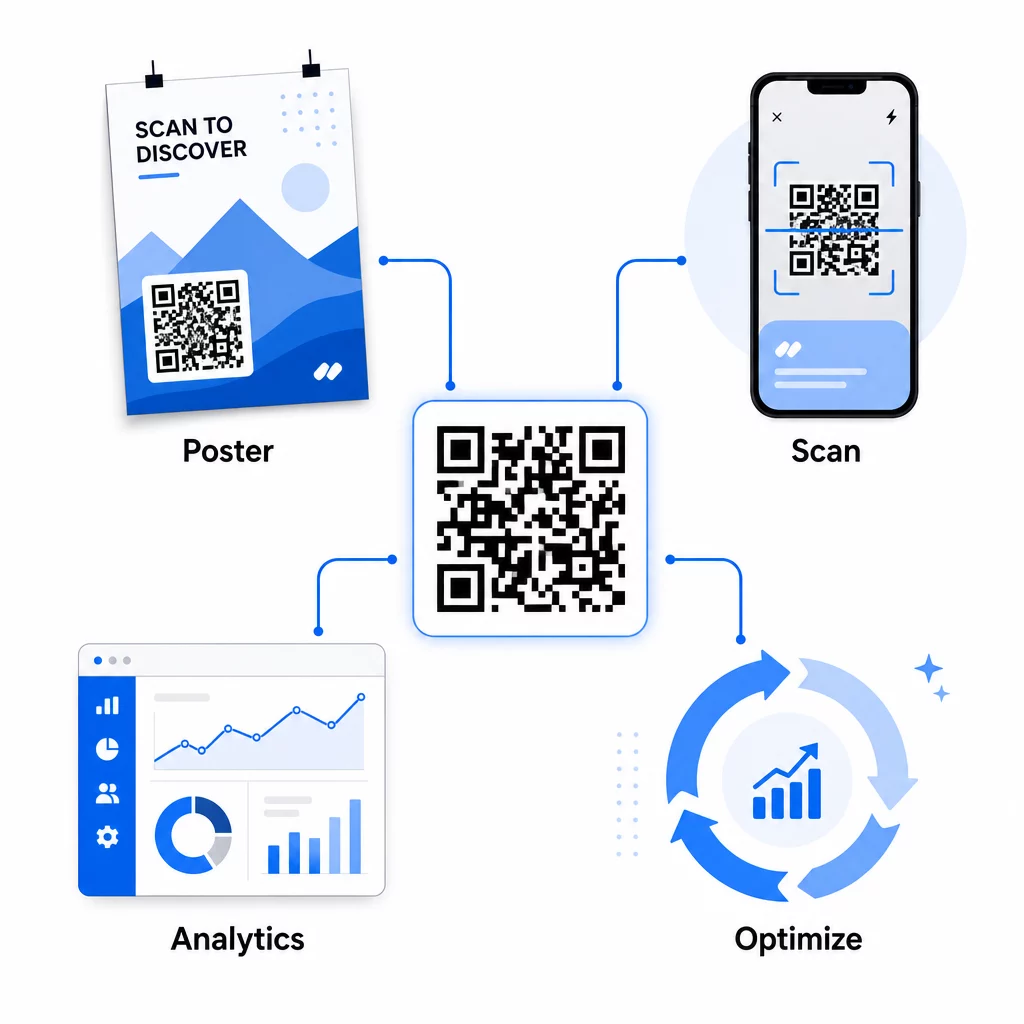
Las optimizaciones prácticas a mitad de campaña incluyen:
- Actualizar la URL de destino si la página de destino original no está convirtiendo bien, sin reimprimir ningún material
- Ajustar la asignación de gastos pausando ubicaciones con bajas tasas de escaneo y aumentando la inversión en canales de alto rendimiento
- Pruebas A/B de páginas de destino dirigiendo el tráfico desde el mismo código QR a diferentes destinos en diferentes momentos
- Identificación de patrones geográficos en los datos de escaneo y adaptación de mensajes de seguimiento para regiones de alta respuesta
El panel de análisis en tiempo real de Pageloot se integra con Google Analytics, para que puedas ver el tráfico impulsado por QR junto con tus otros canales digitales. Esto te da una visión completa de cómo tus campañas impresas contribuyen al recorrido general del cliente, desde el momento en que alguien ve el anuncio hasta la conversión final.
Monitorea Tu Campaña en Tiempo Real ¿Quieres ver exactamente dónde y cuándo tus clientes están escaneando tus materiales impresos? Usa las herramientas de Pageloot herramientas de análisis de códigos QR para acceder a un panel de rendimiento completo y optimizar las campañas mientras aún están en curso.
Códigos QR Dinámicos para Campañas Flexibles y Continuas
Para campañas que se ejecutan en múltiples ubicaciones o períodos de tiempo, los códigos QR dinámicos proporcionan un nivel de flexibilidad que los códigos estáticos no pueden igualar. Puedes probar ofertas estacionales, actualizar páginas de destino para reflejar promociones actuales y redirigir el tráfico sin tocar los materiales impresos.
Esta flexibilidad es especialmente valiosa para:
- Campañas impresas de larga duración donde las ofertas cambian (por ejemplo, promociones estacionales en empaques o señalización)
- Campañas multi-ubicación donde las páginas de destino regionales necesitan variar
- Optimización del presupuesto donde quieres redirigir el tráfico de ubicaciones de bajo rendimiento a otras más fuertes
Dado que el código QR en sí nunca cambia – solo el destino al que apunta – tus materiales impresos siguen siendo válidos indefinidamente. Esto elimina los costos de reimpresión mientras mantiene el contenido de tu campaña actualizado.
Conectar los códigos QR con herramientas de automatización de marketing lo extiende aún más. Cuando un escaneo activa una entrada en una secuencia de correo electrónico o un flujo de trabajo de CRM, cada interacción con un anuncio impreso puede iniciar un viaje estructurado del cliente – no solo una visita única al sitio web. Pageloot es compatible con integraciones con plataformas como HubSpot y Zapier para habilitar estos flujos de trabajo automatizados.
Demostrar el ROI de las campañas impresas
El objetivo final del seguimiento de códigos QR en medios impresos es demostrar el retorno de la inversión. Con la configuración adecuada, puedes calcular esto directamente.
Si conoces el costo de tu campaña impresa y puedes atribuir conversiones – compras, clientes potenciales, registros – a escaneos de códigos QR específicos a través de parámetros UTM y Google Analytics, puedes calcular el costo por adquisición para cada ubicación. Esto te brinda la misma responsabilidad que esperarías de la publicidad digital aplicada a los medios offline.
Los pasos clave para que esto funcione:
- Usa códigos QR únicos para cada ubicación para que la atribución sea clara
- Etiqueta las URL de destino con parámetros UTM para que GA4 capture la ruta de conversión completa
- Configura objetivos de conversión en GA4 para las acciones que importan a tu negocio
- Usa el panel de análisis de Pageloot para cotejar los datos de escaneo con los datos de conversión
Para equipos que gestionan múltiples clientes o campañas simultáneamente, las herramientas para agencias de marketing en Pageloot te permiten rastrear el rendimiento de todas las campañas en un solo lugar y presentar informes de atribución claros a las partes interesadas. Los códigos QR no solo hacen que los anuncios impresos sean interactivos, sino que los hacen medibles. Al combinar códigos QR dinámicos, URL de destino etiquetadas con UTM y una plataforma con análisis en tiempo real, puedes atribuir el engagement de impresión offline a resultados digitales con la misma precisión que aplicarías a cualquier canal digital. Comienza creando códigos únicos para cada una de tus ubicaciones de impresión actuales y ve cuáles están realmente generando resultados.
Empieza con el Generador de códigos QR gratis o explora seguimiento de códigos QR dinámicos para ver todas las capacidades disponibles para sus campañas impresas.
Preguntas frecuentes
Sí, si utiliza códigos QR dinámicos. Los códigos dinámicos apuntan a una URL de redirección que usted controla. Puede actualizar el destino – ya sea una nueva página de destino, una oferta de temporada o una URL revisada con etiquetas UTM – sin cambiar el código QR impreso. Los materiales físicos siguen siendo válidos y su seguimiento continúa ininterrumpidamente.
Los escaneos totales cuentan cada vez que se activa el código, incluyendo múltiples escaneos por la misma persona. Los escaneos únicos cuentan dispositivos individuales, dándote una imagen más clara de cuántas personas distintas respondieron a tu anuncio. Para medir el alcance de un anuncio impreso y calcular las tasas de escaneo, los escaneos únicos suelen ser más significativos.
Añada parámetros UTM a la URL de destino incrustada en su código QR. Cuando alguien escanea el código y llega a su sitio web, Google Analytics registra la sesión con esas etiquetas UTM. Si ha configurado objetivos de conversión en GA4 – compras, envíos de formularios, descargas – puede ver exactamente cuántas conversiones se originaron de cada ubicación impresa. Este es el núcleo de la atribución offline-a-digital para campañas impresas.