Hogyan adhatunk gazdag digitális kontextust egy fizikai műalkotáshoz anélkül, hogy zsúfolnánk a galéria falát, vagy megtörnénk a mű varázsát? Ez a feszültség – az információ és az elmélyülés között – pontosan az, amit a QR-kódok a művészeti installációkban hivatottak feloldani. Ez az útmutató valós példákat, tervezési elveket és gyakorlati lépéseket mutat be kurátorok és művészek számára, akik szkennelhető digitális rétegeket szeretnének beépíteni kiállításaikba.
Esettanulmányok: Hogyan használják a múzeumok és művészek a QR-kódokat
Mehendi QR-kód művészeti installáció
Ez az ideiglenes projekt ötvözte a henna művészet hagyományát a QR-kódok praktikumával. A látogatók beolvashatták a henna alapú mintákat digitális tranzakciók végrehajtásához vagy adományozáshoz. Mivel a henna természetesen elhalványul, az installáció az állandótlanság meditációjává vált, miközben bemutatta, hogyan kapcsolhatják össze a QR-kódok a kulturális hagyományokat a modern digitális interakciókkal.
Térbeli QR-kód integráció a Pinault Gyűjteményben
A franciaországi Rennes-ben található Pinault Gyűjteményben a kurátorok QR-kódokat ágyaztak be a múzeum padlóiba és átmeneti tereibe, ahelyett, hogy szöveges panelekkel zsúfolták volna a galéria falait. A MySmartJourney platformot használva a kódok játékos tartalmat – pop-art oktatóanyagokat és vizuális rejtvényeket – szolgáltattak olyan pillanatokban, amelyek egyébként tétlenek lennének, például sorban álláskor. Az eredmény fokozott elkötelezettség volt anélkül, hogy megzavarta volna a galéria vizuális áramlását, ami egy olyan modell, amelyet érdemes tanulmányozni minden intézmény számára, amely az információátadást az esztétikai integritással egyensúlyozza.
Az Erarta Múzeum kiterjesztett látogatói élménye
Az Erarta Múzeum QR-kódokat használt a látogatás kiterjesztésére a galérián túlra. A műalkotások közelében elhelyezett kódok lehetővé tették a vendégek számára, hogy részletes kiállítási információkat fedezzenek fel, megismerkedjenek a művészekkel, és kiváló minőségű reprodukciókat vásároljanak. Ahelyett, hogy minden látogatót ugyanazon a lineáris élményen keresztül kényszerítettek volna, ez a megközelítés szabadságot adott az embereknek, hogy olyan mélyre merüljenek, amilyen mélyre a kíváncsiságuk vitte őket – egy személyre szabottabb interakciót, mint amit bármely rögzített fali címke kínálhat.
Az Elkoy Művészeti Kollektíva Bauhaus-ihlette QR-kódjai
Az Elkoy Művészeti Kollektíva a Bauhaus elvek lencséjén keresztül gondolta újra a QR-kódokat. Geometriai formák, merész színek és minimalista design beépítésével a szabványos fekete-fehér kódokat kompozíciós elemekké alakították. Minden kód esszékhez kapcsolódott, amelyek elmagyarázták a történelmi design mozgalmak és a modern technológia közötti kapcsolatot. Munkájuk egyértelműen bizonyítja, hogy egy QR-kód a műalkotás része lehet, nem pedig annak annotációja.
A Brooklyn Múzeum korai bevezetésének tanulságai
A Brooklyn Múzeum korán bevezette a QR-kódokat, de kezdeti erőfeszítéseik valós súrlódásba ütköztek – a látogatóknak harmadik féltől származó alkalmazásokra volt szükségük a szkenneléshez, amivel a legtöbb ember nem rendelkezett. Az elkötelezettség csak azután ugrott meg, hogy az Apple és az Android közvetlenül a okostelefon kameráiba integrálta a QR-olvasókat. A tanulság praktikus: még egy jól kigondolt ötlet is kudarcot vallhat a megfelelő infrastruktúra hiányában. Az időzítés és a technikai hozzáférhetőség éppolyan fontos, mint a kreatív vízió.
A QR-kódok előnyei a művészeti installációkban
Mélyebb látogatói elkötelezettség
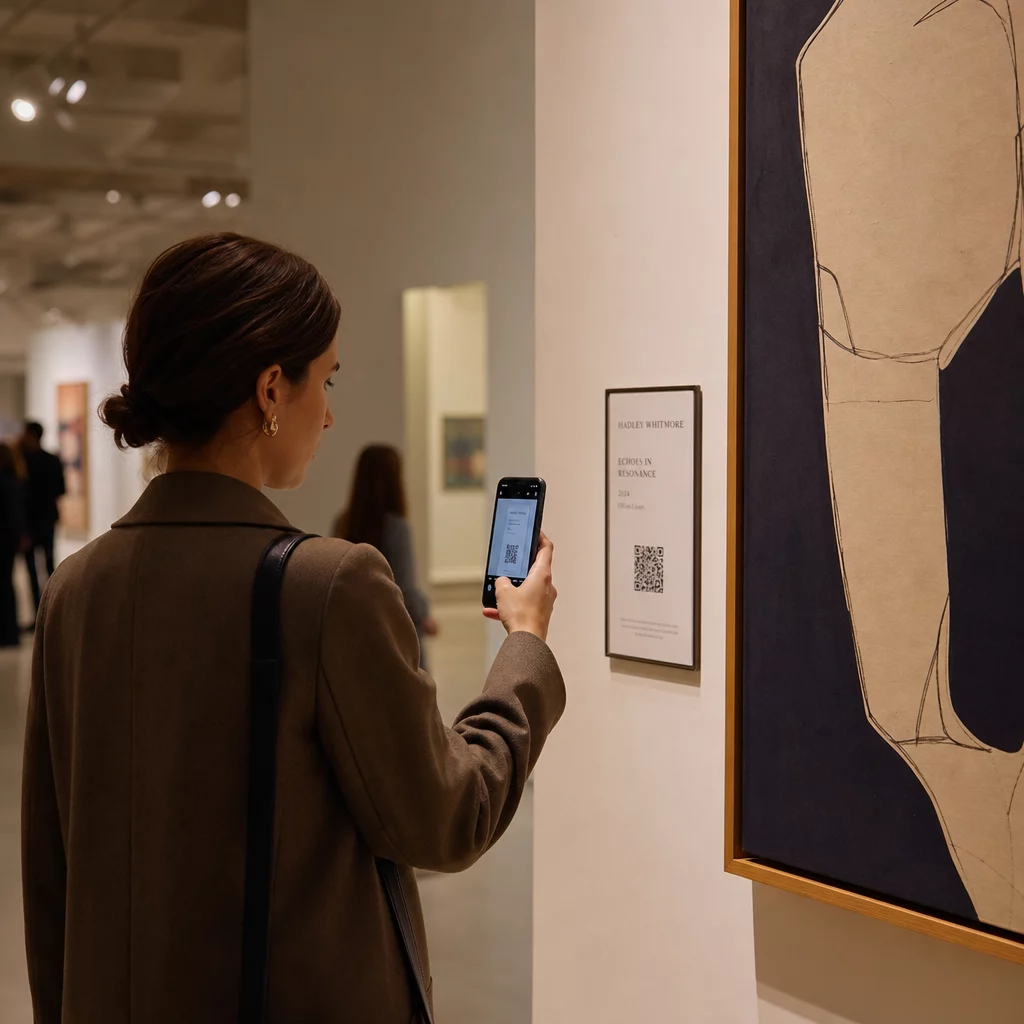
A QR-kódok a látogatókat passzív megfigyelőkből aktív résztvevőkké alakítják. Ahelyett, hogy csak azt fogadnák be, ami egy fali címkén elfér, a látogató beolvashatja és hozzáférhet művészinterjúkhoz, kulisszák mögötti videókhoz, audio útmutatókhoz vagy kiterjesztett valóság overlay-ekhez, amelyek animálják a statikus művet. A múzeumok kódokat használhatnak digitális kincsvadászatok vagy kvízek indítására is, amelyek különösen hatékonyak családok és fiatalabb közönség számára.
QR-kódok múzeumoknak értelmes akadálymentesítési fejlesztéseket is lehetővé tesz. Többnyelvű hangos idegenvezetők, feliratok és ismételten lejátszható videók a tanulási nehézségekkel küzdő látogatók számára mind lehetővé válnak egyetlen szkenneléssel a látogató saját eszközén. A kutatások megerősítik, hogy a tanulási nehézségekkel küzdő látogatók különösen nagyra értékelik azt a lehetőséget, hogy a tartalmat többször is megnézhetik vagy meghallgathatják a saját tempójukban.
Egy gyakorlati megjegyzés: nem minden látogató hord okostelefont – az iskolai csoportok gyakran említett példák. A QR-kódokat kiegészítő rétegként kell kezelni, nem az információhoz vezető egyetlen útként. Mindig biztosítson alternatív módot ugyanazon tartalom elérésére, legyen az egy közeli URL, egy nyomtatott szórólap vagy egy személyzet által segített lehetőség.
Adjon digitális réteget következő kiállításához A Dinamikus QR-kód generátor lehetővé teszi a hivatkozott tartalom bármikori frissítését – újranyomtatás nélkül –, így a kódok naprakészek maradnak a kiállítás teljes időtartama alatt.
Tervezési rugalmasság és művészi integráció
A QR-kódoknak már nem kell hagyományos értelemben QR-kódoknak kinézniük. Színek, formák, beágyazott logók és egyedi minták mind alkalmazhatók a szkennelhetőség megőrzése mellett, feltéve, hogy a kontraszt és a csendes zónák tiszteletben vannak tartva (erről bővebben alább). Az Elkoy Collective Bauhaus-ihlette kódjai és a Pinault Collection padlóba ágyazott kódjai egyaránt azt mutatják, hogy az átgondolt elhelyezés és vizuális tervezés révén a kód a kiállítás szerves részének tűnhet, nem pedig ráerőltetett elemnek.
Egy hasznos vezérelv a kurátori gyakorlatból: “A QR-kódot diszkrétnek és elegánsnak kell tervezni, kiegészítve a kiállítást, nem pedig elvonva attól a figyelmet.” Ez a szabvány érvényes, függetlenül attól, hogy a kód egy festmény melletti kis címkén jelenik meg, vagy közvetlenül egy szobrászati alkotás felületébe van integrálva.
Analitika és valós idejű látogatói betekintések
A QR-kódok egyik legpraktikusabb érve a kiállításokon az általuk generált adatok. Minden szkennelés egy jel: mely alkotások keltenek tartós érdeklődést, mikor történik a csúcsforgalom, mely galériazónákban időznek a látogatók, és mely tartalomformátumokat – videó, hang, szöveg – fogyasztják a leginkább.
| Adatpont | Nyújtott betekintés |
|---|---|
| ÖSSZES BEOLVASÁS | Méri az általános érdeklődést egy adott mű vagy zóna iránt |
| Egyedi szkennelések | Nyomon követi az egyéni látogatói elkötelezettséget |
| Szkennelési idő | Azonosítja a csúcsidőket és a látogatói áramlási mintákat |
| Operációs rendszer | Technikai betekintést nyújt a mobiloptimalizáláshoz |
| Beolvasás helye | Értékeli a QR-kód elhelyezésének hatékonyságát |
A dinamikus QR-kódok még inkább felhasználhatóvá teszik ezeket az adatokat. Mivel a cél URL-cím megváltoztatható a fizikai kód újranyomtatása nélkül, egy kurátor valós időben reagálhat a szkennelési adatokra – lecserélhet egy nem rezonáló videót egy olyanra, amely igen, vagy hozzáférhetőségi tartalmat adhat hozzá a futás közepén a látogatói visszajelzések alapján. A teljesebb képért arról, hogy Az AR QR-kódok átalakítják a múzeumi történetmesélést, a kiterjesztett valóság rétegei ugyanígy hozzáadhatók vagy frissíthetők.
Mit linkeljünk: Értéket hozzáadó tartalom
A kód mögötti tartalom legalább annyira fontos, mint maga a kód. A múzeumok és művészek a következő tartalomtípusokat találták következetesen hasznosnak:
- Művésznyilatkozatok és interjúk – ha egy művész a saját szavaival írja le a folyamatát, olyan kapcsolatot teremt, amelyet semmilyen fali szöveg nem tud megismételni; egy YouTube QR-kód tisztán kezeli ezt
- Audió útmutatók – narrált leírások vagy hangképek, amelyek egy MP3 QR-kódként különösen jól működnek olyan műveknél, ahol a vizuális élménynek zavartalannak kell maradnia
- Bővített katalógustartalom – részletes származás, tudományos esszék vagy kiállítási katalógusok, amelyek PDF QR-kód
- Képgalériák – feldolgozott fényképek, installációs nézetek vagy összehasonlító művek, amelyek egy képgyűjtemény QR-kódon keresztül érhetők el
- Virtuális túrák – azoknak a látogatóknak, akik kapcsolódó műveket vagy testvérintézményeket szeretnének felfedezni, egy virtuális túrára mutató QR-kód kiterjeszti az élményt a fizikai téren túlra
- Látogatói visszajelzési űrlapok – kijáratoknál vagy kulcsfontosságú művek közelében elhelyezve a minőségi válaszok rögzítésére
Tartsa egyszerűen a hivatkozott célállomást. A rövidebb URL-ek kevésbé sűrű mintázatként kódolódnak, ami gyorsabban és megbízhatóbban olvasható be. A dinamikus QR-kódok ezt szisztematikusan oldják meg azáltal, hogy csak egy rövid átirányító linket kódolnak, függetlenül attól, hogy mennyire összetett a célállomás.
Tervezés és elhelyezés: A kódok beolvashatóvá és diszkrétté tétele
A vizuális és fizikai kivitelezés megfelelő megvalósítása az, ahol sok installáció elbukik. Az alábbi elvek az akadálymentesítési útmutatóból és a QR-kód olvashatóságával kapcsolatos kutatásokból származnak.
Kontraszt és szín
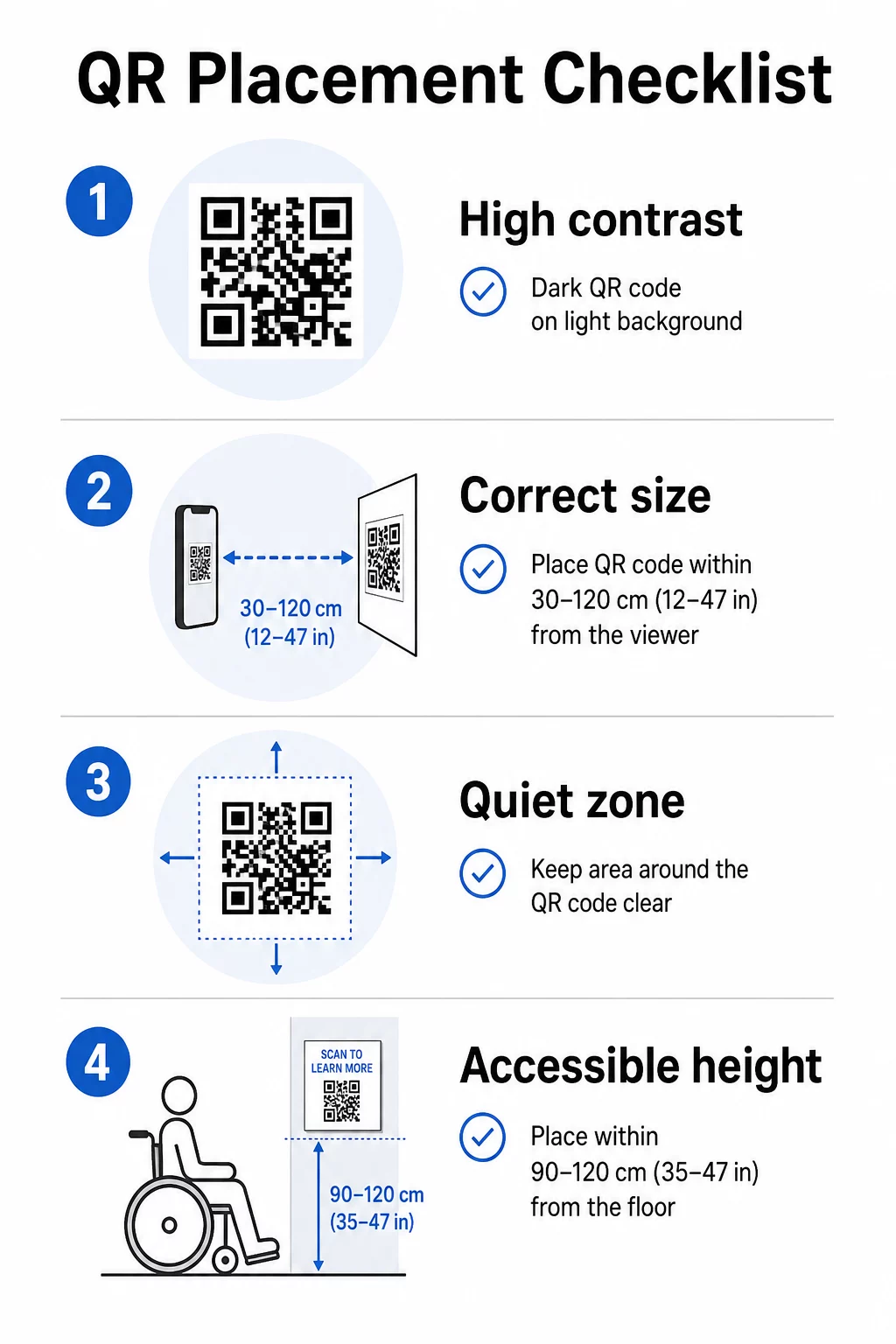
A kód előtere sötét, a háttere pedig világos legyen – nem fordítva. Az invertált kódok (világos minta sötét háttéren) a okostelefon-kamerák jelentős részénél hibásan működnek. Egyedi színű kódok esetén célozzon meg legalább 3:1 kontrasztarányt a kódmodulok és a háttérfelület között. A kontraszt szabályok átfogó részletezése elérhető a QR-kód színkontraszt legjobb gyakorlatok útmutatója.
A színátmenetek és árnyékok köztes tónusokat vezetnek be, amelyek összezavarják a szkennereket. Ha stilizált kódot szeretne, amely illeszkedik az installáció palettájához, használjon egyszínű színeket és alaposan tesztelje.
Méret és szkennelési távolság
Megbízható szabály: a kódnak nagyjából az elvárt szkennelési távolság egytizedének kell lennie. Egy karnyújtásnyiról (kb. 10 hüvelyk) beolvasni szánt kódnak legalább 1 hüvelyk négyzetméteresnek kell lennie. Távolabbról megtekintett installációs táblák esetén ennek megfelelően méretezze. A közeli szkennelés abszolút minimuma 2 × 2 cm (körülbelül 0,8 × 0,8 hüvelyk). A méretezésről további részletek elérhetők a QR-kód elhelyezési útmutató.
Csendes zónák
Minden QR-kódhoz legalább négy modul széles, tiszta margó – az úgynevezett csendes zóna – szükséges minden oldalon. Sem szöveg, sem minták, sem dekoratív elemek nem hatolhatnak be ebbe a térbe. Ha egy kódot mintás felületbe vagy műalkotás szélébe ágyaz be, ez a korlátozás okozza a legnagyobb valószínűséggel a szkennelési hibákat.
Fizikai akadálymentesítés
A magasság és az elhelyezés határozza meg, hogy ki tudja ténylegesen használni a kódot. Az elhelyezésnek elérhetőnek kell lennie a kerekesszékes látogatók vagy a korlátozott növekedésűek számára – nagyjából 2,5-4 lábnyira a padlótól a kényelmes hozzáférés érdekében. Kerülje a kódok elhelyezését ívelt felületeken, tükröződő üvegen vagy olyan anyagokon, amelyek tükröződést okoznak a galéria világítása alatt.
Címke szövege
A kód melletti címkének világosan el kell magyaráznia, mit talál a látogató a beolvasás után, és hogyan kell beolvasni. Nem minden látogató ismeri a folyamatot, és még a tapasztalt beolvasók is profitálnak abból, ha tudják, hogy egy háromperces videót vagy egy 12 oldalas katalógusesszét fognak-e látni. Az egyszerű nyelv, a rövid mondatok és a megfelelő betűméret mind hozzájárulnak a használhatósághoz. Tartsa tömörnek a címkéket – a látogatók átfutják, és a leglényegesebb információnak kell először megjelennie.
Tartsa naprakészen a kiállítási tartalmat újranyomtatás nélkül A művészeti galériák használhatják a Dinamikus QR-kód generátor az előadóművészek életrajzainak frissítésére, hangos idegenvezetők cseréjére vagy új tartalom hozzáadására még a kiállítás megnyitása után is – anélkül, hogy a fizikai táblákat megérintenék.
Tesztelje telepítés előtt
Nyomtassa ki a kódot végleges méretben, és olvassa be legalább két eszközzel – iPhone-nal és Android telefonnal – azokon a fényviszonyok között, amelyeket a telepítés ténylegesen használni fog. A galéria világítása gyakran meleg és irányított, ami eltérően befolyásolhatja a kontrasztot, mint a standard irodai fény. A matt felületek csökkentik a tükröződést, és általában jobban teljesítenek, mint a fényes felületek a megbízható beolvasás szempontjából. További tesztelési útmutató található a QR-kód olvashatósági legjobb gyakorlatok útmutató.
Dinamikus QR-kódok használata fejlődő kiállításokhoz
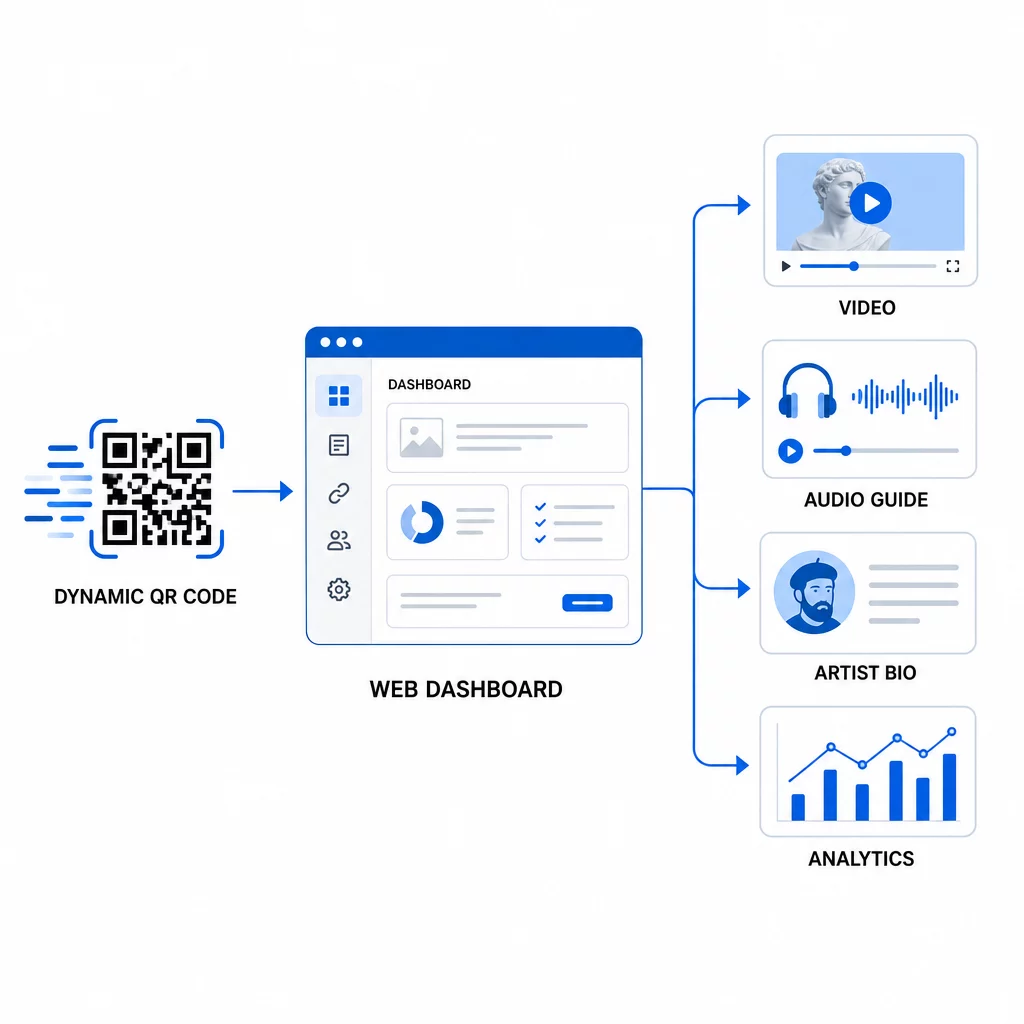
Egy statikus QR-kód egy rögzített célállomást kódol. Miután kinyomtatták, az egyetlen módja annak, hogy megváltoztassák, hová mutat, az az újranyomtatás. A dinamikus QR-kódok másképp működnek: maga a kód egy rövid átirányításra mutat, és az átirányítás célállomását bármikor megváltoztathatja egy irányítópultról.
Művészeti installációk esetében ez a különbség jelentős:
- Egy több hónapig tartó kiállítás a műsor fejlődésével módosíthatja a kapcsolódó tartalmát – új művészi kommentárokat adhat hozzá, egy előzetes videót teljes dokumentumfilmre cserélhet, vagy frissítheti a származási adatokat a kutatás fejlődésével
- Az ideiglenes installációk ugyanazt a fizikai kódot több eseményen is felhasználhatják, egyszerűen a célállomás frissítésével
- Az elemzések ugyanahhoz a kódhoz kapcsolódnak, folyamatos teljesítményrekordot biztosítva, nem pedig töredezett adatokat az újranyomtatások között
A Smithsonian ezt a megközelítést alkalmazta a nagy digitális gyűjteményekhez való hozzáférés hatékony kezelésére, csökkentve mind a költségeket, mind az újranyomtatott anyagokból származó környezeti hulladékot. A több helyszínen vagy utazó kiállításokat kezelő kurátorok számára a képesség, hogy virtuális művészeti túrát állítson össze QR-kódokkal és központilag frissítse, jelentős működési előny.
Gyakori kérdések
Tervezze meg a kódot a műalkotás palettájáról származó színek felhasználásával, de tartson sötét előteret világos háttéren, és célozzon meg legalább 3:1 kontrasztarányt. Tartsa tisztán a csendes zónát minden oldalon, és tesztelje a nyomtatott verziót több eszközzel a telepítés előtt. A magasabb hibajavító szintek (Q vagy H) több vizuális testreszabást tesznek lehetővé – beleértve a beágyazott logókat is – miközben megőrzik a szkennelési megbízhatóságot.
A leghatékonyabb tartalomtípusok a művészinterjúk vagy videónyilatkozatok, audioguide-ok, bővített katalógusesszék vagy proveniencia dokumentumok, folyamatképek és látogatói visszajelzési űrlapok. Illessze a formátumot a közönséghez és a műhöz: a videó jól illik a folyamatcentrikus vagy performansz alapú darabokhoz, míg az audió jól működik olyan darabok mellett, ahol a vizuális élménynek zavartalannak kell maradnia.
A beépített analitikával rendelkező dinamikus QR-kódok összesített adatokat rögzítenek – összes szkennelés, egyedi szkennelések, szkennelési idő, eszköz típusa és földrajzi hely –, anélkül, hogy személyes információkat gyűjtenének az egyes látogatóktól. Az olyan platformok, mint a Pageloot dinamikus QR-kód generátora, ezt az adatot egy műszerfal nézetben biztosítják, így a kurátorok hasznos betekintést nyerhetnek, miközben tiszteletben tartják a látogatók magánéletét.