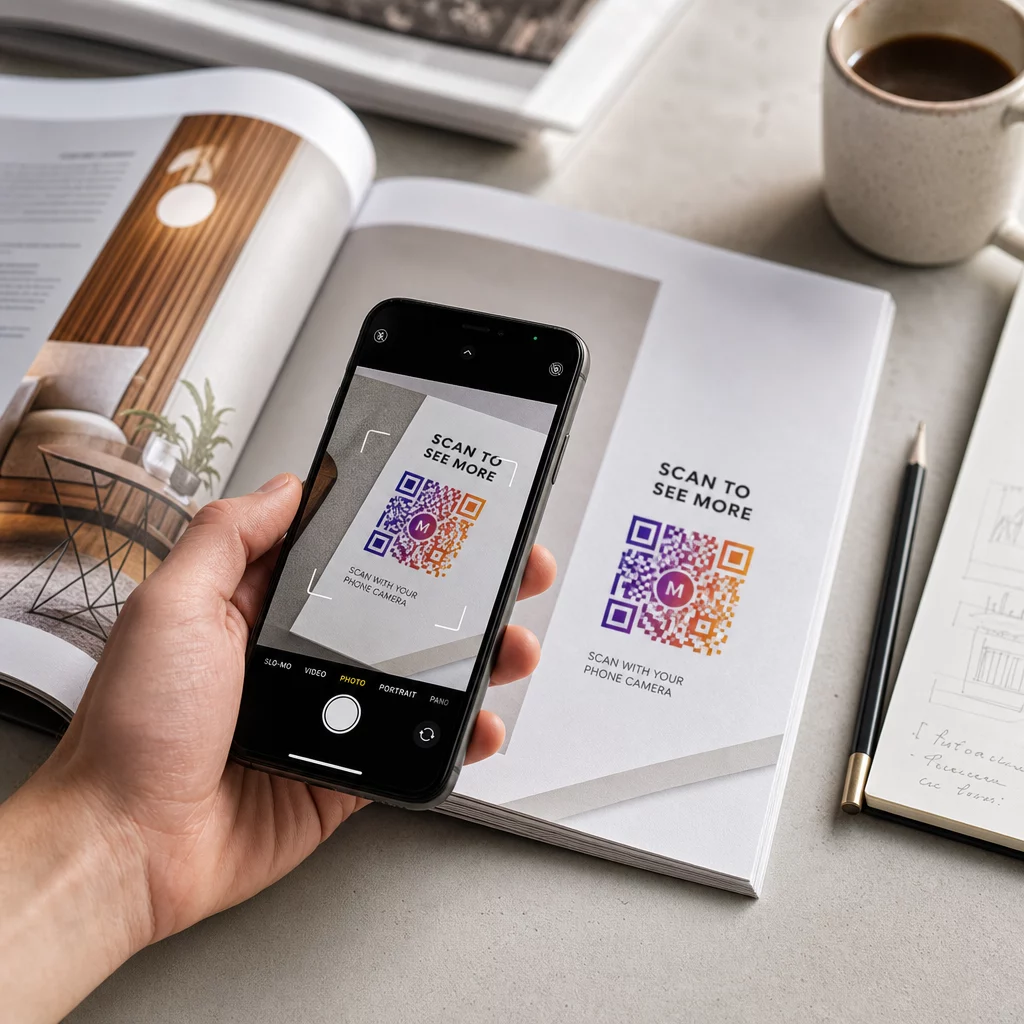
Az ügyfelek kihagyják a termékregisztrációs folyamatot, mert túl sok munkának érzik? Az alacsony regisztrációs arány hiányos tulajdonosi adatokat, lassabb visszahívási válaszokat és elszalasztott lehetőségeket jelent az értékesítés utáni kapcsolatok kiépítésére. Ez az oldal megmutatja, hogyan távolítják el a QR-kódok ezt a súrlódást, és hogyan alakítják a regisztrációt gyors, zökkenőmentes szkenneléssé.
Miért elégtelen a hagyományos termékregisztráció?
A papír alapú jótállási kártyák hírhedten rossz kitöltési aránnyal rendelkeznek. Az ügyfelek kapnak egy kártyát, félreteszik, és ritkán küldik vissza postán. Még a web alapú űrlapok is csak kissé javítanak a helyzeten, ha az ügyfeleknek manuálisan kell beírniuk egy hosszú URL-t, vagy át kell túrniuk a csomagolást egy regisztrációs link megtalálásához.
Az eredmény egy adatrés. Termékeket szállít, de kevés rálátása van arra, hogy ki a tulajdonosuk. Ha biztonsági probléma vagy visszahívás merül fel, a közvetlen értesítés nehézzé vagy lehetetlenné válik. A gyártók számára tartós csecsemő- vagy kisgyermektermékek, ez nem csupán üzleti probléma – a 16 CFR 1130. része előírja a fogyasztói kapcsolattartási adatok nyilvántartását és elektronikus regisztrációs lehetőséget ír elő, kifejezetten azért, mert a CPSC elismeri, hogy a visszahívási válaszadási arányok dokumentált kihívást jelentenek.
Még a szabályozott kategóriákon kívül is valós az alacsony regisztráció működési költsége: a garanciális csalás nehezebben észlelhető, a szolgáltatási kérelmek nehezebben érvényesíthetők, és a termék életciklus adatai hiányosak maradnak.
Hogyan oldja meg egy QR-kód a regisztrációs problémát?
A csomagolásra, egy betétlapra vagy magára a termékre nyomtatott QR-kód súrlódásmentes utat biztosít az ügyfeleknek a regisztrációhoz. Megnyitják a telefonjuk kameráját, beolvassák a kódot, és közvetlenül egy regisztrációs űrlapra vagy márkás céloldalra jutnak – nincs gépelés, nincs keresés, nincs postázás.
Abban a pillanatban, amikor elküldik az űrlapot, strukturált tulajdonosi adatokat kap: név, elérhetőségi adatok, vásárlás dátuma és bármilyen egyéni mező, amit konfigurál. Ez az információ közvetlenül bekerül a nyilvántartásába, anélkül, hogy bármelyik oldalon manuális adatbevitelre lenne szükség.
Ez a megközelítés illeszkedik a termékcsomagolás szélesebb körű elmozdulásához a fizikai elemek digitális tartalomhoz való kapcsolása felé. Az iparági szintű felismerés, miszerint a csomagoláson lévő QR-kódok állandó átjáróként szolgálhatnak a termékinformációkhoz, garanciális részletekhez és regisztrációhoz, olyan funkciót tükröz, amely messze túlmutat azon, amit egy hagyományos vonalkód képes hordozni. A termékcsomagoláson lévő QR-kódok ezt a regisztrációs linket közvetlenül az ügyfél kezébe juttathatják abban a pillanatban, amikor kinyitják a dobozt.
Készen áll a regisztrációs QR-kódok hozzáadására termékeihez? Hozzon létre nyomon követhető, szerkeszthető QR-kódokat csomagolásához vagy betétlapjaihoz a Dinamikus QR-kód generátor. Bármikor frissítheti a hivatkozott űrlap célhelyét – nincs szükség újranyomtatásra.
A megfelelő QR-kód típus kiválasztása a regisztrációhoz
Nem minden QR-kód szolgálja egyformán jól a garanciális regisztrációs munkafolyamatot. A kritikus különbség a statikus és dinamikus kódok között van.
A statikus QR-kód közvetlenül a mintájába kódol egy fix URL-t. Nyomtatás után nem módosíthatja, hová mutat. Ha a regisztrációs űrlap URL-je megváltozik, a több ezer egységen lévő kód használhatatlanná válik.
A dinamikus QR-kód egy rövid átirányítási URL-t kódol, amelyet egy irányítópultról vezérel. Bármikor frissítheti a célhelyet anélkül, hogy hozzáérne a nyomtatott kódhoz. Ez fontos a garanciális regisztráció szempontjából, mert a regisztrációs űrlapok platformok között vándorolnak, a szezonális vagy termékcsalád-specifikus oldalak cserélődnek, és előfordulhat, hogy egy termékfrissítés vagy visszahívás során egy értesítési oldalra kell átirányítania a beolvasásokat.
Termékregisztrációhoz, a dinamikus QR-kódok a gyakorlati alapértelmezettek. Az a képesség, hogy célhelyek szerkesztése nyomtatás után – a szkennelési analitikával kombinálva – sokkal hasznosabbá teszi őket a folyamatos tulajdonosi adatgyűjtéshez. A képességek teljes lebontását megtekintheti a statikus és dinamikus QR-kódok összehasonlítása.
QR-kódos regisztrációs munkafolyamat beállítása
Egy QR-alapú regisztrációs és garanciaaktiválási rendszer felépítése egyszerűbb, mint amilyennek tűnik. Az alábbi lépések a teljes beállítást lefedik az űrlap kiválasztásától a bevezetés utáni nyomon követésig.
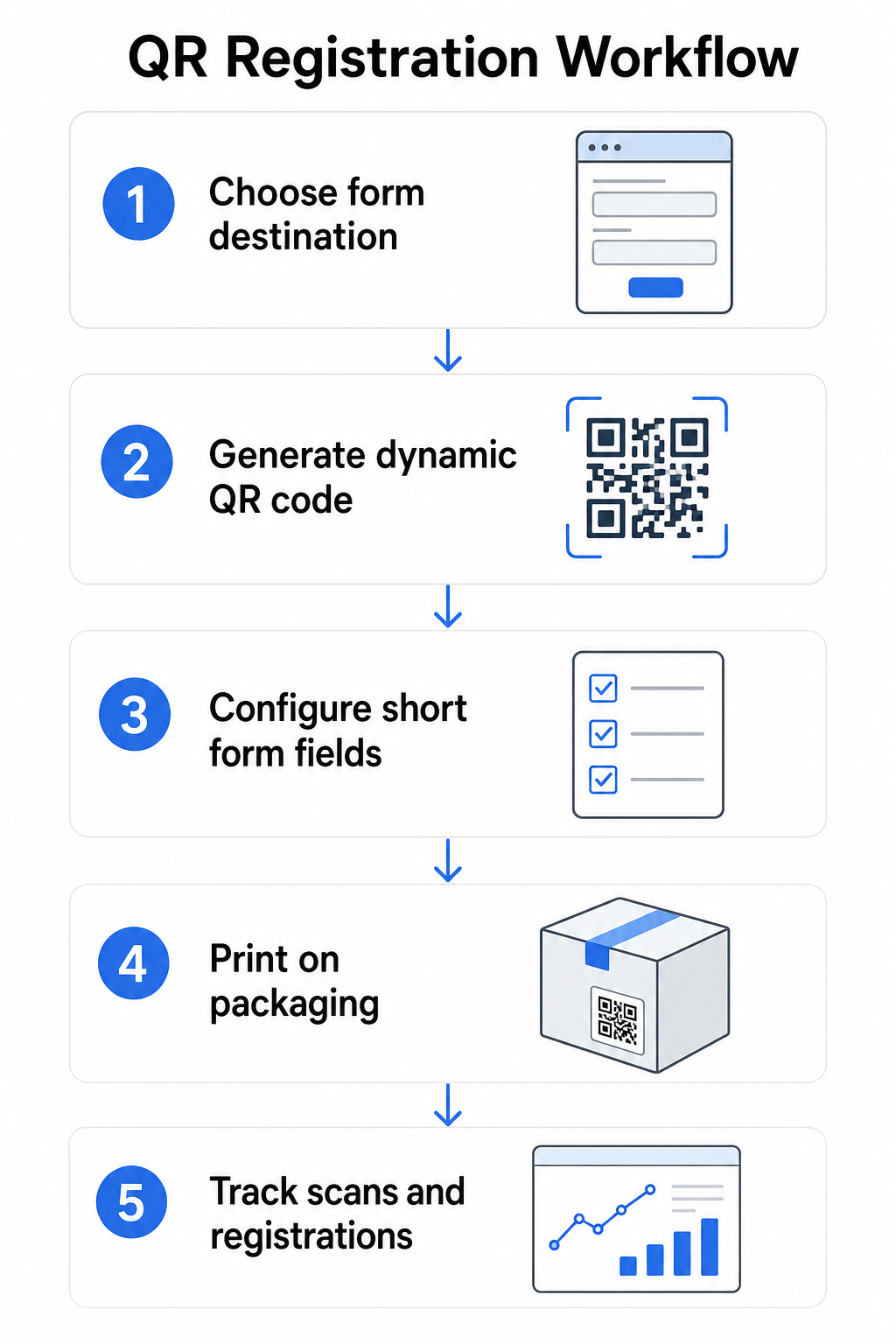
lépés: Válassza ki az űrlap célhelyét
Két fő lehetősége van arra, hogy mire hivatkozzon a QR-kód. A Google Form gyorsan beállítható és jól működik strukturált mezők gyűjtésére. Használja a Google Forms kérdőív QR kód generátor az űrlap megosztási linkjének szkennelhető kóddá alakításához.
A márkázott céloldalt egy mobilra optimalizált oldal, amely a regisztrációs űrlapot termékadatokkal, garanciális feltételekkel és márkavizuális elemekkel együtt mutatja be. A Pageloot Céloldalak funkciója lehetővé teszi, hogy technikai segítség nélkül építse és frissítse ezeket az oldalakat. A céloldal opció általában jobban teljesít az ügyfélélmény szempontjából, mert Ön irányítja a teljes dizájnt, egyértelműen megjelenítheti a garanciális feltételeket, és több linket vagy cselekvésre ösztönző elemet is tartalmazhat – például egy linket a termék kézikönyvéhez a regisztrációs űrlap mellett.
lépés: Dinamikus QR-kód generálása
Hozza létre a QR-kódot a Pageloot Dinamikus QR-kód generátor és irányítsa a kiválasztott célhelyre. Adja hozzá márkája logóját és színeit, hogy a kód felismerhető legyen a csomagoláson. Tartsa a logót a kódterület 30%-án belül a szkennelhetőség megőrzése érdekében, és használjon magas hibajavítási szintet (Q vagy H) vizuális márkajelzés hozzáadásakor.
lépés: A regisztrációs űrlap mezőinek konfigurálása
Gyűjtse össze, amire valójában szüksége van a garanciális és tulajdonosi célokhoz. Tipikus mezők:
- Ügyfél neve és e-mail címe
- Vásárlás dátuma
- Vásárlás helye (kiskereskedő vagy csatorna)
- Termék sorozatszáma (ha nincs előre kitöltve)
- Opcionális: termék visszajelzés vagy preferált kapcsolattartási mód
Az adatminimalizálás nem csupán adatvédelmi legjobb gyakorlat – javítja a kitöltési arányokat is. A rövidebb űrlapok több beküldést kapnak.
lépés: Helyezze el a QR-kódot a csomagoláson vagy a mellékletekben
A megbízható szkennelés érdekében, elhelyezés a termék csomagolásán néhány következetes elvet követ:
- A kód mérete legalább 1 hüvelyk (2,5 cm) széles legyen
- Nyomtasson sík, sima felületre – kerülje a hajtásokat, varratokat vagy ívelt területeket
- Használjon magas kontrasztot (fekete fehéren működik a legjobban; tartson fenn legalább 3:1 kontrasztarányt)
- Hagyjon egy tiszta csendes zónát – egy üres margót – a kód körül
- Tesztelje a nyomtatott kódot a tényleges hordozón a gyártási futamok véglegesítése előtt
A címkespecifikus szempontok mélyebb megismeréséhez lásd a útmutatót a QR-kódokról a termékcímkéken és hogyan kell QR-kódot nyomtatni egy címkére.
lépés: Regisztrációk és szkennelési adatok nyomon követése
Amint a kód éles, a Pageloot irányítópultja mutatja a szkennelések számát, a szkennelések földrajzi helyét, az eszköz típusát és a napszakot. Ez nem csak azt mondja meg, hány ügyfél regisztrált, hanem azt is, mikor és hol léptek kapcsolatba – hasznos annak azonosítására, hogy a csomagolás elhelyezése működik-e, és hogy bizonyos piacok vagy csatornák alacsonyabb regisztrációs arányokkal rendelkeznek-e, mint mások.
Lássa, ki regisztrál – és ki nem Használat QR-kód szkennelés nyomon követése a regisztrációs elkötelezettség nyomon követésére régió, eszköz és idő szerint. Azonosítsa a lemorzsolódásokat korán, és frissítse az űrlap célhelyét újranyomtatás nélkül.
Milyen adatokat gyűjthet – és mit kellene
A QR-kódok két különálló adatgyűjtési réteget támogatnak, és a különbség megértése segít a program helyes beállításában a kezdetektől fogva.
Szkennelési szintű adatok automatikusan gyűjtődik, amikor valaki beolvas egy dinamikus QR-kódot. Ez magában foglalja a szkennelések számát, a szkennelés helyét (ország és régió), az eszköz típusát (iOS vagy Android) és az időbélyeget. Ezek az adatok az ügyfél személyes adatok megadása nélkül gyűjtődnek – a kóddal való interakciót tükrözik. A rögzített adatok teljes áttekintéséhez lásd milyen adatokat gyűjtenek a dinamikus QR-kódok.
Regisztrációs adatok – nevek, e-mail címek, vásárlási dátumok és kapcsolattartási adatok – csak akkor gyűjtődnek, ha az ügyfél önként kitölti az űrlapot a linkelt oldalon. Ez első féltől származó adat, amelyet az ügyfél közvetlenül és tudatosan ad meg. A Pageloot platformja támogatja ezt a modellt: az ügyfelek az űrlapokon vagy céloldalakon keresztül osztanak meg információkat a szkennelés után, így az adatgyűjtés hozzájáruláson alapuló és átlátható marad.
Garanciális és tulajdonosi célokra regisztrációs adatokra van szüksége. Annak megértéséhez, hogy regisztrációs programja nagyméretűen működik-e, a szkennelési szintű adatok értékes kontextust biztosítanak.
Adatvédelmi és jogi megfontolások
A termékregisztrációs adatgyűjtés olyan megfelelőségi kötelezettségekkel jár, amelyek termékkategóriánként és joghatóságonként eltérőek.
Mert tartós csecsemő- vagy kisgyermektermékek a 16 CFR Part 1130 szerint szabályozva, a CPSC megköveteli, hogy:
- Biztosítson postai díjjal előre fizetett fizikai regisztrációs kártyát minden egységhez
- Kínáljon elektronikus regisztrációs lehetőséget (weboldal vagy e-mail) kiegészítésként – nem helyettesítésként – a fizikai kártya mellé
- Tartsa nyilván a regisztrálók nevét, címét és e-mail címét
- A regisztrációs adatokat csak biztonsági figyelmeztetésekre és visszahívásokra használja, nem marketing célokra
Az online regisztrációs űrlapra mutató QR-kód megfelel az elektronikus regisztrációs követelménynek ezen keretrendszer szerint, de nem helyettesíti a fizikai kártya követelményét a fedezett termékek esetében.
A garanciális regisztráció tágabb értelemben, a Magnuson-Moss Garancia Törvény különbséget tesz a teljes és korlátozott garanciák között. A “teljes” garanciával rendelkező termékek nem követelhetik meg a regisztrációt a fedezet feltételeként. A “korlátozott” garanciával rendelkező termékek csak akkor követelhetik meg a regisztrációt, ha a követelményt egyértelműen közzéteszik a vásárlás előtt. Bármely regisztrációs feltételnek meg kell jelennie a garanciális feltételekben, amelyeket a fogyasztók az eladás előtt elérhetnek.
Az adatvédelem érdekében az online regisztrációs űrlapokon keresztül személyes adatokat gyűjtő amerikai vállalkozásoknak adatvédelmi nyilatkozatot kell biztosítaniuk az adatgyűjtés pillanatában vagy azt megelőzően, leírva, hogy milyen adatokat gyűjtenek, miért, és mennyi ideig tárolják azokat. Kalifornia CPRA törvénye szerint az adatgyűjtést és -megőrzést arra kell korlátozni, ami ésszerűen szükséges a közzétett célhoz. Ha termékei 13 év alatti gyermekes családokhoz is eljuthatnak, győződjön meg arról, hogy online űrlapja megfelel a COPPA ellenőrizhető szülői hozzájárulásra vonatkozó követelményeinek, mielőtt személyes adatokat gyűjt ebből a korcsoportból.
További részletekért a QR-kód adatvédelmi kötelezettségeiről a különböző joghatóságokban, lásd QR-kód adatvédelmi törvények: Kulcsfontosságú szabályozások.
QR-kódok használata a termék életciklusa során
A garancia regisztráció egy szélesebb körű lehetőség része. Ugyanaz a QR-kód a termékén több funkciót is elláthat a teljes tulajdonosi út során:
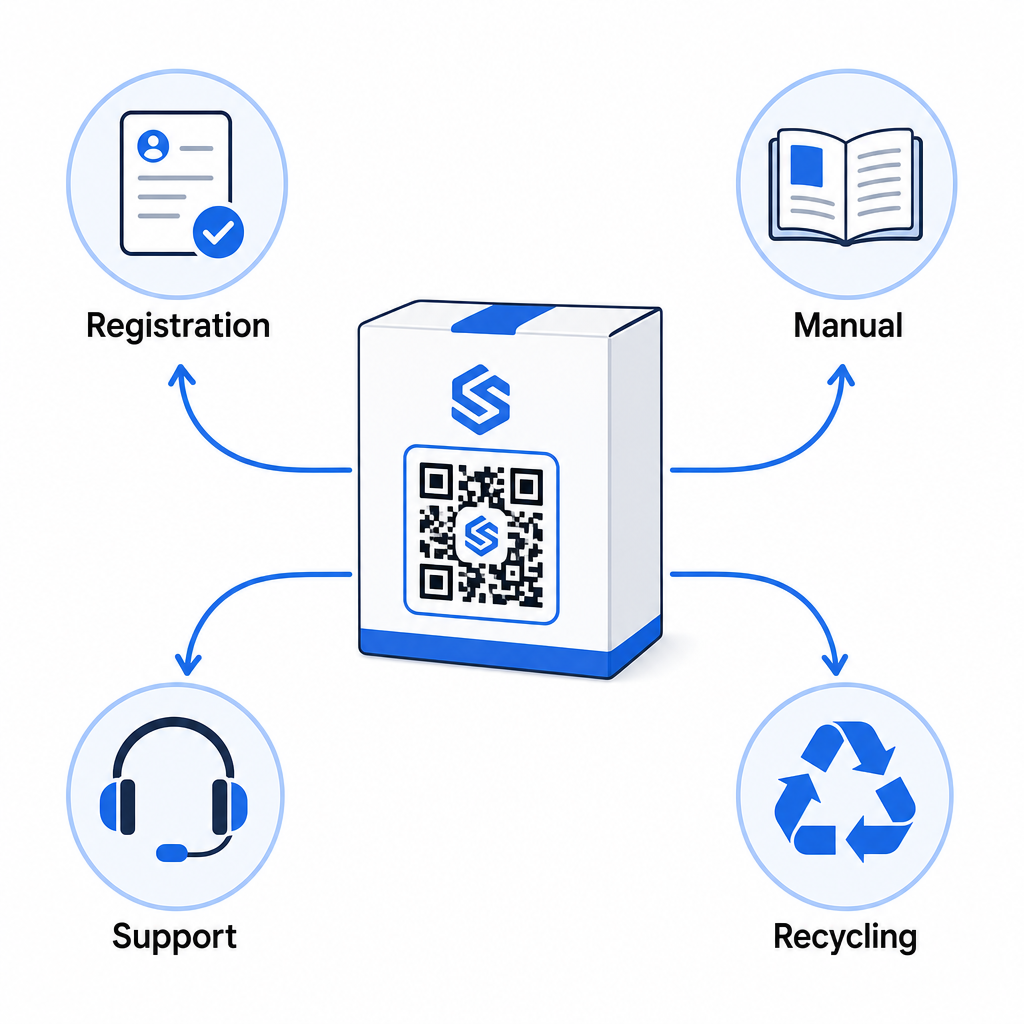
- Kicsomagoláskor: közvetlenül a regisztrációs űrlapra és a garancia aktiválására irányít
- A tulajdonlás során: linkel a termék kézikönyvéhez, GYIK-hez vagy útmutató videókhoz
- Támogatásért: csatlakozik egy szervizkérő űrlaphoz vagy élő csevegéshez
- Az életciklus végén: útmutatót ad az újrahasznosításhoz vagy a beszámításhoz
Mivel a dinamikus QR-kódok lehetővé teszik a cél frissítését újranyomtatás nélkül, fejlesztheti, hogy mit csinál a kód az idő múlásával. Egy ma regisztrációra nyomtatott kód később mutathat egy firmware frissítési oldalra, egy visszahívási értesítésre vagy egy hűségprogramra – anélkül, hogy bármilyen változás történne a fizikai csomagoláson.
Ezt az életciklus-megközelítést részletesebben tárgyaljuk a QR-kódok a termék életciklusának nyomon követéséhez és QR-kódok a gyártásban: Anyagok és termékek nyomon követése.
Azoknak a gyártóknak, akik több SKU-n vagy termékcsaládon keresztül kezelik a termékregisztrációt, egy központosított QR-kód kezelő műszerfal elengedhetetlenné válik. Lásd Vállalati QR-kód kezelő eszközök útmutatót a QR-kódok nagyméretű kezeléséhez, beleértve a tömeges generálást és a kódonkénti elemzést.
Kezdő lépések
A termékregisztrációhoz használt QR-kód nem technikai projekt – hanem csomagolási döntés. Generál egy dinamikus kódot, ráirányítja a regisztrációs űrlapjára vagy céloldalára, kinyomtatja a betétre vagy a dobozra, és elkezdi gyűjteni a tulajdonosi adatokat abban a pillanatban, amikor a termékek eljutnak az ügyfelekhez.
A fizikai regisztrációs kártya és a QR-kód közötti különbség az a különbség, mint valakit megkérni, hogy küldjön el egy levelet, vagy átadni neki egy telefont. Azok az ügyfelek, akik soha nem küldenének vissza egy kártyát, 10 másodperc alatt beolvasnak egy kódot.
Kezdje egy termékcsaláddal. Hozzon létre egy dinamikus QR-kódot a Pageloot QR Kód Generátor, linkelje a regisztrációs űrlapjához, és kövesse nyomon, hogyan viszonyulnak a beolvasási és beküldési arányok az előző regisztrációs módszeréhez. Miután látja az elkötelezettség különbségét, a teljes katalógusra való kiterjesztés egyszerű.
Gyakori kérdések
Nem. A 16 CFR 1130. rész értelmében a tartós csecsemő- vagy kisgyermektermékek gyártói és importőrei kötelesek mellékelni egy postaköltséggel előre kifizetett fizikai regisztrációs kártyát minden egységhez. Az online regisztráció QR-kódon keresztül eleget tesz az előírt elektronikus regisztrációs opciónak, de ki kell egészítenie a fizikai kártyát, nem pedig helyettesítenie. Mindkettő kötelező.
Ha dinamikus QR-kódot használ, bármikor frissítheti a cél URL-t a műszerfaláról anélkül, hogy újranyomtatná vagy módosítaná a fizikai kódot. Ez az egyik elsődleges oka annak, hogy a dinamikus QR-kódokat ajánlják a termékregisztrációhoz – megvédi Önt a törött linkektől, amikor az űrlapokat áttelepítik vagy frissítik. A statikus QR-kódok nyomtatás után nem módosíthatók.
Csak azt gyűjtse, amire valóban szüksége van a regisztrációs cél teljesítéséhez – jellemzően az ügyfél neve, e-mail címe, vásárlás dátuma, vásárlás helye és a termék sorozatszáma. Az adatminimalizálási elvek szerint, amelyeket olyan törvények írnak elő, mint Kalifornia CPRA-ja, az adatgyűjtést arra kell korlátozni, ami ésszerűen szükséges a megadott célhoz. Kevesebb mező javítja az űrlap kitöltési arányát is, így egy karcsú űrlap mind a megfelelőségi, mind az üzleti célokat szolgálja.