Vos cartes postales de publipostage direct ne sont-elles pas suivies une fois qu'elles quittent l'imprimeur ? Sans lien mesurable entre votre courrier physique et les résultats numériques, vous dépensez votre budget sans aucun moyen de prouver le retour sur investissement. Ce guide explique comment ajouter efficacement des codes QR aux cartes postales – de la conception et du dimensionnement au suivi des performances de la campagne en temps réel.
Pourquoi les codes QR ont leur place sur les cartes postales de publipostage direct
Le publipostage direct a toujours été confronté à un problème persistant : la mesure de la réponse. Vous envoyez des milliers de pièces et vous vous fiez à des preuves anecdotiques ou à des utilisations de coupons pour deviner ce qui a fonctionné.
Les codes QR résolvent ce problème. Le service postal américain reconnaît les codes QR comme un moyen direct de connecter les destinataires du courrier à du contenu numérique qui fait progresser leur parcours client – et a même offert des réductions de frais de port aux expéditeurs qui incluent des codes-barres bidimensionnels scannables sur leurs pièces. Parmi les organisations qui suivent la réponse au publipostage direct, 82 % utilisent des méthodes de suivi en ligne qui exploitent les codes QR, des URL spécifiques ou un autre mécanisme numérique.
Le cas est clair : si vous envoyez des cartes postales sans code QR, vous laissez de côté l'engagement et les données mesurables.
Choisir le bon type de code QR pour les cartes postales
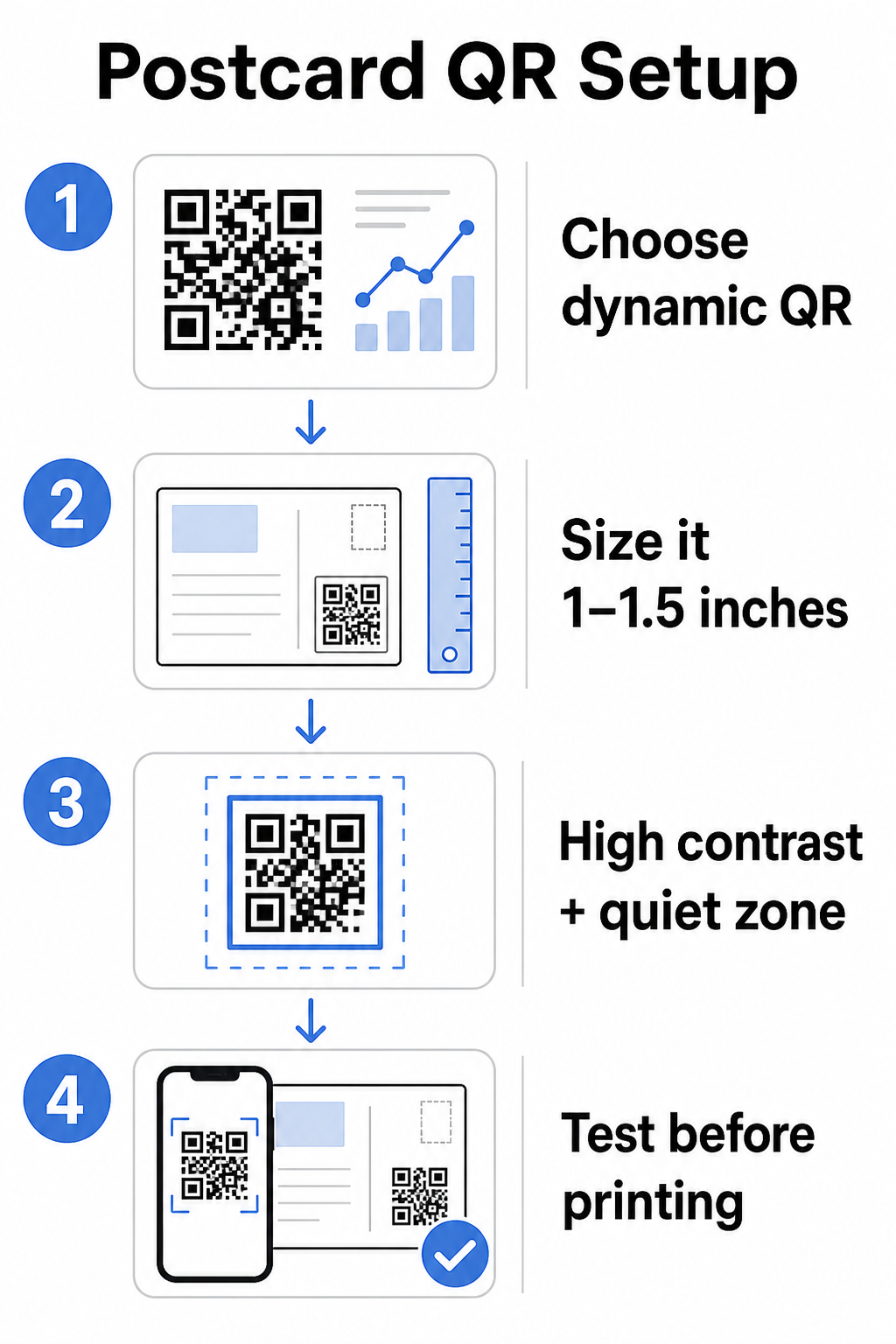
Avant de générer votre code, décidez si vous avez besoin d'un statique ou Dynamique code QR – le choix a des conséquences importantes sur le déroulement de votre campagne.
Les codes QR statiques encodent de manière permanente une URL dans le motif du code lui-même. Une fois imprimée, la destination ne peut pas être modifiée. Ils fonctionnent bien pour le contenu intemporel qui n'aura jamais besoin d'être mis à jour, comme une liste de produits permanente ou la page de contact d'une entreprise.
Les codes QR dynamiques pointent vers un court lien de redirection que vous contrôlez. Le code imprimé reste le même, mais vous pouvez mettre à jour l'URL de destination à tout moment – même après que les cartes postales sont déjà dans les boîtes aux lettres des destinataires. Les codes dynamiques débloquent également des analyses complètes des scans, y compris le nombre de scans, l'heure du scan, la localisation géographique et le type d'appareil.
Pour la plupart des campagnes de cartes postales, les codes dynamiques sont le bon choix. Si votre offre change en cours de campagne, vous pouvez rediriger les scanners vers une nouvelle page de destination sans réimpression. Si une version de carte postale surpasse une autre, vos analyses vous montreront exactement pourquoi.
Suivez chaque scan de votre campagne de cartes postales Utilisez le Générateur de QR code dynamique pour créer un code traçable que vous pouvez mettre à jour à tout moment – aucune réimpression requise. Accédez à un tableau de bord d'analyse complet des scans dès que vos cartes postales arrivent dans les boîtes aux lettres.
À quoi lier votre code QR de carte postale
La destination compte autant que le code lui-même. Le scan doit être immédiatement gratifiant, pas déroutant. Choisissez une destination en fonction de l'objectif de votre campagne :
- UNE page de destination promotionnelle adaptée à l'offre ou au message spécifique de la carte postale
- UNE formulaire de capture de leads pour collecter les noms, e-mails ou demandes de devis des destinataires intéressés
- UNE page de produit ou de service qui amène les destinataires à ce que vous vendez sans navigation supplémentaire
- UNE vidéo ou démo qui permet à une narration plus approfondie de faire le travail qu'un format de carte postale ne peut pas entièrement accueillir
- UNE page de contact ou de réservation qui donne aux destinataires un moyen immédiat de planifier un appel ou un rendez-vous
- UNE téléchargement de PDF partageant une brochure, un menu ou un catalogue avec plus de détails qu'une carte postale ne le permet
Quoi que vous liiez, assurez-vous que la destination est optimisée pour les mobiles. Les destinataires de cartes postales scannent avec leurs téléphones, et une page qui ne s'affiche pas bien sur mobile les perdra immédiatement. Le même principe s'applique lorsque ajoutant des codes QR aux dépliants et brochures – l'expérience de destination est tout aussi importante que le code lui-même.
Dimensionner votre code QR pour l'impression de cartes postales
Obtenir la bonne taille est essentiel. Un code QR trop petit ne scannera pas de manière fiable. Pageloot recommande une taille d'impression minimale de 0,8 × 0,8 pouces (2 × 2 cm) pour un scan à courte portée, par exemple lorsque quelqu'un tient la carte postale à bout de bras.
Pour les cartes postales, qui sont généralement tenues à environ 10 à 20 pouces de l'appareil photo du téléphone, appliquez le rapport distance de scan/taille de 10:1: la largeur du code QR doit être approximativement un dixième de la distance de scan attendue. Un destinataire scannant à 12 pouces de distance a besoin d'un code d'au moins 1,2 pouce de large.
En pratique, visez un code QR entre 1 et 1,5 pouces (25–38 mm) sur une carte postale standard. Cela permet de s'adapter confortablement aux distances de scan typiques tout en laissant suffisamment de place pour le reste de votre design. Pour des conseils détaillés sur d'autres formats, consultez les directives de dimensionnement des codes QR pour les supports imprimés.
Directives de conception pour les codes QR de cartes postales scannables
Contraste et couleur
Les scanners fonctionnent en détectant le contraste entre les modules sombres et un fond clair. Un contraste élevé est non négociable. Le noir sur blanc offre la numérisation la plus fiable et est le réglage par défaut le plus sûr. Les couleurs personnalisées peuvent fonctionner – et maintenir un contraste élevé avec les couleurs de marque peut augmenter significativement l'engagement – mais vous devez préserver un contraste suffisant entre le premier plan et l'arrière-plan, avec un rapport minimum d'au moins 3:1 et idéalement 4:1 ou plus. Des directives complètes sur l'association efficace des couleurs sont disponibles dans le meilleures pratiques de contraste des couleurs des codes QR guide.
Évitez ces pièges courants :
- Modules de couleur claire sur un fond clair
- Dégradés qui créent un contraste inégal sur le code
- Inverser le code (motif clair sur fond sombre) – certains scanners échouent avec des schémas de couleurs inversés
La Zone de Silence
Le zone de silence est la bordure blanche claire entourant le motif du code QR. Selon les normes ISO/IEC 18004, elle doit être d'au moins quatre modules de large de tous les côtés. Sur une carte postale, cela signifie laisser environ un quart de pouce (0,25 pouce) d'espace clair autour du code et ne pas placer de texte, d'images ou d'éléments de conception directement adjacents à celui-ci. Ce tampon aide les scanners à reconnaître où le code commence et se termine – sans cela, même un code bien conçu peut ne pas être scanné de manière fiable.
Ajouter un logo
Ajouter le logo de votre marque au centre du code QR le rend plus reconnaissable et digne de confiance sur une carte postale. Si vous intégrez un logo, utilisez un niveau de correction d'erreur plus élevé (Q ou H) pour maintenir la scannabilité, et limitez le logo à 30 % maximum de la surface totale du code. Vous pouvez créer un code de marque en utilisant le Générateur de QR code avec logo.
Qualité d'impression
Exportez votre code QR en tant que fichier vectoriel (SVG ou PDF) plutôt qu'un JPEG basse résolution avant de l'envoyer à l'imprimeur. Les formats vectoriels préservent les bords nets des modules quelle que soit la taille d'impression. Demandez au moins 300 DPI à votre fournisseur d'impression et utilisez une finition mate si possible – les cartes postales brillantes peuvent produire des reflets qui interfèrent avec la numérisation sous une lumière vive.
Où placer le code QR sur votre carte postale
Le placement affecte le nombre de destinataires qui scannent réellement. Suivez ces principes :
- Placez le code sur le côté message, pas sur le côté adresse – c'est là que les destinataires passent du temps à lire
- Positionnez-le à un point de lecture naturel, comme le coin inférieur droit ou juste en dessous de votre appel à l'action principal, afin qu'il apparaisse après que le destinataire a absorbé votre message
- Entourez-le d'un appel à l'action clair – des phrases comme “ Scannez pour votre offre exclusive ” ou “ Scannez pour prendre rendez-vous ” indiquent aux destinataires exactement quoi faire et ce qu'ils obtiendront
- Donnez-lui de l'espace – ne surchargez pas le code avec d'autres éléments de conception ; la zone de silence doit rester dégagée de tous les côtés
Un code QR sans appel à l'action est une occasion manquée. Les destinataires qui ne comprennent pas pourquoi ils devraient scanner ne le feront tout simplement pas.
Ajout de paramètres UTM pour le suivi de campagne
Les codes QR dynamiques vous donnent des données de scan. Mais pour connecter ces scans à vos analyses marketing plus larges – y compris ce que les destinataires font après avoir atterri sur votre page – vous avez besoin de les paramètres UTM ajoutés à votre URL de destination.
Les paramètres UTM sont de courtes balises ajoutées à une URL qui indiquent à Google Analytics l'origine du trafic. Les paramètres standard sont :
| Paramètre | Ce qu'il suit | Exemple de valeur |
|---|---|---|
| `source utm` | D'où provient le trafic | `courrier-direct` |
| `support utm` | Le canal marketing | `carte-postale` |
| `campagne utm` | Le nom spécifique de la campagne | `soldes-été-2025` |
| `contenu utm` | Quelle version de carte postale | `version-a` |
Une URL balisée complète ressemble à ceci :
`https://yoursite.com/offer?utm``source=courrier-direct&utm``medium=carte-postale&utm_campaign=soldes-été-2025`
Créez votre URL à l'aide de l'outil de création d'URL de campagne de Google, puis collez cette URL balisée dans la destination de votre code QR dynamique. Dans GA4, vous pouvez consulter ce trafic sous Rapports > Acquisition > Acquisition de trafic, où Source de session, Support de session et Campagne de session refléteront vos valeurs UTM. Cela vous permet d'attribuer les sessions de site web, les soumissions de formulaires et les achats directement à des campagnes de cartes postales spécifiques – bouclant la boucle entre les performances imprimées et numériques.
Tests avant l'impression
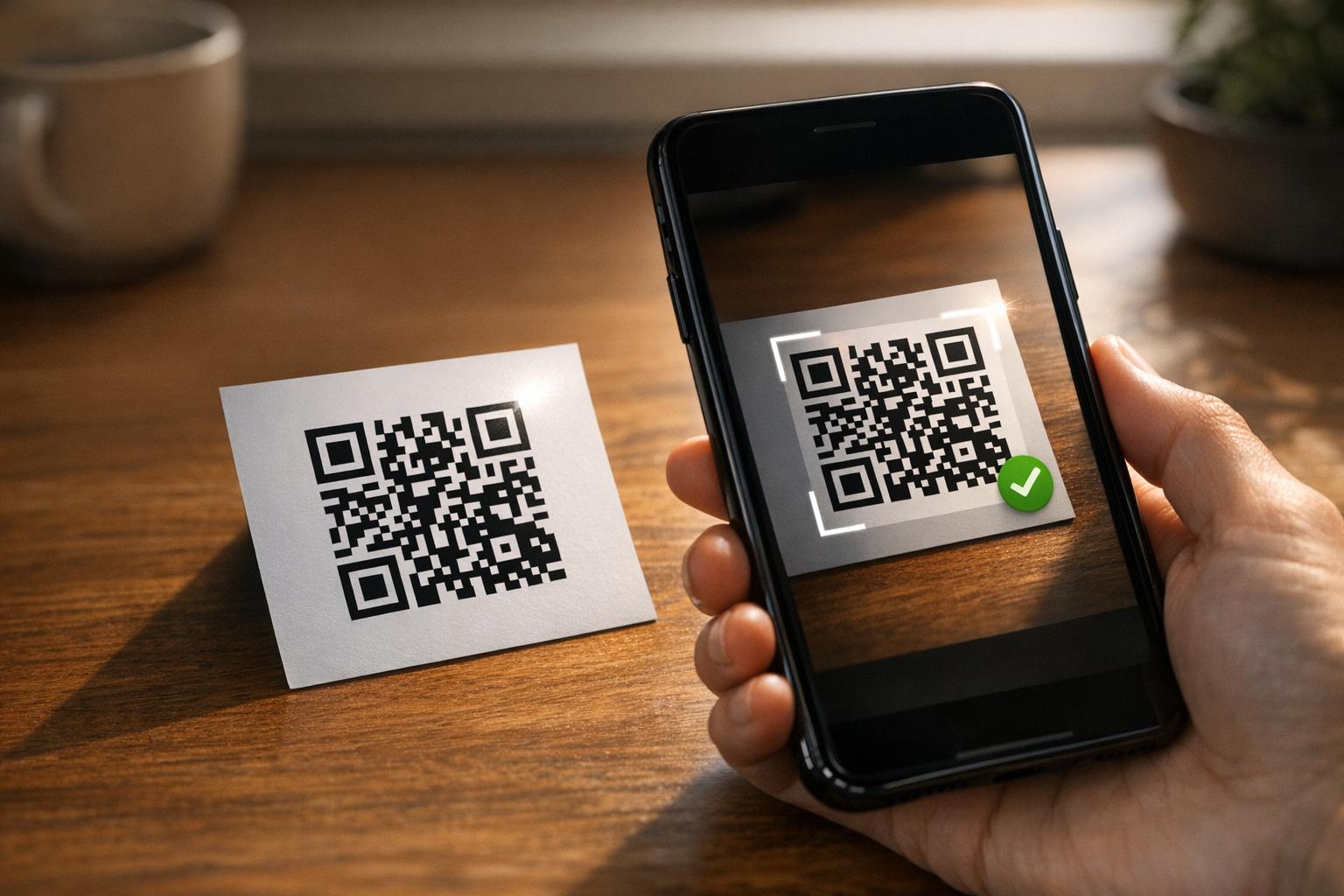
N'envoyez jamais de cartes postales à l'impression sans avoir scanné le code QR final au préalable. Testez-le sur plusieurs appareils – iOS et Android – et dans différentes conditions d'éclairage. Confirmez que :
- Le code scanne rapidement et de manière fiable dès la première tentative
- L'URL de destination se charge correctement et est optimisée pour les mobiles
- Les redirections pour les codes dynamiques mènent à la bonne page
- Le code scanne toujours après l'application de votre conception finale de carte postale, surtout si des couleurs ou un logo en surimpression ont été ajoutés
Si vous imprimez un lot test, scannez la preuve physique dans les conditions que les destinataires sont susceptibles de rencontrer – éclairage intérieur typique, tenu à bout de bras. Cela permet de détecter les problèmes de qualité d'impression avant qu'ils n'affectent votre tirage complet. Le les meilleures pratiques pour la lisibilité des codes QR guide couvre une liste de contrôle complète pour les tests avant impression.
Suivi et optimisation après l'envoi
Une fois que vos cartes postales sont en circulation, votre campagne ne fait que commencer. Les codes QR dynamiques fournissent des données de scan en temps réel, vous permettant de surveiller :
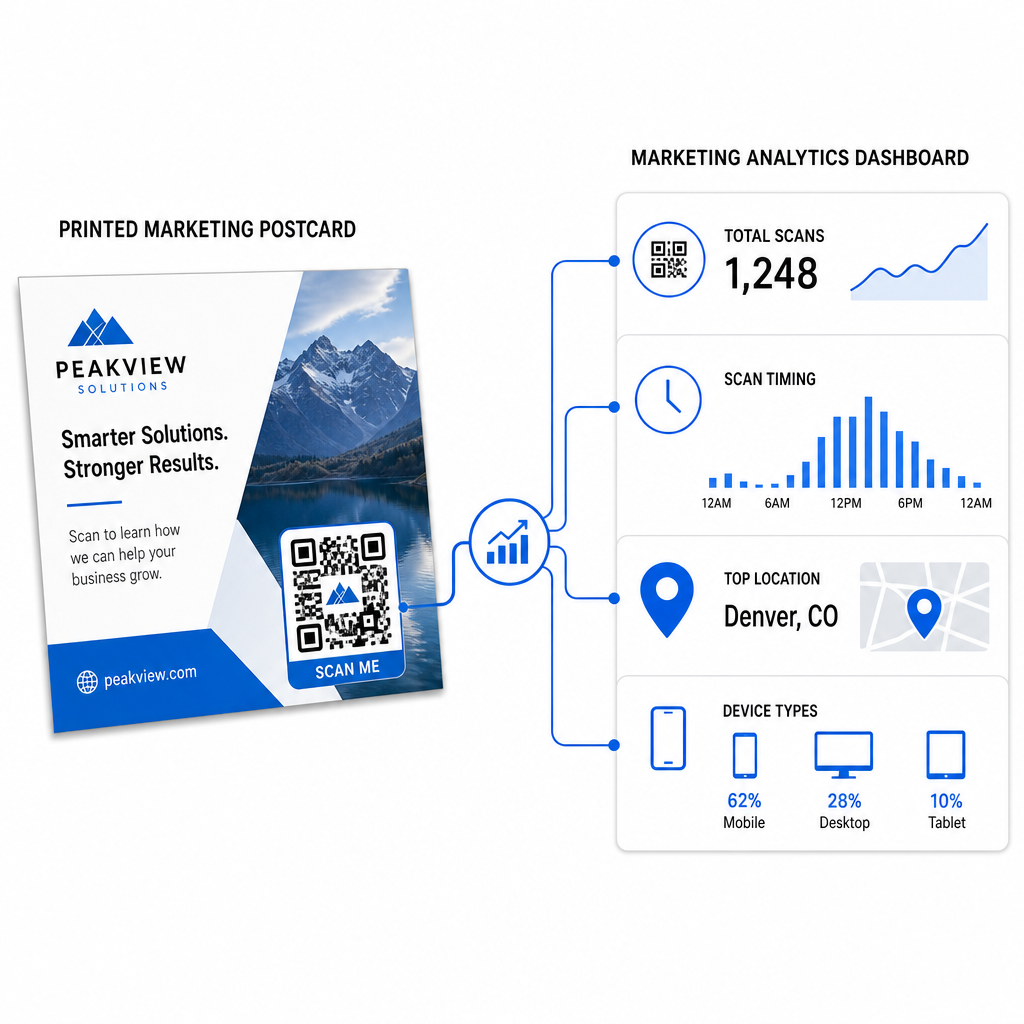
- Nombre total de scans et utilisateurs uniques – combien de destinataires se sont engagés, et combien ont scanné plus d'une fois
- Moment du scan – quels jours et heures ont généré le plus d'activité après l'envoi postal
- Distribution géographique – quels codes postaux ou régions ont réagi le plus fortement
- Type d'appareil – si les destinataires ont scanné sur iOS ou Android, ce qui peut éclairer les décisions concernant les pages de destination mobiles
Utilisez ces données pour affiner les futurs envois. Si une zone particulière a montré des taux de scan élevés, augmentez le volume là-bas la prochaine fois. Si les scans ont culminé le troisième jour après la livraison, planifiez votre suivi par e-mail en conséquence.
Pour les campagnes multi-versions – où vous testez différentes offres, designs ou appels à l'action – attribuez à chaque version de carte postale son propre code QR dynamique. Les analyses de scan vous montreront quelle version a généré le plus d'engagement sans attendre uniquement les données de conversion.
Commencez à mesurer la performance de votre publipostage Le Générateur de code QR Pageloot vous permet de créer, personnaliser et gérer des codes QR pour les campagnes de publipostage – avec des analyses intégrées et la possibilité de mettre à jour les destinations sans réimpression.
Les erreurs courantes à éviter
Lien vers une page d'accueil au lieu d'une page de campagne. Une page d'accueil oblige le destinataire à faire un travail supplémentaire pour trouver l'offre mentionnée sur la carte postale. Chaque étape supplémentaire réduit les conversions.
Utiliser un code QR statique pour une offre à durée limitée. Si l'offre expire ou si l'URL change, un code statique pointera vers une page cassée ou non pertinente sans aucun moyen de le corriger après l'impression.
Rendre le code QR trop petit. Tout ce qui est inférieur à 0,8 × 0,8 pouces est risqué, surtout si le design de la carte postale est chargé ou si le code utilise des couleurs personnalisées.
Omettre l'appel à l'action. Un code QR seul sur une carte postale ne donne aucune raison aux destinataires de scanner. Dites-leur ce qu'ils obtiendront.
Ne pas tester sur le support imprimé physique. Les épreuves numériques ne prédisent pas toujours comment un code sera scanné après être passé par une imprimante commerciale. Vérifiez toujours sur le résultat réel.
Les mêmes principes fondamentaux s'appliquent à tous les formats d'impression – le guide des codes QR sur les flyers couvre comment adapter ces pratiques à d'autres supports de réponse directe.
Une carte postale avec un code QR bien exécuté fait deux choses à la fois : elle offre aux destinataires un moyen immédiat et sans friction d'agir sur votre offre, et elle vous fournit des données mesurables sur la performance réelle de votre campagne. La combinaison d'un code QR dynamique, d'une destination optimisée pour les mobiles, d'URL balisées UTM et d'analyses de scan boucle la boucle entre l'impression hors ligne et les résultats numériques.
Commencez par générer un code QR dynamique via le Générateur de codes QR dynamiques Pageloot, dimensionnez-le correctement pour votre format de carte postale, appliquez une marque à contraste élevé, rédigez un appel à l'action clair et testez sur une preuve physique avant le tirage complet. Dès que les destinataires commencent à scanner, votre tableau de bord vous montrera exactement ce qui fonctionne.
Questions fréquentes
Visez au moins 0,8 × 0,8 pouces (2 × 2 cm) comme un minimum absolu, mais pour des distances de balayage typiques de cartes postales de 10 à 20 pouces, une taille entre 1 et 1,5 pouces (25 à 38 mm) est plus fiable. Appliquez la règle du 10:1 : faites en sorte que la largeur du code soit environ un dixième de la distance de balayage attendue.
Oui, mais seulement si vous avez utilisé un code QR dynamique avant d'imprimer. Les codes QR dynamiques pointent vers un lien de redirection que vous contrôlez, de sorte que vous pouvez mettre à jour l'URL de destination à tout moment sans réimprimer. Les codes QR statiques encodent de manière permanente la destination et ne peuvent pas être modifiés après coup.
Utilisez un code QR dynamique d'une plateforme comme Pageloot, qui fournit des analyses intégrées montrant le nombre total de scans, les utilisateurs uniques, le moment des scans, la localisation géographique et le type d'appareil. Pour une attribution plus approfondie dans Google Analytics, ajoutez des paramètres UTM (utmsource, utmmedium, utm_campaign) à votre URL de destination avant de générer le code – les scans apparaîtront alors comme des sessions traçables dans votre rapport d'acquisition de trafic GA4.