Da li vaše direktne poštanske razglednice ostaju nepratljive kada napuste štampač? Bez merljive veze između vaše fizičke pošte i digitalnih rezultata, trošite budžet bez načina da dokažete ROI. Ovaj vodič pokriva kako efikasno dodati QR kodove na razglednice – od dizajna i dimenzionisanja do praćenja performansi kampanje u realnom vremenu.
Zašto QR kodovi pripadaju direktnim poštanskim razglednicama
Direktna pošta se uvek suočavala sa jednim upornim problemom: merenjem odgovora. Šaljete hiljade komada i oslanjate se na anegdotske dokaze ili iskorišćavanje kupona da biste pogodili šta je funkcionisalo.
QR kodovi ovo rešavaju. Poštanska služba SAD prepoznaje QR kodove kao direktan način povezivanja primalaca pošte sa digitalnim sadržajem koji unapređuje njihovo korisničko putovanje – i čak je nudila popuste na poštarinu pošiljaocima koji uključuju skenirajuće dvodimenzionalne bar kodove na svojim komadima. Među organizacijama koje prate odgovor na direktnu poštu, 82% koristi metode onlajn praćenja koje koriste QR kodove, specifične URL adrese ili drugi digitalni mehanizam.
Slučaj je jasan: ako šaljete razglednice bez QR koda, ostavljate i angažovanje i merljive podatke neiskorišćenim.
Odabir pravog tipa QR koda za razglednice
Pre generisanja koda, odlučite da li vam je potreban statički или Dinamički QR kod – izbor ima značajne posledice na to kako će vaša kampanja funkcionisati.
Statički QR kodovi trajno kodiraju URL adresu u sam obrazac koda. Jednom odštampana, destinacija se ne može promeniti. Oni dobro funkcionišu za sadržaj koji je uvek aktuelan i koji nikada neće trebati ažuriranje, kao što je trajni popis proizvoda ili kontakt stranica preduzeća.
Dinamički QR kodovi upućuju na kratak link za preusmeravanje koji vi kontrolišete. Odštampani kod ostaje isti, ali možete ažurirati odredišnu URL adresu u bilo kom trenutku – čak i nakon što su razglednice već u poštanskim sandučićima primalaca. Dinamički kodovi takođe otključavaju potpunu analitiku skeniranja, uključujući broj skeniranja, vreme skeniranja, geografsku lokaciju i tip uređaja.
Za većinu kampanja sa razglednicama, dinamički kodovi su pravi izbor. Ako se vaša ponuda promeni usred kampanje, možete preusmeriti skenere na novu odredišnu stranicu bez ponovnog štampanja. Ako jedna verzija razglednice nadmaši drugu, vaša analitika će vam pokazati tačno zašto.
Pratite svako skeniranje iz vaše kampanje sa razglednicama Користити Dinamički QR kod generator da kreirate kod koji se može pratiti i koji možete ažurirati u bilo kom trenutku – nije potrebno ponovno štampanje. Pristupite potpunoj analitičkoj kontrolnoj tabli skeniranja od trenutka kada vaše razglednice stignu u poštanske sandučiće.
Na šta povezati QR kod vaše razglednice
Odredište je jednako važno kao i sam kod. Skeniranje bi trebalo da se odmah oseti kao nagrađujuće, a ne zbunjujuće. Odaberite odredište na osnovu cilja vaše kampanje:
- А. promotivna odredišna stranica prilagođena specifičnoj ponudi ili poruci razglednice
- А. obrazac za prikupljanje potencijalnih klijenata za prikupljanje imena, e-mail adresa ili zahteva za ponudu od zainteresovanih primalaca
- А. stranica proizvoda ili usluge koja dovodi primaoce do onoga što prodajete bez dodatne navigacije
- А. video ili demo koja omogućava dubljem pripovedanju da obavi posao koji format razglednice ne može u potpunosti da primi
- А. kontakt ili stranica za rezervaciju koja primaocima pruža neposredan način da zakažu poziv ili sastanak
- А. PDF preuzimanje deljenje brošure, menija ili kataloga sa više detalja nego što razglednica dozvoljava
Šta god da povežete, uverite se da je odredište optimizovano za mobilne uređaje. Primaoci razglednica skeniraju svojim telefonima, a stranica koja se ne prikazuje dobro na mobilnom uređaju će ih odmah izgubiti. Isti princip važi i kada dodavanjem QR kodova na flajere i brošure – iskustvo odredišta je jednako važno kao i sam kod.
Dimenzionisanje vašeg QR koda za štampanje razglednica
Pravilno određivanje veličine je ključno. QR kod koji je premali neće se pouzdano skenirati. Pageloot preporučuje minimalnu štampanu veličinu od 0,8 × 0,8 inča (2 × 2 cm) za skeniranje izbliza, na primer kada neko drži razglednicu na dužini ruke.
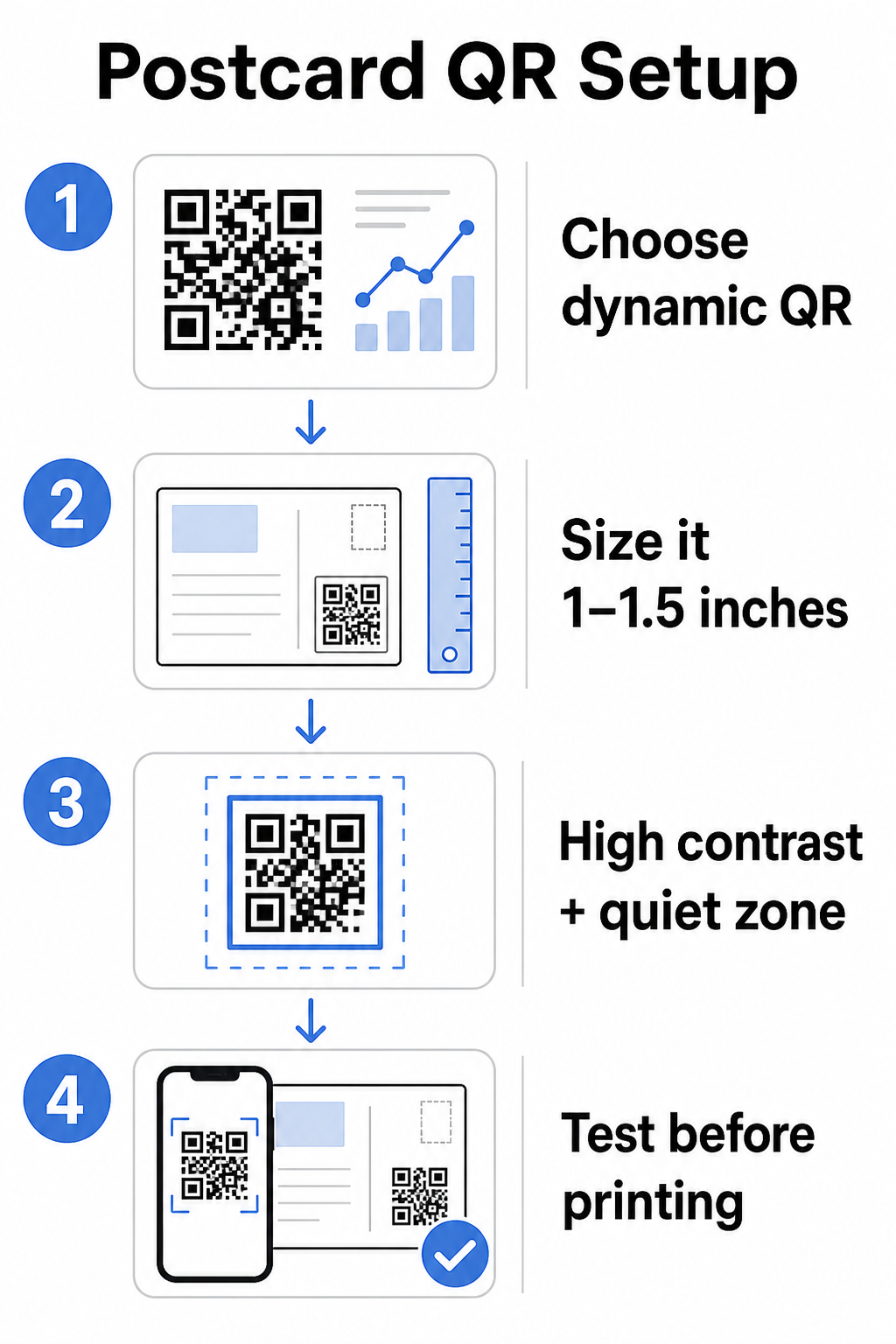
Za razglednice, koje se obično drže na otprilike 10–20 inča od kamere telefona, primenite odnos udaljenosti skeniranja i veličine 10:1: širina QR koda bi trebalo da bude približno jedna desetina očekivane udaljenosti skeniranja. Primalac koji skenira sa udaljenosti od 12 inča treba kod koji je širok najmanje 1,2 inča.
U praksi, ciljajte na QR kod između 1 i 1,5 inča (25–38 mm) na standardnoj razglednici. Ovo udobno omogućava tipične udaljenosti skeniranja, ostavljajući dovoljno prostora za ostatak vašeg dizajna. Za detaljne smernice za druge formate, pogledajte smernice za dimenzionisanje QR koda za štampane materijale.
Smernice za dizajn skenirajućih QR kodova za razglednice
Kontrast i boja
Skeneri rade tako što detektuju kontrast između tamnih modula i svetle pozadine. Visok kontrast je neophodan. Crna na beloj pruža najpouzdanije skeniranje i najsigurnija je podrazumevana opcija. Prilagođene boje mogu funkcionisati – a održavanje visokog kontrasta sa brendiranim bojama može značajno povećati angažovanje – ali morate sačuvati dovoljan kontrast između prednjeg plana i pozadine, sa minimalnim odnosom od najmanje 3:1 i idealno 4:1 ili više. Potpune smernice o efikasnom kombinovanju boja dostupne su u najbolje prakse za kontrast boja QR koda vodiču.
Izbegnite ove uobičajene zamke:
- Svetli moduli na svetloj pozadini
- Gradijenti koji stvaraju neravnomeran kontrast preko koda
- Invertovanje koda (svetli obrazac na tamnoj pozadini) – neki skeneri ne uspevaju sa obrnutim šemama boja
Tiha zona
Тхе tihu zonu je jasan beli obrub koji okružuje obrazac QR koda. Prema ISO/IEC 18004 standardima, mora biti širok najmanje četiri modula sa svih strana. Na razglednici, to znači ostaviti otprilike četvrtinu inča (0,25 inča) slobodnog prostora oko koda i ne postavljati tekst, slike ili elemente dizajna direktno pored njega. Ovaj bafer pomaže skenerima da prepoznaju gde kod počinje i završava – bez njega, čak i dobro dizajniran kod može propasti pri pouzdanom skeniranju.
Dodavanje logotipa
Dodavanje logotipa vašeg brenda u centar QR koda čini ga prepoznatljivijim i pouzdanijim na razglednici. Ako ugradite logotip, koristite viši nivo korekcije grešaka (Q ili H) da biste održali mogućnost skeniranja, i neka logotip ne zauzima više od 30% ukupne površine koda. Brendirani kod možete kreirati koristeći QR kod generator sa logom.
Квалитет штампе
Izvezite svoj QR kod kao vektorsku datoteku (SVG ili PDF) umesto JPEG-a niske rezolucije pre slanja u štampu. Vektorski formati čuvaju oštre ivice modula pri bilo kojoj veličini štampe. Zatražite najmanje 300 DPI od vašeg dobavljača štampe i koristite mat završnu obradu gde je to moguće – sjajne razglednice mogu proizvesti odsjaj koji ometa skeniranje pod jakim svetlom.
Gde postaviti QR kod na vašoj razglednici
Postavljanje utiče na to koliko primalaca zapravo skenira. Sledite ove principe:
- Postavite kod na stranu sa porukom, a ne na stranu sa adresom – ovo je mesto gde primaoci provode vreme čitajući
- Pozicionirajte ga na prirodnoj tački završetka čitanja, kao što je donji desni ugao ili odmah ispod vašeg glavnog poziva na akciju, tako da se pojavi nakon što primalac usvoji vašu poruku
- Okružite ga jasnim pozivom na akciju – fraze poput “Skenirajte za vašu ekskluzivnu ponudu” ili “Skenirajte da rezervišete svoj termin” govore primaocima tačno šta da rade i šta će dobiti
- Dajte mu prostora za disanje – ne pretrpavajte kod drugim elementima dizajna; tiha zona mora ostati čista sa svih strana
QR kod bez poziva na akciju je propuštena prilika. Primaoci koji ne razumeju zašto bi trebalo da skeniraju jednostavno to neće učiniti.
Dodavanje UTM parametara za praćenje kampanje
Dinamički QR kodovi vam daju podatke o skeniranju. Ali da biste povezali ta skeniranja sa vašom širom marketinškom analitikom – uključujući šta primaoci rade nakon što slete na vašu stranicu – potrebni su vam UTM parametara dodati vašem odredišnom URL-u.
UTM parametri su kratke oznake dodate URL-u koje govore Google Analitici odakle je saobraćaj potekao. Standardni parametri su:
| Parametar | Šta prati | Primer vrednosti |
|---|---|---|
| `utm_izvor` | Odakle je saobraćaj potekao | `direktna-pošta` |
| `utm_medijum` | Marketinški kanal | `razglednica` |
| `utm_kampanja` | Specifičan naziv kampanje | `letnja-rasprodaja-2025` |
| `utm_sadržaj` | Koja verzija razglednice | `verzija-a` |
Kompletan URL sa oznakama izgleda ovako:
`https://yoursite.com/offer?utm``source=direct-mail&utm``medium=postcard&utm_campaign=summer-sale-2025`
Kreirajte svoj URL koristeći Google-ov Campaign URL Builder, zatim zalepite taj URL sa oznakama u odredište vašeg dinamičkog QR koda. U GA4, ovaj saobraćaj možete pregledati pod Izveštaji > Akvizicija > Akvizicija saobraćaja, gde će Izvor sesije, Medijum sesije i Kampanja sesije odražavati vaše UTM vrednosti. Ovo vam omogućava da pripišete sesije veb-sajta, popunjene obrasce i kupovine direktno specifičnim kampanjama razglednica – zatvarajući krug između štampanih i digitalnih performansi.
Testiranje pre štampanja
Nikada ne šaljite razglednice u štampu bez prethodnog skeniranja finalnog QR koda. Testirajte ga na više uređaja – i iOS i Android – i pod različitim svetlosnim uslovima. Potvrdite da:
- Kod se skenira brzo i pouzdano iz prvog pokušaja
- Odredišni URL se pravilno učitava i optimizovan je za mobilne uređaje
- Preusmeravanja za dinamičke kodove vode na pravu stranicu
- Kod se i dalje skenira nakon što je primenjen vaš konačni dizajn razglednice, posebno ako su dodate boje ili preklapanje logotipa
Ako štampate probnu seriju, skenirajte fizički dokaz pod uslovima koje će primaoci verovatno iskusiti – tipično unutrašnje osvetljenje, držano na dužini ruke. Ovo hvata probleme sa kvalitetom štampe pre nego što utiču na vašu punu seriju. The najbolje prakse za čitljivost QR kodova vodič pokriva kompletnu kontrolnu listu za testiranje pre štampe.
Praćenje i optimizacija nakon slanja poštom
Kada su vaše razglednice u opticaju, vaša kampanja tek počinje. Dinamički QR kodovi pružaju podatke o skeniranju u realnom vremenu, omogućavajući vam da pratite:
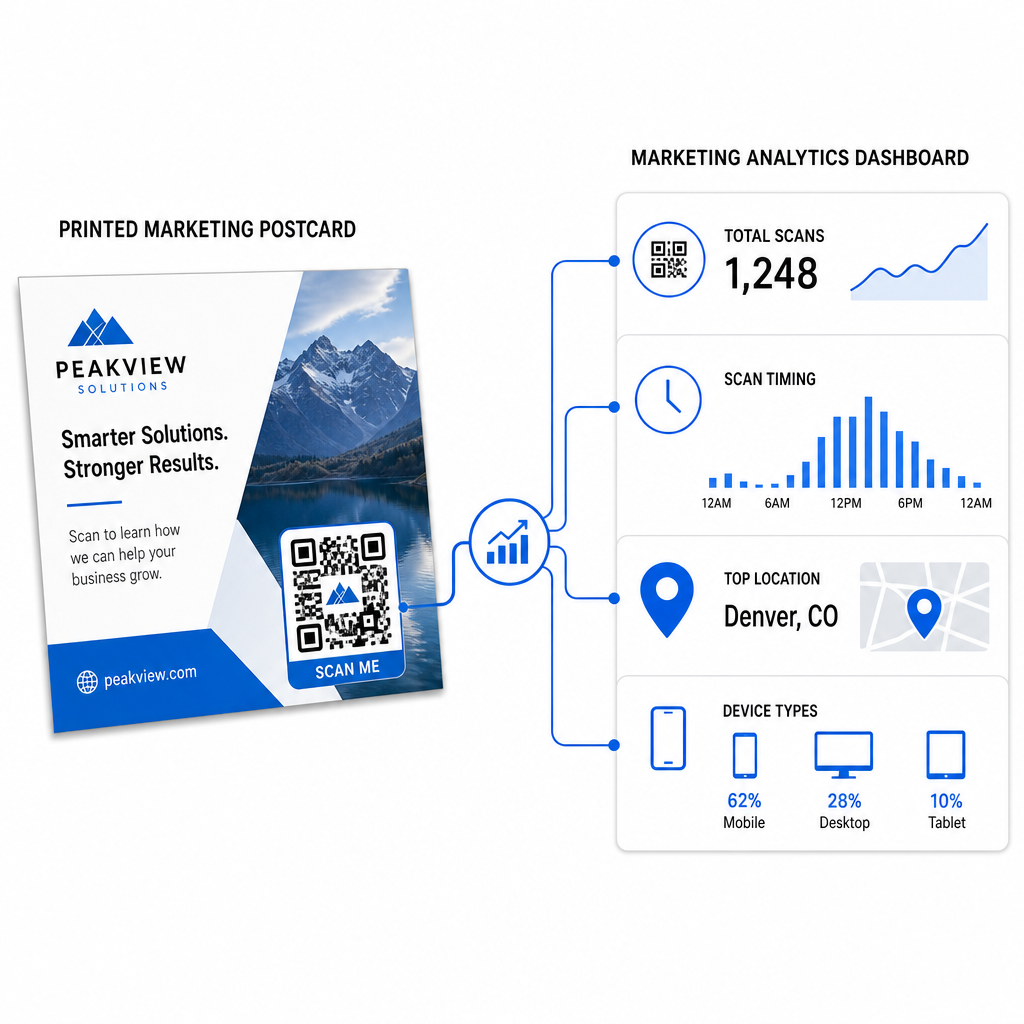
- Ukupan broj skeniranja i jedinstvenih korisnika – koliko primalaca se angažovalo i koliko je skeniralo više od jednom
- Време скенирања – koji dani i vremena su doveli do najveće aktivnosti nakon slanja pošte
- Geografska distribucija – koji poštanski brojevi ili regioni su najsnažnije reagovali
- Tip uređaja – da li su primaoci skenir
Koristite ove podatke za poboljšanje budućih pošiljki. Ako je određeno područje pokazalo visoke stope skeniranja, povećajte obim tamo sledeći put. Ako su skeniranja dostigla vrhunac trećeg dana nakon isporuke, uskladite svoj naknadni e-mail.
Za kampanje sa više verzija – gde testirate različite ponude, dizajne ili pozive na akciju – dodelite svakoj verziji razglednice sopstveni dinamički QR kod. Analitika skeniranja će vam pokazati koja je verzija podstakla veći angažman, bez čekanja samo na podatke o konverzijama.
Počnite da merite performanse vaše direktne pošte Тхе Пагелоот генератор КР кодова omogućava vam da kreirate, prilagodite i upravljate QR kodovima za kampanje direktne pošte – sa ugrađenom analitikom i mogućnošću ažuriranja destinacija bez ponovnog štampanja.
Уобичајене грешке које треба избегавати
Povezivanje na početnu stranicu umesto na stranicu kampanje. Početna stranica tera primaoca da uloži dodatni napor da pronađe ponudu pomenutu na razglednici. Svaki dodatni korak smanjuje konverzije.
Korišćenje statičkog QR koda za vremenski ograničenu ponudu. Ako ponuda istekne ili se URL promeni, statički kod će voditi na neispravnu ili irelevantnu stranicu bez mogućnosti da se to popravi nakon štampanja.
Pravljenje QR koda previše malim. Sve ispod 0,8 × 0,8 inča je rizično, posebno ako je dizajn razglednice pretrpan ili kod koristi prilagođene boje.
Preskakanje poziva na akciju. Sam QR kod na razglednici ne daje primaocima razlog za skeniranje. Recite im šta će dobiti.
Netestiranje na fizičkom odštampanom komadu. Digitalne probe ne predviđaju uvek kako će se kod skenirati nakon prolaska kroz komercijalnu štampu. Uvek proverite na stvarnom izlazu.
Isti osnovni principi primenjuju se na sve formate štampe – vodič za QR kodove na flajerima pokriva kako prilagoditi ove prakse za druge materijale direktnog odgovora.
Razglednica sa dobro implementiranim QR kodom radi dve stvari istovremeno: pruža primaocima neposredan, bez trenja način da reaguju na vašu ponudu, i daje vam merljive podatke o tome kako vaša kampanja zaista funkcioniše. Kombinacija dinamičkog QR koda, mobilno optimizovane destinacije, URL-ova sa UTM oznakama i analitike skeniranja zatvara krug između oflajn štampe i digitalnih rezultata.
Započnite generisanjem dinamičkog QR koda putem Pageloot Generator dinamičkih QR kodova, pravilno ga dimenzionirajte za format vaše razglednice, primenite brendiranje visokog kontrasta, napišite jasan poziv na akciju i testirajte na fizičkoj probi pre pune tiraže. Od trenutka kada primaoci počnu da skeniraju, vaša kontrolna tabla će vam pokazati šta tačno funkcioniše.
Često postavljana pitanja
Ciljajte na najmanje 0,8 × 0,8 inča (2 × 2 cm) kao apsolutni minimum, ali za tipične udaljenosti skeniranja razglednica od 10–20 inča, veličina između 1 i 1,5 inča (25–38 mm) je pouzdanija. Primenite pravilo 10:1: učinite širinu koda otprilike jednu desetinu očekivane udaljenosti skeniranja.
Da, ali samo ako ste koristili dinamički QR kod pre štampanja. Dinamički QR kodovi ukazuju na link za preusmeravanje koji vi kontrolišete, tako da možete ažurirati odredišni URL u bilo kom trenutku bez ponovnog štampanja. Statički QR kodovi trajno kodiraju odredište i ne mogu se promeniti naknadno.
Koristite dinamički QR kod sa platforme kao što je Pageloot, koja pruža ugrađenu analitiku koja prikazuje ukupan broj skeniranja, jedinstvene korisnike, vreme skeniranja, geografsku lokaciju i tip uređaja. Za dublju atribuciju u Google Analytics-u, dodajte UTM parametre (utmsource, utmmedium, utm_campaign) vašem odredišnom URL-u pre generisanja koda – skeniranja će se tada pojaviti kao sesije koje se mogu pratiti u vašem GA4 izveštaju o akviziciji saobraćaja.