โปสการ์ดจดหมายตรงของคุณไม่ได้รับการติดตามเมื่อออกจากเครื่องพิมพ์ใช่หรือไม่ หากไม่มีลิงก์ที่วัดผลได้ระหว่างจดหมายจริงของคุณกับผลลัพธ์ดิจิทัล คุณกำลังใช้งบประมาณโดยไม่มีวิธีพิสูจน์ ROI คู่มือนี้ครอบคลุมวิธีเพิ่มรหัส QR ลงในโปสการ์ดอย่างมีประสิทธิภาพ – ตั้งแต่การออกแบบและการปรับขนาดไปจนถึงการติดตามประสิทธิภาพแคมเปญแบบเรียลไทม์.
ทำไมรหัส QR จึงควรอยู่บนโปสการ์ดจดหมายตรง
จดหมายตรงเผชิญกับปัญหาที่แก้ไขยากมาโดยตลอด: การวัดผลตอบรับ คุณส่งจดหมายหลายพันชิ้นและอาศัยหลักฐานจากคำบอกเล่าหรือการแลกคูปองเพื่อคาดเดาสิ่งที่ได้ผล.
รหัส QR แก้ปัญหานี้ ไปรษณีย์สหรัฐฯ ตระหนักถึงรหัส QR ว่าเป็นวิธีโดยตรงในการเชื่อมโยงผู้รับจดหมายไปยังเนื้อหาดิจิทัลที่ช่วยพัฒนาเส้นทางลูกค้าของพวกเขา – และยังเสนอส่วนลดค่าไปรษณีย์ให้กับผู้ส่งจดหมายที่รวมบาร์โค้ดสองมิติที่สแกนได้บนชิ้นงานของพวกเขา ในบรรดาองค์กรที่ติดตามผลตอบรับจดหมายตรง 82% ใช้การติดตามออนไลน์ที่ใช้ประโยชน์จากรหัส QR, URL เฉพาะ หรือกลไกดิจิทัลอื่น ๆ.
กรณีนี้ชัดเจน: หากคุณส่งโปสการ์ดที่ไม่มีรหัส QR คุณกำลังทิ้งทั้งการมีส่วนร่วมและข้อมูลที่วัดผลได้ไป.
การเลือกประเภทของรหัส QR ที่เหมาะสมสำหรับโปสการ์ด
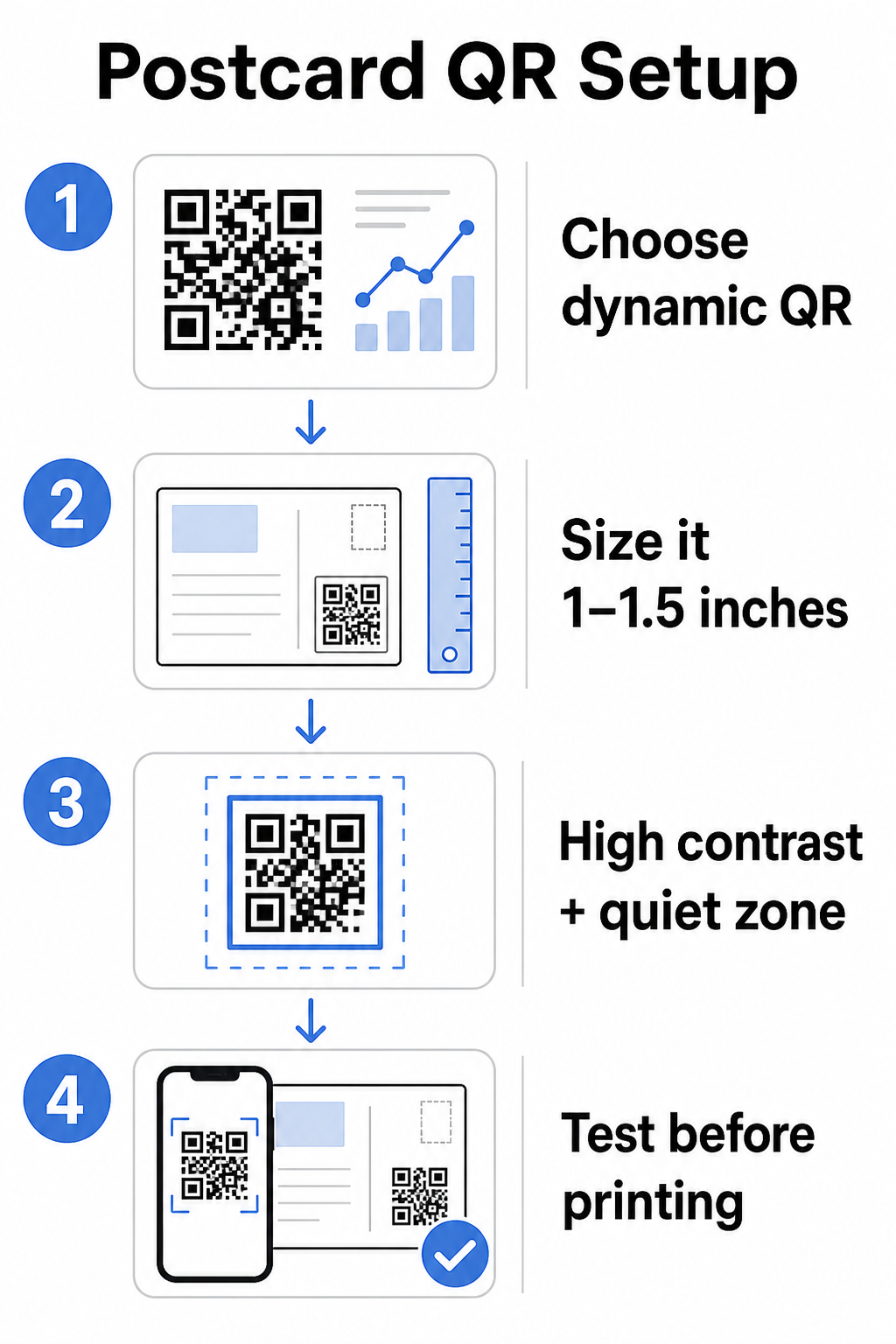
ก่อนสร้างรหัสของคุณ ตัดสินใจว่าคุณต้องการ แบบคงที่ (static) หรือ ไดนามิก รหัส QR – การเลือกมีผลกระทบสำคัญต่อวิธีการดำเนินแคมเปญของคุณ.
รหัส QR แบบคงที่เข้ารหัส URL อย่างถาวรลงในรูปแบบรหัสเอง เมื่อพิมพ์แล้ว ปลายทางไม่สามารถเปลี่ยนแปลงได้ เหมาะสำหรับเนื้อหาที่คงอยู่ตลอดไปที่ไม่จำเป็นต้องอัปเดต เช่น รายการสินค้าถาวร หรือหน้าติดต่อของธุรกิจ.
รหัส QR แบบไดนามิกชี้ไปยังลิงก์เปลี่ยนเส้นทางสั้น ๆ ที่คุณควบคุม รหัสที่พิมพ์ยังคงเหมือนเดิม แต่คุณสามารถอัปเดต URL ปลายทางได้ตลอดเวลา – แม้ว่าโปสการ์ดจะอยู่ในกล่องจดหมายของผู้รับแล้วก็ตาม รหัสแบบไดนามิกยังปลดล็อกการวิเคราะห์การสแกนแบบเต็มรูปแบบ รวมถึงจำนวนการสแกน เวลาที่สแกน ตำแหน่งทางภูมิศาสตร์ และประเภทอุปกรณ์.
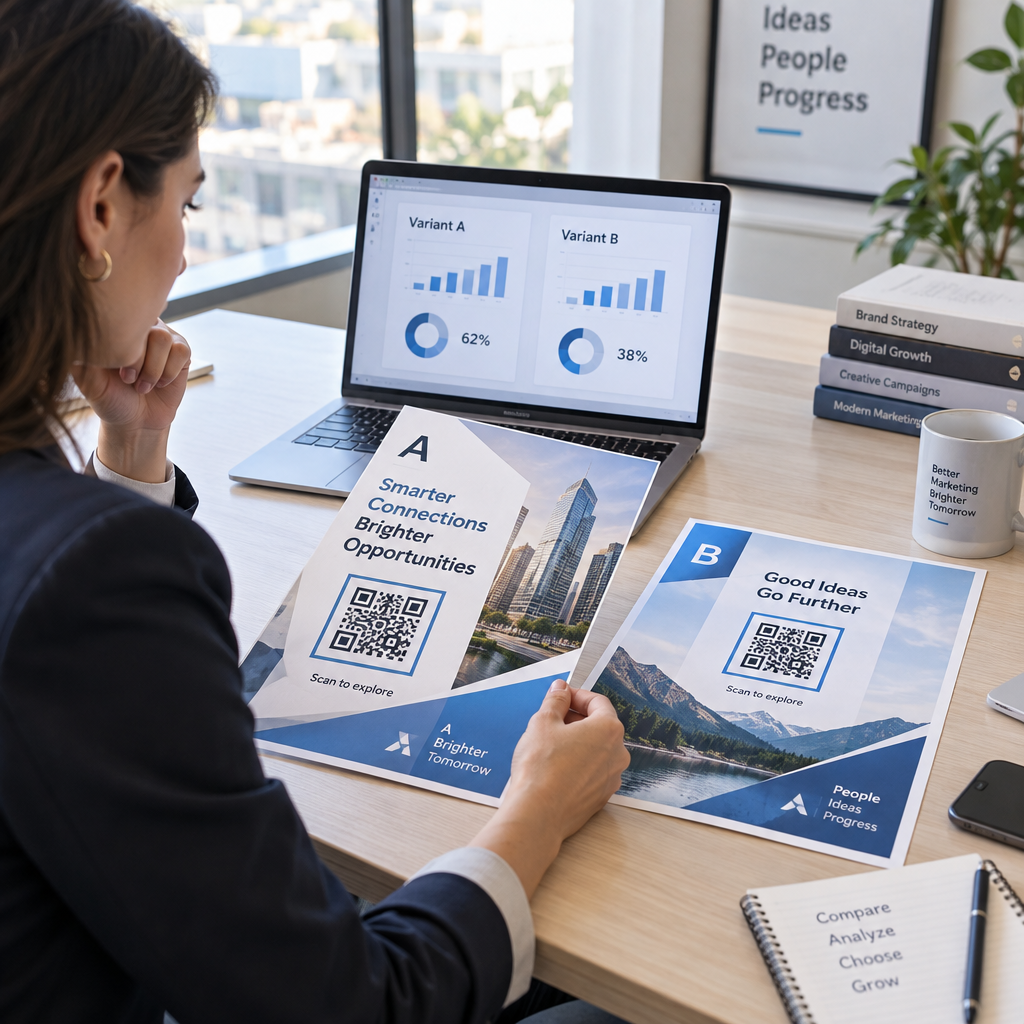
สำหรับแคมเปญโปสการ์ดส่วนใหญ่ รหัสแบบไดนามิกคือตัวเลือกที่เหมาะสม หากข้อเสนอของคุณเปลี่ยนแปลงกลางแคมเปญ คุณสามารถเปลี่ยนเส้นทางผู้สแกนไปยังหน้า Landing Page ใหม่โดยไม่ต้องพิมพ์ซ้ำ หากโปสการ์ดเวอร์ชันหนึ่งมีประสิทธิภาพดีกว่าอีกเวอร์ชันหนึ่ง การวิเคราะห์ของคุณจะแสดงให้คุณเห็นว่าทำไม.
ติดตามทุกการสแกนจากแคมเปญโปสการ์ดของคุณ ใช้ สร้าง Dynamic QR Code เพื่อสร้างรหัสที่ติดตามได้ที่คุณสามารถอัปเดตได้ตลอดเวลา – ไม่ต้องพิมพ์ซ้ำ เข้าถึงแดชบอร์ดการวิเคราะห์การสแกนแบบเต็มรูปแบบตั้งแต่โปสการ์ดของคุณถึงกล่องจดหมาย.
สิ่งที่ควรเชื่อมโยงรหัส QR โปสการ์ดของคุณไปที่
ปลายทางมีความสำคัญพอ ๆ กับตัวรหัสเอง การสแกนควรรู้สึกคุ้มค่าทันที ไม่ใช่ทำให้สับสน เลือกปลายทางตามเป้าหมายแคมเปญของคุณ:
- ก หน้า Landing Page โปรโมชัน ปรับแต่งให้เข้ากับข้อเสนอหรือข้อความเฉพาะของโปสการ์ด
- ก แบบฟอร์มเก็บข้อมูลลูกค้าเป้าหมาย เพื่อรวบรวมชื่อ อีเมล หรือคำขอใบเสนอราคาจากผู้รับที่สนใจ
- ก หน้าสินค้าหรือบริการ ที่นำผู้รับไปยังสิ่งที่คุณกำลังขายโดยไม่ต้องนำทางเพิ่มเติม
- ก วิดีโอหรือการสาธิต ที่ให้การเล่าเรื่องที่ลึกซึ้งยิ่งขึ้นทำงาน ซึ่งรูปแบบโปสการ์ดไม่สามารถรองรับได้อย่างเต็มที่
- ก หน้าติดต่อหรือจอง ที่ให้ผู้รับมีวิธีทันทีในการกำหนดเวลาโทรหรือนัดหมาย
- ก ดาวน์โหลด PDF การแบ่งปันโบรชัวร์ เมนู หรือแคตตาล็อก ที่มีรายละเอียดมากกว่าที่โปสการ์ดจะทำได้
ไม่ว่าคุณจะเชื่อมโยงไปที่ใด ตรวจสอบให้แน่ใจว่าปลายทางคือ เหมาะสำหรับมือถือ. ผู้รับโปสการ์ดสแกนด้วยโทรศัพท์ของพวกเขา และหน้าเว็บที่ไม่แสดงผลได้ดีบนมือถือจะทำให้พวกเขาสูญเสียความสนใจทันที หลักการเดียวกันนี้ใช้เมื่อ เพิ่ม QR โค้ดลงในใบปลิวและโบรชัวร์ – ประสบการณ์ปลายทางมีความสำคัญพอ ๆ กับตัวรหัสเอง.
การปรับขนาดรหัส QR ของคุณสำหรับการพิมพ์โปสการ์ด
การปรับขนาดให้ถูกต้องเป็นสิ่งสำคัญ รหัส QR ที่เล็กเกินไปจะไม่สามารถสแกนได้อย่างน่าเชื่อถือ Pageloot แนะนำ ขนาดพิมพ์ขั้นต่ำ 0.8 × 0.8 นิ้ว (2 × 2 ซม.) สำหรับการสแกนระยะใกล้ เช่น เมื่อมีคนถือโปสการ์ดในระยะแขน.
สำหรับโปสการ์ด ซึ่งโดยทั่วไปจะถือห่างจากกล้องโทรศัพท์ประมาณ 10–20 นิ้ว ให้ใช้ อัตราส่วนระยะการสแกนต่อขนาด 10:1: ความกว้างของรหัส QR ควรเป็นประมาณหนึ่งในสิบของระยะการสแกนที่คาดไว้ ผู้รับที่สแกนจากระยะ 12 นิ้ว ต้องการรหัสที่มีความกว้างอย่างน้อย 1.2 นิ้ว.
ในทางปฏิบัติ ตั้งเป้าให้รหัส QR อยู่ระหว่าง 1 ถึง 1.5 นิ้ว (25–38 มม.) บนโปสการ์ดมาตรฐาน ซึ่งรองรับระยะการสแกนทั่วไปได้อย่างสบาย ในขณะที่เหลือพื้นที่เพียงพอสำหรับการออกแบบส่วนที่เหลือของคุณ สำหรับคำแนะนำโดยละเอียดในรูปแบบอื่น ๆ โปรดดูที่ แนวทางการปรับขนาดรหัส QR สำหรับวัสดุสิ่งพิมพ์.
แนวทางการออกแบบสำหรับรหัส QR โปสการ์ดที่สแกนได้
คอนทราสต์และสี
เครื่องสแกนทำงานโดยการตรวจจับความแตกต่างระหว่างโมดูลสีเข้มและพื้นหลังสีอ่อน ความคมชัดสูงเป็นสิ่งจำเป็น สีดำบนสีขาวให้การสแกนที่น่าเชื่อถือที่สุดและเป็นค่าเริ่มต้นที่ปลอดภัยที่สุด สีที่กำหนดเองสามารถใช้ได้ – และการรักษาความคมชัดสูงด้วยสีของแบรนด์สามารถเพิ่มการมีส่วนร่วมได้อย่างมีความหมาย – แต่คุณต้องรักษาระดับความคมชัดที่เพียงพอระหว่างพื้นหน้าและพื้นหลัง โดยมีอัตราส่วนขั้นต่ำอย่างน้อย 3:1 และเหมาะอย่างยิ่งคือ 4:1 หรือสูงกว่า คำแนะนำฉบับเต็มเกี่ยวกับการจับคู่สีอย่างมีประสิทธิภาพมีอยู่ใน แนวทางปฏิบัติที่ดีที่สุดสำหรับความคมชัดของสีรหัส QR คู่มือของเรา.
หลีกเลี่ยงข้อผิดพลาดทั่วไปเหล่านี้:
- โมดูลสีอ่อนบนพื้นหลังสีอ่อน
- การไล่ระดับสีที่สร้างความคมชัดไม่สม่ำเสมอทั่วทั้งโค้ด
- การกลับโค้ด (รูปแบบสีอ่อนบนพื้นหลังสีเข้ม) – เครื่องสแกนบางเครื่องไม่สามารถทำงานได้กับโทนสีที่กลับกัน
โซนเงียบ
เดอะ พื้นที่ว่างรอบรหัส (quiet zone) ที่ชัดเจน คือขอบสีขาวที่ชัดเจนล้อมรอบรูปแบบ QR โค้ด ตามมาตรฐาน ISO/IEC 18004 จะต้องมีความกว้างอย่างน้อยสี่โมดูลในทุกด้าน บนโปสการ์ด หมายถึงการเว้นช่องว่างประมาณหนึ่งในสี่นิ้ว (0.25 นิ้ว) รอบโค้ด และไม่วางข้อความ รูปภาพ หรือองค์ประกอบการออกแบบติดกับโค้ดโดยตรง บัฟเฟอร์นี้ช่วยให้เครื่องสแกนจดจำจุดเริ่มต้นและจุดสิ้นสุดของโค้ดได้ – หากไม่มีสิ่งนี้ แม้แต่โค้ดที่ออกแบบมาอย่างดีก็อาจสแกนไม่ได้อย่างน่าเชื่อถือ.
การเพิ่มโลโก้
การเพิ่มโลโก้แบรนด์ของคุณไปที่กึ่งกลางของ QR โค้ดทำให้จดจำได้ง่ายขึ้นและน่าเชื่อถือยิ่งขึ้นบนโปสการ์ด หากคุณฝังโลโก้ ให้ใช้ระดับการแก้ไขข้อผิดพลาดที่สูงขึ้น (Q หรือ H) เพื่อรักษาความสามารถในการสแกน และจำกัดขนาดโลโก้ไม่ให้เกิน 30% ของพื้นที่ทั้งหมดของโค้ด คุณสามารถสร้างโค้ดที่มีแบรนด์ได้โดยใช้ สร้าง QR Code ใส่โลโก้.
คุณภาพการพิมพ์
ส่งออก QR โค้ดของคุณเป็นไฟล์เวกเตอร์ (SVG หรือ PDF) แทนที่จะเป็น JPEG ความละเอียดต่ำก่อนส่งไปยังเครื่องพิมพ์ รูปแบบเวกเตอร์ช่วยรักษาส่วนขอบของโมดูลให้คมชัดในทุกขนาดการพิมพ์ ขอความละเอียดอย่างน้อย 300 DPI จากผู้จำหน่ายงานพิมพ์ของคุณ และใช้พื้นผิวแบบด้านหากเป็นไปได้ – โปสการ์ดแบบมันวาวอาจทำให้เกิดแสงสะท้อนที่รบกวนการสแกนภายใต้แสงจ้า.
ตำแหน่งที่จะวาง QR โค้ดบนโปสการ์ดของคุณ
ตำแหน่งมีผลต่อจำนวนผู้รับที่สแกนจริง ปฏิบัติตามหลักการเหล่านี้:
- วางโค้ดไว้ด้านข้อความ, ไม่ใช่ด้านที่อยู่ – นี่คือที่ที่ผู้รับใช้เวลาอ่าน
- วางไว้ที่จุดสิ้นสุดการอ่านตามธรรมชาติ, เช่น มุมล่างขวา หรือใต้ข้อความกระตุ้นการตัดสินใจหลักของคุณ เพื่อให้ปรากฏหลังจากผู้รับได้ซึมซับข้อความของคุณแล้ว
- ล้อมรอบด้วยข้อความกระตุ้นการตัดสินใจที่ชัดเจน – วลีเช่น “สแกนเพื่อรับข้อเสนอพิเศษของคุณ” หรือ “สแกนเพื่อจองนัดหมายของคุณ” บอกผู้รับอย่างชัดเจนว่าต้องทำอะไรและจะได้อะไร
- ให้มีพื้นที่ว่าง – อย่าทำให้โค้ดแออัดด้วยองค์ประกอบการออกแบบอื่น ๆ โซนเงียบจะต้องคงความชัดเจนในทุกด้าน
QR โค้ดที่ไม่มีข้อความกระตุ้นการตัดสินใจคือโอกาสที่พลาดไป ผู้รับที่ไม่เข้าใจว่าทำไมต้องสแกนก็จะไม่สแกน.
การเพิ่มพารามิเตอร์ UTM สำหรับการติดตามแคมเปญ
QR โค้ดแบบไดนามิกให้ข้อมูลการสแกนแก่คุณ แต่ในการเชื่อมโยงการสแกนเหล่านั้นกับการวิเคราะห์การตลาดที่กว้างขึ้นของคุณ – รวมถึงสิ่งที่ผู้รับทำหลังจากเข้าสู่หน้าของคุณ – คุณต้องมี พารามิเตอร์ UTM ต่อท้าย URL ปลายทางของคุณ.
พารามิเตอร์ UTM คือแท็กสั้นๆ ที่เพิ่มลงใน URL ซึ่งบอก Google Analytics ว่าการเข้าชมมาจากที่ใด พารามิเตอร์มาตรฐานคือ:
| พารามิเตอร์ | สิ่งที่ติดตาม | ค่าตัวอย่าง |
|---|---|---|
| `utm_แหล่งที่มา` | ที่มาของการเข้าชม | `จดหมายตรง` |
| `utm_สื่อ` | ช่องทางการตลาด | `ไปรษณียบัตร` |
| `utm_แคมเปญ` | ชื่อแคมเปญเฉพาะ | `ลดราคาหน้าร้อน-2025` |
| `utm_เนื้อหา` | โปสการ์ดเวอร์ชันใด | `เวอร์ชัน-เอ` |
URL ที่ติดแท็กสมบูรณ์มีลักษณะดังนี้:
`https://yoursite.com/offer?utm``source=direct-mail&utm``medium=postcard&utm_campaign=summer-sale-2025`
สร้าง URL ของคุณโดยใช้ Google’s Campaign URL Builder จากนั้นวาง URL ที่ติดแท็กนั้นลงในปลายทางของ QR โค้ดแบบไดนามิกของคุณ ใน GA4 คุณสามารถตรวจสอบการเข้าชมนี้ได้ภายใต้ รายงาน > การได้มา > การได้มาซึ่งการเข้าชม, โดยที่แหล่งที่มาของเซสชัน, สื่อของเซสชัน และแคมเปญของเซสชันจะสะท้อนค่า UTM ของคุณ สิ่งนี้ช่วยให้คุณสามารถระบุแหล่งที่มาของเซสชันเว็บไซต์ การกรอกแบบฟอร์ม และการซื้อกลับไปยังแคมเปญโปสการ์ดที่เฉพาะเจาะจงได้โดยตรง – เป็นการปิดช่องว่างระหว่างประสิทธิภาพการพิมพ์และดิจิทัล.
การทดสอบก่อนพิมพ์
อย่าส่งโปสการ์ดไปพิมพ์โดยไม่สแกน QR โค้ดสุดท้ายก่อน ทดสอบกับอุปกรณ์หลายเครื่อง – ทั้ง iOS และ Android – และภายใต้สภาพแสงที่แตกต่างกัน ยืนยันว่า:
- โค้ดสแกนได้อย่างรวดเร็วและน่าเชื่อถือในการลองครั้งแรก
- URL ปลายทางโหลดได้อย่างถูกต้องและเหมาะสำหรับมือถือ
- การเปลี่ยนเส้นทางสำหรับโค้ดแบบไดนามิกนำไปสู่หน้าที่ถูกต้อง
- โค้ดยังคงสแกนได้หลังจากใช้การออกแบบโปสการ์ดขั้นสุดท้ายของคุณแล้ว โดยเฉพาะอย่างยิ่งหากมีการเพิ่มสีหรือการซ้อนทับโลโก้
หากคุณกำลังพิมพ์ชุดทดสอบ ให้สแกนหลักฐานทางกายภาพภายใต้เงื่อนไขที่ผู้รับมีแนวโน้มที่จะประสบ – แสงในร่มทั่วไป ถือในระยะแขน สิ่งนี้จะตรวจจับปัญหาคุณภาพการพิมพ์ก่อนที่จะส่งผลกระทบต่อการพิมพ์ทั้งหมดของคุณ The แนวทางปฏิบัติที่ดีที่สุดสำหรับการอ่านรหัส QR คู่มือครอบคลุมรายการตรวจสอบการทดสอบก่อนพิมพ์ที่สมบูรณ์.
การติดตามและเพิ่มประสิทธิภาพหลังการส่งจดหมาย
เมื่อโปสการ์ดของคุณเริ่มหมุนเวียน แคมเปญของคุณเพิ่งเริ่มต้นเท่านั้น รหัส QR แบบไดนามิกให้ข้อมูลการสแกนแบบเรียลไทม์ ให้คุณตรวจสอบ:
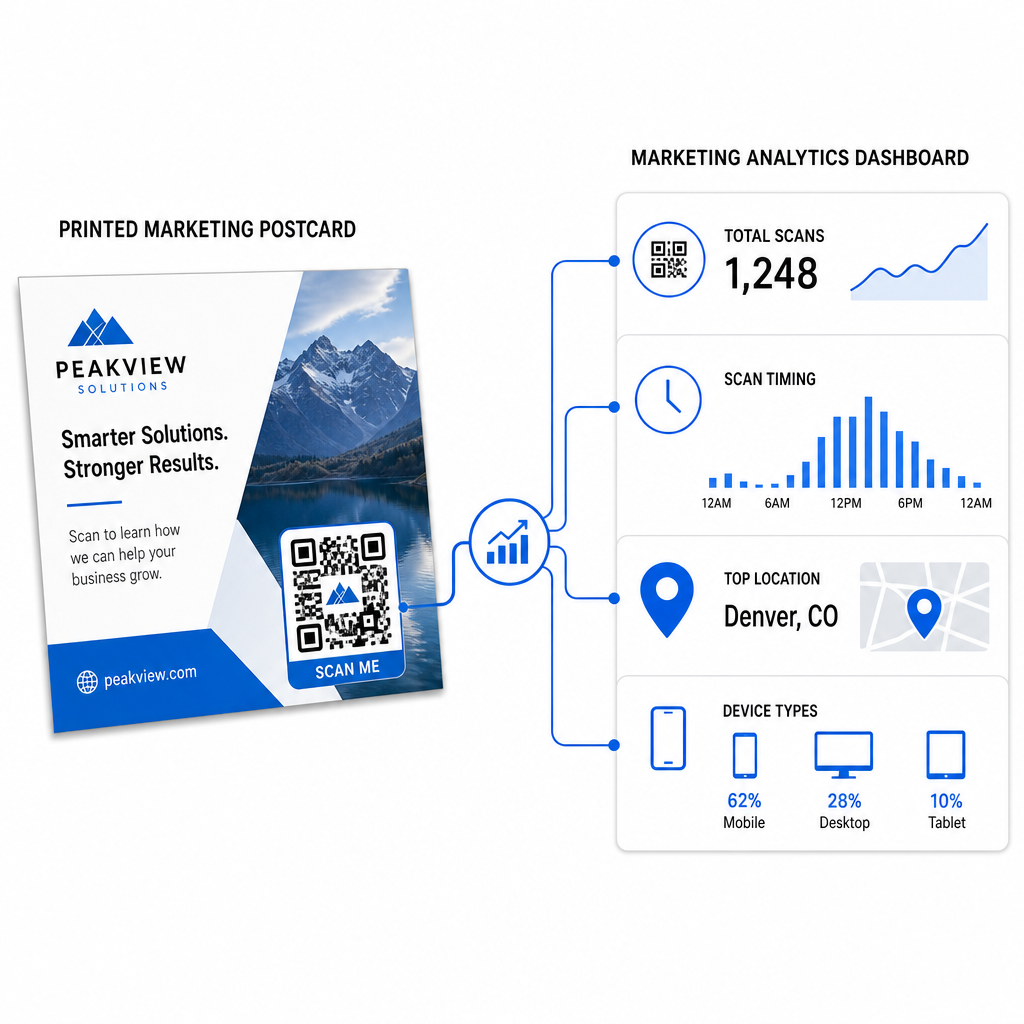
- จำนวนการสแกนทั้งหมดและผู้ใช้ที่ไม่ซ้ำกัน – จำนวนผู้รับที่เข้าร่วม และจำนวนที่สแกนมากกว่าหนึ่งครั้ง
- ช่วงเวลาการสแกน – วันและเวลาใดที่กระตุ้นกิจกรรมมากที่สุดหลังจากการส่งจดหมาย
- การกระจายทางภูมิศาสตร์ – รหัสไปรษณีย์หรือภูมิภาคใดที่ตอบสนองอย่างแข็งแกร่งที่สุด
- ประเภทอุปกรณ์ – ไม่ว่าผู้รับจะสแกนบน iOS หรือ Android ซึ่งสามารถแจ้งการตัดสินใจเกี่ยวกับหน้า Landing Page บนมือถือได้
ใช้ข้อมูลนี้เพื่อปรับปรุงการส่งจดหมายในอนาคต หากพื้นที่ใดพื้นที่หนึ่งแสดงอัตราการสแกนสูง ให้เพิ่มปริมาณในครั้งต่อไป หากการสแกนสูงสุดในวันที่สามหลังการจัดส่ง ให้กำหนดเวลาการติดตามทางอีเมลของคุณให้เหมาะสม.
สำหรับแคมเปญหลายเวอร์ชัน – ที่คุณกำลังทดสอบข้อเสนอ การออกแบบ หรือคำกระตุ้นการตัดสินใจที่แตกต่างกัน – กำหนดรหัส QR แบบไดนามิกของตัวเองให้กับโปสการ์ดแต่ละเวอร์ชัน การวิเคราะห์การสแกนจะแสดงให้คุณเห็นว่าเวอร์ชันใดกระตุ้นการมีส่วนร่วมได้มากกว่า โดยไม่ต้องรอข้อมูลการแปลงเพียงอย่างเดียว.
เริ่มวัดผลประสิทธิภาพการส่งจดหมายโดยตรงของคุณ เดอะ Pageloot เครื่องสร้างรหัส QR ช่วยให้คุณสร้าง ปรับแต่ง และจัดการรหัส QR สำหรับแคมเปญการส่งจดหมายโดยตรง – พร้อมการวิเคราะห์ในตัว และความสามารถในการอัปเดตปลายทางโดยไม่ต้องพิมพ์ซ้ำ.
ข้อผิดพลาดทั่วไปที่ควรหลีกเลี่ยง
การเชื่อมโยงไปยังหน้าแรกแทนที่จะเป็นหน้าแคมเปญ. หน้าแรกทำให้ผู้รับต้องทำงานเพิ่มเพื่อค้นหาข้อเสนอที่กล่าวถึงบนโปสการ์ด ทุกขั้นตอนที่เพิ่มขึ้นจะลดการแปลง.
การใช้รหัส QR แบบคงที่สำหรับข้อเสนอที่มีเวลาจำกัด. หากข้อเสนอหมดอายุหรือ URL เปลี่ยนแปลง รหัสแบบคงที่จะชี้ไปยังหน้าเสียหรือหน้าไม่เกี่ยวข้อง โดยไม่มีวิธีแก้ไขหลังจากพิมพ์.
การทำรหัส QR ให้เล็กเกินไป. อะไรก็ตามที่เล็กกว่า 0.8 × 0.8 นิ้วมีความเสี่ยง โดยเฉพาะอย่างยิ่งหากการออกแบบโปสการ์ดมีความซับซ้อน หรือรหัสใช้สีที่กำหนดเอง.
การข้ามคำกระตุ้นการตัดสินใจ. รหัส QR ที่อยู่โดดเดี่ยวบนโปสการ์ดไม่ได้ให้เหตุผลแก่ผู้รับในการสแกน บอกพวกเขาว่าพวกเขาจะได้อะไร.
ไม่ได้ทดสอบบนชิ้นงานพิมพ์จริง. หลักฐานดิจิทัลไม่ได้คาดการณ์เสมอไปว่ารหัสจะสแกนอย่างไรหลังจากผ่านเครื่องพิมพ์เชิงพาณิชย์ ตรวจสอบบนผลลัพธ์จริงเสมอ.
หลักการหลักเดียวกันนี้ใช้ได้กับรูปแบบการพิมพ์ทั้งหมด – the คู่มือรหัส QR บนใบปลิว ครอบคลุมวิธีการปรับใช้แนวทางปฏิบัติเหล่านี้สำหรับวัสดุตอบกลับโดยตรงอื่นๆ.
โปสการ์ดที่มีรหัส QR ที่ดำเนินการได้ดีทำสองสิ่งพร้อมกัน: มันให้วิธีที่รวดเร็วและไร้ข้อจำกัดแก่ผู้รับในการดำเนินการตามข้อเสนอของคุณ และให้ข้อมูลที่วัดผลได้ว่าแคมเปญของคุณทำงานจริงอย่างไร การรวมกันของรหัส QR แบบไดนามิก ปลายทางที่ปรับให้เหมาะกับมือถือ URL ที่ติดแท็ก UTM และการวิเคราะห์การสแกนปิดช่องว่างระหว่างการพิมพ์ออฟไลน์และผลลัพธ์ดิจิทัล.
เริ่มต้นด้วยการสร้างรหัส QR แบบไดนามิกผ่าน the เครื่องสร้างรหัส QR แบบไดนามิกของ Pageloot, ปรับขนาดให้ถูกต้องสำหรับรูปแบบโปสการ์ดของคุณ ใช้แบรนด์ที่มีคอนทราสต์สูง เขียนคำกระตุ้นการตัดสินใจที่ชัดเจน และทดสอบบนหลักฐานทางกายภาพก่อนการพิมพ์เต็มรูปแบบ ตั้งแต่ผู้รับเริ่มสแกน แดชบอร์ดของคุณจะแสดงให้คุณเห็นว่าอะไรได้ผลบ้าง.
คำถามที่พบบ่อย
ตั้งเป้าสำหรับอย่างน้อย 0.8 × 0.8 นิ้ว (2 × 2 ซม.) เป็นขนาดต่ำสุดสัมบูรณ์ แต่สำหรับระยะการสแกนโปสการ์ดทั่วไปที่ 10–20 นิ้ว ขนาดระหว่าง 1 ถึง 1.5 นิ้ว (25–38 มม.) คือเชื่อถือได้มากกว่า ใช้กฎ 10:1: ทำให้ความกว้างของโค้ดประมาณหนึ่งในสิบของระยะการสแกนที่คาดไว้.
ใช่, แต่เฉพาะในกรณีที่คุณใช้โค้ด QR แบบไดนามิกก่อนพิมพ์ โค้ด QR แบบไดนามิกจะชี้ไปยังลิงก์เปลี่ยนเส้นทางที่คุณควบคุมได้ ดังนั้นคุณจึงสามารถอัปเดต URL ปลายทางได้ตลอดเวลาโดยไม่ต้องพิมพ์ซ้ำ โค้ด QR แบบคงที่เข้ารหัสปลายทางอย่างถาวรและไม่สามารถเปลี่ยนแปลงได้ในภายหลัง.
ใช้คิวอาร์โค้ดแบบไดนามิกจากแพลตฟอร์มอย่าง Pageloot ซึ่งมีระบบวิเคราะห์ในตัวที่แสดงจำนวนการสแกนทั้งหมด, ผู้ใช้ที่ไม่ซ้ำกัน, เวลาที่สแกน, ตำแหน่งทางภูมิศาสตร์ และประเภทอุปกรณ์ สำหรับการระบุแหล่งที่มาที่ลึกขึ้นใน Google Analytics ให้เพิ่มพารามิเตอร์ UTM (utmsource, utmmedium, utm_campaign) ไปยัง URL ปลายทางของคุณก่อนสร้างโค้ด – จากนั้นการสแกนจะปรากฏเป็นเซสชันที่ติดตามได้ในรายงานการได้มาซึ่งทราฟฟิกของ GA4 ของคุณ.