ホーム > ユースケース > QR Codes on Postcards: How to Drive Engagement and Track Results
Scanning postcard QR code

QR Codes on Postcards: How to Drive Engagement and Track Results

Learn how to add QR codes to postcards to drive engagement and track ROI. This guide covers sizing, dynamic tracking, design tips, and campaign optimization.
Updated on 7月 2, 2026
目次

Are your direct mail postcards going untracked once they leave the printer? Without a measurable link between your physical mail and digital outcomes, you’re spending budget with no way to prove ROI. This guide covers how to add QR codes to postcards effectively – from design and sizing to tracking campaign performance in real time.

Why QR Codes Belong on Direct Mail Postcards

Direct mail has always faced one persistent problem: measuring response. You send thousands of pieces and rely on anecdotal evidence or coupon redemptions to guess what worked.

QR codes solve this. The U.S. Postal Service recognizes QR codes as a direct way to connect mail recipients to digital content that advances their customer journey – and has even offered postage discounts to mailers who include scannable two-dimensional barcodes on their pieces. Among organizations that do track direct mail response, 82% use online tracking methods that leverage QR codes, specific URLs, or another digital mechanism.

The case is clear: if you’re sending postcards without a QR code, you’re leaving both engagement and measurable data on the table.

Choosing the Right QR Code Type for Postcards

Before generating your code, decide whether you need a 静的 或いは 動的 QR code – the choice has significant consequences for how your campaign runs.

Static QR codes permanently encode a URL into the code pattern itself. Once printed, the destination cannot be changed. They work fine for evergreen content that will never need updating, such as a permanent product listing or a business’s contact page.

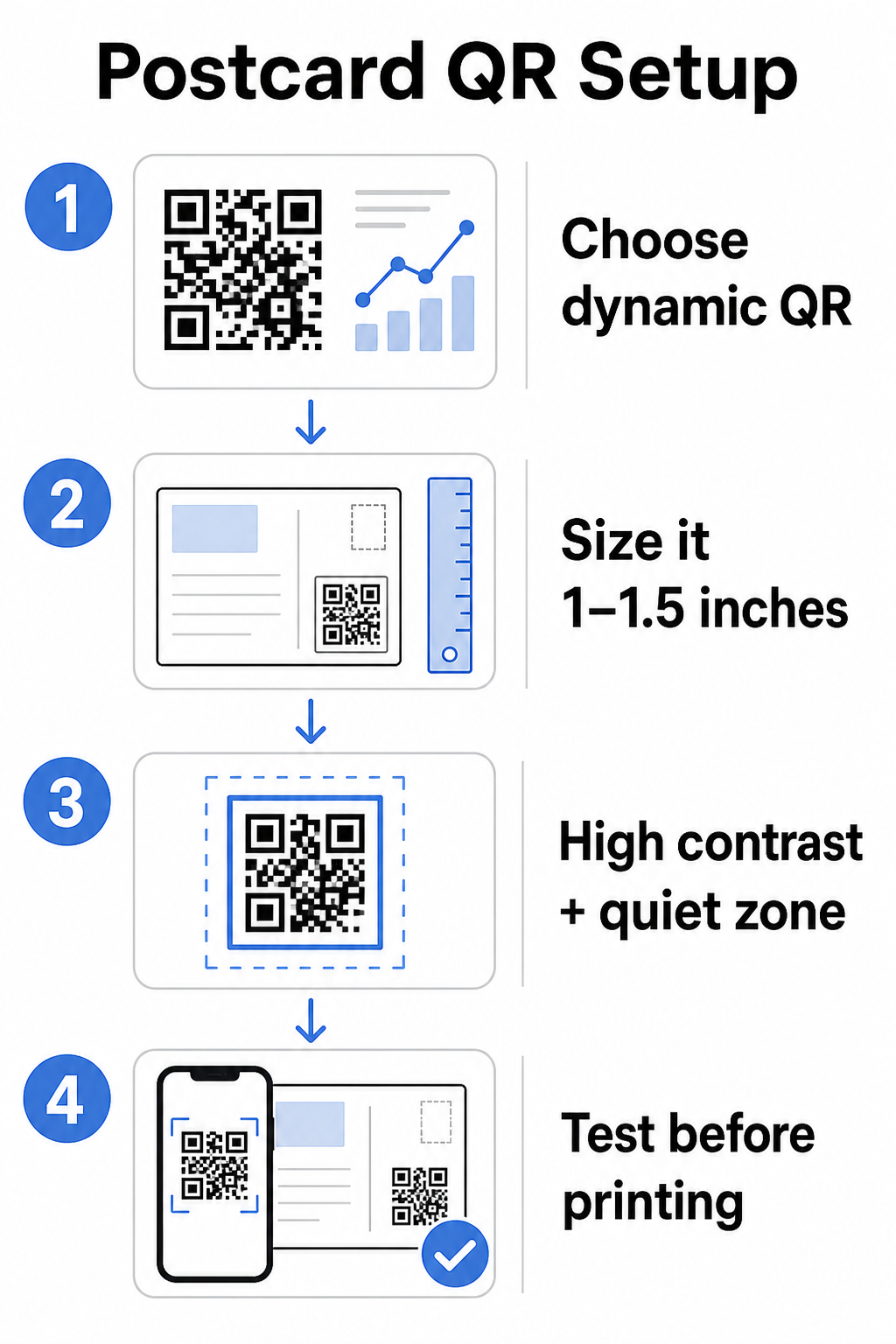
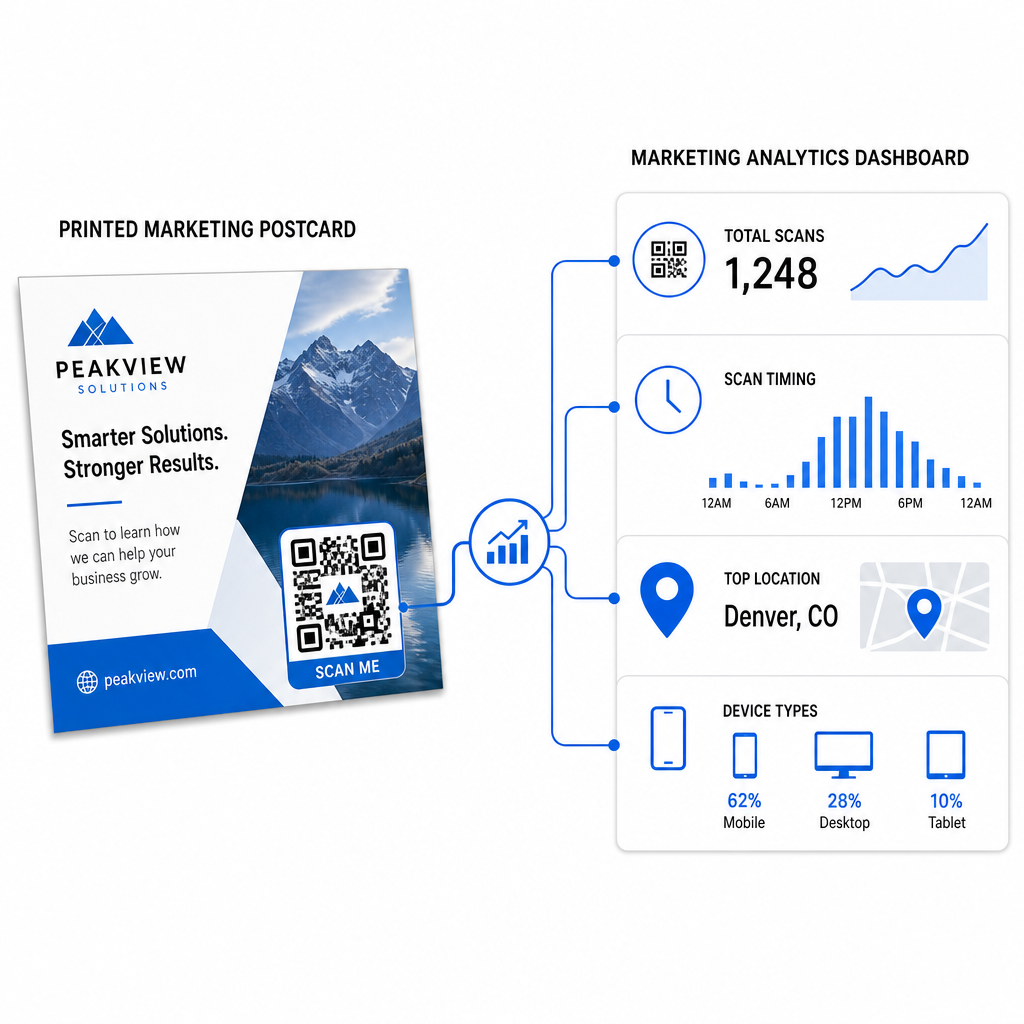
Dynamic QR codes point to a short redirect link that you control. The printed code stays the same, but you can update the destination URL at any time – even after the postcards are already in recipients’ mailboxes. Dynamic codes also unlock full scan analytics, including scan count, time of scan, geographic location, and device type.

For most postcard campaigns, dynamic codes are the right choice. If your offer changes mid-campaign, you can redirect scanners to a new landing page without reprinting. If one postcard version outperforms another, your analytics will show you exactly why.

Track Every Scan From Your Postcard Campaign を使用しています。 ダイナミックQRコードジェネレーター to create a trackable code you can update anytime – no reprinting required. Access a full scan analytics dashboard from the moment your postcards hit mailboxes.

What to Link Your Postcard QR Code To

The destination matters as much as the code itself. Scanning should feel immediately rewarding, not confusing. Choose a destination based on your campaign goal:

  • promotional landing page tailored to the postcard’s specific offer or message
  • lead capture form to collect names, emails, or quote requests from interested recipients
  • product or service page that gets recipients to what you’re selling without extra navigation
  • video or demo that lets deeper storytelling do the work a postcard format can’t fully accommodate
  • contact or booking page that gives recipients an immediate way to schedule a call or appointment
  • PDF download sharing a brochure, menu, or catalog with more detail than a postcard allows

Whatever you link to, make sure the destination is mobile-optimized. Postcard recipients scan with their phones, and a page that doesn’t render well on mobile will lose them immediately. The same principle applies when チラシやパンフレットにQRコードを追加する – the destination experience is just as important as the code itself.

Sizing Your QR Code for Postcard Printing

Getting the size right is critical. A QR code that’s too small won’t scan reliably. Pageloot recommends a minimum printed size of 0.8 × 0.8 inches (2 × 2 cm) for close-range scanning, such as when someone holds the postcard at arm’s length.

Postcard QR code tips

For postcards, which are typically held at roughly 10–20 inches from the phone camera, apply the 10:1 scan distance-to-size ratio: the QR code width should be approximately one-tenth of the expected scanning distance. A recipient scanning from 12 inches away needs a code that’s at least 1.2 inches wide.

In practice, aim for a QR code between 1 and 1.5 inches (25–38 mm) on a standard postcard. This comfortably accommodates typical scanning distances while leaving enough room for the rest of your design. For detailed guidance across other formats, see the QR code sizing guidelines for printed materials.

Design Guidelines for Scannable Postcard QR Codes

コントラストと色

Scanners work by detecting the contrast between dark modules and a light background. High contrast is non-negotiable. Black on white provides the most reliable scanning and is the safest default. Custom colors can work – and maintaining high contrast with branded colors can meaningfully increase engagement – but you need to preserve sufficient contrast between the foreground and background, with a minimum ratio of at least 3:1 and ideally 4:1 or higher. Full guidance on pairing colors effectively is available in the QRコードの色のコントラストに関するベストプラクティス ガイドで詳しく学ぶことができます。.

Avoid these common pitfalls:

  • Light-colored modules on a light background
  • Gradients that create uneven contrast across the code
  • Inverting the code (light pattern on dark background) – some scanners fail on reversed color schemes

クワイエットゾーン

クワイエットゾーン is the clear white border surrounding the QR code pattern. Per ISO/IEC 18004 standards, it must be at least four modules wide on all sides. On a postcard, this means leaving roughly a quarter inch (0.25 inch) of clear space around the code and not placing text, images, or design elements directly adjacent to it. This buffer helps scanners recognize where the code begins and ends – without it, even a well-designed code can fail to scan reliably.

Adding a Logo

Adding your brand logo to the center of the QR code makes it more recognizable and trustworthy on a postcard. If you embed a logo, use a higher error correction level (Q or H) to maintain scannability, and keep the logo to no more than 30% of the code’s total area. You can create a branded code using the ロゴ付きQRコードジェネレーター.

印刷品質

Export your QR code as a vector file (SVG or PDF) rather than a low-resolution JPEG before sending to the printer. Vector formats preserve sharp module edges at any print size. Request at least 300 DPI from your print vendor and use a matte finish where possible – glossy postcards can produce glare that interferes with scanning under bright light.

Where to Place the QR Code on Your Postcard

Placement affects how many recipients actually scan. Follow these principles:

  • Place the code on the message side, not the address side – this is where recipients spend time reading
  • Position it at a natural reading endpoint, such as the bottom right corner or just below your main call-to-action, so it appears after the recipient has absorbed your message
  • Surround it with a clear call-to-action – phrases like “Scan for your exclusive offer” or “Scan to book your appointment” tell recipients exactly what to do and what they’ll get
  • Give it breathing room – don’t crowd the code with other design elements; the quiet zone must remain clear on all sides

A QR code without a call-to-action is a missed opportunity. Recipients who don’t understand why they should scan simply won’t.

Adding UTM Parameters for Campaign Tracking

Dynamic QR codes give you scan data. But to connect those scans to your broader marketing analytics – including what recipients do after they land on your page – you need UTMパラメーター appended to your destination URL.

UTM parameters are short tags added to a URL that tell Google Analytics where traffic originated. The standard parameters are:

パラメーター What It Tracks Example Value
`utm_source` Where the traffic originated `direct-mail`
`utm_medium` The marketing channel `postcard`
`utm_campaign` The specific campaign name `summer-sale-2025`
`utm_content` Which postcard version `version-a`

A complete tagged URL looks like this:

`https://yoursite.com/offer?utmsource=direct-mail&utmmedium=postcard&utm_campaign=summer-sale-2025`

Build your URL using Google’s Campaign URL Builder, then paste that tagged URL into your dynamic QR code’s destination. In GA4, you can review this traffic under Reports > Acquisition > Traffic acquisition, where Session source, Session medium, and Session campaign will reflect your UTM values. This lets you attribute website sessions, form completions, and purchases directly back to specific postcard campaigns – closing the loop between print and digital performance.

印刷前のテスト

Never send postcards to print without scanning the final QR code first. Test it across multiple devices – both iOS and Android – and under different lighting conditions. Confirm that:

  • The code scans quickly and reliably on the first attempt
  • The destination URL loads correctly and is mobile-optimized
  • Redirects for dynamic codes resolve to the right page
  • The code still scans after your final postcard design has been applied, especially if colors or a logo overlay were added

If you’re printing a test batch, scan the physical proof under the conditions recipients are likely to experience – typical indoor lighting, held at arm’s length. This catches print quality issues before they affect your full run. The QRコードの読みやすさに関するベストプラクティス guide covers a complete pre-print testing checklist.

Tracking and Optimizing After Mailing

Once your postcards are in circulation, your campaign is only beginning. Dynamic QR codes provide real-time scan data, letting you monitor:

Tracking postcard scans
  • Total scans and unique users – how many recipients engaged, and how many scanned more than once
  • Scan timing – which days and times drove the most activity following the mail drop
  • Geographic distribution – which zip codes or regions responded most strongly
  • Device type – whether recipients scanned on iOS or Android, which can inform mobile landing page decisions

Use this data to refine future mailings. If a particular area showed high scan rates, increase volume there next time. If scans peaked on day three after delivery, time your email follow-up accordingly.

For multi-version campaigns – where you’re testing different offers, designs, or calls-to-action – assign each postcard version its own dynamic QR code. The scan analytics will show you which version drove more engagement without waiting for conversion data alone.

Start Measuring Your Direct Mail PerformancePageloot QRコードジェネレータ lets you create, customize, and manage QR codes for direct mail campaigns – with built-in analytics and the ability to update destinations without reprinting.

避けるべき一般的な間違い

Linking to a homepage instead of a campaign page. A homepage makes the recipient do extra work to find the offer mentioned on the postcard. Every extra step reduces conversions.

Using a static QR code for a time-limited offer. If the offer expires or the URL changes, a static code will point to a broken or irrelevant page with no way to fix it after printing.

Making the QR code too small. Anything under 0.8 × 0.8 inches is risky, particularly if the postcard design is busy or the code uses custom colors.

Skipping the call-to-action. A lone QR code on a postcard gives recipients no reason to scan. Tell them what they’ll get.

Not testing on the physical printed piece. Digital proofs don’t always predict how a code will scan after going through a commercial printer. Always verify on the actual output.

The same core principles apply across print formats – the QR codes on flyers guide covers how to adapt these practices for other direct-response materials.

A postcard with a well-executed QR code does two things at once: it gives recipients an immediate, friction-free way to act on your offer, and it gives you measurable data on how your campaign is actually performing. The combination of a dynamic QR code, a mobile-optimized destination, UTM-tagged URLs, and scan analytics closes the loop between offline print and digital outcomes.

Start by generating a dynamic QR code through the PagelootダイナミックQRコードジェネレーター, size it correctly for your postcard format, apply high-contrast branding, write a clear call-to-action, and test on a physical proof before the full print run. From the moment recipients start scanning, your dashboard will show you exactly what’s working.

よくある質問

What size should a QR code be on a postcard?

Aim for at least 0.8 × 0.8 inches (2 × 2 cm) as an absolute minimum, but for typical postcard scanning distances of 10–20 inches, a size between 1 and 1.5 inches (25–38 mm) is more reliable. Apply the 10:1 rule: make the code width roughly one-tenth of the expected scanning distance.

Can I change the QR code destination after the postcards are printed?

Yes, but only if you used a dynamic QR code before printing. Dynamic QR codes point to a redirect link that you control, so you can update the destination URL at any time without reprinting. Static QR codes permanently encode the destination and cannot be changed after the fact.

How do I track how many people scanned my postcard QR code?

Use a dynamic QR code from a platform like Pageloot, which provides built-in analytics showing total scans, unique users, scan timing, geographic location, and device type. For deeper attribution in Google Analytics, append UTM parameters (utmsource, utmmedium, utm_campaign) to your destination URL before generating the code – scans will then appear as trackable sessions in your GA4 Traffic acquisition report.

著者について

Siim KostabiはPagelootのコンテンツリードです。Pagelootの革新的なQRコード生成サービスについて執筆しています。5年以上にわたるQRコードに関する深い専門知識を持つSiimは、この分野の専門家です。QRテクノロジーを活用してデジタルインタラクションを簡素化・拡張する上で、大きな進歩を遂げています。.

カテゴリー
について詳しくはこちら
QRコードの検索方法
どのように QRコードを検索
製品のQRコードをスキャン
QRコードの 製品包装
✅ QRコードの#1ソリューション

オンラインでQRコードを作成する必要がある場合は QRコードを作る ここで無料で
ページルートは #1のGo-Toソリューション でQRコードを作成してスキャンすることができます。

BL-0282

ブログジェネ

売上、レビュー、フォロワーを増やすために 20,000 を超えるブランドから信頼されています。

クライアントのロゴ
トップブランドから信頼される
5 のうち 4.8 と評価しました

4.86 / 5つ星評価

ユーゴ・ローラン
ユーゴ・ローラン
レストランオーナー
最も簡単で信頼性の高いQRコードジェネレータです。PDFファイルを即座にアップロードできます。レストランのメニューがデジタル化されました。
ルーカス・ジャンセン
ルーカス・ジャンセン
不動産開発業者
これは優れたツールで、QRコードでちょうど欲しいところに連れて行ってくれます。私たちは位置情報のQRコードしか使っていませんが、とても便利な機能がたくさんあります。
エマ・モレッティ
エマ・モレッティ
小売製品
使いやすいし、早い。素晴らしい機能で、完璧な画像を作成してくれるので、社員は私のvCardをダウンロードすることができます。
ユーゴ・ローラン
ユーゴ・ローラン
レストランオーナー
最も簡単で信頼性の高いQRコードジェネレータです。PDFファイルを即座にアップロードできます。レストランのメニューがデジタル化されました。
ルーカス・ジャンセン
ルーカス・ジャンセン
不動産開発業者
これは優れたツールで、QRコードでちょうど欲しいところに連れて行ってくれます。私たちは位置情報のQRコードしか使っていませんが、とても便利な機能がたくさんあります。
エマ・モレッティ
エマ・モレッティ
小売製品
使いやすいし、早い。素晴らしい機能で、完璧な画像を作成してくれるので、社員は私のvCardをダウンロードすることができます。
QRコードをもっと見る
あらゆるものをデジタル体験に変えよう 3分以内に。

14日間の無料トライアル。

クレジットカードは必要ありません。

初回購入で30%オフ

次のコードを使用してください:

MP3ファイルを共有

PDF QRコードを作成するにはサインアップしてください

必要なものをすべてアップロードして表示する。

  • オーディオファイル
  • ポッドキャスト
  • 音楽

サインアップで14日間無料トライアル。.
トライアル終了後、QRコードは期限切れになります。.

オーディオmp3 QRコードを作成するにはサインアップしてください

フレームでより多くのスキャンを獲得

QRコードにフレームを追加するにはサインアップしてください

コールトゥアクションフレームは、お客様が簡単にQRコードと対話できるようにします。ぜひお試しください。

サインアップで14日間無料トライアル。.
トライアル終了後、QRコードは期限切れになります。.

QRコードにフレームを追加するにはサインアップしてください

シェイプでスタイルを追加

より多くの図形を作成するにはサインアップしてください

QRコードは四角いものである必要はありません。あなたのブランドのイメージに合わせて変えてみてください。

サインアップで14日間無料トライアル。.
トライアル終了後、QRコードは期限切れになります。.

より多くの図形を作成するにはサインアップしてください

QRコードにロゴを追加

QRコードにロゴを追加するにはサインアップしてください

QRコードにロゴやブランドを入れることで、目立たせることができます。

サインアップで14日間無料トライアル。.
トライアル終了後、QRコードは期限切れになります。.

QRコードにロゴを追加するにはサインアップしてください

スマートなApp Storeリダイレクト

アプリストアのQRコードを作成するにはサインアップしてください

スマートなApp StoreのQRコードに、あなたのアプリのリンクを追加します。ユーザーは、デバイスに応じてリダイレクトされます。

サインアップで14日間無料トライアル。.
トライアル終了後、QRコードは期限切れになります。.

アプリストアのQRコードを作成するにはサインアップしてください

QRコードに画像をアップロード

画像QRコードを作成するにはサインアップしてください

画像を簡単に共有できます。どんな画像も、数秒でダイナミックに変化します。

サインアップで14日間無料トライアル。.
トライアル終了後、QRコードは期限切れになります。.

画像QRコードを作成するにはサインアップしてください

PDFファイルを共有

PDF QRコードを作成するにはサインアップしてください

必要なものをすべてアップロードして表示する。

  • メニュー&プライスリスト
  • 指示
  • 任意の書類

サインアップで14日間無料トライアル。.
トライアル終了後、QRコードは期限切れになります。.

PDF QRコードを作成するにはサインアップしてください

印刷せずに後で編集

再度印刷せずにQRコードを編集するにはサインアップしてください

ダイナミックQRコードは、新たにQRコードを印刷することなく、QRコードの内容を変更することができます。

サインアップで14日間無料トライアル。.
トライアル終了後、QRコードは期限切れになります。.

再度印刷せずにQRコードを編集するにはサインアップしてください

いつ?どこで?QRコードのスキャンを追跡

QRコードを追跡するにはサインアップしてください

どのQRコードが最も多くスキャンされ、何が最も顧客を喜ばせているのかを知ることができます。

サインアップで14日間無料トライアル。.
トライアル終了後、QRコードは期限切れになります。.

QRコードを追跡するにはサインアップしてください

印刷可能なファイルが利用可能

PDFやSVGのようなベクターQRコードを作成するにはサインアップしてください

.eps、.pdf、.svg

QRコードをHD解像度でダウンロードしたいですか?すぐに印刷できるベクターまたはピクセル形式を入手しましょう。

サインアップで14日間無料トライアル。.
トライアル終了後、QRコードは期限切れになります。.

PDFやSVGのようなベクターQRコードを作成するにはサインアップしてください

しばらくお待ちください。あなたのQRコードは ロード... ロード...

あなただけのものに

サインアップしてQRコードを後で保存してください

異なる色、ロゴ、コールトゥアクションフレームで素晴らしいQRコードを作成することで、より多くのスキャンを得ることができます。

サインアップで14日間無料トライアル。.
トライアル終了後、QRコードは期限切れになります。.

サインアップしてQRコードを後で保存してください