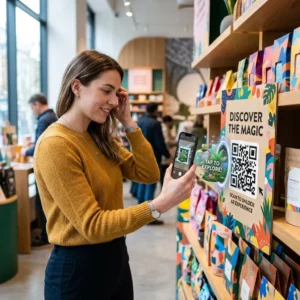
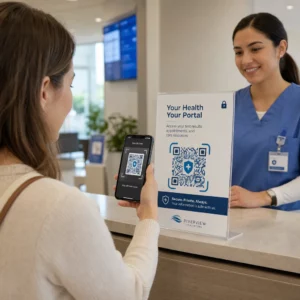
Le tue cartoline di direct mail non vengono tracciate una volta uscite dalla stampante? Senza un collegamento misurabile tra la tua posta fisica e i risultati digitali, stai spendendo il budget senza alcun modo per dimostrare il ROI. Questa guida copre come aggiungere codici QR alle cartoline in modo efficace – dal design e dimensionamento al tracciamento delle prestazioni della campagna in tempo reale.
Perché i codici QR appartengono alle cartoline di direct mail
Il direct mail ha sempre affrontato un problema persistente: misurare la risposta. Invii migliaia di pezzi e ti affidi a prove aneddotiche o riscossioni di coupon per indovinare cosa ha funzionato.
I codici QR risolvono questo. Il servizio postale degli Stati Uniti riconosce i codici QR come un modo diretto per connettere i destinatari della posta a contenuti digitali che fanno progredire il loro percorso cliente – e ha persino offerto sconti sulle spese postali agli spedizionieri che includono codici a barre bidimensionali scansionabili sui loro pezzi. Tra le organizzazioni che tracciano la risposta del direct mail, l'82% utilizza metodi di tracciamento online che sfruttano codici QR, URL specifici o un altro meccanismo digitale.
Il caso è chiaro: se stai inviando cartoline senza un codice QR, stai lasciando sul tavolo sia l'engagement che i dati misurabili.
Scegliere il tipo di codice QR giusto per le cartoline
Prima di generare il tuo codice, decidi se hai bisogno di un statico oppure Dinamico codice QR – la scelta ha conseguenze significative per il modo in cui la tua campagna viene eseguita.
I codici QR statici codificano permanentemente un URL nel modello del codice stesso. Una volta stampata, la destinazione non può essere modificata. Funzionano bene per contenuti evergreen che non avranno mai bisogno di aggiornamenti, come un elenco prodotti permanente o una pagina di contatto di un'azienda.
I codici QR dinamici puntano a un breve link di reindirizzamento che controlli. Il codice stampato rimane lo stesso, ma puoi aggiornare l'URL di destinazione in qualsiasi momento – anche dopo che le cartoline sono già nelle caselle di posta dei destinatari. I codici dinamici sbloccano anche l'analisi completa delle scansioni, inclusi il numero di scansioni, l'ora della scansione, la posizione geografica e il tipo di dispositivo.
Per la maggior parte delle campagne di cartoline, i codici dinamici sono la scelta giusta. Se la tua offerta cambia a metà campagna, puoi reindirizzare gli scanner a una nuova landing page senza ristampare. Se una versione di cartolina supera un'altra, le tue analisi ti mostreranno esattamente il perché.
Traccia ogni scansione dalla tua campagna di cartoline Utilizzare il Generatore di QR code dinamici per creare un codice tracciabile che puoi aggiornare in qualsiasi momento – nessuna ristampa richiesta. Accedi a una dashboard completa di analisi delle scansioni dal momento in cui le tue cartoline arrivano nelle caselle di posta.
A cosa collegare il codice QR della tua cartolina
La destinazione conta tanto quanto il codice stesso. La scansione dovrebbe risultare immediatamente gratificante, non confusa. Scegli una destinazione in base all'obiettivo della tua campagna:
- UN pagina di destinazione promozionale personalizzata per l'offerta o il messaggio specifico della cartolina
- UN modulo di acquisizione lead per raccogliere nomi, email o richieste di preventivo da destinatari interessati
- UN pagina di prodotto o servizio che porta i destinatari a ciò che stai vendendo senza navigazione aggiuntiva
- UN video o demo che permette a una narrazione più approfondita di fare il lavoro che un formato cartolina non può accogliere completamente
- UN pagina di contatto o prenotazione che offre ai destinatari un modo immediato per programmare una chiamata o un appuntamento
- UN download PDF per condividere una brochure, un menu o un catalogo con più dettagli di quanto una cartolina permetta
Qualunque cosa tu colleghi, assicurati che la destinazione sia ottimizzata per dispositivi mobili. I destinatari delle cartoline scansionano con i loro telefoni, e una pagina che non si visualizza bene su mobile li perderà immediatamente. Lo stesso principio si applica quando l'aggiunta di codici QR a volantini e brochure – l'esperienza di destinazione è altrettanto importante quanto il codice stesso.
Dimensionamento del codice QR per la stampa di cartoline
Ottenere la dimensione giusta è fondamentale. Un codice QR troppo piccolo non scansionerà in modo affidabile. Pageloot raccomanda una dimensione minima stampata di 0,8 × 0,8 pollici (2 × 2 cm) per la scansione a distanza ravvicinata, ad esempio quando qualcuno tiene la cartolina a distanza di un braccio.
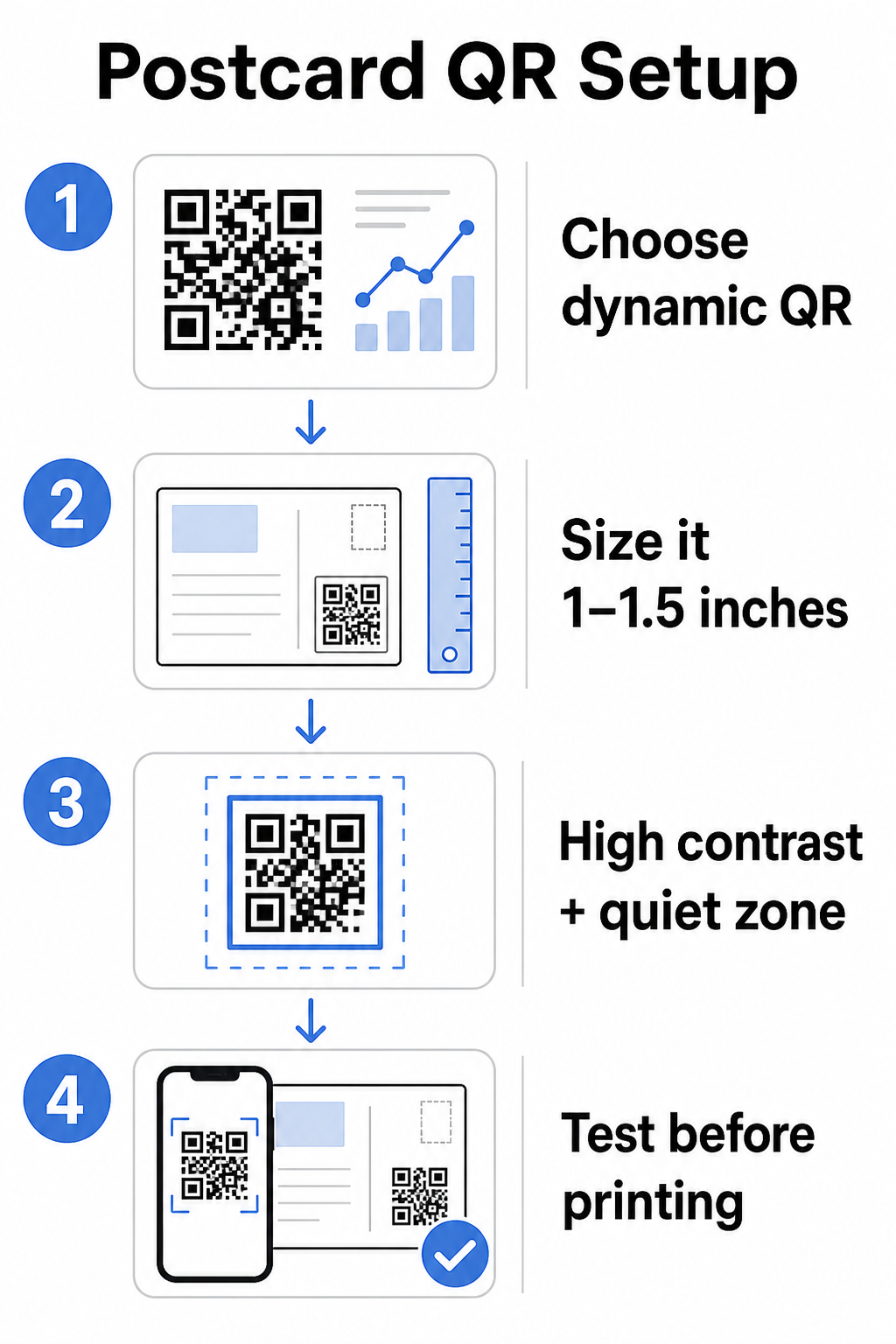
Per le cartoline, che sono tipicamente tenute a circa 10–20 pollici dalla fotocamera del telefono, applica il rapporto distanza di scansione-dimensione di 10:1: la larghezza del codice QR dovrebbe essere circa un decimo della distanza di scansione prevista. Un destinatario che scansiona da 12 pollici di distanza ha bisogno di un codice largo almeno 1,2 pollici.
In pratica, punta a un codice QR tra 1 e 1,5 pollici (25–38 mm) su una cartolina standard. Questo si adatta comodamente alle tipiche distanze di scansione lasciando abbastanza spazio per il resto del tuo design. Per una guida dettagliata su altri formati, consulta le linee guida per il dimensionamento dei codici QR per materiali stampati.
Linee guida di design per codici QR scansionabili su cartoline
Contrasto e colore
Gli scanner funzionano rilevando il contrasto tra moduli scuri e uno sfondo chiaro. Un contrasto elevato è non negoziabile. Il nero su bianco fornisce la scansione più affidabile ed è l'impostazione predefinita più sicura. I colori personalizzati possono funzionare – e mantenere un contrasto elevato con i colori del marchio può aumentare significativamente l'engagement – ma è necessario preservare un contrasto sufficiente tra il primo piano e lo sfondo, con un rapporto minimo di almeno 3:1 e idealmente 4:1 o superiore. La guida completa sull'abbinamento efficace dei colori è disponibile nel migliori pratiche di contrasto cromatico dei codici QR guida.
Evita questi errori comuni:
- Moduli di colore chiaro su uno sfondo chiaro
- Sfumature che creano un contrasto irregolare attraverso il codice
- Invertire il codice (motivo chiaro su sfondo scuro) – alcuni scanner falliscono con schemi di colore invertiti
La Zona Silenziosa
Il sito zona silenziosa è il bordo bianco chiaro che circonda il pattern del codice QR. Secondo gli standard ISO/IEC 18004, deve essere largo almeno quattro moduli su tutti i lati. Su una cartolina, questo significa lasciare circa un quarto di pollice (0,25 pollici) di spazio libero intorno al codice e non posizionare testo, immagini o elementi di design direttamente adiacenti ad esso. Questo buffer aiuta gli scanner a riconoscere dove il codice inizia e finisce – senza di esso, anche un codice ben progettato può non essere scansionato in modo affidabile.
Aggiungere un Logo
Aggiungere il logo del tuo brand al centro del codice QR lo rende più riconoscibile e affidabile su una cartolina. Se incorpori un logo, usa un livello di correzione degli errori più elevato (Q o H) per mantenere la scansionabilità, e mantieni il logo non più grande del 30% dell'area totale del codice. Puoi creare un codice brandizzato usando il Generatore di QR code con logo.
Qualità di stampa
Esporta il tuo codice QR come file vettoriale (SVG o PDF) piuttosto che come JPEG a bassa risoluzione prima di inviarlo alla stampante. I formati vettoriali preservano i bordi netti dei moduli a qualsiasi dimensione di stampa. Richiedi almeno 300 DPI al tuo fornitore di stampa e usa una finitura opaca dove possibile – le cartoline lucide possono produrre riflessi che interferiscono con la scansione sotto luce intensa.
Dove Posizionare il Codice QR sulla Tua Cartolina
Il posizionamento influisce su quanti destinatari scansionano effettivamente. Segui questi principi:
- Posiziona il codice sul lato del messaggio, non sul lato dell'indirizzo – è qui che i destinatari trascorrono il tempo leggendo
- Posizionalo in un punto di lettura naturale, come l'angolo in basso a destra o appena sotto la tua principale call-to-action, in modo che appaia dopo che il destinatario ha assorbito il tuo messaggio
- Circondalo con una chiara call-to-action – frasi come “Scansiona per la tua offerta esclusiva” o “Scansiona per prenotare il tuo appuntamento” dicono ai destinatari esattamente cosa fare e cosa otterranno
- Dagli spazio per respirare – non affollare il codice con altri elementi di design; la zona di silenzio deve rimanere chiara su tutti i lati
Un codice QR senza una call-to-action è un'opportunità persa. I destinatari che non capiscono perché dovrebbero scansionare semplicemente non lo faranno.
Aggiunta di Parametri UTM per il Monitoraggio della Campagna
I codici QR dinamici ti forniscono dati di scansione. Ma per connettere quelle scansioni alla tua analisi di marketing più ampia – incluso ciò che i destinatari fanno dopo essere atterrati sulla tua pagina – hai bisogno di parametri UTM aggiunti al tuo URL di destinazione.
I parametri UTM sono brevi tag aggiunti a un URL che indicano a Google Analytics da dove ha avuto origine il traffico. I parametri standard sono:
| Parametro | Cosa Traccia | Valore Esempio |
|---|---|---|
| `utm_sorgente` | Da dove ha avuto origine il traffico | `posta-diretta` |
| `utm_mezzo` | Il canale di marketing | `cartolina` |
| `utm_campagna` | Il nome specifico della campagna | `saldi-estivi-2025` |
| `utm_contenuto` | Quale versione della cartolina | `versione-a` |
Un URL completo con tag appare così:
`https://yoursite.com/offer?utm`source=posta-diretta&utmmedium=cartolina&utm_campaign=saldi-estivi-2025`
Costruisci il tuo URL usando il Campaign URL Builder di Google, quindi incolla quell'URL con tag nella destinazione del tuo codice QR dinamico. In GA4, puoi rivedere questo traffico sotto Rapporti > Acquisizione > Acquisizione traffico, dove Origine sessione, Mezzo sessione e Campagna sessione rifletteranno i tuoi valori UTM. Questo ti permette di attribuire sessioni del sito web, completamenti di moduli e acquisti direttamente a specifiche campagne di cartoline – chiudendo il ciclo tra performance di stampa e digitali.
Testare prima di stampare
Non inviare mai cartoline in stampa senza aver prima scansionato il codice QR finale. Testalo su più dispositivi – sia iOS che Android – e in diverse condizioni di illuminazione. Conferma che:
- Il codice scansiona rapidamente e in modo affidabile al primo tentativo
- L'URL di destinazione si carica correttamente ed è ottimizzato per i dispositivi mobili
- I reindirizzamenti per i codici dinamici risolvono alla pagina corretta
- Il codice scansiona ancora dopo che il design finale della tua cartolina è stato applicato, specialmente se sono stati aggiunti colori o una sovrapposizione di logo
Se stai stampando un lotto di prova, scansiona la prova fisica nelle condizioni che i destinatari probabilmente sperimenteranno – illuminazione interna tipica, tenuto a distanza di un braccio. Questo rileva problemi di qualità di stampa prima che influenzino la tua tiratura completa. Il le migliori pratiche per la leggibilità dei codici QR guida copre una checklist completa di test pre-stampa.
Monitoraggio e Ottimizzazione Dopo la Spedizione
Una volta che le tue cartoline sono in circolazione, la tua campagna è solo all'inizio. I codici QR dinamici forniscono dati di scansione in tempo reale, permettendoti di monitorare:
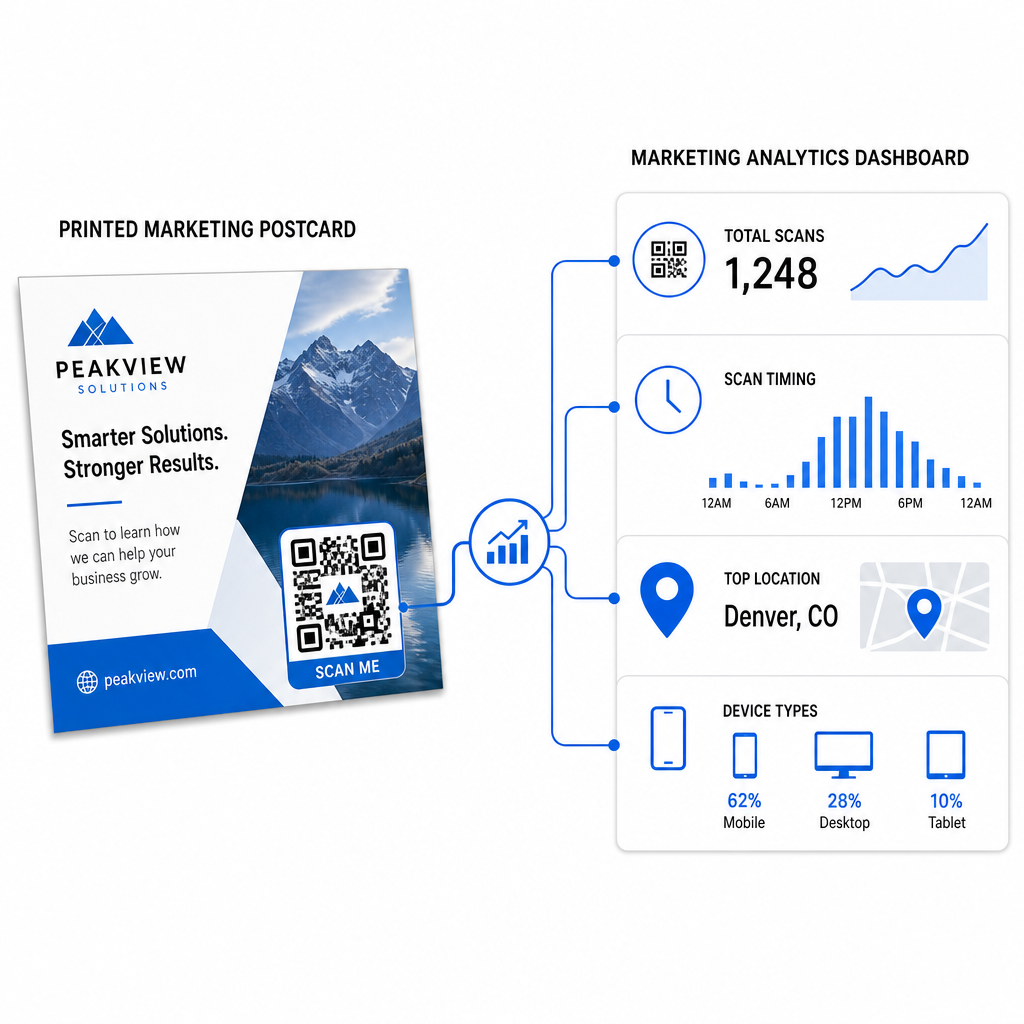
- Scansioni totali e utenti unici – quanti destinatari si sono impegnati e quanti hanno scansionato più di una volta
- Tempistiche di scansione – quali giorni e orari hanno generato la maggiore attività dopo l'invio postale
- Distribuzione geografica – quali codici postali o regioni hanno risposto più fortemente
- Tipo di dispositivo – se i destinatari hanno scansionato su iOS o Android, il che può informare le decisioni sulle landing page mobili
Usa questi dati per affinare le spedizioni future. Se un'area particolare ha mostrato alti tassi di scansione, aumenta il volume lì la prossima volta. Se le scansioni hanno raggiunto il picco il terzo giorno dopo la consegna, tempistica il tuo follow-up via email di conseguenza.
Per campagne multi-versione – dove stai testando diverse offerte, design o call-to-action – assegna a ogni versione della cartolina il proprio codice QR dinamico. Le analisi delle scansioni ti mostreranno quale versione ha generato più coinvolgimento senza aspettare solo i dati di conversione.
Inizia a Misurare le Prestazioni della Tua Direct Mail Il sito Generatore di codici QR di Pageloot ti permette di creare, personalizzare e gestire codici QR per campagne di direct mail – con analisi integrate e la possibilità di aggiornare le destinazioni senza ristampare.
Errori comuni da evitare
Collegamento a una homepage invece di una pagina della campagna. Una homepage fa fare al destinatario un lavoro extra per trovare l'offerta menzionata sulla cartolina. Ogni passo extra riduce le conversioni.
Utilizzo di un codice QR statico per un'offerta a tempo limitato. Se l'offerta scade o l'URL cambia, un codice statico punterà a una pagina rotta o irrilevante senza alcun modo per correggerlo dopo la stampa.
Rendere il codice QR troppo piccolo. Qualsiasi cosa sotto 0,8 × 0,8 pollici è rischiosa, in particolare se il design della cartolina è troppo carico o il codice utilizza colori personalizzati.
Saltare la call-to-action. Un codice QR solitario su una cartolina non dà ai destinatari alcun motivo per scansionare. Dì loro cosa otterranno.
Non testare sul pezzo stampato fisico. Le prove digitali non sempre prevedono come un codice verrà scansionato dopo essere passato attraverso una stampante commerciale. Verifica sempre sull'output effettivo.
Gli stessi principi fondamentali si applicano a tutti i formati di stampa – il guida ai codici QR sui volantini copre come adattare queste pratiche per altri materiali a risposta diretta.
Una cartolina con un codice QR ben eseguito fa due cose contemporaneamente: offre ai destinatari un modo immediato e senza attriti per agire sulla tua offerta, e ti fornisce dati misurabili su come la tua campagna sta effettivamente performando. La combinazione di un codice QR dinamico, una destinazione ottimizzata per dispositivi mobili, URL con tag UTM e analisi delle scansioni chiude il cerchio tra stampa offline e risultati digitali.
Inizia generando un codice QR dinamico tramite il Generatore di codici QR dinamici Pageloot, dimensionarlo correttamente per il formato della tua cartolina, applica un branding ad alto contrasto, scrivi una chiara call-to-action e testa su una prova fisica prima della tiratura completa. Dal momento in cui i destinatari iniziano a scansionare, la tua dashboard ti mostrerà esattamente cosa sta funzionando.
Domande frequenti
Punta ad almeno 0.8 × 0.8 pollici (2 × 2 cm) come un minimo assoluto, ma per distanze di scansione tipiche per cartoline di 10–20 pollici, una dimensione tra 1 e 1.5 pollici (25–38 mm) è più affidabile. Applica la regola 10:1: rendi la larghezza del codice circa un decimo della distanza di scansione prevista.
Sì, ma solo se hai usato un codice QR dinamico prima di stampare. I codici QR dinamici puntano a un link di reindirizzamento che controlli, quindi puoi aggiornare l'URL di destinazione in qualsiasi momento senza ristampare. I codici QR statici codificano permanentemente la destinazione e non possono essere modificati a posteriori.
Utilizza un codice QR dinamico da una piattaforma come Pageloot, che fornisce analisi integrate mostrando il totale delle scansioni, gli utenti unici, la tempistica delle scansioni, la posizione geografica e il tipo di dispositivo. Per un'attribuzione più approfondita in Google Analytics, aggiungi i parametri UTM (utmsource, utmmedium, utm_campaign) al tuo URL di destinazione prima di generare il codice – le scansioni appariranno quindi come sessioni tracciabili nel tuo rapporto di acquisizione traffico di GA4.