> 사용 사례 > QR Codes on Postcards: How to Drive Engagement and Track Results
Scanning postcard QR code

QR Codes on Postcards: How to Drive Engagement and Track Results

Learn how to add QR codes to postcards to drive engagement and track ROI. This guide covers sizing, dynamic tracking, design tips, and campaign optimization.
Updated on 7월 2, 2026
목차

Are your direct mail postcards going untracked once they leave the printer? Without a measurable link between your physical mail and digital outcomes, you’re spending budget with no way to prove ROI. This guide covers how to add QR codes to postcards effectively – from design and sizing to tracking campaign performance in real time.

Why QR Codes Belong on Direct Mail Postcards

Direct mail has always faced one persistent problem: measuring response. You send thousands of pieces and rely on anecdotal evidence or coupon redemptions to guess what worked.

QR codes solve this. The U.S. Postal Service recognizes QR codes as a direct way to connect mail recipients to digital content that advances their customer journey – and has even offered postage discounts to mailers who include scannable two-dimensional barcodes on their pieces. Among organizations that do track direct mail response, 82% use online tracking methods that leverage QR codes, specific URLs, or another digital mechanism.

The case is clear: if you’re sending postcards without a QR code, you’re leaving both engagement and measurable data on the table.

Choosing the Right QR Code Type for Postcards

Before generating your code, decide whether you need a 정적 또는 동적 QR code – the choice has significant consequences for how your campaign runs.

Static QR codes permanently encode a URL into the code pattern itself. Once printed, the destination cannot be changed. They work fine for evergreen content that will never need updating, such as a permanent product listing or a business’s contact page.

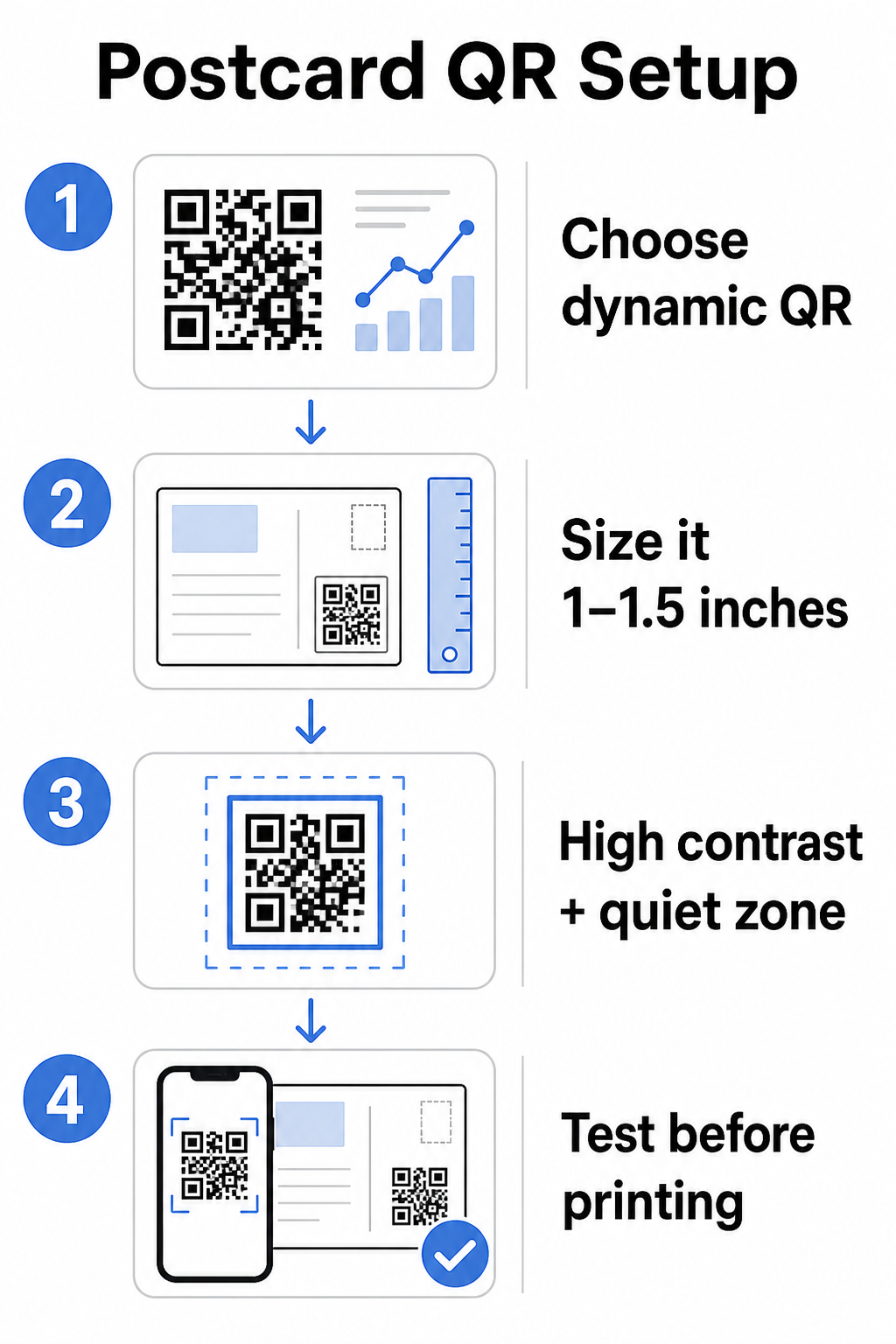
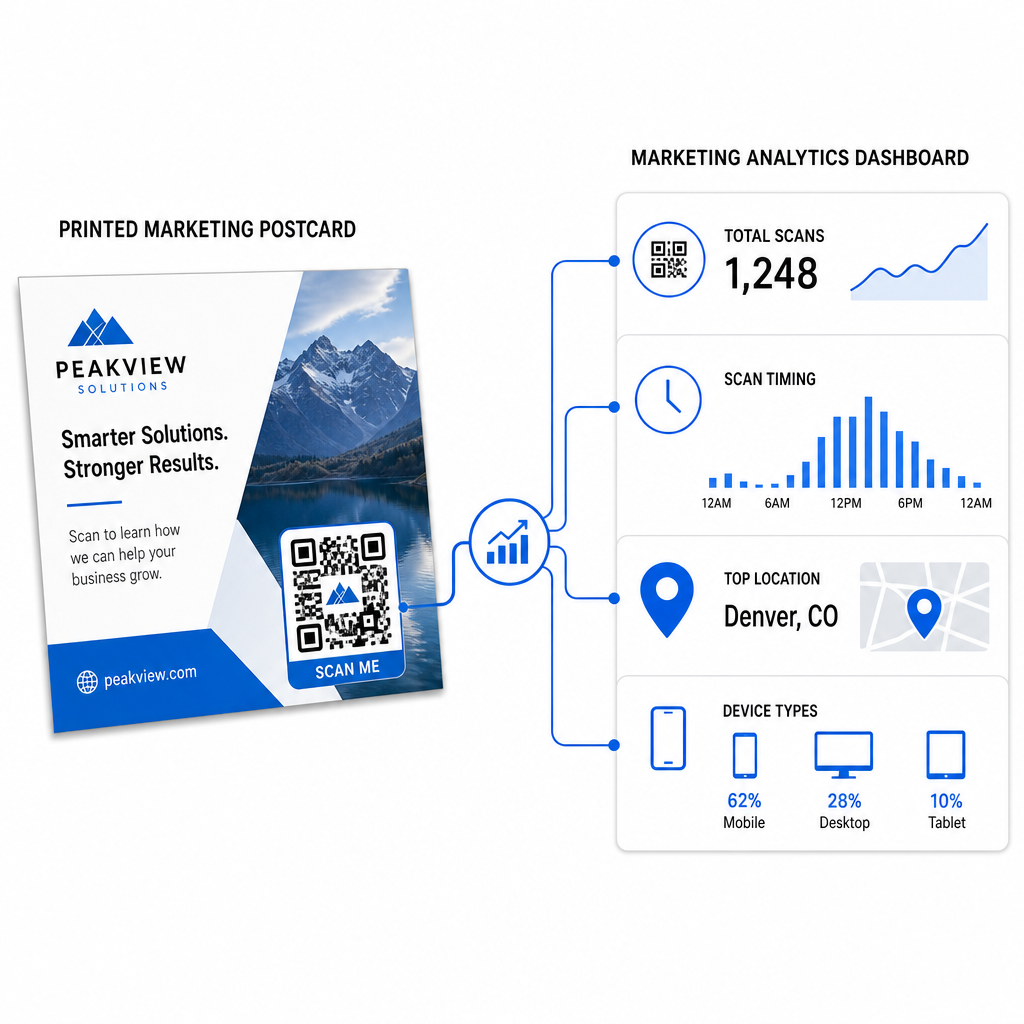
Dynamic QR codes point to a short redirect link that you control. The printed code stays the same, but you can update the destination URL at any time – even after the postcards are already in recipients’ mailboxes. Dynamic codes also unlock full scan analytics, including scan count, time of scan, geographic location, and device type.

For most postcard campaigns, dynamic codes are the right choice. If your offer changes mid-campaign, you can redirect scanners to a new landing page without reprinting. If one postcard version outperforms another, your analytics will show you exactly why.

Track Every Scan From Your Postcard Campaign 사용 동적 QR 코드 생성기 to create a trackable code you can update anytime – no reprinting required. Access a full scan analytics dashboard from the moment your postcards hit mailboxes.

What to Link Your Postcard QR Code To

The destination matters as much as the code itself. Scanning should feel immediately rewarding, not confusing. Choose a destination based on your campaign goal:

  • promotional landing page tailored to the postcard’s specific offer or message
  • lead capture form to collect names, emails, or quote requests from interested recipients
  • product or service page that gets recipients to what you’re selling without extra navigation
  • video or demo that lets deeper storytelling do the work a postcard format can’t fully accommodate
  • contact or booking page that gives recipients an immediate way to schedule a call or appointment
  • PDF download sharing a brochure, menu, or catalog with more detail than a postcard allows

Whatever you link to, make sure the destination is mobile-optimized. Postcard recipients scan with their phones, and a page that doesn’t render well on mobile will lose them immediately. The same principle applies when 전단지와 브로슈어에 QR 코드를 추가하여 – the destination experience is just as important as the code itself.

Sizing Your QR Code for Postcard Printing

Getting the size right is critical. A QR code that’s too small won’t scan reliably. Pageloot recommends a minimum printed size of 0.8 × 0.8 inches (2 × 2 cm) for close-range scanning, such as when someone holds the postcard at arm’s length.

Postcard QR code tips

For postcards, which are typically held at roughly 10–20 inches from the phone camera, apply the 10:1 scan distance-to-size ratio: the QR code width should be approximately one-tenth of the expected scanning distance. A recipient scanning from 12 inches away needs a code that’s at least 1.2 inches wide.

In practice, aim for a QR code between 1 and 1.5 inches (25–38 mm) on a standard postcard. This comfortably accommodates typical scanning distances while leaving enough room for the rest of your design. For detailed guidance across other formats, see the QR code sizing guidelines for printed materials.

Design Guidelines for Scannable Postcard QR Codes

대비 및 색상

Scanners work by detecting the contrast between dark modules and a light background. High contrast is non-negotiable. Black on white provides the most reliable scanning and is the safest default. Custom colors can work – and maintaining high contrast with branded colors can meaningfully increase engagement – but you need to preserve sufficient contrast between the foreground and background, with a minimum ratio of at least 3:1 and ideally 4:1 or higher. Full guidance on pairing colors effectively is available in the QR 코드 색상 대비 모범 사례 가이드에서 확인할 수 있습니다.

Avoid these common pitfalls:

  • Light-colored modules on a light background
  • Gradients that create uneven contrast across the code
  • Inverting the code (light pattern on dark background) – some scanners fail on reversed color schemes

콰이어트 존

그만큼 콰이어트 존 is the clear white border surrounding the QR code pattern. Per ISO/IEC 18004 standards, it must be at least four modules wide on all sides. On a postcard, this means leaving roughly a quarter inch (0.25 inch) of clear space around the code and not placing text, images, or design elements directly adjacent to it. This buffer helps scanners recognize where the code begins and ends – without it, even a well-designed code can fail to scan reliably.

Adding a Logo

Adding your brand logo to the center of the QR code makes it more recognizable and trustworthy on a postcard. If you embed a logo, use a higher error correction level (Q or H) to maintain scannability, and keep the logo to no more than 30% of the code’s total area. You can create a branded code using the 로고가 있는 QR 코드 생성기.

인쇄 품질

Export your QR code as a vector file (SVG or PDF) rather than a low-resolution JPEG before sending to the printer. Vector formats preserve sharp module edges at any print size. Request at least 300 DPI from your print vendor and use a matte finish where possible – glossy postcards can produce glare that interferes with scanning under bright light.

Where to Place the QR Code on Your Postcard

Placement affects how many recipients actually scan. Follow these principles:

  • Place the code on the message side, not the address side – this is where recipients spend time reading
  • Position it at a natural reading endpoint, such as the bottom right corner or just below your main call-to-action, so it appears after the recipient has absorbed your message
  • Surround it with a clear call-to-action – phrases like “Scan for your exclusive offer” or “Scan to book your appointment” tell recipients exactly what to do and what they’ll get
  • Give it breathing room – don’t crowd the code with other design elements; the quiet zone must remain clear on all sides

A QR code without a call-to-action is a missed opportunity. Recipients who don’t understand why they should scan simply won’t.

Adding UTM Parameters for Campaign Tracking

Dynamic QR codes give you scan data. But to connect those scans to your broader marketing analytics – including what recipients do after they land on your page – you need UTM 매개변수 appended to your destination URL.

UTM parameters are short tags added to a URL that tell Google Analytics where traffic originated. The standard parameters are:

매개변수 What It Tracks Example Value
`utm_source` Where the traffic originated `direct-mail`
`utm_medium` The marketing channel `postcard`
`utm_campaign` The specific campaign name `summer-sale-2025`
`utm_content` Which postcard version `version-a`

A complete tagged URL looks like this:

`https://yoursite.com/offer?utmsource=direct-mail&utmmedium=postcard&utm_campaign=summer-sale-2025`

Build your URL using Google’s Campaign URL Builder, then paste that tagged URL into your dynamic QR code’s destination. In GA4, you can review this traffic under Reports > Acquisition > Traffic acquisition, where Session source, Session medium, and Session campaign will reflect your UTM values. This lets you attribute website sessions, form completions, and purchases directly back to specific postcard campaigns – closing the loop between print and digital performance.

인쇄 전 테스트

Never send postcards to print without scanning the final QR code first. Test it across multiple devices – both iOS and Android – and under different lighting conditions. Confirm that:

  • The code scans quickly and reliably on the first attempt
  • The destination URL loads correctly and is mobile-optimized
  • Redirects for dynamic codes resolve to the right page
  • The code still scans after your final postcard design has been applied, especially if colors or a logo overlay were added

If you’re printing a test batch, scan the physical proof under the conditions recipients are likely to experience – typical indoor lighting, held at arm’s length. This catches print quality issues before they affect your full run. The QR 코드 가독성을 위한 모범 사례 guide covers a complete pre-print testing checklist.

Tracking and Optimizing After Mailing

Once your postcards are in circulation, your campaign is only beginning. Dynamic QR codes provide real-time scan data, letting you monitor:

Tracking postcard scans
  • Total scans and unique users – how many recipients engaged, and how many scanned more than once
  • Scan timing – which days and times drove the most activity following the mail drop
  • Geographic distribution – which zip codes or regions responded most strongly
  • Device type – whether recipients scanned on iOS or Android, which can inform mobile landing page decisions

Use this data to refine future mailings. If a particular area showed high scan rates, increase volume there next time. If scans peaked on day three after delivery, time your email follow-up accordingly.

For multi-version campaigns – where you’re testing different offers, designs, or calls-to-action – assign each postcard version its own dynamic QR code. The scan analytics will show you which version drove more engagement without waiting for conversion data alone.

Start Measuring Your Direct Mail Performance 그만큼 Pageloot QR 코드 생성기 lets you create, customize, and manage QR codes for direct mail campaigns – with built-in analytics and the ability to update destinations without reprinting.

피해야 할 일반적인 실수

Linking to a homepage instead of a campaign page. A homepage makes the recipient do extra work to find the offer mentioned on the postcard. Every extra step reduces conversions.

Using a static QR code for a time-limited offer. If the offer expires or the URL changes, a static code will point to a broken or irrelevant page with no way to fix it after printing.

Making the QR code too small. Anything under 0.8 × 0.8 inches is risky, particularly if the postcard design is busy or the code uses custom colors.

Skipping the call-to-action. A lone QR code on a postcard gives recipients no reason to scan. Tell them what they’ll get.

Not testing on the physical printed piece. Digital proofs don’t always predict how a code will scan after going through a commercial printer. Always verify on the actual output.

The same core principles apply across print formats – the QR codes on flyers guide covers how to adapt these practices for other direct-response materials.

A postcard with a well-executed QR code does two things at once: it gives recipients an immediate, friction-free way to act on your offer, and it gives you measurable data on how your campaign is actually performing. The combination of a dynamic QR code, a mobile-optimized destination, UTM-tagged URLs, and scan analytics closes the loop between offline print and digital outcomes.

Start by generating a dynamic QR code through the Pageloot 동적 QR 코드 생성기, size it correctly for your postcard format, apply high-contrast branding, write a clear call-to-action, and test on a physical proof before the full print run. From the moment recipients start scanning, your dashboard will show you exactly what’s working.

자주 묻는 질문

What size should a QR code be on a postcard?

Aim for at least 0.8 × 0.8 inches (2 × 2 cm) as an absolute minimum, but for typical postcard scanning distances of 10–20 inches, a size between 1 and 1.5 inches (25–38 mm) is more reliable. Apply the 10:1 rule: make the code width roughly one-tenth of the expected scanning distance.

Can I change the QR code destination after the postcards are printed?

Yes, but only if you used a dynamic QR code before printing. Dynamic QR codes point to a redirect link that you control, so you can update the destination URL at any time without reprinting. Static QR codes permanently encode the destination and cannot be changed after the fact.

How do I track how many people scanned my postcard QR code?

Use a dynamic QR code from a platform like Pageloot, which provides built-in analytics showing total scans, unique users, scan timing, geographic location, and device type. For deeper attribution in Google Analytics, append UTM parameters (utmsource, utmmedium, utm_campaign) to your destination URL before generating the code – scans will then appear as trackable sessions in your GA4 Traffic acquisition report.

작성자 정보

시임 코스타비는 페이지루트의 콘텐츠 책임자입니다. 그는 페이지루트의 혁신적인 QR 코드 생성 서비스에 대한 글을 쓰고 있습니다. 5년 이상 QR 코드 분야에서 쌓아온 깊이 있는 전문 지식을 바탕으로, 시임은 이 분야의 전문가로 인정받고 있습니다. 그는 QR 기술을 활용하여 디지털 상호작용을 간소화하고 향상시키는 데 크게 기여하고 있습니다.

범주
에 대해 자세히 알아보기
QR 명함 스캔
QR 코드 만들기 명함

온라인으로 QR 코드를 생성해야하는 경우 QR 코드 만들기 무료로 여기!
Pageloot는 #1 Go-To 솔루션 QR 코드를 만들고 스캔합니다.

BL-0282

블로그 세대

20,000개 이상의 브랜드로부터 신뢰를 받아 더 많은 매출, 리뷰, 팔로워를 확보했습니다.

클라이언트 로고
최고 브랜드의 신뢰
5 중 4.8 평가

4.86 / 5 별점

휴고 로랑
휴고 로랑
레스토랑 주인
가장 쉽고 안정적인 QR 코드 생성기. PDF 파일을 즉시 업로드할 수 있습니다. 이제 레스토랑 메뉴가 디지털화되었습니다.
루카스 얀센
루카스 얀센
부동산 개발사
이것은 훌륭한 도구이며 QR 코드를 사용하면 원하는 곳으로 이동할 수 있습니다. 우리는 위치 QR 코드만 사용하지만 유용한 기능이 너무 많습니다.
엠마 모레티
엠마 모레티
소매 제품
사용하기 쉽고 빠릅니다. 그것은 훌륭하게 작동하고 완벽한 이미지를 생성하므로 직원들이 내 vCard를 다운로드할 수 있습니다.
휴고 로랑
휴고 로랑
레스토랑 주인
가장 쉽고 안정적인 QR 코드 생성기. PDF 파일을 즉시 업로드할 수 있습니다. 이제 레스토랑 메뉴가 디지털화되었습니다.
루카스 얀센
루카스 얀센
부동산 개발사
이것은 훌륭한 도구이며 QR 코드를 사용하면 원하는 곳으로 이동할 수 있습니다. 우리는 위치 QR 코드만 사용하지만 유용한 기능이 너무 많습니다.
엠마 모레티
엠마 모레티
소매 제품
사용하기 쉽고 빠릅니다. 그것은 훌륭하게 작동하고 완벽한 이미지를 생성하므로 직원들이 내 vCard를 다운로드할 수 있습니다.
더 많은 QR 코드보기
제품 바코드 스캔
바코드 스캐너 방법 일하다
무엇이든 디지털 경험으로 전환하세요 3분 이내에.

14일 무료 체험.

신용카드는 필요 없습니다.

첫 구매 시 30% 할인

코드를 사용하세요:

MP3 파일 공유

PDF QR 코드를 생성하려면 가입하세요

필요한 모든 것을 업로드하고 표시합니다.

  • 오디오 파일
  • 팟캐스트
  • 음악

가입 시 14일 무료 체험.
체험 기간 후 QR 코드 만료.

오디오 mp3 QR 코드를 생성하려면 가입하세요

프레임으로 더 많은 스캔 확보

QR 코드에 더 많은 프레임을 추가하려면 가입하세요

클릭 유도 문안 프레임은 고객이 QR 코드와 쉽게 상호 작용할 수 있도록 도와줍니다. 사용해 보세요!

가입 시 14일 무료 체험.
체험 기간 후 QR 코드 만료.

QR 코드에 더 많은 프레임을 추가하려면 가입하세요

도형으로 더 많은 스타일 추가

더 많은 도형을 만들려면 가입하세요

QR 코드는 정사각형일 필요가 없습니다. 브랜드 이미지에 맞게 전환해 보세요.

가입 시 14일 무료 체험.
체험 기간 후 QR 코드 만료.

더 많은 도형을 만들려면 가입하세요

QR 코드에 로고 추가

QR 코드에 로고를 추가하려면 가입하세요

로고와 브랜드를 추가하여 QR 코드를 돋보이게 만드세요.

가입 시 14일 무료 체험.
체험 기간 후 QR 코드 만료.

QR 코드에 로고를 추가하려면 가입하세요

스마트 앱 스토어 리디렉션

앱 스토어 QR 코드를 생성하려면 가입하세요

스마트 앱 스토어 QR 코드에 앱 링크를 추가하세요. 사용자는 장치에 따라 리디렉션됩니다.

가입 시 14일 무료 체험.
체험 기간 후 QR 코드 만료.

앱 스토어 QR 코드를 생성하려면 가입하세요

QR 코드에 이미지 업로드

이미지 QR 코드를 생성하려면 가입하세요

이미지를 쉽게 공유하세요. 몇 초 안에 동적으로 이미지를 변경하십시오.

가입 시 14일 무료 체험.
체험 기간 후 QR 코드 만료.

이미지 QR 코드를 생성하려면 가입하세요

PDF 파일 공유

PDF QR 코드를 생성하려면 가입하세요

필요한 모든 것을 업로드하고 표시합니다.

  • 메뉴 및 가격표
  • 명령
  • 모든 문서

가입 시 14일 무료 체험.
체험 기간 후 QR 코드 만료.

PDF QR 코드를 생성하려면 가입하세요

인쇄 없이 나중에 편집

다시 인쇄하지 않고 QR 코드를 편집하려면 가입하세요

동적 QR 코드를 사용하면 새 QR 코드를 인쇄하지 않고도 QR 코드의 내용을 변경할 수 있습니다.

가입 시 14일 무료 체험.
체험 기간 후 QR 코드 만료.

다시 인쇄하지 않고 QR 코드를 편집하려면 가입하세요

언제? 어디서? QR 코드 스캔 추적

QR 코드를 추적하려면 가입하세요

어떤 QR 코드가 가장 많이 스캔되고 무엇이 고객을 가장 흥분시키는지 알아보십시오.

가입 시 14일 무료 체험.
체험 기간 후 QR 코드 만료.

QR 코드를 추적하려면 가입하세요

인쇄 준비 파일 제공

PDF 및 SVG와 같은 벡터 QR 코드를 생성하려면 가입하세요.

.EPS, .PDF, .SVG

HD 해상도로 QR 코드를 다운로드하고 싶으신가요? 인쇄할 준비가 된 벡터 또는 픽셀 형식을 가져옵니다.

가입 시 14일 무료 체험.
체험 기간 후 QR 코드 만료.

PDF 및 SVG와 같은 벡터 QR 코드를 생성하려면 가입하세요.

기다리세요. 귀하의 QR 코드는 로드 중... 로드 중...

나만의 것으로 만들기

나중을 위해 QR 코드를 저장하려면 가입하세요.

다양한 색상, 로고 및 클릭 유도문안 프레임으로 멋진 QR 코드를 만들어 더 많은 스캔을 받으세요.

가입 시 14일 무료 체험.
체험 기간 후 QR 코드 만료.

나중을 위해 QR 코드를 저장하려면 가입하세요.