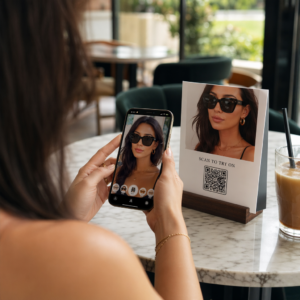
Чи ваші листівки прямої поштової розсилки залишаються невідстеженими, щойно вони залишають принтер? Без вимірюваного зв’язку між вашою фізичною поштою та цифровими результатами ви витрачаєте бюджет, не маючи можливості довести рентабельність інвестицій. Цей посібник охоплює, як ефективно додавати QR-коди до листівок – від дизайну та розміру до відстеження ефективності кампанії в реальному часі.
Чому QR-коди належать на листівках прямої поштової розсилки
Пряма поштова розсилка завжди стикалася з однією постійною проблемою: вимірювання відповіді. Ви надсилаєте тисячі одиниць і покладаєтеся на анекдотичні докази або погашення купонів, щоб вгадати, що спрацювало.
QR-коди вирішують цю проблему. Поштова служба США визнає QR-коди як прямий спосіб зв’язати одержувачів пошти з цифровим контентом, який просуває їхню клієнтську подорож – і навіть пропонувала знижки на поштові відправлення для відправників, які включають скановані двовимірні штрих-коди на свої матеріали. Серед організацій, які відстежують відповідь на пряму поштову розсилку, 82% використовують онлайн-методи відстеження, що використовують QR-коди, конкретні URL-адреси або інший цифровий механізм.
Випадок очевидний: якщо ви надсилаєте листівки без QR-коду, ви залишаєте як залучення, так і вимірювані дані на столі.
Вибір правильного типу QR-коду для листівок
Перед генерацією вашого коду вирішіть, чи потрібен вам статичні або Динамічний QR-код – цей вибір має значні наслідки для того, як проходить ваша кампанія.
Статичні QR-коди постійно кодують URL-адресу в сам шаблон коду. Після друку призначення не може бути змінено. Вони чудово підходять для вічного контенту, який ніколи не потребуватиме оновлення, наприклад, постійний список продуктів або сторінка контактів компанії.
Динамічні QR-коди вказують на коротке посилання для перенаправлення, яке ви контролюєте. Надрукований код залишається незмінним, але ви можете оновлювати цільову URL-адресу в будь-який час – навіть після того, як листівки вже знаходяться в поштових скриньках одержувачів. Динамічні коди також розблоковують повну аналітику сканувань, включаючи кількість сканувань, час сканування, географічне розташування та тип пристрою.
Для більшості кампаній з листівками динамічні коди є правильним вибором. Якщо ваша пропозиція змінюється в середині кампанії, ви можете перенаправити сканерів на нову цільову сторінку без повторного друку. Якщо одна версія листівки перевершує іншу, ваша аналітика покаже вам, чому саме.
Відстежуйте кожне сканування з вашої кампанії листівок Використовувати Динамічний QR код: генератор щоб створити відстежуваний код, який ви можете оновлювати в будь-який час – повторний друк не потрібен. Отримайте доступ до повної панелі аналітики сканувань з моменту, коли ваші листівки потраплять у поштові скриньки.
До чого прив'язати QR-код вашої листівки
Призначення має таке ж значення, як і сам код. Сканування має бути негайно винагороджуючим, а не заплутаним. Виберіть призначення на основі мети вашої кампанії:
- A промоційна цільова сторінка адаптована до конкретної пропозиції або повідомлення листівки
- A форма для збору лідів для збору імен, електронних адрес або запитів на пропозиції від зацікавлених одержувачів
- A сторінка продукту або послуги яка доставляє одержувачів до того, що ви продаєте, без зайвої навігації
- A відео або демонстрація що дозволяє глибшому оповіданню виконувати роботу, яку формат листівки не може повністю вмістити
- A сторінка контактів або бронювання яка дає одержувачам негайний спосіб запланувати дзвінок або зустріч
- A завантаження PDF обмін брошурою, меню або каталогом з більшою деталізацією, ніж дозволяє листівка
До чого б ви не прив'язали, переконайтеся, що призначення є оптимізована для мобільних пристроїв. Одержувачі листівок сканують за допомогою своїх телефонів, і сторінка, яка погано відображається на мобільних пристроях, негайно їх втратить. Той самий принцип застосовується, коли QR-коди до листівок та брошур – досвід цільової сторінки так само важливий, як і сам код.
Визначення розміру QR-коду для друку листівок
Правильний розмір є критично важливим. Занадто маленький QR-код не буде надійно скануватися. Pageloot рекомендує мінімальний надрукований розмір 0,8 × 0,8 дюйма (2 × 2 см) для сканування з близької відстані, наприклад, коли хтось тримає листівку на відстані витягнутої руки.
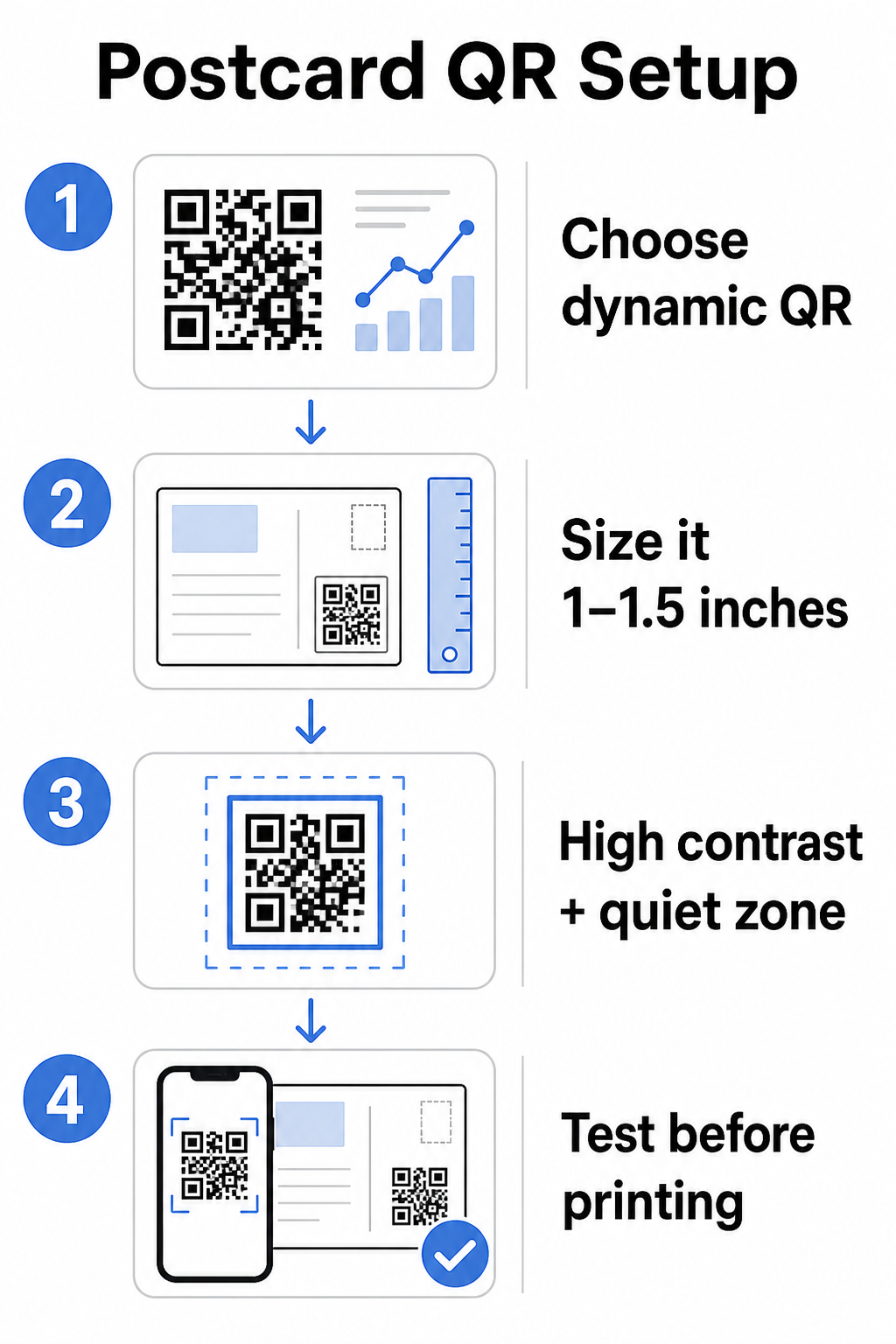
Для листівок, які зазвичай тримають на відстані приблизно 10–20 дюймів від камери телефону, застосуйте співвідношення відстані сканування до розміру 10:1: ширина QR-коду повинна становити приблизно одну десяту від очікуваної відстані сканування. Одержувачу, який сканує з відстані 12 дюймів, потрібен код шириною щонайменше 1,2 дюйма.
На практиці прагніть до QR-коду розміром від 1 до 1,5 дюйма (25–38 мм) на стандартній листівці. Це зручно вміщує типові відстані сканування, залишаючи достатньо місця для решти вашого дизайну. Для детального керівництва щодо інших форматів дивіться керівництво з розмірів QR-кодів для друкованих матеріалів.
Рекомендації з дизайну для сканованих QR-кодів листівок
Контраст і колір
Сканери працюють, виявляючи контраст між темними модулями та світлим фоном. Високий контраст є обов'язковим. Чорний на білому забезпечує найнадійніше сканування та є найбезпечнішим варіантом за замовчуванням. Користувацькі кольори можуть працювати – і підтримка високого контрасту з фірмовими кольорами може значно підвищити залученість – але вам потрібно зберегти достатній контраст між переднім планом і фоном, з мінімальним співвідношенням щонайменше 3:1, а в ідеалі 4:1 або вище. Повні рекомендації щодо ефективного поєднання кольорів доступні в найкращих практик контрастності кольорів QR-коду посібнику.
Уникайте цих поширених помилок:
- Світлі модулі на світлому фоні
- Градієнти, що створюють нерівномірний контраст по всьому коду
- Інвертування коду (світлий візерунок на темному фоні) – деякі сканери не працюють зі зворотними колірними схемами
Тиха зона
Цей тихої зони це чітка біла рамка, що оточує візерунок QR-коду. Згідно зі стандартами ISO/IEC 18004, вона повинна бути щонайменше чотири модулі завширшки з усіх боків. На листівці це означає залишити приблизно чверть дюйма (0,25 дюйма) вільного простору навколо коду і не розміщувати текст, зображення або елементи дизайну безпосередньо поруч із ним. Цей буфер допомагає сканерам розпізнавати, де починається і закінчується код – без нього навіть добре розроблений код може не скануватися надійно.
Додавання логотипу
Додавання логотипу вашого бренду в центр QR-коду робить його більш впізнаваним і надійним на листівці. Якщо ви вбудовуєте логотип, використовуйте вищий рівень виправлення помилок (Q або H) для збереження можливості сканування та обмежуйте розмір логотипу не більше ніж 30% від загальної площі коду. Ви можете створити брендований код за допомогою Генератор QR-кодів з логотипом.
Якість друку
Експортуйте свій QR-код як векторний файл (SVG або PDF), а не як JPEG з низькою роздільною здатністю, перш ніж надсилати його до друкарні. Векторні формати зберігають чіткі краї модулів при будь-якому розмірі друку. Запитуйте щонайменше 300 DPI у свого постачальника друку та використовуйте матове покриття, де це можливо – глянцеві листівки можуть створювати відблиски, що заважають скануванню при яскравому освітленні.
Де розмістити QR-код на листівці
Розміщення впливає на те, скільки одержувачів насправді сканують. Дотримуйтесь цих принципів:
- Розмістіть код на стороні повідомлення, а не на стороні адреси – саме тут одержувачі проводять час за читанням
- Розташуйте його в природній точці завершення читання, наприклад, у нижньому правому куті або одразу під вашим основним закликом до дії, щоб він з'явився після того, як одержувач засвоїть ваше повідомлення
- Оточіть його чітким закликом до дії – фрази на кшталт “Скануйте для вашої ексклюзивної пропозиції” або “Скануйте, щоб записатися на прийом” точно вказують одержувачам, що робити і що вони отримають
- Дайте йому простір – не захаращуйте код іншими елементами дизайну; тиха зона повинна залишатися вільною з усіх боків
QR-код без заклику до дії – це втрачена можливість. Одержувачі, які не розуміють, навіщо їм сканувати, просто не будуть цього робити.
Додавання UTM-параметрів для відстеження кампаній
Динамічні QR-коди надають дані про сканування. Але щоб пов'язати ці сканування з вашою ширшою маркетинговою аналітикою – включно з тим, що роблять одержувачі після переходу на вашу сторінку – вам потрібні UTM-параметри додані до вашої цільової URL-адреси.
UTM-параметри – це короткі теги, додані до URL-адреси, які повідомляють Google Analytics, звідки надійшов трафік. Стандартні параметри:
| Параметр | Що відстежує | Приклад значення |
|---|---|---|
| `utm_source` | Звідки надійшов трафік | `direct-mail` |
| `utm_medium` | Маркетинговий канал | `postcard` |
| `utm_campaign` | Конкретна назва кампанії | `summer-sale-2025` |
| `utm_content` | Яка версія листівки | `version-a` |
Повна URL-адреса з тегами виглядає так:
`https://yoursite.com/offer?utm``source=direct-mail&utm``medium=postcard&utm_campaign=summer-sale-2025`
Створіть свою URL-адресу за допомогою Google Campaign URL Builder, потім вставте цю URL-адресу з тегами в цільове призначення вашого динамічного QR-коду. У GA4 ви можете переглянути цей трафік у розділі Звіти > Залучення > Залучення трафіку, де Джерело сесії, Канал сесії та Кампанія сесії відображатимуть ваші значення UTM. Це дозволяє вам безпосередньо пов'язувати сесії веб-сайту, заповнення форм та покупки з конкретними кампаніями листівок – замикаючи цикл між друкованою та цифровою ефективністю.
Тестування перед друком
Ніколи не відправляйте листівки до друку, не відсканувавши спочатку фінальний QR-код. Протестуйте його на кількох пристроях – як iOS, так і Android – та за різних умов освітлення. Переконайтеся, що:
- Код сканується швидко та надійно з першої спроби
- Цільова URL-адреса завантажується коректно та оптимізована для мобільних пристроїв
- Перенаправлення для динамічних кодів ведуть на правильну сторінку
- Код все ще сканується після застосування вашого остаточного дизайну листівки, особливо якщо були додані кольори або накладення логотипу
Якщо ви друкуєте тестову партію, відскануйте фізичний зразок за умов, які, ймовірно, відчують одержувачі – типове внутрішнє освітлення, тримаючи на відстані витягнутої руки. Це виявляє проблеми з якістю друку до того, як вони вплинуть на весь тираж. Цей найкращих практик для читабельності QR-кодів посібник охоплює повний контрольний список тестування перед друком.
Відстеження та оптимізація після розсилки
Щойно ваші листівки надійдуть в обіг, ваша кампанія тільки починається. Динамічні QR-коди надають дані сканування в реальному часі, дозволяючи вам відстежувати:
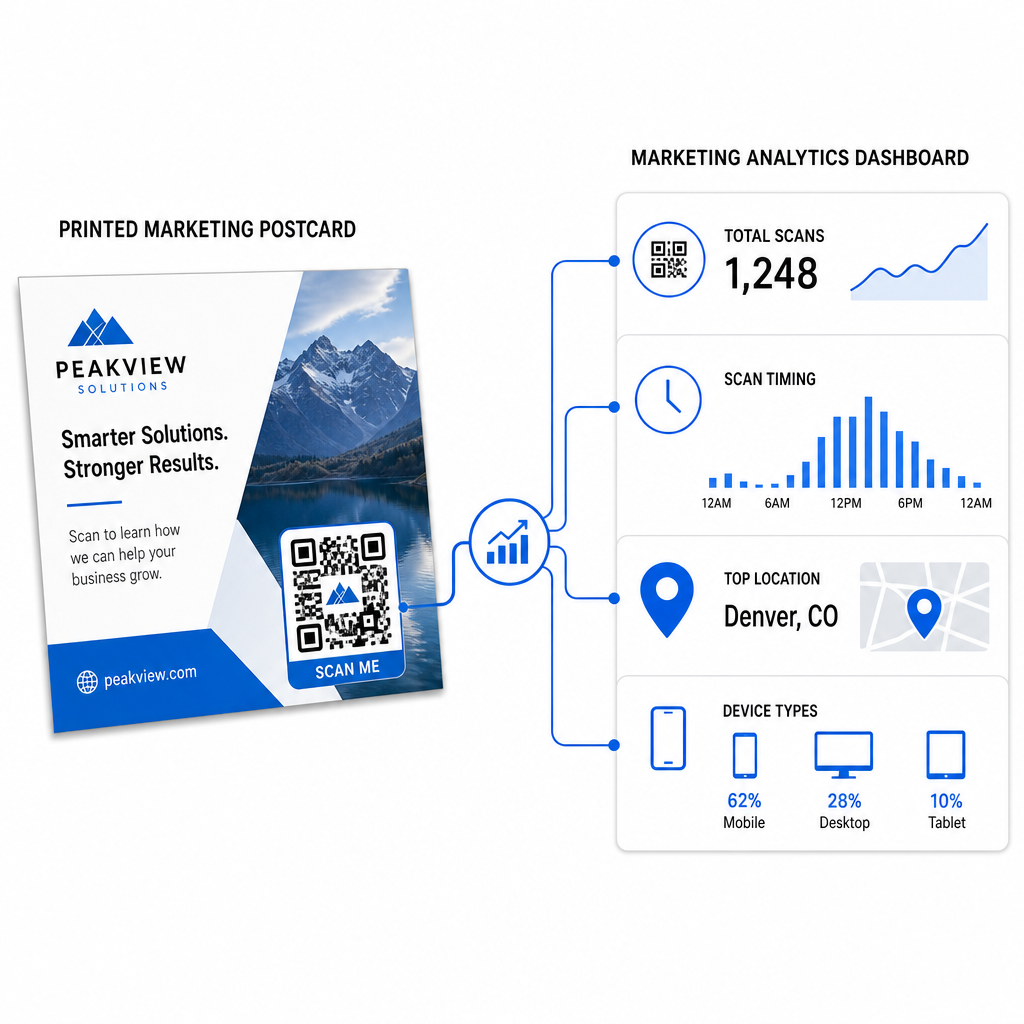
- Загальна кількість сканувань та унікальних користувачів – скільки одержувачів залучилися, і скільки сканували більше одного разу
- Час сканування – які дні та години спричинили найбільшу активність після розсилки
- Географічний розподіл – які поштові індекси або регіони відреагували найсильніше
- Тип пристрою – чи сканували одержувачі на iOS або Android, що може вплинути на рішення щодо мобільних цільових сторінок
Використовуйте ці дані для вдосконалення майбутніх розсилок. Якщо певна область показала високі показники сканування, збільште обсяг там наступного разу. Якщо сканування досягло піку на третій день після доставки, відповідно сплануйте подальші дії електронною поштою.
Для багатоверсійних кампаній – де ви тестуєте різні пропозиції, дизайни або заклики до дії – призначте кожній версії листівки власний динамічний QR-код. Аналітика сканувань покаже вам, яка версія забезпечила більше залучення, не чекаючи лише даних про конверсію.
Почніть вимірювати ефективність вашої прямої поштової розсилки Цей Генератор QR-кодів Pageloot дозволяє створювати, налаштовувати та керувати QR-кодами для кампаній прямої поштової розсилки – з вбудованою аналітикою та можливістю оновлювати призначення без повторного друку.
Типові помилки, яких слід уникати
Посилання на домашню сторінку замість сторінки кампанії. Домашня сторінка змушує одержувача виконувати додаткову роботу, щоб знайти пропозицію, згадану на листівці. Кожен додатковий крок зменшує конверсії.
Використання статичного QR-коду для обмеженої за часом пропозиції. Якщо пропозиція закінчується або URL-адреса змінюється, статичний код вказуватиме на непрацюючу або неактуальну сторінку без можливості виправити це після друку.
Зменшення QR-коду до занадто малого розміру. Все, що менше 0,8 × 0,8 дюйма, є ризикованим, особливо якщо дизайн листівки перевантажений або код використовує нестандартні кольори.
Пропуск заклику до дії. Самотній QR-код на листівці не дає отримувачам жодної причини сканувати. Скажіть їм, що вони отримають.
Не тестування на фізичному друкованому зразку. Цифрові макети не завжди передбачають, як код скануватиметься після проходження через комерційний принтер. Завжди перевіряйте на фактичному виході.
Ті самі основні принципи застосовуються до всіх друкованих форматів – Посібник з QR-кодів на флаєрах охоплює, як адаптувати ці практики для інших матеріалів прямого відгуку.
Листівка з добре виконаним QR-кодом робить дві речі одночасно: вона дає отримувачам негайний, безперешкодний спосіб відреагувати на вашу пропозицію, і вона дає вам вимірювані дані про те, як насправді працює ваша кампанія. Поєднання динамічного QR-коду, мобільно-оптимізованого призначення, URL-адрес з UTM-мітками та аналітики сканувань замикає цикл між офлайн-друком та цифровими результатами.
Почніть з генерації динамічного QR-коду через Генератор динамічних QR-кодів Pageloot, правильно розмістіть його для формату вашої листівки, застосуйте висококонтрастний брендинг, напишіть чіткий заклик до дії та протестуйте на фізичному зразку перед повним тиражем. З того моменту, як отримувачі почнуть сканувати, ваша інформаційна панель покаже вам, що саме працює.
Поширені запитання
Прагніть принаймні 0.8 × 0.8 дюймів (2 × 2 см) як абсолютний мінімум, але для типових відстаней сканування листівок 10–20 дюймів, розмір між 1 і 1.5 дюймів (25–38 мм) є надійнішим. Застосуйте правило 10:1: зробіть ширину коду приблизно однією десятою від очікуваної відстані сканування.
Так, але лише якщо ви використали динамічний QR-код перед друком. Динамічні QR-коди вказують на посилання для перенаправлення, яке ви контролюєте, тому ви можете оновити цільову URL-адресу в будь-який час без повторного друку. Статичні QR-коди постійно кодують призначення і не можуть бути змінені після створення.
Використовуйте динамічний QR-код з платформи, такої як Pageloot, яка надає вбудовану аналітику, що показує загальну кількість сканувань, унікальних користувачів, час сканування, географічне розташування та тип пристрою. Для глибшої атрибуції в Google Analytics додайте UTM-параметри (utmsource, utmmedium, utm_campaign) до вашої цільової URL-адреси перед генеруванням коду – сканування тоді з'являться як відстежувані сесії у вашому звіті GA4 про залучення трафіку.