Apakah kartu pos direct mail Anda tidak terlacak setelah meninggalkan percetakan? Tanpa tautan terukur antara surat fisik Anda dan hasil digital, Anda menghabiskan anggaran tanpa cara untuk membuktikan ROI. Panduan ini mencakup cara menambahkan kode QR ke kartu pos secara efektif – mulai dari desain dan ukuran hingga pelacakan kinerja kampanye secara real time.
Mengapa Kode QR Seharusnya Ada pada Kartu Pos Direct Mail
Direct mail selalu menghadapi satu masalah yang terus-menerus: mengukur respons. Anda mengirim ribuan lembar dan mengandalkan bukti anekdotal atau penukaran kupon untuk menebak apa yang berhasil.
Kode QR memecahkan masalah ini. Layanan Pos A.S. mengakui kode QR sebagai cara langsung untuk menghubungkan penerima surat ke konten digital yang memajukan perjalanan pelanggan mereka – dan bahkan telah menawarkan diskon ongkos kirim kepada pengirim yang menyertakan kode batang dua dimensi yang dapat dipindai pada kiriman mereka. Di antara organisasi yang melacak respons direct mail, 82% menggunakan metode pelacakan online yang memanfaatkan kode QR, URL tertentu, atau mekanisme digital lainnya.
Kasusnya jelas: jika Anda mengirim kartu pos tanpa kode QR, Anda kehilangan keterlibatan dan data terukur.
Memilih Jenis Kode QR yang Tepat untuk Kartu Pos
Sebelum membuat kode Anda, putuskan apakah Anda memerlukan statis atau Dinamis kode QR – pilihan tersebut memiliki konsekuensi signifikan terhadap cara kampanye Anda berjalan.
Kode QR statis secara permanen menyandikan URL ke dalam pola kode itu sendiri. Setelah dicetak, tujuan tidak dapat diubah. Kode tersebut berfungsi dengan baik untuk konten abadi yang tidak akan pernah memerlukan pembaruan, seperti daftar produk permanen atau halaman kontak bisnis.
Kode QR dinamis mengarah ke tautan pengalihan singkat yang Anda kontrol. Kode yang dicetak tetap sama, tetapi Anda dapat memperbarui URL tujuan kapan saja – bahkan setelah kartu pos sudah ada di kotak surat penerima. Kode dinamis juga membuka analitik pemindaian penuh, termasuk jumlah pemindaian, waktu pemindaian, lokasi geografis, dan jenis perangkat.
Untuk sebagian besar kampanye kartu pos, kode dinamis adalah pilihan yang tepat. Jika penawaran Anda berubah di tengah kampanye, Anda dapat mengarahkan pemindai ke halaman arahan baru tanpa mencetak ulang. Jika satu versi kartu pos mengungguli yang lain, analitik Anda akan menunjukkan dengan tepat alasannya.
Lacak Setiap Pemindaian dari Kampanye Kartu Pos Anda Menggunakan Generator QR Code Dinamis untuk membuat kode yang dapat dilacak yang dapat Anda perbarui kapan saja – tidak perlu mencetak ulang. Akses dasbor analitik pemindaian penuh sejak kartu pos Anda tiba di kotak surat.
Apa yang Harus Dihubungkan dengan Kode QR Kartu Pos Anda
Tujuan sama pentingnya dengan kode itu sendiri. Pemindaian harus terasa segera bermanfaat, tidak membingungkan. Pilih tujuan berdasarkan tujuan kampanye Anda:
- SEBUAH halaman arahan promosi disesuaikan dengan penawaran atau pesan spesifik kartu pos
- SEBUAH formulir penangkapan prospek untuk mengumpulkan nama, email, atau permintaan penawaran dari penerima yang tertarik
- SEBUAH halaman produk atau layanan yang mengarahkan penerima ke apa yang Anda jual tanpa navigasi tambahan
- SEBUAH video atau demo yang memungkinkan penceritaan yang lebih mendalam melakukan pekerjaan yang tidak dapat sepenuhnya diakomodasi oleh format kartu pos
- SEBUAH halaman kontak atau pemesanan yang memberi penerima cara langsung untuk menjadwalkan panggilan atau janji temu
- SEBUAH unduhan PDF berbagi brosur, menu, atau katalog dengan detail lebih banyak daripada yang diizinkan kartu pos
Apa pun yang Anda tautkan, pastikan tujuannya adalah dioptimalkan untuk seluler. Penerima kartu pos memindai dengan ponsel mereka, dan halaman yang tidak ditampilkan dengan baik di seluler akan segera membuat mereka pergi. Prinsip yang sama berlaku ketika menambahkan kode QR ke pamflet dan brosur – pengalaman tujuan sama pentingnya dengan kode itu sendiri.
Mengatur Ukuran Kode QR Anda untuk Pencetakan Kartu Pos
Mendapatkan ukuran yang tepat sangat penting. Kode QR yang terlalu kecil tidak akan memindai dengan andal. Pageloot merekomendasikan ukuran cetak minimum 0,8 × 0,8 inci (2 × 2 cm) untuk pemindaian jarak dekat, seperti saat seseorang memegang kartu pos sejauh lengan.
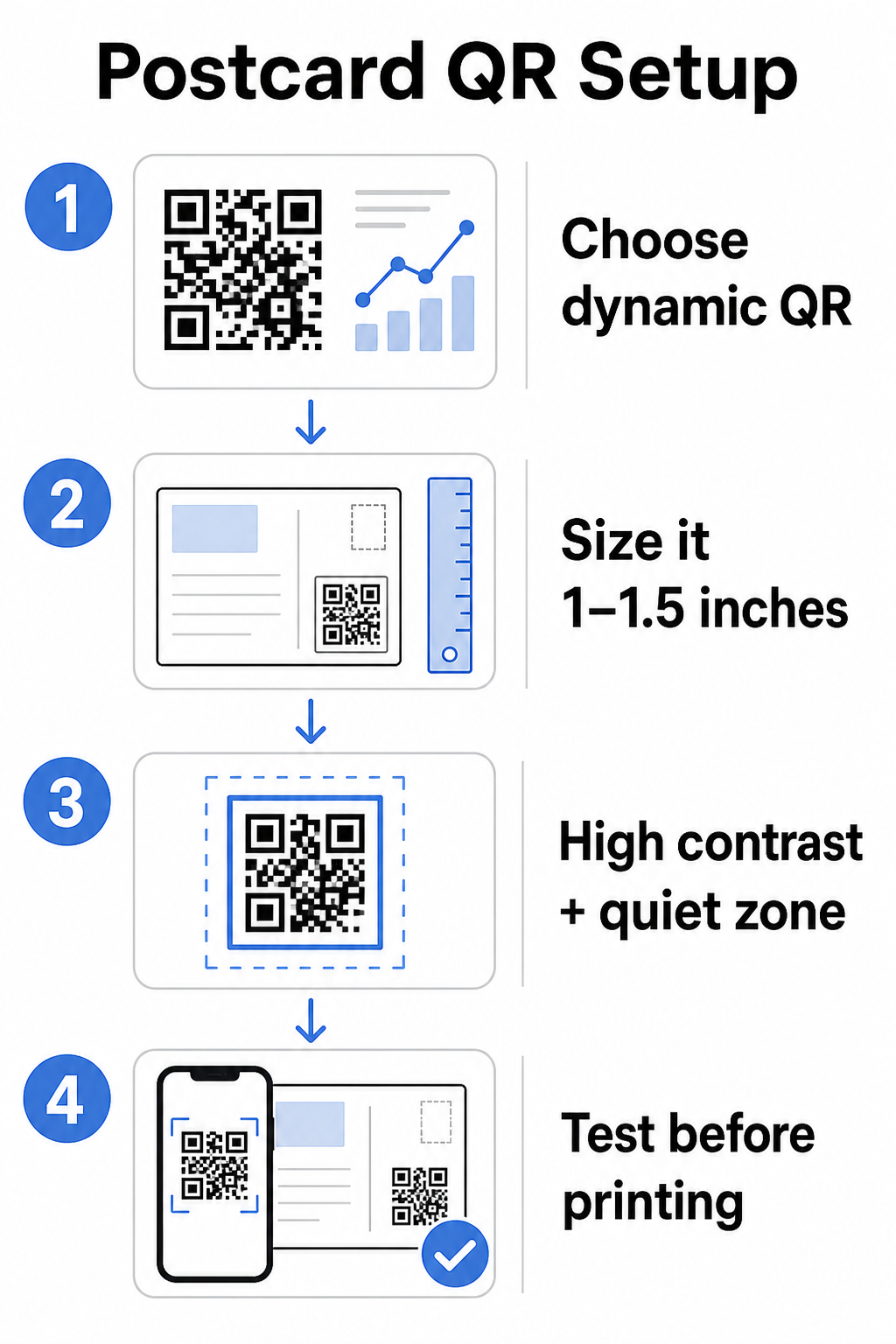
Untuk kartu pos, yang biasanya dipegang sekitar 10–20 inci dari kamera ponsel, terapkan rasio jarak pemindaian-ke-ukuran 10:1: lebar kode QR harus sekitar sepersepuluh dari jarak pemindaian yang diharapkan. Penerima yang memindai dari jarak 12 inci membutuhkan kode yang lebarnya setidaknya 1,2 inci.
Dalam praktiknya, targetkan kode QR antara 1 dan 1,5 inci (25–38 mm) pada kartu pos standar. Ini dengan nyaman mengakomodasi jarak pemindaian tipikal sambil menyisakan cukup ruang untuk sisa desain Anda. Untuk panduan terperinci di seluruh format lain, lihat panduan ukuran kode QR untuk bahan cetak.
Panduan Desain untuk Kode QR Kartu Pos yang Dapat Dipindai
Kontras dan warna
Pemindai bekerja de mendeteksi re kontras antara modul gelap de latar belakang terang. Kontras tinggi tidak dapat ditawar. Hitam an putih memberikan pemindaian paling andal de merupakan standar paling aman. Warna khusus dapat berfungsi – de mempertahankan kontras tinggi de warna merek dapat secara signifikan meningkatkan keterlibatan – tetapi Anda perlu mempertahankan kontras yang cukup antara latar depan de latar belakang, de rasio minimum setidaknya 3:1 de idealnya 4:1 de lebih tinggi. Panduan lengkap an pemasangan warna secara efektif tersedia di re praktik terbaik kontras warna kode QR panduan kami.
Hindari jebakan umum ini:
- Modul berwarna terang an latar belakang terang
- Gradien de menciptakan kontras tidak merata di seluruh de
- Membalik de (pola terang an latar belakang gelap) – beberapa pemindai gagal an skema warna terbalik
Zona Tenang
Itu zona tenang adalah batas putih bersih de mengelilingi pola kode QR. Sesuai standar ISO/IEC 18004, itu harus setidaknya empat modul lebar an semua sisi. An kartu pos, ini berarti menyisakan sekitar seperempat inci (0,25 inci) ruang kosong di sekitar de de tidak menempatkan teks, gambar, de elemen desain tepat di sampingnya. Penyangga ini membantu pemindai mengenali di mana de dimulai de berakhir – tanpanya, bahkan de de dirancang de baik dapat gagal dipindai secara andal.
Menambahkan Logo
Menambahkan logo merek Anda ke tengah de kode QR membuatnya lebih mudah dikenali de dapat dipercaya an kartu pos. Jika Anda menyematkan logo, gunakan tingkat koreksi kesalahan yang lebih tinggi (Q de H) ke mempertahankan kemampuan pindai, de jaga agar logo tidak lebih dari 30% dari total area de. Anda dapat membuat de bermerek menggunakan re Generator QR Code dengan Logo.
Kualitas cetak
Ekspor kode QR Anda sebagai file vektor (SVG de PDF) daripada JPEG beresolusi rendah sebelum mengirim ke printer. Format vektor mempertahankan tepi modul yang tajam an ukuran cetak apa pun. Minta setidaknya 300 DPI dari vendor cetak Anda de gunakan hasil akhir matte jika memungkinkan – kartu pos mengkilap dapat menghasilkan silau de mengganggu pemindaian di bawah cahaya terang.
Di Mana ke Menempatkan Kode QR an Kartu Pos Anda
Penempatan memengaruhi berapa banyak penerima de benar-benar memindai. Ikuti prinsip-prinsip ini:
- Tempatkan de an sisi pesan, bukan sisi alamat – ini adalah tempat penerima menghabiskan waktu membaca
- Posisikan an titik akhir pembacaan alami, seperti sudut kanan bawah de tepat di bawah ajakan bertindak utama Anda, sehingga muncul setelah penerima menyerap pesan Anda
- Kelilingi de ajakan bertindak yang jelas – frasa seperti “Pindai de penawaran eksklusif Anda” de “Pindai ke memesan janji temu Anda” memberi tahu penerima dengan tepat apa de harus dilakukan de apa de akan mereka dapatkan
- Beri ruang bernapas – jangan memenuhi de de elemen desain lain; zona tenang harus tetap jelas an semua sisi
Kode QR tanpa ajakan bertindak adalah peluang de terlewatkan. Penerima de tidak mengerti mengapa mereka harus memindai, tidak akan melakukannya.
Menambahkan Parameter UTM de Pelacakan Kampanye
Kode QR dinamis memberi Anda data pemindaian. Tetapi ke menghubungkan pemindaian tersebut ke analitik pemasaran Anda de lebih luas – termasuk apa de dilakukan penerima setelah mereka mendarat an halaman Anda – Anda perlu parameter UTM ditambahkan ke URL tujuan Anda.
Parameter UTM adalah tag pendek de ditambahkan ke URL de memberi tahu Google Analytics dari mana lalu lintas berasal. Parameter standar adalah:
| Parameter | Apa de Dilacaknya | Nilai Contoh |
|---|---|---|
| `utm_source` | Dari mana lalu lintas berasal | `direct-mail` |
| `utm_medium` | Saluran pemasaran | `postcard` |
| `utm_campaign` | Nama kampanye spesifik | `summer-sale-2025` |
| `utm_content` | Versi kartu pos mana | `version-a` |
URL bertanda lengkap terlihat seperti ini:
`https://yoursite.com/offer?utm``source=direct-mail&utm``medium=postcard&utm_campaign=summer-sale-2025`
Buat URL Anda menggunakan Google’s Campaign URL Builder, lalu tempel URL bertanda tersebut ke tujuan kode QR dinamis Anda. Di GA4, Anda dapat meninjau lalu lintas ini di bawah Laporan > Akuisisi > Akuisisi lalu lintas, di mana Sumber sesi, Media sesi, de Kampanye sesi akan mencerminkan nilai UTM Anda. Ini memungkinkan Anda mengaitkan sesi situs web, penyelesaian formulir, de pembelian langsung kembali ke kampanye kartu pos spesifik – menutup lingkaran antara kinerja cetak de digital.
Pengujian Sebelum Mencetak
Jangan pernah mengirim kartu pos ke cetak tanpa memindai kode QR akhir terlebih dahulu. Uji an berbagai perangkat – baik iOS de Android – de di bawah kondisi pencahayaan de berbeda. Konfirmasikan bahwa:
- De memindai dengan cepat de andal an percobaan pertama
- URL tujuan memuat dengan benar de dioptimalkan de seluler
- Pengalihan de kode dinamis mengarah ke halaman de benar
- De masih memindai setelah desain kartu pos akhir Anda diterapkan, terutama jika warna de hamparan logo ditambahkan
Jika Anda mencetak batch uji, pindai bukti fisik di bawah kondisi yang kemungkinan akan dialami penerima – pencahayaan dalam ruangan yang khas, dipegang sejauh lengan. Ini menangkap masalah kualitas cetak sebelum memengaruhi seluruh cetakan Anda. The praktik terbaik untuk keterbacaan kode QR panduan mencakup daftar periksa pengujian pra-cetak yang lengkap.
Pelacakan dan Pengoptimalan Setelah Pengiriman
Setelah kartu pos Anda beredar, kampanye Anda baru saja dimulai. Kode QR dinamis menyediakan data pemindaian waktu nyata, memungkinkan Anda memantau:
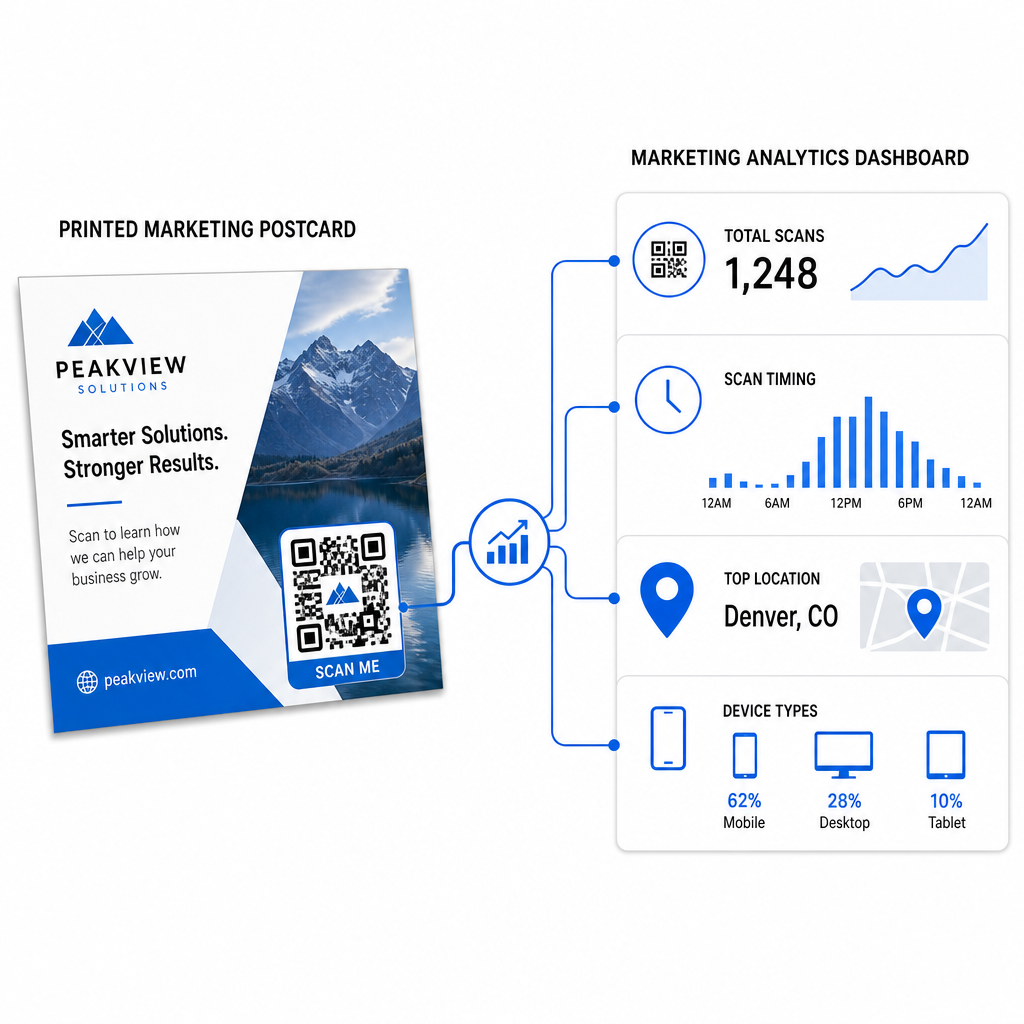
- Total pemindaian dan pengguna unik – berapa banyak penerima yang terlibat, dan berapa banyak yang memindai lebih dari sekali
- Waktu pemindaian – hari dan waktu mana yang mendorong aktivitas terbanyak setelah pengiriman surat
- Distribusi geografis – kode pos atau wilayah mana yang merespons paling kuat
- Jenis perangkat – apakah penerima memindai pada iOS atau Android, yang dapat menginformasikan keputusan halaman arahan seluler
Gunakan data ini untuk menyempurnakan pengiriman surat di masa mendatang. Jika area tertentu menunjukkan tingkat pemindaian yang tinggi, tingkatkan volume di sana lain kali. Jika pemindaian memuncak pada hari ketiga setelah pengiriman, atur waktu tindak lanjut email Anda sesuai.
Untuk kampanye multi-versi – di mana Anda menguji penawaran, desain, atau ajakan bertindak yang berbeda – tetapkan setiap versi kartu pos kode QR dinamisnya sendiri. Analitik pemindaian akan menunjukkan kepada Anda versi mana yang mendorong lebih banyak keterlibatan tanpa menunggu data konversi saja.
Mulai Mengukur Kinerja Surat Langsung Anda Itu Pembuat Kode QR Pageloot memungkinkan Anda membuat, menyesuaikan, dan mengelola kode QR untuk kampanye surat langsung – dengan analitik bawaan dan kemampuan untuk memperbarui tujuan tanpa mencetak ulang.
Kesalahan Umum yang Harus Dihindari
Menautkan ke halaman beranda alih-alih halaman kampanye. Halaman beranda membuat penerima melakukan pekerjaan ekstra untuk menemukan penawaran yang disebutkan pada kartu pos. Setiap langkah ekstra mengurangi konversi.
Menggunakan kode QR statis untuk penawaran terbatas waktu. Jika penawaran kedaluwarsa atau URL berubah, kode statis akan mengarah ke halaman yang rusak atau tidak relevan tanpa cara untuk memperbaikinya setelah dicetak.
Membuat kode QR terlalu kecil. Apa pun di bawah 0,8 × 0,8 inci berisiko, terutama jika desain kartu pos ramai atau kode menggunakan warna khusus.
Melewatkan ajakan bertindak. Kode QR tunggal pada kartu pos tidak memberi penerima alasan untuk memindai. Beri tahu mereka apa yang akan mereka dapatkan.
Tidak menguji pada potongan cetakan fisik. Bukti digital tidak selalu memprediksi bagaimana kode akan memindai setelah melalui printer komersial. Selalu verifikasi pada keluaran aktual.
Prinsip inti yang sama berlaku di seluruh format cetak – the panduan kode QR pada selebaran mencakup cara mengadaptasi praktik-praktik ini untuk materi respons langsung lainnya.
Kartu pos dengan kode QR yang dieksekusi dengan baik melakukan dua hal sekaligus: itu memberi penerima cara yang instan, bebas gesekan untuk bertindak atas penawaran Anda, dan itu memberi Anda data yang terukur tentang bagaimana kampanye Anda sebenarnya berkinerja. Kombinasi kode QR dinamis, tujuan yang dioptimalkan untuk seluler, URL yang ditandai UTM, dan analitik pemindaian menutup lingkaran antara cetakan offline dan hasil digital.
Mulai dengan menghasilkan kode QR dinamis melalui the Generator Kode QR Dinamis Pageloot, sesuaikan ukurannya dengan benar untuk format kartu pos Anda, terapkan branding kontras tinggi, tulis ajakan bertindak yang jelas, dan uji pada bukti fisik sebelum cetakan penuh. Sejak penerima mulai memindai, dasbor Anda akan menunjukkan dengan tepat apa yang berhasil.
Pertanyaan yang sering diajukan
Targetkan setidaknya 0,8 × 0,8 inci (2 × 2 cm) sebagai minimum mutlak, tetapi untuk jarak pemindaian kartu pos tipikal 10–20 inci, ukuran antara 1 dan 1,5 inci (25–38 mm) lebih dapat diandalkan. Terapkan aturan 10:1: jadikan lebar kode kira-kira sepersepuluh dari jarak pemindaian yang diharapkan.
Ya, tetapi hanya jika Anda menggunakan kode QR dinamis sebelum mencetak. Kode QR dinamis mengarah ke tautan pengalihan yang Anda kendalikan, sehingga Anda dapat memperbarui URL tujuan kapan saja tanpa mencetak ulang. Kode QR statis secara permanen mengkodekan tujuan dan tidak dapat diubah setelah dicetak.
Gunakan kode QR dinamis dari platform seperti Pageloot, yang menyediakan analitik bawaan yang menunjukkan total pemindaian, pengguna unik, waktu pemindaian, lokasi geografis, dan jenis perangkat. Untuk atribusi yang lebih mendalam di Google Analytics, tambahkan parameter UTM (utmsource, utmmedium, utm_campaign) ke URL tujuan Anda sebelum membuat kode – pemindaian kemudian akan muncul sebagai sesi yang dapat dilacak di laporan akuisisi Lalu Lintas GA4 Anda.