Jsou vaše pohlednice pro direct mail netrackované, jakmile opustí tiskárnu? Bez měřitelného spojení mezi vaší fyzickou poštou a digitálními výsledky utrácíte rozpočet bez možnosti prokázat návratnost investic. Tato příručka popisuje, jak efektivně přidávat QR kódy na pohlednice – od designu a velikosti po sledování výkonu kampaně v reálném čase.
Proč QR kódy patří na pohlednice pro direct mail
Direct mail vždy čelil jednomu přetrvávajícímu problému: měření odezvy. Posíláte tisíce kusů a spoléháte na neoficiální důkazy nebo uplatnění kupónů, abyste odhadli, co fungovalo.
QR kódy to řeší. Americká poštovní služba uznává QR kódy jako přímý způsob, jak propojit příjemce pošty s digitálním obsahem, který posouvá jejich zákaznickou cestu – a dokonce nabídla slevy na poštovné odesílatelům, kteří na své zásilky zahrnou skenovatelné dvourozměrné čárové kódy. Mezi organizacemi, které sledují odezvu direct mailu, 82% používá online sledovací metody, které využívají QR kódy, specifické URL adresy nebo jiný digitální mechanismus.
Případ je jasný: pokud posíláte pohlednice bez QR kódu, necháváte na stole jak zapojení, tak měřitelná data.
Výběr správného typu QR kódu pro pohlednice
Před vygenerováním kódu se rozhodněte, zda potřebujete statické nebo Dynamický QR kód – volba má významné důsledky pro to, jak vaše kampaň poběží.
Statické QR kódy trvale zakódují URL adresu do samotného vzoru kódu. Jakmile je vytištěn, cíl nelze změnit. Fungují dobře pro trvalý obsah, který nikdy nebude potřebovat aktualizaci, jako je trvalý výpis produktů nebo kontaktní stránka firmy.
Dynamické QR kódy odkazují na krátký přesměrovací odkaz, který ovládáte. Vytištěný kód zůstává stejný, ale cílovou URL adresu můžete kdykoli aktualizovat – i poté, co jsou pohlednice již v poštovních schránkách příjemců. Dynamické kódy také odemykají kompletní analytiku skenování, včetně počtu skenů, času skenování, geografické polohy a typu zařízení.
Pro většinu pohlednicových kampaní jsou dynamické kódy správnou volbou. Pokud se vaše nabídka změní uprostřed kampaně, můžete skenery přesměrovat na novou vstupní stránku bez opětovného tisku. Pokud jedna verze pohlednice překoná druhou, vaše analytika vám přesně ukáže proč.
Sledujte každé skenování z vaší pohlednicové kampaně Použijte Dynamický QR kód k vytvoření sledovatelného kódu, který můžete kdykoli aktualizovat – bez nutnosti opětovného tisku. Získejte přístup k plnému analytickému panelu skenování od okamžiku, kdy vaše pohlednice dorazí do poštovních schránek.
Na co odkázat QR kód vaší pohlednice
Cíl je stejně důležitý jako samotný kód. Skenování by mělo být okamžitě odměňující, ne matoucí. Vyberte cíl na základě cíle vaší kampaně:
- A propagační vstupní stránka přizpůsobená konkrétní nabídce nebo zprávě pohlednice
- A formulář pro sběr leadů pro sběr jmen, e-mailů nebo žádostí o cenovou nabídku od zainteresovaných příjemců
- A stránka produktu nebo služby která dostane příjemce k tomu, co prodáváte, bez další navigace
- A video nebo demo které umožňuje hlubšímu vyprávění příběhů dělat práci, kterou formát pohlednice nemůže plně pojmout
- A kontaktní nebo rezervační stránka která dává příjemcům okamžitý způsob, jak si naplánovat hovor nebo schůzku
- A stažení PDF sdílení brožury, menu nebo katalogu s více detaily, než umožňuje pohlednice
Ať už odkazujete na cokoli, ujistěte se, že cíl je optimalizovaný pro mobilní zařízení. Příjemci pohlednic skenují svými telefony a stránka, která se na mobilu nezobrazuje dobře, je okamžitě ztratí. Stejný princip platí, když QR kódů na letáky a brožury – zážitek z cíle je stejně důležitý jako samotný kód.
Velikost QR kódu pro tisk pohlednic
Správná velikost je klíčová. QR kód, který je příliš malý, nebude spolehlivě skenovat. Pageloot doporučuje minimální tištěnou velikost 0,8 × 0,8 palce (2 × 2 cm) pro skenování zblízka, například když někdo drží pohlednici na délku paže.
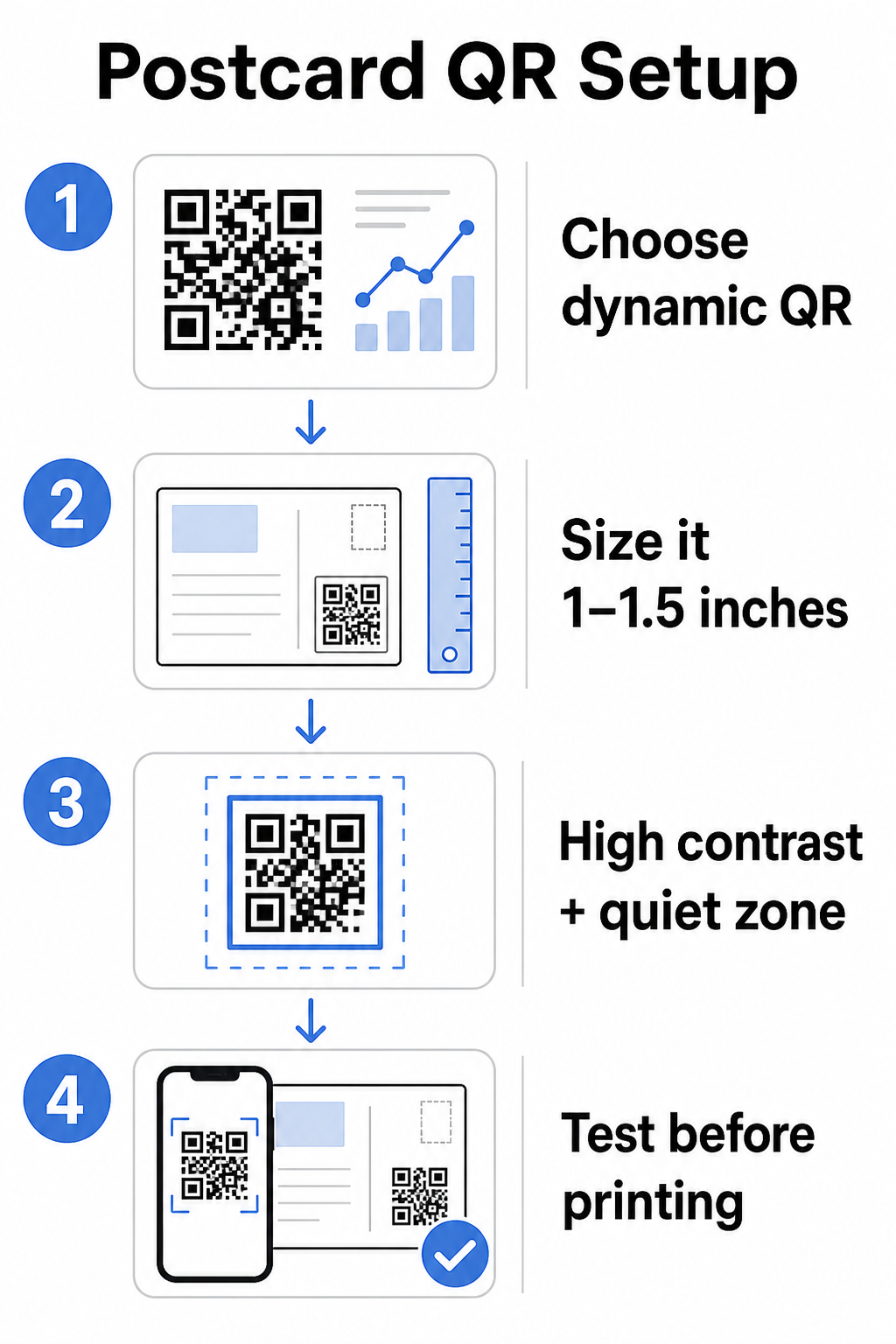
Pro pohlednice, které se obvykle drží zhruba 10–20 palců od fotoaparátu telefonu, použijte poměr vzdálenosti skenování k velikosti 10:1: šířka QR kódu by měla být přibližně jedna desetina očekávané vzdálenosti skenování. Příjemce skenující z 12 palců potřebuje kód, který je široký alespoň 1,2 palce.
V praxi se zaměřte na QR kód mezi 1 a 1,5 palce (25–38 mm) na standardní pohlednici. To pohodlně vyhovuje typickým vzdálenostem skenování a zároveň ponechává dostatek místa pro zbytek vašeho designu. Pro podrobné pokyny napříč jinými formáty viz pokyny pro velikost QR kódu pro tištěné materiály.
Pokyny pro design skenovatelných QR kódů na pohlednicích
Kontrast a barva
Skenery fungují na principu detekce kontrastu mezi tmavými moduly a světlým pozadím. Vysoký kontrast je nekompromisní. Černá na bílé poskytuje nejspolehlivější skenování a je nejbezpečnější výchozí volbou. Vlastní barvy mohou fungovat – a udržení vysokého kontrastu s firemními barvami může smysluplně zvýšit zapojení – ale musíte zachovat dostatečný kontrast mezi popředím a pozadím, s minimálním poměrem alespoň 3:1 a ideálně 4:1 nebo vyšším. Kompletní pokyny pro efektivní párování barev jsou k dispozici v osvědčené postupy pro barevný kontrast QR kódů průvodci.
Vyhněte se těmto běžným nástrahám:
- Světlé moduly na světlém pozadí
- Přechody, které vytvářejí nerovnoměrný kontrast napříč kódem
- Invertování kódu (světlý vzor na tmavém pozadí) – některé skenery selhávají u obrácených barevných schémat
Tichá zóna
Ten tichou zónu je jasný bílý okraj obklopující vzor QR kódu. Podle norem ISO/IEC 18004 musí být široký alespoň čtyři moduly na všech stranách. Na pohlednici to znamená ponechat kolem kódu zhruba čtvrt palce (0,25 palce) volného prostoru a neumisťovat text, obrázky ani designové prvky přímo vedle něj. Tato vyrovnávací paměť pomáhá skenerům rozpoznat, kde kód začíná a končí – bez ní se i dobře navržený kód může nespolehlivě skenovat.
Přidání loga
Přidání loga vaší značky do středu QR kódu jej činí rozpoznatelnějším a důvěryhodnějším na pohlednici. Pokud vložíte logo, použijte vyšší úroveň korekce chyb (Q nebo H) pro zachování skenovatelnosti a udržujte logo na maximálně 30 % celkové plochy kódu. Značkový kód můžete vytvořit pomocí QR kód s logem generátor.
Kvalita tisku
Exportujte svůj QR kód jako vektorový soubor (SVG nebo PDF) namísto JPEG s nízkým rozlišením před odesláním do tiskárny. Vektorové formáty zachovávají ostré hrany modulů při jakékékoli tiskové velikosti. Vyžádejte si alespoň 300 DPI od svého dodavatele tisku a pokud možno použijte matný povrch – lesklé pohlednice mohou vytvářet odlesky, které ruší skenování za jasného světla.
Kam umístit QR kód na vaši pohlednici
Umístění ovlivňuje, kolik příjemců skutečně skenuje. Dodržujte tyto zásady:
- Umístěte kód na stranu se zprávou, nikoli na stranu s adresou – zde příjemci tráví čas čtením
- Umístěte jej na přirozený konec čtení, například do pravého dolního rohu nebo těsně pod vaši hlavní výzvu k akci, aby se zobrazil poté, co příjemce vstřebal vaši zprávu
- Obklopte jej jasnou výzvou k akci – fráze jako “Naskenujte pro vaši exkluzivní nabídku” nebo “Naskenujte pro rezervaci schůzky” sdělují příjemcům přesně, co mají dělat a co získají
- Dejte mu prostor – nezaplňujte kód jinými designovými prvky; tichá zóna musí zůstat volná na všech stranách
QR kód bez výzvy k akci je promarněná příležitost. Příjemci, kteří nerozumí, proč by měli skenovat, jednoduše nebudou.
Přidání parametrů UTM pro sledování kampaní
Dynamické QR kódy vám poskytují data o skenování. Ale pro propojení těchto skenů s vaší širší marketingovou analýzou – včetně toho, co příjemci dělají poté, co přistanou na vaší stránce – potřebujete UTM parametrů připojené k vaší cílové URL.
Parametry UTM jsou krátké značky přidané k URL, které sdělují Google Analytics, odkud provoz pochází. Standardní parametry jsou:
| Parametr | Co sleduje | Příklad hodnoty |
|---|---|---|
| `utm_zdroj` | Odkud provoz pochází | `přímá pošta` |
| `utm_médium` | Marketingový kanál | `pohlednice` |
| `utm_kampaň` | Konkrétní název kampaně | `letní-výprodej-2025` |
| `utm_obsah` | Která verze pohlednice | `verze-a` |
Kompletní označená URL vypadá takto:
`https://yoursite.com/offer?utm``source=direct-mail&utm``medium=postcard&utm_campaign=summer-sale-2025`
Vytvořte svou URL pomocí nástroje Google Campaign URL Builder a poté vložte tuto označenou URL do cíle vašeho dynamického QR kódu. V GA4 můžete tento provoz zkontrolovat pod Přehledy > Akvizice > Akvizice návštěvnosti, kde zdroj relace, médium relace a kampaň relace budou odrážet vaše hodnoty UTM. To vám umožní přímo přiřadit webové relace, vyplnění formulářů a nákupy konkrétním kampaním s pohlednicemi – čímž se uzavře smyčka mezi tiskovým a digitálním výkonem.
Testování před tiskem
Nikdy neposílejte pohlednice do tisku, aniž byste nejprve naskenovali finální QR kód. Otestujte jej na více zařízeních – iOS i Android – a za různých světelných podmínek. Potvrďte, že:
- Kód se skenuje rychle a spolehlivě na první pokus
- Cílová URL se načítá správně a je optimalizována pro mobilní zařízení
- Přesměrování pro dynamické kódy vede na správnou stránku
- Kód se stále skenuje i po aplikaci vašeho finálního designu pohlednice, zejména pokud byly přidány barvy nebo překrytí loga
Pokud tisknete zkušební dávku, naskenujte fyzický vzorek za podmínek, které pravděpodobně zažijí příjemci – typické vnitřní osvětlení, držení na délku paže. Tím se zachytí problémy s kvalitou tisku dříve, než ovlivní celou sérii. The osvědčené postupy pro čitelnost QR kódů průvodce obsahuje kompletní kontrolní seznam pro testování před tiskem.
Sledování a optimalizace po odeslání
Jakmile jsou vaše pohlednice v oběhu, vaše kampaň teprve začíná. Dynamické QR kódy poskytují data o skenování v reálném čase, což vám umožňuje sledovat:
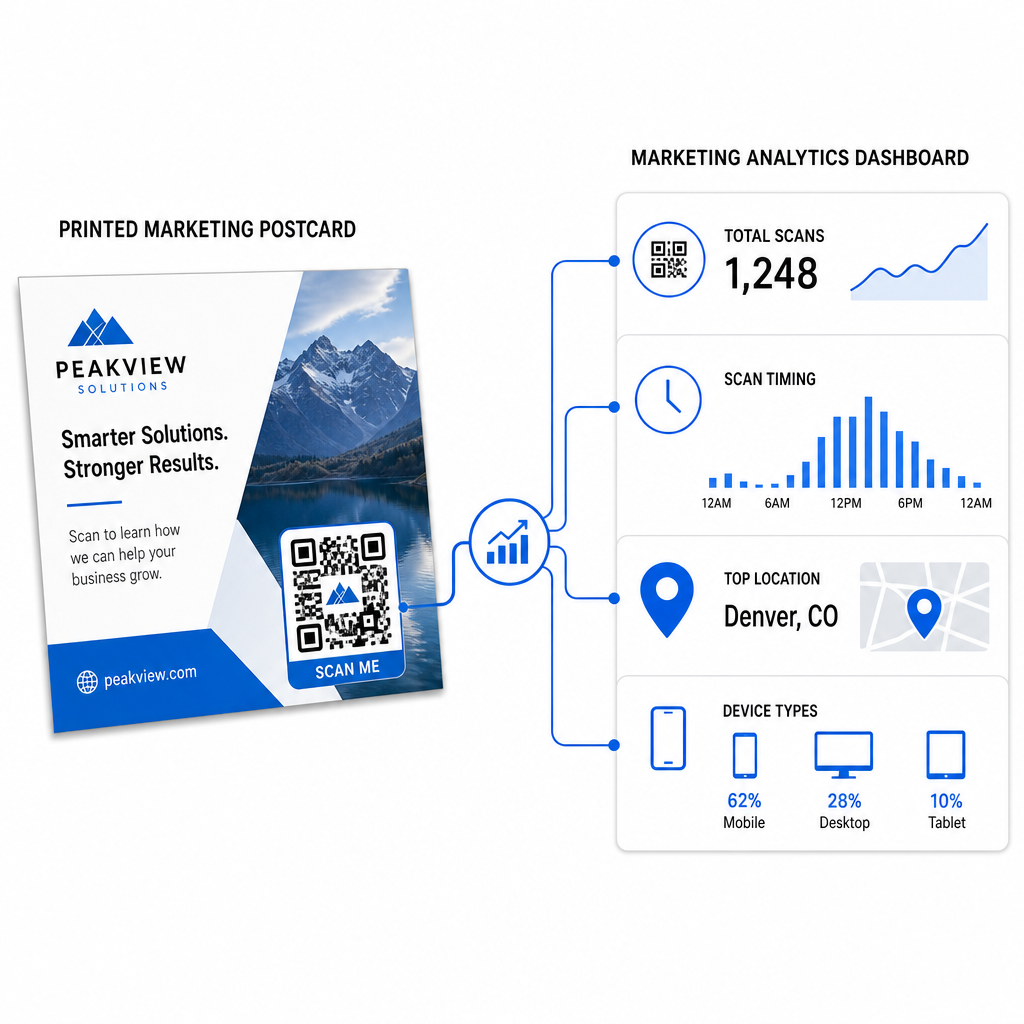
- Celkový počet skenování a unikátních uživatelů – kolik příjemců se zapojilo a kolik jich skenovalo více než jednou
- Časování skenování – které dny a časy zaznamenaly největší aktivitu po odeslání
- Geografické rozložení – které PSČ nebo regiony reagovaly nejsilněji
- Typ zařízení – zda příjemci skenovali na iOS nebo Androidu, což může ovlivnit rozhodnutí ohledně mobilních vstupních stránek
Použijte tato data k vylepšení budoucích rozesílek. Pokud konkrétní oblast vykazovala vysokou míru skenování, zvyšte tam příště objem. Pokud skeny dosáhly vrcholu třetí den po doručení, načasujte tomu odpovídajícím způsobem své e-mailové sledování.
Pro víceverzové kampaně – kde testujete různé nabídky, designy nebo výzvy k akci – přiřaďte každé verzi pohlednice vlastní dynamický QR kód. Analýza skenování vám ukáže, která verze vygenerovala větší zapojení, aniž byste museli čekat pouze na data o konverzích.
Začněte měřit výkonnost vaší direct mail kampaně Ten Generátor QR kódu Pageloot umožňuje vytvářet, přizpůsobovat a spravovat QR kódy pro direct mail kampaně – s vestavěnou analytikou a možností aktualizovat cíle bez nutnosti přetisku.
Běžné chyby, kterým je třeba se vyhnout
Odkazování na domovskou stránku namísto stránky kampaně. Domovská stránka nutí příjemce vynaložit další úsilí k nalezení nabídky zmíněné na pohlednici. Každý další krok snižuje konverze.
Použití statického QR kódu pro časově omezenou nabídku. Pokud nabídka vyprší nebo se změní URL adresa, statický kód bude odkazovat na nefunkční nebo irelevantní stránku bez možnosti to po tisku opravit.
Příliš malé QR kódy. Cokoli pod 0,8 × 0,8 palce je riskantní, zejména pokud je design pohlednice přeplněný nebo kód používá vlastní barvy.
Vyhýbání se výzvě k akci. Samotný QR kód na pohlednici nedává příjemcům žádný důvod ke skenování. Řekněte jim, co získají.
Netestování na fyzickém tištěném kusu. Digitální náhledy vždy nepředpovídají, jak se kód naskenuje po průchodu komerční tiskárnou. Vždy ověřte na skutečném výstupu.
Stejné základní principy platí napříč tiskovými formáty – průvodce QR kódy na letácích pokrývá, jak tyto postupy přizpůsobit pro jiné materiály přímé odezvy.
Pohlednice s dobře provedeným QR kódem dělá dvě věci najednou: poskytuje příjemcům okamžitý, bezproblémový způsob, jak reagovat na vaši nabídku, a poskytuje vám měřitelná data o tom, jak si vaše kampaň skutečně vede. Kombinace dynamického QR kódu, mobilně optimalizovaného cíle, URL adres s UTM tagy a analýzy skenování uzavírá smyčku mezi offline tiskem a digitálními výsledky.
Začněte generováním dynamického QR kódu prostřednictvím Generátor dynamických QR kódů Pageloot, správně ho velikostně přizpůsobte formátu vaší pohlednice, použijte vysoce kontrastní branding, napište jasnou výzvu k akci a otestujte na fyzickém náhledu před plným tiskem. Od okamžiku, kdy příjemci začnou skenovat, vám váš dashboard ukáže, co přesně funguje.
Často kladené otázky
Snažte se o alespoň 0,8 × 0,8 palců (2 × 2 cm) jako absolutní minimum, ale pro typické skenovací vzdálenosti pohlednic 10–20 palců je spolehlivější velikost mezi 1 a 1,5 palce (25–38 mm). Použijte pravidlo 10:1: udělejte šířku kódu zhruba jednu desetinu očekávané skenovací vzdálenosti.
Ano, ale pouze pokud jste před tiskem použili dynamický QR kód. Dynamické QR kódy odkazují na přesměrovací odkaz, který ovládáte, takže můžete kdykoli aktualizovat cílovou URL adresu bez opětovného tisku. Statické QR kódy trvale kódují cíl a nelze je dodatečně změnit.
Použijte dynamický QR kód z platformy jako je Pageloot, která poskytuje vestavěnou analýzu zobrazující celkové skeny, jedinečné uživatele, časování skenování, geografickou polohu a typ zařízení. Pro hlubší atribuci v Google Analytics připojte parametry UTM (utmsource, utmmedium, utm_campaign) k vaší cílové URL před vygenerováním kódu – skeny se pak objeví jako sledovatelné relace ve vašem přehledu akvizice návštěvnosti GA4.