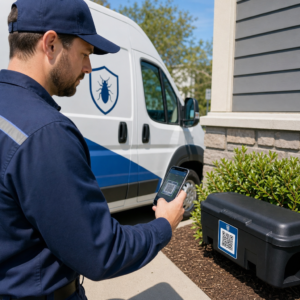
Kas teie otsepostituse postkaardid jäävad pärast printerist lahkumist jälgimata? Ilma mõõdetava seoseta teie füüsilise posti ja digitaalsete tulemuste vahel kulutate eelarvet ilma võimaluseta tõestada ROI-d. See juhend käsitleb, kuidas lisada QR-koode postkaartidele tõhusalt – alates disainist ja suuruse määramisest kuni kampaania tulemuslikkuse jälgimiseni reaalajas.
Miks QR-koodid kuuluvad otsepostituse postkaartidele
Otsepostitus on alati seisnud silmitsi ühe püsiva probleemiga: vastuse mõõtmine. Te saadate tuhandeid saadetisi ja tuginete anekdootlikele tõenditele või kupongide lunastamisele, et arvata, mis toimis.
QR-koodid lahendavad selle. USA Postiteenistus tunnistab QR-koode otsese viisina ühendada posti saajad digitaalse sisuga, mis edendab nende klienditeekonda – ja on isegi pakkunud postikulusoodustusi saatjatele, kes lisavad oma saadetistele skannitavaid kahemõõtmelisi vöötkoode. Organisatsioonide hulgas, mis jälgivad otsepostituse vastust, kasutab 82% veebipõhiseid jälgimismeetodeid, mis kasutavad QR-koode, konkreetseid URL-e või mõnda muud digitaalset mehhanismi.
Juhtum on selge: kui te saadate postkaarte ilma QR-koodita, jätate nii kaasatuse kui ka mõõdetavad andmed kasutamata.
Õige QR-koodi tüübi valimine postkaartide jaoks
Enne oma koodi genereerimist otsustage, kas vajate staatiline või Dünaamiline QR-koodi – see valik omab olulisi tagajärgi teie kampaania kulgemisele.
Staatilised QR-koodid kodeerivad URL-i püsivalt koodimustrisse endasse. Pärast printimist ei saa sihtkohta muuta. Need sobivad hästi igihalja sisu jaoks, mis ei vaja kunagi värskendamist, näiteks püsiv tootenimekiri või ettevõtte kontaktleht.
Dünaamilised QR-koodid viitavad lühikesele ümbersuunamislingile, mida te kontrollite. Prinditud kood jääb samaks, kuid te saate siht-URL-i igal ajal värskendada – isegi pärast seda, kui postkaardid on juba saajate postkastides. Dünaamilised koodid avavad ka täieliku skannimisanalüüsi, sealhulgas skannimiste arvu, skannimise aja, geograafilise asukoha ja seadme tüübi.
Enamiku postkaardikampaaniate puhul on dünaamilised koodid õige valik. Kui teie pakkumine muutub kampaania keskel, saate suunata skannerid uuele sihtlehele ilma uuesti printimata. Kui üks postkaardi versioon toimib teisest paremini, näitab teie analüütika teile täpselt, miks.
Jälgige iga skannimist oma postkaardikampaaniast Kasuta Dünaamilise QR koodi generaator et luua jälgitav kood, mida saate igal ajal värskendada – uuesti printimist pole vaja. Juurdepääs täielikule skannimisanalüüsi armatuurlauale alates hetkest, mil teie postkaardid postkastidesse jõuavad.
Millega oma postkaardi QR-koodi linkida
Sihtkoht on sama oluline kui kood ise. Skannimine peaks tunduma koheselt tasuv, mitte segadust tekitav. Valige sihtkoht vastavalt oma kampaania eesmärgile:
- A reklaami sihtleht kohandatud postkaardi konkreetsele pakkumisele või sõnumile
- A müügivihjete kogumise vorm huvitatud saajatelt nimede, e-kirjade või hinnapäringute kogumiseks
- A toote- või teenuseleht mis viib saajad selleni, mida te müüte ilma lisanavigatsioonita
- A video või demo mis laseb sügavamatel lugudel teha tööd, mida postkaardi formaat täielikult mahutada ei suuda
- A kontakti- või broneerimisleht mis annab saajatele kohese viisi kõne või kohtumise ajastamiseks
- A PDF-i allalaadimine brošüüri, menüü või kataloogi jagamine rohkemate detailidega, kui postkaart võimaldab
Millele iganes te lingite, veenduge, et sihtkoht on mobiilile optimeeritud. Postkaardi saajad skannivad oma telefonidega ja leht, mis mobiilis hästi ei renderdu, kaotab nad koheselt. Sama põhimõte kehtib ka siis, kui QR-koode flaieritele ja brošüüridele – sihtkoha kogemus on sama oluline kui kood ise.
Teie QR-koodi suuruse määramine postkaardi printimiseks
Õige suuruse saamine on kriitilise tähtsusega. Liiga väike QR-kood ei skaneeri usaldusväärselt. Pageloot soovitab minimaalset prinditud suurust 0,8 × 0,8 tolli (2 × 2 cm) lähiskannimiseks, näiteks kui keegi hoiab postkaarti väljasirutatud käe kaugusel.
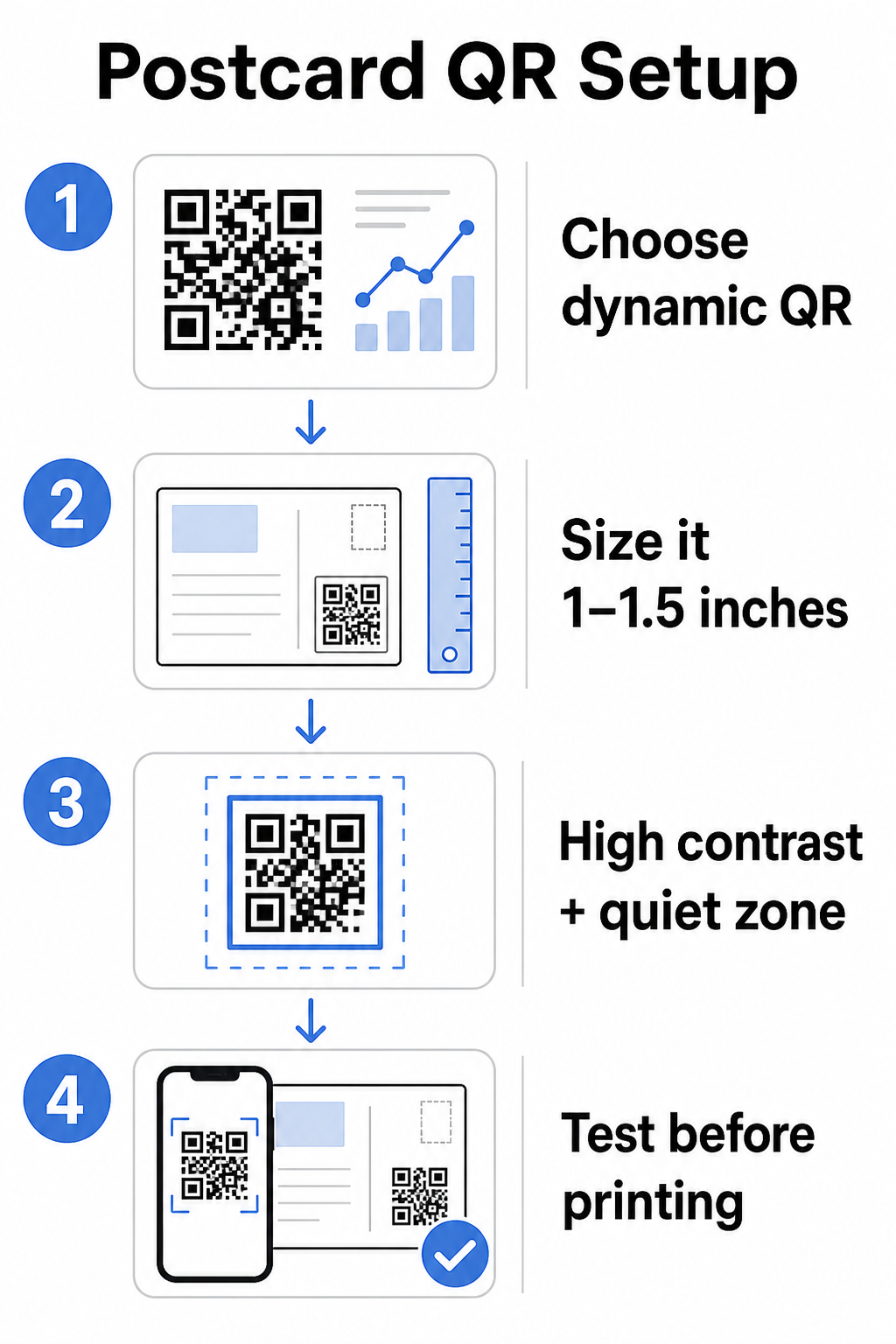
Postkaartide puhul, mida tavaliselt hoitakse telefonikaamerast umbes 10–20 tolli kaugusel, rakendage 10:1 skannimiskauguse ja suuruse suhet: QR-koodi laius peaks olema ligikaudu üks kümnendik eeldatavast skannimiskaugusest. Saaja, kes skannib 12 tolli kauguselt, vajab koodi, mis on vähemalt 1,2 tolli lai.
Praktikas püüdke standardsel postkaardil QR-koodi suuruseks 1 ja 1,5 tolli (25–38 mm) See mahutab mugavalt tüüpilisi skannimiskaugusi, jättes samal ajal piisavalt ruumi ülejäänud teie disaini jaoks. Üksikasjaliku juhendi saamiseks muude formaatide kohta vaadake QR-koodi suuruse juhiseid trükimaterjalide jaoks.
Disainijuhised skannitavate postkaardi QR-koodide jaoks
Kontrast ja värv
Skannerid töötavad, tuvastades kontrasti tumedate moodulite ja heleda tausta vahel. Kõrge kontrast on möödapääsmatu. Must valgel annab kõige usaldusväärsema skaneerimise ja on kõige ohutum vaikeseade. Kohandatud värvid võivad toimida – ja kõrge kontrasti säilitamine brändivärvidega võib oluliselt suurendada kaasatust – kuid peate säilitama piisava kontrasti esiplaani ja tausta vahel, minimaalse suhtega vähemalt 3:1 ja ideaalis 4:1 või kõrgem. Täielik juhend värvide tõhusaks sobitamiseks on saadaval QR-koodi värvikontrasti parimaid tavasid juhendist.
Vältige neid levinud vigu:
- Heledad moodulid heledal taustal
- Gradiendid, mis loovad koodis ebaühtlase kontrasti
- Koodi inversioon (hele muster tumedal taustal) – mõned skannerid ei tööta pööratud värviskeemidega
Vaikne tsoon
See vaikne tsoon on selge valge äär, mis ümbritseb QR-koodi mustrit. Vastavalt ISO/IEC 18004 standarditele peab see olema igast küljest vähemalt neli moodulit lai. Postkaardil tähendab see umbes veerand tolli (0,25 tolli) vaba ruumi jätmist koodi ümber ja teksti, piltide või disainielementide mitte paigutamist otse selle kõrvale. See puhver aitab skanneritel ära tunda, kus kood algab ja lõpeb – ilma selleta ei pruugi isegi hästi kujundatud kood usaldusväärselt skaneerida.
Logo lisamine
Brändilogo lisamine QR-koodi keskele muudab selle postkaardil äratuntavamaks ja usaldusväärsemaks. Kui lisate logo, kasutage kõrgemat veaparandustaset (Q või H), et säilitada skaneeritavus, ja hoidke logo mitte rohkem kui 30% koodi kogu pindalast. Saate luua bränditud koodi, kasutades QR-koodi generaator logoga.
Prindikvaliteet
Eksportige oma QR-kood vektorfailina (SVG või PDF), mitte madala resolutsiooniga JPEG-na, enne printerisse saatmist. Vektorformaadid säilitavad teravad mooduliservad igas trükisuuruses. Nõudke oma trükiteenuse pakkujalt vähemalt 300 DPI-d ja kasutage võimalusel mattviimistlust – läikivad postkaardid võivad tekitada peegeldust, mis segab skaneerimist eredas valguses.
Kuhu paigutada QR-kood oma postkaardil
Paigutus mõjutab seda, kui paljud saajad tegelikult skaneerivad. Järgige neid põhimõtteid:
- Asetage kood sõnumi poolele, mitte aadressi poolele – siin veedavad saajad aega lugedes
- Paigutage see loomulikku lugemise lõpp-punkti, näiteks paremasse alanurka või otse teie peamise üleskutse all, nii et see ilmub pärast seda, kui saaja on teie sõnumi omaks võtnud
- Ümbritsege see selge üleskutsega tegevusele – fraasid nagu “Skaneeri oma eksklusiivse pakkumise saamiseks” või “Skaneeri oma kohtumise broneerimiseks” ütlevad saajatele täpselt, mida teha ja mida nad saavad
- Andke sellele hingamisruumi – ärge ummistage koodi teiste disainielementidega; vaikne tsoon peab jääma igast küljest selgeks
QR-kood ilma üleskutseta tegevusele on kasutamata võimalus. Saajad, kes ei mõista, miks nad peaksid skaneerima, lihtsalt ei tee seda.
UTM-parameetrite lisamine kampaania jälgimiseks
Dünaamilised QR-koodid annavad teile skaneerimisandmeid. Kuid nende skaneeringute ühendamiseks oma laiemate turundusanalüütikatega – sealhulgas sellega, mida saajad teevad pärast teie lehele jõudmist – vajate UTM-parameetreid lisatud teie siht-URL-ile.
UTM-parameetrid on lühikesed sildid, mis lisatakse URL-ile ja mis ütlevad Google Analyticsile, kust liiklus pärineb. Standardparameetrid on:
| Parameeter | Mida see jälgib | Näidisväärtus |
|---|---|---|
| `utm_allikas` | Kust liiklus pärines | `otsepostitus` |
| `utm_meedia` | Turunduskanal | `postkaart` |
| `utm_kampaania` | Konkreetne kampaanianimi | `suvemüük-2025` |
| `utm_sisu` | Milline postkaardi versioon | `versioon-a` |
Täielik märgistatud URL näeb välja selline:
`https://yoursite.com/offer?utm``allikas=otsepostitus&utm``meedia=postkaart&utm_campaign=suvemüük-2025`
Koostage oma URL Google'i kampaania URL-i koostaja abil, seejärel kleepige see märgistatud URL oma dünaamilise QR-koodi sihtkohta. GA4-s saate seda liiklust vaadata jaotises Aruanded > Omandamine > Liikluse omandamine, kus seansi allikas, seansi meedium ja seansi kampaania kajastavad teie UTM-väärtusi. See võimaldab teil omistada veebisaidi seansid, vormide täitmised ja ostud otse konkreetsetele postkaardikampaaniatele – sulgedes ringi trüki- ja digitaalse jõudluse vahel.
Testimine enne printimist
Ärge kunagi saatke postkaarte trükki ilma lõplikku QR-koodi esmalt skaneerimata. Testige seda mitmel seadmel – nii iOS-i kui ka Androidi – ja erinevates valgustingimustes. Veenduge, et:
- Kood skaneerib kiiresti ja usaldusväärselt esimesel katsel
- Siht-URL laadib õigesti ja on mobiilile optimeeritud
- Dünaamiliste koodide ümbersuunamised lahenduvad õigele lehele
- Kood skaneerib endiselt pärast teie lõpliku postkaardi kujunduse rakendamist, eriti kui lisati värve või logo ülekatet
Kui prindite testpartii, skannige füüsilist tõendit tingimustes, mida vastuvõtjad tõenäoliselt kogevad – tavaline sisevalgustus, käeulatuses hoitud. See püüab kinni prindikvaliteedi probleemid enne, kui need mõjutavad teie täielikku tiraaži. See QR-koodi loetavuse parimaid tavasid juhend hõlmab täieliku eeltrüki testimise kontrollnimekirja.
Jälgimine ja optimeerimine pärast postitamist
Kui teie postkaardid on ringluses, teie kampaania alles algab. Dünaamilised QR-koodid pakuvad reaalajas skannimisandmeid, mis võimaldab teil jälgida:
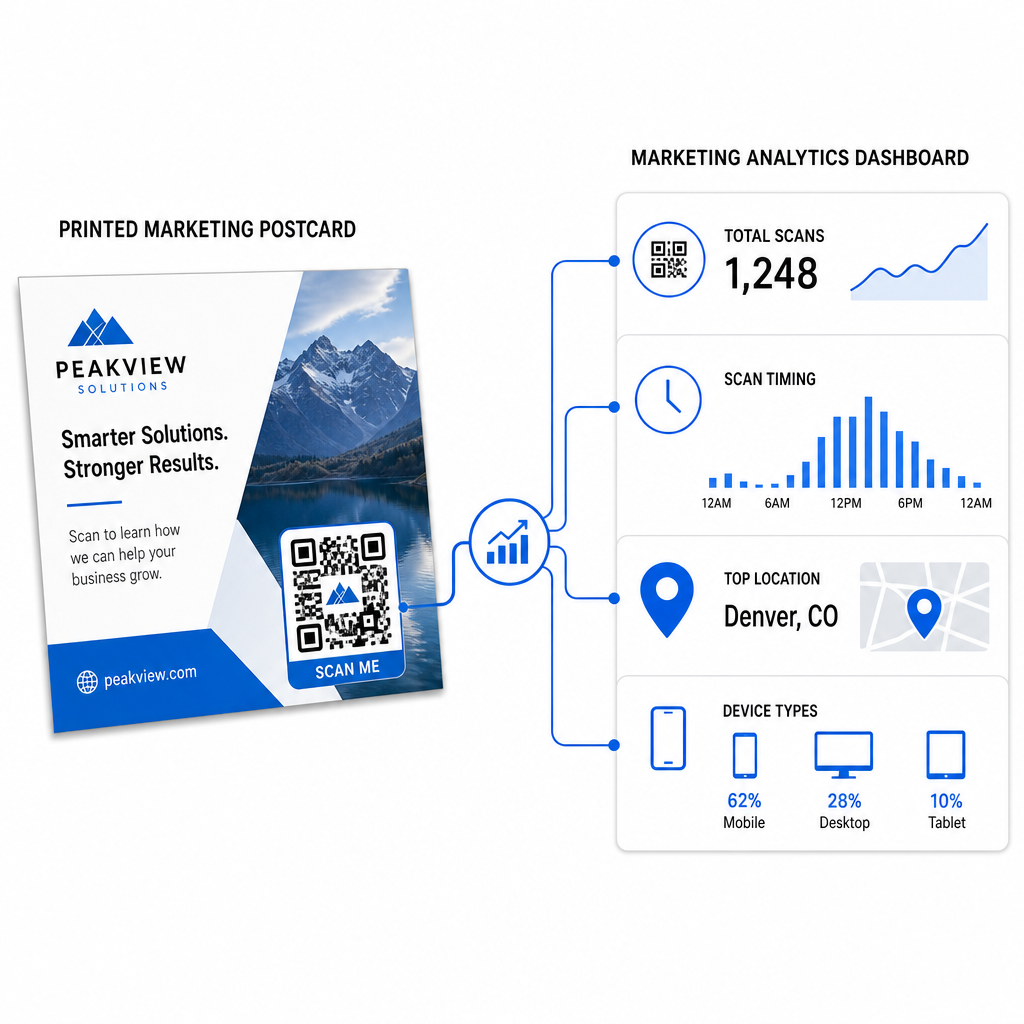
- Skannimiste koguarv ja unikaalsed kasutajad – kui palju vastuvõtjaid kaasati ja kui paljud skannisid rohkem kui üks kord
- Skaneerimise ajastus – millised päevad ja kellaajad ajendasid kõige rohkem tegevust pärast posti saatmist
- Geograafiline jaotus – millised sihtnumbrid või piirkonnad reageerisid kõige tugevamalt
- Seadme tüüp – kas vastuvõtjad skannisid iOS-i või Androidi peal, mis võib teavitada mobiilse sihtlehe otsuseid
Kasutage neid andmeid tulevaste postituste täpsustamiseks. Kui teatud piirkond näitas kõrgeid skannimismäärasid, suurendage seal järgmine kord mahtu. Kui skannimised saavutasid haripunkti kolmandal päeval pärast kohaletoimetamist, ajastage oma e-posti järeltegevus vastavalt.
Mitmeversiooniliste kampaaniate puhul – kus te testite erinevaid pakkumisi, kujundusi või üleskutseid tegevusele – määrake igale postkaardi versioonile oma dünaamiline QR-kood. Skannimisanalüütika näitab teile, milline versioon ajendas rohkem kaasamist, ootamata ainult konversiooniandmeid.
Alustage oma otseposti jõudluse mõõtmist See Pageloot QR-koodi generaator võimaldab teil luua, kohandada ja hallata QR-koode otseposti kampaaniate jaoks – sisseehitatud analüütikaga ja võimalusega sihtkohti värskendada ilma uuesti printimata.
Levinumad vead, mida vältida
Linkimine kodulehele kampaanialehe asemel. Koduleht paneb vastuvõtja tegema lisatööd, et leida postkaardil mainitud pakkumine. Iga lisasamm vähendab konversioone.
Staatilise QR-koodi kasutamine ajaliselt piiratud pakkumise jaoks. Kui pakkumine aegub või URL muutub, osutab staatiline kood katkisele või ebaolulisele lehele, ilma võimaluseta seda pärast printimist parandada.
QR-koodi tegemine liiga väikeseks. Kõik alla 0,8 × 0,8 tolli on riskantne, eriti kui postkaardi kujundus on hõivatud või kood kasutab kohandatud värve.
Üleskutse tegevusele vahelejätmine. Üksik QR-kood postkaardil ei anna vastuvõtjatele põhjust skannida. Öelge neile, mida nad saavad.
Mitte testimine füüsilisel trükitud eksemplaril. Digitaalsed tõendid ei ennusta alati, kuidas kood skannib pärast kommertsprinteri läbimist. Kontrollige alati tegelikul väljundil.
Samad põhiprintsiibid kehtivad kõigis prindivormingutes – see QR-koodid flaieritel juhend hõlmab, kuidas neid tavasid kohandada muude otsevastuse materjalide jaoks.
Hästi teostatud QR-koodiga postkaart teeb korraga kahte asja: see annab vastuvõtjatele kohese, hõõrdumisvaba viisi teie pakkumisele reageerimiseks ja see annab teile mõõdetavaid andmeid selle kohta, kuidas teie kampaania tegelikult toimib. Dünaamilise QR-koodi, mobiilile optimeeritud sihtkoha, UTM-märgistatud URL-ide ja skannimisanalüütika kombinatsioon sulgeb ahela võrguühenduseta printimise ja digitaalsete tulemuste vahel.
Alustage dünaamilise QR-koodi genereerimisega läbi selle Pagelooti dünaamiline QR-koodi generaator, suurustage see õigesti teie postkaardi formaadi jaoks, rakendage suure kontrastsusega brändingut, kirjutage selge üleskutse tegevusele ja testige füüsilisel tõendil enne täielikku trükkimist. Alates hetkest, mil vastuvõtjad hakkavad skannima, näitab teie armatuurlaud teile täpselt, mis töötab.
Korduma kippuvad küsimused
Püüdke vähemalt 0,8 × 0,8 tolli (2 × 2 cm) absoluutse miinimumina, kuid tüüpiliste postkaardi skaneerimiskauguste (10–20 tolli) puhul on usaldusväärsem suurus vahemikus 1 ja 1,5 tolli (25–38 mm). Rakendage 10:1 reeglit: tehke koodi laius ligikaudu üks kümnendik oodatavast skaneerimiskaugusest.
Jah, aga ainult siis, kui te kasutasite enne printimist dünaamilist QR-koodi. Dünaamilised QR-koodid viitavad ümbersuunamislingile, mida te kontrollite, nii et te saate siht-URL-i igal ajal uuendada ilma uuesti printimata. Staatilised QR-koodid kodeerivad sihtkoha püsivalt ja neid ei saa tagantjärele muuta.
Kasuta dünaamilist QR-koodi platvormilt nagu Pageloot, mis pakub sisseehitatud analüütikat, näidates skannimiste koguarvu, unikaalseid kasutajaid, skannimise ajastust, geograafilist asukohta ja seadme tüüpi. Sügavama omistamise jaoks Google Analyticsis lisa UTM-parameetrid (utmsource, utmmedium, utm_campaign) oma siht-URL-ile enne koodi genereerimist – skannimised ilmuvad siis jälgitavate seanssidena sinu GA4 liikluse omandamise aruandes.