Ваши открытки для прямой почтовой рассылки остаются неотслеживаемыми после того, как они покидают типографию? Без измеримой связи между вашей физической почтой и цифровыми результатами вы тратите бюджет, не имея возможности доказать рентабельность инвестиций. Это руководство охватывает, как эффективно добавлять QR-коды на открытки – от дизайна и размера до отслеживания эффективности кампании в реальном времени.
Почему QR-коды должны быть на открытках для прямой почтовой рассылки
Прямая почтовая рассылка всегда сталкивалась с одной постоянной проблемой: измерением отклика. Вы отправляете тысячи единиц и полагаетесь на анекдотические данные или погашение купонов, чтобы угадать, что сработало.
QR-коды решают эту проблему. Почтовая служба США признает QR-коды прямым способом соединения получателей почты с цифровым контентом, который продвигает их путь клиента – и даже предлагала скидки на почтовые расходы отправителям, которые включают сканируемые двухмерные штрих-коды на свои отправления. Среди организаций, которые отслеживают отклик на прямую почтовую рассылку, 82% используют методы онлайн-отслеживания, которые задействуют QR-коды, конкретные URL-адреса или другой цифровой механизм.
Случай очевиден: если вы отправляете открытки без QR-кода, вы упускаете как вовлеченность, так и измеримые данные.
Выбор правильного типа QR-кода для открыток
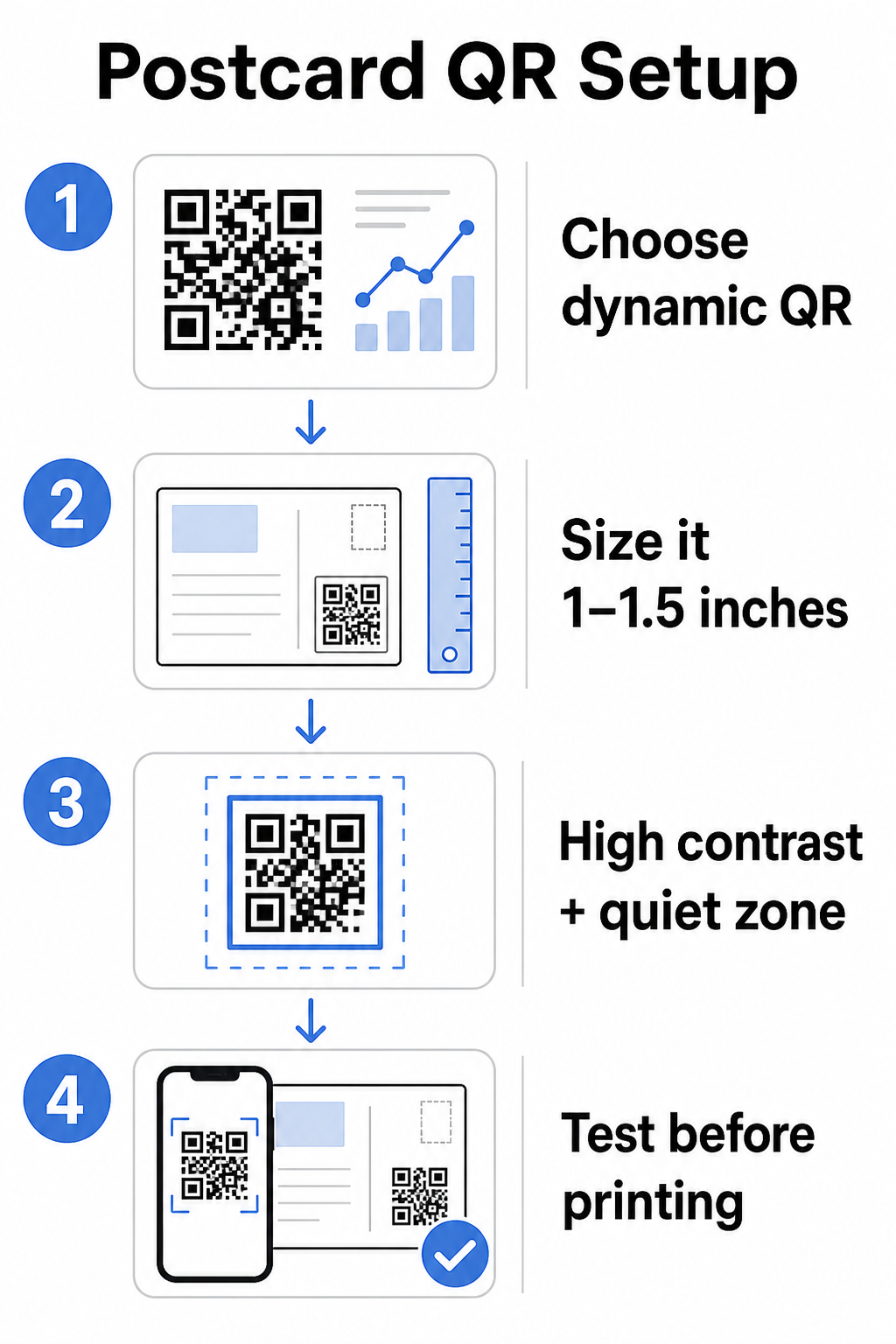
Прежде чем генерировать свой код, решите, нужен ли вам статические или Динамический QR-код – этот выбор имеет значительные последствия для того, как будет проходить ваша кампания.
Статические QR-коды навсегда кодируют URL-адрес в сам шаблон кода. После печати пункт назначения не может быть изменен. Они хорошо подходят для вечнозеленого контента, который никогда не потребует обновления, такого как постоянный список продуктов или контактная страница компании.
Динамические QR-коды указывают на короткую ссылку перенаправления, которую вы контролируете. Напечатанный код остается прежним, но вы можете обновить URL-адрес назначения в любое время – даже после того, как открытки уже находятся в почтовых ящиках получателей. Динамические коды также открывают полную аналитику сканирования, включая количество сканирований, время сканирования, географическое положение и тип устройства.
Для большинства кампаний с открытками динамические коды являются правильным выбором. Если ваше предложение меняется в середине кампании, вы можете перенаправить сканеры на новую целевую страницу без перепечатки. Если одна версия открытки превосходит другую, ваша аналитика покажет вам, почему именно.
Отслеживайте каждое сканирование из вашей кампании с открытками Использовать Динамический QR код: генератор чтобы создать отслеживаемый код, который вы можете обновлять в любое время – перепечатка не требуется. Получите доступ к полной панели аналитики сканирования с момента попадания ваших открыток в почтовые ящики.
К чему привязать QR-код вашей открытки
Пункт назначения важен так же, как и сам код. Сканирование должно приносить немедленное вознаграждение, а не вызывать путаницу. Выберите пункт назначения в зависимости от цели вашей кампании:
- A рекламная целевая страница адаптированная к конкретному предложению или сообщению открытки
- A форма для сбора лидов для сбора имен, адресов электронной почты или запросов на коммерческое предложение от заинтересованных получателей
- A страница продукта или услуги которая приводит получателей к тому, что вы продаете, без дополнительной навигации
- A видео или демонстрация которая позволяет более глубокому повествованию выполнить работу, которую формат открытки не может полностью вместить
- A страница контактов или бронирования которая дает получателям немедленный способ запланировать звонок или встречу
- A загрузка PDF обмен брошюрой, меню или каталогом с большей детализацией, чем позволяет открытка
К чему бы вы ни привязывали, убедитесь, что пункт назначения оптимизирован для мобильных устройств. Получатели открыток сканируют их своими телефонами, и страница, которая плохо отображается на мобильных устройствах, немедленно их потеряет. Тот же принцип применяется, когда добавления QR-кодов к листовкам и брошюрам – опыт использования пункта назначения так же важен, как и сам код.
Определение размера QR-кода для печати на открытках
Правильный выбор размера имеет решающее значение. Слишком маленький QR-код не будет надежно сканироваться. Pageloot рекомендует минимальный размер печати 0,8 × 0,8 дюйма (2 × 2 см) для сканирования с близкого расстояния, например, когда кто-то держит открытку на расстоянии вытянутой руки.
Для открыток, которые обычно держат на расстоянии примерно 10–20 дюймов от камеры телефона, примените соотношение расстояния сканирования к размеру 10:1: ширина QR-кода должна составлять примерно одну десятую от ожидаемого расстояния сканирования. Получателю, сканирующему с расстояния 12 дюймов, нужен код шириной не менее 1,2 дюйма.
На практике стремитесь к QR-коду размером от 1 до 1,5 дюйма (25–38 мм) на стандартной открытке. Это удобно вмещает типичные расстояния сканирования, оставляя при этом достаточно места для остальной части вашего дизайна. Для подробного руководства по другим форматам см. рекомендации по размеру QR-кода для печатных материалов.
Рекомендации по дизайну сканируемых QR-кодов для открыток
Контраст и цвет
Сканеры работают, определяя контраст между темными модулями и светлым фоном. Высокий контраст не подлежит обсуждению. Черный на белом обеспечивает наиболее надежное сканирование и является самым безопасным вариантом по умолчанию. Пользовательские цвета могут работать – и поддержание высокого контраста с фирменными цветами может значительно повысить вовлеченность – но вам необходимо сохранить достаточный контраст между передним планом и фоном, с минимальным соотношением не менее 3:1 и в идеале 4:1 или выше. Полное руководство по эффективному подбору цветов доступно в лучшим практикам контрастности цветов QR-кода руководстве.
Избегайте этих распространенных ошибок:
- Светлые модули на светлом фоне
- Градиенты, создающие неравномерный контраст по всему коду
- Инвертирование кода (светлый узор на темном фоне) – некоторые сканеры не работают с инвертированными цветовыми схемами
Тихая зона
В тихой зоны — это четкая белая рамка, окружающая шаблон QR-кода. Согласно стандартам ISO/IEC 18004, она должна быть шириной не менее четырех модулей со всех сторон. На открытке это означает, что вокруг кода должно быть оставлено примерно четверть дюйма (0,25 дюйма) свободного пространства, и нельзя размещать текст, изображения или элементы дизайна непосредственно рядом с ним. Этот буфер помогает сканерам распознавать, где начинается и заканчивается код – без него даже хорошо разработанный код может не сканироваться надежно.
Добавление логотипа
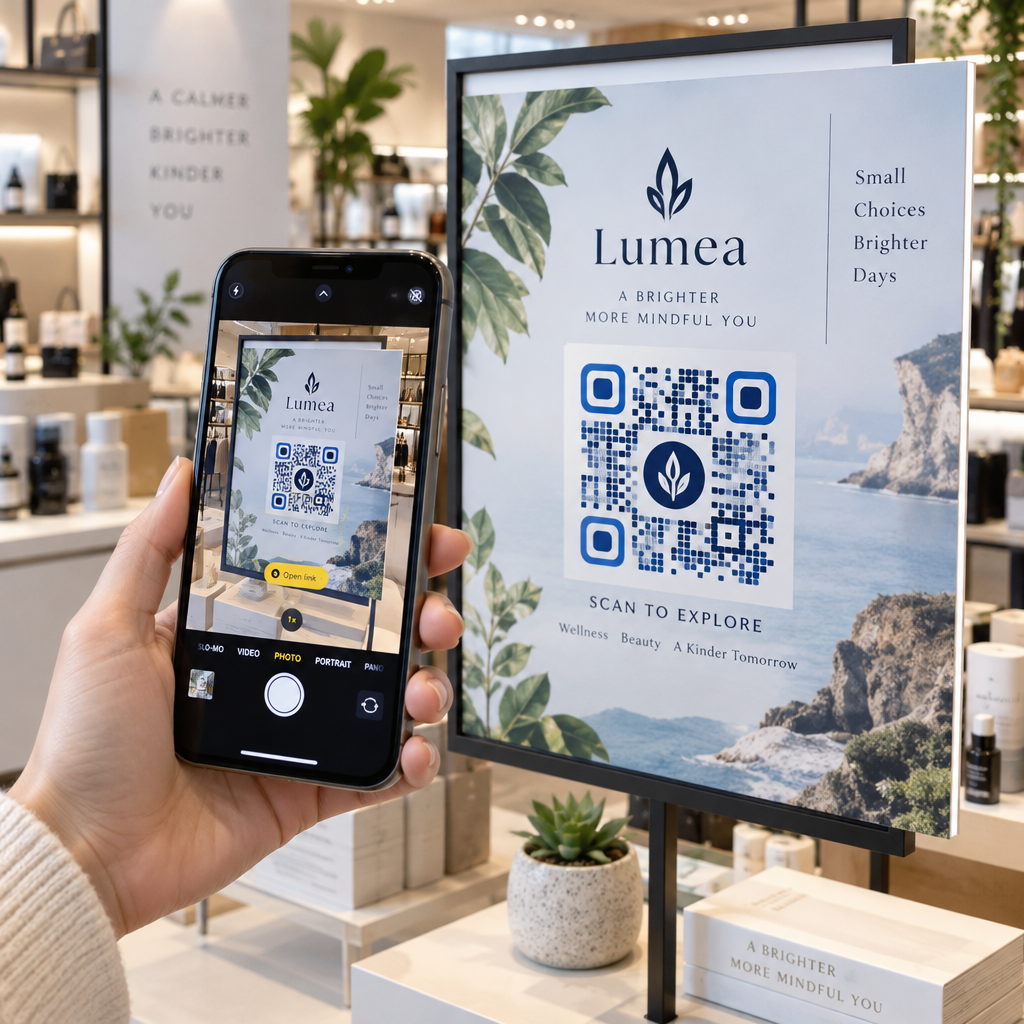
Добавление логотипа вашего бренда в центр QR-кода делает его более узнаваемым и надежным на открытке. Если вы встраиваете логотип, используйте более высокий уровень коррекции ошибок (Q или H) для сохранения сканируемости и сохраняйте размер логотипа не более 30% от общей площади кода. Вы можете создать брендированный код, используя QR код с логотипом.
Качество печати
Экспортируйте свой QR-код как векторный файл (SVG или PDF), а не как JPEG с низким разрешением, прежде чем отправлять его в типографию. Векторные форматы сохраняют четкие края модулей при любом размере печати. Запросите не менее 300 DPI у вашего поставщика печати и используйте матовое покрытие, где это возможно – глянцевые открытки могут создавать блики, которые мешают сканированию при ярком свете.
Где разместить QR-код на вашей открытке
Размещение влияет на то, сколько получателей фактически сканируют. Следуйте этим принципам:
- Разместите код на стороне с сообщением, а не на адресной стороне – именно здесь получатели проводят время за чтением
- Разместите его в естественной точке завершения чтения, например, в правом нижнем углу или непосредственно под вашим основным призывом к действию, чтобы он появлялся после того, как получатель усвоил ваше сообщение
- Окружите его четким призывом к действию – фразы вроде “Сканируйте для получения эксклюзивного предложения” или “Сканируйте, чтобы записаться на прием” точно сообщают получателям, что делать и что они получат
- Дайте ему пространство для дыхания – не загромождайте код другими элементами дизайна; тихая зона должна оставаться свободной со всех сторон
QR-код без призыва к действию — это упущенная возможность. Получатели, которые не понимают, почему они должны сканировать, просто не будут этого делать.
Добавление UTM-параметров для отслеживания кампаний
Динамические QR-коды предоставляют вам данные о сканировании. Но чтобы связать эти сканирования с вашей более широкой маркетинговой аналитикой – включая то, что получатели делают после того, как они попадают на вашу страницу – вам нужны UTM-параметры , добавленные к вашему целевому URL.
UTM-параметры — это короткие теги, добавляемые к URL-адресу, которые сообщают Google Analytics, откуда пришел трафик. Стандартные параметры:
| Параметр | Что отслеживает | Пример значения |
|---|---|---|
| `utm_источник` | Откуда пришел трафик | `прямая-почта` |
| `utm_канал` | Маркетинговый канал | `открытка` |
| `utm_кампания` | Конкретное название кампании | `летняя-распродажа-2025` |
| `utm_содержание` | Какая версия открытки | `версия-а` |
Полный URL-адрес с тегами выглядит так:
`https://yoursite.com/offer?utm`источник=прямая-почта&utmканал=открытка&utm_campaign=летняя-распродажа-2025`
Создайте свой URL-адрес с помощью компоновщика URL-адресов кампаний Google, затем вставьте этот URL-адрес с тегами в целевой адрес вашего динамического QR-кода. В GA4 вы можете просмотреть этот трафик в разделе Отчеты > Привлечение > Привлечение трафика, где Источник сеанса, Канал сеанса и Кампания сеанса будут отражать ваши значения UTM. Это позволяет вам напрямую связывать сеансы веб-сайта, заполнение форм и покупки с конкретными кампаниями с открытками – замыкая цикл между печатной и цифровой эффективностью.
Тестирование перед печатью
Никогда не отправляйте открытки в печать, не отсканировав предварительно окончательный QR-код. Протестируйте его на нескольких устройствах – как iOS, так и Android – и при различных условиях освещения. Убедитесь, что:
- Код сканируется быстро и надежно с первой попытки
- Целевой URL-адрес загружается правильно и оптимизирован для мобильных устройств
- Перенаправления для динамических кодов ведут на нужную страницу
- Код по-прежнему сканируется после применения окончательного дизайна вашей открытки, особенно если были добавлены цвета или наложение логотипа
Если вы печатаете тестовую партию, отсканируйте физический образец в условиях, в которых его, вероятно, будут использовать получатели – при обычном комнатном освещении, держа на расстоянии вытянутой руки. Это позволяет выявить проблемы с качеством печати до того, как они повлияют на весь тираж. The лучшим практикам читаемости QR-кодов Руководство охватывает полный чек-лист предпечатной проверки.
Отслеживание и оптимизация после рассылки
Как только ваши открытки поступят в обращение, ваша кампания только начинается. Динамические QR-коды предоставляют данные сканирования в реальном времени, позволяя вам отслеживать:
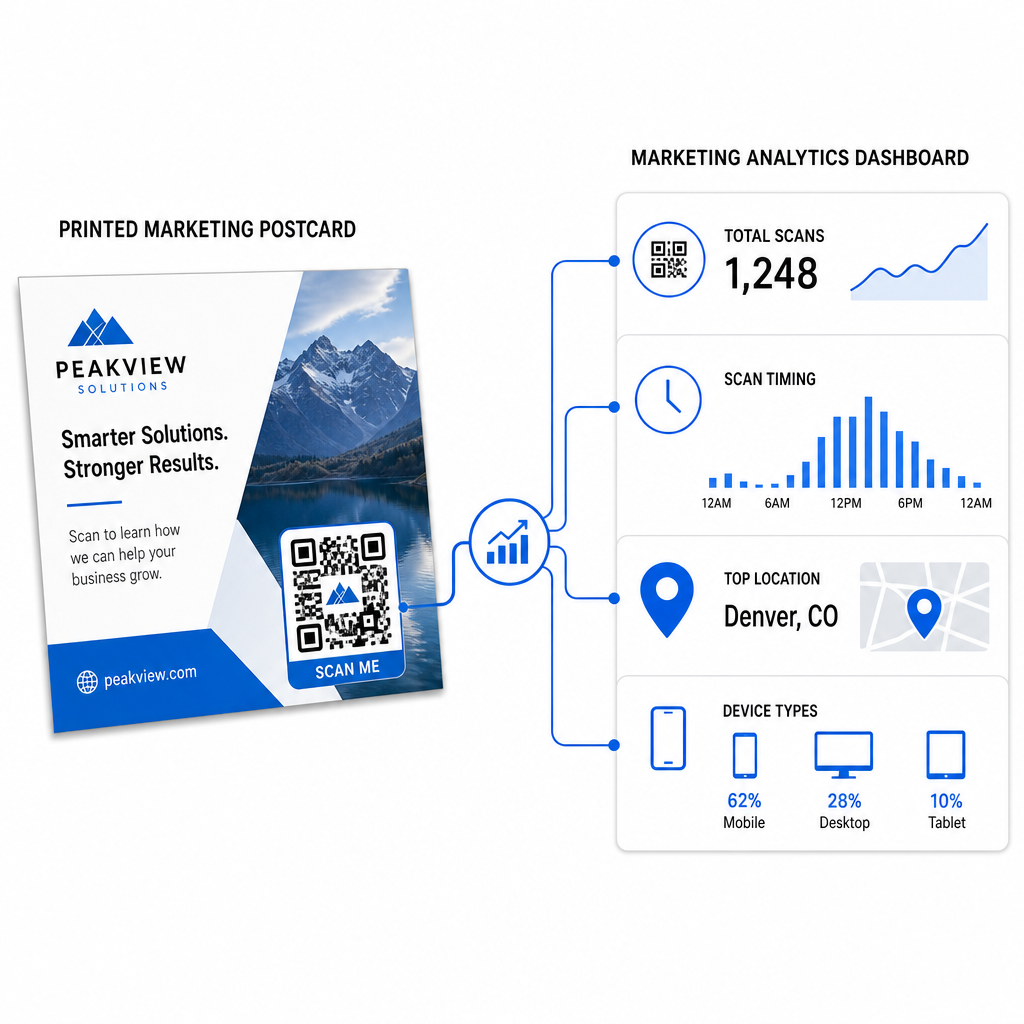
- Общее количество сканирований и уникальных пользователей – сколько получателей взаимодействовали и сколько сканировали более одного раза
- Время сканирования – какие дни и время привели к наибольшей активности после рассылки
- Географическое распределение – какие почтовые индексы или регионы отреагировали наиболее активно
- Тип устройства – сканировали ли получатели на iOS или Android, что может повлиять на решения по мобильным целевым страницам
Используйте эти.
Для многоверсионных кампаний – где вы тестируете различные предложения, дизайны или призывы к действию – назначьте каждой версии открытки свой динамический QR-код. Аналитика сканирований покажет вам, какая версия вызвала больше вовлеченности, без ожидания только данных о конверсии.
Начните измерять эффективность вашей прямой почтовой рассылки В Генератор QR-кодов позволяет создавать, настраивать и управлять QR-кодами для кампаний прямой почтовой рассылки – со встроенной аналитикой и возможностью обновлять адреса назначения без перепечатки.
Общие ошибки, которых следует избегать
Ссылка на главную страницу вместо страницы кампании. Главная страница заставляет получателя выполнять дополнительную работу, чтобы найти предложение, упомянутое на открытке. Каждый дополнительный шаг снижает конверсию.
Использование статического QR-кода для ограниченного по времени предложения. Если срок действия предложения истечет или URL изменится, статический код будет указывать на неработающую или неактуальную страницу без возможности исправить это после печати.
Слишком маленький QR-код. Все, что меньше 0,8 × 0,8 дюйма, рискованно, особенно если дизайн открытки перегружен или код использует нестандартные цвета.
Пропуск призыва к действию. Одинокий QR-код на открытке не дает получателям повода для сканирования. Скажите им, что они получат.
Отсутствие тестирования на физическом печатном экземпляре. Цифровые макеты не всегда предсказывают, как код будет сканироваться после прохождения через коммерческий принтер. Всегда проверяйте на фактическом отпечатке.
Применяются те же основные принципы для всех печатных форматов – руководство по QR-кодам на флаерах охватывает, как адаптировать эти практики для других материалов прямого отклика.
Открытка с хорошо реализованным QR-кодом делает две вещи одновременно: она предоставляет получателям немедленный, беспрепятственный способ отреагировать на ваше предложение, и предоставляет вам измеримые данные о том, как на самом деле работает ваша кампания. Сочетание динамического QR-кода, мобильно-оптимизированного адреса назначения, URL-адресов с UTM-метками и аналитики сканирований замыкает цикл между офлайн-печатью и цифровыми результатами.
Начните с генерации динамического QR-кода через Генератор динамических QR-кодов Pageloot, правильно подберите его размер для формата вашей открытки, примените высококонтрастный брендинг, напишите четкий призыв к действию и протестируйте на физическом образце перед полным тиражом. С того момента, как получатели начнут сканировать, ваша панель управления покажет вам, что именно работает.
Часто задаваемые вопросы
Стремитесь по крайней мере к 0.8 × 0.8 дюйма (2 × 2 см) как к абсолютному минимуму, но для типичных расстояний сканирования открыток в 10–20 дюймов, размер между 1 и 1.5 дюйма (25–38 мм) является более надежным. Применяйте правило 10:1: сделайте ширину кода примерно одной десятой от ожидаемого расстояния сканирования.
Да, но только если вы использовали динамический QR-код до печати. Динамические QR-коды указывают на ссылку перенаправления, которую вы контролируете, поэтому вы можете обновить целевой URL-адрес в любое время без повторной печати. Статические QR-коды постоянно кодируют пункт назначения и не могут быть изменены постфактум.
Используйте динамический QR-код с платформы, такой как Pageloot, которая предоставляет встроенную аналитику, показывающую общее количество сканирований, уникальных пользователей, время сканирования, географическое местоположение и тип устройства. Для более глубокой атрибуции в Google Analytics добавьте параметры UTM (utmsource, utmmedium, utm_campaign) к вашему целевому URL перед генерацией кода – сканирования затем появятся как отслеживаемые сеансы в вашем отчете GA4 "Привлечение трафика".