Είναι οι καρτ-ποστάλ άμεσης αλληλογραφίας σας χωρίς παρακολούθηση μόλις φύγουν από τον εκτυπωτή; Χωρίς έναν μετρήσιμο σύνδεσμο μεταξύ της φυσικής σας αλληλογραφίας και των ψηφιακών αποτελεσμάτων, ξοδεύετε προϋπολογισμό χωρίς τρόπο να αποδείξετε την απόδοση επένδυσης. Αυτός ο οδηγός καλύπτει πώς να προσθέσετε κωδικούς QR σε καρτ-ποστάλ αποτελεσματικά – από τον σχεδιασμό και το μέγεθος έως την παρακολούθηση της απόδοσης της καμπάνιας σε πραγματικό χρόνο.
Γιατί οι Κωδικοί QR Ανήκουν σε Καρτ-ποστάλ Άμεσης Αλληλογραφίας
Η άμεση αλληλογραφία αντιμετώπιζε πάντα ένα επίμονο πρόβλημα: τη μέτρηση της απόκρισης. Στέλνετε χιλιάδες κομμάτια και βασίζεστε σε ανέκδοτα στοιχεία ή εξαργυρώσεις κουπονιών για να μαντέψετε τι λειτούργησε.
Οι κωδικοί QR το λύνουν αυτό. Η Ταχυδρομική Υπηρεσία των ΗΠΑ αναγνωρίζει τους κωδικούς QR ως έναν άμεσο τρόπο σύνδεσης των παραληπτών αλληλογραφίας με ψηφιακό περιεχόμενο που προωθεί το ταξίδι των πελατών τους – και έχει προσφέρει ακόμη και εκπτώσεις στα ταχυδρομικά τέλη σε αποστολείς που περιλαμβάνουν σαρώσιμους δισδιάστατους γραμμωτούς κώδικες στα κομμάτια τους. Μεταξύ των οργανισμών που παρακολουθούν την απόκριση της άμεσης αλληλογραφίας, το 82% χρησιμοποιεί διαδικτυακές μεθόδους παρακολούθησης που αξιοποιούν κωδικούς QR, συγκεκριμένες διευθύνσεις URL ή έναν άλλο ψηφιακό μηχανισμό.
Η υπόθεση είναι σαφής: αν στέλνετε καρτ-ποστάλ χωρίς κωδικό QR, αφήνετε τόσο την αφοσίωση όσο και τα μετρήσιμα δεδομένα στο τραπέζι.
Επιλογή του Σωστού Τύπου Κωδικού QR για Καρτ-ποστάλ
Πριν δημιουργήσετε τον κωδικό σας, αποφασίστε αν χρειάζεστε έναν στατικοί ή Δυναμικό κωδικό QR – η επιλογή έχει σημαντικές συνέπειες για το πώς θα λειτουργήσει η καμπάνια σας.
Οι στατικοί κωδικοί QR κωδικοποιούν μόνιμα μια διεύθυνση URL στο ίδιο το μοτίβο του κωδικού. Μόλις εκτυπωθεί, ο προορισμός δεν μπορεί να αλλάξει. Λειτουργούν καλά για διαχρονικό περιεχόμενο που δεν θα χρειαστεί ποτέ ενημέρωση, όπως μια μόνιμη καταχώριση προϊόντος ή μια σελίδα επικοινωνίας μιας επιχείρησης.
Οι δυναμικοί κωδικοί QR δείχνουν σε έναν σύντομο σύνδεσμο ανακατεύθυνσης που ελέγχετε εσείς. Ο εκτυπωμένος κωδικός παραμένει ο ίδιος, αλλά μπορείτε να ενημερώσετε τη διεύθυνση URL προορισμού ανά πάσα στιγμή – ακόμη και αφού οι καρτ-ποστάλ βρίσκονται ήδη στα γραμματοκιβώτια των παραληπτών. Οι δυναμικοί κωδικοί ξεκλειδώνουν επίσης πλήρη αναλυτικά στοιχεία σάρωσης, συμπεριλαμβανομένου του αριθμού σαρώσεων, του χρόνου σάρωσης, της γεωγραφικής τοποθεσίας και του τύπου συσκευής.
Για τις περισσότερες καμπάνιες καρτ-ποστάλ, οι δυναμικοί κωδικοί είναι η σωστή επιλογή. Εάν η προσφορά σας αλλάξει στη μέση της καμπάνιας, μπορείτε να ανακατευθύνετε τους σαρωτές σε μια νέα σελίδα προορισμού χωρίς επανεκτύπωση. Εάν μία έκδοση καρτ-ποστάλ υπερτερεί μιας άλλης, τα αναλυτικά στοιχεία σας θα σας δείξουν ακριβώς γιατί.
Παρακολουθήστε Κάθε Σάρωση Από την Καμπάνια Καρτ-ποστάλ σας Χρησιμοποιήστε το Δημιουργία dynamic QR code για να δημιουργήσετε έναν ανιχνεύσιμο κωδικό που μπορείτε να ενημερώσετε ανά πάσα στιγμή – δεν απαιτείται επανεκτύπωση. Αποκτήστε πρόσβαση σε ένα πλήρες ταμπλό αναλυτικών στοιχείων σάρωσης από τη στιγμή που οι καρτ-ποστάλ σας φτάνουν στα γραμματοκιβώτια.
Τι να Συνδέσετε τον Κωδικό QR της Καρτ-ποστάλ σας
Ο προορισμός έχει τόση σημασία όσο και ο ίδιος ο κωδικός. Η σάρωση πρέπει να είναι άμεσα ανταποδοτική, όχι συγκεχυμένη. Επιλέξτε έναν προορισμό με βάση τον στόχο της καμπάνιας σας:
- ΕΝΑ προωθητική σελίδα προορισμού προσαρμοσμένη στην ειδική προσφορά ή μήνυμα της καρτ-ποστάλ
- ΕΝΑ φόρμα συλλογής δυνητικών πελατών για τη συλλογή ονομάτων, email ή αιτημάτων προσφοράς από ενδιαφερόμενους παραλήπτες
- ΕΝΑ σελίδα προϊόντος ή υπηρεσίας που οδηγεί τους παραλήπτες σε αυτό που πουλάτε χωρίς επιπλέον πλοήγηση
- ΕΝΑ βίντεο ή επίδειξη που επιτρέπει σε μια βαθύτερη αφήγηση να κάνει τη δουλειά που μια μορφή καρτ-ποστάλ δεν μπορεί να φιλοξενήσει πλήρως
- ΕΝΑ σελίδα επικοινωνίας ή κράτησης που δίνει στους παραλήπτες έναν άμεσο τρόπο να προγραμματίσουν μια κλήση ή ραντεβού
- ΕΝΑ λήψη PDF κοινοποιώντας ένα φυλλάδιο, μενού ή κατάλογο με περισσότερες λεπτομέρειες από όσες επιτρέπει μια καρτ-ποστάλ
Ό,τι κι αν συνδέσετε, βεβαιωθείτε ότι ο προορισμός είναι βελτιστοποιημένος για κινητά. Οι παραλήπτες καρτ-ποστάλ σαρώνουν με τα τηλέφωνά τους, και μια σελίδα που δεν αποδίδεται καλά σε κινητό θα τους χάσει αμέσως. Η ίδια αρχή ισχύει όταν προσθήκη κωδικών QR σε φυλλάδια και μπροσούρες – η εμπειρία προορισμού είναι εξίσου σημαντική με τον ίδιο τον κωδικό.
Μέγεθος του Κωδικού QR σας για Εκτύπωση Καρτ-ποστάλ
Το σωστό μέγεθος είναι κρίσιμο. Ένας κωδικός QR που είναι πολύ μικρός δεν θα σαρώνεται αξιόπιστα. Η Pageloot συνιστά ένα ελάχιστο εκτυπωμένο μέγεθος 0,8 × 0,8 ίντσες (2 × 2 εκ.) για σάρωση από κοντινή απόσταση, όπως όταν κάποιος κρατά την καρτ-ποστάλ σε απόσταση αναπνοής.
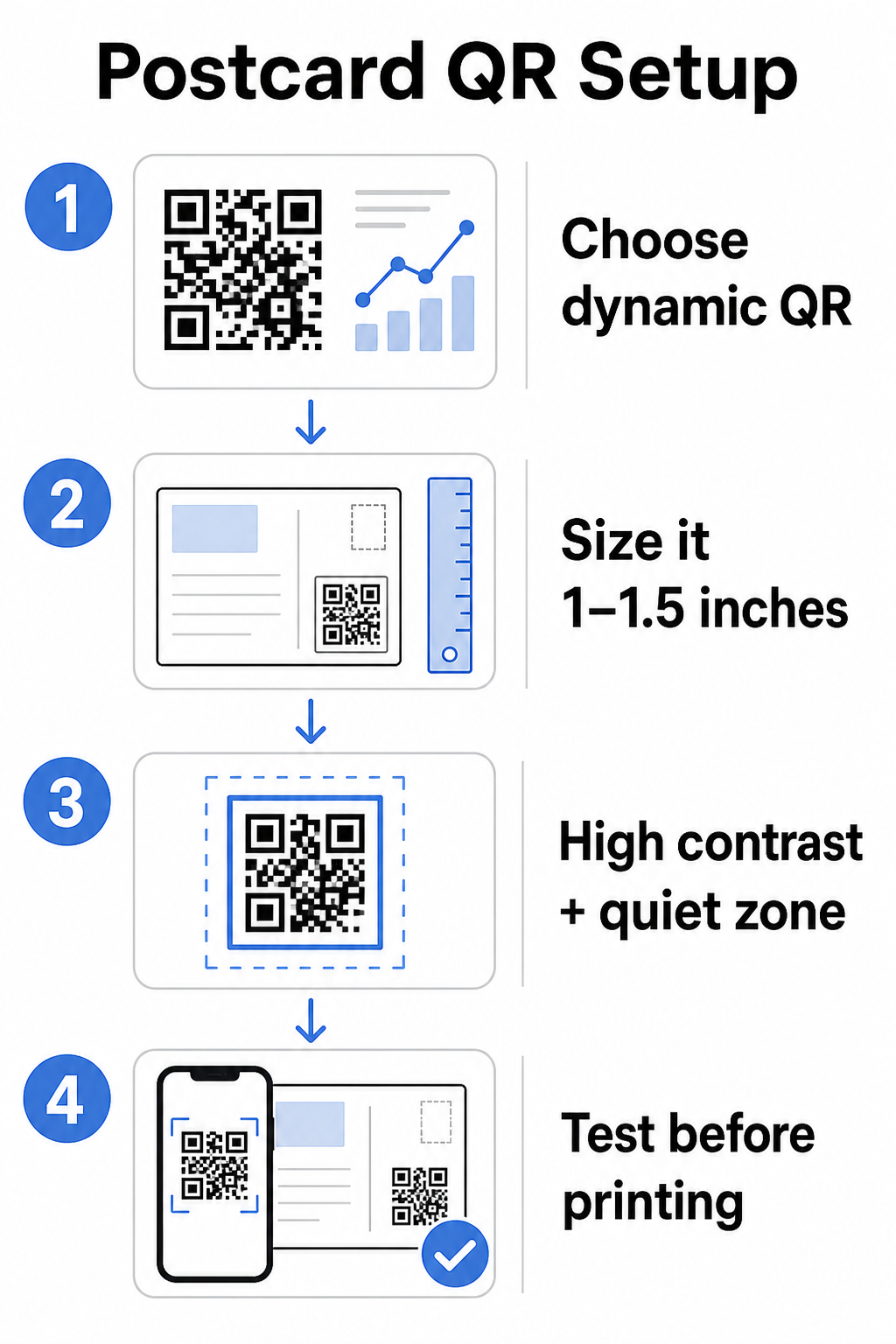
Για καρτ-ποστάλ, οι οποίες συνήθως κρατούνται σε απόσταση περίπου 10–20 ιντσών από την κάμερα του τηλεφώνου, εφαρμόστε την αναλογία απόστασης σάρωσης προς μέγεθος 10:1: το πλάτος του κωδικού QR πρέπει να είναι περίπου το ένα δέκατο της αναμενόμενης απόστασης σάρωσης. Ένας παραλήπτης που σαρώνει από απόσταση 12 ιντσών χρειάζεται έναν κωδικό που να έχει πλάτος τουλάχιστον 1,2 ίντσες.
Στην πράξη, στοχεύστε σε έναν κωδικό QR μεταξύ 1 και 1,5 ίντσες (25–38 χιλιοστά) σε μια τυπική καρτ-ποστάλ. Αυτό φιλοξενεί άνετα τις τυπικές αποστάσεις σάρωσης, αφήνοντας παράλληλα αρκετό χώρο για το υπόλοιπο του σχεδιασμού σας. Για λεπτομερείς οδηγίες σε άλλες μορφές, δείτε τις οδηγίες μεγέθους κωδικών QR για έντυπα υλικά.
Οδηγίες Σχεδιασμού για Σαρώσιμους Κωδικούς QR Καρτ-ποστάλ
Αντίθεση και χρώμα
Οι σαρωτές λειτουργούν ανιχνεύοντας την αντίθεση μεταξύ σκούρων μονάδων και ανοιχτού φόντου. Η υψηλή αντίθεση είναι αδιαπραγμάτευτη. Το μαύρο σε λευκό παρέχει την πιο αξιόπιστη σάρωση και είναι η ασφαλέστερη προεπιλογή. Τα προσαρμοσμένα χρώματα μπορούν να λειτουργήσουν – και η διατήρηση υψηλής αντίθεσης με επώνυμα χρώματα μπορεί να αυξήσει σημαντικά την αφοσίωση – αλλά πρέπει να διατηρήσετε επαρκή αντίθεση μεταξύ προσκηνίου και φόντου, με ελάχιστη αναλογία τουλάχιστον 3:1 και ιδανικά 4:1 ή υψηλότερη. Πλήρης καθοδήγηση για τον αποτελεσματικό συνδυασμό χρωμάτων είναι διαθέσιμη στο βέλτιστες πρακτικές αντίθεσης χρωμάτων κωδικών QR οδηγό μας.
Αποφύγετε αυτές τις κοινές παγίδες:
- Ανοιχτόχρωμες μονάδες σε ανοιχτό φόντο
- Ντεγκραντέ που δημιουργούν ανομοιόμορφη αντίθεση στον κώδικα
- Αντιστροφή του κώδικα (ανοιχτό μοτίβο σε σκούρο φόντο) – ορισμένοι σαρωτές αποτυγχάνουν σε ανεστραμμένα χρωματικά σχήματα
Η Ήσυχη Ζώνη
ο ήσυχη ζώνη είναι το καθαρό λευκό περίγραμμα που περιβάλλει το μοτίβο του κώδικα QR. Σύμφωνα με τα πρότυπα ISO/IEC 18004, πρέπει να έχει πλάτος τουλάχιστον τεσσάρων μονάδων σε όλες τις πλευρές. Σε μια καρτ ποστάλ, αυτό σημαίνει να αφήσετε περίπου ένα τέταρτο της ίντσας (0,25 ίντσες) καθαρού χώρου γύρω από τον κώδικα και να μην τοποθετείτε κείμενο, εικόνες ή στοιχεία σχεδιασμού ακριβώς δίπλα του. Αυτός ο χώρος βοηθά τους σαρωτές να αναγνωρίσουν πού αρχίζει και πού τελειώνει ο κώδικας – χωρίς αυτόν, ακόμη και ένας καλά σχεδιασμένος κώδικας μπορεί να αποτύχει να σαρωθεί αξιόπιστα.
Προσθήκη Λογότυπου
Η προσθήκη του λογότυπου της επωνυμίας σας στο κέντρο του κώδικα QR τον καθιστά πιο αναγνωρίσιμο και αξιόπιστο σε μια καρτ ποστάλ. Εάν ενσωματώσετε ένα λογότυπο, χρησιμοποιήστε υψηλότερο επίπεδο διόρθωσης σφαλμάτων (Q ή H) για να διατηρήσετε τη δυνατότητα σάρωσης και διατηρήστε το λογότυπο σε όχι περισσότερο από το 30% της συνολικής περιοχής του κώδικα. Μπορείτε να δημιουργήσετε έναν επώνυμο κώδικα χρησιμοποιώντας το Δημιουργία QR με λογότυπο.
Ποιότητα εκτύπωσης
Εξάγετε τον κώδικα QR ως αρχείο διανυσματικής γραφικής (SVG ή PDF) αντί για JPEG χαμηλής ανάλυσης πριν τον στείλετε στον εκτυπωτή. Οι διανυσματικές μορφές διατηρούν ευκρινείς ακμές μονάδων σε οποιοδήποτε μέγεθος εκτύπωσης. Ζητήστε τουλάχιστον 300 DPI από τον προμηθευτή εκτύπωσης και χρησιμοποιήστε ματ φινίρισμα όπου είναι δυνατόν – οι γυαλιστερές καρτ ποστάλ μπορούν να δημιουργήσουν αντανάκλαση που παρεμβαίνει στη σάρωση υπό έντονο φως.
Πού να Τοποθετήσετε τον Κώδικα QR στην Καρτ Ποστάλ σας
Η τοποθέτηση επηρεάζει πόσοι παραλήπτες σαρώνονται πραγματικά. Ακολουθήστε αυτές τις αρχές:
- Τοποθετήστε τον κώδικα στην πλευρά του μηνύματος, όχι στην πλευρά της διεύθυνσης – εδώ οι παραλήπτες αφιερώνουν χρόνο στην ανάγνωση
- Τοποθετήστε τον σε ένα φυσικό σημείο ολοκλήρωσης ανάγνωσης, όπως η κάτω δεξιά γωνία ή ακριβώς κάτω από την κύρια παρότρυνση για δράση, ώστε να εμφανίζεται αφού ο παραλήπτης έχει αφομοιώσει το μήνυμά σας
- Περιβάλλετέ το με μια σαφή παρότρυνση για δράση – φράσεις όπως “Σαρώστε για την αποκλειστική σας προσφορά” ή “Σαρώστε για να κλείσετε το ραντεβού σας” λένε στους παραλήπτες τι ακριβώς να κάνουν και τι θα λάβουν
- Δώστε του χώρο – μην γεμίζετε τον κώδικα με άλλα στοιχεία σχεδιασμού· η ήσυχη ζώνη πρέπει να παραμείνει καθαρή από όλες τις πλευρές
Ένας κώδικας QR χωρίς παρότρυνση για δράση είναι μια χαμένη ευκαιρία. Οι παραλήπτες που δεν καταλαβαίνουν γιατί πρέπει να σαρώσουν απλά δεν θα το κάνουν.
Προσθήκη Παραμέτρων UTM για Παρακολούθηση Καμπάνιας
Οι δυναμικοί κώδικες QR σας δίνουν δεδομένα σάρωσης. Αλλά για να συνδέσετε αυτές τις σαρώσεις με τις ευρύτερες αναλύσεις μάρκετινγκ – συμπεριλαμβανομένου του τι κάνουν οι παραλήπτες αφού προσγειωθούν στη σελίδα σας – χρειάζεστε παραμέτρους UTM προσαρτημένο στην URL προορισμού σας.
Οι παράμετροι UTM είναι σύντομες ετικέτες που προστίθενται σε μια URL και λένε στο Google Analytics από πού προήλθε η επισκεψιμότητα. Οι τυπικές παράμετροι είναι:
| Παράμετρος | Τι Παρακολουθεί | Παράδειγμα Τιμής |
|---|---|---|
| `utm_πηγή` | Από πού προήλθε η επισκεψιμότητα | `άμεση-αλληλογραφία` |
| `utm_μέσο` | Το κανάλι μάρκετινγκ | `καρτ-ποστάλ` |
| `utm_καμπάνια` | Το συγκεκριμένο όνομα καμπάνιας | `καλοκαιρινές-προσφορές-2025` |
| `utm_περιεχόμενο` | Ποια έκδοση καρτ ποστάλ | `έκδοση-α` |
Μια πλήρης URL με ετικέτες μοιάζει με αυτή:
`https://yoursite.com/offer?utm``πηγή=άμεση-αλληλογραφία&utm``μέσο=καρτ-ποστάλ&utm_καμπάνια=καλοκαιρινές-προσφορές-2025`
Δημιουργήστε την URL σας χρησιμοποιώντας το Campaign URL Builder της Google και, στη συνέχεια, επικολλήστε αυτήν την URL με ετικέτες στον προορισμό του δυναμικού κώδικα QR σας. Στο GA4, μπορείτε να αναθεωρήσετε αυτήν την επισκεψιμότητα υπό Αναφορές > Απόκτηση > Απόκτηση επισκεψιμότητας, όπου η πηγή περιόδου σύνδεσης, το μέσο περιόδου σύνδεσης και η καμπάνια περιόδου σύνδεσης θα αντικατοπτρίζουν τις τιμές UTM σας. Αυτό σας επιτρέπει να αποδώσετε συνεδρίες ιστότοπου, ολοκληρώσεις φορμών και αγορές απευθείας σε συγκεκριμένες καμπάνιες καρτ ποστάλ – κλείνοντας τον κύκλο μεταξύ της απόδοσης εκτύπωσης και ψηφιακής.
Δοκιμή Πριν την Εκτύπωση
Ποτέ μην στέλνετε καρτ ποστάλ για εκτύπωση χωρίς να σαρώσετε πρώτα τον τελικό κώδικα QR. Δοκιμάστε τον σε πολλές συσκευές – τόσο iOS όσο και Android – και υπό διαφορετικές συνθήκες φωτισμού. Επιβεβαιώστε ότι:
- Ο κώδικας σαρώνεται γρήγορα και αξιόπιστα με την πρώτη προσπάθεια
- Η URL προορισμού φορτώνεται σωστά και είναι βελτιστοποιημένη για κινητά
- Οι ανακατευθύνσεις για δυναμικούς κώδικες οδηγούν στη σωστή σελίδα
- Ο κώδικας εξακολουθεί να σαρώνεται αφού έχει εφαρμοστεί ο τελικός σχεδιασμός της καρτ ποστάλ σας, ειδικά αν προστέθηκαν χρώματα ή επικάλυψη λογότυπου
Εάν εκτυπώνετε μια δοκιμαστική παρτίδα, σαρώστε τη φυσική δοκιμή υπό τις συνθήκες που είναι πιθανό να βιώσουν οι παραλήπτες – τυπικός εσωτερικός φωτισμός, κρατημένο σε απόσταση αναπνοής. Αυτό εντοπίζει προβλήματα ποιότητας εκτύπωσης πριν επηρεάσουν την πλήρη εκτύπωσή σας. Το βέλτιστες πρακτικές για την αναγνωσιμότητα των κωδικών QR οδηγός καλύπτει μια πλήρη λίστα ελέγχου δοκιμών πριν την εκτύπωση.
Παρακολούθηση και Βελτιστοποίηση Μετά την Αποστολή
Μόλις οι καρτ ποστάλ σας κυκλοφορήσουν, η καμπάνια σας μόλις ξεκινά. Οι δυναμικοί κωδικοί QR παρέχουν δεδομένα σάρωσης σε πραγματικό χρόνο, επιτρέποντάς σας να παρακολουθείτε:
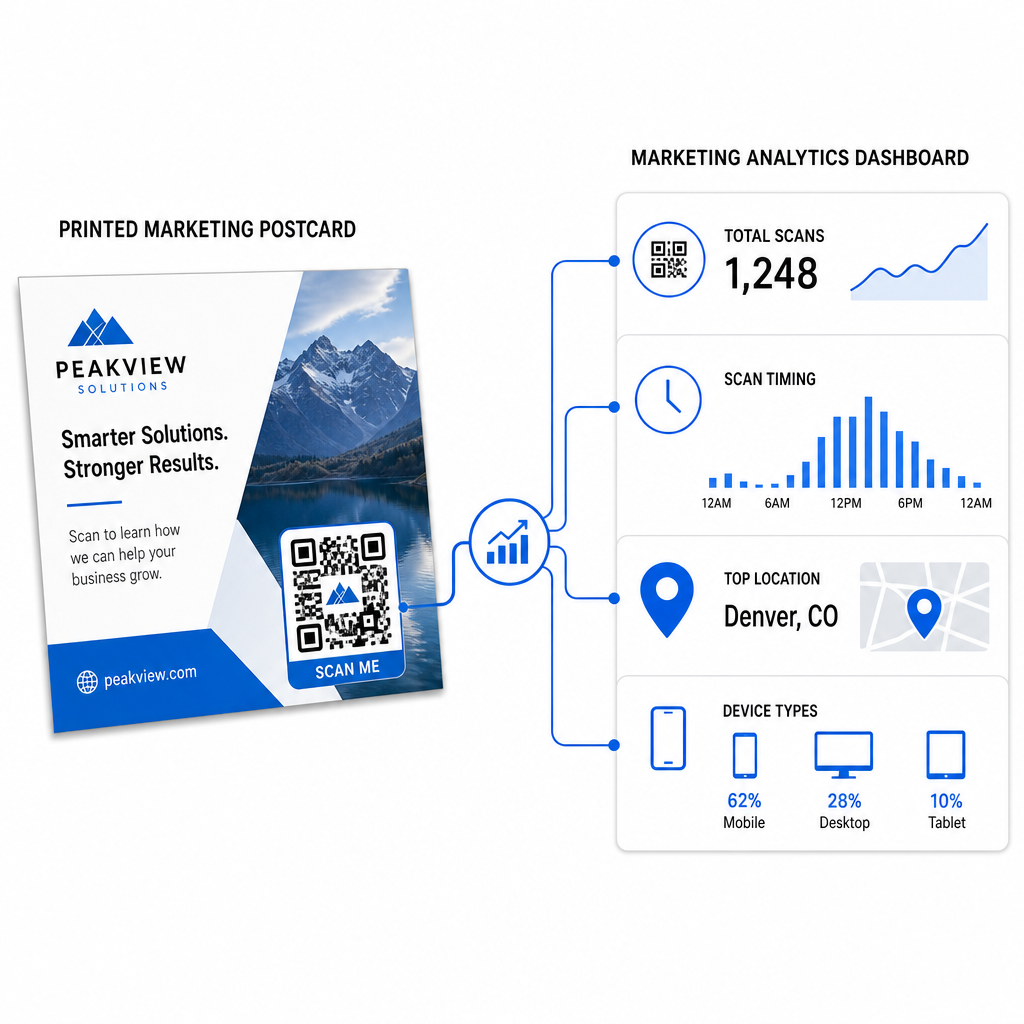
- Συνολικές σαρώσεις και μοναδικοί χρήστες – πόσοι παραλήπτες αλληλεπίδρασαν, και πόσοι σάρωσαν περισσότερες από μία φορές
- Χρόνος σάρωσης – ποιες ημέρες και ώρες οδήγησαν στην περισσότερη δραστηριότητα μετά την αποστολή
- Γεωγραφική κατανομή – ποιοι ταχυδρομικοί κώδικες ή περιοχές ανταποκρίθηκαν πιο έντονα
- Τύπος συσκευής – εάν οι παραλήπτες σάρωσαν σε iOS ή Android, κάτι που μπορεί να ενημερώσει τις αποφάσεις για τις σελίδες προορισμού για κινητά
Χρησιμοποιήστε αυτά τα δεδομένα για να βελτιώσετε τις μελλοντικές αποστολές. Εάν μια συγκεκριμένη περιοχή εμφάνισε υψηλά ποσοστά σάρωσης, αυξήστε τον όγκο εκεί την επόμενη φορά. Εάν οι σαρώσεις κορυφώθηκαν την τρίτη ημέρα μετά την παράδοση, χρονομετρήστε την παρακολούθηση του email σας ανάλογα.
Για καμπάνιες πολλαπλών εκδόσεων – όπου δοκιμάζετε διαφορετικές προσφορές, σχέδια ή παροτρύνσεις για δράση – αναθέστε σε κάθε έκδοση καρτ ποστάλ τον δικό της δυναμικό κωδικό QR. Τα αναλυτικά στοιχεία σάρωσης θα σας δείξουν ποια έκδοση οδήγησε σε μεγαλύτερη αλληλεπίδραση χωρίς να περιμένετε μόνο τα δεδομένα μετατροπής.
Ξεκινήστε να Μετράτε την Απόδοση της Άμεσης Αλληλογραφίας σας ο Δημιουργία κώδικα Pageloot QR σας επιτρέπει να δημιουργείτε, να προσαρμόζετε και να διαχειρίζεστε κωδικούς QR για καμπάνιες άμεσης αλληλογραφίας – με ενσωματωμένα αναλυτικά στοιχεία και τη δυνατότητα ενημέρωσης προορισμών χωρίς επανεκτύπωση.
Κοινά λάθη προς αποφυγή
Σύνδεση με μια αρχική σελίδα αντί για μια σελίδα καμπάνιας. Μια αρχική σελίδα αναγκάζει τον παραλήπτη να κάνει επιπλέον δουλειά για να βρει την προσφορά που αναφέρεται στην καρτ ποστάλ. Κάθε επιπλέον βήμα μειώνει τις μετατροπές.
Χρήση στατικού κωδικού QR για μια προσφορά περιορισμένου χρόνου. Εάν η προσφορά λήξει ή αλλάξει η διεύθυνση URL, ένας στατικός κωδικός θα παραπέμπει σε μια χαλασμένη ή άσχετη σελίδα χωρίς τρόπο να το διορθώσετε μετά την εκτύπωση.
Κάνοντας τον κωδικό QR πολύ μικρό. Οτιδήποτε κάτω από 0,8 × 0,8 ίντσες είναι επικίνδυνο, ιδιαίτερα εάν ο σχεδιασμός της καρτ ποστάλ είναι φορτωμένος ή ο κωδικός χρησιμοποιεί προσαρμοσμένα χρώματα.
Παράλειψη της παρότρυνσης για δράση. Ένας μοναχικός κωδικός QR σε μια καρτ ποστάλ δεν δίνει στους παραλήπτες κανένα λόγο να σαρώσουν. Πείτε τους τι θα λάβουν.
Μη δοκιμή στο φυσικό εκτυπωμένο κομμάτι. Οι ψηφιακές δοκιμές δεν προβλέπουν πάντα πώς θα σαρωθεί ένας κωδικός αφού περάσει από έναν εμπορικό εκτυπωτή. Πάντα να επαληθεύετε στην πραγματική έξοδο.
Οι ίδιες βασικές αρχές ισχύουν σε όλες τις μορφές εκτύπωσης – ο οδηγός κωδικών QR σε φυλλάδια καλύπτει πώς να προσαρμόσετε αυτές τις πρακτικές για άλλα υλικά άμεσης απόκρισης.
Μια καρτ ποστάλ με έναν καλά εκτελεσμένο κωδικό QR κάνει δύο πράγματα ταυτόχρονα: δίνει στους παραλήπτες έναν άμεσο, χωρίς τριβές τρόπο να ενεργήσουν στην προσφορά σας, και σας δίνει μετρήσιμα δεδομένα για το πώς αποδίδει πραγματικά η καμπάνια σας. Ο συνδυασμός ενός δυναμικού κωδικού QR, ενός βελτιστοποιημένου για κινητά προορισμού, διευθύνσεων URL με ετικέτες UTM και αναλυτικών στοιχείων σάρωσης κλείνει τον κύκλο μεταξύ της εκτύπωσης εκτός σύνδεσης και των ψηφιακών αποτελεσμάτων.
Ξεκινήστε δημιουργώντας έναν δυναμικό κωδικό QR μέσω του Pageloot Δυναμική Γεννήτρια Κωδικών QR, διαμορφώστε το σωστά για τη μορφή της καρτ ποστάλ σας, εφαρμόστε branding υψηλής αντίθεσης, γράψτε μια σαφή παρότρυνση για δράση, και δοκιμάστε σε μια φυσική δοκιμή πριν από την πλήρη εκτύπωση. Από τη στιγμή που οι παραλήπτες αρχίζουν να σαρώνουν, ο πίνακας ελέγχου σας θα σας δείξει ακριβώς τι λειτουργεί.
Συχνές ερωτήσεις
Στοχεύστε σε τουλάχιστον 0,8 × 0,8 ίντσες (2 × 2 εκ.) ως ένα απόλυτο ελάχιστο, αλλά για τυπικές αποστάσεις σάρωσης καρτ ποστάλ 10–20 ιντσών, ένα μέγεθος μεταξύ 1 και 1,5 ιντσών (25–38 χιλ.) είναι πιο αξιόπιστο. Εφαρμόστε τον κανόνα 10:1: κάντε το πλάτος του κώδικα περίπου το ένα δέκατο της αναμενόμενης απόστασης σάρωσης.
Ναι, αλλά μόνο αν χρησιμοποιήσατε έναν δυναμικό κωδικό QR πριν την εκτύπωση. Οι δυναμικοί κωδικοί QR παραπέμπουν σε έναν σύνδεσμο ανακατεύθυνσης τον οποίο εσείς ελέγχετε, ώστε να μπορείτε να ενημερώσετε την URL προορισμού ανά πάσα στιγμή χωρίς επανεκτύπωση. Οι στατικοί κωδικοί QR κωδικοποιούν μόνιμα τον προορισμό και δεν μπορούν να αλλάξουν εκ των υστέρων.
Χρησιμοποιήστε έναν δυναμικό κωδικό QR από μια πλατφόρμα όπως το Pageloot, η οποία παρέχει ενσωματωμένα αναλυτικά στοιχεία που δείχνουν συνολικές σαρώσεις, μοναδικούς χρήστες, χρονισμό σάρωσης, γεωγραφική τοποθεσία και τύπο συσκευής. Για βαθύτερη απόδοση στο Google Analytics, προσθέστε παραμέτρους UTM (utmsource, utmmedium, utm_campaign) στην URL προορισμού σας πριν δημιουργήσετε τον κωδικό – οι σαρώσεις θα εμφανίζονται τότε ως ανιχνεύσιμες συνεδρίες στην αναφορά απόκτησης επισκεψιμότητας GA4 σας.