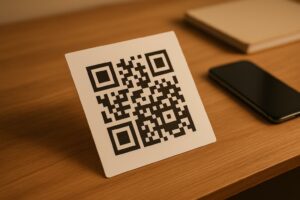
Doğrudan posta kartlarınız yazıcıdan çıktıktan sonra takip edilmiyor mu? Fiziksel postanız ile dijital sonuçlar arasında ölçülebilir bir bağlantı olmadan, yatırım getirisini kanıtlama yolu olmaksızın bütçe harcıyorsunuz. Bu kılavuz, QR kodlarını kartpostallara etkili bir şekilde nasıl ekleyeceğinizi kapsar – tasarımdan boyutlandırmaya ve kampanya performansını gerçek zamanlı olarak izlemeye kadar.
QR Kodları Neden Doğrudan Posta Kartpostallarında Olmalı?
Doğrudan posta her zaman kalıcı bir sorunla karşı karşıya kalmıştır: yanıtı ölçmek. Binlerce parça gönderir ve neyin işe yaradığını tahmin etmek için anekdot niteliğindeki kanıtlara veya kupon kullanımlarına güvenirsiniz.
QR kodları bunu çözer. ABD Posta Servisi, QR kodlarını posta alıcılarını müşteri yolculuklarını ilerleten dijital içeriğe bağlamanın doğrudan bir yolu olarak tanır – ve hatta parçalarına taranabilir iki boyutlu barkodlar ekleyen göndericilere posta indirimleri bile sunmuştur. Doğrudan posta yanıtını takip eden kuruluşlar arasında, 'si QR kodlarını, belirli URL'leri veya başka bir dijital mekanizmayı kullanan çevrimiçi takip yöntemlerini kullanır.
Durum açık: QR kodu olmadan kartpostal gönderiyorsanız, hem etkileşimi hem de ölçülebilir verileri masada bırakıyorsunuz.
Kartpostallar İçin Doğru QR Kodu Türünü Seçmek
Kodunuzu oluşturmadan önce, bir şeye ihtiyacınız olup olmadığına karar verin statik veya Dinamik QR kodu – bu seçim, kampanyanızın nasıl yürüyeceği konusunda önemli sonuçlar doğurur.
Statik QR kodları, bir URL'yi kod deseninin içine kalıcı olarak kodlar. Bir kez basıldıktan sonra, hedef değiştirilemez. Kalıcı bir ürün listesi veya bir işletmenin iletişim sayfası gibi asla güncellenmeyecek sürekli içerik için iyi çalışırlar.
Dinamik QR kodları, kontrol ettiğiniz kısa bir yönlendirme bağlantısına işaret eder. Basılı kod aynı kalır, ancak hedef URL'yi istediğiniz zaman güncelleyebilirsiniz – kartpostallar alıcıların posta kutularına ulaştıktan sonra bile. Dinamik kodlar ayrıca tarama sayısı, tarama zamanı, coğrafi konum ve cihaz türü dahil olmak üzere tam tarama analizlerini de açar.
Çoğu kartpostal kampanyası için dinamik kodlar doğru seçimdir. Teklifiniz kampanya ortasında değişirse, tarayıcıları yeniden basım yapmadan yeni bir açılış sayfasına yönlendirebilirsiniz. Bir kartpostal sürümü diğerinden daha iyi performans gösterirse, analizleriniz size tam olarak nedenini gösterecektir.
Kartpostal Kampanyanızdaki Her Taramayı Takip Edin Kullan Dinamik QR Kod Oluşturucu istediğiniz zaman güncelleyebileceğiniz izlenebilir bir kod oluşturmak için – yeniden basım gerekmez. Kartpostallarınız posta kutularına ulaştığı andan itibaren tam bir tarama analizi panosuna erişin.
Kartpostal QR Kodunuzu Neye Bağlamalısınız?
Hedef, kodun kendisi kadar önemlidir. Tarama hemen ödüllendirici hissettirmeli, kafa karıştırıcı olmamalıdır. Kampanya hedefinize göre bir hedef seçin:
- Bir tanıtım açılış sayfası kartpostalın belirli teklifine veya mesajına göre uyarlanmış
- Bir potansiyel müşteri yakalama formu ilgili alıcılardan isim, e-posta veya fiyat teklifi talepleri toplamak için
- Bir ürün veya hizmet sayfası alıcıları ek navigasyon olmadan sattığınız şeye ulaştıran
- Bir video veya demo daha derin hikaye anlatımının, bir kartpostal formatının tam olarak karşılayamayacağı işi yapmasına olanak tanıyan
- Bir iletişim veya rezervasyon sayfası alıcılara hemen bir arama veya randevu planlama imkanı sunan
- Bir PDF indirme bir kartpostalın izin verdiğinden daha fazla ayrıntıyla bir broşür, menü veya katalog paylaşma
Neye bağlantı verirseniz verin, hedefin olduğundan emin olun mobil uyumlu. Kartpostal alıcıları telefonlarıyla tarama yapar ve mobil cihazlarda iyi görüntülenmeyen bir sayfa onları hemen kaybeder. Aynı prensip şunlar için de geçerlidir: el ilanlarına ve broşürlere QR kodları ekleyerek – hedef deneyimi, kodun kendisi kadar önemlidir.
Kartpostal Baskısı İçin QR Kodunuzu Boyutlandırma
Boyutu doğru ayarlamak çok önemlidir. Çok küçük bir QR kodu güvenilir bir şekilde taranmaz. Pageloot şunları önerir: minimum basılı boyut 0.8 × 0.8 inç (2 × 2 cm) yakın mesafeli tarama için, örneğin birisi kartpostalı kol mesafesinde tuttuğunda.
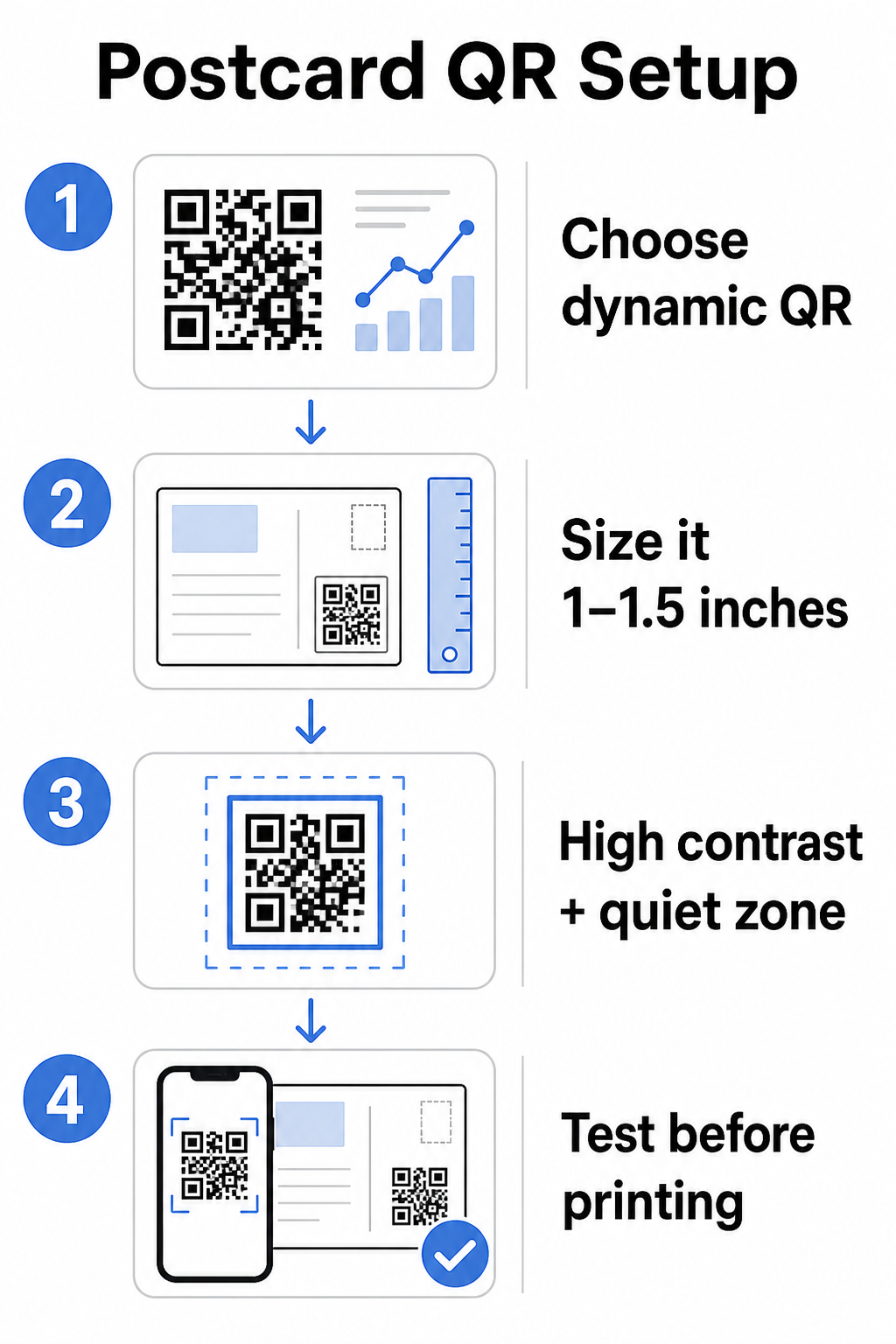
Genellikle telefon kamerasından yaklaşık 10-20 inç mesafede tutulan kartpostallar için şunları uygulayın: 10:1 tarama mesafesi-boyut oranı: QR kodu genişliği, beklenen tarama mesafesinin yaklaşık onda biri olmalıdır. 12 inç uzaktan tarama yapan bir alıcı, en az 1.2 inç genişliğinde bir koda ihtiyaç duyar.
Uygulamada, bir QR kodu şunlar arasında hedefleyin: 1 ve 1.5 inç (25–38 mm) standart bir kartpostal üzerinde. Bu, tasarımınızın geri kalanı için yeterli yer bırakırken tipik tarama mesafelerini rahatça karşılar. Diğer formatlar için ayrıntılı rehberlik için şuraya bakın: basılı materyaller için QR kodu boyutlandırma yönergeleri.
Taranabilir Kartpostal QR Kodları İçin Tasarım Yönergeleri
Kontrast ve renk
Tarayıcılar, koyu modüller ile açık bir arka plan arasındaki kontrastı algılayarak çalışır. Yüksek kontrast vazgeçilmezdir. Beyaz üzerine siyah, en güvenilir taramayı sağlar ve en güvenli varsayılan seçenektir. Özel renkler işe yarayabilir – ve markalı renklerle yüksek kontrastı korumak etkileşimi anlamlı şekilde artırabilir – ancak ön plan ile arka plan arasında yeterli kontrastı korumanız gerekir, minimum 3:1 ve ideal olarak 4:1 veya daha yüksek bir oranla. Renkleri etkili bir şekilde eşleştirme konusunda tam rehberlik şurada mevcuttur: QR kodu renk kontrastı en iyi uygulamaları rehberimizde bulabilirsiniz.
Bu yaygın hatalardan kaçının:
- Açık renkli modüllerin açık bir arka plan üzerinde olması
- Kod boyunca düzensiz kontrast oluşturan gradyanlar
- Kodu tersine çevirme (koyu arka plan üzerinde açık desen) – bazı tarayıcılar tersine çevrilmiş renk şemalarında başarısız olur
Sessiz Bölge
Bu sessiz alan QR kodu desenini çevreleyen net beyaz kenarlıktır. ISO/IEC 18004 standartlarına göre, her tarafta en az dört modül genişliğinde olmalıdır. Bir kartpostalda, bu, kodun etrafında yaklaşık çeyrek inç (0,25 inç) boş alan bırakmak ve metin, resim veya tasarım öğelerini doğrudan yanına yerleştirmemek anlamına gelir. Bu tampon, tarayıcıların kodun nerede başlayıp bittiğini tanımasına yardımcı olur – bu olmadan, iyi tasarlanmış bir kod bile güvenilir bir şekilde taranamayabilir.
Logo Ekleme
Marka logonuzu QR kodunun ortasına eklemek, bir kartpostalda onu daha tanınır ve güvenilir kılar. Bir logo yerleştirirseniz, taranabilirliği korumak için daha yüksek bir hata düzeltme seviyesi (Q veya H) kullanın ve logoyu kodun toplam alanının 'undan fazla tutmayın. Markalı bir kod oluşturmak için şunları kullanabilirsiniz: Logolu QR Kod Oluşturucu.
Baskı kalitesi
QR kodunuzu yazıcıya göndermeden önce düşük çözünürlüklü bir JPEG yerine vektör dosyası (SVG veya PDF) olarak dışa aktarın. Vektör formatları, herhangi bir baskı boyutunda keskin modül kenarlarını korur. Baskı sağlayıcınızdan en az 300 DPI isteyin ve mümkün olduğunca mat bir yüzey kullanın – parlak kartpostallar, parlak ışık altında taramayı engelleyen parlamalar oluşturabilir.
QR Kodunu Kartpostalınızda Nereye Yerleştirmelisiniz?
Yerleşim, kaç alıcının gerçekten taradığını etkiler. Şu ilkelere uyun:
- Kodu mesaj tarafına yerleştirin, adres tarafına değil – alıcılar okumak için zamanı burada harcar
- Doğal bir okuma bitiş noktasına konumlandırın, örneğin sağ alt köşeye veya ana harekete geçirici mesajınızın hemen altına, böylece alıcı mesajınızı özümsedikten sonra görünür
- Etrafını net bir harekete geçirici mesajla çevreleyin – “Özel teklifiniz için tarayın” veya “Randevunuzu ayırtmak için tarayın” gibi ifadeler, alıcılara tam olarak ne yapacaklarını ve ne elde edeceklerini söyler
- Ona nefes alma alanı verin – kodu diğer tasarım öğeleriyle doldurmayın; sessiz bölge her tarafta açık kalmalıdır
Harekete geçirici mesajı olmayan bir QR kodu kaçırılmış bir fırsattır. Neden taramaları gerektiğini anlamayan alıcılar, basitçe taramayacaktır.
Kampanya Takibi İçin UTM Parametreleri Ekleme
Dinamik QR kodları size tarama verileri sağlar. Ancak bu taramaları daha geniş pazarlama analizlerinize bağlamak için – alıcıların sayfanıza indikten sonra ne yaptıklarını da dahil olmak üzere – şunlara ihtiyacınız var: UTM parametreleri hedef URL'nize eklenmiş.
UTM parametreleri, Google Analytics'e trafiğin nereden geldiğini söyleyen bir URL'ye eklenen kısa etiketlerdir. Standart parametreler şunlardır:
| Parametre | Ne İzler | Örnek Değer |
|---|---|---|
| `utm_kaynak` | Trafiğin nereden geldiği | `doğrudan-posta` |
| `utm_mecra` | Pazarlama kanalı | `kartpostal` |
| `utm_kampanya` | Belirli kampanya adı | `yaz-indirimi-2025` |
| `utm_içerik` | Hangi kartpostal sürümü | `versiyon-a` |
Tam etiketli bir URL şöyle görünür:
`https://yoursite.com/offer?utm``kaynak=doğrudan-posta&utm``mecra=kartpostal&utm_kampanya=yaz-indirimi-2025`
URL'nizi Google'ın Kampanya URL Oluşturucusu'nu kullanarak oluşturun, ardından bu etiketli URL'yi dinamik QR kodunuzun hedefine yapıştırın. GA4'te bu trafiği şurada inceleyebilirsiniz: Raporlar > Edinme > Trafik edinimi, burada Oturum kaynağı, Oturum ortamı ve Oturum kampanyası UTM değerlerinizi yansıtacaktır. Bu, web sitesi oturumlarını, form doldurmalarını ve satın alımları doğrudan belirli kartpostal kampanyalarına atfetmenizi sağlar – basılı ve dijital performans arasındaki döngüyü kapatır.
Baskıdan Önce Test Etme
Kartpostalları, son QR kodunu önce taramadan asla baskıya göndermeyin. Hem iOS hem de Android olmak üzere birden fazla cihazda ve farklı aydınlatma koşullarında test edin. Şunları onaylayın:
- Kod ilk denemede hızlı ve güvenilir bir şekilde taranıyor
- Hedef URL doğru yükleniyor ve mobil uyumlu
- Dinamik kodlar için yönlendirmeler doğru sayfaya çözümleniyor
- Kod, son kartpostal tasarımınız uygulandıktan sonra bile taranıyor, özellikle renkler veya bir logo katmanı eklendiyse
Bir test partisi basıyorsanız, fiziksel kanıtı alıcıların deneyimlemesi muhtemel koşullar altında (tipik iç mekan aydınlatması, kol mesafesinde tutularak) tarayın. Bu, tam baskınızı etkilemeden önce baskı kalitesi sorunlarını yakalar. The QR kodu okunabilirliği için en iyi uygulamaları kılavuz, eksiksiz bir baskı öncesi test kontrol listesini kapsar.
Postalamadan Sonra Takip Etme ve Optimize Etme
Kartpostallarınız dolaşıma girdiğinde, kampanyanız daha yeni başlıyor demektir. Dinamik QR kodları, gerçek zamanlı tarama verileri sağlayarak şunları izlemenizi sağlar:
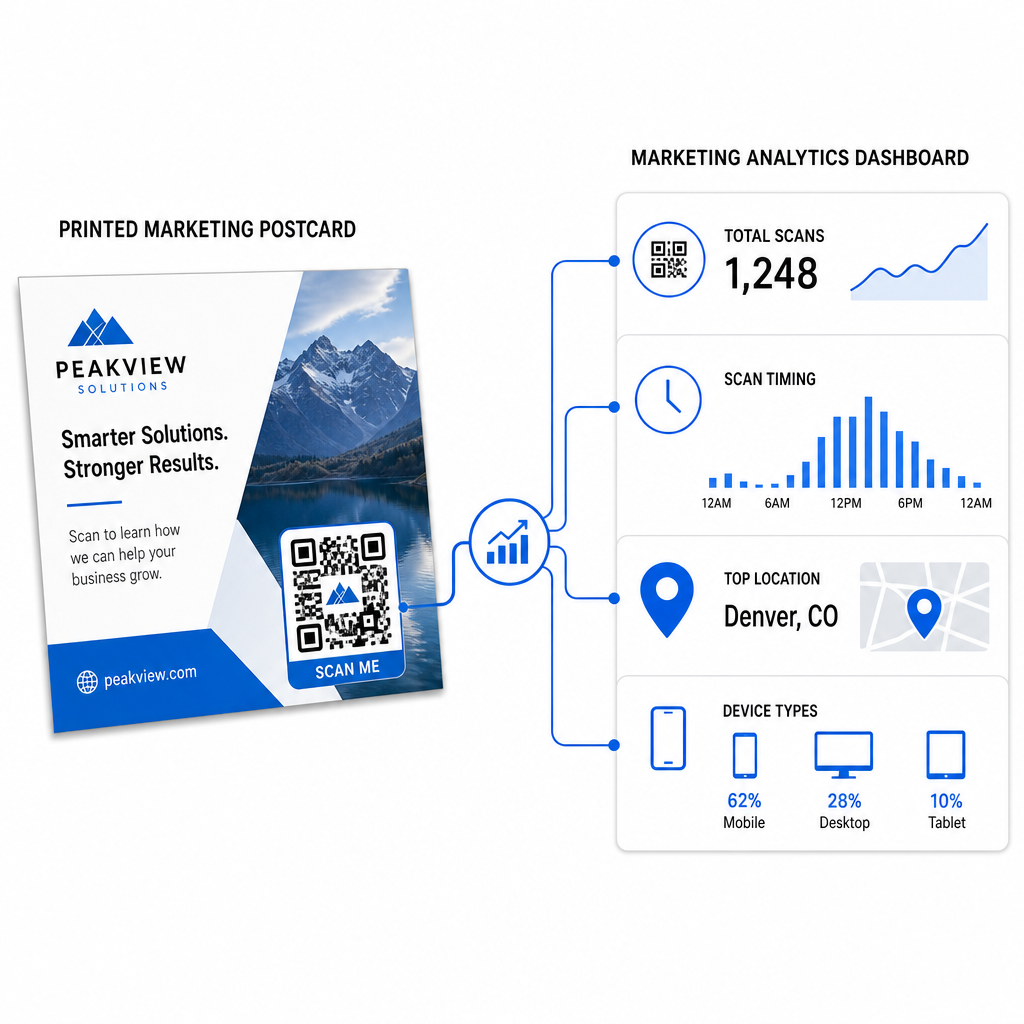
- Toplam taramalar ve benzersiz kullanıcılar – kaç alıcının etkileşimde bulunduğunu ve kaçının birden fazla taradığını
- Tarama zamanlaması – posta gönderimini takiben hangi günlerin ve saatlerin en fazla etkinliği sağladığını
- Coğrafi dağılım – hangi posta kodlarının veya bölgelerin en güçlü şekilde yanıt verdiğini
- Cihaz türü – alıcıların iOS veya Android'de tarayıp taramadığını, bu da mobil açılış sayfası kararlarına bilgi verebilir
Gelecekteki postalamaları iyileştirmek için bu verileri kullanın. Belirli bir alan yüksek tarama oranları gösteriyorsa, bir dahaki sefere oradaki hacmi artırın. Taramalar teslimattan üç gün sonra zirveye ulaştıysa, e-posta takibinizi buna göre zamanlayın.
Çok versiyonlu kampanyalar için – farklı teklifler, tasarımlar veya harekete geçirici mesajlar test ettiğiniz durumlarda – her kartpostal versiyonuna kendi dinamik QR kodunu atayın. Tarama analizi, yalnızca dönüşüm verilerini beklemeden hangi versiyonun daha fazla etkileşim sağladığını size gösterecektir.
Doğrudan Posta Performansınızı Ölçmeye Başlayın Bu Pageloot QR Kodu Oluşturucu doğrudan posta kampanyaları için QR kodları oluşturmanızı, özelleştirmenizi ve yönetmenizi sağlar – yerleşik analizler ve yeniden baskı yapmadan hedefleri güncelleme yeteneği ile.
Kaçınılması Gereken Yaygın Hatalar
Bir kampanya sayfası yerine bir ana sayfaya bağlantı vermek. Bir ana sayfa, alıcının kartpostalda belirtilen teklifi bulmak için fazladan iş yapmasına neden olur. Her ek adım dönüşümleri azaltır.
Sınırlı süreli bir teklif için statik bir QR kodu kullanmak. Teklifin süresi dolarsa veya URL değişirse, statik bir kod bozuk veya alakasız bir sayfaya yönlendirecektir ve baskıdan sonra düzeltmenin hiçbir yolu yoktur.
QR kodunu çok küçük yapmak. 0,8 × 0,8 inçten küçük her şey risklidir, özellikle kartpostal tasarımı yoğunsa veya kod özel renkler kullanıyorsa.
Harekete geçirici mesajı atlamak. Bir kartpostaldaki tek başına bir QR kodu, alıcılara taramak için hiçbir neden vermez. Ne alacaklarını söyleyin.
Fiziksel basılı parçada test yapmamak. Dijital provalar, bir kodun ticari bir yazıcıdan geçtikten sonra nasıl taranacağını her zaman tahmin etmez. Her zaman gerçek çıktıda doğrulayın.
Aynı temel prensipler tüm baskı formatlarında geçerlidir – the el ilanları kılavuzundaki QR kodları bu uygulamaların diğer doğrudan yanıt materyalleri için nasıl uyarlanacağını kapsar.
İyi uygulanmış bir QR koduna sahip bir kartpostal aynı anda iki şey yapar: alıcılara teklifinize anında, sürtünmesiz bir şekilde yanıt verme imkanı sunar ve kampanyanızın gerçekte nasıl performans gösterdiğine dair ölçülebilir veriler sağlar. Dinamik bir QR kodu, mobil uyumlu bir hedef, UTM etiketli URL'ler ve tarama analizlerinin kombinasyonu, çevrimdışı baskı ile dijital sonuçlar arasındaki döngüyü kapatır.
Dinamik bir QR kodu oluşturarak başlayın Pageloot Dinamik QR Kod Oluşturucu, kartpostal formatınıza göre doğru boyutlandırın, yüksek kontrastlı markalama uygulayın, açık bir harekete geçirici mesaj yazın ve tam baskıdan önce fiziksel bir provada test edin. Alıcılar taramaya başladığı andan itibaren, kontrol paneliniz size tam olarak neyin işe yaradığını gösterecektir.
Sıkça sorulan sorular
Mutlak minimum olarak en az 0,8 × 0,8 inç (2 × 2 cm) hedefleyin, ancak 10–20 inçlik tipik kartpostal tarama mesafeleri için, 1 ila 1,5 inç (25–38 mm) arasındaki bir boyut daha güvenilirdir. 10:1 kuralını uygulayın: kod genişliğini beklenen tarama mesafesinin yaklaşık onda biri yapın.
Evet, ancak sadece yazdırmadan önce dinamik bir QR kod kullandıysanız. Dinamik QR kodlar, kontrol ettiğiniz bir yönlendirme bağlantısına işaret eder, böylece hedef URL'yi yeniden yazdırmadan istediğiniz zaman güncelleyebilirsiniz. Statik QR kodlar hedefi kalıcı olarak kodlar ve sonradan değiştirilemez.
Pageloot gibi, toplam taramaları, benzersiz kullanıcıları, tarama zamanlamasını, coğrafi konumu ve cihaz türünü gösteren yerleşik analizler sunan bir platformdan dinamik bir QR kod kullanın. Google Analytics'te daha derin ilişkilendirme için, kodu oluşturmadan önce UTM parametrelerini (utmsource, utmmedium, utm_campaign) hedef URL'nize ekleyin – taramalar daha sonra GA4 Trafik edinimi raporunuzda izlenebilir oturumlar olarak görünecektir.