Ar jūsų tiesioginio pašto atvirukai lieka nesekami, kai palieka spaustuvę? Be išmatuojamos sąsajos tarp jūsų fizinio pašto ir skaitmeninių rezultatų, jūs leidžiate biudžetą neturėdami būdo įrodyti investicijų grąžos. Šis vadovas aprašo, kaip efektyviai pridėti QR kodus prie atvirukų – nuo dizaino ir dydžio iki kampanijos našumo stebėjimo realiuoju laiku.
Kodėl QR kodai priklauso tiesioginio pašto atvirukams
Tiesioginis paštas visada susidūrė su viena nuolatine problema: atsakymų matavimu. Jūs siunčiate tūkstančius vienetų ir pasikliaujate anekdotiniais įrodymais arba kuponų išpirkimais, kad atspėtumėte, kas suveikė.
QR kodai tai išsprendžia. JAV pašto tarnyba pripažįsta QR kodus kaip tiesioginį būdą sujungti pašto gavėjus su skaitmeniniu turiniu, kuris skatina jų kliento kelionę – ir netgi pasiūlė pašto nuolaidas siuntėjams, kurie įtraukia nuskaitomus dvimačius brūkšninius kodus į savo siuntas. Tarp organizacijų, kurios seka tiesioginio pašto atsakymus, 82% naudoja internetinius stebėjimo metodus, kurie pasitelkia QR kodus, konkrečius URL adresus arba kitą skaitmeninį mechanizmą.
Atvejis aiškus: jei siunčiate atvirukus be QR kodo, paliekate tiek įsitraukimą, tiek išmatuojamus duomenis ant stalo.
Tinkamo QR kodo tipo pasirinkimas atvirukams
Prieš generuodami savo kodą, nuspręskite, ar jums reikia statiniai arba Dinaminis QR kodo – pasirinkimas turi didelių pasekmių tam, kaip veiks jūsų kampanija.
Statiniai QR kodai nuolat užkoduoja URL adresą pačiame kodo šablone. Atspausdinus, paskirties vieta negali būti pakeista. Jie puikiai tinka nuolatiniam turiniui, kurio niekada nereikės atnaujinti, pavyzdžiui, nuolatiniam produkto sąrašui arba įmonės kontaktų puslapiui.
Dinaminiai QR kodai nukreipia į trumpą peradresavimo nuorodą, kurią valdote. Atspausdintas kodas lieka tas pats, tačiau paskirties URL adresą galite atnaujinti bet kuriuo metu – net ir po to, kai atvirukai jau yra gavėjų pašto dėžutėse. Dinaminiai kodai taip pat atrakina visą nuskaitymo analizę, įskaitant nuskaitymų skaičių, nuskaitymo laiką, geografinę vietą ir įrenginio tipą.
Daugumai atvirukų kampanijų dinaminiai kodai yra tinkamas pasirinkimas. Jei jūsų pasiūlymas pasikeičia kampanijos viduryje, galite nukreipti skaitytuvus į naują nukreipimo puslapį be pakartotinio spausdinimo. Jei viena atviruko versija veikia geriau nei kita, jūsų analizė tiksliai parodys, kodėl.
Stebėkite kiekvieną nuskaitymą iš savo atvirukų kampanijos Naudoti Dinaminis QR kodo generatorius sukurti sekamą kodą, kurį galite atnaujinti bet kuriuo metu – nereikia pakartotinio spausdinimo. Pasiekite visą nuskaitymo analizės prietaisų skydelį nuo to momento, kai jūsų atvirukai pasiekia pašto dėžutes.
Prie ko susieti savo atviruko QR kodą
Paskirties vieta yra tokia pat svarbi kaip ir pats kodas. Nuskaitymas turėtų iš karto atrodyti naudingas, o ne painus. Pasirinkite paskirties vietą pagal savo kampanijos tikslą:
- A reklaminis nukreipimo puslapis pritaikytas konkrečiam atviruko pasiūlymui ar žinutei
- A potencialių klientų surinkimo forma rinkti vardus, el. pašto adresus arba užklausas dėl kainos iš suinteresuotų gavėjų
- A produkto ar paslaugos puslapis kuris nukreipia gavėjus prie to, ką parduodate, be papildomos navigacijos
- A vaizdo įrašas ar demonstracija kuris leidžia gilesniam pasakojimui atlikti darbą, kurio atviruko formatas negali visiškai pritaikyti
- A kontaktų ar rezervacijos puslapis kuris suteikia gavėjams tiesioginį būdą suplanuoti skambutį ar susitikimą
- A PDF atsisiuntimas dalijimasis brošiūra, meniu ar katalogu su daugiau detalių, nei leidžia atvirukas
Kad ir ką susietumėte, įsitikinkite, kad paskirties vieta yra optimizuota mobiliesiems įrenginiams. Atvirukų gavėjai nuskaito savo telefonais, o puslapis, kuris blogai atvaizduojamas mobiliajame telefone, juos iš karto praras. Tas pats principas galioja, kai pridėję QR kodus prie skrajučių ir brošiūrų – paskirties vietos patirtis yra tokia pat svarbi kaip ir pats kodas.
QR kodo dydžio nustatymas atvirukų spausdinimui
Teisingas dydžio nustatymas yra labai svarbus. Per mažas QR kodas nebus patikimai nuskaitomas. Pageloot rekomenduoja minimalų atspausdintą dydį 0,8 × 0,8 colio (2 × 2 cm) artimo nuotolio nuskaitymui, pavyzdžiui, kai kas nors laiko atviruką ištiestos rankos atstumu.
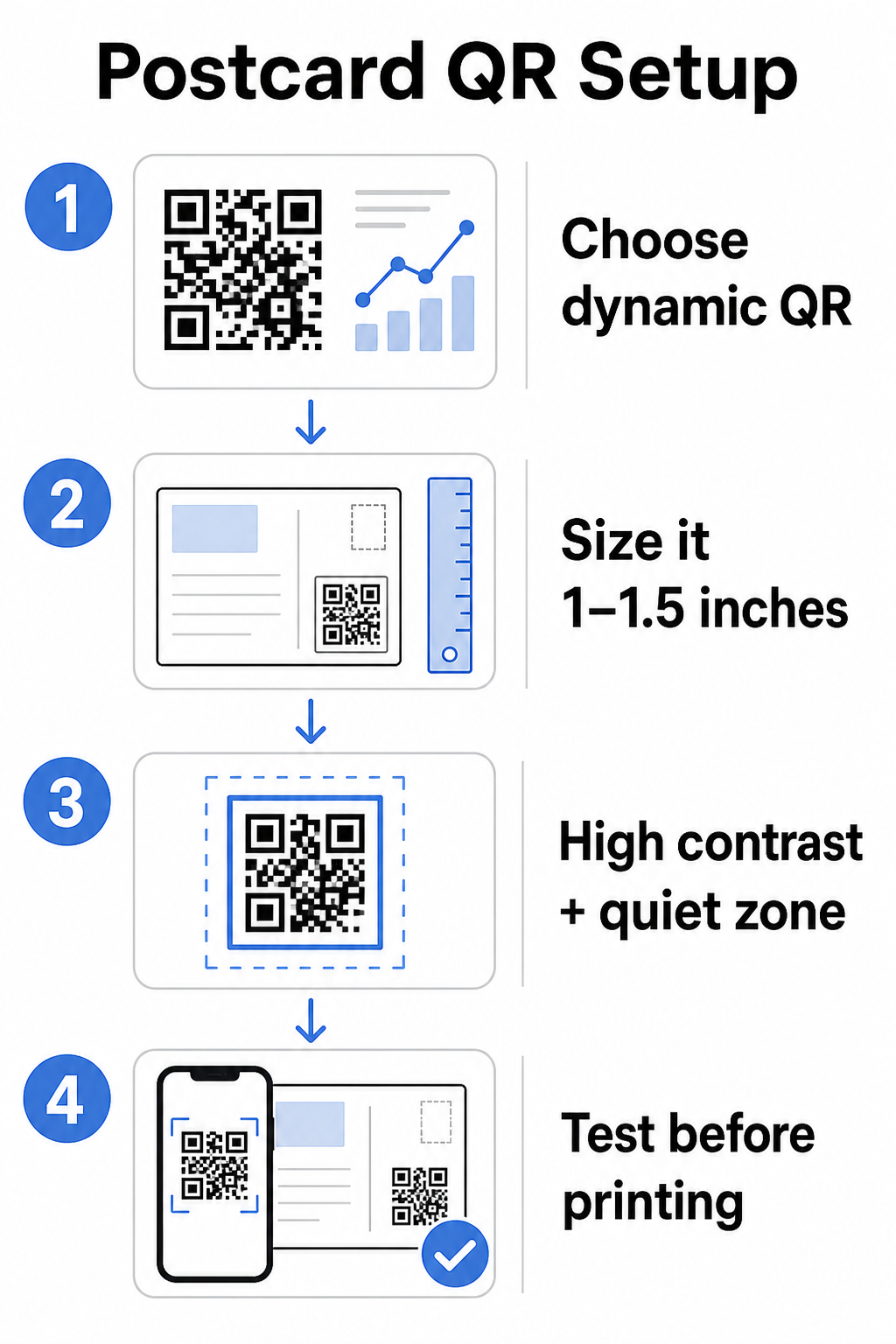
Atvirukams, kurie paprastai laikomi maždaug 10–20 colių atstumu nuo telefono kameros, taikykite 10:1 nuskaitymo atstumo ir dydžio santykį: QR kodo plotis turėtų būti maždaug viena dešimtoji numatomo nuskaitymo atstumo. Gavėjui, nuskaitančiam iš 12 colių atstumo, reikia kodo, kurio plotis būtų bent 1,2 colio.
Praktiškai siekite, kad QR kodas būtų tarp 1 ir 1,5 colio (25–38 mm) ant standartinio atviruko. Tai patogiai pritaikoma tipiniams nuskaitymo atstumams, paliekant pakankamai vietos likusiam jūsų dizainui. Išsamesnes gaires apie kitus formatus rasite QR kodo dydžio nustatymo gairės spausdintoms medžiagoms.
Dizaino gairės nuskaitomiems atvirukų QR kodams
Kontrastas ir spalva
Skaitytuvai veikia aptikdami kontrastą tarp tamsių modulių ir šviesaus fono. Didelis kontrastas yra nediskutuotinas. Juoda ant balto užtikrina patikimiausią nuskaitymą ir yra saugiausias numatytasis variantas. Pasirinktinės spalvos gali veikti – ir išlaikant didelį kontrastą su prekės ženklo spalvomis galima reikšmingai padidinti įsitraukimą – tačiau turite išlaikyti pakankamą kontrastą tarp priekinio plano ir fono, su minimaliu santykiu bent 3:1, o idealu 4:1 ar didesniu. Išsamios gairės, kaip efektyviai derinti spalvas, pateikiamos QR kodo spalvų kontrasto geriausios praktikos vadove.
Venkite šių dažnų klaidų:
- Šviesios spalvos moduliai ant šviesaus fono
- Gradientai, kurie sukuria netolygų kontrastą visame kode
- Kodo apvertimas (šviesus raštas ant tamsaus fono) – kai kurie skaitytuvai neveikia su apverstomis spalvų schemomis
Tylioji zona
Tas ramioji zona yra aiškus baltas apvadas, supantis QR kodo raštą. Pagal ISO/IEC 18004 standartus, jis turi būti bent keturių modulių pločio iš visų pusių. Ant atviruko tai reiškia, kad aplink kodą reikia palikti maždaug ketvirtį colio (0,25 colio) laisvos vietos ir nestatyti teksto, paveikslėlių ar dizaino elementų tiesiai šalia jo. Šis buferis padeda skaitytuvams atpažinti, kur kodas prasideda ir baigiasi – be jo net gerai suprojektuotas kodas gali būti nepatikimai nuskaitomas.
Logotipo pridėjimas
Pridėjus savo prekės ženklo logotipą į QR kodo centrą, jis tampa atpažįstamesnis ir patikimesnis ant atviruko. Jei įterpiate logotipą, naudokite aukštesnį klaidų taisymo lygį (Q arba H), kad išlaikytumėte nuskaitymo galimybę, ir logotipas neturi viršyti 30% viso kodo ploto. Prekės ženklo kodą galite sukurti naudodami QR kodo generatorius su logotipu.
Spausdinimo kokybė
Eksportuokite savo QR kodą kaip vektorinį failą (SVG arba PDF), o ne mažos raiškos JPEG, prieš siųsdami spausdintuvui. Vektoriniai formatai išsaugo aštrius modulių kraštus bet kokiu spausdinimo dydžiu. Prašykite bent 300 DPI iš savo spausdinimo paslaugų teikėjo ir, jei įmanoma, naudokite matinį paviršių – blizgūs atvirukai gali sukelti atspindžius, kurie trukdo nuskaityti ryškioje šviesoje.
Kur dėti QR kodą ant atviruko
Išdėstymas turi įtakos tam, kiek gavėjų iš tikrųjų nuskenuoja. Laikykitės šių principų:
- Padėkite kodą pranešimo pusėje, ne adreso pusėje – čia gavėjai praleidžia laiką skaitydami
- Padėkite jį natūralioje skaitymo pabaigos vietoje, pavyzdžiui, apatiniame dešiniajame kampe arba tiesiai po pagrindiniu raginimu veikti, kad jis pasirodytų gavėjui įsisavinus jūsų žinutę
- Apsupkite jį aiškiu raginimu veikti – tokios frazės kaip “Nuskaitykite, kad gautumėte išskirtinį pasiūlymą” arba “Nuskaitykite, kad užsisakytumėte susitikimą” tiksliai pasako gavėjams, ką daryti ir ką jie gaus
- Suteikite jam erdvės – neapkraukite kodo kitais dizaino elementais; rami zona turi likti neužpildyta iš visų pusių
QR kodas be raginimo veikti yra praleista galimybė. Gavėjai, kurie nesupranta, kodėl turėtų nuskaityti, tiesiog to nepadarys.
UTM parametrų pridėjimas kampanijos stebėjimui
Dinaminiai QR kodai suteikia jums nuskaitymo duomenis. Tačiau norint susieti tuos nuskaitymus su platesne jūsų rinkodaros analize – įskaitant tai, ką gavėjai daro nusileidę jūsų puslapyje – jums reikia UTM parametrus pridėtų prie jūsų paskirties URL.
UTM parametrai yra trumpos žymės, pridėtos prie URL, kurios pasako „Google Analytics“, iš kur atsirado srautas. Standartiniai parametrai yra:
| Parametras | Ką stebi | Pavyzdinė reikšmė |
|---|---|---|
| `utm_source` | Iš kur atsirado srautas | `direct-mail` |
| `utm_medium` | Rinkodaros kanalas | `postcard` |
| `utm_campaign` | Konkretus kampanijos pavadinimas | `summer-sale-2025` |
| `utm_content` | Kuri atviruko versija | `version-a` |
Pilnas pažymėtas URL atrodo taip:
`https://yoursite.com/offer?utm`source=direct-mail&utmmedium=postcard&utm_campaign=summer-sale-2025``
Sukurkite savo URL naudodami „Google“ kampanijos URL kūrimo įrankį, tada įklijuokite tą pažymėtą URL į savo dinaminio QR kodo paskirties vietą. GA4 galite peržiūrėti šį srautą skiltyje Ataskaitos > Įsigijimas > Srauto įsigijimas, kur Sesijos šaltinis, Sesijos terpė ir Sesijos kampanija atspindės jūsų UTM reikšmes. Tai leidžia jums priskirti svetainės sesijas, formų užpildymus ir pirkimus tiesiogiai konkrečioms atvirukų kampanijoms – užbaigiant ryšį tarp spausdintos ir skaitmeninės veiklos.
Testavimas prieš spausdinant
Niekada nesiųskite atvirukų spausdinti, prieš tai nenuskaitę galutinio QR kodo. Išbandykite jį įvairiuose įrenginiuose – tiek iOS, tiek Android – ir skirtingomis apšvietimo sąlygomis. Patvirtinkite, kad:
- Kodas nuskaitomas greitai ir patikimai pirmu bandymu
- Paskirties URL įkeliamas teisingai ir yra optimizuotas mobiliesiems įrenginiams
- Dinaminių kodų nukreipimai nukreipia į tinkamą puslapį
- Kodas vis dar nuskaitomas po to, kai buvo pritaikytas jūsų galutinis atviruko dizainas, ypač jei buvo pridėtos spalvos arba logotipo perdanga
Jei spausdinate bandomąją partiją, nuskaitykite fizinį pavyzdį tokiomis sąlygomis, kokias greičiausiai patirs gavėjai – esant įprastam patalpų apšvietimui, laikant ištiesta ranka. Tai padeda aptikti spausdinimo kokybės problemas, kol jos nepaveikė viso tiražo. geriausia praktika QR kodo skaitomumui vadove pateikiamas išsamus testavimo prieš spausdinimą kontrolinis sąrašas.
Stebėjimas ir optimizavimas po išsiuntimo
Kai jūsų atvirukai pradeda cirkuliuoti, jūsų kampanija tik prasideda. Dinaminiai QR kodai teikia nuskaitymo duomenis realiuoju laiku, leisdami stebėti:
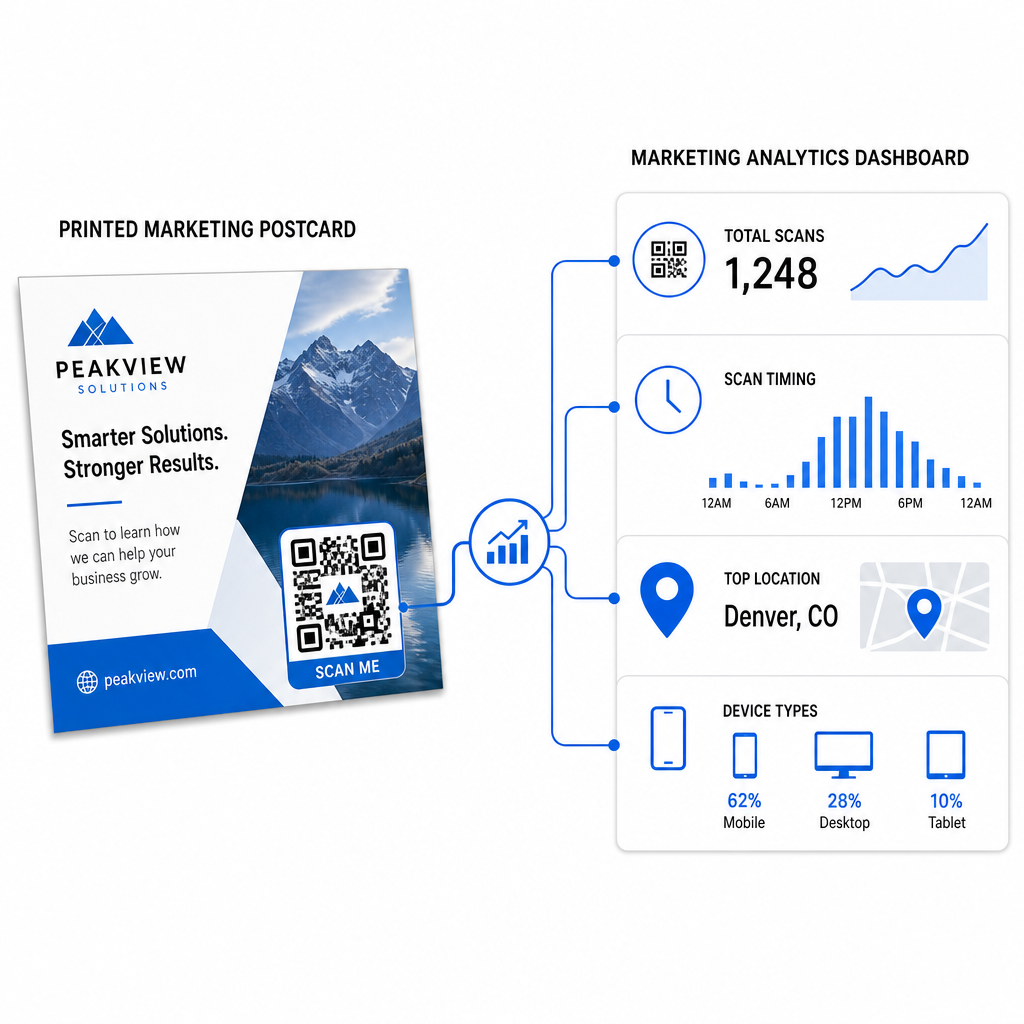
- Visus nuskaitymus ir unikalius vartotojus – kiek gavėjų įsitraukė ir kiek kartų nuskaityta daugiau nei vieną kartą
- Nuskaitymo laikas – kurios dienos ir laikas paskatino didžiausią aktyvumą po laiško išsiuntimo
- Geografinis pasiskirstymas – kurie pašto kodai ar regionai reagavo stipriausiai
- Įrenginio tipas – ar gavėjai nuskenavo naudodami „iOS“ ar „Android“, o tai gali padėti priimti sprendimus dėl mobiliųjų nukreipimo puslapių
Naudokite šiuos duomenis būsimiems siuntimams tobulinti. Jei tam tikroje srityje buvo didelis nuskaitymų skaičius, kitą kartą padidinkite apimtį ten. Jei nuskaitymai pasiekė piką trečią dieną po pristatymo, atitinkamai suplanuokite el. pašto tęsinį.
Kelių versijų kampanijoms – kai bandote skirtingus pasiūlymus, dizainus ar raginimus veikti – kiekvienai atviruko versijai priskirkite savo dinaminį QR kodą. Nuskaitymo analizė parodys, kuri versija paskatino didesnį įsitraukimą, nelaukiant vien tik konversijos duomenų.
Pradėkite matuoti savo tiesioginio pašto našumą Tas „Pageloot“ QR kodų generatorius leidžia kurti, tinkinti ir valdyti QR kodus tiesioginio pašto kampanijoms – su integruota analitika ir galimybe atnaujinti paskirties vietas be pakartotinio spausdinimo.
Dažniausiai pasitaikančios klaidos, kurių reikia vengti
Nuoroda į pagrindinį puslapį, o ne į kampanijos puslapį. Pagrindinis puslapis verčia gavėją atlikti papildomą darbą, kad rastų atviruke paminėtą pasiūlymą. Kiekvienas papildomas žingsnis sumažina konversijas.
Statinio QR kodo naudojimas riboto laiko pasiūlymui. Jei pasiūlymas baigiasi arba URL pasikeičia, statinis kodas nukreips į neveikiantį arba nerelevantų puslapį, kurio po spausdinimo nebus galima pataisyti.
Per mažas QR kodas. Viskas, kas mažiau nei 0,8 × 0,8 colio, yra rizikinga, ypač jei atviruko dizainas yra perkrautas arba kodas naudoja pasirinktines spalvas.
Praleidžiamas raginimas veikti. Vienišas QR kodas ant atviruko nesuteikia gavėjams jokios priežasties nuskaityti. Pasakykite jiems, ką jie gaus.
Nebandymas ant fizinio atspausdinto egzemplioriaus. Skaitmeniniai maketai ne visada tiksliai parodo, kaip kodas bus nuskaitytas po komercinio spausdinimo. Visada patikrinkite ant faktinio rezultato.
Tie patys pagrindiniai principai taikomi visuose spausdinimo formatuose – QR kodų ant skrajučių vadovas aprašo, kaip pritaikyti šią praktiką kitoms tiesioginio atsako medžiagoms.
Atvirukas su gerai įgyvendintu QR kodu atlieka du dalykus vienu metu: suteikia gavėjams tiesioginį, be trinties būdą pasinaudoti jūsų pasiūlymu ir suteikia jums išmatuojamus duomenis apie tai, kaip iš tikrųjų veikia jūsų kampanija. Dinaminio QR kodo, mobiliesiems pritaikytos paskirties vietos, UTM žymėmis pažymėtų URL ir nuskaitymo analizės derinys užbaigia ryšį tarp neprisijungusio spausdinimo ir skaitmeninių rezultatų.
Pradėkite generuodami dinaminį QR kodą per Pageloot dinaminis QR kodo generatorius, tinkamai pritaikykite jį savo atviruko formatui, pritaikykite didelio kontrasto prekės ženklą, parašykite aiškų raginimą veikti ir išbandykite ant fizinio maketo prieš visą spausdinimą. Nuo to momento, kai gavėjai pradės nuskaityti, jūsų prietaisų skydelis parodys, kas tiksliai veikia.
Dažniausiai užduodami klausimai
Siekti už į bent 0,8 × 0,8 colių (2 × 2 cm) į į absoliutų minimumą, bet už tipinius atvirukų nuskaitymo atstumus į 10–20 colių, dydis tarp 1 ir 1,5 colių (25–38 mm) į patikimesnis. Taikykite į 10:1 taisyklę: padarykite į kodo plotį maždaug vieną dešimtąją į į numatomo nuskaitymo atstumo.
Taip, bet tik tuo atveju, jei jūs naudojote dinaminį QR kodą prieš spausdinimą. Dinaminiai QR kodai nukreipia į nukreipimo nuorodą, kurią jūs valdote, todėl jūs galite atnaujinti paskirties URL bet kuriuo metu be perspausdinimo. Statiniai QR kodai visam laikui užkoduoja paskirties vietą ir negali būti pakeisti po to.
Naudokite dinaminį QR kodą iš platformos, tokios kaip „Pageloot“, kuri teikia integruotą analizę, rodančią bendrą nuskaitymų skaičių, unikalius vartotojus, nuskaitymo laiką, geografinę vietą ir įrenginio tipą. Norėdami giliau priskirti „Google Analytics“, pridėkite UTM parametrus (utmsource, utmmedium, utm_campaign) prie savo paskirties URL prieš generuodami kodą – nuskaitymai tada pasirodys kaip sekamos sesijos jūsų GA4 srauto įgijimo ataskaitoje.