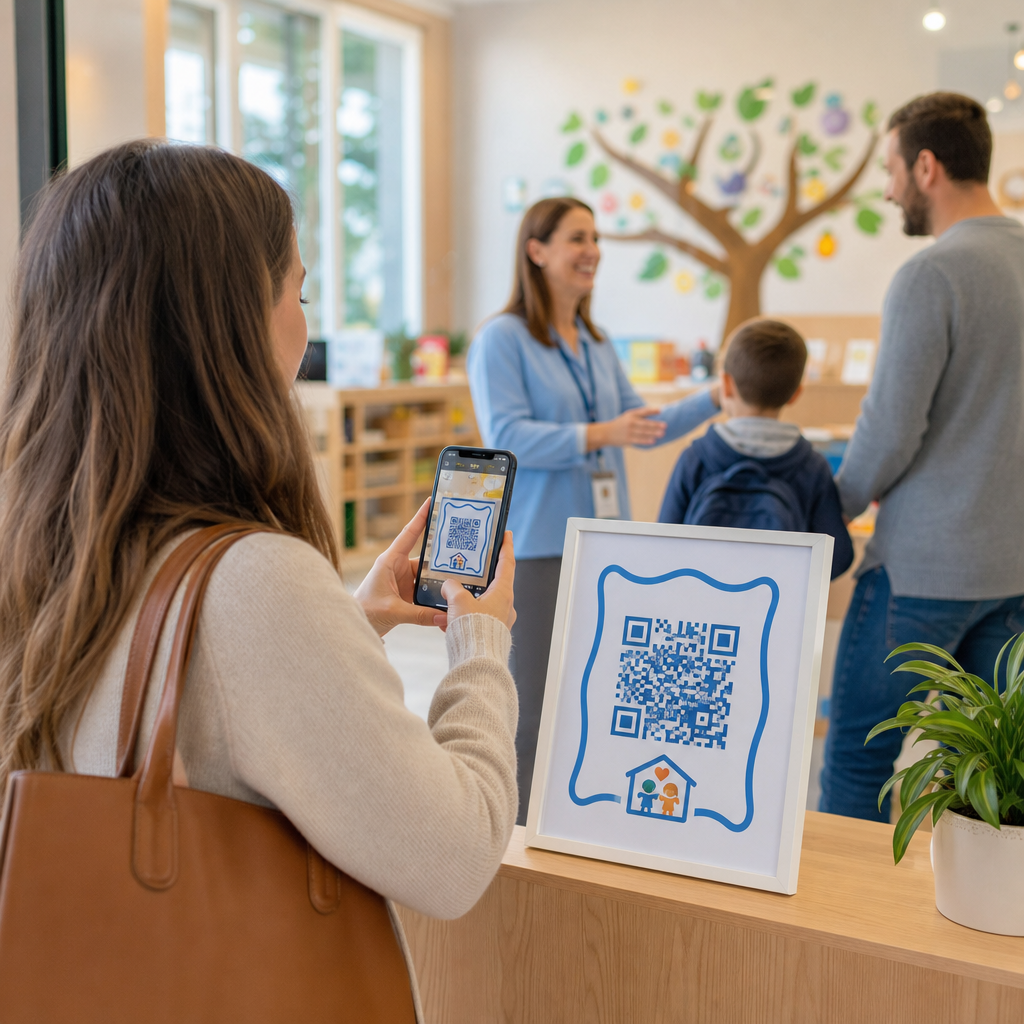

เส้นการส่งมอบที่ยาวนานและใบลงชื่อด้วยตนเองทำให้การดำเนินงานของสถานรับเลี้ยงเด็กของคุณล่าช้าทุกเช้าหรือไม่? บันทึกกระดาษสร้างคอขวดที่ทางเข้า เสี่ยงต่อการสูญหาย และทำให้การตรวจสอบใบอนุญาตที่จำเป็นซับซ้อน การใช้รหัส QR ช่วยให้ผู้ปกครองสามารถบันทึกการมาถึงได้ในไม่กี่วินาทีบนสมาร์ทโฟนของตน ในขณะที่บันทึกการเข้าเรียนแบบดิจิทัลจะได้รับการอัปเดตโดยอัตโนมัติ.
การปรับปรุงการเช็คอินและการเข้าเรียนของผู้ปกครองรายวันให้คล่องตัว
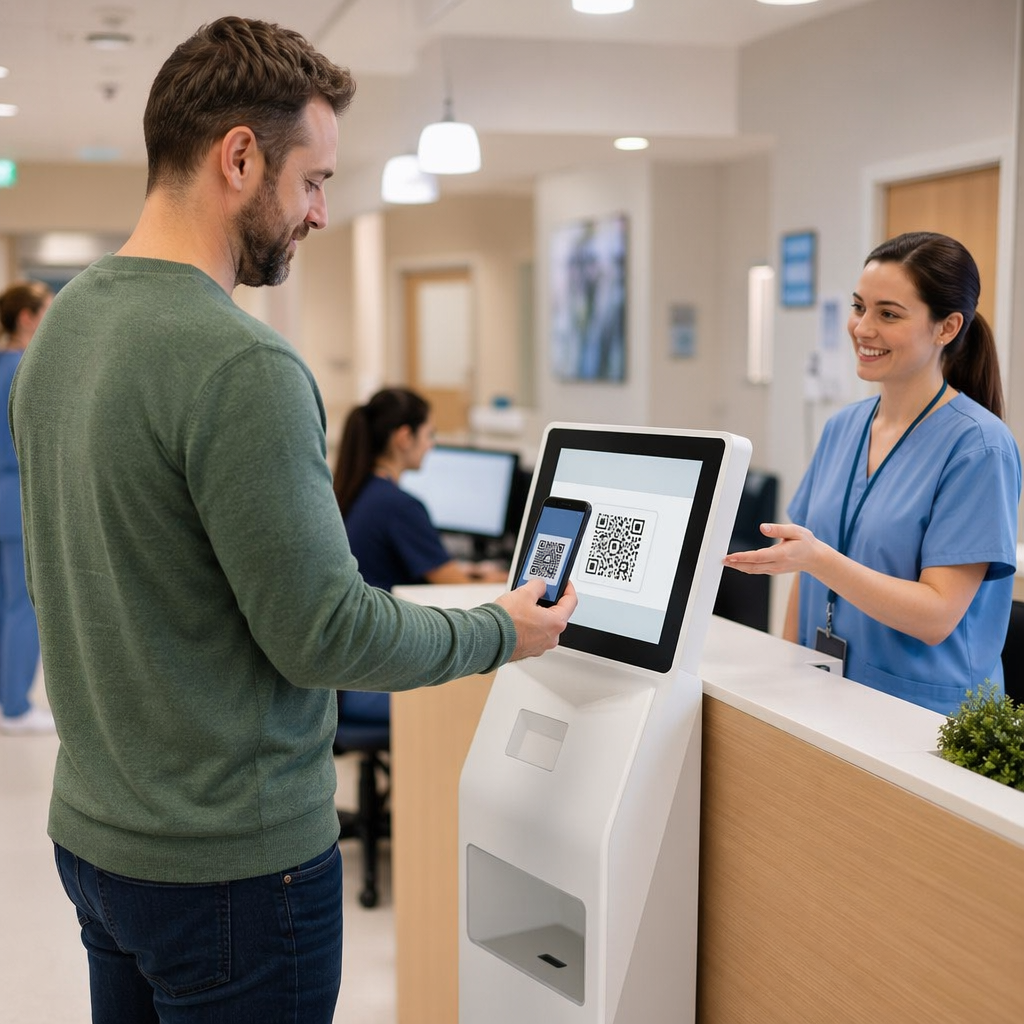
การเปลี่ยนไปใช้การลงชื่อเข้าใช้แบบดิจิทัลช่วยขจัดบันทึกกระดาษจริงและลดความล่าช้าในการเช็คอินตอนเช้า ผู้ปกครองสามารถใช้อุปกรณ์มือถือของตนเองเพื่อสแกนรหัสที่แสดง กรอกแบบฟอร์มลงชื่อเข้าใช้สั้นๆ และไปยังห้องเรียนของบุตรหลานโดยไม่ต้องสัมผัสปากกาหรือคลิปบอร์ดร่วมกัน.
การตั้งค่าระบบการเข้าเรียนแบบดิจิทัลเกี่ยวข้องกับขั้นตอนการทำงานง่ายๆ สามขั้นตอน:
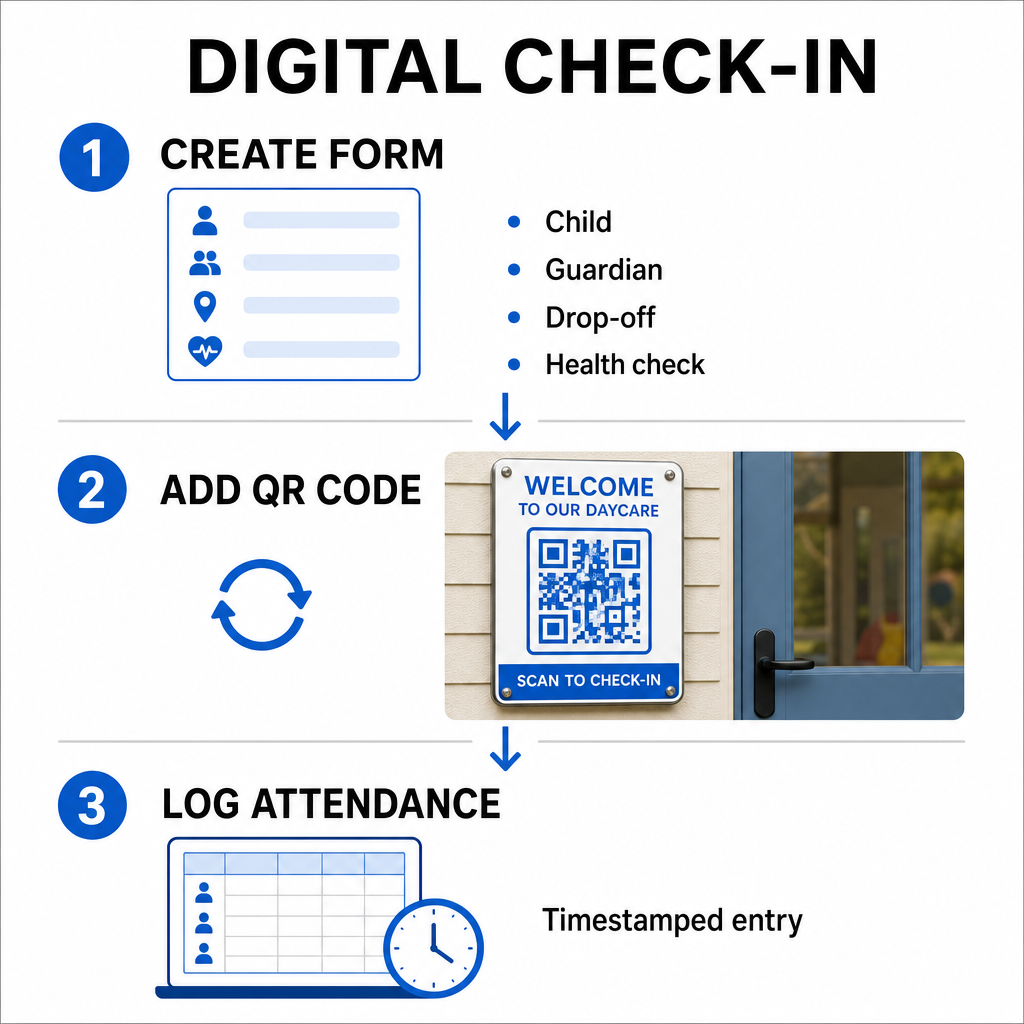
- สร้างแบบฟอร์มเช็คอินของคุณ: สร้างแบบฟอร์มเช็คอินออนไลน์โดยใช้เครื่องมือต่างๆ เช่น Google Forms หรือ Typeform ใส่ช่องสำหรับชื่อเด็ก ชื่อผู้ปกครองหรือผู้ดูแล เวลาส่งมอบ และคำถามคัดกรองสุขภาพประจำวัน.
- สร้างคิวอาร์โค้ดแบบไดนามิก: เชื่อมโยง URL แบบฟอร์มของคุณโดยใช้ สร้าง QR Code เช็คชื่อ หรือ ทำ Google Form เป็น QR Code. การเลือกใช้รหัส QR แบบไดนามิกช่วยให้คุณสามารถอัปเดตลิงก์ปลายทางหรือแก้ไขแบบฟอร์มในอนาคตได้โดยไม่ต้องพิมพ์โปสเตอร์ใหม่.
- รวบรวมบันทึกอัตโนมัติ: กำหนดค่าแบบฟอร์มออนไลน์ของคุณเพื่อบันทึกรายการโดยอัตโนมัติลงในสเปรดชีตแบบรวมศูนย์ เช่น Google Sheets การสแกนแต่ละครั้งจะสร้างรายการที่มีการประทับเวลาซึ่งเจ้าหน้าที่สามารถตรวจสอบได้แบบเรียลไทม์.
สำหรับการยืนยันการรับบุตรหลานของผู้ดูแลระบบ ศูนย์ของคุณยังสามารถออกบัตร QR ส่วนบุคคลให้กับบุคคลที่ได้รับอนุญาตให้มารับได้ เจ้าหน้าที่สามารถใช้เว็บเบส สแกนคิวอาร์โค้ด บนแท็บเล็ตหรือสมาร์ทโฟนเพื่อสแกนบัตรผู้ปกครอง เพื่อให้แน่ใจว่าการยืนยันตัวตนเป็นไปอย่างรวดเร็วในช่วงเวลาเร่งด่วนช่วงบ่าย คุณยังสามารถสำรวจขั้นตอนการทำงานเฉพาะภาคส่วนต่างๆ ได้ โซลูชันรหัส QR อุตสาหกรรมต่างๆ เพื่อดูว่าจุดสัมผัสดิจิทัลช่วยปรับปรุงการดำเนินงานได้อย่างไร.
ติดตามการเข้าเรียนของบุตรหลานของคุณโดยอัตโนมัติ ต้องการวิธีที่เร็วกว่าและไม่ต้องสัมผัสเพื่อบันทึกการมาถึงของนักเรียนและพร้อมสำหรับการตรวจสอบหรือไม่? ใช้ สร้าง QR Code เช็คชื่อ เพื่อสร้างจุดเช็คอินที่ติดตามได้สำหรับศูนย์ของคุณวันนี้.
การปฏิบัติตามข้อกำหนดการเข้าเรียนของรัฐและรัฐบาลกลาง
สถานรับเลี้ยงเด็กต้องปฏิบัติตามมาตรฐานการเก็บบันทึกที่เข้มงวดเพื่อรักษาใบอนุญาตและรักษาเงินทุนของรัฐบาลกลาง ใบลงชื่อด้วยกระดาษมีแนวโน้มที่จะมีลายเซ็นที่ขาดหายไป ลายมือที่อ่านไม่ออก และแฟ้มที่วางผิดที่ ขั้นตอนการเช็คอินแบบดิจิทัลแก้ไขปัญหาเหล่านี้โดยการสร้างเส้นทางการตรวจสอบดิจิทัลที่ทันทีและไม่สามารถเปลี่ยนแปลงได้.
ระบบ QR ดิจิทัลช่วยในกรอบการปฏิบัติตามข้อกำหนดที่สำคัญหลายประการ:
- กองทุนดูแลเด็กและพัฒนาการ (CCDF): กฎกองทุน CCDF ของรัฐบาลกลางกำหนดให้ผู้ให้บริการดูแลเด็กต้องเก็บบันทึกการเข้าเรียนโดยละเอียดอย่างน้อยสามปีเพื่อมีสิทธิ์ได้รับเงินคืนค่าอุดหนุน.
- โครงการอาหารสำหรับเด็กและผู้ใหญ่ (CACFP): ภายใต้กฎระเบียบของรัฐบาลกลาง (7 CFR 226.15(e)) ศูนย์ที่เข้าร่วม CACFP ต้องเก็บบันทึกการเข้าเรียนรายวันอย่างถูกต้องแยกจากจำนวนมื้ออาหาร บันทึกอัตโนมัติช่วยให้มั่นใจได้ว่าบันทึกเหล่านี้ยังคงถูกต้องสำหรับการตรวจสอบทางการเงิน.
- ข้อกำหนดใบอนุญาตของรัฐ: รัฐต่างๆ เช่น เท็กซัส วอชิงตัน และฟลอริดา กำหนดให้ศูนย์ดูแลเด็กต้องมีระบบติดตามรายวันซึ่งบันทึกเวลามาถึง เวลาออกเดินทาง และตัวระบุที่ไม่ซ้ำกันหรือลายเซ็นที่ได้รับอนุญาต การประทับเวลาอัตโนมัติเป็นไปตามข้อกำหนดใบอนุญาตของรัฐสำหรับการติดตามเวลาที่แม่นยำ.
บันทึกดิจิทัลยังสามารถสำรองข้อมูลไปยังเซิร์ฟเวอร์คลาวด์ได้ ช่วยให้ศูนย์ของคุณรักษาความต่อเนื่องทางธุรกิจที่แข็งแกร่งและแผนการกู้คืนจากภัยพิบัติสำหรับไฟล์การดูแลระบบที่สำคัญ.
การสร้างขั้นตอนการทำงานแบบไร้สัมผัสสำหรับแบบฟอร์มและคู่มือ
นอกเหนือจากการลงชื่อเข้าใช้รายวันแล้ว รหัส QR ยังช่วยปรับปรุงการสื่อสารทั่วทั้งศูนย์ของคุณโดยการเชื่อมต่อผู้ปกครองกับเอกสารดิจิทัลที่จำเป็นได้ทันที.
คุณสามารถใช้ แปลงไฟล์ PDF เป็น QR Code ฟรี เพื่อโพสต์รหัสที่สแกนได้บนประตูห้องเรียน เคาน์เตอร์แผนกต้อนรับ หรือบอร์ดประกาศ สิ่งนี้ช่วยให้ผู้ปกครองสามารถเปิดและดูเอกสารสำคัญบนโทรศัพท์ส่วนตัวของตนได้ เช่น:
- คู่มือผู้ปกครองและนโยบายศูนย์
- เมนูอาหารและของว่างรายเดือน
- แบบฟอร์มติดต่อกรณีฉุกเฉินและการยินยอมทางการแพทย์
- การลงทะเบียนกิจกรรมตามฤดูกาลและใบอนุญาต
นอกจากนี้ การใช้ เครื่องสร้างรหัส QR สำหรับลิงก์ ช่วยให้คุณสามารถส่งผู้ปกครองไปยังพอร์ทัลชำระค่าเล่าเรียนออนไลน์ พอร์ทัลการลงทะเบียน หรือแบบฟอร์มข้อเสนอแนะของพนักงานได้ โดยการแปลงเอกสารจริงให้เป็นลิงก์ดิจิทัลที่เข้าถึงได้ ศูนย์ของคุณจะลดต้นทุนการพิมพ์ในขณะที่ยังคงแจ้งให้ครอบครัวทราบ ค้นพบทั้งหมดที่มีอยู่ คุณสมบัติแพลตฟอร์มรหัส QR เพื่อขยายกลยุทธ์ดิจิทัลของศูนย์ของคุณ.
แนวทางปฏิบัติที่ดีที่สุดสำหรับการพิมพ์และวางรหัส QR ของสถานรับเลี้ยงเด็ก
เพื่อรักษาอัตราการสแกนที่สูงและหลีกเลี่ยงความล่าช้าในการเช็คอิน รหัส QR ที่พิมพ์ของคุณต้องเป็นไปตามมาตรฐานการอ่านที่กำหนดไว้ แสงน้อย พิมพ์ขนาดเล็กเกินไป หรือพื้นผิวสะท้อนแสงอาจขัดขวางเซ็นเซอร์กล้องในช่วงเวลาเร่งด่วนของการส่งมอบตอนเช้า.
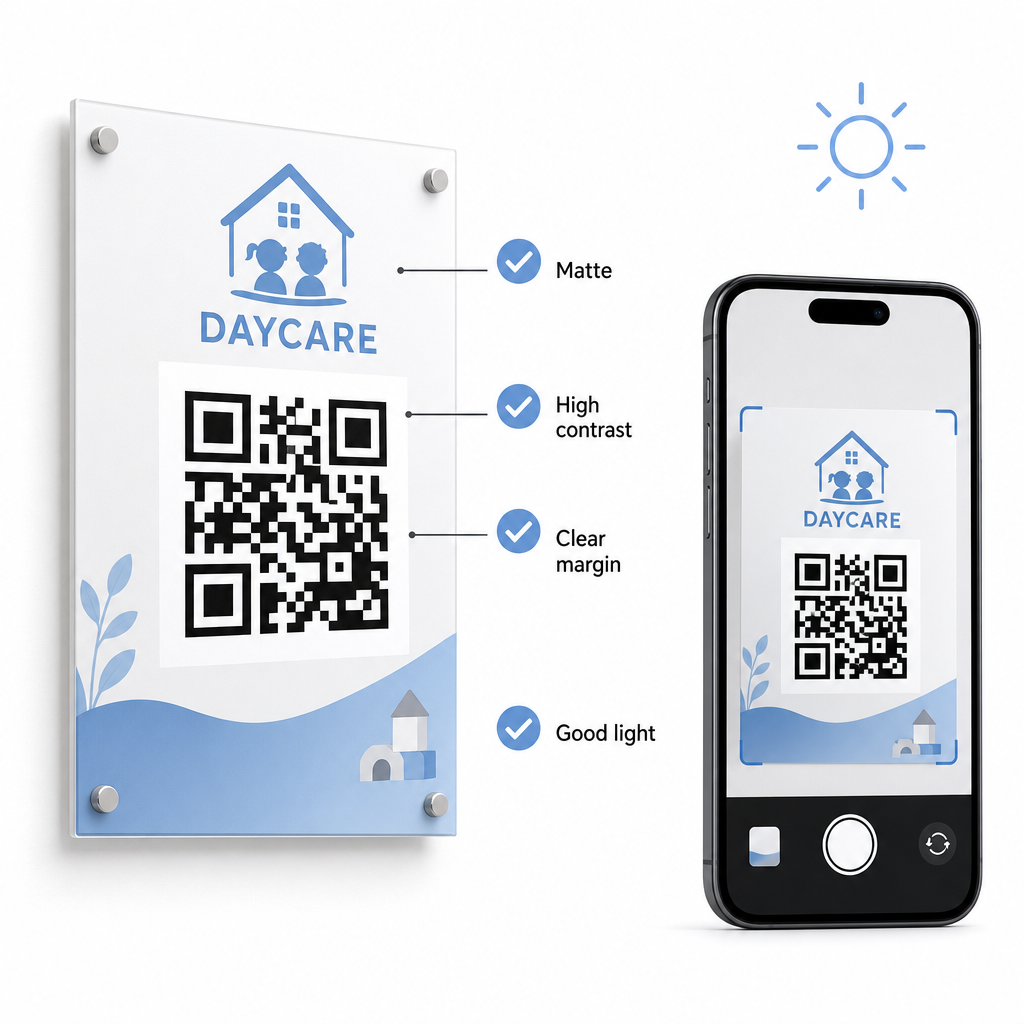
ปฏิบัติตามแนวทางทางเทคนิคเหล่านี้เมื่อแสดงรหัสในศูนย์ของคุณ:
- รักษาสัดส่วนขนาดที่เหมาะสม: ปฏิบัติตามอัตราส่วน 10:1 ระหว่างระยะการสแกนกับความกว้างของรหัส โดยรักษาระยะห่างขั้นต่ำ 2x2 ซม. สำหรับการสแกนระยะใกล้.
- ตรวจสอบให้แน่ใจว่ามีความคมชัดของสีสูง: ใช้รูปแบบสีเข้มบนพื้นหลังสีอ่อนเพื่อให้ได้อัตราส่วนความคมชัด 21:1 โดยมีอัตราส่วนอย่างน้อย 4.5:1 สำหรับการพิมพ์ขนาดเล็ก.
- รักษามาร์จิ้นโซนเงียบ: เว้นขอบสีขาวที่ชัดเจนไว้รอบทั้งสี่ด้านของรหัส เพื่อป้องกันไม่ให้ข้อความหรือภาพที่อยู่ใกล้เคียงรบกวนเครื่องสแกน.
- เลือกวัสดุที่ไม่สะท้อนแสง: พิมพ์ป้ายบนกระดาษผิวด้านหรือกระดาน แทนที่จะเป็นลามิเนตหรือกระจกมันวาว เพื่อป้องกันแสงสะท้อน.
- ส่งออกรูปแบบไฟล์เวกเตอร์: ดาวน์โหลดไฟล์พิมพ์ในรูปแบบเวกเตอร์ความละเอียดสูง เช่น SVG หรือ EPS เพื่อให้รูปภาพยังคงคมชัดเมื่อปรับขนาด.
- ทดสอบในสภาพแวดล้อมจริง: สแกนการทดสอบการพิมพ์บนอุปกรณ์มือถือหลายเครื่องภายใต้สภาพแสงที่แตกต่างกันก่อนติดตั้งป้ายถาวร ตรวจสอบคู่มือโดยละเอียดของเราเกี่ยวกับ แนวทางปฏิบัติที่ดีที่สุดสำหรับการอ่านรหัส QR สำหรับคำแนะนำทางเทคนิคเพิ่มเติม.
ความปลอดภัยของข้อมูล ความเป็นส่วนตัว และความปลอดภัยของผู้ปกครอง
การจัดการข้อมูลเด็กและครอบครัวต้องให้ความสำคัญอย่างยิ่งต่อความปลอดภัยของข้อมูล การดำเนินงานดูแลเด็กที่รวบรวมรายละเอียดส่วนบุคคลทางออนไลน์ต้องสอดคล้องกับมาตรฐานของรัฐบาลกลาง รวมถึงกฎหมายคุ้มครองความเป็นส่วนตัวทางออนไลน์ของเด็ก (COPPA) เมื่อเกี่ยวข้องกับบริการดิจิทัลที่มุ่งเป้าไปที่เด็ก และต้องมีการเปิดเผยข้อมูลที่ชัดเจนเกี่ยวกับวิธีการจัดเก็บและจัดการข้อมูลของผู้ปกครอง.
ตรวจสอบมาตรการรักษาความปลอดภัยที่สำคัญเหล่านี้เมื่อติดตั้งรหัส QR ในสถานประกอบการของคุณ:
- แสดงประกาศความเป็นส่วนตัวที่ชัดเจน: ตรวจสอบให้แน่ใจว่าแบบฟอร์มที่เชื่อมโยงหรือหน้า Landing Page มีลิงก์โดยตรงไปยังนโยบายความเป็นส่วนตัวของศูนย์ของคุณก่อนที่จะรวบรวมข้อมูลครอบครัว.
- ตรวจสอบป้ายทางกายภาพอย่างสม่ำเสมอ: ตรวจสอบว่าไม่มีสติกเกอร์ที่ไม่ได้รับอนุญาตหรือรหัสที่ถูกดัดแปลงถูกวางทับบนกระดานลงชื่อเข้าใช้เดิม เนื่องจากการดัดแปลงทางกายภาพอาจนำผู้ใช้ไปยังเว็บไซต์ที่เป็นอันตราย.
- รักษาความปลอดภัยการเข้าถึงข้อมูลการบริหาร: เข้ารหัสแบบฟอร์มเช็คอินออนไลน์ด้วยโปรโตคอล HTTPS และจำกัดการเข้าถึงสเปรดชีตการบริหารเฉพาะบุคลากรที่ได้รับอนุญาตเท่านั้น.
ด้วยการใช้แนวทางปฏิบัติด้านความปลอดภัยที่เหมาะสมและการเลือกเครื่องมือที่เชื่อถือได้ คุณจะปกป้องความเป็นส่วนตัวของครอบครัวพร้อมทั้งปรับปรุงการจัดการศูนย์ประจำวันให้เหมาะสม สำหรับภาพรวมที่กว้างขึ้นเกี่ยวกับกรอบการกำกับดูแล โปรดดูภาพรวมของเราเกี่ยวกับ กฎหมายความเป็นส่วนตัวของรหัส QR และข้อบังคับที่สำคัญ.
การปรับปรุงกระบวนการเช็คอินของสถานรับเลี้ยงเด็กให้ทันสมัยช่วยลดความแออัดบริเวณทางเข้า ปรับปรุงความถูกต้องของข้อมูล และทำให้การปฏิบัติตามข้อกำหนดการตรวจสอบง่ายขึ้น การแทนที่บันทึกกระดาษด้วยรหัส QR แบบไดนามิกช่วยให้ผู้ปกครองได้รับประสบการณ์การส่งมอบที่รวดเร็วและถูกสุขอนามัย ในขณะที่ยังคงรักษาบันทึกการบริหารให้เป็นระเบียบเรียบร้อยแบบเรียลไทม์ เริ่มออกแบบขั้นตอนการเช็คอินที่กำหนดเองของคุณวันนี้ด้วยการสร้างรหัสแบบไดนามิกและแบบฟอร์มที่กำหนดเองซึ่งปรับให้เหมาะกับความต้องการในการดำเนินงานประจำวันของศูนย์ของคุณ.
คำถามที่พบบ่อย
Dynamic QR codes เหมาะอย่างยิ่งสำหรับการเช็คอินเนอร์สเซอรี่ เนื่องจากช่วยให้ผู้ดูแลระบบสามารถอัปเดตแบบฟอร์มที่เชื่อมโยงหรือ URL ปลายทางได้โดยไม่ต้องพิมพ์ป้ายประตูใหม่.
ไม่ ผู้ปกครองไม่จำเป็นต้องมีแอปพิเศษ สมาร์ทโฟนรุ่นใหม่ส่วนใหญ่สามารถสแกนรหัส QR ได้โดยตรงผ่านแอปกล้องถ่ายรูปที่มีมาให้แล้ว.
โครงการเงินอุดหนุนของรัฐบาลกลาง เช่น CCDF และ CACFP กำหนดให้ศูนย์ต้องจัดเก็บบันทึกการเข้าเรียนเป็นเวลาอย่างน้อยสามปี แม้ว่ากฎระเบียบของรัฐหรือสัญญาการให้ทุนเฉพาะอาจกำหนดระยะเวลาการเก็บรักษาที่นานกว่านั้น.