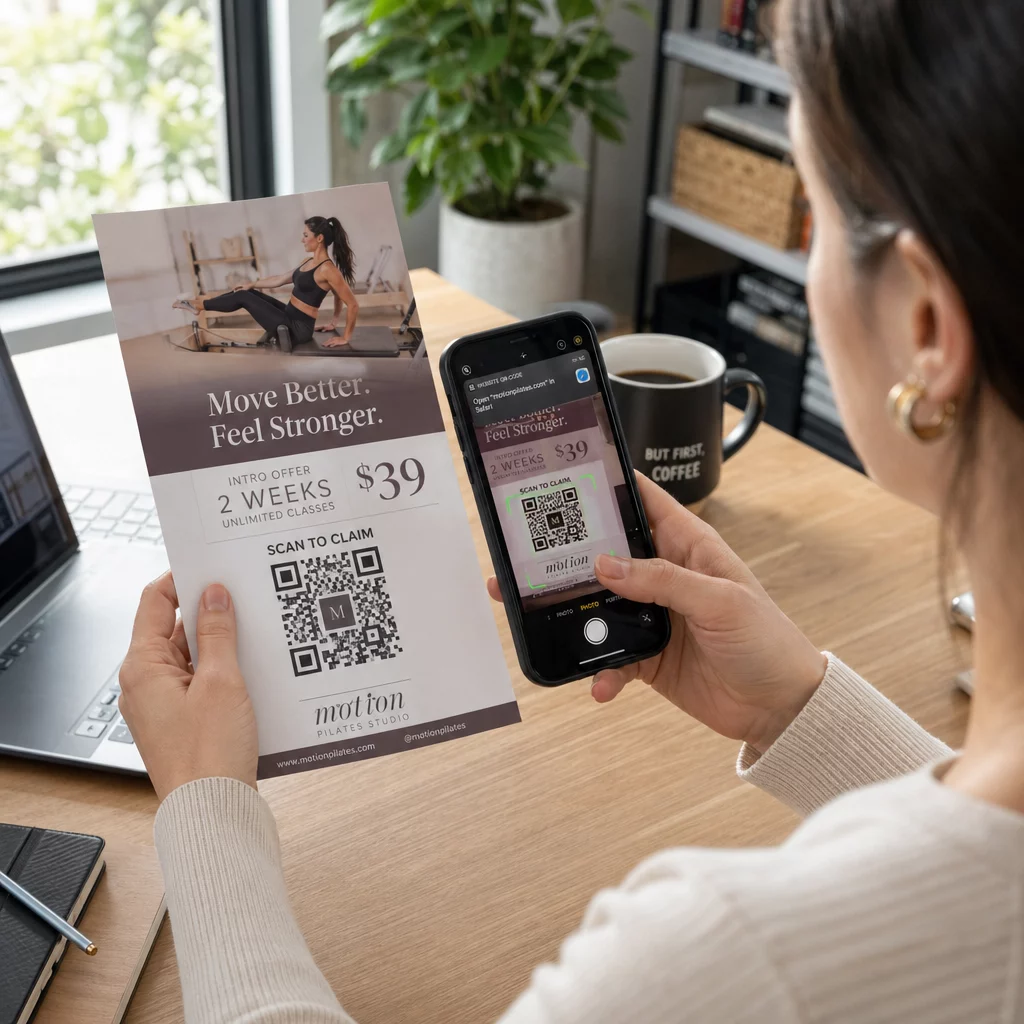
En QR-kod på en flygblad är en kod på ditt tryckta flygblad som öppnar en webbsida, ett formulär eller en fil när en läsare skannar den. För att skapa en, skapa koden i en QR-kodgenerator, ladda ner den som SVG eller PDF, placera den i din layout minst 0,8 tum (2 cm) bred med en tydlig vit kant, och lägg till en kort uppmaning bredvid den. Testa den med två telefoner innan du skriver ut. Stegen, storlekarna och placeringsreglerna finns nedan.
Varför QR-koder hör hemma på flygblad
Ett flygblad har lite utrymme. Om du försöker få plats med varje produktdetalj eller evenemangsschema på det, blir designen trång och svårläst. En QR-kod ger läsarna en-trycksåtkomst till en digital meny, ett registreringsformulär, en kupong eller en fullständig katalog, medan flygbladet förblir rent. Så här fungerar det: QR-koder kopplar samman tryckt och digital marknadsföring: flygbladet får uppmärksamhet, och skanningen flyttar läsaren till nästa steg.
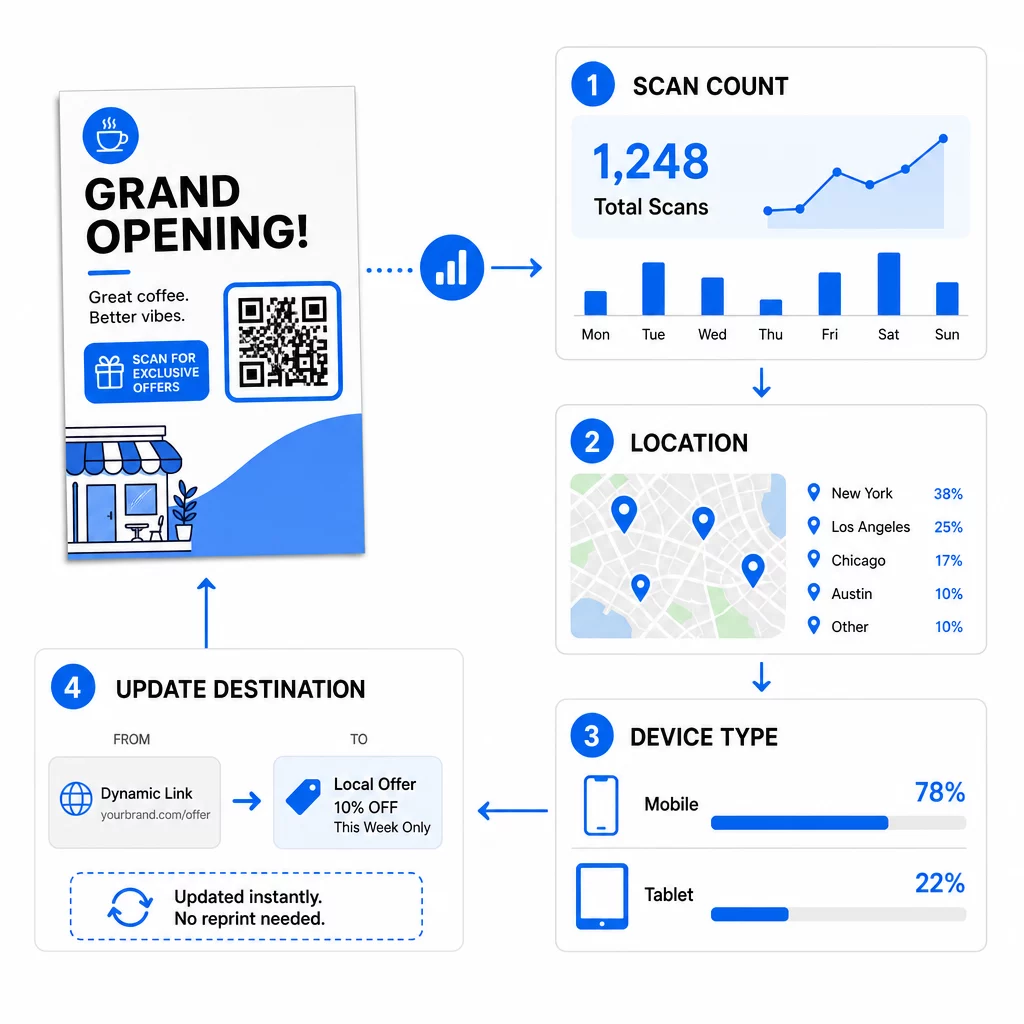
En QR-kod låter dig också mäta en tryckt kampanj. Med en dynamisk kod kan du se när, var och på vilken enhet varje skanning skedde, så du vet vilka flygblad och platser som lockar människor.
Statiska vs. Dynamiska QR-koder: Vilken ska du använda?
Välj typen innan du designar flygbladet. Statiska och dynamiska QR-koder bete sig olika efter utskrift.
Statiska QR-koder lagrar destinationen direkt i mönstret. Destinationen kan inte ändras efter utskrift, och koden går aldrig ut. Statisk är tillräckligt när länken inte kommer att ändras, till exempel en Wi-Fi-inloggning eller en permanent webbsida, och när du inte behöver skanningsnummer.
Dynamiska QR-koder pekar på en kort omdirigeringslänk som du hanterar i ett konto. Du kan ändra destinationen efter att flygbladen har distribuerats, utan att behöva skriva ut igen. Om du marknadsför ett veckoevenemang byter du registreringssidan varje vecka. Dynamiska koder innehåller också mindre data, så mönstret är enklare och skannas ofta lättare i dåligt ljus.
För flygblad som används på mer än en plats eller under mer än en vecka är dynamiska koder oftast värda det eftersom du får QR-kodspårning med skanningsantal, platser och enheter. Dynamiska koder levereras med en 14-dagars gratis provperiod, och planer finns listade på Pageloots prissida. Skanningar är obegränsade, och det finns en 30-dagars pengarna-tillbaka-garanti på prenumerationer. En dynamisk kod slutar fungera när en månads- eller årsplan slutar, så håll planen aktiv medan flygbladet är i omlopp.
Så här skapar du en QR-kod för ett flygblad i 5 steg
Följ dessa steg för att lägga till en QR-kod på ett flygblad:
- Välj vad koden öppnar. Välj en destination som fungerar på en telefon: en webbplats-URL, en PDF-dokument, en Google Formulär, eller a vCard-kontaktsida. Använd generatorn som matchar innehållet.
- Generera och anpassa. Öppna QR-kodgenerator och klistra in din länk. Om du vill ha ditt varumärke på koden, använd den QR-kodgenerator med logotyp. Håll logotypen liten och färgerna mörka på ljus bakgrund.
- Ladda ner för utskrift. Ladda ner SVG eller PDF om tillgängligt, eftersom vektorfiler förblir skarpa oavsett storlek. Om du bara har PNG, ladda ner den i stor storlek (generatorreglaget går upp till 2000 px) och förstora den inte i din layout.
- Placera den i ditt designverktyg. Importera filen till Canva, Adobe Illustrator eller annan layoutapplikation. Ställ in storleken, lämna en vit kant runt den och placera din uppmaning bredvid den.
- Testa innan du skriver ut. Skriv ut en kopia i slutlig storlek. Skanna den med en iPhone och en Android-telefon, i normal rumsbelysning, från det avstånd en läsare kommer att hålla flygbladet.
Skapa din anpassade QR-kod Redo att lägga till en märkesanpassad, spårbar QR-kod till din nästa flyer? Använd QR-kodgenerator med logotyp för att designa en kod som matchar din varumärkesidentitet.
Designstandarder för tillförlitlig skanning
Ett välutformat flygblad misslyckas fortfarande om koden är svår att skanna. Följ riktlinjer för QR-kodstorlek för tryckt material och kontrollera dessa tre punkter.
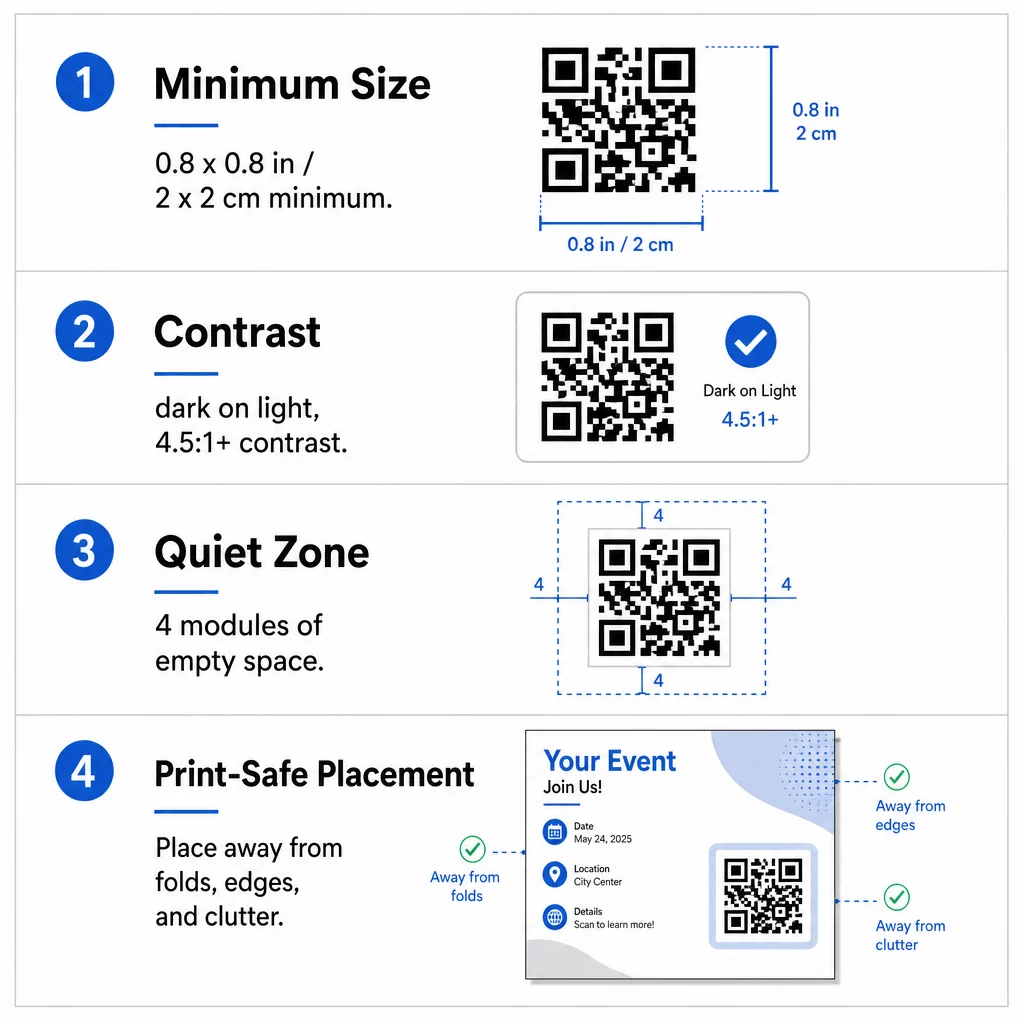
Storlek: På ett flygblad som hålls i handen (A5, A4 eller US Letter), gör koden minst 0,8 × 0,8 tum (2 × 2 cm). En större kod, runt 1 till 1,5 tum, är lättare att skanna och tar lite plats. För flygblad som människor skannar från längre avstånd, använd 10:1-regeln: en tum kodbredd för varje tio tum skanningsavstånd. Ett flygblad på en vägg som skannas från 20 tums avstånd behöver en kod som är minst 2 tum bred.
Kontrast: Använd mörka moduler på ljus bakgrund. Ett kontrastförhållande på minst 4.5:1 rekommenderas för tillförlitlig skanning, och 7:1 eller högre är bättre. Invertera inte färgerna (ljus kod på mörk bakgrund) och placera inte koden på ett foto.
Tyst zon: Lämna en tydlig kant på minst fyra moduler (de små rutorna) på alla fyra sidor. Text, linjer eller bilder inom denna kant kan hindra skannern från att hitta koden.
Strategisk placering och att skriva en tydlig CTA
Var du placerar koden och vad du skriver bredvid den påverkar båda antalet skanningar. placering av QR-koder i marknadsföringsmaterial följer några praktiska regler.
På en A4- eller A5-flyer är bra platser det nedre högra hörnet, mitten längst ner, eller direkt under huvuderbjudandet. Undvik dessa platser:
- Veck, skrynklor och böjda kanter, som förvränger mönstret
- Glansigt eller strukturerat papper där blänk eller kornighet minskar kontrasten
- Platser där andra designelement tränger undan den tysta zonen
- Baksidan av en flyer som folk kanske aldrig vänder
En kod ensam leder sällan till handling. Lägg till en uppmaning till handling (CTA) som berättar vad läsaren får: “Skanna för 20% rabatt”, “Skanna för att OSA”, “Skanna för att se menyn”. Lägg till en kort anvisning som “Rikta telefonens kamera mot koden” för läsare som är nya med QR-koder. Placera uppmaningen till handling (CTA) direkt ovanför eller bredvid koden. Dessa bästa praxis för läsbarhet av QR-koder hjälpa alla åldersgrupper. Se även till att sidan som koden öppnar är mobilanpassad och laddar snabbt.
Spåra och analysera flyerprestanda
För att se vilka flygblad som fungerar, ge varje distributionskanal en egen kod eller ett eget UTM-parametrar. Använd till exempel en kod för en mässa och en annan för en butiksdisk. Google Analytics visar då trafik per flygblad, så att du kan jämföra platser.
Med en dynamisk kod kan du även spåra QR-kodsskanningar i realtid och se tid, plats och enhetstyp. Om ett område presterar dåligt, ändra destinationen för den koden till ett mer relevant lokalt erbjudande. Det tryckta flygbladet förblir detsamma.
Övervaka din kampanjprestanda Vill du se vilka flygblad som driver mest trafik? Använd QR-kodgenerator för att skapa dynamiska, spårbara koder och se skanningsdata i din kontrollpanel.
QR-kod på flygblad skannas inte? Kontrollera detta
- För liten: Under 0,8 tum (2 cm) misslyckas många telefoner. Förstora koden.
- Låg kontrast eller inverterade färger: Använd en mörk kod på en ljus bakgrund.
- Ingen vit kant: Återställ den tysta zonen med fyra moduler.
- Suddigt tryck: En liten PNG som sträckts ut blir suddig vid utskrift. Använd SVG eller PDF, eller en större PNG.
- För mycket data: En mycket lång destinationslänk skapar ett tätt mönster. Använd en kort länk eller en dynamisk kod.
- Trasig destination: Öppna länken själv. En raderad sida eller en utgången dynamisk kod ger ett skanningsfel även om koden är intakt.
Att lägga till en QR-kod på ett flygblad tar några minuter och ger dig ett mätbart resultat. Välj rätt kodtyp, följ reglerna för storlek och kontrast, placera koden där folk kommer att se den, och skriv en tydlig CTA.
Vanliga frågor
För en vanlig handhållen flyer bör QR-koden vara minst 0,8 × 0,8 tum (2 × 2 cm). Om flyern är avsedd att skannas på avstånd, tillämpa förhållandet 10:1: gör koden en tum bred för varje tio tum förväntat skanningsavstånd.
Ja, men bara om du använde en dynamisk QR-kod. Dynamiska koder dirigeras via en kort omdirigerings-URL som du kan uppdatera från din kontrollpanel när som helst. Statiska koder bäddar in destinationen direkt i mönstret och kan inte ändras efter utskrift.
Dynamiska QR-koder inkluderar en analyspanel som visar totalt antal skanningar, unika användare, geografiska platser och tidsbaserat engagemang. Du kan också bifoga UTM-parametrar till din destinations-URL för att spåra dessa interaktioner direkt i Google Analytics.
SVG eller PDF, eftersom vektorfiler förblir skarpa vid alla utskriftsstorlekar. Om du använder PNG, ladda ner en stor och förstora den inte i din layout.
Statiska QR-koder upphör aldrig att gälla. Dynamiska koder slutar fungera när den månads- eller årsplan som skapade dem upphör, så håll planen aktiv så länge flygbladet är i omlopp.