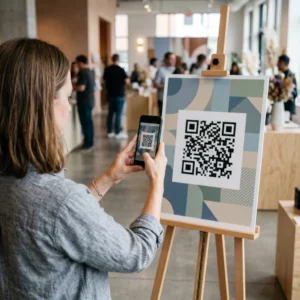
Har du svårt att koppla dina tryckta publikationer till de digitala upplevelser läsare alltmer förväntar sig? Statiska sidor kan bara göra så mycket – och förlag som enbart förlitar sig på tryck riskerar att förlora läsarnas engagemang till helt digitala konkurrenter. Denna guide visar dig exakt hur du överbryggar den klyftan med hjälp av QR-koder i böcker, tidskrifter och tidningar.
Varför förlag lägger till QR-koder i tryck
Dagens läsare förväntar sig mer än text på en sida. De vill ha ljud, video, kompletterande innehåll och sätt att interagera med författare och förlag – allt från sina smartphones. QR-koder ger förlag en direkt kanal för att leverera den upplevelsen utan att ersätta den tryckta produkt läsarna redan älskar.
Siffrorna speglar ett genuint beteendeskifte. Uppskattningsvis 89 miljoner amerikaner skannade en QR-kod under 2025, och den siffran beräknas överstiga 100 miljoner under 2026. Avgörande är att 43% av smartphoneanvändare skannar minst en QR-kod per vecka – ett beteendemönster som väl överensstämmer med engagerade läsare som regelbundet plockar upp en bok eller tidskrift.
För förlag specifikt är attraktionskraften enkel: en enda tryckt kod kan koppla en läsare till en videointervju med författaren, en kompletterande webbplats, en nedladdningsbar resurs eller ett prenumerationserbjudande – utan några extra tryckkostnader.
Skapa spårbara QR-koder för dina publikationer Vill du veta exakt vilka sidor och utgåvor som driver mest engagemang? Använd Dynamisk QR-kodgenerator för att skapa koder du kan uppdatera och spåra utan att trycka om ett enda exemplar.
Vilka typer av publikationer drar mest nytta
QR-koder tillför mätbart värde i praktiskt taget alla publiceringsformat, men vissa kategorier ser särskilt stark avkastning:
- Reseböcker och guider – Länka läsare direkt till fotogallerier, kartor, destinationswebbplatser eller videorundturer av platserna som beskrivs på varje sida
- Läroböcker – Koppla studenter till quiz, kompletterande videor, facit eller resurser för examensförberedelser i anslutning till varje kapitel
- Kokböcker – Länka till teknikvideor, guider för ingrediensersättning eller interaktiva inköpslistor
- Barnböcker – Utöka berättelsen med ljudberättelse, animerade scener eller interaktiva spel
- Språkinlärningsböcker – Spela upp ljuduttal eller videoförklaringar av grammatikkoncept direkt i texten
- Tidningar och tidningar – Driv läsare från tryckta annonser och redaktionellt innehåll till prenumerationssidor, videoinnehåll, feedbackformulär eller exklusiva erbjudanden
För en djupare titt på hur tidningar och magasin effektivt kan använda QR-koder, se guide till QR-koder i tidningar och magasin. Om ditt fokus specifikt är böcker, guide till QR-koder i böcker går igenom placering, skanning och innehållstyper i detalj.
Praktiska idéer för att använda QR-koder i publikationer
De mest effektiva QR-koderna från förlag tjänar ett tydligt syfte för läsaren. Här är beprövade metoder:
- Lägg till en video vid kapitelpauser i fackböcker som berättar om en specifik händelse eller visar den faktiska platsen där den ägde rum – särskilt effektivt för historia, resor och memoarer
- Länka till författarintervjuer eller bakom kulisserna-innehåll som belönar läsare som läser ut boken
- Placera en kod på baksidan eller insidan av framsidan som låter läsare lämna betyg och recensioner direkt på din föredragna plattform
- Dela en rabattkod för läsarens nästa köp, som kan lösas in genom att skanna en kod inuti den aktuella titeln
- Låt läsare ladda ner första kapitlet av författarens nästa bok innan den publiceras
- Lägg till koder till skyltfönster eller försäljningsmaterial som marknadsför kommande utgåvor eller lanseringsevenemang
- I tidskrifter, länka QR-koder i annonser till landningssidor, prenumerationserbjudanden eller videoinnehåll som utökar den tryckta annonsen
För tidningar och tidskrifter specifikt, placera koden framträdande i innehållet istället för att gömma den i ett hörn. Kombinera den med en kort, specifik uppmaning till handling – “Skanna för att se hela intervjun” är mer effektivt än ett generiskt “Skanna här.”
Länka tryckta annonser till digitala destinationer Använd Länk QR-kodgenerator för att koppla vilken tryckt sida som helst till en URL, landningssida eller digital resurs – ingen teknisk installation krävs.
Statiska vs. dynamiska QR-koder för utgivare
Denna skillnad är betydande för utgivare som trycker stora upplagor. En statisk QR-kod kodar en fast destination direkt in i kodmönstret. Om den länkade sidan flyttas eller innehållet ändras, blir koden oanvändbar – och du kan inte uppdatera den utan att trycka om.
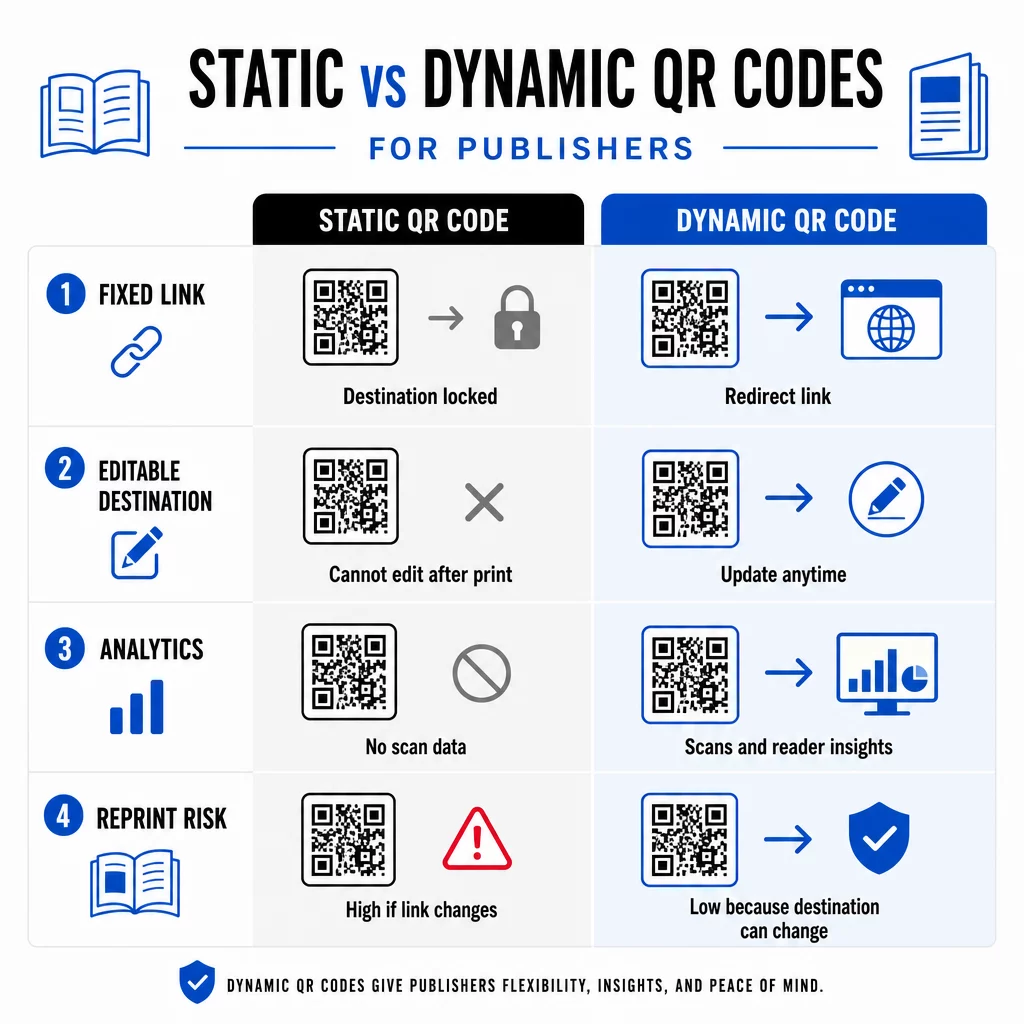
A dynamisk QR-kod, däremot, pekar på en kort omdirigerings-URL som du kontrollerar. Du kan uppdatera destinationen när som helst efter att koden har tryckts och distribuerats. För utgivare innebär detta:
- En lärobok tryckt i år kan fortfarande tillhandahålla uppdaterade innehållslänkar fem år från nu
- En tidningsannons kan uppdateras mitt under kampanjen för att återspegla ett nytt erbjudande utan att trycka om
- Föråldrade författarwebbplatser eller trasiga länkar kan åtgärdas utan att röra tryckupplagan
Dynamiska koder tillhandahåller också inbyggd analys. Du kan spåra hur många gånger varje kod skannas, var läsarna befinner sig och vilka enheter de använder – data som annars är osynlig inom traditionell publicering. För att förstå de fullständiga avvägningarna, den jämförelse mellan statiska och dynamiska QR-koder är värt att granska innan du bestämmer dig för ett format.
Vilket innehåll du ska länka från dina QR-koder
Innehållet bakom koden avgör om läsarna skannar en andra gång. Några format som fungerar särskilt bra för förlag:
- PDF-dokument – Länka till kompletterande guider, läslistor, utökade bilagor eller akademiska referenser med hjälp av en PDF QR-kod
- YouTube-videor – Koppla tryckt innehåll till författarintervjuer, dokumentärklipp eller instruktionsgenomgångar med hjälp av en QR-kodgenerator för YouTube
- Landningssidor – Använd en märkesanpassad landningssida för att presentera flera alternativ från en enda skanning – länkar till författarens webbplats, en recensionssida, sociala profiler och ett prenumerationsformulär, allt tillgängligt från en kod
- Bilder och gallerier – Komplettera rese- eller konstböcker med fullfärgsfotogallerier som tryckutgåvan inte kan rymma
Oavsett vilket format du väljer, se till att destinationen är mobiloptimerad. Majoriteten av skanningarna sker på smartphones, så en sida som återges dåligt på en liten skärm kommer att helt undergräva kodens värde.
Skriva ut QR-koder som faktiskt skannar
En QR-kod som inte skannar skadar läsarens förtroende – och en läsare som skannar en gång och får ett fel kommer sannolikt inte att försöka igen. Följ dessa riktlinjer för att säkerställa tillförlitlig prestanda i tryck:
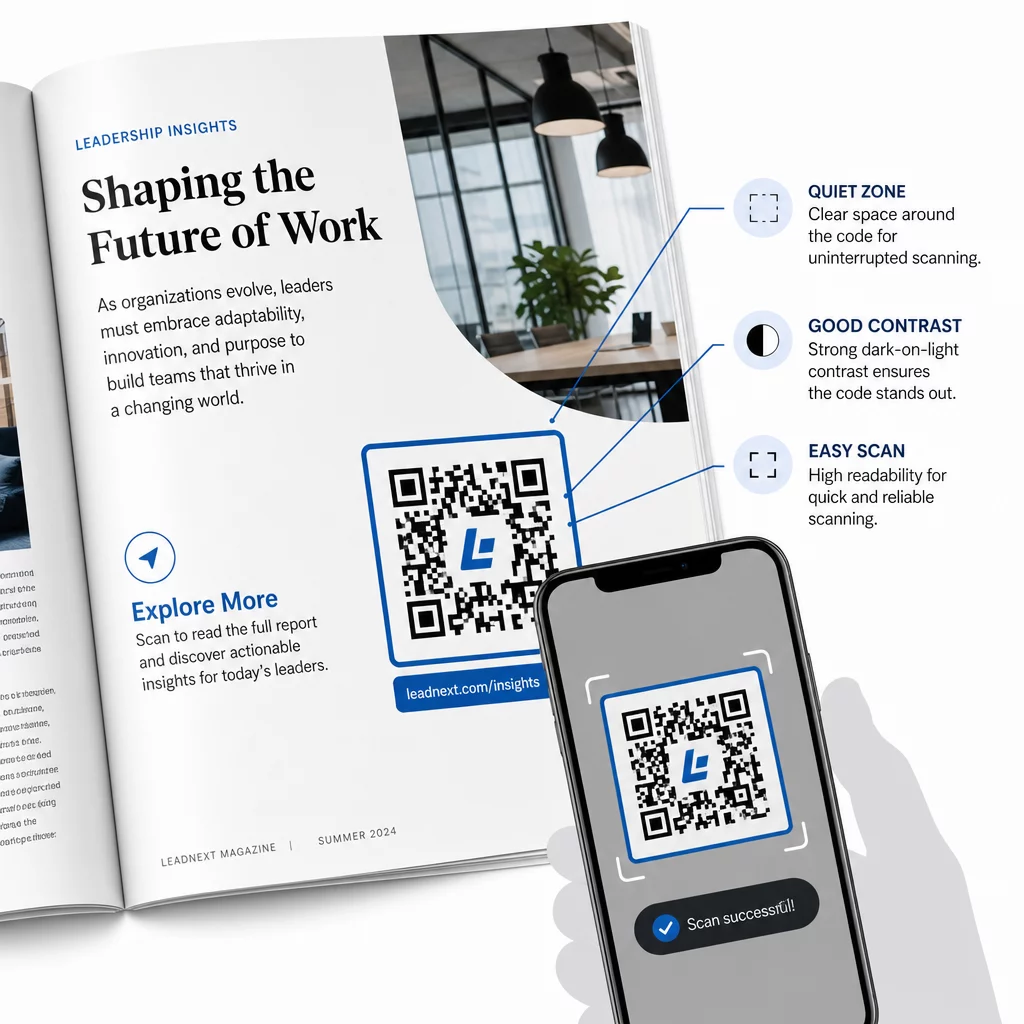
- Minsta storlek – Skriv ut QR-koder med minst 0,8 × 0,8 tum (20 mm) för de flesta publikationsformat. För affischer och POS-skyltar, använd minst 1,2 × 1,2 tum (30 mm)
- Tyst zon – Behåll en tydlig kant på minst fyra moduler bred på alla fyra sidor av koden, fri från text, bilder eller designelement
- Kontrast – Använd en mörk kod på en ljus bakgrund. Sikta på ett kontrastförhållande på minst 3:1; 4:1 eller högre är mer tillförlitligt under varierande läsförhållanden
- Filformat – Ladda ner koder som SVG- eller EPS-vektorfiler för utskrift, snarare än PNG eller JPG, för att undvika pixelering vid skalning. riktlinjer för QR-kodstorlek för tryckt material täcker detta mer i detalj
- PLACERING – Undvik att placera koder över veck, ryggar, sömmar eller kraftigt texturerade ytor där skanning blir opålitlig. För ytterligare vägledning, se Placeringsguide för QR-koder för marknadsföringsmaterial täcker position, synlighet och sammanhang i detalj
För en komplett checklista för att göra koder skanningsbara under olika utskriftsförhållanden, se bästa praxis för läsbarhet av QR-koder.
Spåra läsarengagemang under din tryckning
En av de mest underutnyttjade fördelarna med QR-koder inom publicering är analysskiktet. Med dynamiska koder kan du se:
- Vilka sidor eller avsnitt som genererar flest skanningar
- Hur engagemanget varierar mellan olika utgåvor eller geografiska marknader
- Om en viss typ av länkat innehåll (video kontra PDF kontra landningssida) driver mer interaktion
- Skanningstrender över tid – användbart för att förstå en titels livslängd
Denna data ger förläggare något genuint nytt: en återkopplingsslinga från tryck som tidigare endast var tillgänglig för digitala produkter. Använd den för att informera beslut om framtida utgåvor, identifiera vilka innehållsformat som resonerar och visa engagemangsstatistik för författare och annonsörer.
Pageloots plattform konsoliderar kodskapande, innehållshantering och analys i en enda instrumentpanel, så att du kan hantera QR-koder över en hel katalog utan att jonglera med flera verktyg. Utforska hela utbudet av QR-kodlösningar per bransch för att se hur andra sektorer tillämpar samma tillvägagångssätt.
Börja bygga din QR-strategi för publicering Skapa din första varumärkesanpassade, spårbara QR-kod på några minuter med QR-kodgenerator. Gratis 14-dagars provperiod, inget kreditkort krävs.
Vanliga frågor
Inte om du använder en dynamisk QR-kod. Dynamiska koder pekar på en omdirigerings-URL som du kontrollerar, så att du kan uppdatera destinationen – oavsett om det är en ny video, en reviderad landningssida eller en korrigerad länk – när som helst efter utskrift, utan att generera en ny kod eller röra vid tryckningen.
Du kan länka till praktiskt taget vilket digitalt innehåll som helst: YouTube-videor, PDF-dokument, webbsidor, bildgallerier, ljudfiler, prenumerationsformulär eller varumärkesanpassade landningssidor som kombinerar flera länkar. Det bästa valet beror på vad som tillför mest värde för dina läsare vid den tidpunkten i publikationen.
Dynamiska QR-koder inkluderar inbyggd analys som registrerar antalet skanningar, skanningstidpunkter, läsarplatser och enhetstyper. Detta ger dig en tydlig bild av vilka koder som presterar och vilka placeringar eller innehållstyper som driver mest engagemang – data som statiska koder inte kan tillhandahålla.