คุณกำลังประสบปัญหาในการเชื่อมโยงสิ่งพิมพ์ของคุณเข้ากับประสบการณ์ดิจิทัลที่ผู้อ่านคาดหวังมากขึ้นเรื่อยๆ หรือไม่? หน้ากระดาษแบบคงที่ทำอะไรได้ไม่มากนัก และผู้จัดพิมพ์ที่พึ่งพาสิ่งพิมพ์เพียงอย่างเดียวเสี่ยงที่จะสูญเสียการมีส่วนร่วมของผู้อ่านให้กับคู่แข่งที่เป็นดิจิทัลเต็มรูปแบบ คู่มือนี้จะแสดงให้คุณเห็นอย่างชัดเจนถึงวิธีการเชื่อมช่องว่างนั้นโดยใช้รหัส QR ในหนังสือ นิตยสาร และหนังสือพิมพ์.
ทำไมผู้จัดพิมพ์จึงเพิ่มรหัส QR ลงในสิ่งพิมพ์
ผู้อ่านในปัจจุบันคาดหวังมากกว่าแค่ข้อความบนหน้ากระดาษ พวกเขาต้องการเสียง วิดีโอ เนื้อหาเสริม และวิธีการโต้ตอบกับผู้เขียนและผู้จัดพิมพ์ ทั้งหมดนี้ทำได้จากสมาร์ทโฟน รหัส QR ช่วยให้ผู้จัดพิมพ์มีช่องทางโดยตรงในการมอบประสบการณ์นั้นโดยไม่ต้องแทนที่ผลิตภัณฑ์สิ่งพิมพ์ที่ผู้อ่านชื่นชอบอยู่แล้ว.
ตัวเลขสะท้อนให้เห็นถึงการเปลี่ยนแปลงพฤติกรรมที่แท้จริง มีชาวอเมริกันประมาณ 89 ล้านคนสแกนรหัส QR ในปี 2025 โดยคาดการณ์ว่าตัวเลขนี้จะเกิน 100 ล้านคนในปี 2026 ที่สำคัญคือ 43% ของผู้ใช้สมาร์ทโฟนสแกนรหัส QR อย่างน้อยหนึ่งครั้งต่อสัปดาห์ ซึ่งเป็นรูปแบบพฤติกรรมที่สอดคล้องกับผู้อ่านที่มีส่วนร่วมซึ่งหยิบหนังสือหรือนิตยสารขึ้นมาอ่านเป็นประจำ.
สำหรับผู้จัดพิมพ์โดยเฉพาะ ความน่าสนใจนั้นตรงไปตรงมา: รหัสที่พิมพ์เพียงรหัสเดียวสามารถเชื่อมโยงผู้อ่านกับการสัมภาษณ์วิดีโอกับผู้เขียน เว็บไซต์คู่หู ทรัพยากรที่ดาวน์โหลดได้ หรือข้อเสนอการสมัครสมาชิก โดยไม่มีค่าใช้จ่ายในการพิมพ์เพิ่มเติม.
สร้างรหัส QR ที่ติดตามได้สำหรับสิ่งพิมพ์ของคุณ ต้องการทราบว่าหน้าและฉบับใดที่สร้างการมีส่วนร่วมมากที่สุด? ใช้ สร้าง Dynamic QR Code เพื่อสร้างรหัสที่คุณสามารถอัปเดตและติดตามได้โดยไม่ต้องพิมพ์ซ้ำแม้แต่ฉบับเดียว.
สิ่งพิมพ์ประเภทใดที่ได้รับประโยชน์มากที่สุด
รหัส QR เพิ่มมูลค่าที่วัดผลได้ในรูปแบบการเผยแพร่เกือบทุกรูปแบบ แต่บางประเภทก็เห็นผลตอบแทนที่แข็งแกร่งเป็นพิเศษ:
- หนังสือและคู่มือท่องเที่ยว – เชื่อมโยงผู้อ่านโดยตรงไปยังแกลเลอรีรูปภาพ แผนที่ เว็บไซต์ปลายทาง หรือวิดีโอทัวร์ของสถานที่ที่อธิบายไว้ในแต่ละหน้า
- ตำราเรียนเพื่อการศึกษา – เชื่อมโยงนักเรียนเข้ากับแบบทดสอบ วิดีโอเสริม เฉลยคำตอบ หรือแหล่งข้อมูลเตรียมสอบควบคู่ไปกับแต่ละบท
- หนังสือตำราอาหาร – เชื่อมโยงไปยังวิดีโอเทคนิค คู่มือการเปลี่ยนส่วนผสม หรือรายการช้อปปิ้งแบบโต้ตอบ
- หนังสือเด็ก – ขยายเรื่องราวด้วยเสียงบรรยาย, ฉากแอนิเมชัน หรือเกมแบบโต้ตอบ
- หนังสือเรียนภาษา – เล่นเสียงการออกเสียงหรือวิดีโออธิบายแนวคิดไวยากรณ์ที่อยู่ในข้อความ
- นิตยสารและหนังสือพิมพ์ – ดึงดูดผู้อ่านจากโฆษณาสิ่งพิมพ์และเนื้อหาบรรณาธิการไปยังหน้าสมัครสมาชิก, เนื้อหาวิดีโอ, แบบฟอร์มข้อเสนอแนะ หรือข้อเสนอพิเศษ
สำหรับข้อมูลเชิงลึกเพิ่มเติมเกี่ยวกับวิธีที่หนังสือพิมพ์และนิตยสารสามารถใช้รหัส QR ได้อย่างมีประสิทธิภาพ โปรดดูที่ คู่มือการใช้รหัส QR บนหนังสือพิมพ์และนิตยสาร. หากคุณมุ่งเน้นไปที่หนังสือโดยเฉพาะ คู่มือการใช้รหัส QR ในหนังสือ จะอธิบายรายละเอียดเกี่ยวกับการจัดวาง การสแกน และประเภทเนื้อหา.
แนวคิดเชิงปฏิบัติสำหรับการใช้รหัส QR ในสิ่งพิมพ์
รหัส QR ของสำนักพิมพ์ที่มีประสิทธิภาพสูงสุดจะตอบสนองวัตถุประสงค์ที่ชัดเจนสำหรับผู้อ่าน นี่คือแนวทางที่ได้รับการพิสูจน์แล้ว:
- เพิ่มวิดีโอที่ช่วงพักบทในหนังสือสารคดีที่เล่าเหตุการณ์เฉพาะหรือแสดงสถานที่จริงที่เกิดขึ้น – มีประสิทธิภาพเป็นพิเศษสำหรับประวัติศาสตร์ การเดินทาง และบันทึกความทรงจำ
- เชื่อมโยงไปยังบทสัมภาษณ์ผู้เขียนหรือเนื้อหาเบื้องหลังที่ให้รางวัลแก่ผู้อ่านที่อ่านหนังสือจบ
- วางรหัสบนปกหลังหรือหน้าปกด้านในเพื่อให้ผู้อ่านสามารถให้คะแนนและรีวิวได้โดยตรงบนแพลตฟอร์มที่คุณต้องการ
- แบ่งปันรหัสส่วนลดสำหรับการซื้อครั้งต่อไปของผู้อ่าน ซึ่งสามารถแลกได้โดยการสแกนรหัสภายในหนังสือเล่มปัจจุบัน
- อนุญาตให้ผู้อ่านดาวน์โหลดบทแรกของหนังสือเล่มถัดไปของผู้เขียนก่อนที่จะตีพิมพ์
- เพิ่มรหัสลงในหน้าต่างแสดงสินค้าหรือสื่อ ณ จุดขายเพื่อโปรโมตการเปิดตัวหรือกิจกรรมเปิดตัวที่กำลังจะมาถึง
- ในนิตยสาร ให้เชื่อมโยงรหัส QR ในโฆษณาไปยังหน้า Landing Page, ข้อเสนอการสมัครสมาชิก หรือเนื้อหาวิดีโอที่ต่อยอดจากโฆษณาสิ่งพิมพ์
สำหรับหนังสือพิมพ์และนิตยสารโดยเฉพาะ ให้วางรหัสไว้ในตำแหน่งที่โดดเด่นภายในเนื้อหา แทนที่จะซ่อนไว้ที่มุม จับคู่กับคำกระตุ้นการตัดสินใจที่สั้นและเฉพาะเจาะจง – “สแกนเพื่อดูบทสัมภาษณ์ฉบับเต็ม” มีประสิทธิภาพมากกว่า “สแกนที่นี่” ทั่วไป”
เชื่อมโยงโฆษณาสิ่งพิมพ์ไปยังปลายทางดิจิทัล ใช้ เครื่องสร้างรหัส QR สำหรับลิงก์ เพื่อเชื่อมต่อหน้าสิ่งพิมพ์ใดๆ กับ URL, หน้า Landing Page หรือแหล่งข้อมูลดิจิทัล – ไม่ต้องมีการตั้งค่าทางเทคนิค.
รหัส QR แบบคงที่เทียบกับแบบไดนามิกสำหรับผู้จัดพิมพ์
ความแตกต่างนี้มีความสำคัญอย่างยิ่งสำหรับผู้จัดพิมพ์ที่พิมพ์จำนวนมาก A รหัส QR แบบคงที่ เข้ารหัสปลายทางที่ตายตัวโดยตรงลงในรูปแบบรหัส หากหน้าเว็บที่เชื่อมโยงย้ายตำแหน่งหรือเนื้อหาเปลี่ยนแปลง รหัสจะไร้ประโยชน์ – และคุณไม่สามารถอัปเดตได้หากไม่พิมพ์ซ้ำ.
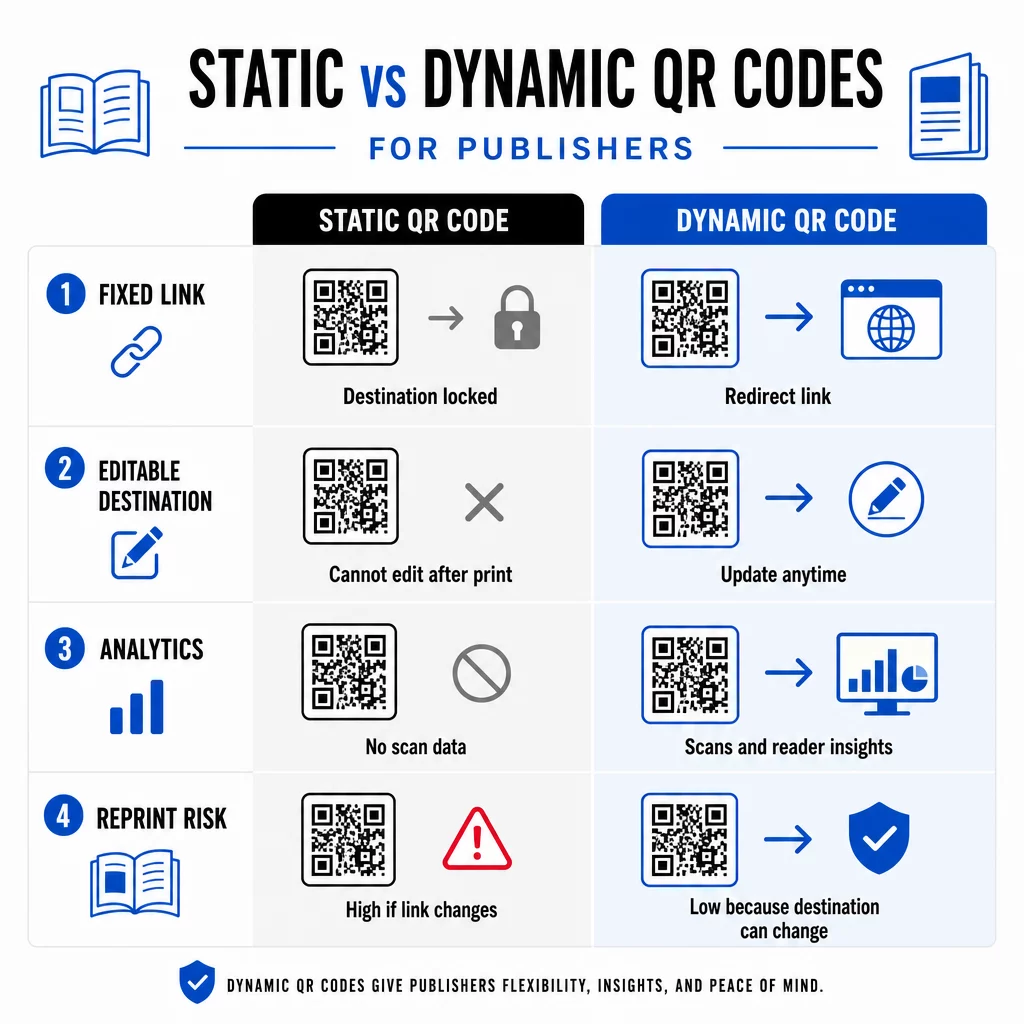
ก รหัส QR แบบไดนามิก, ในทางตรงกันข้าม ชี้ไปยัง URL เปลี่ยนเส้นทางสั้นๆ ที่คุณควบคุมได้ คุณสามารถอัปเดตปลายทางได้ตลอดเวลาหลังจากที่รหัสถูกพิมพ์และแจกจ่ายไปแล้ว สำหรับผู้จัดพิมพ์ นี่หมายถึง:
- หนังสือเรียนที่พิมพ์ในปีนี้ยังคงสามารถให้บริการลิงก์เนื้อหาที่อัปเดตได้ในอีกห้าปีข้างหน้า
- โฆษณานิตยสารสามารถอัปเดตกลางแคมเปญเพื่อสะท้อนข้อเสนอใหม่โดยไม่ต้องพิมพ์ซ้ำ
- เว็บไซต์ผู้เขียนที่ล้าสมัยหรือลิงก์เสียสามารถแก้ไขได้โดยไม่ต้องแตะต้องงานพิมพ์
รหัสไดนามิกยังให้การวิเคราะห์ในตัว คุณสามารถติดตาม จำนวนครั้งที่แต่ละรหัสถูกสแกน ตำแหน่งของผู้อ่าน และอุปกรณ์ที่พวกเขาใช้ – ข้อมูลที่มองไม่เห็นในการเผยแพร่แบบดั้งเดิม หากต้องการทำความเข้าใจข้อดีข้อเสียทั้งหมด การเปรียบเทียบรหัส QR แบบคงที่เทียบกับแบบไดนามิก ควรค่าแก่การทบทวนก่อนที่คุณจะตัดสินใจเลือกรูปแบบ.
เนื้อหาใดที่จะเชื่อมโยงจากรหัส QR ของคุณ
เนื้อหาที่อยู่เบื้องหลังรหัสจะเป็นตัวกำหนดว่าผู้อ่านจะสแกนซ้ำหรือไม่ รูปแบบบางอย่างที่เหมาะกับผู้จัดพิมพ์เป็นพิเศษ:
- เอกสาร PDF – เชื่อมโยงไปยังคู่มือประกอบ, รายการหนังสืออ่าน, ภาคผนวกเพิ่มเติม, หรือเอกสารอ้างอิงทางวิชาการโดยใช้ รหัส QR PDF
- วิดีโอ YouTube – เชื่อมโยงเนื้อหาที่พิมพ์ออกมากับการสัมภาษณ์ผู้เขียน, คลิปสารคดี, หรือคำแนะนำการใช้งานโดยใช้ สร้าง QR Code YouTube
- หน้า Landing Page – ใช้ หน้า Landing Page ที่มีแบรนด์ เพื่อนำเสนอตัวเลือกที่หลากหลายจากการสแกนเพียงครั้งเดียว – ลิงก์ไปยังเว็บไซต์ของผู้เขียน, หน้าบทวิจารณ์, โปรไฟล์โซเชียล, และแบบฟอร์มการสมัครสมาชิก ทั้งหมดนี้เข้าถึงได้จากรหัสเดียว
- รูปภาพและแกลเลอรี – เสริมหนังสือท่องเที่ยวหรือหนังสือศิลปะด้วยแกลเลอรีภาพสีเต็มรูปแบบที่ฉบับพิมพ์ไม่สามารถรองรับได้
ไม่ว่าคุณจะเลือกรูปแบบใด โปรดตรวจสอบให้แน่ใจว่าปลายทางได้รับการปรับให้เหมาะกับมือถือ การสแกนส่วนใหญ่เกิดขึ้นบนสมาร์ทโฟน ดังนั้นหน้าเว็บที่แสดงผลได้ไม่ดีบนหน้าจอขนาดเล็กจะบั่นทอนคุณค่าของรหัสโดยสิ้นเชิง.
การพิมพ์รหัส QR ที่สามารถสแกนได้จริง
รหัส QR ที่สแกนไม่ได้จะทำลายความไว้วางใจของผู้อ่าน – และผู้อ่านที่สแกนครั้งเดียวแล้วพบข้อผิดพลาดก็ไม่น่าจะลองอีกครั้ง ปฏิบัติตามแนวทางเหล่านี้เพื่อให้แน่ใจว่าประสิทธิภาพในการพิมพ์เชื่อถือได้:
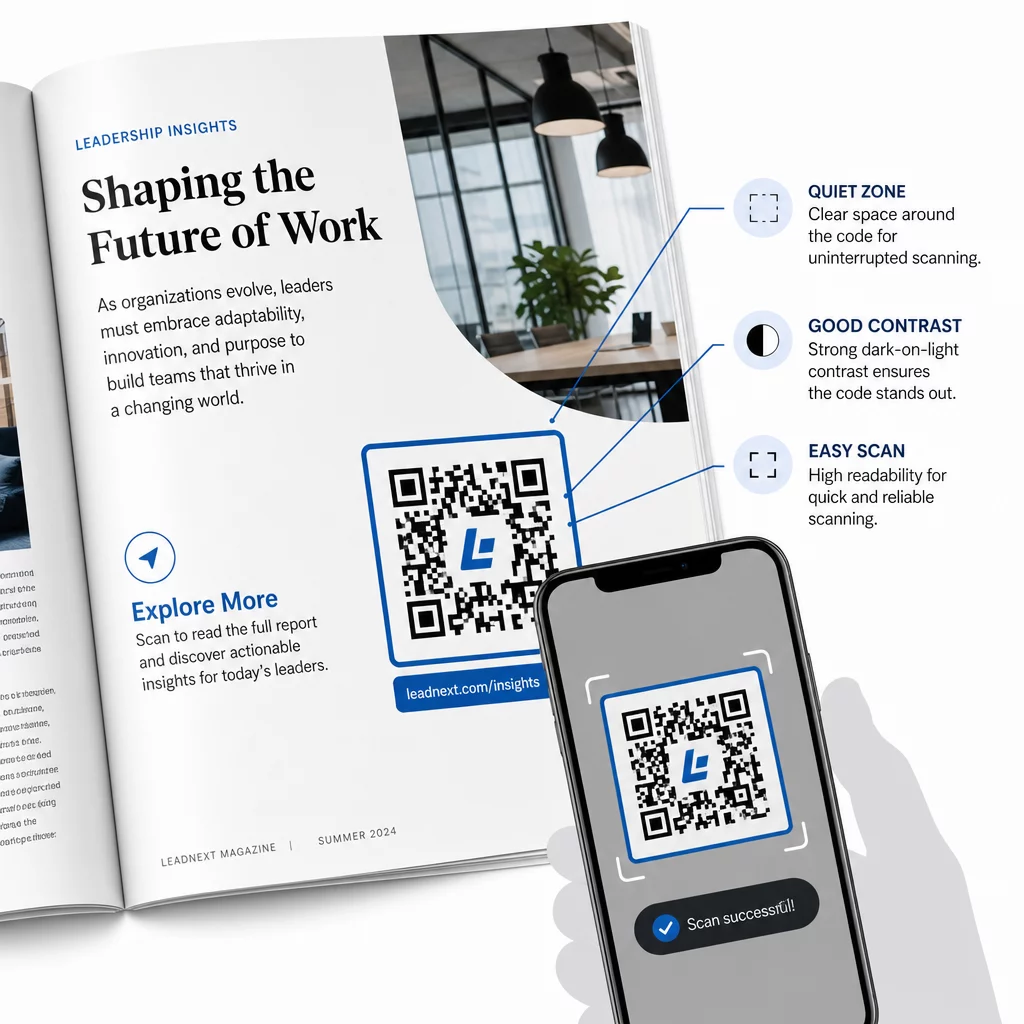
- ขนาดขั้นต่ำ – พิมพ์รหัส QR ที่ขนาดขั้นต่ำ 0.8 × 0.8 นิ้ว (20 มม.) สำหรับรูปแบบสิ่งพิมพ์ส่วนใหญ่ สำหรับโปสเตอร์และป้าย ณ จุดขาย ให้ใช้ขนาดอย่างน้อย 1.2 × 1.2 นิ้ว (30 มม.)
- พื้นที่ว่าง – รักษาระยะขอบที่ชัดเจนอย่างน้อยสี่โมดูลกว้างทั้งสี่ด้านของโค้ด โดยปราศจากข้อความ รูปภาพ หรือองค์ประกอบการออกแบบ
- ตัดกัน – ใช้โค้ดสีเข้มบนพื้นหลังสีอ่อน ตั้งเป้าอัตราส่วนคอนทราสต์ขั้นต่ำ 3:1; 4:1 หรือสูงกว่าจะเชื่อถือได้มากกว่าในสภาพการอ่านที่หลากหลาย
- รูปแบบไฟล์ – ดาวน์โหลดโค้ดเป็นไฟล์เวกเตอร์ SVG หรือ EPS สำหรับการพิมพ์ แทนที่จะเป็น PNG หรือ JPG เพื่อหลีกเลี่ยงการแตกของพิกเซลเมื่อปรับขนาด. แนวทางการกำหนดขนาด QR โค้ดสำหรับสื่อสิ่งพิมพ์ ครอบคลุมเรื่องนี้ในรายละเอียดเพิ่มเติม
- ตำแหน่งที่วางโค้ด – หลีกเลี่ยงการวางโค้ดข้ามรอยพับ สันหนังสือ ตะเข็บ หรือพื้นผิวที่มีลวดลายมาก ซึ่งการสแกนอาจไม่น่าเชื่อถือ สำหรับคำแนะนำเพิ่มเติม คู่มือการวางรหัส QR สำหรับสื่อการตลาด ครอบคลุมตำแหน่ง การมองเห็น และบริบทอย่างละเอียด
สำหรับรายการตรวจสอบฉบับสมบูรณ์เกี่ยวกับการทำให้โค้ดสามารถสแกนได้ในสภาพการพิมพ์ที่แตกต่างกัน โปรดดู แนวทางปฏิบัติที่ดีที่สุดสำหรับการอ่านรหัส QR.
การติดตามการมีส่วนร่วมของผู้อ่านตลอดการพิมพ์ของคุณ
หนึ่งในข้อดีที่ถูกนำไปใช้น้อยที่สุดของรหัส QR ในการเผยแพร่คือชั้นการวิเคราะห์ ด้วยรหัสแบบไดนามิก คุณสามารถดูได้ว่า:
- หน้าหรือส่วนใดที่สร้างการสแกนมากที่สุด
- การมีส่วนร่วมแตกต่างกันอย่างไรในฉบับพิมพ์หรือตลาดทางภูมิศาสตร์ที่แตกต่างกัน
- เนื้อหาที่เชื่อมโยงประเภทใด (วิดีโอ เทียบกับ PDF เทียบกับหน้า Landing Page) ที่กระตุ้นการโต้ตอบได้มากกว่า
- แนวโน้มการสแกนเมื่อเวลาผ่านไป – มีประโยชน์สำหรับการทำความเข้าใจอายุการวางจำหน่ายของชื่อเรื่อง
ข้อมูลนี้ทำให้ผู้จัดพิมพ์ได้รับสิ่งใหม่ๆ อย่างแท้จริง: วงจรป้อนกลับจากการพิมพ์ที่ก่อนหน้านี้มีให้สำหรับผลิตภัณฑ์ดิจิทัลเท่านั้น ใช้เพื่อประกอบการตัดสินใจเกี่ยวกับฉบับพิมพ์ในอนาคต ระบุรูปแบบเนื้อหาที่โดนใจ และแสดงเมตริกการมีส่วนร่วมแก่นักเขียนและผู้ลงโฆษณา.
แพลตฟอร์มของ Pageloot รวมการสร้างโค้ด การจัดการเนื้อหา และการวิเคราะห์ไว้ในแดชบอร์ดเดียว เพื่อให้คุณสามารถจัดการรหัส QR ทั่วทั้งแคตตาล็อกโดยไม่ต้องสลับใช้เครื่องมือหลายอย่าง สำรวจทั้งหมดของ โซลูชัน QR โค้ดตามอุตสาหกรรม เพื่อดูว่าภาคส่วนอื่น ๆ กำลังนำแนวทางเดียวกันไปใช้อย่างไร.
เริ่มสร้างกลยุทธ์ QR สำหรับการเผยแพร่ของคุณ สร้างรหัส QR แรกของคุณที่มีแบรนด์และสามารถติดตามได้ในไม่กี่นาทีด้วย เครื่องสร้างรหัส QR. ทดลองใช้ฟรี 14 วัน ไม่ต้องใช้บัตรเครดิต.
คำถามที่พบบ่อย
ไม่ใช่ถ้าคุณใช้รหัส QR แบบไดนามิก รหัสแบบไดนามิกจะชี้ไปยัง URL เปลี่ยนเส้นทางที่คุณควบคุม ดังนั้นคุณจึงสามารถอัปเดตปลายทางได้ – ไม่ว่าจะเป็นวิดีโอใหม่ หน้า Landing Page ที่แก้ไข หรือลิงก์ที่ถูกต้อง – ได้ตลอดเวลาหลังจากการพิมพ์ โดยไม่ต้องสร้างรหัสใหม่หรือแก้ไขงานพิมพ์.
คุณสามารถเชื่อมโยงไปยังเนื้อหาดิจิทัลได้แทบทุกประเภท: วิดีโอ YouTube, เอกสาร PDF, หน้าเว็บ, แกลเลอรีรูปภาพ, ไฟล์เสียง, แบบฟอร์มสมัครสมาชิก หรือหน้า Landing Page ที่มีแบรนด์ซึ่งรวมลิงก์หลายรายการเข้าไว้ด้วยกัน ตัวเลือกที่ดีที่สุดขึ้นอยู่กับสิ่งที่เพิ่มคุณค่าสูงสุดให้กับผู้อ่านของคุณ ณ จุดนั้นในสิ่งพิมพ์.
คิวอาร์โค้ดแบบไดนามิกมีระบบวิเคราะห์ในตัวที่บันทึกจำนวนการสแกน, เวลาที่สแกน, ตำแหน่งของผู้สแกน และประเภทอุปกรณ์ สิ่งนี้ช่วยให้คุณเห็นภาพที่ชัดเจนว่าโค้ดใดทำงานได้ดี และตำแหน่งหรือประเภทเนื้อหาใดที่กระตุ้นการมีส่วนร่วมได้มากที่สุด – ซึ่งเป็นข้อมูลที่คิวอาร์โค้ดแบบคงที่ให้ไม่ได้.