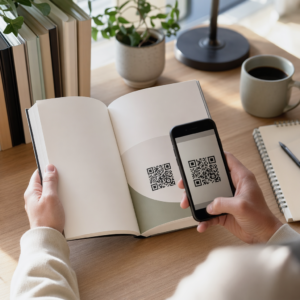
Kas teil on raskusi oma trükiste ühendamisega digitaalsete kogemustega, mida lugejad üha enam ootavad? Staatilised lehed suudavad teha vaid piiratud hulgal – ja kirjastajad, kes toetuvad ainult trükile, riskivad lugejate kaasatuse kaotamisega täielikult digitaalsetele konkurentidele. See juhend näitab teile täpselt, kuidas seda lünka ületada, kasutades QR-koode raamatutes, ajakirjades ja ajalehtedes.
Miks kirjastajad lisavad trükistele QR-koode
Tänapäeva lugejad ootavad lehel olevast tekstist enamat. Nad tahavad heli, videot, lisasisu ja võimalusi autorite ja kirjastajatega suhelda – kõike seda oma nutitelefonidest. QR-koodid annavad kirjastajatele otsese kanali selle kogemuse pakkumiseks, asendamata trükist, mida lugejad juba armastavad.
Numbrid peegeldavad tõelist käitumismuutust. Hinnanguliselt skaneeris 2025. aastal QR-koodi 89 miljonit ameeriklast, kusjuures see arv peaks 2026. aastal ületama 100 miljonit. Kriitiliselt, 43% nutitelefoni kasutajatest skaneerib vähemalt ühe QR-koodi nädalas – käitumismuster, mis sobib hästi kaasatud lugejatega, kes regulaarselt raamatut või ajakirja kätte võtavad.
Kirjastajate jaoks konkreetselt on atraktiivsus lihtne: üks trükitud kood võib ühendada lugeja videointervjuuga autoriga, kaasneva veebisaidiga, allalaaditava ressursiga või tellimispakkumisega – ilma lisatrükikuludeta.
Looge oma väljaannete jaoks jälgitavaid QR-koode Tahad täpselt teada, millised lehed ja väljaanded kõige rohkem kaasatust tekitavad? Kasuta Dünaamilise QR koodi generaator koodide loomiseks, mida saate värskendada ja jälgida ilma ühtegi eksemplari uuesti trükkimata.
Millised väljaannete tüübid saavad kõige rohkem kasu
QR-koodid lisavad mõõdetavat väärtust praktiliselt igale kirjastusformaadile, kuid mõned kategooriad näevad eriti tugevat tulu:
- Reisiraamatud ja -juhendid – Linkige lugejad otse fotogaleriidele, kaartidele, sihtkohtade veebisaitidele või videotuuri igal lehel kirjeldatud kohtadest
- Õpperaamatud – Ühendage õpilased viktoriinide, lisavideote, vastuste võtmete või eksamiks ettevalmistamise ressurssidega iga peatüki juures
- Kokaraamatud – Linkige tehnikavideotele, koostisosade asendamise juhenditele või interaktiivsetele ostunimekirjadele
- Lasteraamatud – Laienda lugu helijutustuse, animeeritud stseenide või interaktiivsete mängudega
- Keeleõppe raamatud – Esita teksti sees helihääldusi või grammatikakontseptsioonide videoseletusi
- Ajakirjad ja ajalehed – Suuna lugejaid trükireklaamidest ja toimetuse sisust tellimislehtedele, videosisu juurde, tagasisidevormidele või eksklusiivsetele pakkumistele
Sügavama ülevaate saamiseks sellest, kuidas ajalehed ja ajakirjad saavad QR-koode tõhusalt kasutada, vaata QR-koodide juhendit ajalehtedes ja ajakirjades. Kui teie fookus on konkreetselt raamatutel, siis QR-koodide juhend raamatutes käsitleb paigutust, skaneerimist ja sisutüüpe üksikasjalikult.
Praktilised ideed QR-koodide kasutamiseks väljaannetes
Kõige tõhusamad kirjastaja QR-koodid teenivad lugeja jaoks selget eesmärki. Siin on tõestatud lähenemisviisid:
- Lisa peatükkide vahele mitteilukirjanduslikes raamatutes video, mis jutustab konkreetset sündmust või näitab tegelikku asukohta, kus see aset leidis – eriti tõhus ajaloo, reisimise ja memuaaride puhul
- Lingi autoriintervjuudele või telgitagusele sisule, mis premeerib lugejaid, kes raamatu lõpetavad
- Aseta kood tagakaanele või esilehe siseküljele, võimaldades lugejatel jätta hinnanguid ja arvustusi otse teie eelistatud platvormile
- Jaga sooduskoodi lugeja järgmiseks ostuks, mis on lunastatav praeguse teose sees oleva koodi skaneerimisega
- Luba lugejatel alla laadida autori järgmise raamatu esimene peatükk enne selle ilmumist
- Lisage koode vaateakendele või müügimaterjalidele, mis reklaamivad eelseisvaid väljalaseid või turuletoomise üritusi
- Ajakirjades linkige reklaamides olevad QR-koodid sihtlehtedele, tellimispakkumistele või videosisule, mis laiendab trükitud reklaami
Eriti ajalehtede ja ajakirjade puhul asetage kood silmatorkavalt sisu sisse, mitte nurka peitu. Siduge see lühikese, spetsiifilise üleskutsega tegevusele – “Skannige, et vaadata täielikku intervjuud” on tõhusam kui üldine “Skannige siin.”
Linkige trükireklaadid digitaalsetele sihtkohtadele Kasuta Lingi QR-koodi generaator mis tahes trükitud lehe ühendamiseks URL-i, sihtlehe või digitaalse ressursiga – tehnilist seadistust pole vaja.
Staatilised vs. dünaamilised QR-koodid kirjastajatele
See eristus on oluline kirjastajatele, kes trükivad suuri tiraaže. A staatiline QR-kood kodeerib fikseeritud sihtkoha otse koodimustrisse. Kui lingitud leht liigub või sisu muutub, muutub kood kasutuks – ja te ei saa seda värskendada ilma uuesti trükkimata.
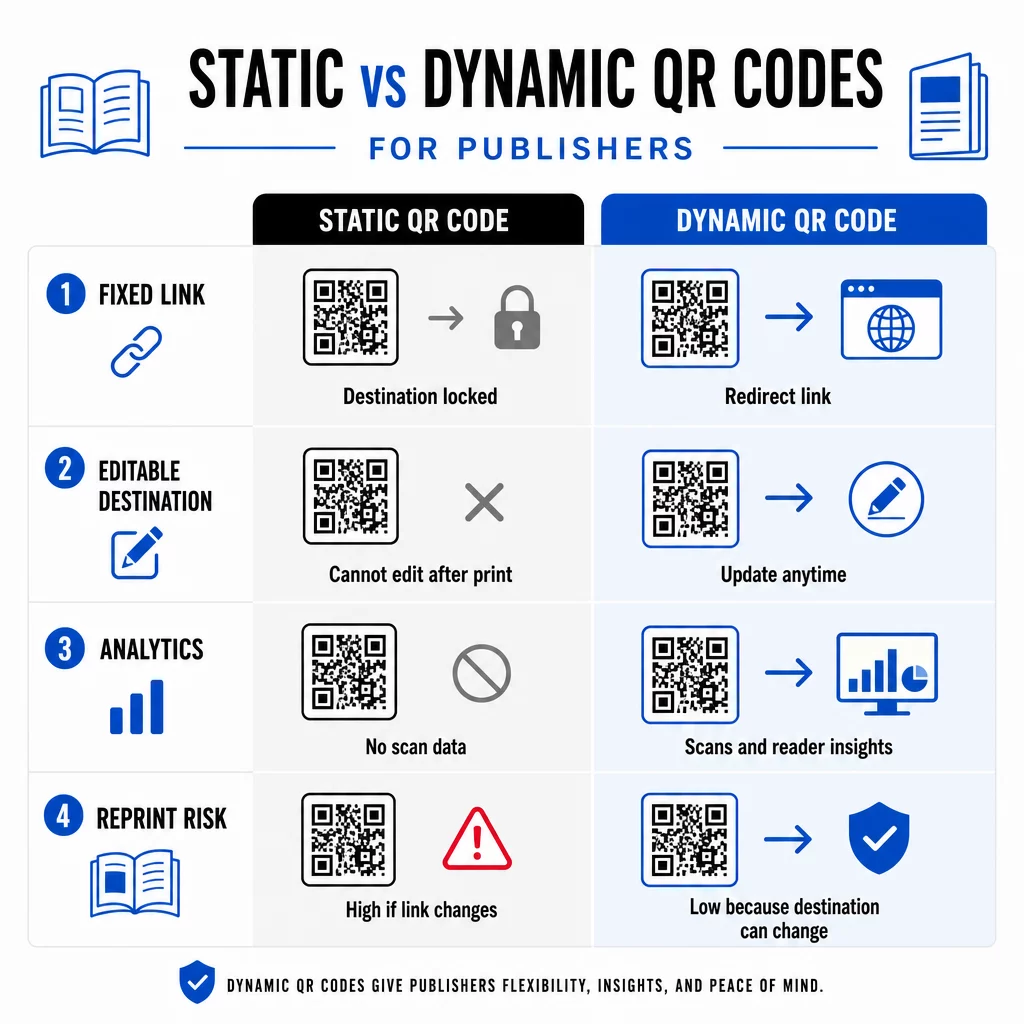
A dünaamiline QR-kood, vastupidi, osutab lühikesele ümbersuunamise URL-ile, mida te kontrollite. Saate sihtkohta igal ajal värskendada pärast koodi trükkimist ja levitamist. Kirjastajate jaoks tähendab see:
- Sel aastal trükitud õpik saab endiselt pakkuda värskendatud sisulinke viie aasta pärast
- Ajakirjareklaami saab kampaania keskel värskendada, et kajastada uut pakkumist ilma uuesti trükkimata
- Aegunud autori veebisaite või katkiseid linke saab parandada trükkimist puudutamata
Dünaamilised koodid pakuvad ka sisseehitatud analüütikat. Saate jälgida mitu korda iga koodi skannitakse, kus lugejad asuvad ja milliseid seadmeid nad kasutavad – andmed, mis on traditsioonilises kirjastamises muidu nähtamatud. Et mõista kõiki kompromisse, on staatiliste vs. dünaamiliste QR-koodide võrdlus tasub üle vaadata enne, kui valite formaadi.
Millist sisu oma QR-koodidest linkida
Koodi taga olev sisu määrab, kas lugejad skaneerivad teist korda. Mõned formaadid, mis kirjastajatele eriti hästi sobivad:
- PDF-dokumendid – Linkige kaasjuhenditele, lugemisnimekirjadele, laiendatud lisadele või akadeemilistele viidetele, kasutades PDF QR-kood
- YouTube'i videod – Ühendage trükitud sisu autoriintervjuude, dokumentaalkaadrite või õppevideotega, kasutades YouTube QR-koodi generaator
- Maandumislehed – Kasutage bränditud sihtlehte mitme valiku esitamiseks ühe skaneerimisega – lingid autori veebisaidile, arvustuste lehele, sotsiaalprofiilidele ja tellimisvormile, mis kõik on ligipääsetavad ühest koodist
- Pildid ja galeriid – Täiendage reisi- või kunstiraamatuid täisvärviliste fotogaleriidega, mida trükiväljaanne mahutada ei saa
Ükskõik millise formaadi valite, veenduge, et sihtkoht oleks mobiilile optimeeritud. Enamik skaneeringuid toimub nutitelefonides, seega väikeekraanil halvasti kuvatav leht õõnestab koodi väärtust täielikult.
QR-koodide printimine, mis tegelikult skaneerivad
QR-kood, mis ei skaneeri, kahjustab lugeja usaldust – ja lugeja, kes skaneerib korra ja saab vea, ei proovi tõenäoliselt uuesti. Järgige neid juhiseid, et tagada usaldusväärne toimimine trükis:
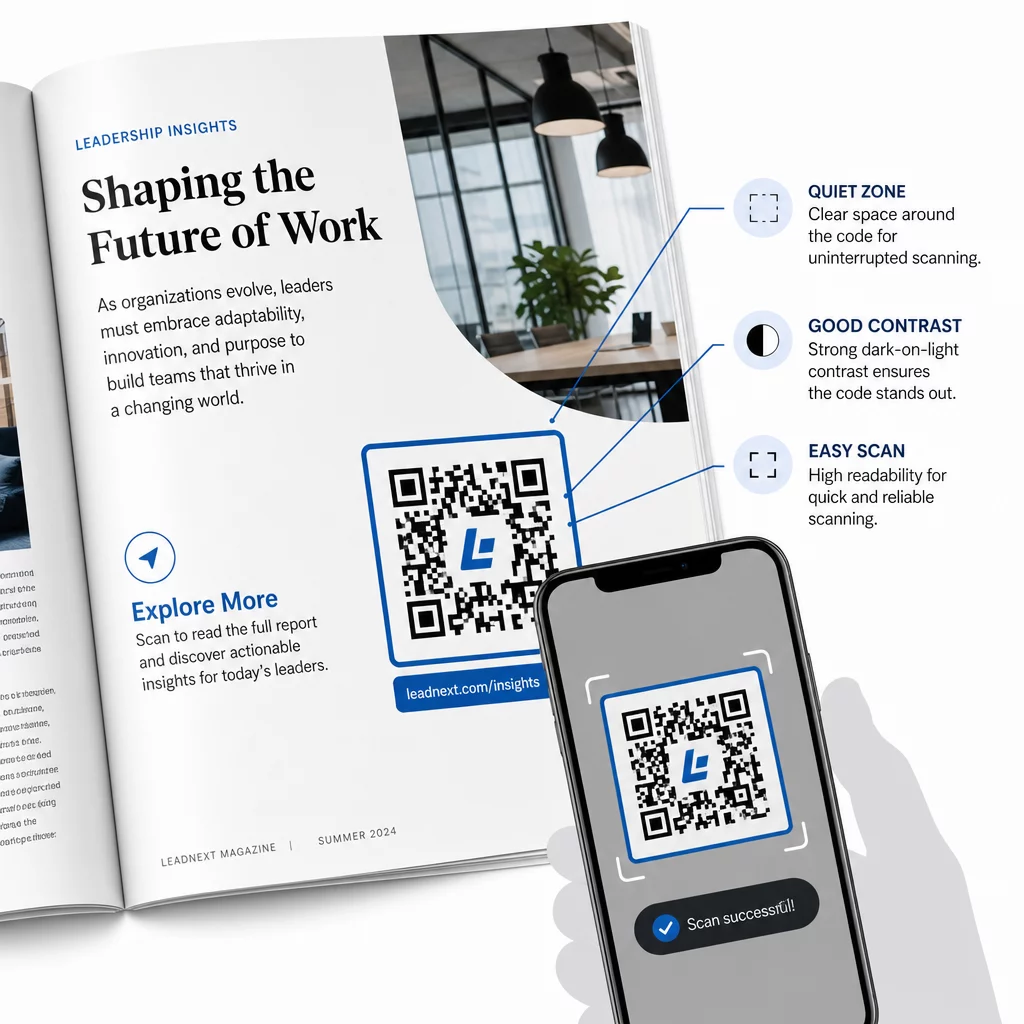
- Minimaalne suurus – Printige QR-koodid enamiku väljaannete formaatide puhul minimaalselt 0,8 × 0,8 tolli (20 mm) suuruses. Plakatite ja müügikoha siltide puhul kasutage vähemalt 1,2 × 1,2 tolli (30 mm)
- Vaikne tsoon – Hoidke koodi kõigil neljal küljel vähemalt nelja mooduli laiune selge äär, mis on vaba tekstist, piltidest või disainielementidest
- Kontrast – Kasutage heledal taustal tumedat koodi. Püüdke saavutada minimaalne kontrastsussuhe 3:1; 4:1 või kõrgem on usaldusväärsem erinevates lugemistingimustes
- Failivorming – Laadige koodid printimiseks alla SVG- või EPS-vektorfailidena, mitte PNG- või JPG-failidena, et vältida skaleerimisel pikseldumist. QR-koodi suuruse juhiseid trükimaterjalide jaoks käsitleme seda üksikasjalikumalt
- paigutus – Vältige koodide paigutamist üle voltide, selgade, õmbluste või tugevalt tekstureeritud pindade, kus skaneerimine muutub ebausaldusväärseks. Täiendavate juhiste saamiseks on QR-koodi paigutamise juhend turundusmaterjalidele käsitleb põhjalikult asukohta, nähtavust ja konteksti
Täieliku kontrollnimekirja saamiseks koodide skaneeritavuse kohta erinevates printimistingimustes vaadake QR-koodi loetavuse parimaid tavasid.
Lugejate kaasatuse jälgimine teie trükise tiraaži ulatuses
Üks QR-koodide kõige alakasutatud eeliseid kirjastamises on analüütikakiht. Dünaamiliste koodidega näete:
- Millised lehed või jaotised genereerivad kõige rohkem skaneeringuid
- Kuidas kaasatus varieerub erinevates väljaannetes või geograafilistes turgudel
- Kas teatud tüüpi lingitud sisu (video vs. PDF vs. sihtleht) juhib rohkem interaktsiooni
- Skaneerimistrendid aja jooksul – kasulik pealkirja säilivusaja mõistmiseks
Need andmed annavad kirjastajatele midagi tõeliselt uut: trükist tagasisideahela, mis oli varem saadaval ainult digitaalsete toodete puhul. Kasutage seda tulevaste väljaannete kohta otsuste tegemiseks, tuvastage, millised sisuvormingud kõnetavad, ja demonstreerige kaasatuse mõõdikuid autoritele ja reklaamijatele.
Pageloot'i platvorm koondab koodi loomise, sisuhalduse ja analüütika ühte juhtpaneeli, nii et saate hallata QR-koode kogu kataloogis ilma mitme tööriista vahel žongleerimata. Avastage kogu valik QR-koodi lahendused tööstusharude kaupa et näha, kuidas teised sektorid sama lähenemist rakendavad.
Alustage oma kirjastamise QR-strateegia loomist Looge oma esimene bränditud, jälgitav QR-kood minutitega koos QR-koodi generaator. Tasuta 14-päevane prooviperiood, krediitkaarti pole vaja.
Korduma kippuvad küsimused
Mitte siis, kui kasutate dünaamilist QR-koodi. Dünaamilised koodid viitavad ümbersuunamise URL-ile, mida te kontrollite, nii et saate sihtkohta – olgu see siis uus video, muudetud sihtleht või parandatud link – igal ajal pärast printimist värskendada, ilma uut koodi genereerimata või trükki puudutamata.
Saate linkida praktiliselt igale digitaalsele sisule: YouTube'i videod, PDF-dokumendid, veebilehed, pildigaleriid, helifailid, tellimisvormid või bränditud sihtlehed, mis ühendavad mitu linki. Parim valik sõltub sellest, mis pakub teie lugejatele antud väljaande punktis kõige rohkem väärtust.
Dünaamilised QR-koodid sisaldavad sisseehitatud analüütikat, mis registreerib skaneeringute arvu, skaneerimise ajatemplid, lugejate asukohad ja seadmetüübid. See annab teile selge ülevaate sellest, millised koodid toimivad ja millised paigutused või sisutüübid toovad kõige rohkem kaasatust – andmed, mida staatilised koodid pakkuda ei saa.