Küzd azzal, hogy nyomtatott kiadványait összekapcsolja azokkal a digitális élményekkel, amelyeket az olvasók egyre inkább elvárnak? A statikus oldalak csak korlátozottan képesek erre – és azok a kiadók, akik kizárólag a nyomtatott formára támaszkodnak, kockáztatják, hogy elveszítik az olvasók elkötelezettségét a teljesen digitális versenytársakkal szemben. Ez az útmutató pontosan megmutatja, hogyan hidalhatja át ezt a szakadékot QR-kódok használatával könyvekben, magazinokban és újságokban.
Miért adnak a kiadók QR-kódokat a nyomtatott kiadványokhoz
Az olvasók ma már többet várnak egy oldalon lévő szövegnél. Hangot, videót, kiegészítő tartalmat és módokat szeretnének, hogy interakcióba lépjenek a szerzőkkel és kiadókkal – mindezt okostelefonjukról. A QR-kódok közvetlen csatornát biztosítanak a kiadóknak ezen élmény nyújtására anélkül, hogy lecserélnék azt a nyomtatott terméket, amelyet az olvasók már szeretnek.
A számok valódi viselkedésbeli változást tükröznek. Becslések szerint 2025-ben 89 millió amerikai szkennelt be QR-kódot, és ez a szám 2026-ra várhatóan meghaladja a 100 milliót. Kritikus fontosságú, hogy az okostelefon-használók 43%-a hetente legalább egy QR-kódot beolvas – ez a viselkedési minta jól illeszkedik az elkötelezett olvasókhoz, akik rendszeresen kézbe vesznek egy könyvet vagy magazint.
A kiadók számára különösen egyértelmű a vonzereje: egyetlen nyomtatott kód összekapcsolhatja az olvasót egy videóinterjúval a szerzővel, egy kísérő weboldallal, egy letölthető forrással vagy egy előfizetési ajánlattal – további nyomtatási költségek nélkül.
Hozzon létre nyomon követhető QR-kódokat kiadványaihoz Szeretné pontosan tudni, mely oldalak és kiadások generálják a legnagyobb elkötelezettséget? Használja a Dinamikus QR-kód generátor a kódok létrehozásához, amelyeket frissíthet és nyomon követhet anélkül, hogy egyetlen példányt is újra kellene nyomtatnia.
Mely kiadványtípusok profitálnak a legtöbbet
A QR-kódok mérhető értéket adnak gyakorlatilag minden kiadói formátumban, de egyes kategóriák különösen erős megtérülést mutatnak:
- Útikönyvek és útikalauzok – Közvetlenül összekapcsolja az olvasókat fotógalériákkal, térképekkel, úti cél weboldalakkal vagy videós túrákkal az egyes oldalakon leírt helyekről
- Tankönyvek – Összekapcsolja a diákokat kvízekkel, kiegészítő videókkal, megoldókulcsokkal vagy vizsgafelkészítő forrásokkal az egyes fejezetek mellett
- Szakácskönyvek – Link technikai videókhoz, összetevő-helyettesítő útmutatókhoz vagy interaktív bevásárlólistákhoz
- Gyermekkönyvek – Bővítse a történetet hangos narrációval, animált jelenetekkel vagy interaktív játékokkal
- Nyelvtanulási könyvek – Játsszon le hangos kiejtéseket vagy videós magyarázatokat a nyelvtani fogalmakról a szövegben
- Magazinok és újságok – Terelje az olvasókat a nyomtatott hirdetésekből és szerkesztőségi tartalmakból előfizetési oldalakra, videótartalmakra, visszajelzési űrlapokra vagy exkluzív ajánlatokra
Ha mélyebben meg szeretné vizsgálni, hogyan használhatják hatékonyan a QR-kódokat az újságok és magazinok, tekintse meg a QR-kódok újságokban és magazinokban útmutatót. Ha kifejezetten a könyvekre összpontosít, a QR-kódok könyvekben útmutató részletesen bemutatja az elhelyezést, a szkennelést és a tartalomtípusokat.
Gyakorlati ötletek a QR-kódok használatához kiadványokban
A leghatékonyabb kiadói QR-kódok világos célt szolgálnak az olvasó számára. Íme bevált megközelítések:
- Helyezzen el egy videót a fejezetek szüneteiben a tényirodalmi könyvekben, amely egy adott eseményt mesél el, vagy bemutatja a tényleges helyszínt, ahol az történt – különösen hatékony történelem, utazás és memoár esetén
- Linkeljen szerzői interjúkra vagy kulisszák mögötti tartalmakra, amelyek jutalmazzák azokat az olvasókat, akik befejezik a könyvet
- Helyezzen el egy kódot a hátlapon vagy a belső borítón, lehetővé téve az olvasók számára, hogy közvetlenül az Ön által preferált platformon hagyjanak értékeléseket és véleményeket
- Osszon meg egy kedvezménykódot az olvasó következő vásárlásához, amely a jelenlegi címben található kód beolvasásával váltható be
- Engedélyezze az olvasóknak, hogy letöltsék a szerző következő könyvének első fejezetét a megjelenés előtt
- Helyezzen el kódokat kirakatokba vagy értékesítési pontokon elhelyezett anyagokra, amelyek a közelgő megjelenéseket vagy bemutató eseményeket népszerűsítik
- Magazinokban kapcsoljon QR-kódokat a hirdetésekben céloldalakhoz, előfizetési ajánlatokhoz vagy videótartalomhoz, amely kiterjeszti a nyomtatott hirdetést
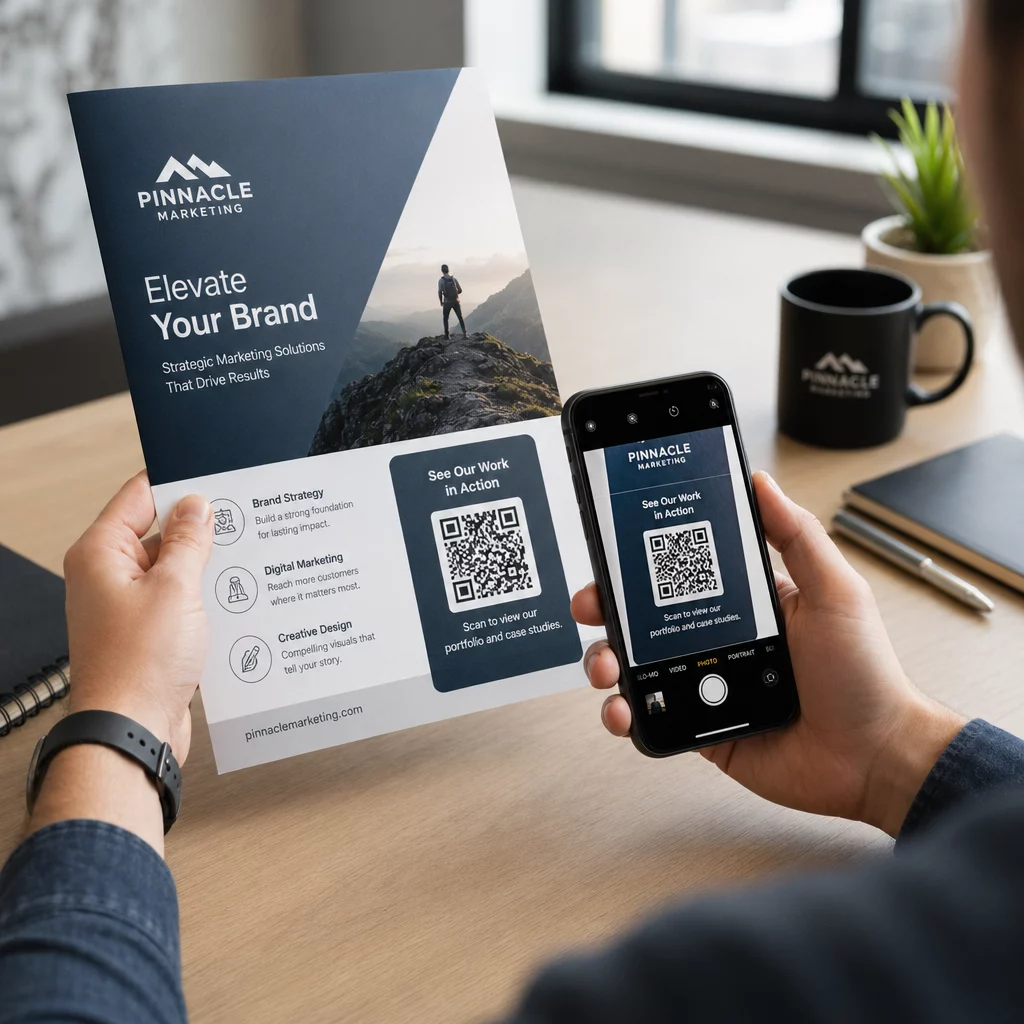
Különösen újságok és magazinok esetében helyezze el a kódot feltűnően a tartalmon belül, ahelyett, hogy egy sarokba rejtené. Párosítsa egy rövid, specifikus cselekvésre ösztönző felhívással – a “Olvassa be a teljes interjú megtekintéséhez” hatékonyabb, mint egy általános “Olvassa be itt.”
Nyomtatott hirdetések összekapcsolása digitális célhelyekkel Használja a Link QR-kód generátor bármely nyomtatott oldal összekapcsolására egy URL-lel, céloldallal vagy digitális erőforrással – nincs szükség technikai beállításra.
Statikus vs. dinamikus QR-kódok kiadók számára
Ez a különbség jelentősen számít azoknak a kiadóknak, akik nagy példányszámban nyomtatnak. A statikus QR-kód fix célhelyet kódol közvetlenül a kódmintába. Ha a hivatkozott oldal áthelyeződik, vagy a tartalom megváltozik, a kód használhatatlanná válik – és nem frissítheti újra nyomtatás nélkül.
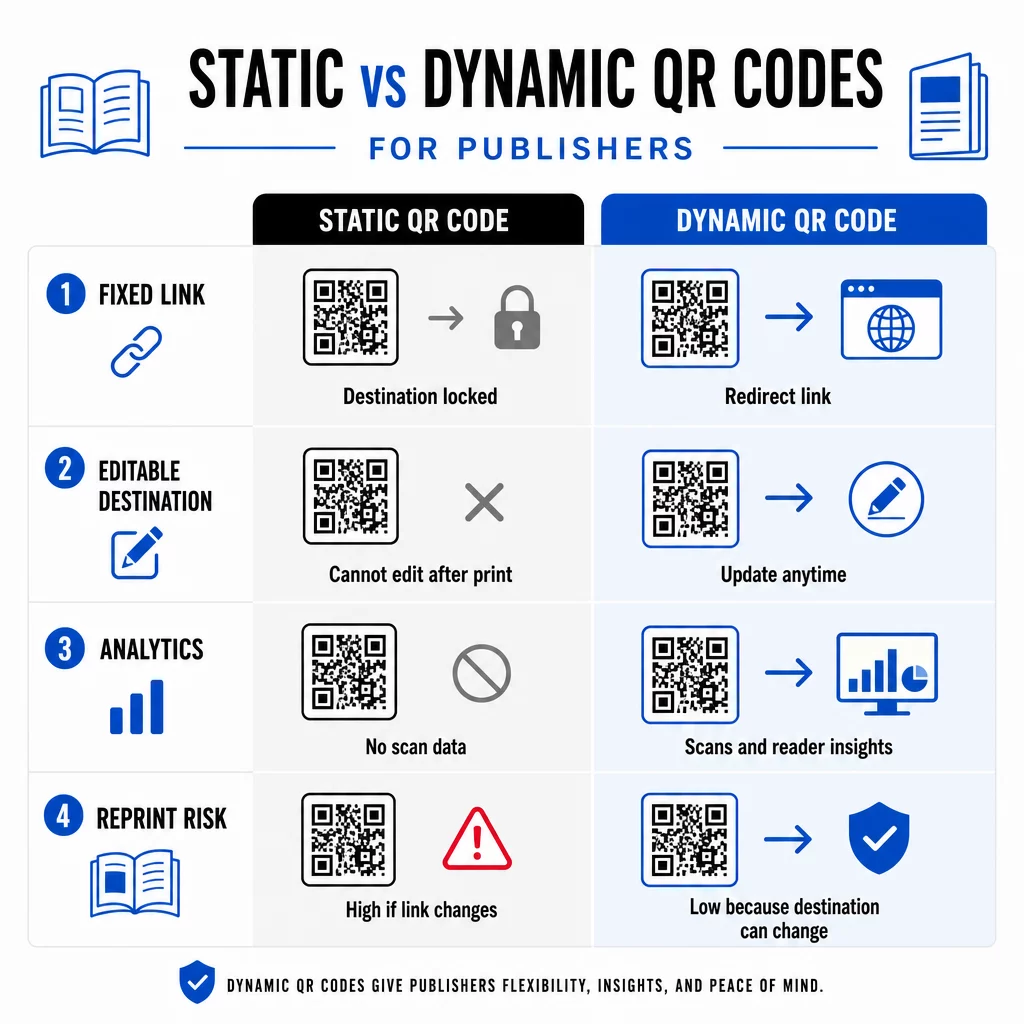
A dinamikus QR-kód, ezzel szemben egy rövid átirányítási URL-re mutat, amelyet Ön irányít. Bármikor frissítheti a célhelyet, miután a kódot kinyomtatták és terjesztették. A kiadók számára ez azt jelenti:
- Az idén nyomtatott tankönyv még öt év múlva is szolgáltathat frissített tartalomlinkeket
- Egy magazin hirdetés frissíthető a kampány közepén, hogy egy új ajánlatot tükrözzön, újra nyomtatás nélkül
- Elavult szerzői weboldalak vagy törött linkek javíthatók a nyomtatott példányok érintése nélkül
A dinamikus kódok beépített analitikát is biztosítanak. Nyomon követheti hányszor olvassák be az egyes kódokat, hol találhatók az olvasók, és milyen eszközöket használnak – olyan adatok, amelyek egyébként láthatatlanok a hagyományos kiadásban. A teljes kompromisszumok megértéséhez a statikus vs. dinamikus QR-kód összehasonlítás érdemes áttekinteni, mielőtt elkötelezi magát egy formátum mellett.
Milyen tartalmat linkeljen QR-kódjaiból
A kód mögötti tartalom határozza meg, hogy az olvasók szkennelnek-e másodszor is. Néhány formátum, amely különösen jól működik a kiadók számára:
- PDF dokumentumok – Linkeljen kiegészítő útmutatókhoz, olvasmánylistákhoz, kibővített mellékletekhez vagy tudományos hivatkozásokhoz egy PDF QR-kód
- YouTube videók – Kapcsolja össze a nyomtatott tartalmat szerzői interjúkkal, dokumentumfilmekkel vagy oktatóvideókkal egy YouTube QR kód generátor
- Landing oldalak – Használjon egy márkázott céloldalt hogy több lehetőséget mutasson be egyetlen szkennelésből – linkek a szerző weboldalára, egy értékelő oldalra, közösségi profilokra és egy feliratkozási űrlapra, mindez egyetlen kódból elérhető
- Képek és galériák – Egészítse ki az utazási vagy művészeti könyveket teljes színű fotógalériákkal, amelyeket a nyomtatott kiadás nem tud befogadni
Bármilyen formátumot is választ, győződjön meg róla, hogy a céloldal mobilra optimalizált. A szkennelések többsége okostelefonokon történik, így egy kis képernyőn rosszul megjelenő oldal teljesen aláássa a kód értékét.
QR-kódok nyomtatása, amelyek ténylegesen szkennelhetők
Egy nem szkennelhető QR-kód károsítja az olvasók bizalmát – és egy olvasó, aki egyszer szkennel és hibát kap, valószínűleg nem fogja újra megpróbálni. Kövesse ezeket az irányelveket a megbízható nyomtatási teljesítmény biztosításához:
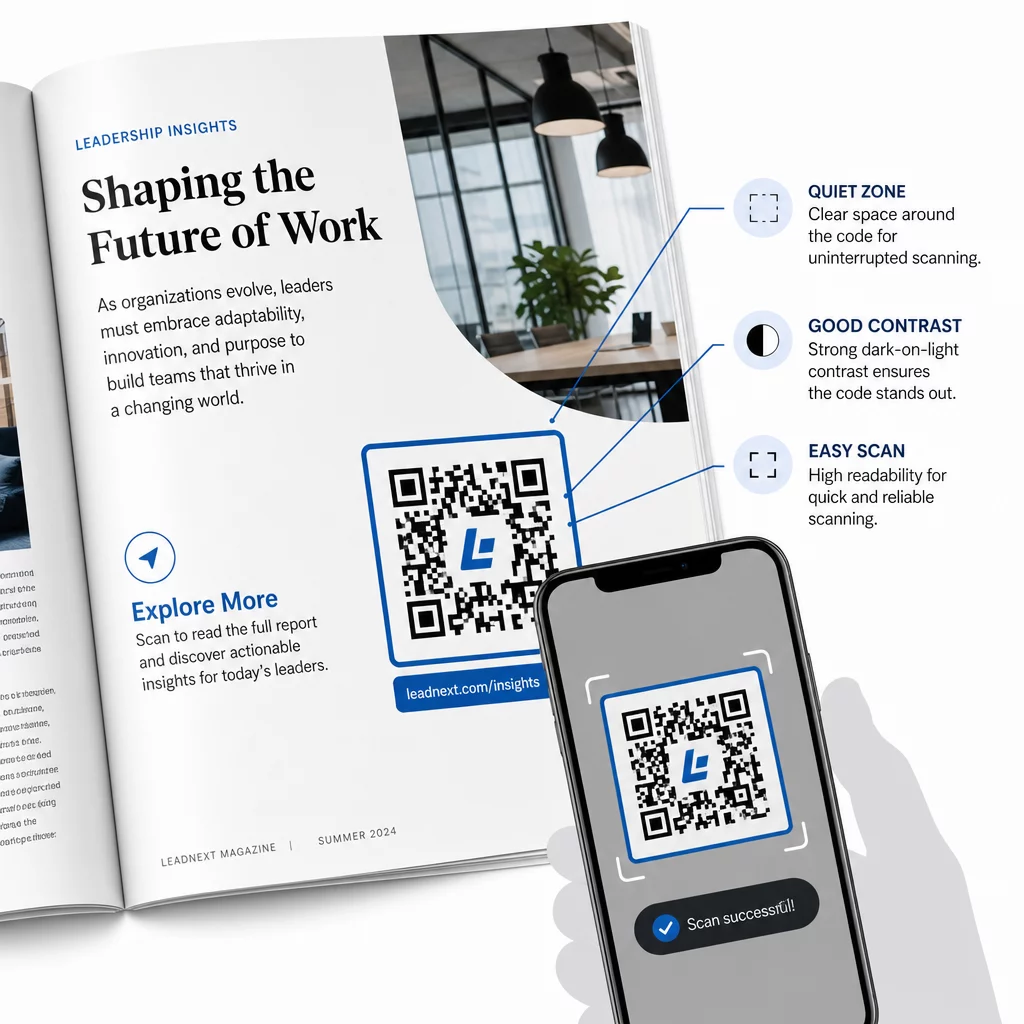
- Minimális méret – Nyomtasson QR-kódokat legalább 0,8 × 0,8 hüvelyk (20 mm) méretben a legtöbb kiadványformátumhoz. Plakátok és POS-táblák esetén használjon legalább 1,2 × 1,2 hüvelyk (30 mm) méretet
- Csendes zóna – Tartson legalább négy modul széles tiszta keretet a kód mind a négy oldalán, szövegtől, képektől vagy designelemektől mentesen.
- Kontraszt – Használjon sötét kódot világos háttéren. Törekedjen legalább 3:1 kontrasztarányra; a 4:1 vagy magasabb megbízhatóbb változatos olvasási körülmények között.
- Fájlformátum – Töltse le a kódokat SVG vagy EPS vektoros fájlként nyomtatáshoz, PNG vagy JPG helyett, hogy elkerülje a pixelesedést méretezéskor. QR-kód méretezési irányelvek nyomtatott anyagokhoz részletesebben tárgyalja ezt
- elhelyezés – Kerülje a kódok elhelyezését hajtásokon, gerinceken, varratokon vagy erősen texturált felületeken, ahol a szkennelés megbízhatatlanná válik. További útmutatásért a QR-kód elhelyezési útmutató marketinganyagokhoz részletesen tárgyalja a pozíciót, láthatóságot és kontextust
A kódok különböző nyomtatási körülmények közötti szkennelhetőségét biztosító teljes ellenőrzőlistáért lásd: a QR-kód olvashatóságára vonatkozó legjobb gyakorlatokat.
Olvasói elkötelezettség nyomon követése a nyomtatott kiadványban
A QR-kódok egyik legkevésbé kihasznált előnye a kiadói tevékenységben az analitikai réteg. Dinamikus kódokkal láthatja:
- Mely oldalak vagy szakaszok generálják a legtöbb szkennelést
- Hogyan változik az elkötelezettség a különböző kiadások vagy földrajzi piacok között
- Hogy egy adott típusú linkelt tartalom (videó vs. PDF vs. céloldal) több interakciót generál-e
- Szkennelési trendek az idő múlásával – hasznos a cím élettartamának megértéséhez
Ezek az adatok valami igazán újat adnak a kiadóknak: egy visszajelzési hurkot a nyomtatott kiadványokból, ami korábban csak digitális termékeknél volt elérhető. Használja fel ezt az információt a jövőbeli kiadásokkal kapcsolatos döntések meghozatalához, azonosítsa, mely tartalomformátumok rezonálnak, és mutassa be az elkötelezettségi mutatókat a szerzőknek és hirdetőknek.
A Pageloot platformja egyetlen irányítópulton egyesíti a kódkészítést, a tartalomkezelést és az analitikát, így egy teljes katalóguson keresztül kezelheti a QR-kódokat anélkül, hogy több eszközzel kellene zsonglőrködnie. Fedezze fel a teljes skáláját a QR-kód megoldásokat iparágak szerint hogy lássa, más szektorok hogyan alkalmazzák ugyanezt a megközelítést.
Kezdje el kiépíteni kiadói QR-stratégiáját Hozza létre első márkás, nyomon követhető QR-kódját percek alatt a QR Kód Generátor. Ingyenes 14 napos próbaidőszak, hitelkártya nem szükséges.
Gyakori kérdések
Nem, ha dinamikus QR-kódot használ. A dinamikus kódok egy Ön által vezérelt átirányítási URL-re mutatnak, így a célállomást – legyen szó új videóról, átdolgozott céloldalról vagy javított linkről – bármikor frissítheti a nyomtatás után, anélkül, hogy új kódot generálna vagy módosítaná a nyomtatási tételt.
Gyakorlatilag bármilyen digitális tartalomra linkelhet: YouTube videókra, PDF dokumentumokra, weboldalakra, képgalériákra, hangfájlokra, feliratkozási űrlapokra vagy olyan márkázott céloldalakra, amelyek több linket kombinálnak. A legjobb választás attól függ, hogy mi adja a legnagyobb értéket olvasóinak a kiadvány adott pontján.
Dinamikus QR-kódok beépített analitikát tartalmaznak, amelyek rögzítik a szkennelések számát, a szkennelések időpontját, az olvasók helyét és az eszközök típusát. Ez világos képet ad arról, hogy mely kódok teljesítenek jól, és mely elhelyezések vagy tartalomtípusok generálják a legnagyobb elkötelezettséget – olyan adatok, amelyeket a statikus kódok nem tudnak biztosítani.