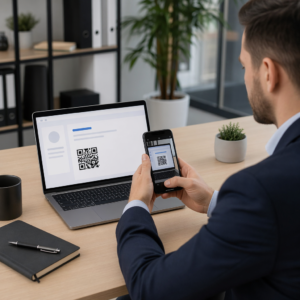
Bojujete s prepojením vašich tlačených publikácií s digitálnymi zážitkami, ktoré čitatelia čoraz viac očakávajú? Statické stránky dokážu len obmedzené veci – a vydavatelia, ktorí sa spoliehajú len na tlač, riskujú stratu záujmu čitateľov v prospech plne digitálnych konkurentov. Táto príručka vám presne ukáže, ako preklenúť túto medzeru pomocou QR kódov v knihách, časopisoch a novinách.
Prečo vydavatelia pridávajú QR kódy do tlače
Dnešní čitatelia očakávajú viac než len text na stránke. Chcú zvuk, video, doplnkový obsah a spôsoby interakcie s autormi a vydavateľmi – všetko zo svojich smartfónov. QR kódy poskytujú vydavateľom priamy kanál na poskytovanie tohto zážitku bez toho, aby nahradili tlačený produkt, ktorý čitatelia už milujú.
Čísla odrážajú skutočný posun v správaní. Odhaduje sa, že v roku 2025 naskenovalo QR kód 89 miliónov Američanov, pričom sa predpokladá, že toto číslo v roku 2026 presiahne 100 miliónov. Kriticky, 43 % používateľov smartfónov naskenuje aspoň jeden QR kód týždenne – vzorec správania, ktorý dobre korešponduje so zainteresovanými čitateľmi, ktorí si pravidelne berú knihu alebo časopis.
Pre vydavateľov konkrétne je príťažlivosť jednoduchá: jeden vytlačený kód môže prepojiť čitateľa s video rozhovorom s autorom, sprievodnou webovou stránkou, stiahnuteľným zdrojom alebo ponukou predplatného – bez akýchkoľvek dodatočných nákladov na tlač.
Vytvorte sledovateľné QR kódy pre vaše publikácie Chcete presne vedieť, ktoré stránky a vydania generujú najväčšiu angažovanosť? Použite Dynamický QR kód generátor na vytvorenie kódov, ktoré môžete aktualizovať a sledovať bez opätovnej tlače jedinej kópie.
Ktoré typy publikácií majú najväčší úžitok
QR kódy pridávajú merateľnú hodnotu prakticky každému publikačnému formátu, ale niektoré kategórie zaznamenávajú obzvlášť silné výsledky:
- Cestovné knihy a sprievodcovia – Prepojte čitateľov priamo s fotogalériami, mapami, webovými stránkami destinácií alebo video prehliadkami miest popísaných na každej stránke
- Vzdelávacie učebnice – Prepojte študentov s kvízmi, doplnkovými videami, kľúčmi k odpovediam alebo zdrojmi na prípravu na skúšky ku každej kapitole
- kuchárske knihy – Odkaz na videá s technikami, sprievodcovia náhradou ingrediencií alebo interaktívne nákupné zoznamy
- Detské knihy – Rozšírte príbeh o zvukové rozprávanie, animované scény alebo interaktívne hry
- Knihy na výučbu jazykov – Prehrávajte zvukové výslovnosti alebo video vysvetlenia gramatických konceptov priamo v texte
- Časopisy a noviny – Nasmerujte čitateľov z tlačených reklám a redakčného obsahu na stránky s predplatným, video obsah, formuláre spätnej väzby alebo exkluzívne ponuky
Ak sa chcete hlbšie pozrieť na to, ako môžu noviny a časopisy efektívne používať QR kódy, pozrite si príručku k QR kódom v novinách a časopisoch. Ak sa zameriavate konkrétne na knihy, príručka k QR kódom v knihách podrobne prechádza umiestnením, skenovaním a typmi obsahu.
Praktické nápady na používanie QR kódov v publikáciách
Najefektívnejšie QR kódy vydavateľov slúžia čitateľovi jasnému účelu. Tu sú osvedčené prístupy:
- Pridajte video na prelome kapitol v náučných knihách, ktoré rozpráva o konkrétnej udalosti alebo ukazuje skutočné miesto, kde sa odohrala – obzvlášť účinné pre históriu, cestovanie a memoáre
- Odkážte na rozhovory s autormi alebo zákulisný obsah, ktorý odmeňuje čitateľov, ktorí dočítajú knihu
- Umiestnite kód na zadnú obálku alebo vnútornú prednú stranu, čo umožní čitateľom zanechať hodnotenia a recenzie priamo na vašej preferovanej platforme
- Zdieľajte zľavový kód na ďalší nákup čitateľa, ktorý je možné uplatniť naskenovaním kódu vo vnútri aktuálneho titulu
- Umožnite čitateľom stiahnuť si prvú kapitolu ďalšej knihy autora pred jej vydaním
- Pridajte kódy na výkladné skrine alebo materiály v mieste predaja propagujúce nadchádzajúce vydania alebo uvedenie na trh
- V časopisoch prepojte QR kódy v reklamách s vstupnými stránkami, ponukami predplatného alebo video obsahom, ktorý rozširuje tlačenú reklamu
Konkrétne pre noviny a časopisy umiestnite kód výrazne do obsahu, namiesto toho, aby ste ho zastrčili do rohu. Spojte ho s krátkou, špecifickou výzvou k akcii – “Naskenujte pre zhliadnutie celého rozhovoru” je efektívnejšie ako všeobecné “Naskenujte tu.”
Prepojte tlačené reklamy s digitálnymi destináciami Použi Generátor QR kódov pre odkazy na prepojenie akejkoľvek tlačenej stránky s URL adresou, vstupnou stránkou alebo digitálnym zdrojom – bez potreby technického nastavenia.
Statické vs. dynamické QR kódy pre vydavateľov
Tento rozdiel je významný pre vydavateľov, ktorí tlačia vo veľkých nákladoch. A statický QR kód kóduje pevnú destináciu priamo do vzoru kódu. Ak sa prepojená stránka presunie alebo sa zmení obsah, kód sa stane nepoužiteľným – a nemôžete ho aktualizovať bez opätovnej tlače.
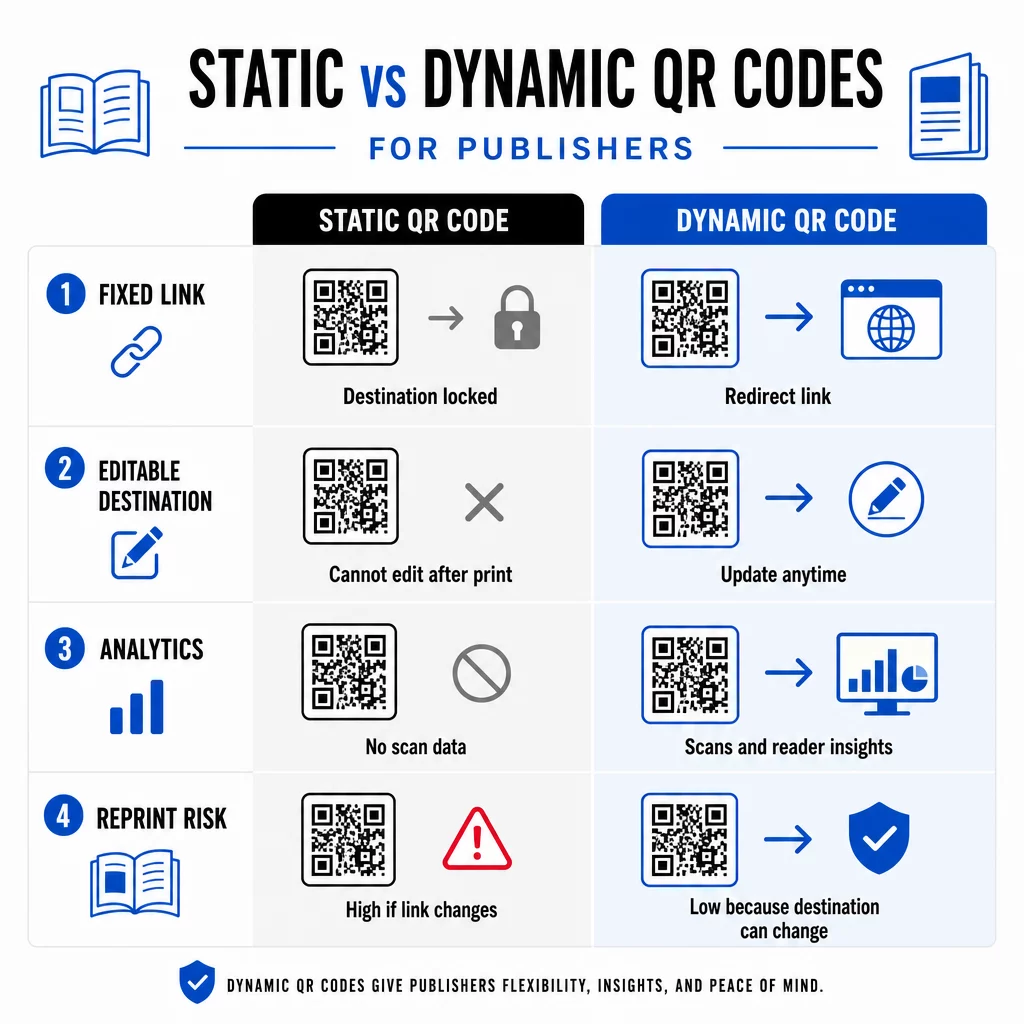
A dynamický QR kód, naopak, odkazuje na krátku presmerovaciu URL adresu, ktorú ovládate. Destináciu môžete aktualizovať kedykoľvek po vytlačení a distribúcii kódu. Pre vydavateľov to znamená:
- Učebnica vytlačená tento rok môže stále poskytovať aktualizované odkazy na obsah aj o päť rokov
- Reklama v časopise môže byť aktualizovaná v polovici kampane, aby odrážala novú ponuku bez opätovnej tlače
- Zastarané webové stránky autorov alebo nefunkčné odkazy je možné opraviť bez zásahu do tlačového nákladu
Dynamické kódy tiež poskytujú vstavanú analytiku. Môžete sledovať koľkokrát je každý kód naskenovaný, kde sa čitatelia nachádzajú a aké zariadenia používajú – údaje, ktoré sú inak neviditeľné v tradičnom vydavateľstve. Na pochopenie všetkých kompromisov, porovnanie statických a dynamických QR kódov je vhodné skontrolovať predtým, ako sa rozhodnete pre formát.
Aký obsah prepojiť z vašich QR kódov
Obsah za kódom určuje, či čitatelia naskenujú kód druhýkrát. Niektoré formáty, ktoré fungujú obzvlášť dobre pre vydavateľov:
- Dokumenty PDF – Odkaz na sprievodné príručky, zoznamy na čítanie, rozšírené prílohy alebo akademické referencie pomocou Kód QR vo formáte PDF
- Videá z YouTube – Prepojte tlačený obsah s rozhovormi s autormi, dokumentárnymi klipmi alebo inštruktážnymi návodmi pomocou QR kód YouTube: generátor
- Vstupné stránky – Použite značkovú vstupnú stránku na prezentáciu viacerých možností z jedného skenovania – odkazy na webovú stránku autora, stránku s recenziami, sociálne profily a formulár na odber, všetko dostupné z jedného kódu
- Obrázky a galérie – Doplňte cestopisné alebo umelecké knihy plnofarebnými fotogalériami, ktoré sa do tlačenej edície nezmestia
Nech už si vyberiete akýkoľvek formát, uistite sa, že cieľová stránka je optimalizovaná pre mobilné zariadenia. Väčšina skenov sa uskutočňuje na smartfónoch, takže stránka, ktorá sa zle zobrazuje na malej obrazovke, úplne podkope hodnotu kódu.
Tlač QR kódov, ktoré skutočne fungujú
QR kód, ktorý sa nedá naskenovať, poškodzuje dôveru čitateľa – a čitateľ, ktorý raz naskenuje a dostane chybu, sa pravdepodobne už nepokúsi znova. Dodržujte tieto pokyny, aby ste zaistili spoľahlivý výkon pri tlači:
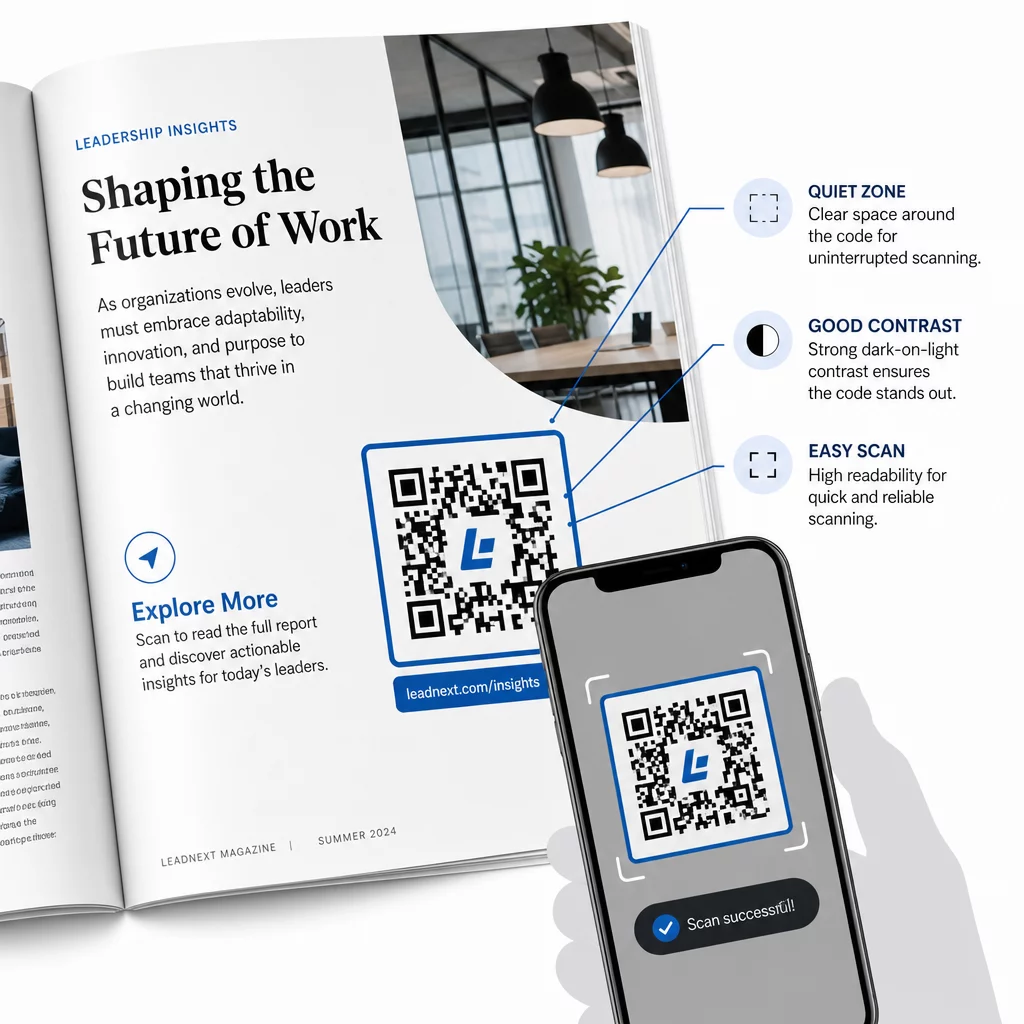
- Minimálna veľkosť – Tlačte QR kódy s minimálnou veľkosťou 0,8 × 0,8 palca (20 mm) pre väčšinu publikačných formátov. Pre plagáty a POS reklamu použite minimálne 1,2 × 1,2 palca (30 mm)
- Tichá zóna – Udržujte jasný okraj s minimálnou šírkou štyroch modulov na všetkých štyroch stranách kódu, bez textu, obrázkov alebo dizajnových prvkov
- Kontrast – Používajte tmavý kód na svetlom pozadí. Snažte sa o minimálny kontrastný pomer 3:1; 4:1 alebo vyšší je spoľahlivejší v rôznych podmienkach čítania
- Formát súboru – Sťahujte kódy ako vektorové súbory SVG alebo EPS pre tlač, namiesto PNG alebo JPG, aby ste predišli pixelizácii pri zmene mierky. pokynov pre veľkosť QR kódu pre tlačené materiály podrobnejšie sa tomu venovať
- UMIESTNENIE – Vyhnite sa umiestňovaniu kódov cez záhyby, chrbty, švy alebo silne textúrované povrchy, kde sa skenovanie stáva nespoľahlivým. Pre ďalšie usmernenie, Sprievodca umiestnením QR kódu pre marketingové materiály podrobne pokrýva pozíciu, viditeľnosť a kontext
Pre kompletný kontrolný zoznam, ako zabezpečiť skenovateľnosť kódov v rôznych tlačových podmienkach, pozrite si osvedčených postupov pre čitateľnosť QR kódov.
Sledovanie zapojenia čitateľov v rámci vašej tlačovej série
Jednou z najmenej využívaných výhod QR kódov vo vydavateľstve je analytická vrstva. S dynamickými kódmi môžete vidieť:
- Ktoré stránky alebo sekcie generujú najviac skenov
- Ako sa zapojenie líši naprieč rôznymi vydaniami alebo geografickými trhmi
- Či konkrétny typ prepojeného obsahu (video vs. PDF vs. vstupná stránka) vedie k väčšej interakcii
- Trendy skenovania v čase – užitočné pre pochopenie životnosti titulu
Tieto údaje poskytujú vydavateľom niečo skutočne nové: spätnú väzbu z tlače, ktorá bola predtým dostupná len pre digitálne produkty. Použite ich na informovanie rozhodnutí o budúcich vydaniach, identifikáciu formátov obsahu, ktoré rezonujú, a preukázanie metrík zapojenia autorom a inzerentom.
Platforma Pageloot konsoliduje tvorbu kódov, správu obsahu a analýzy v jednom paneli, takže môžete spravovať QR kódy v celom katalógu bez žonglovania s viacerými nástrojmi. Preskúmajte celý rozsah Riešenia QR kódov podľa odvetvia a zistite, ako iné sektory uplatňujú rovnaký prístup.
Začnite budovať svoju vydavateľskú QR stratégiu Vytvorte si svoj prvý značkový, sledovateľný QR kód za pár minút s Generátor QR kódov. Bezplatná 14-dňová skúšobná verzia, nie je potrebná kreditná karta.
Často kladené otázky
Nie, ak použijete dynamický QR kód. Dynamické kódy odkazujú na presmerovaciu URL adresu, ktorú ovládate, takže môžete aktualizovať cieľ – či už ide o nové video, revidovanú vstupnú stránku alebo opravený odkaz – kedykoľvek po vytlačení, bez generovania nového kódu alebo zásahu do tlačovej série.
Môžete odkazovať na prakticky akýkoľvek digitálny obsah: videá z YouTube, dokumenty PDF, webové stránky, galérie obrázkov, zvukové súbory, formuláre na odber alebo značkové vstupné stránky, ktoré kombinujú viacero odkazov. Najlepšia voľba závisí od toho, čo v danom bode publikácie pridáva najväčšiu hodnotu pre vašich čitateľov.
Dynamické QR kódy zahŕňajú vstavanú analytiku, ktorá zaznamenáva počet skenov, časové pečiatky skenovania, miesta skenovania a typy zariadení. To vám poskytuje jasný obraz o tom, ktoré kódy fungujú a ktoré umiestnenia alebo typy obsahu prinášajú najväčšiu angažovanosť – údaje, ktoré statické kódy nemôžu poskytnúť.