Avez-vous du mal à connecter vos publications imprimées aux expériences numériques que les lecteurs attendent de plus en plus ? Les pages statiques ont leurs limites – et les éditeurs qui ne comptent que sur l'imprimé risquent de perdre l'engagement des lecteurs au profit de concurrents entièrement numériques. Ce guide vous montre exactement comment combler ce fossé en utilisant des codes QR dans les livres, les magazines et les journaux.
Pourquoi les éditeurs ajoutent des codes QR à l'imprimé
Les lecteurs d'aujourd'hui attendent plus que du texte sur une page. Ils veulent de l'audio, de la vidéo, du contenu supplémentaire et des moyens d'interagir avec les auteurs et les éditeurs – le tout depuis leurs smartphones. Les codes QR offrent aux éditeurs un canal direct pour offrir cette expérience sans remplacer le produit imprimé que les lecteurs aiment déjà.
Les chiffres reflètent un véritable changement de comportement. On estime que 89 millions d'Américains ont scanné un code QR en 2025, ce chiffre devant dépasser les 100 millions en 2026. De manière critique, 43 % des utilisateurs de smartphones scannent au moins un code QR par semaine – un modèle de comportement qui correspond bien aux lecteurs engagés qui lisent régulièrement un livre ou un magazine.
Pour les éditeurs spécifiquement, l'attrait est simple : un seul code imprimé peut connecter un lecteur à une interview vidéo avec l'auteur, un site web complémentaire, une ressource téléchargeable ou une offre d'abonnement – sans aucun coût d'impression supplémentaire.
Créez des codes QR traçables pour vos publications Vous voulez savoir exactement quelles pages et éditions génèrent le plus d'engagement ? Utilisez le Générateur de QR code dynamique pour créer des codes que vous pouvez mettre à jour et suivre sans réimprimer un seul exemplaire.
Quels types de publications en bénéficient le plus
Les codes QR ajoutent une valeur mesurable à pratiquement tous les formats de publication, mais certaines catégories obtiennent des retours particulièrement importants :
- Livres et guides de voyage – Liez les lecteurs directement à des galeries de photos, des cartes, des sites web de destination ou des visites vidéo des lieux décrits sur chaque page
- Manuels scolaires – Connectez les étudiants à des quiz, des vidéos supplémentaires, des corrigés ou des ressources de préparation aux examens pour chaque chapitre
- Livres de cuisine – Liez à des vidéos de techniques, des guides de substitution d'ingrédients ou des listes de courses interactives
- Livres pour enfants – Prolongez l'histoire avec une narration audio, des scènes animées ou des jeux interactifs
- Livres d'apprentissage des langues – Écoutez des prononciations audio ou des explications vidéo de concepts grammaticaux directement dans le texte
- Magazines et journaux – Dirigez les lecteurs des publicités imprimées et du contenu éditorial vers des pages d'abonnement, du contenu vidéo, des formulaires de commentaires ou des offres exclusives
Pour un aperçu plus approfondi de la façon dont les journaux et magazines peuvent utiliser efficacement les codes QR, consultez le guide des codes QR dans les journaux et magazines. Si votre objectif est spécifiquement les livres, le guide des codes QR dans les livres explique en détail le placement, la numérisation et les types de contenu.
Idées pratiques pour l'utilisation des codes QR dans les publications
Les codes QR d'éditeur les plus efficaces servent un objectif clair pour le lecteur. Voici des approches éprouvées :
- Ajoutez une vidéo aux pauses de chapitre dans les livres non-fictionnels narrant un événement spécifique ou montrant le lieu réel où il s'est déroulé – particulièrement efficace pour l'histoire, les voyages et les mémoires
- Liez à des interviews d'auteurs ou à du contenu des coulisses qui récompense les lecteurs qui terminent le livre
- Placez un code sur la quatrième de couverture ou la première de couverture intérieure permettant aux lecteurs de laisser des notes et des avis directement sur votre plateforme préférée
- Partagez un code de réduction pour le prochain achat du lecteur, utilisable en scannant un code à l'intérieur du titre actuel
- Permettez aux lecteurs de télécharger le premier chapitre du prochain livre de l'auteur avant sa publication
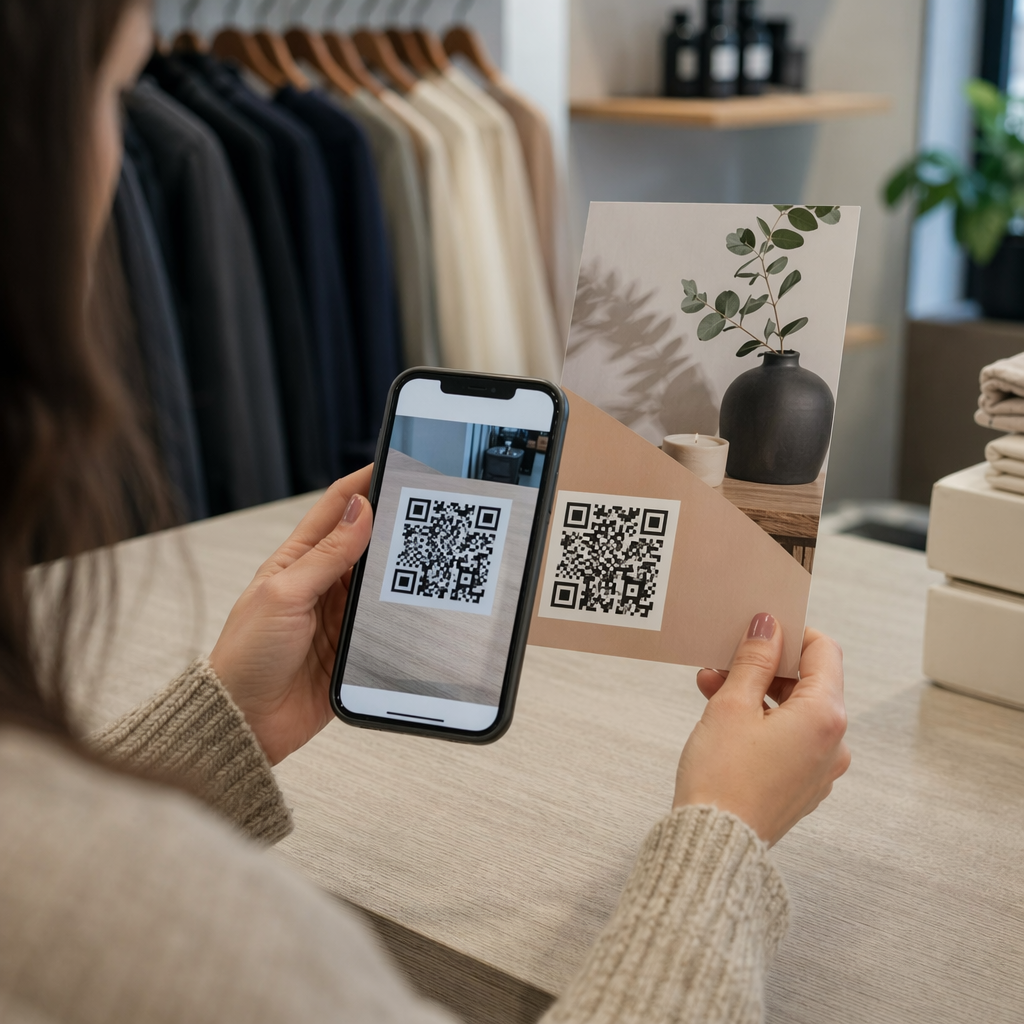
- Add codes to display windows or point-of-sale materials promoting upcoming releases or launch events
- In magazines, link QR codes in advertisements to landing pages, subscription offers, or video content that extends the printed ad
For newspapers and magazines specifically, place the code prominently within the content rather than tucking it into a corner. Pair it with a short, specific call-to-action – “Scan to watch the full interview” is more effective than a generic “Scan here.”
Link Print Ads to Digital Destinations Utilisez le Générateur de codes QR de liens to connect any printed page to a URL, landing page, or digital resource – no technical setup required.
Static vs. Dynamic QR Codes for Publishers
This distinction matters significantly for publishers who print large runs. A code QR statique encodes a fixed destination directly into the code pattern. If the linked page moves or the content changes, the code becomes useless – and you cannot update it without reprinting.
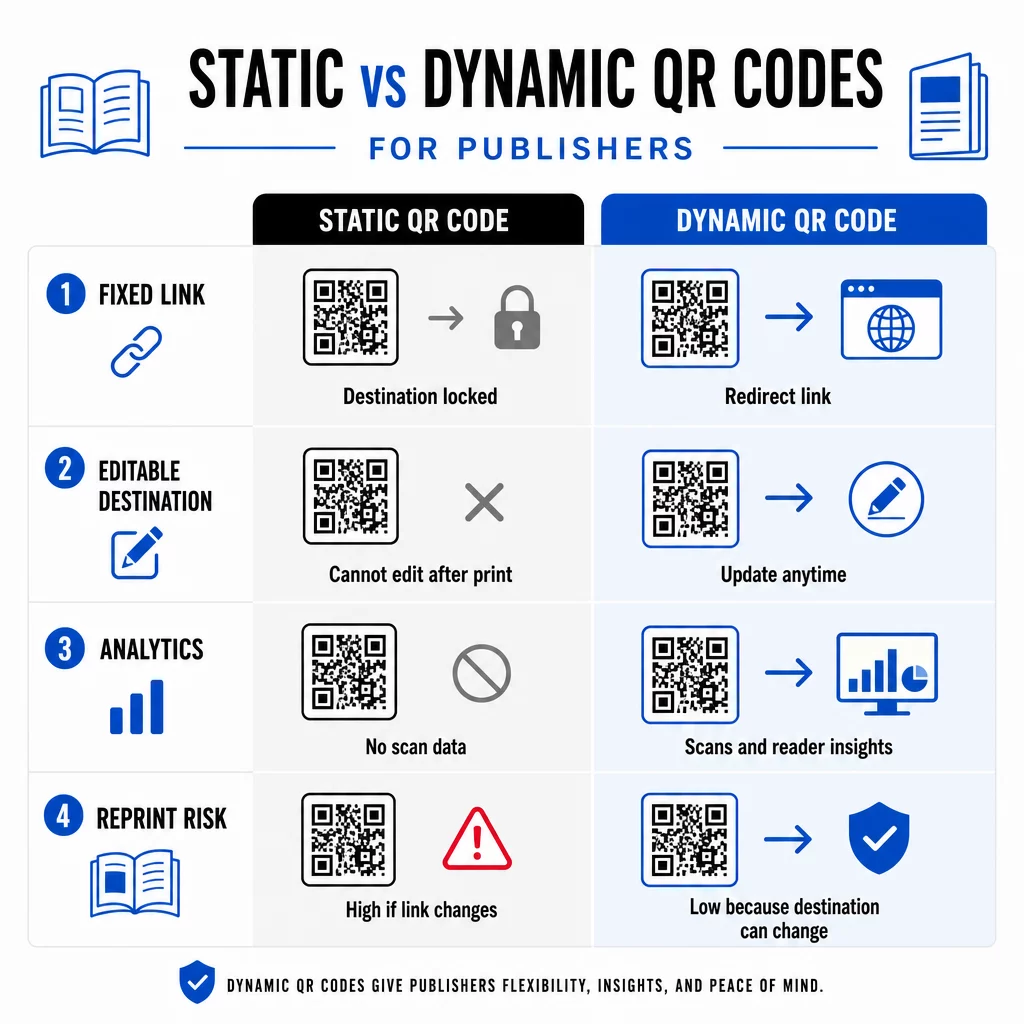
UNE code QR dynamique, by contrast, points to a short redirect URL that you control. You can update the destination at any time after the code has been printed and distributed. For publishers, this means:
- A textbook printed this year can still serve updated content links five years from now
- A magazine ad can be updated mid-campaign to reflect a new offer without reprinting
- Outdated author websites or broken links can be fixed without touching the print run
Dynamic codes also provide built-in analytics. You can track how many times each code is scanned, where readers are located, and which devices they use – data that is otherwise invisible in traditional publishing. To understand the full trade-offs, the static vs. dynamic QR code comparison mérite d'être examiné avant de vous engager sur un format.
Quel contenu lier à partir de vos codes QR
Le contenu derrière le code détermine si les lecteurs scanneront une deuxième fois. Certains formats qui fonctionnent particulièrement bien pour les éditeurs :
- Documents PDF – Liez à des guides complémentaires, des listes de lecture, des annexes étendues ou des références académiques en utilisant un PDF Code QR
- Vidéos YouTube – Connectez le contenu imprimé à des interviews d'auteurs, des extraits de documentaires ou des tutoriels détaillés en utilisant un Générateur de QR code YouTube
- Pages de destination – Utilisez une page de destination personnalisée pour présenter plusieurs options à partir d'un seul scan – des liens vers le site web de l'auteur, une page de critique, des profils sociaux et un formulaire d'abonnement, tous accessibles depuis un seul code
- Images et galeries – Complétez les livres de voyage ou d'art avec des galeries de photos en couleur que l'édition imprimée ne peut pas accueillir
Quel que soit le format que vous choisissez, assurez-vous que la destination est optimisée pour les mobiles. La majorité des scans se produisent sur des smartphones, donc une page qui s'affiche mal sur un petit écran nuira entièrement à la valeur du code.
Imprimer des codes QR qui scannent réellement
Un code QR qui ne scanne pas nuit à la confiance du lecteur – et un lecteur qui scanne une fois et obtient une erreur est peu susceptible de réessayer. Suivez ces directives pour garantir des performances fiables à l'impression :
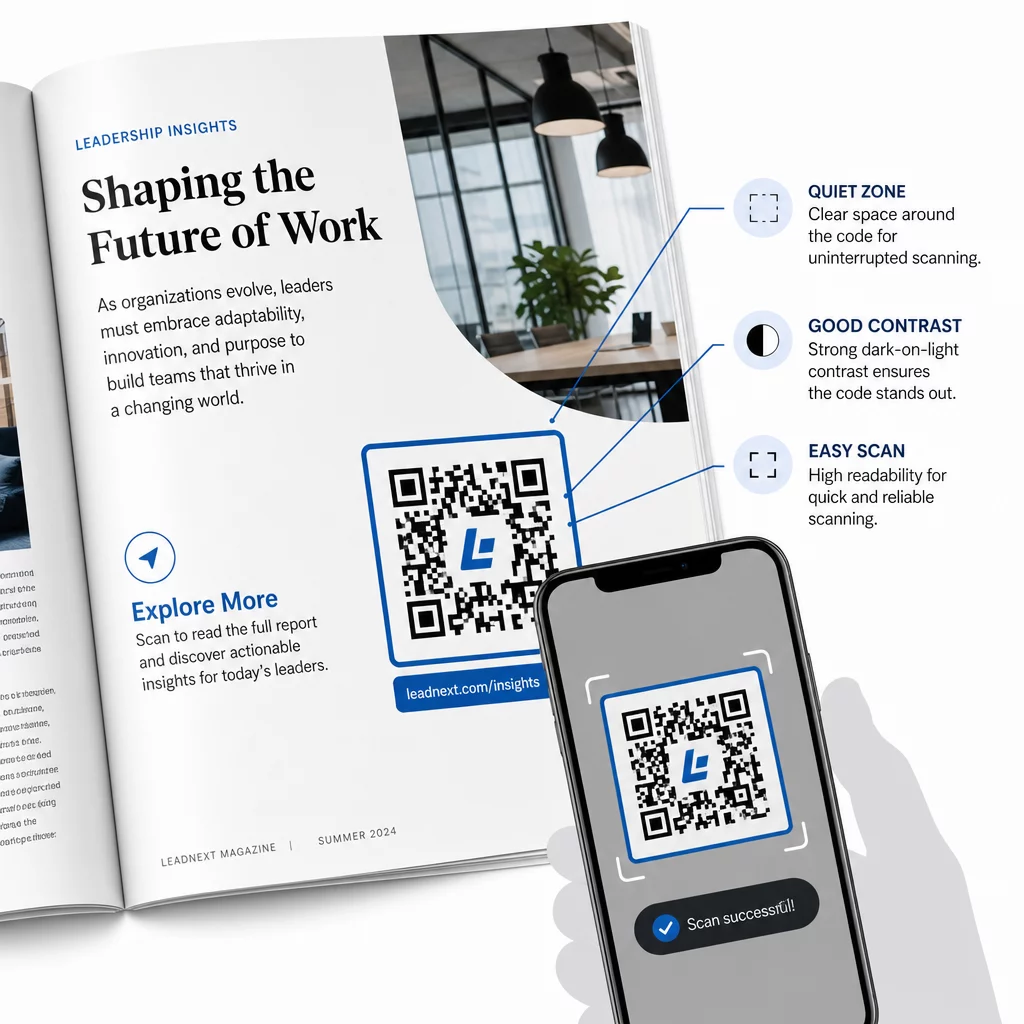
- Taille minimale – Imprimez les codes QR à un minimum de 0,8 × 0,8 pouces (20 mm) pour la plupart des formats de publication. Pour les affiches et la signalisation de point de vente, utilisez au moins 1,2 × 1,2 pouces (30 mm)
- Zone de silence – Maintenir une bordure claire d'au moins quatre modules de large sur les quatre côtés du code, exempte de texte, d'images ou d'éléments de design
- Contraste – Utiliser un code sombre sur un fond clair. Viser un rapport de contraste minimum de 3:1 ; 4:1 ou plus est plus fiable dans des conditions de lecture variées
- Format de fichier – Télécharger les codes sous forme de fichiers vectoriels SVG ou EPS pour l'impression, plutôt que PNG ou JPG, afin d'éviter la pixellisation lors de la mise à l'échelle. les directives de dimensionnement des codes QR pour les supports imprimés couvrir cela plus en détail
- EMPLACEMENT – Éviter de placer les codes sur des plis, des dos, des coutures ou des surfaces fortement texturées où la numérisation devient peu fiable. Pour plus de conseils, le guide de placement des codes QR pour les supports marketing couvre la position, la visibilité et le contexte en profondeur
Pour une liste de contrôle complète sur la façon de rendre les codes scannables dans différentes conditions d'impression, voir les meilleures pratiques pour la lisibilité des codes QR.
Suivi de l'engagement des lecteurs tout au long de votre tirage
L'un des avantages les plus sous-utilisés des codes QR dans l'édition est la couche d'analyse. Avec les codes dynamiques, vous pouvez voir :
- Quelles pages ou sections génèrent le plus de scans
- Comment l'engagement varie selon les différentes éditions ou marchés géographiques
- Si un type particulier de contenu lié (vidéo vs. PDF vs. page de destination) génère plus d'interaction
- Tendances de scan au fil du temps – utile pour comprendre la durée de vie d'un titre
Ces données offrent aux éditeurs quelque chose de vraiment nouveau : une boucle de rétroaction issue de l'impression qui n'était auparavant disponible que pour les produits numériques. Utilisez-les pour éclairer les décisions concernant les futures éditions, identifier les formats de contenu qui résonnent, et démontrer les métriques d'engagement aux auteurs et aux annonceurs.
La plateforme de Pageloot consolide la création de codes, la gestion de contenu et l'analyse dans un seul tableau de bord, afin que vous puissiez gérer les codes QR sur l'ensemble d'un catalogue sans jongler avec plusieurs outils. Découvrez toute la gamme de les solutions de codes QR par secteur d'activité pour voir comment d'autres secteurs appliquent la même approche.
Commencez à élaborer votre stratégie QR pour l'édition Créez votre premier code QR de marque et traçable en quelques minutes avec le Générateur de codes QR. Essai gratuit de 14 jours, aucune carte de crédit requise.
Questions fréquentes
Non, si vous utilisez un code QR dynamique. Les codes dynamiques pointent vers une URL de redirection que vous contrôlez, vous pouvez donc mettre à jour la destination – qu'il s'agisse d'une nouvelle vidéo, d'une page de destination révisée ou d'un lien corrigé – à tout moment après l'impression, sans générer un nouveau code ni toucher au tirage.
Vous pouvez créer des liens vers pratiquement n'importe quel contenu numérique : des vidéos YouTube, des documents PDF, des pages web, des galeries d'images, des fichiers audio, des formulaires d'abonnement ou des pages de destination de marque qui combinent plusieurs liens. Le meilleur choix dépend de ce qui apporte le plus de valeur à vos lecteurs à ce stade de la publication.
Les codes QR dynamiques incluent des analyses intégrées qui enregistrent le nombre de scans, les horodatages des scans, les emplacements des lecteurs et les types d'appareils. Cela vous donne une image claire des codes qui fonctionnent et des emplacements ou types de contenu qui génèrent le plus d'engagement – des données que les codes statiques ne peuvent pas fournir.