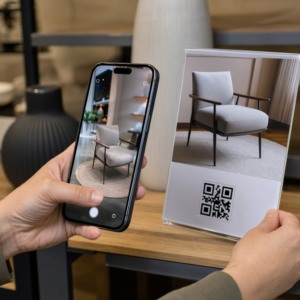
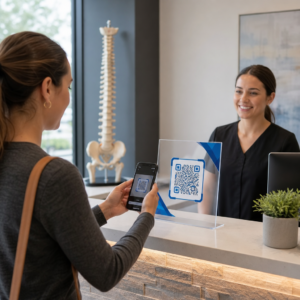
Vai jums ir grūtības savienot savas drukātās publikācijas ar digitālo pieredzi, ko lasītāji arvien vairāk sagaida? Statiskas lapas var paveikt tikai tik daudz – un izdevēji, kas paļaujas tikai uz drukāto materiālu, riskē zaudēt lasītāju iesaisti pilnībā digitāliem konkurentiem. Šis ceļvedis parāda, kā tieši pārvarēt šo plaisu, izmantojot QR kodus grāmatās, žurnālos un avīzēs.
Kāpēc izdevēji pievieno QR kodus drukātajiem materiāliem
Mūsdienu lasītāji sagaida vairāk nekā tekstu lapā. Viņi vēlas audio, video, papildu saturu un veidus, kā mijiedarboties ar autoriem un izdevējiem – visu no saviem viedtālruņiem. QR kodi dod izdevējiem tiešu kanālu, lai nodrošinātu šo pieredzi, neaizstājot drukāto produktu, ko lasītāji jau mīl.
Skaitļi atspoguļo patiesu uzvedības maiņu. Tiek lēsts, ka 2025. gadā aptuveni 89 miljoni amerikāņu skenēja QR kodu, un prognozēts, ka 2026. gadā šis skaitlis pārsniegs 100 miljonus. Kritiski svarīgi ir tas, ka 43% viedtālruņu lietotāju skenē vismaz vienu QR kodu nedēļā – tas ir uzvedības modelis, kas labi saskan ar iesaistītiem lasītājiem, kuri regulāri paņem rokās grāmatu vai žurnālu.
Izdevējiem konkrēti, pievilcība ir vienkārša: viens drukāts kods var savienot lasītāju ar video interviju ar autoru, pavadošo vietni, lejupielādējamu resursu vai abonēšanas piedāvājumu – bez papildu drukāšanas izmaksām.
Izveidojiet izsekojamus QR kodus savām publikācijām Vai vēlaties precīzi zināt, kuras lapas un izdevumi nodrošina vislielāko iesaisti? Izmantojiet Dinamisks QR kodu ģenerators lai izveidotu kodus, kurus varat atjaunināt un izsekot, nepārprintējot nevienu eksemplāru.
Kuri publikāciju veidi gūst vislielāko labumu
QR kodi pievieno izmērāmu vērtību praktiski katram publicēšanas formātam, taču dažās kategorijās ir īpaši spēcīga atdeve:
- Ceļojumu grāmatas un ceļveži – Savienojiet lasītājus tieši ar fotogalerijām, kartēm, galamērķu vietnēm vai video tūrēm par vietām, kas aprakstītas katrā lapā
- Izglītības mācību grāmatas – Savienojiet studentus ar viktorīnām, papildu video, atbilžu atslēgām vai eksāmenu sagatavošanas resursiem katras nodaļas ietvaros
- Pavārgrāmatas – Saite uz tehnikas video, sastāvdaļu aizstāšanas ceļvežiem vai interaktīviem iepirkumu sarakstiem
- Bērnu grāmatas – Paplašiniet stāstu ar audio stāstījumu, animētām ainām vai interaktīvām spēlēm
- Valodu apguves grāmatas – Atskaņojiet audio izrunas vai video skaidrojumus par gramatikas jēdzieniem tieši tekstā
- Žurnāli un avīzes – Novirziet lasītājus no drukātām reklāmām un redakcionālā satura uz abonēšanas lapām, video saturu, atsauksmju veidlapām vai ekskluzīviem piedāvājumiem
Lai dziļāk ieskatītos, kā avīzes un žurnāli var efektīvi izmantot QR kodus, skatiet ceļvedi par QR kodiem avīzēs un žurnālos. Ja jūsu uzmanība ir vērsta tieši uz grāmatām, tad ceļvedis par QR kodiem grāmatās detalizēti izskaidro izvietojumu, skenēšanu un satura veidus.
Praktiskas idejas QR kodu izmantošanai publikācijās
Visefektīvākie izdevēju QR kodi kalpo skaidram mērķim lasītājam. Šeit ir pārbaudītas pieejas:
- Pievienojiet video nodaļu pārtraukumos daiļliteratūras grāmatās, kas stāsta par konkrētu notikumu vai parāda faktisko vietu, kur tas notika – īpaši efektīvi vēsturei, ceļojumiem un memuāriem
- Saite uz autoru intervijām vai aizkulišu saturu, kas apbalvo lasītājus, kuri pabeidz grāmatu
- Novietojiet kodu uz aizmugurējā vāka vai iekšējā priekšlapā, ļaujot lasītājiem atstāt vērtējumus un atsauksmes tieši jūsu vēlamajā platformā
- Kopīgojiet atlaižu kodu lasītāja nākamajam pirkumam, ko var izmantot, skenējot kodu pašreizējā izdevumā
- Ļaujiet lasītājiem lejupielādēt autora nākamās grāmatas pirmo nodaļu pirms tās publicēšanas
- Pievienojiet kodus, lai parādītu logus vai tirdzniecības vietu materiālus, kas reklamē gaidāmās izlaidumus vai palaišanas pasākumus
- Žurnālos saistiet QR kodus reklāmās ar galvenajām lapām, abonēšanas piedāvājumiem vai video saturu, kas paplašina drukāto reklāmu
Konkrēti avīzēs un žurnālos novietojiet kodu pamanāmi satura ietvaros, nevis iespiediet to stūrī. Savienojiet to ar īsu, specifisku aicinājumu uz darbību – “Skenējiet, lai noskatītos pilnu interviju” ir efektīvāk nekā vispārīgs “Skenējiet šeit.”
Saistiet drukātās reklāmas ar digitālajiem galamērķiem Izmantojiet Saites QR koda ģenerators lai savienotu jebkuru drukātu lapu ar URL, galveno lapu vai digitālo resursu – nav nepieciešama tehniska iestatīšana.
Statiskie pret dinamiskajiem QR kodiem izdevējiem
Šī atšķirība ir būtiski svarīga izdevējiem, kas drukā lielas tirāžas. A statisks QR kods kodē fiksētu galamērķi tieši koda modelī. Ja saistītā lapa pārvietojas vai saturs mainās, kods kļūst bezjēdzīgs – un to nevar atjaunināt bez atkārtotas drukāšanas.
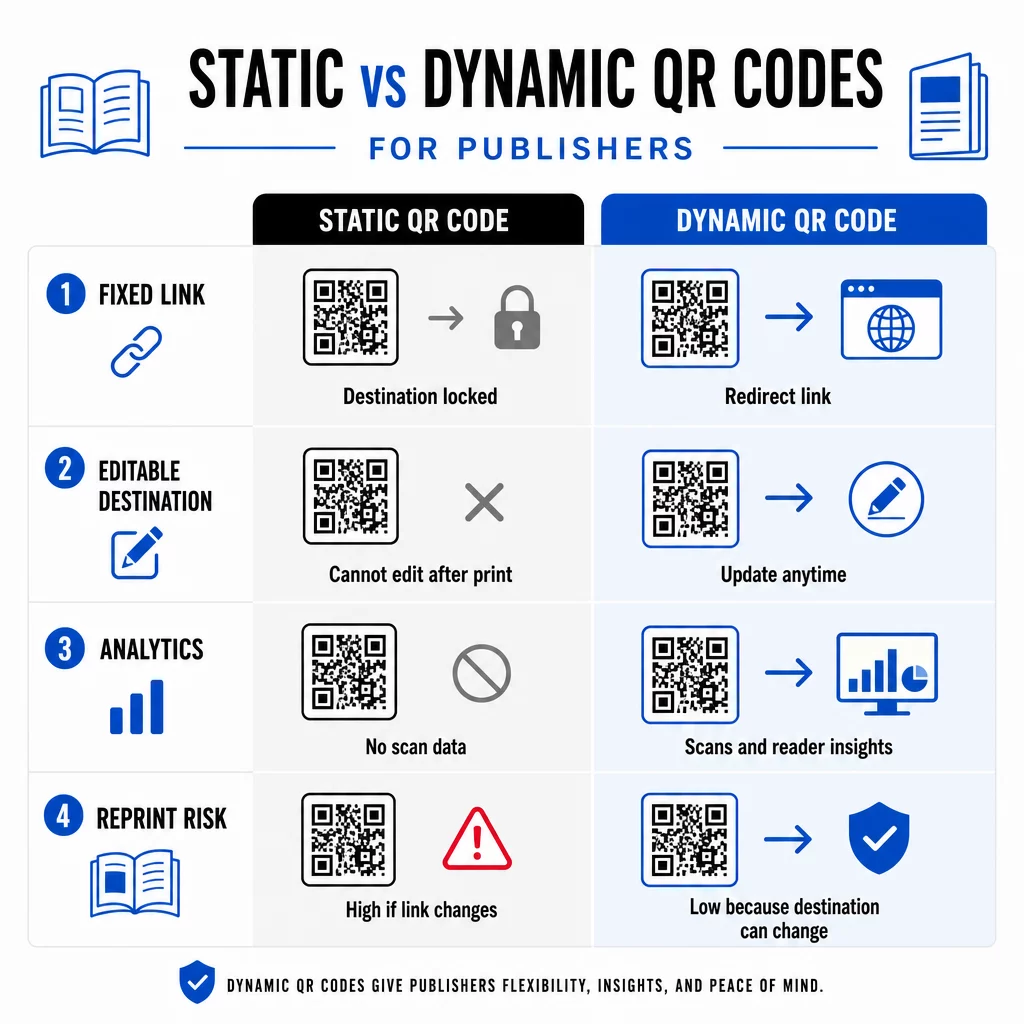
A dinamiskais QR kods, turpretim, norāda uz īsu pāradresācijas URL, ko jūs kontrolējat. Jūs varat atjaunināt galamērķi jebkurā laikā pēc koda izdrukāšanas un izplatīšanas. Izdevējiem tas nozīmē:
- Šogad izdota mācību grāmata joprojām var nodrošināt atjauninātas satura saites piecus gadus no šī brīža
- Žurnāla reklāmu var atjaunināt kampaņas vidū, lai atspoguļotu jaunu piedāvājumu bez atkārtotas drukāšanas
- Novecojušas autora vietnes vai bojātas saites var labot, neaizskarot drukāto tirāžu
Dinamiskie kodi nodrošina arī iebūvētu analītiku. Jūs varat izsekot cik reizes katrs kods tiek skenēts, kur atrodas lasītāji un kādas ierīces viņi izmanto – dati, kas citādi ir neredzami tradicionālajā izdevējdarbībā. Lai saprastu visus kompromisus, the statiskā vs. dinamiskā QR koda salīdzinājums ir vērts pārskatīt pirms izvēlaties formātu.
Kādu saturu saistīt ar jūsu QR kodiem
Satura aiz koda nosaka, vai lasītāji skenēs vēlreiz. Daži formāti, kas īpaši labi darbojas izdevējiem:
- PDF dokumenti – Saistiet ar pavadošajiem ceļvežiem, lasīšanas sarakstiem, paplašinātiem pielikumiem vai akadēmiskām atsaucēm, izmantojot PDF QR kods
- YouTube videoklipi – Savienojiet drukāto saturu ar autoru intervijām, dokumentālajiem klipiem vai instrukciju pamācībām, izmantojot YouTube QR koda ģenerators
- Galvenās lapas – Izmantojiet zīmola galveno lapu lai no vienas skenēšanas prezentētu vairākas iespējas – saites uz autora vietni, atsauksmju lapu, sociālajiem profiliem un abonēšanas veidlapu, kas visas ir pieejamas no viena koda
- Attēli un galerijas – Papildiniet ceļojumu vai mākslas grāmatas ar pilnkrāsu fotogalerijām, ko drukātais izdevums nevar ietvert
Neatkarīgi no izvēlētā formāta, pārliecinieties, ka galamērķis ir optimizēts mobilajām ierīcēm. Lielākā daļa skenēšanas notiek viedtālruņos, tāpēc lapa, kas slikti atveidojas uz maza ekrāna, pilnībā mazinās koda vērtību.
QR kodu drukāšana, kas patiešām skenējas
QR kods, kas neizdodas skenēt, bojā lasītāju uzticību – un lasītājs, kurš skenē vienreiz un saņem kļūdu, visticamāk, nemēģinās vēlreiz. Ievērojiet šīs vadlīnijas, lai nodrošinātu uzticamu veiktspēju drukā:
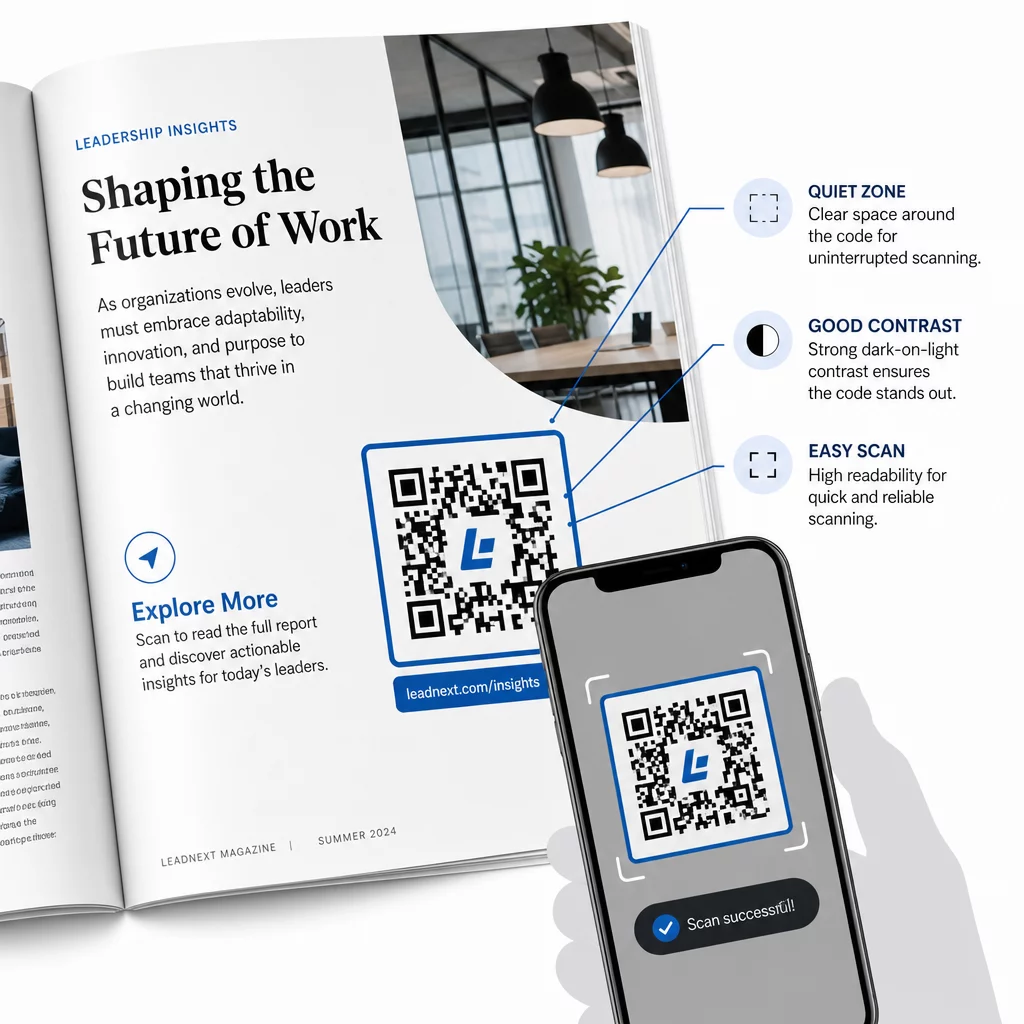
- Minimālais izmērs – Drukājiet QR kodus vismaz 0,8 × 0,8 collu (20 mm) izmērā lielākajai daļai publikāciju formātu. Plakātiem un tirdzniecības vietu izkārtnēm izmantojiet vismaz 1,2 × 1,2 collu (30 mm) izmēru
- Klusā zona – Uzturiet skaidru apmali vismaz četru moduļu platumā visās četrās koda pusēs, bez teksta, attēliem vai dizaina elementiem
- Kontrasts – Izmantojiet tumšu kodu uz gaiša fona. Tiecieties uz minimālo kontrasta attiecību 3:1; 4:1 vai augstāka ir uzticamāka dažādos lasīšanas apstākļos
- Failu formāts – Lejupielādējiet kodus kā SVG vai EPS vektoru failus drukāšanai, nevis PNG vai JPG, lai izvairītos no pikseļu veidošanās mērogojot. QR koda izmēru vadlīnijas drukātiem materiāliem sīkāk aplūkot šo jautājumu
- novietojums – Izvairieties no kodu novietošanas pāri locījumiem, muguriņām, šuvēm vai stipri teksturētām virsmām, kur skenēšana kļūst neuzticama. Papildu norādījumus sniedz QR kodu izvietošanas ceļvedis mārketinga materiāliem padziļināti aplūko pozīciju, redzamību un kontekstu
Lai iegūtu pilnīgu kontrolsarakstu par kodu skenējamību dažādos drukāšanas apstākļos, skatiet labāko praksi QR kodu lasāmībā.
Lasītāju iesaistes izsekošana visā jūsu tirāžā
Viena no vismazāk izmantotajām QR kodu priekšrocībām izdevējdarbībā ir analītikas slānis. Ar dinamiskiem kodiem jūs varat redzēt:
- Kuras lapas vai sadaļas ģenerē visvairāk skenējumu
- Kā iesaiste atšķiras dažādos izdevumos vai ģeogrāfiskajos tirgos
- Vai noteikta veida saistītais saturs (video pret PDF pret galveno lapu) veicina lielāku mijiedarbību
- Skenēšanas tendences laika gaitā – noderīgi, lai izprastu nosaukuma glabāšanas laiku
Šie dati sniedz izdevējiem kaut ko patiesi jaunu: atgriezeniskās saites cilpu no drukātā materiāla, kas iepriekš bija pieejama tikai digitālajiem produktiem. Izmantojiet to, lai pieņemtu lēmumus par nākamajiem izdevumiem, identificētu, kuri satura formāti rezonē, un demonstrētu iesaistes rādītājus autoriem un reklāmdevējiem.
Pageloot platforma apvieno kodu izveidi, satura pārvaldību un analītiku vienā informācijas panelī, lai jūs varētu pārvaldīt QR kodus visā katalogā, neizmantojot vairākus rīkus. Izpētiet pilnu klāstu QR kodu risinājumi pa nozarēm lai redzētu, kā citas nozares piemēro to pašu pieeju.
Sāciet veidot savu izdevējdarbības QR stratēģiju Izveidojiet savu pirmo zīmoloto, izsekojamo QR kodu dažu minūšu laikā ar QR kodu ģenerators. Bezmaksas 14 dienu izmēģinājums, nav nepieciešama kredītkarte.
Biežāk uzdotie jautājumi
Ne, ja izmantojat dinamisku QR kodu. Dinamiskie kodi norāda uz novirzīšanas URL, ko jūs kontrolējat, tāpēc jūs varat atjaunināt galamērķi – vai tas būtu jauns video, pārskatīta galvenā lapa vai labota saite – jebkurā laikā pēc drukāšanas, neģenerējot jaunu kodu vai neaizskarot drukas tirāžu.
Jūs varat pievienot saiti praktiski uz jebkuru digitālo saturu: YouTube videoklipiem, PDF dokumentiem, tīmekļa lapām, attēlu galerijām, audio failiem, abonēšanas veidlapām vai zīmola mērķlapām, kas apvieno vairākas saites. Labākā izvēle ir atkarīga no tā, kas tajā publikācijas brīdī sniedz vislielāko vērtību jūsu lasītājiem.
Dinamiskie QR kodi ietver iebūvētu analītiku, kas reģistrē skenēšanas reižu skaitu, skenēšanas laika zīmogus, lasītāju atrašanās vietas un ierīču veidus. Tas sniedz jums skaidru priekšstatu par to, kuri kodi darbojas un kuri izvietojumi vai satura veidi nodrošina vislielāko iesaisti – datus, ko statiskie kodi nevar nodrošināt.