Apakah Anda kesulitan menghubungkan publikasi cetak Anda dengan pengalaman digital yang semakin diharapkan pembaca? Halaman statis hanya bisa melakukan begitu banyak – dan penerbit yang hanya mengandalkan cetak berisiko kehilangan keterlibatan pembaca kepada pesaing yang sepenuhnya digital. Panduan ini menunjukkan kepada Anda dengan tepat bagaimana menjembatani kesenjangan itu menggunakan kode QR di buku, majalah, dan surat kabar.
Mengapa Penerbit Menambahkan Kode QR ke Media Cetak
Pembaca saat ini mengharapkan lebih dari sekadar teks di halaman. Mereka menginginkan audio, video, konten tambahan, dan cara untuk berinteraksi dengan penulis dan penerbit – semuanya dari ponsel cerdas mereka. Kode QR memberi penerbit saluran langsung untuk memberikan pengalaman itu tanpa mengganti produk cetak yang sudah disukai pembaca.
Angka-angka tersebut mencerminkan pergeseran perilaku yang nyata. Diperkirakan 89 juta orang Amerika memindai kode QR pada tahun 2025, dengan angka tersebut diproyeksikan melebihi 100 juta pada tahun 2026. Yang penting, 43% pengguna ponsel cerdas memindai setidaknya satu kode QR per minggu – pola perilaku yang sangat cocok dengan pembaca yang terlibat yang secara teratur mengambil buku atau majalah.
Khusus untuk penerbit, daya tariknya lugas: satu kode cetak dapat menghubungkan pembaca ke wawancara video dengan penulis, situs web pendamping, sumber daya yang dapat diunduh, atau penawaran langganan – tanpa biaya pencetakan tambahan.
Buat Kode QR yang Dapat Dilacak untuk Publikasi Anda Ingin tahu persis halaman dan edisi mana yang paling banyak menarik perhatian? Gunakan Generator QR Code Dinamis untuk membuat kode yang dapat Anda perbarui dan lacak tanpa mencetak ulang satu pun salinan.
Jenis Publikasi Apa yang Paling Diuntungkan
Kode QR menambah nilai terukur di hampir setiap format penerbitan, tetapi beberapa kategori melihat keuntungan yang sangat kuat:
- Buku dan panduan perjalanan – Hubungkan pembaca langsung ke galeri foto, peta, situs web tujuan, atau tur video tempat-tempat yang dijelaskan di setiap halaman
- Buku teks pendidikan – Hubungkan siswa ke kuis, video tambahan, kunci jawaban, atau sumber daya persiapan ujian di samping setiap bab
- Buku Resep Masakan – Tautkan ke video teknik, panduan pengganti bahan, atau daftar belanja interaktif
- Buku anak-anak – Perluas cerita dengan narasi audio, adegan animasi, atau permainan interaktif
- Buku pembelajaran bahasa – Putar pengucapan audio atau penjelasan video konsep tata bahasa sejalan dengan teks
- Majalah dan koran – Arahkan pembaca dari iklan cetak dan konten editorial ke halaman langganan, konten video, formulir umpan balik, atau penawaran eksklusif
Untuk melihat lebih dalam bagaimana surat kabar dan majalah dapat menggunakan kode QR secara efektif, lihat panduan kode QR di surat kabar dan majalah. Jika fokus Anda khusus pada buku, panduan kode QR dalam buku menjelaskan penempatan, pemindaian, dan jenis konten secara rinci.
Ide Praktis untuk Menggunakan Kode QR dalam Publikasi
Kode QR penerbit yang paling efektif memiliki tujuan yang jelas bagi pembaca. Berikut adalah pendekatan yang terbukti:
- Tambahkan video di sela-sela bab dalam buku non-fiksi yang menceritakan peristiwa tertentu atau menunjukkan lokasi sebenarnya tempat kejadian itu berlangsung – sangat efektif untuk sejarah, perjalanan, dan memoar
- Tautkan ke wawancara penulis atau konten di balik layar yang memberi penghargaan kepada pembaca yang menyelesaikan buku
- Tempatkan kode di sampul belakang atau halaman depan bagian dalam yang memungkinkan pembaca meninggalkan peringkat dan ulasan langsung di platform pilihan Anda
- Bagikan kode diskon untuk pembelian pembaca berikutnya, yang dapat ditukarkan dengan memindai kode di dalam judul saat ini
- Izinkan pembaca mengunduh bab pertama buku penulis berikutnya sebelum diterbitkan
- Tambahkan kode ke jendela pajangan atau materi titik penjualan yang mempromosikan rilis mendatang atau acara peluncuran
- Di majalah, tautkan kode QR dalam iklan ke halaman arahan, penawaran langganan, atau konten video yang memperluas iklan cetak
Khusus untuk surat kabar dan majalah, tempatkan kode secara menonjol di dalam konten daripada menyembunyikannya di sudut. Pasangkan dengan ajakan bertindak yang singkat dan spesifik – “Pindai untuk menonton wawancara lengkap” lebih efektif daripada “Pindai di sini” yang umum.”
Tautkan Iklan Cetak ke Destinasi Digital Menggunakan Generator Kode QR Tautan untuk menghubungkan halaman cetak apa pun ke URL, halaman arahan, atau sumber daya digital – tidak diperlukan pengaturan teknis.
Kode QR Statis vs. Dinamis untuk Penerbit
Perbedaan ini sangat penting bagi penerbit yang mencetak dalam jumlah besar. Sebuah kode QR statis mengenkode tujuan tetap langsung ke dalam pola kode. Jika halaman yang ditautkan berpindah atau konten berubah, kode menjadi tidak berguna – dan Anda tidak dapat memperbaruinya tanpa mencetak ulang.
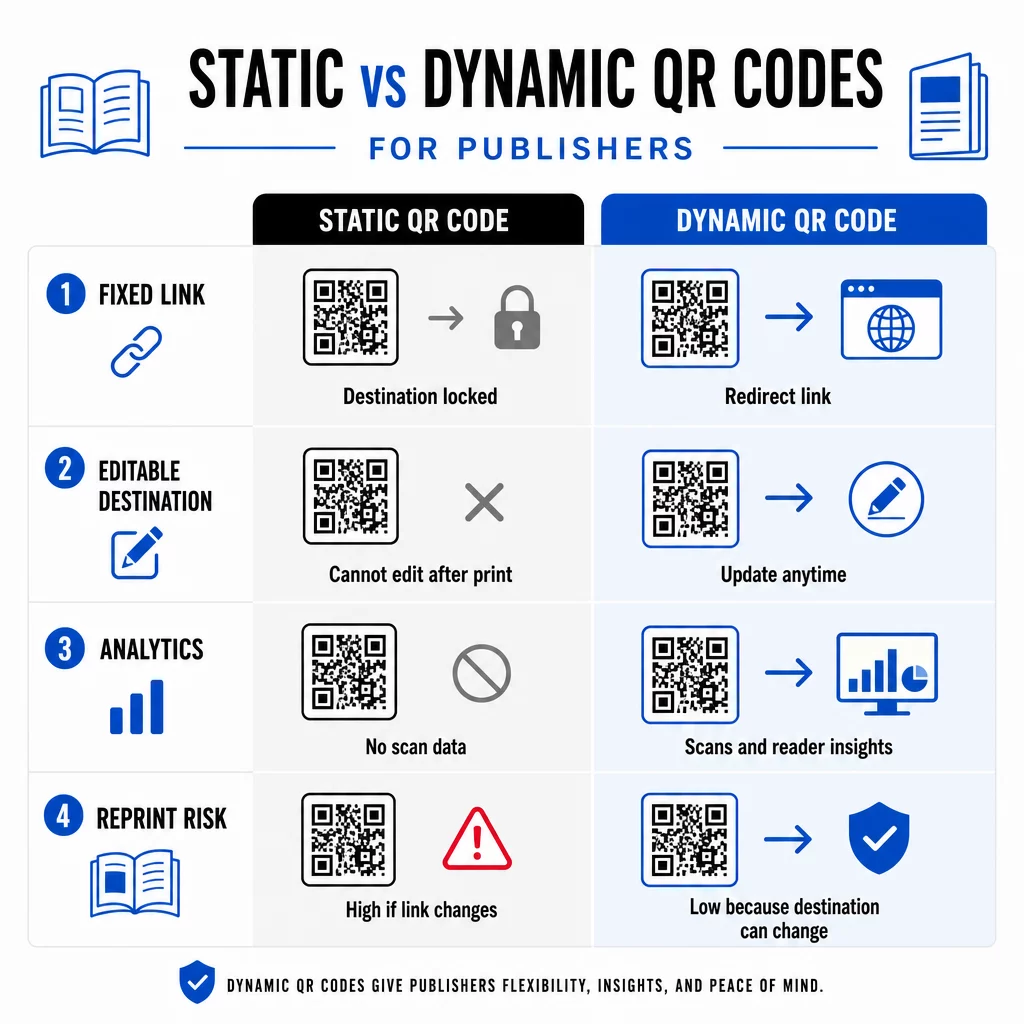
SEBUAH kode QR dinamis, sebaliknya, menunjuk ke URL pengalihan singkat yang Anda kendalikan. Anda dapat memperbarui tujuan kapan saja setelah kode dicetak dan didistribusikan. Bagi penerbit, ini berarti:
- Buku teks yang dicetak tahun ini masih dapat menyajikan tautan konten yang diperbarui lima tahun dari sekarang
- Iklan majalah dapat diperbarui di tengah kampanye untuk mencerminkan penawaran baru tanpa mencetak ulang
- Situs web penulis yang usang atau tautan rusak dapat diperbaiki tanpa menyentuh cetakan
Kode dinamis juga menyediakan analitik bawaan. Anda dapat melacak berapa kali setiap kode dipindai, di mana pembaca berada, dan perangkat apa yang mereka gunakan – data yang sebaliknya tidak terlihat dalam penerbitan tradisional. Untuk memahami semua pertukaran, perbandingan kode QR statis vs. dinamis layak ditinjau sebelum Anda berkomitmen pada suatu format.
Konten Apa yang Akan Ditautkan dari Kode QR Anda
Konten di balik kode menentukan apakah pembaca akan memindai untuk kedua kalinya. Beberapa format yang sangat cocok untuk penerbit:
- Dokumen PDF – Tautkan ke panduan pendamping, daftar bacaan, lampiran yang diperluas, atau referensi akademik menggunakan Kode QR PDF
- Video YouTube – Hubungkan konten cetak ke wawancara penulis, klip dokumenter, atau panduan instruksional menggunakan Generator QR Code YouTube
- Halaman arahan – Gunakan halaman arahan bermerek untuk menyajikan beberapa opsi dari satu pemindaian – tautan ke situs web penulis, halaman ulasan, profil sosial, dan formulir langganan semuanya dapat diakses dari satu kode
- Gambar dan galeri – Lengkapi buku perjalanan atau seni dengan galeri foto berwarna penuh yang tidak dapat ditampung oleh edisi cetak
Apa pun format yang Anda pilih, pastikan tujuan dioptimalkan untuk seluler. Mayoritas pemindaian terjadi pada ponsel cerdas, jadi halaman yang tampil buruk di layar kecil akan sepenuhnya merusak nilai kode tersebut.
Mencetak Kode QR yang Benar-benar Dapat Dipindai
Kode QR yang gagal dipindai merusak kepercayaan pembaca – dan pembaca yang memindai sekali dan mendapatkan kesalahan kemungkinan besar tidak akan mencoba lagi. Ikuti panduan ini untuk memastikan kinerja yang andal dalam cetakan:
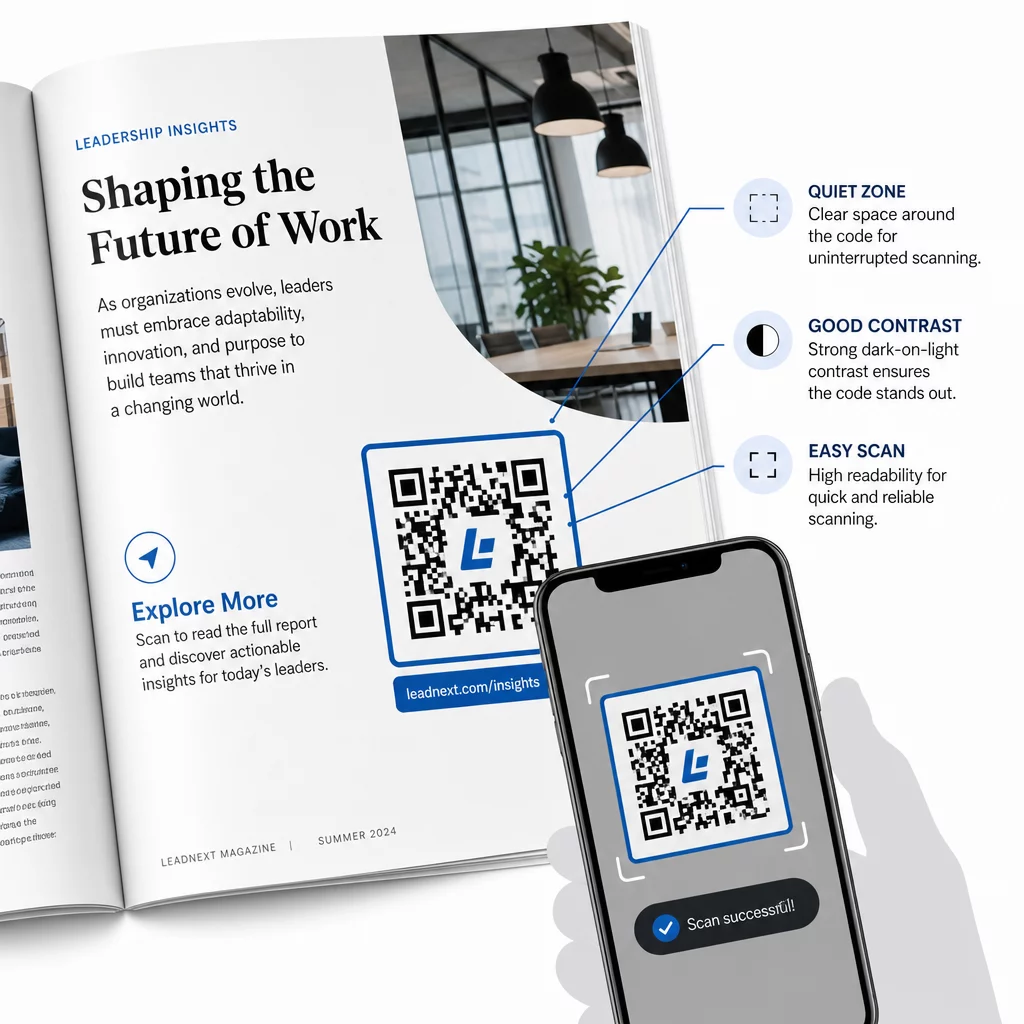
- Ukuran minimum – Cetak kode QR dengan ukuran minimal 0,8 × 0,8 inci (20 mm) untuk sebagian besar format publikasi. Untuk poster dan papan nama titik penjualan, gunakan setidaknya 1,2 × 1,2 inci (30 mm)
- Zona tenang – Pertahankan batas yang jelas setidaknya selebar empat modul di keempat sisi kode, bebas dari teks, gambar, atau elemen desain
- Kontras – Gunakan kode gelap dengan latar belakang terang. Targetkan rasio kontras minimum 3:1; 4:1 atau lebih tinggi lebih dapat diandalkan dalam berbagai kondisi pembacaan
- Format file – Unduh kode sebagai file vektor SVG atau EPS untuk dicetak, bukan PNG atau JPG, untuk menghindari pikselasi saat diskalakan. pedoman ukuran kode QR untuk bahan cetak membahas ini lebih detail
- PENEMPATAN – Hindari menempatkan kode di lipatan, punggung buku, jahitan, atau permukaan bertekstur kasar yang membuat pemindaian menjadi tidak dapat diandalkan. Untuk panduan lebih lanjut, panduan penempatan kode QR untuk materi pemasaran mencakup posisi, visibilitas, dan konteks secara mendalam
Untuk daftar periksa lengkap tentang cara membuat kode dapat dipindai di berbagai kondisi cetak, lihat praktik terbaik untuk keterbacaan kode QR.
Melacak Keterlibatan Pembaca di Seluruh Cetakan Anda
Salah satu keuntungan kode QR yang paling kurang dimanfaatkan dalam penerbitan adalah lapisan analitik. Dengan kode dinamis, Anda dapat melihat:
- Halaman atau bagian mana yang menghasilkan pemindaian terbanyak
- Bagaimana keterlibatan bervariasi di berbagai edisi atau pasar geografis
- Apakah jenis konten tertaut tertentu (video vs. PDF vs. halaman arahan) mendorong lebih banyak interaksi
- Tren pemindaian dari waktu ke waktu – berguna untuk memahami umur simpan suatu judul
Data ini memberikan sesuatu yang benar-benar baru bagi penerbit: umpan balik dari cetakan yang sebelumnya hanya tersedia untuk produk digital. Gunakan ini untuk menginformasikan keputusan tentang edisi mendatang, mengidentifikasi format konten mana yang beresonansi, dan menunjukkan metrik keterlibatan kepada penulis dan pengiklan.
Platform Pageloot menggabungkan pembuatan kode, manajemen konten, dan analitik dalam satu dasbor, sehingga Anda dapat mengelola kode QR di seluruh katalog tanpa harus menggunakan banyak alat. Jelajahi berbagai macam solusi kode QR berdasarkan industri untuk melihat bagaimana sektor lain menerapkan pendekatan yang sama.
Mulai Bangun Strategi QR Penerbitan Anda Buat kode QR pertama Anda yang bermerek dan dapat dilacak dalam hitungan menit dengan Generator Kode QR. Uji coba gratis 14 hari, tidak perlu kartu kredit.
Pertanyaan yang sering diajukan
Tidak jika Anda menggunakan kode QR dinamis. Kode dinamis mengarah ke URL pengalihan yang Anda kontrol, sehingga Anda dapat memperbarui tujuan – baik itu video baru, halaman arahan yang direvisi, atau tautan yang dikoreksi – kapan saja setelah dicetak, tanpa membuat kode baru atau menyentuh hasil cetakan.
Anda dapat menautkan ke hampir semua konten digital: video YouTube, dokumen PDF, halaman web, galeri gambar, file audio, formulir langganan, atau halaman arahan bermerek yang menggabungkan beberapa tautan. Pilihan terbaik tergantung pada apa yang paling menambah nilai bagi pembaca Anda pada titik tersebut dalam publikasi.
Kode QR Dinamis menyertakan analitik bawaan yang mencatat jumlah pemindaian, stempel waktu pemindaian, lokasi pembaca, dan jenis perangkat. Ini memberi Anda gambaran yang jelas tentang kode mana yang berkinerja baik dan penempatan atau jenis konten mana yang mendorong keterlibatan paling tinggi – data yang tidak dapat disediakan oleh kode statis.