Sätter QR-koder ditt företag i riskzonen? Bedrägliga QR-koder är ett allt vanligare verktyg för cyberbrottslingar som riktar sig mot företag av alla storlekar – och de flesta anställda vet inte hur man upptäcker dem. Denna guide förklarar hur QR-kodbedrägerier fungerar, vilka varningssignaler man ska leta efter och vilka specifika åtgärder ditt företag kan vidta för att skydda sig.
Varför QR-kodbedrägerier är ett växande hot mot företag
QR-koder har blivit en rutinmässig del av att göra affärer – betalningar, menyer, marknadsföringsmaterial, evenemangsincheckningar och mer. Denna förtrogenhet är precis vad som gör dem attraktiva för brottslingar.
Denna typ av attack är känd som quishing (QR-kodsfiske). Bedragare skapar eller manipulerar QR-koder för att omdirigera människor till bedrägliga webbplatser utformade för att stjäla inloggningsuppgifter, betalningsinformation eller annan känslig data – eller för att tyst installera skadlig programvara på deras enhet.
Omfattningen är betydande. Mellan maj och juli 2023 växte en QR-kodsfiskekampanj som riktade sig mot Microsoft-uppgifter med mer än 2 400 %. Analys av trender mellan Q4 2023 och Q1 2024 visade en ökning med 433 % i referenser till QR-kodsfiske. Chefer är särskilt utsatta och tar emot 42 gånger fler QR-kodsattacker än andra anställda på grund av deras bredare tillgång till företagsresurser.
Ingen bransch är immun. Energi, tillverkning, försäkring, teknik och finansiella tjänster har alla varit måltavlor i dokumenterade kampanjer. En enda anställd som skannar fel kod kan öppna dörren för stöld av inloggningsuppgifter, ekonomiskt bedrägeri eller ett fullständigt nätverksintrång.
Hur QR-kodbedrägerier riktar sig mot företag
Att förstå metoderna brottslingar använder är det första steget mot att bygga ett effektivt försvar. Quishing-attacker följer i allmänhet ett av flera mönster:
Nätfiskemejl med inbäddade QR-koder. Angripare skickar e-postmeddelanden som innehåller QR-koder som dirigerar mottagare till övertygande falska inloggningssidor – ofta som efterliknar Microsoft 365, bankportaler eller interna system. Eftersom den skadliga länken är dold inuti en bild snarare än skriven som text, misslyckas många e-postsäkerhetsfilter med att upptäcka den.
Fysiskt kodbyte. Brottslingar skriver ut bedrägliga QR-kodklistermärken och placerar dem över legitima koder på skyltar, betalterminaler, menyer, parkeringsautomater eller produktförpackningar. Offer skannar vad som verkar vara en officiell kod och omdirigeras till en falsk webbplats. I Austin, Texas, upptäckte polisen 29 falska QR-koder placerade på stadens parkeringsautomater. I York, Storbritannien, falska QR-koder på parkeringsskyltar omdirigerade förare till klonade betalningssidor, där vissa offer förlorade upp till 400 £.
Oönskade paket och post. United States Postal Inspection Service varnar för att bedragare skickar oväntade paket som innehåller små presenter tillsammans med QR-koder, och ber mottagarna att skanna koden för att “registrera” varan. Skanning leder till en förfalskad webbplats som begär personliga eller finansiella uppgifter.
Utgivning för betrodda organisationer. Angripare utger sig för att vara statliga myndigheter, banker, leveranstjänster eller andra välkända företag för att skapa brådska och sänka målets vaksamhet innan QR-koden skannas.
Varningssignaler för en bedräglig QR-kod
Det finns ingen tillförlitlig visuell skillnad i själva QR-mönstret som konsekvent skiljer en skadlig kod från en legitim. Istället måste ditt team utvärdera sammanhanget och beteendet kring koden. Utbilda anställda att behandla följande som varningssignaler:
- Tecken på fysisk manipulering: Koden visas som ett klistermärke, är tejpad, ser repig eller pixlig ut, är feljusterad eller är tydligt placerad över en annan tryckt kod.
- Inget tydligt sammanhang eller varumärke: Koden visas på en slumpmässig yta, har ingen förklaring till sitt syfte, eller saknar konsekvent varumärke från den organisation den påstår sig representera.
- Brådskande eller påtryckande språk: Omkringliggande text kräver omedelbar åtgärd, betalning eller inloggning utan en tydlig legitim anledning.
- Inkonsekvenser i varumärket: Felstavningar, felaktiga logotyper, ovanliga färger eller en design som inte matchar organisationens normala utseende.
- En misstänkt förhandsgransknings-URL: Efter skanning matchar den visade URL:en inte den förväntade domänen, är förkortad, är felstavad eller saknar HTTPS (ingen hänglåsikon i webbläsaren).
- Oväntade förfrågningar om känslig information: Sidan ber om lösenord, betalningsuppgifter eller personuppgifter utan en tydlig, förväntad anledning.
- Oönskad leverans: QR-koden kom i ett e-postmeddelande, textmeddelande eller paket som du inte förväntade dig – särskilt med ett meddelande som uppmanade dig att agera snabbt.
För en djupare titt på att identifiera komprometterade koder, täcker den guiden till bästa praxis för QR-kodssäkerhet inom cyberförsvar detektion och incidenthantering i detalj.
Så skyddar du ditt företag: En praktisk checklista
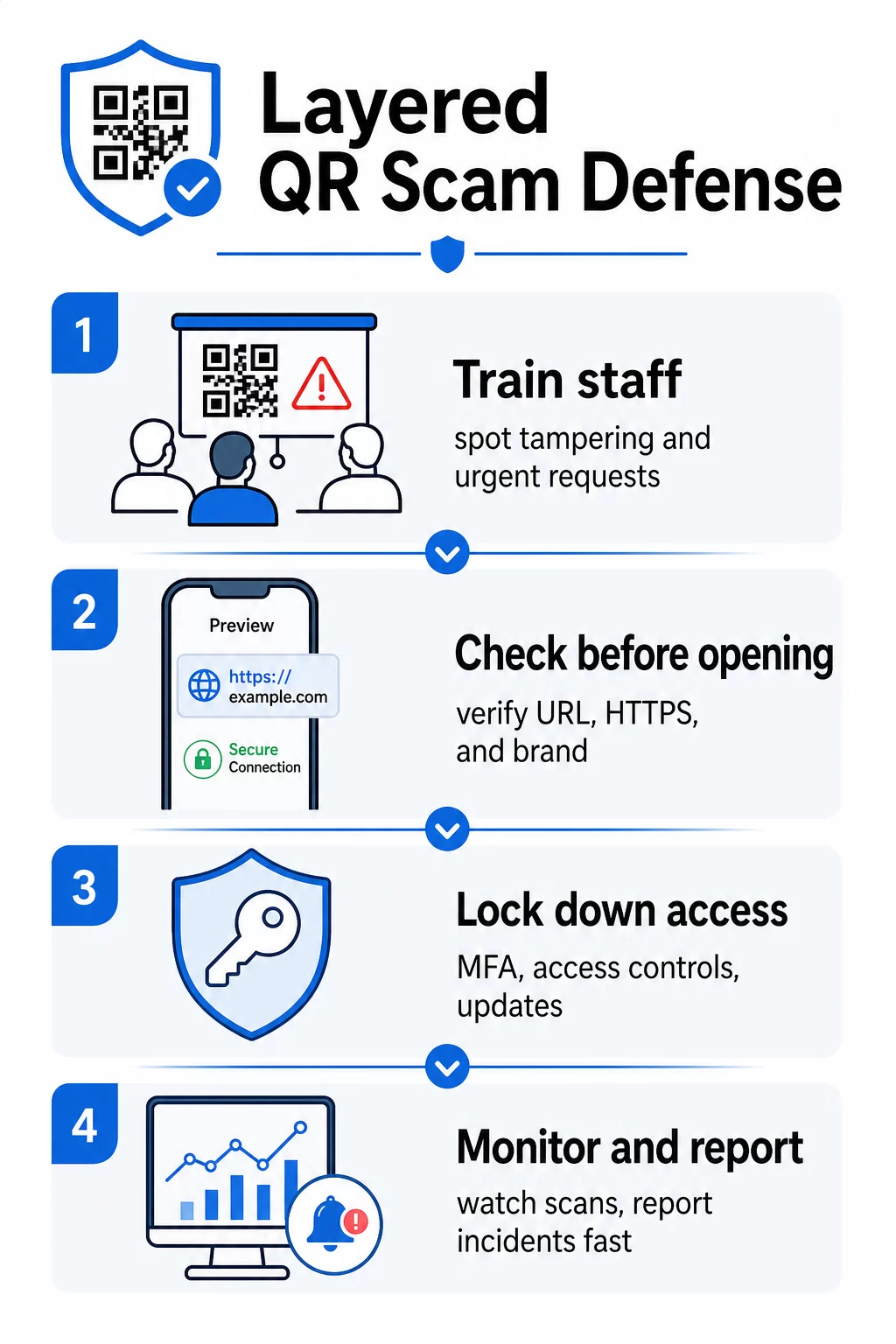
Att skydda din organisation från QR-kodbedrägerier kräver lager av försvar – ingen enskild åtgärd är tillräcklig på egen hand. FBI rekommenderar en flerskiktad strategi som kombinerar medarbetarutbildning, tekniska kontroller, stark autentisering och kontinuerlig övervakning.
Utbilda anställda att känna igen Quishing
Mänskliga fel förblir den mest utnyttjade sårbarheten i QR-kodsattacker. Regelbunden, praktisk utbildning bör omfatta:
- Att aldrig skanna QR-koder från oväntade e-postmeddelanden, textmeddelanden, paket eller flygblad – även om de verkar komma från en betrodd källa
- Att alltid förhandsgranska URL:en innan du öppnar den efter skanning, och kontrollera efter stavfel, felmatchade domäner eller saknad HTTPS
- Att fysiskt inspektera QR-koder på arbetsplatsen för tecken på manipulering, särskilt på betalterminaler, skyltar eller tryckt material
- Att verifiera källan till en QR-kod via en separat, betrodd kanal innan du anger några inloggningsuppgifter eller betalningsinformation
- Att omedelbart rapportera misstänkta QR-koder genom en tydlig intern eskaleringsprocess
FBI rekommenderar specifikt att upprätta formella interna protokoll för rapportering av misstänkta koder så att incidenter snabbt kan eskaleras och åtgärdas.
Implementera stark autentisering och åtkomstkontroller
Uppgifter som stulits genom quishing-attacker kan endast orsaka allvarlig skada om de ger obegränsad åtkomst. FBI och cybersäkerhetsmyndigheter rekommenderar:
- Kräva nätfiske-resistent multifaktorautentisering (MFA) för all fjärråtkomst och känsliga system
- Tillämpa rollbaserade åtkomstkontroller så att anställda endast kan nå system och data som är relevanta för deras roll
- Överväga en nollförtroendestrategi som kontinuerligt verifierar åtkomstförfrågningar istället för att bevilja generellt nätverksförtroende
Håll system och programvara uppdaterade
Tekniska skyddsåtgärder minskar attackytan som är tillgänglig för brottslingar. Se till att din organisation upprätthåller:
- Uppdaterade operativsystem, antivirusprogram och säkerhetsuppdateringar på alla enheter
- Aktiva spam- och webbfilter på e-post- och nätverkssystem
- Starka lösenordskrav för alla konton
FTC rekommenderar att uppdatera telefonens operativsystem specifikt för att skydda mot skadlig programvara som levereras via QR-koder.
Säkra de QR-koder ditt företag skapar och distribuerar
Dina egna QR-koder kan bli vektorer för bedrägeri om de inte hanteras korrekt. Att ta kontroll över dina koder är ett av de mest direkta sätten att skydda både dina kunder och ditt rykte.
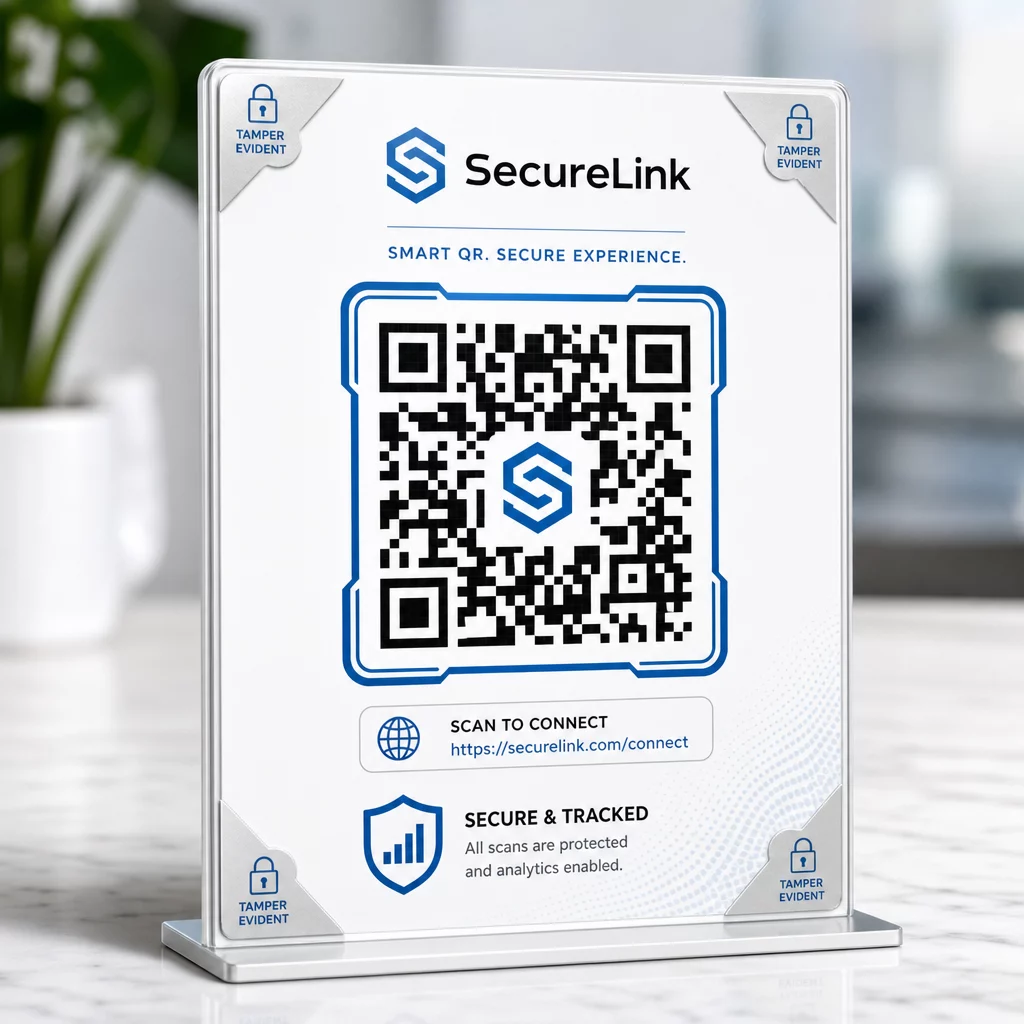
Använd dynamiska QR-koder istället för statiska. Till skillnad från statiska koder, dynamiska QR-koder kan redigeras, övervakas och avaktiveras efter att de har skrivits ut. Om en kod manipuleras eller omdirigeras till en skadlig destination kan du uppdatera eller inaktivera den utan att skriva ut något igen. Statiska koder är däremot permanenta – om destinationen komprometteras finns det inget sätt att korrigera det.
Använd anpassad branding för varje kod. Koder med din logotyp, varumärkesfärger och visuella identitet är betydligt svårare för brottslingar att övertygande replikera. Varumärkeskoder ger också kunder och anställda en visuell referenspunkt – om en kod inte ser rätt ut, sticker den ut. Detta är en kärnrekommendation från säkra bästa praxis för generering av QR-koder.
Länka alltid till HTTPS-destinationer. Se till att varje QR-kod du publicerar leder till en webbplats med ett giltigt SSL-certifikat. Undvik HTTP-destinationer för alla koder som används för betalningar, inloggningsflöden eller datainsamling.
Övervaka skanningsaktivitet för avvikelser. Analys i realtid låter dig upptäcka ovanliga mönster – plötsliga toppar i skanningsvolym, geografiska avvikelser eller oväntade enhetstyper – som kan indikera att en kod har komprometterats eller ersatts. Spårningsverktyg för QR-koder kan varna dig för dessa signaler innan betydande skada har skett.
Inspektera fysiskt utplacerade koder regelbundet. Schemalägg rutinmässiga kontroller av alla QR-koder som visas på offentliga platser. Fotografera varje kod när den först placeras så att du har en referens att jämföra med. Leta efter tecken på överläggsklistermärken, feljustering eller manipulering.
Skydda dina koder med realtidsövervakning Vill du upptäcka misstänkt skanningsaktivitet innan det blir ett allvarligt problem? Använd Dynamisk QR-kodgenerator för att skapa redigerbara, spårbara koder med inbyggd analys – och uppdatera eller inaktivera vilken kod som helst omedelbart om något ser fel ut.
Skydda dina kunder vid skanningstillfället
Om ditt företag visar QR-koder för betalningar, menyer eller kundinteraktioner, vidta åtgärder för att hjälpa kunder att verifiera att de skannar en legitim kod:
- Visa tydliga instruktioner nära varje kod som förklarar vad den leder till och vilken information kunder kommer att ombes att tillhandahålla
- Lägg till synlig branding och ett domännamn så att kunder kan verifiera destinationen innan de interagerar
- Tillhandahåll en alternativ metod för att komma åt samma information (en direkt URL, en tryckt meny, etc.) så att kunder aldrig tvingas skanna om de är osäkra
- Sätt upp synliga meddelanden som uppmuntrar kunder att rapportera misstänkta koder till ditt team
För mer om att minska QR-kodrisker i betalningssammanhang, inklusive branschspecifik vägledning för detaljhandel och e-handel, se den dedikerade guiden för betalningssäkerhet.
När en incident inträffar: Vad du ska göra
Om en anställd eller kund rapporterar en potentiellt komprometterad QR-kod, agera omedelbart:
- Inaktivera eller uppdatera den berörda dynamiska QR-koden så att den inte längre leder till den skadliga destinationen
- Dokumentera incidenten och bevara bevis för utredning
- Meddela berörda parter så att de kan övervaka konton och ändra lösenord
- Rapportera incidenten till relevanta myndigheter – FBI:s Internet Crime Complaint Center (IC3) för företagsrelaterad cyberbedrägeri, och FTC för konsumentfokuserade bedrägerier
- Granska dina andra utplacerade koder för att kontrollera om liknande manipulering har skett
Att ha en incidentresponsplan på plats innan något går fel är betydligt billigare än att improvisera under press.
Vanliga frågor
Quishing är nätfiske som använder QR-koder istället för textbaserade länkar för att dirigera offer till skadliga webbplatser. Eftersom den skadliga URL:en är inbäddad i en bild, kringgår den ofta e-postsäkerhetsfilter som normalt skulle fånga misstänkta länkar i klartext. Resultatet är detsamma – stulna inloggningsuppgifter, betalningsinformation eller installation av skadlig programvara – men leveransmetoden gör det svårare för både automatiserade verktyg och användare att upptäcka.
Leta efter fysiska tecken som klistermärken placerade över befintliga koder, feljustering, repor eller pixelering. Kontrollera den omgivande kontexten – har koden tydlig varumärkesprofilering som matchar organisationen? Matchar förhandsgransknings-URL:en efter skanning den förväntade domänen och använder HTTPS? Var särskilt misstänksam mot koder som åtföljs av brådskande språk eller finns på ovanliga platser utan en tydlig förklaring. Det finns ingen visuell skillnad i själva QR-mönstret som på ett tillförlitligt sätt signalerar illvilligt uppsåt, så kontext är allt.
Dynamiska QR-koder kan redigeras, övervakas och avaktiveras efter att de har skrivits ut – så om en kod komprometteras kan du uppdatera eller inaktivera den omedelbart utan att skriva ut den igen. De tillhandahåller också skanningsanalys i realtid, vilket gör att du kan upptäcka avvikande aktivitet som oväntade geografiska skanningar eller plötsliga volymtoppar. Statiska QR-koder har en fast destination som inte kan ändras, vilket innebär att varje kompromettering kräver att man skapar och distribuerar en helt ny kod utan möjlighet att återställa det som redan distribuerats.