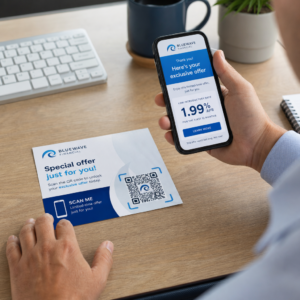
Kæmper du med at forbinde dine trykte publikationer med de digitale oplevelser, læserne i stigende grad forventer? Statiske sider kan kun gøre så meget – og udgivere, der udelukkende baserer sig på print, risikerer at miste læserengagement til fuldt digitale konkurrenter. Denne guide viser dig præcis, hvordan du bygger bro over dette hul ved hjælp af QR-koder i bøger, magasiner og aviser.
Hvorfor udgivere tilføjer QR-koder til print
Læsere i dag forventer mere end tekst på en side. De ønsker lyd, video, supplerende indhold og måder at interagere med forfattere og udgivere på – alt sammen fra deres smartphones. QR-koder giver udgivere en direkte kanal til at levere den oplevelse uden at erstatte det printprodukt, læserne allerede elsker.
Tallene afspejler et ægte adfærdsskift. Anslået 89 millioner amerikanere scannede en QR-kode i 2025, og dette tal forventes at overstige 100 millioner i 2026. Kritisk er det, at 43% af smartphonebrugere scanner mindst én QR-kode om ugen – et adfærdsmønster, der passer godt til engagerede læsere, der regelmæssigt tager en bog eller et magasin op.
For udgivere specifikt er appellen ligetil: en enkelt trykt kode kan forbinde en læser med et videointerview med forfatteren, en ledsagende hjemmeside, en downloadbar ressource eller et abonnementstilbud – uden yderligere printomkostninger.
Opret sporbare QR-koder til dine publikationer Vil du vide præcis, hvilke sider og udgaver der skaber mest engagement? Brug Dynamisk QR-kode generator til at oprette koder, du kan opdatere og spore uden at genoptrykke et eneste eksemplar.
Hvilke typer publikationer drager mest fordel
QR-koder tilføjer målbar værdi på tværs af stort set alle udgivelsesformater, men nogle kategorier ser særligt stærke afkast:
- Rejsebøger og -guider – Link læsere direkte til fotogallerier, kort, destinationshjemmesider eller videoture af de steder, der beskrives på hver side
- Uddannelsesbøger – Forbind studerende med quizzer, supplerende videoer, facitlister eller eksamensforberedende ressourcer sammen med hvert kapitel
- Kogebøger – Link til teknikvideoer, guider til ingredienserstatninger eller interaktive indkøbslister
- Børnebøger – Udvid historien med lydfortælling, animerede scener eller interaktive spil
- Sprogindlæringsbøger – Afspil lydudtaler eller videoforklaringer af grammatikkoncepter direkte i teksten
- Magasiner og aviser – Før læsere fra printannoncer og redaktionelt indhold til abonnementssider, videoindhold, feedbackformularer eller eksklusive tilbud
For et dybere kig på, hvordan aviser og magasiner effektivt kan bruge QR-koder, se guide til QR-koder i aviser og magasiner. Hvis dit fokus specifikt er bøger, vil guide til QR-koder i bøger gennemgå placering, scanning og indholdstyper i detaljer.
Praktiske idéer til brug af QR-koder i publikationer
De mest effektive QR-koder fra udgivere tjener et klart formål for læseren. Her er gennemprøvede tilgange:
- Tilføj en video ved kapitelpauser i faglitterære bøger, der fortæller om en specifik begivenhed eller viser den faktiske placering, hvor den fandt sted – særligt effektivt for historie, rejser og erindringer
- Link til forfatterinterviews eller bag-kulisserne-indhold, der belønner læsere, som afslutter bogen
- Placer en kode på bagsiden eller den indvendige forside, der giver læsere mulighed for at efterlade bedømmelser og anmeldelser direkte på din foretrukne platform
- Del en rabatkode til læserens næste køb, som kan indløses ved at scanne en kode inde i den aktuelle titel
- Giv læsere mulighed for at downloade første kapitel af forfatterens næste bog, før den udgives
- Tilføj koder til udstillingsvinduer eller salgsmaterialer, der promoverer kommende udgivelser eller lanceringsbegivenheder
- I magasiner kan du linke QR-koder i annoncer til landingssider, abonnementstilbud eller videoindhold, der udvider den trykte annonce
For aviser og magasiner specifikt skal koden placeres fremtrædende i indholdet i stedet for at gemme den i et hjørne. Par den med en kort, specifik opfordring til handling – “Scan for at se hele interviewet” er mere effektivt end et generisk “Scan her.”
Link trykte annoncer til digitale destinationer Brug Link QR-kodegenerator for at forbinde enhver trykt side til en URL, landingsside eller digital ressource – ingen teknisk opsætning påkrævet.
Statiske vs. dynamiske QR-koder for udgivere
Denne forskel er afgørende for udgivere, der trykker store oplag. En statisk QR-kode koder en fast destination direkte ind i kodemønsteret. Hvis den linkede side flyttes, eller indholdet ændres, bliver koden ubrugelig – og du kan ikke opdatere den uden at genoptrykke.
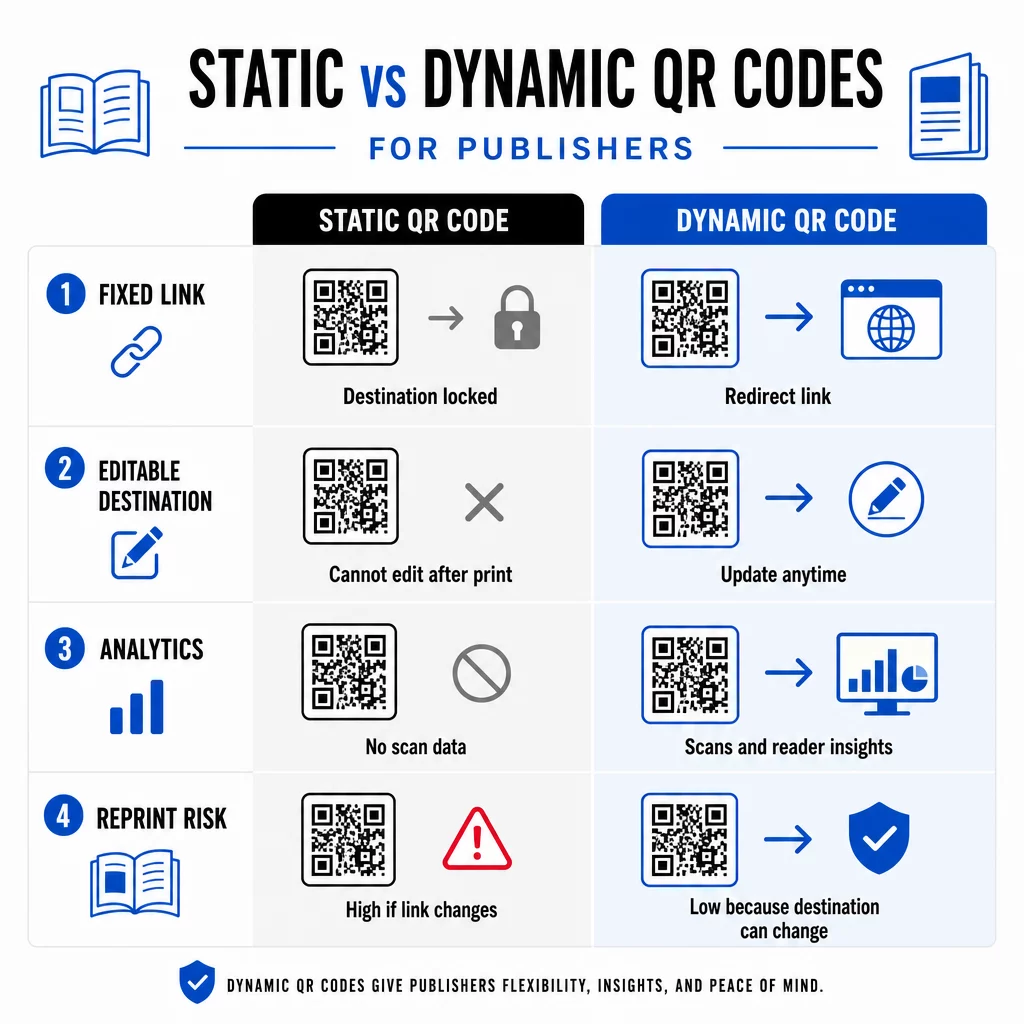
EN dynamisk QR-kode, derimod, peger på en kort omdirigerings-URL, som du kontrollerer. Du kan opdatere destinationen når som helst, efter at koden er blevet trykt og distribueret. For udgivere betyder dette:
- En lærebog trykt i år kan stadig levere opdaterede indholdslinks fem år frem
- En magasinannonce kan opdateres midt i kampagnen for at afspejle et nyt tilbud uden genoptryk
- Forældede forfatterhjemmesider eller ødelagte links kan rettes uden at røre ved trykket
Dynamiske koder giver også indbygget analyse. Du kan spore hvor mange gange hver kode scannes, hvor læserne befinder sig, og hvilke enheder de bruger – data, der ellers er usynlige i traditionel udgivelse. For at forstå de fulde afvejninger, er sammenligning af statiske vs. dynamiske QR-koder er værd at gennemgå, før du forpligter dig til et format.
Hvilket indhold skal du linke til fra dine QR-koder
Indholdet bag koden afgør, om læserne scanner en anden gang. Nogle formater, der fungerer særligt godt for udgivere:
- PDF-dokumenter – Link til ledsagende guider, læselister, udvidede bilag eller akademiske referencer ved hjælp af en PDF QR-kode
- YouTube-videoer – Forbind trykt indhold med forfatterinterviews, dokumentarklip eller instruktionsgennemgange ved hjælp af en YouTube QR-kode generator
- Landingssider – Brug en brandet landingsside til at præsentere flere muligheder fra en enkelt scanning – links til forfatterens hjemmeside, en anmeldelsesside, sociale profiler og en abonnementsformular, alt sammen tilgængeligt fra én kode
- Billeder og gallerier – Suppler rejse- eller kunstbøger med farverige fotogallerier, som den trykte udgave ikke kan rumme
Uanset hvilket format du vælger, skal du sikre, at destinationen er mobiloptimeret. Størstedelen af scanningerne sker på smartphones, så en side, der vises dårligt på en lille skærm, vil fuldstændig underminere kodens værdi.
Udskrivning af QR-koder, der faktisk scanner
En QR-kode, der ikke scanner, skader læserens tillid – og en læser, der scanner én gang og får en fejl, vil sandsynligvis ikke prøve igen. Følg disse retningslinjer for at sikre pålidelig ydeevne i tryk:
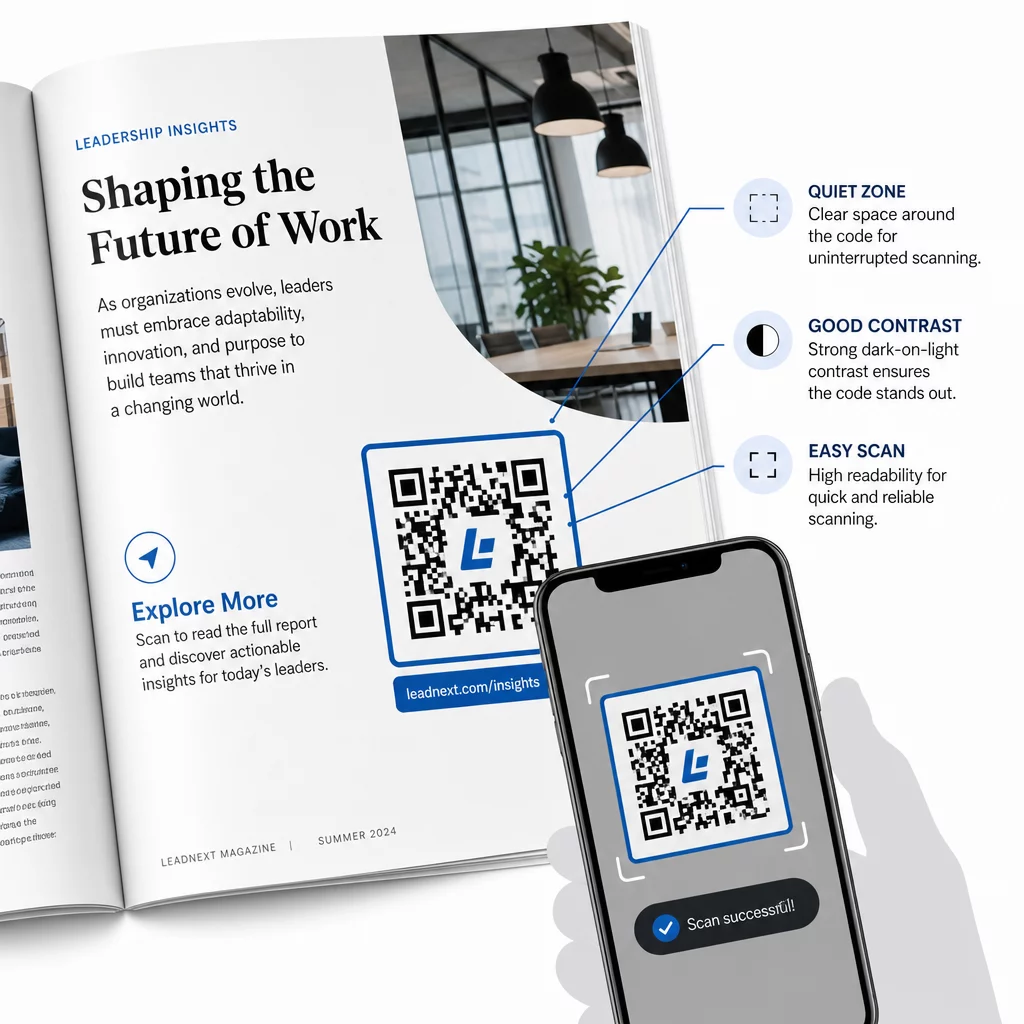
- Mindstestørrelse – Udskriv QR-koder med et minimum på 0,8 × 0,8 tommer (20 mm) for de fleste publikationsformater. Til plakater og POS-skilte skal du bruge mindst 1,2 × 1,2 tommer (30 mm)
- Stillezone – Oprethold en klar kant på mindst fire moduler bred på alle fire sider af koden, fri for tekst, billeder eller designelementer
- Kontrast – Brug en mørk kode på en lys baggrund. Tilstræb et kontrastforhold på mindst 3:1; 4:1 eller højere er mere pålideligt under varierende læseforhold
- Filformat – Download koder som SVG- eller EPS-vektorfiler til print, snarere end PNG eller JPG, for at undgå pixelering ved skalering. retningslinjer for QR-kodestørrelse til trykt materiale dækker dette mere detaljeret
- PLACERING – Undgå at placere koder hen over folder, ryggen, sømme eller stærkt teksturerede overflader, hvor scanning bliver upålidelig. For yderligere vejledning, se Vejledning til placering af QR-koder i markedsføringsmaterialer dækker position, synlighed og kontekst i dybden
For en komplet tjekliste til at gøre koder scanbare under forskellige printforhold, se bedste praksis for QR-kodelæsbarhed.
Sporing af læserengagement på tværs af dit printoplag
En af de mest underudnyttede fordele ved QR-koder i forlagsbranchen er analyselaget. Med dynamiske koder kan du se:
- Hvilke sider eller sektioner der genererer flest scanninger
- Hvordan engagement varierer på tværs af forskellige udgaver eller geografiske markeder
- Om en bestemt type linket indhold (video vs. PDF vs. landingsside) driver mere interaktion
- Scanningstendenser over tid – nyttigt til at forstå en titels holdbarhed
Disse data giver udgivere noget ægte nyt: en feedback-loop fra print, som tidligere kun var tilgængelig for digitale produkter. Brug det til at informere beslutninger om fremtidige udgaver, identificere hvilke indholdsformater der vækker genklang, og demonstrere engagementstal over for forfattere og annoncører.
Pageloots platform samler kodeoprettelse, indholdsstyring og analyser i ét dashboard, så du kan administrere QR-koder på tværs af et helt katalog uden at jonglere med flere værktøjer. Udforsk hele udvalget af QR-kodeløsninger efter branche for at se, hvordan andre sektorer anvender den samme tilgang.
Begynd at opbygge din udgivelses-QR-strategi Opret din første brandede, sporingsbare QR-kode på få minutter med QR-kodegenerator. Gratis 14-dages prøveperiode, intet kreditkort påkrævet.
Ofte stillede spørgsmål
Ikke hvis du bruger en dynamisk QR-kode. Dynamiske koder peger på en omdirigerings-URL, som du kontrollerer, så du kan opdatere destinationen – uanset om det er en ny video, en revideret landingsside eller et rettet link – når som helst efter udskrivning, uden at generere en ny kode eller røre ved trykningen.
Du kan linke til stort set ethvert digitalt indhold: YouTube-videoer, PDF-dokumenter, websider, billedgallerier, lydfiler, tilmeldingsformularer eller brandede landingssider, der kombinerer flere links. Det bedste valg afhænger af, hvad der tilføjer mest værdi for dine læsere på det pågældende tidspunkt i publikationen.
Dynamiske QR-koder inkluderer indbygget analyse, der registrerer antal scanninger, scanningstidspunkter, læserlokationer og enhedstyper. Dette giver dig et klart billede af, hvilke koder der performer, og hvilke placeringer eller indholdstyper der skaber mest engagement – data som statiske koder ikke kan levere.