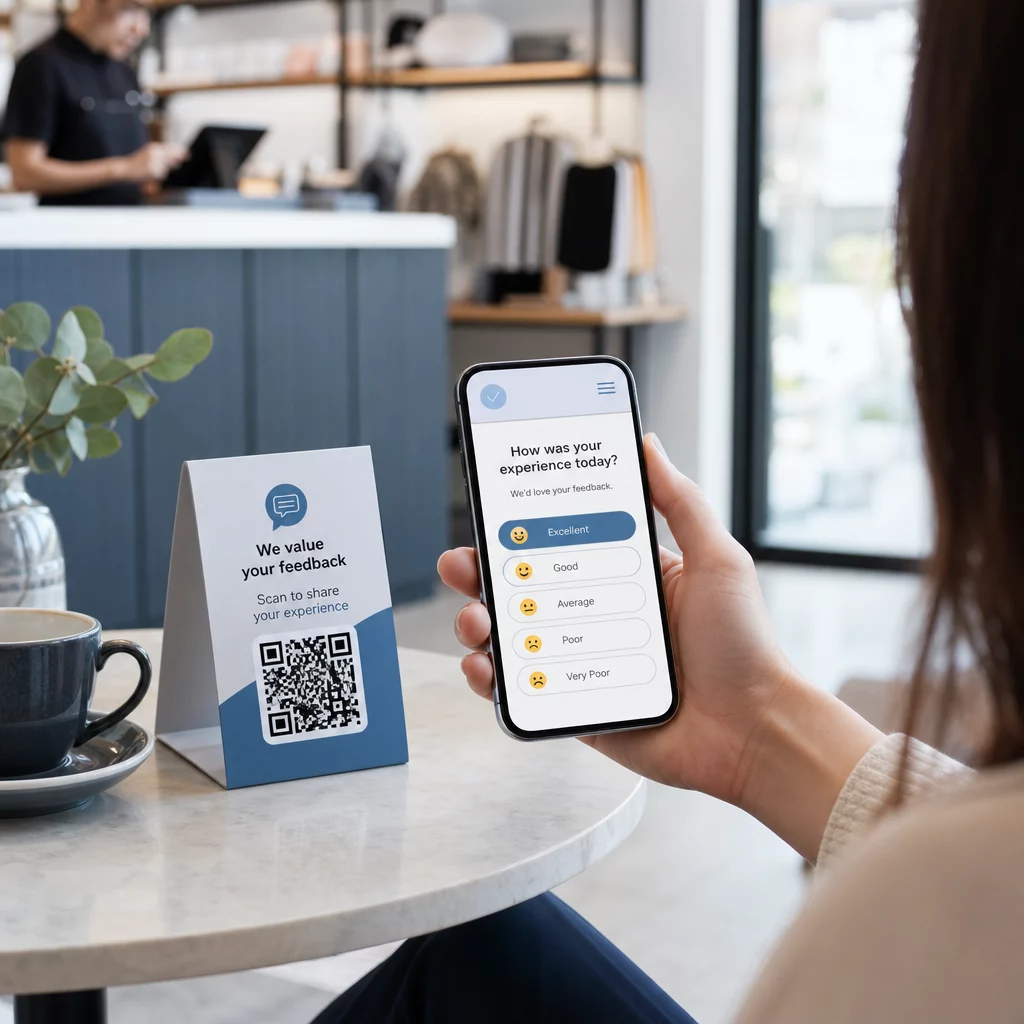
Har du svårt att samla in feedback från kunder som står precis framför dig? Pappersformulär ignoreras, och långa enkät-URL:er skrivs aldrig in. Denna guide visar dig hur du skapar en QR-kodundersökning från grunden – täcker plattformsval, kodgenerering, design, placering och spårning – så att du kan börja samla in svar omedelbart.
Varför QR-kodundersökningar fungerar för offline- och mobilpublik
Kärnproblemet med traditionella enkäter är friktion. Att skriva en URL på ett mobilt tangentbord är tillräckligt irriterande för att de flesta hoppar över det. En QR-kod tar bort den barriären helt – en skanning öppnar undersökningen direkt i en webbläsare, ingen app krävs.
Detta är särskilt viktigt i fysiska miljöer: restauranger, butiker, evenemang, kliniker och klassrum. Din publik är redan närvarande och engagerad. En välplacerad QR-kod fångar det ögonblicket innan det försvinner.
Några anledningar till att QR-kodundersökningar konsekvent överträffar pappers- och e-postalternativ:
- Hastighet: Tiderna för enkätkomplettering är mätbart snabbare eftersom det inte finns någon manuell URL-inmatning eller formulärdistributionssteg.
- Räckvidd: Användningen av QR-koder fortsätter att växa i USA, med skanningsvolymer som ökar år efter år – vilket innebär att din publik redan vet hur man interagerar med dem.
- Realtidsdata: Svar kommer omedelbart, så du kan agera på feedback samma dag istället för att vänta på en batch-export.
- Spårbarhet: Dynamiska QR-koder registrera skanningsantal, enhetstyper, geografiska platser och tidsstämplar, vilket ger dig beteendemässig kontext tillsammans med själva enkätssvaren.
Hur man skapar en QR-kodundersökning: Steg för steg
Steg 1: Definiera dina undersökningsmål
Innan du bygger något, klargör vad du vill lära dig och hur du ska mäta framgång. Vaga mål ger vaga frågor. Fråga dig själv:
- Mäter du tillfredsställelse efter ett köp eller en tjänsteinteraktion?
- Samlar du in åsikter under eller efter ett evenemang?
- Utför du produktforskning för att informera ett framtida beslut?
Ditt mål formar också tidpunkten och formatet för undersökningen. En enkät efter köp på ett kvitto behöver andra frågor än en live-undersökning som projiceras på en skärm. Bestäm i förväg hur en framgångsrik svarsfrekvens eller insikt ser ut så att du kan utvärdera kampanjen senare.
Steg 2: Bygg undersökningen på en enkätplattform
Använd en pålitlig enkätplattform för att bygga dina frågor. Google Forms är ett enkelt, gratis alternativ som integreras med Google Sheets för enkel datagranskning. För mer avancerad logik, anpassad branding eller detaljerad analys på formulärnivå, är Typeform eller SurveyMonkey starka alternativ.
När du utformar dina frågor, tänk på mobilanvändare i första hand – vilket är nästan alla som kommer att skanna koden. Följ dessa principer:
- Håll det kort. Sikta på under två minuter att slutföra. Längre undersökningar förlorar respondenter på mobilen innan de når slutet.
- En idé per fråga. Undvik dubbelfrågor som frågar två saker samtidigt (till exempel, “Var vår service snabb och vänlig?” bör vara två separata frågor).
- Använd enkelt språk. Minska antalet ord i varje fråga utan att offra meningen.
- Var neutral. Undvik formuleringar som styr respondenter mot ett visst svar.
- Balansera dina skalor. Om du använder betygsskalor, inkludera ett lika antal positiva och negativa alternativ och en tydligt definierad mittpunkt.
När omröstningen är klar, generera en delbar länk. I Google Forms, klicka Skicka, välj sedan länkikonen för att kopiera URL:en.
Steg 3: Konvertera omröstningslänken till en QR-kod
När din omröstnings-URL är redo, klistra in den i en QR-kodgenerator. Pageloot’s Länk QR-kodgenerator hanterar detta på några sekunder – klistra in URL:en, och en skanningsbar kod visas omedelbart.
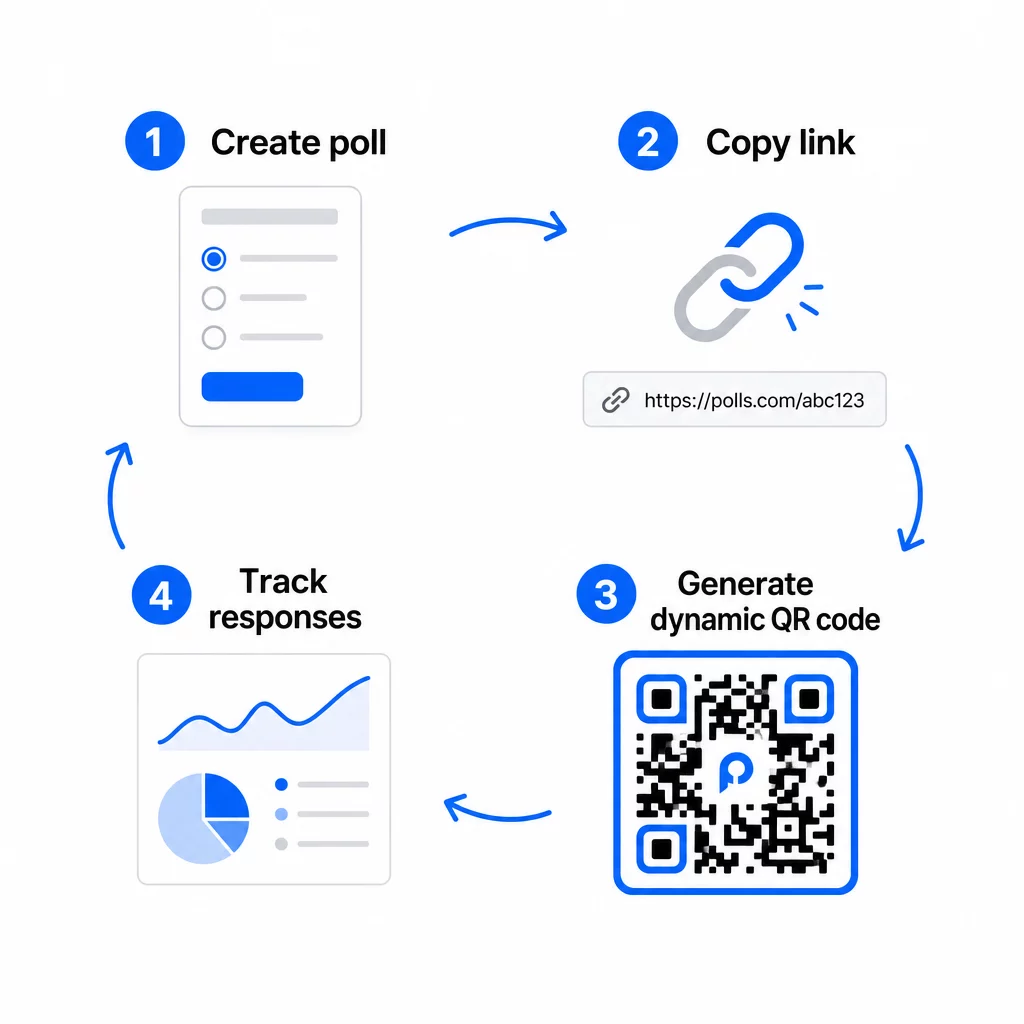
I detta skede behöver du också välja mellan en statisk och en dynamisk QR-kod.
| FUNKTION | Statiska QR-koder | Dynamiska QR-koder |
|---|---|---|
| Redigerbar efter skapande | Nej | Ja |
| Skanningsspårning och analys | Nej | Ja |
| URL-längd i mönster | Lång, tät | Kort, ren |
| Skanningshastighet | Långsammare | Snabbare |
| Kampanjuppdateringar | Kräver ny kod | Uppdatera destination när som helst |
För de flesta omröstningskampanjer, dynamiska QR-koder är det bättre valet. Du kan uppdatera destinations-URL:en efter att koden redan är utskriven – användbart om du behöver byta ut en stängd omröstning mot en ny, förlänga en deadline eller omdirigera till en uppföljningsundersökning. Dynamiska koder låser också upp skanningsanalys inklusive antal skanningar, plats, enhetstyp och tidpunkt för skanning.
Spåra varje skanning från din QR-kodsomröstning Vill du se vilka platser som genererar flest svar och när engagemanget är som högst? Använd Pageloots QR-kodgenerator för att skapa en dynamisk omröstningskod med inbyggd spårning och en centraliserad analyspanel.
Steg 4: Anpassa QR-koden för ditt varumärke
En enkel svartvit QR-kod fungerar, men en märkesanpassad presterar bättre. Att lägga till din logotyp och dina varumärkesfärger signalerar att koden är legitim, vilket ökar sannolikheten att någon faktiskt skannar den.
Praktiska designriktlinjer:
- Använda en mörk förgrund på en ljus bakgrund. Svart på vitt är det mest tillförlitliga. Mörkblått eller mörkgrönt på vitt fungerar också bra. Invertera aldrig detta – ljust på mörkt orsakar skanningsfel.
- Bibehåll hög kontrast genomgående. Låg kontrast är en av de vanligaste anledningarna till att QR-koder misslyckas med att skannas.
- Lägg till din företagslogotyp i mitten av koden. Detta bygger förtroende vid första anblicken utan att påverka skanningsbarheten, så länge logotypen inte täcker mer än ungefär 30% av mönstret.
- Inkludera en uppmaning till handling nära (inte inuti) koden – något i stil med “Skanna för att dela din feedback” eller “Delta i vår 60-sekundersundersökning.” Detta berättar för folk varför de ska skanna och vad de kan förvänta sig.
- För tryckt material, håll koden minst 0.8 × 0.8 tum (2 × 2 cm) för skanning på nära håll. För affischer eller skyltar som ses på längre avstånd, tillämpa 10:1-regeln: kodens bredd bör vara minst en tiondel av det förväntade skanningsavståndet.
- Bevara en tyst zon – minst fyra tomma moduler på alla sidor av koden. Ingen text, logotyper eller färgblödning får tränga in i denna kant.
För mer om placering och storlek, den Placeringsguide för QR-koder för marknadsföring täcker varje större format i detalj.
Steg 5: Testa koden innan du distribuerar
Testning är inte förhandlingsbart. En QR-kod som inte går att skanna i fält slösar bort din utskriftsbudget och frustrerar de människor du försöker nå.
Testa med:
- Flera enheter: Både iOS och Android, och minst en äldre smartphonemodell.
- Flera appar: Inbyggda kameraappar och tredjeparts skannerappar.
- Flera förhållanden: Olika belysning (inklusive utomhusbländning), olika avstånd och olika vinklar.
- Flera webbläsare: Bekräfta att undersökningen laddas och visas korrekt i Safari, Chrome och andra vanliga webbläsare.
Om du använder en dynamisk kod, verifiera att destinations-URL:en är aktiv och att formuläret skickas in framgångsrikt från en mobil webbläsare innan du distribuerar.
Steg 6: Distribuera på rätt platser
Var du placerar QR-koden avgör direkt hur många svar du samlar in. QR-koder för kundfeedback fungerar bäst när de visas vid naturliga pauspunkter i kundresan – ögonblick då någon har tid, sammanhang och motivation att svara.
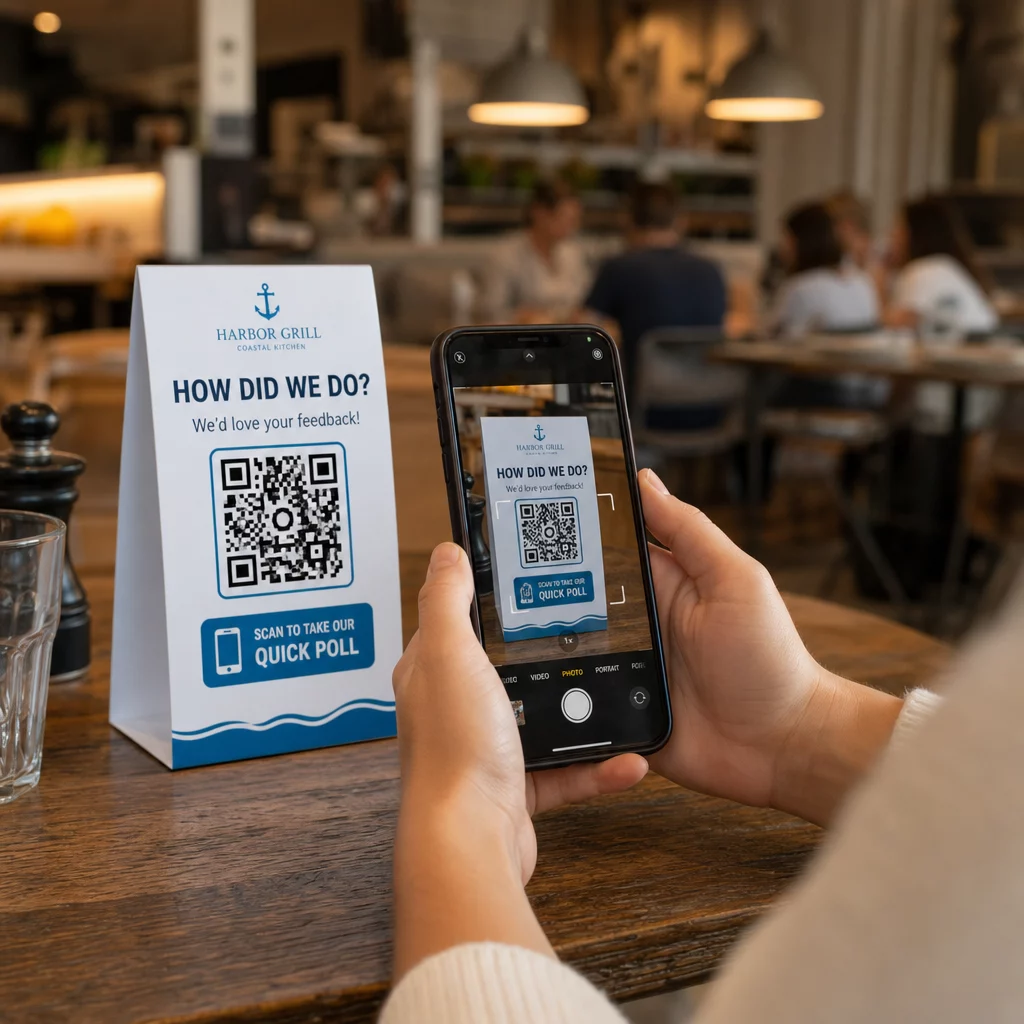
Exempel på bra placeringar:
- Bordsryttare eller bordstabletter på restauranger, placerade där gäster naturligt tittar under eller efter en måltid
- Kvitton eller förpackningar inkluderade med ett köp, som uppmanar till feedback medan upplevelsen är färsk
- Skyltar nära utgångar i butiker eller på evenemangsplatser, som fångar intryck på vägen ut
- Registreringsdiskar eller incheckningsområden vid evenemang, där deltagare har en stund innan de går vidare
- Presentationsbilder på konferenser, visas i 15–20 sekunder med en muntlig uppmaning att skanna
Håll koder i ögonhöjd (ungefär 1,0–1,7 meter från marken) och borta från reflekterande eller böjda ytor som förvränger skanningen. Undvik att placera koder i dåligt upplysta områden, bakom glas eller i obekväma vinklar. Varje placeringsplats bör inkludera en kort förklaring av undersökningens syfte och en ärlig uppskattning av hur lång tid det tar att slutföra den.
Integritet och datamedgivande
När din undersökning samlar in personuppgifter – namn, e-postadresser eller svar som kan identifiera en individ – har du juridiska och etiska skyldigheter. USA:s integritetslagstiftning är ett lapptäcke av federala och delstatliga regleringar, men vanliga krav inkluderar att inhämta samtycke innan data samlas in, förklara hur den kommer att användas och säkra den på lämpligt sätt.
Praktiska steg för att upprätthålla efterlevnad:
- Lägg till en samtyckesfråga i början av undersökningen som förklarar vilken data som samlas in, varför, hur länge den kommer att behållas och vem man ska kontakta med frågor. Hantera avslag så att ingen data samlas in från dem som tackar nej.
- Använd endast HTTPS-länkar. Prefixet “https://” bekräftar att data överförs med SSL/TLS-kryptering.
- Välj undersökningsplattformar och QR-kodgeneratorer som inte lagrar onödig användardata.
- Om din undersökning visas offentligt, kontrollera koderna regelbundet för att säkerställa att de inte har manipulerats eller ersatts.
- För känsliga ämnen, överväg att lösenordsskydda undersökningen eller använda åtkomstkontroller. Dynamiska QR-koder låter dig uppdatera dessa inställningar utan att trycka om material.
Mäta undersökningsprestanda
När din kampanj är live, använd analysverktyg för att förstå vad som fungerar och vad som behöver justeras. Dynamiska QR-koder ger dig tillgång till mätvärden som går långt bortom ett enkelt antal svar.
Viktiga mätvärden att övervaka:
- Totalt antal skanningar kontra unika skanningar: En stor skillnad mellan dessa tyder på återkommande besökare eller oavsiktliga omskanningar snarare än nya respondenter.
- Skannings-till-slutförandegrad: Om skanningsfrekvensen är hög men antalet slutförda undersökningar är lågt, kan din undersökning vara för lång eller så orsakar den första frågan avhopp.
- Toppskanningstider: Tidsstämplar visar när engagemanget är som högst, vilket kan informera när man ska köra framtida kampanjer eller när man ska bemanna uppföljningssvar.
- Geografisk fördelning: Om de flesta skanningar kommer från en plats men du riktar dig mot flera platser, justera placering eller skyltning på underpresterande platser.
- Enhetsdata: Bekräftar om din mobilanpassade design betjänar din faktiska publik korrekt.
Att lägga till UTM-parametrar till din enkät-URL innan du genererar koden gör att du kan hämta denna data till Google Analytics tillsammans med dina bredare marknadsföringsmått, och kopplar QR-enkätengagemang till resten av din kampanjrapportering.
Om du kör flera placeringar samtidigt, behandla dem som ett naturligt A/B-test. Jämför skannings- och slutförandegraden över platser för att identifiera vilka sammanhang som driver starkast deltagande, koncentrera sedan framtida ansträngningar där.
Koppla enkätdata till din marknadsföringsstack Använd Pageloots spårnings- och analysfunktioner för att övervaka skanningsbeteende över alla dina QR-kodplaceringar, justera sedan kampanjer i realtid – utan att trycka om ett enda material.
Att sätta ihop allt
QR-kodenkäter är mest effektiva när varje element är avsiktligt: ett fokuserat mål, ett kort och mobilvänligt formulär, en välutformad dynamisk kod, en placering som passar kundresan, och analys som berättar hur du kan förbättra nästa kampanj.
De Pageloot QR-kodgenerator ger dig allt du behöver i en plattform – dynamiska koder, varumärkesalternativ och skanningsdata i realtid. Börja med ett gratis konto och ha din första enkät live på under femton minuter.
Vanliga frågor
En statisk QR-kod bäddar in destinations-URL:en permanent i kodmönstret. När den väl är utskriven kan den inte ändras och spårar inte skanningar. En dynamisk QR-kod använder en kort omdirigerings-URL, vilket innebär att du kan uppdatera omröstningsdestinationen när som helst – även efter att material redan har skrivits ut – och få tillgång till analyser som antal skanningar, plats, enhetstyp och tidpunkt för skanning. För de flesta omröstningskampanjer är dynamiska koder det bättre valet eftersom de tillåter redigeringar och tillhandahåller den data du behöver för att mäta och förbättra prestanda.
Använd endast HTTPS-säkrade enkätlänkar för att säkerställa att data krypteras under överföring. Lägg till en samtyckesfråga i början av undersökningen som förklarar vilken data som samlas in, varför och hur länge den sparas. Välj enkätplattformar och QR-kodgeneratorer som minimerar onödig datalagring. Om enkäten visas i ett offentligt utrymme, kontrollera regelbundet att koden inte har manipulerats. För enkäter som behandlar känsliga ämnen, använd lösenordsskydd eller åtkomstkontroller – dynamiska QR-koder låter dig uppdatera dessa inställningar utan att skriva ut igen.
Den minsta rekommenderade storleken för skanning på nära håll är 0,8 × 0,8 tum (2 × 2 cm). För material som ses från ett större avstånd, använd 10:1-regeln: QR-kodens bredd bör vara minst en tiondel av det förväntade skanningsavståndet. En kod som ses från fem fot bort bör vara minst sex tum bred. Bevara alltid en tyst zon på minst fyra tomma moduler på alla sidor av koden, och testa skanning under verkliga förhållanden innan du distribuerar i stor skala.