首页 > 博客 > 如何创建二维码投票
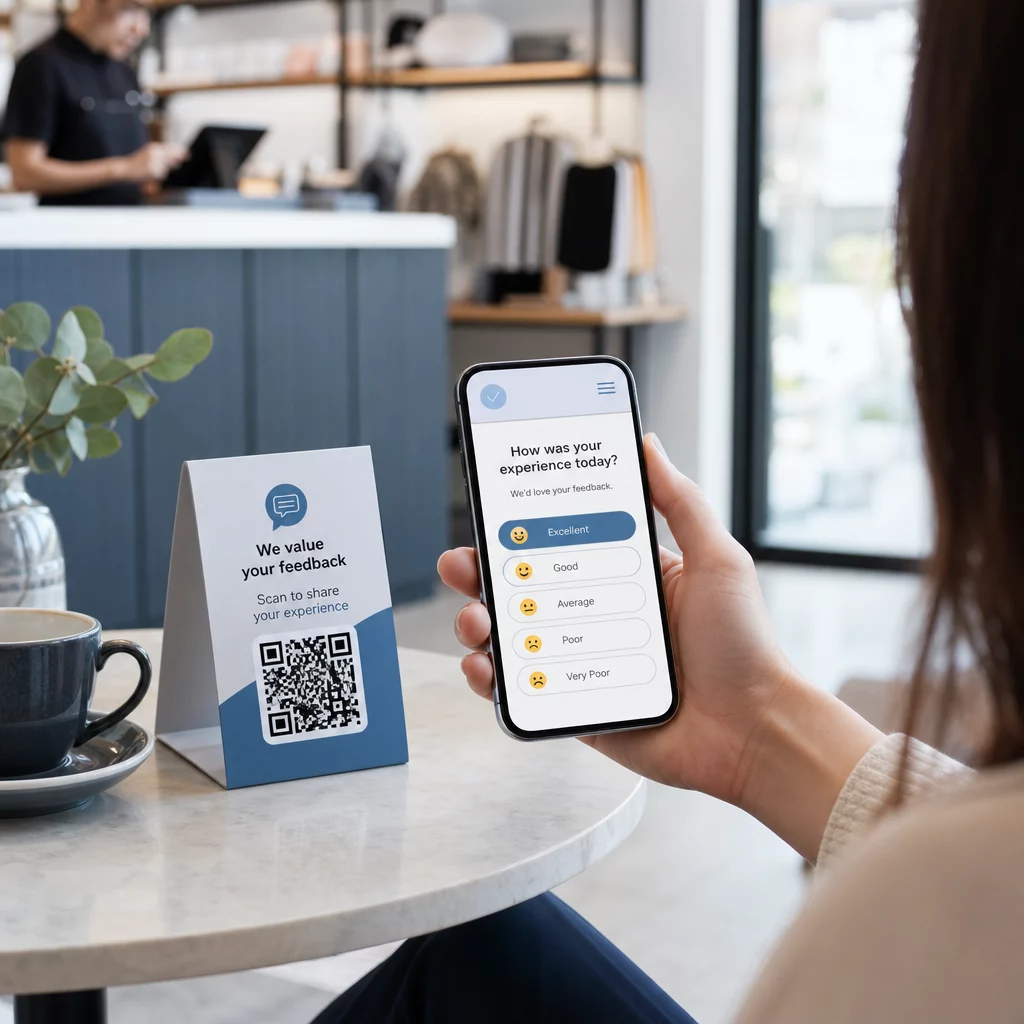
Customer scanning poll

如何创建二维码投票

Learn how to create QR code polls to gather instant feedback from mobile users. This guide covers platform choice, code design, placement, and tracking.
Updated on 6 月 10, 2026
目录

Struggling to collect feedback from customers who are standing right in front of you? Paper forms get ignored, and long survey URLs are never typed in. This guide walks you through how to create a QR code poll from scratch – covering platform choice, code generation, design, placement, and tracking – so you can start gathering responses immediately.

Why QR Code Polls Work for Offline and Mobile Audiences

The core problem with traditional surveys is friction. Typing a URL on a mobile keyboard is annoying enough that most people skip it. A QR code removes that barrier entirely – one scan opens the poll directly in a browser, no app required.

This matters especially in physical settings: restaurants, retail stores, events, clinics, and classrooms. Your audience is already present and engaged. A well-placed QR code captures that moment before it passes.

A few reasons QR code polls consistently outperform paper and email alternatives:

  • Speed: Survey completion times are measurably faster because there is no manual URL entry or form distribution step.
  • Reach: QR code usage continues to grow in the US, with scan volumes rising year over year – meaning your audience already knows how to interact with them.
  • Real-time data: Responses arrive instantly, so you can act on feedback the same day rather than waiting for a batch export.
  • 可追踪性: 动态 QR 码 record scan counts, device types, geographic locations, and timestamps, giving you behavioral context alongside the survey answers themselves.

How to Create a QR Code Poll: Step-by-Step

Step 1: Define Your Poll Objectives

Before building anything, clarify what you want to learn and how you’ll measure success. Vague goals produce vague questions. Ask yourself:

  • Are you measuring satisfaction after a purchase or service interaction?
  • Are you gathering opinions during or after an event?
  • Are you running product research to inform a future decision?

Your objective also shapes the timing and format of the poll. A post-purchase survey on a receipt needs different questions than a live event poll projected on a screen. Decide upfront what a successful response rate or insight looks like so you can evaluate the campaign later.

Step 2: Build the Poll on a Survey Platform

Use a reliable survey platform to build your questions. Google表格 is a straightforward, free option that integrates with Google Sheets for easy data review. For more advanced logic, custom branding, or detailed analytics at the form level, Typeform or SurveyMonkey are strong alternatives.

When designing your questions, keep mobile users front of mind – which is nearly everyone who will scan the code. Follow these principles:

  • Keep it short. Aim for under two minutes to complete. Longer polls lose respondents on mobile before they reach the end.
  • One idea per question. Avoid double-barreled questions that ask two things at once (for example, “Was our service fast and friendly?” should be two separate questions).
  • Use plain language. Reduce the word count in each question without sacrificing meaning.
  • Stay neutral. Avoid phrasing that steers respondents toward a particular answer.
  • Balance your scales. If you use rating scales, include an equal number of positive and negative options and a clearly defined midpoint.

Once the poll is complete, generate a shareable link. In Google Forms, click 发送, then select the link icon to copy the URL.

Step 3: Convert the Poll Link into a QR Code

With your poll URL ready, paste it into a QR code generator. Pageloot’s 链接二维码生成器 handles this in seconds – paste the URL, and a scannable code appears immediately.

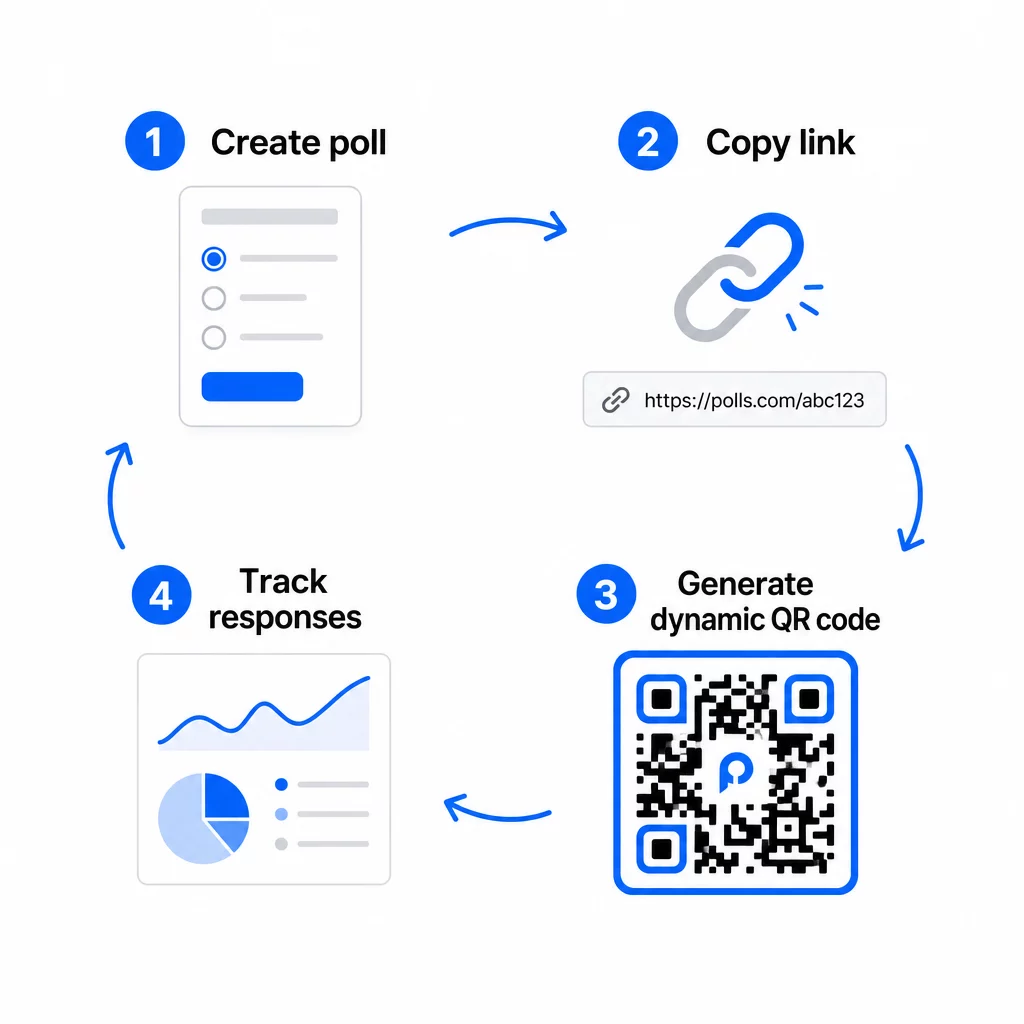
QR poll workflow

At this stage, you also need to decide between a static and a dynamic QR code.

功能 静态二维码 动态二维码
创建后可编辑 没有
扫描跟踪和分析 没有
URL length in pattern Long, dense Short, clean
Scanning speed Slower Faster
Campaign updates Requires new code 随时更新目标

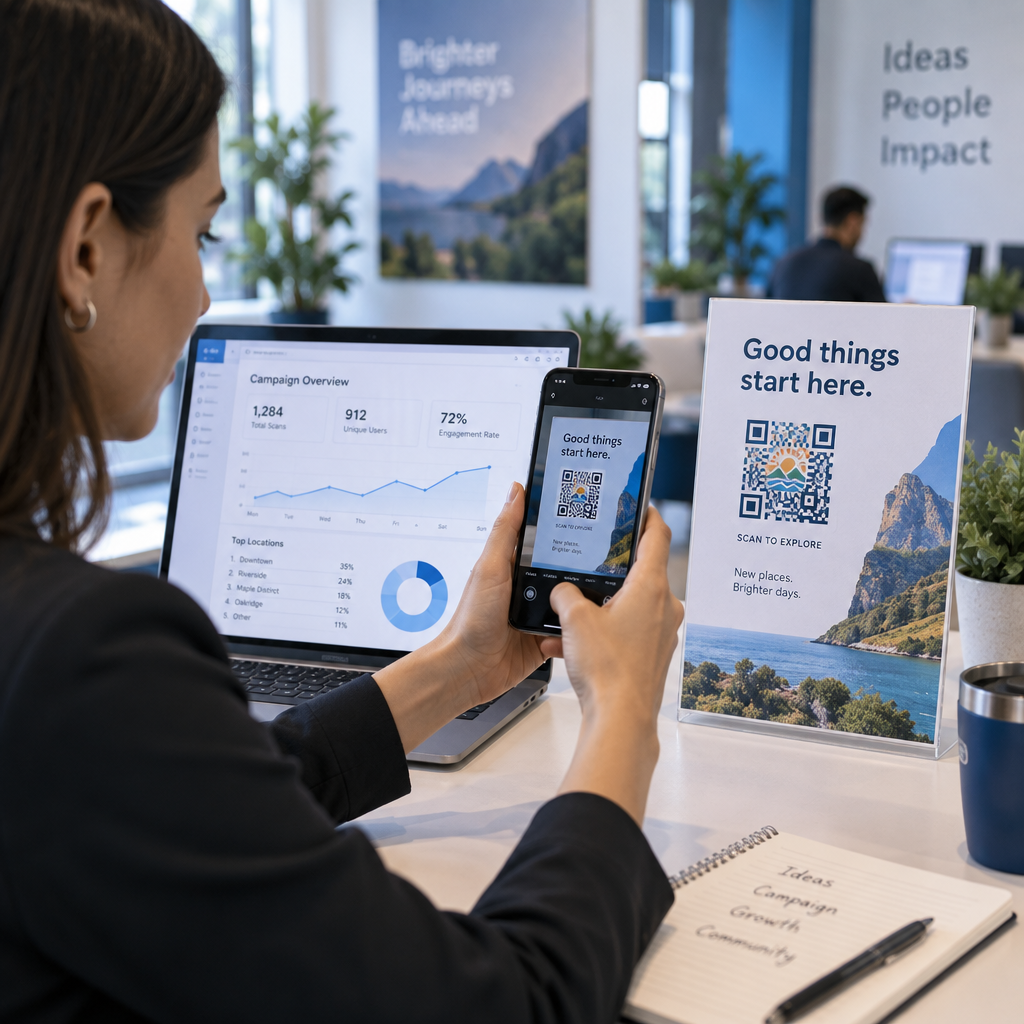
For most poll campaigns, dynamic QR codes are the better choice. You can update the destination URL after the code is already printed – useful if you need to swap a closed poll for a new one, extend a deadline, or redirect to a follow-up survey. Dynamic codes also unlock 扫描分析 including scan count, location, device type, and time of scan.

Track Every Scan From Your QR Code Poll Want to see which locations drive the most responses and when engagement peaks? Use Pageloot’s 二维码生成器 to create a dynamic poll code with built-in tracking and a centralized analytics dashboard.

Step 4: Customize the QR Code for Your Brand

A plain black-and-white QR code works, but a branded one performs better. Adding your logo and brand colors signals that the code is legitimate, which increases the likelihood that someone will actually scan it.

Practical design guidelines:

  • 使用一个 浅色背景上的深色前景. Black on white is the most reliable. Dark blue or dark green on white also work well. Never invert this – light on dark causes scanning failures.
  • Maintain high contrast throughout. Low contrast is one of the most common reasons QR codes fail to scan.
  • Add your company logo to the center of the code. This builds trust at a glance without affecting scannability, as long as the logo doesn’t cover more than roughly 30% of the pattern.
  • Include a call-to-action near (not inside) the code – something like “Scan to share your feedback” or “Take our 60-second poll.” This tells people why they should scan and what to expect.
  • For printed materials, keep the code at least 0.8 × 0.8 inches (2 × 2 cm) for close-range scanning. For posters or signage viewed from further away, apply the 10:1 rule: the code’s width should be at least one-tenth of the expected scanning distance.
  • Preserve a 静区 – at least four blank modules on all sides of the code. No text, logos, or color bleed should intrude into this border.

For more on placement and sizing, the QR code placement guide for marketing covers every major format in detail.

Step 5: Test the Code Before Deploying

Testing is non-negotiable. A QR code that fails to scan in the field wastes your printing budget and frustrates the people you’re trying to reach.

Test across:

  • Multiple devices: Both iOS and Android, and at least one older smartphone model.
  • Multiple apps: Built-in camera apps and third-party scanner apps.
  • Multiple conditions: Different lighting (including outdoor glare), different distances, and different angles.
  • Multiple browsers: Confirm the poll loads and displays correctly in Safari, Chrome, and other common browsers.

If you’re using a dynamic code, verify that the destination URL is live and that the form submits successfully from a mobile browser before you deploy.

Step 6: Deploy in the Right Locations

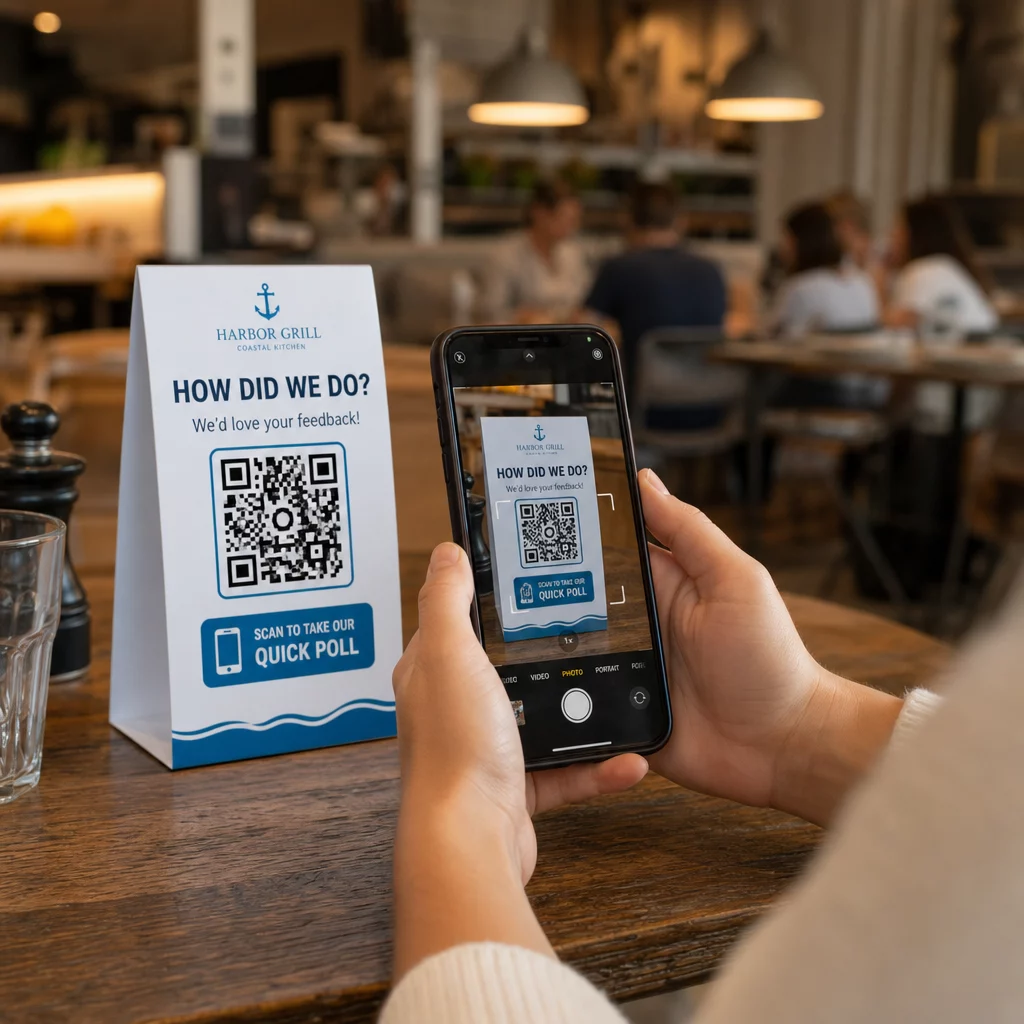
Where you place the QR code directly determines how many responses you collect. 用于客户反馈的二维码 work best when they appear at natural pause points in the customer journey – moments when someone has time, context, and motivation to respond.

Scanning feedback poll

Strong placement examples:

  • Table tents or placemats in restaurants, placed where diners naturally look during or after a meal
  • Receipts or packaging included with a purchase, prompting feedback while the experience is fresh
  • Signage near exits of retail stores or event venues, capturing impressions on the way out
  • Registration desks or check-in areas at events, where attendees have a moment before moving on
  • Presentation slides at conferences, displayed for 15–20 seconds with a verbal prompt to scan

Keep codes at eye level (roughly 3.5–5.5 feet from the ground) and away from reflective or curved surfaces that distort scanning. Avoid placing codes in low-light areas, behind glass, or at awkward angles. Each placement location should include a brief explanation of the poll’s purpose and an honest estimate of how long it takes to complete.

Privacy and Data Consent

When your poll collects personal data – names, emails, or any responses that could identify an individual – you have legal and ethical obligations. U.S. privacy law is a patchwork of federal and state regulations, but common requirements include obtaining consent before collecting data, explaining how it will be used, and securing it appropriately.

Practical steps to stay compliant:

  • Add a consent question at the start of the poll that explains what data is being collected, why, how long it will be retained, and who to contact with questions. Route refusals so no data is collected from those who decline.
  • Use HTTPS links only. The “https://” prefix confirms that data is transmitted with SSL/TLS encryption.
  • Choose survey platforms and QR code generators that do not store unnecessary user data.
  • If your poll is displayed publicly, check codes periodically to make sure they have not been tampered with or replaced.
  • For sensitive topics, consider password-protecting the poll or using access controls. Dynamic QR codes let you update these settings without reprinting materials.

Measuring Poll Performance

Once your campaign is live, use analytics to understand what is working and what needs adjustment. Dynamic QR codes give you access to metrics that go well beyond a simple response count.

Key metrics to monitor:

  • Total scans vs. unique scans: A large gap between these suggests repeat visitors or accidental rescans rather than new respondents.
  • Scan-to-completion rate: If scan rates are high but poll completions are low, your poll may be too long or the first question is causing drop-off.
  • Peak scan times: Timestamps show when engagement is highest, which can inform when to run future campaigns or when to staff follow-up responses.
  • Geographic breakdown: If most scans come from one location but you’re targeting multiple sites, adjust placement or signage at underperforming locations.
  • Device data: Confirms whether your mobile-first design is serving your actual audience correctly.

Adding UTM parameters to your poll URL before generating the code allows you to pull this data into Google Analytics alongside your broader marketing metrics, connecting QR poll engagement to the rest of your campaign reporting.

If you’re running multiple placements simultaneously, treat them as a natural A/B test. Compare scan and completion rates across locations to identify which contexts drive the strongest participation, then concentrate future efforts there.

Connect Poll Data to Your Marketing Stack 使用Pageloot的 tracking and analytics features to monitor scan behavior across all your QR code placements, then adjust campaigns in real time – without reprinting a single material.

整合所有要素

QR code polls are most effective when every element is intentional: a focused objective, a short and mobile-friendly form, a well-designed dynamic code, a placement that fits the customer journey, and analytics that tell you how to improve the next campaign.

Pageloot QR码生成器 gives you everything you need in one platform – dynamic codes, branding options, and real-time scan data. Start with a free account and have your first poll live in under fifteen minutes.

常见问题

What is the difference between a static and dynamic QR code for polls?

A static QR code embeds the destination URL permanently into the code pattern. Once printed, it cannot be changed and does not track scans. A dynamic QR code uses a short redirect URL, which means you can update the poll destination at any time – even after materials are already printed – and access analytics like scan count, location, device type, and time of scan. For most poll campaigns, dynamic codes are the better choice because they allow edits and provide the data you need to measure and improve performance.

How do I keep respondent data private when using a QR code poll?

Use only HTTPS-secured poll links to ensure data is encrypted in transit. Add a consent question at the start of the survey explaining what data is collected, why, and how long it is retained. Choose survey platforms and QR code generators that minimize unnecessary data storage. If the poll is displayed in a public space, check periodically that the code has not been tampered with. For polls covering sensitive topics, use password protection or access controls – dynamic QR codes let you update these settings without reprinting.

How large does a QR code need to be for reliable scanning?

The minimum recommended size for close-range scanning is 0.8 × 0.8 inches (2 × 2 cm). For materials viewed from a greater distance, use the 10:1 rule: the QR code’s width should be at least one-tenth of the expected scanning distance. A code viewed from five feet away should be at least six inches wide. Always preserve a quiet zone of at least four blank modules on all sides of the code, and test scanning under real conditions before deploying at scale.

关于作者

Siim Kostabi 是 Pageloot 的内容主管,负责撰写关于我们创新型二维码生成器服务的文章。凭借五年多来在二维码领域积累的深厚专业知识,Siim 是该领域的专家。他致力于利用二维码技术简化和增强数字交互,并取得了显著的成果。.

类别
了解更多关于
Scanning fashion hangtag
的QR码 时尚品牌
选择二维码类型
如何使用 动态二维码
QR QR码的#1解决方案

如果您需要在线创建QR码,则可以 制作二维码 就在这里免费!
Pageloot是 #1转到解决方案 创建和扫描QR码。

BL-0018

受到超过 20,000 个品牌的信赖,可获得更多销售、评论和关注者。

客户徽标
受到顶级品牌的信赖
评分为 4.8(共 5)

4.86 / 5 星评级

雨果·劳伦特
雨果·劳伦特
餐馆老板
有史以来最容易和最可靠的QR码生成器。PDF文件可以立即上传。我们的餐厅菜单现在是数字化的。
卢卡斯-詹森
卢卡斯-詹森
房地产开发商
这是一个很好的工具,二维码带你到你想要的地方。我们只使用位置二维码,但有许多有用的功能。
艾玛-莫雷蒂
艾玛-莫雷蒂
零售产品
易于使用和快速。它工作得很好,创造了一个完美的图像,所以员工可以下载我的vCard。
雨果·劳伦特
雨果·劳伦特
餐馆老板
有史以来最容易和最可靠的QR码生成器。PDF文件可以立即上传。我们的餐厅菜单现在是数字化的。
卢卡斯-詹森
卢卡斯-詹森
房地产开发商
这是一个很好的工具,二维码带你到你想要的地方。我们只使用位置二维码,但有许多有用的功能。
艾玛-莫雷蒂
艾玛-莫雷蒂
零售产品
易于使用和快速。它工作得很好,创造了一个完美的图像,所以员工可以下载我的vCard。
查看更多QR码
QR table tent
开启QR码 餐桌帐篷
将一切转化为数字体验 不到3分钟。

免费试用 14 天。

无需信用卡。

首次购买可享受 30% 折扣

使用代码:

分享您的 MP3 文件

注册以创建 PDF QR 码

上传和显示你需要的一切。

  • 音频文件
  • 播客
  • 音乐

注册即可享 14 天免费试用。.
试用期结束后,二维码将失效。.

注册以创建音频 mp3 二维码

使用边框获得更多扫描

注册以向您的二维码添加更多框架

呼叫行动框架帮助您的客户与QR码轻松互动。试试吧!

注册即可享 14 天免费试用。.
试用期结束后,二维码将失效。.

注册以向您的二维码添加更多框架

使用形状添加更多样式

注册以创建更多形状

二维码不一定是方形的。试着改变它以适应你的品牌形象。

注册即可享 14 天免费试用。.
试用期结束后,二维码将失效。.

注册以创建更多形状

为您的二维码添加徽标

注册以将您的徽标添加到二维码中

通过在二维码上添加你的标志和品牌,使你的二维码脱颖而出。

注册即可享 14 天免费试用。.
试用期结束后,二维码将失效。.

注册以将您的徽标添加到二维码中

智能应用商店重定向

注册以创建应用商店二维码

将您的应用程序链接添加到我们的智能应用程序商店QR码。用户会根据他们的设备被重新定向。

注册即可享 14 天免费试用。.
试用期结束后,二维码将失效。.

注册以创建应用商店二维码

将图片上传到二维码

注册以创建图像二维码

轻松分享你的图像。在几秒钟内动态地改变任何图像。

注册即可享 14 天免费试用。.
试用期结束后,二维码将失效。.

注册以创建图像二维码

分享您的 PDF 文件

注册以创建 PDF QR 码

上传和显示你需要的一切。

  • 菜单和价格表
  • 使用说明
  • 任何文件

注册即可享 14 天免费试用。.
试用期结束后,二维码将失效。.

注册以创建 PDF QR 码

稍后编辑,无需打印

注册即可编辑您的二维码,无需再次打印

动态QR码让你改变你的QR码的内容,而不需要打印新的QR码。

注册即可享 14 天免费试用。.
试用期结束后,二维码将失效。.

注册即可编辑您的二维码,无需再次打印

何时?何地?追踪您的二维码扫描

注册以追踪您的二维码

发现你的哪些二维码收到了最多的扫描,以及什么最能让你的客户兴奋。

注册即可享 14 天免费试用。.
试用期结束后,二维码将失效。.

注册以追踪您的二维码

提供可打印文件

注册以创建 PDF 和 SVG 等矢量二维码

.EPS, .PDF, .SVG

想下载高清分辨率的QR码吗?获得矢量或像素格式,可随时打印。

注册即可享 14 天免费试用。.
试用期结束后,二维码将失效。.

注册以创建 PDF 和 SVG 等矢量二维码

请等待。您的二维码是 正在加载... 正在加载...

打造专属

注册以保存您的二维码以供日后使用

通过创建具有不同颜色、标识和行动呼吁框架的出色的QR码,获得更多的扫描。

注册即可享 14 天免费试用。.
试用期结束后,二维码将失效。.

注册以保存您的二维码以供日后使用