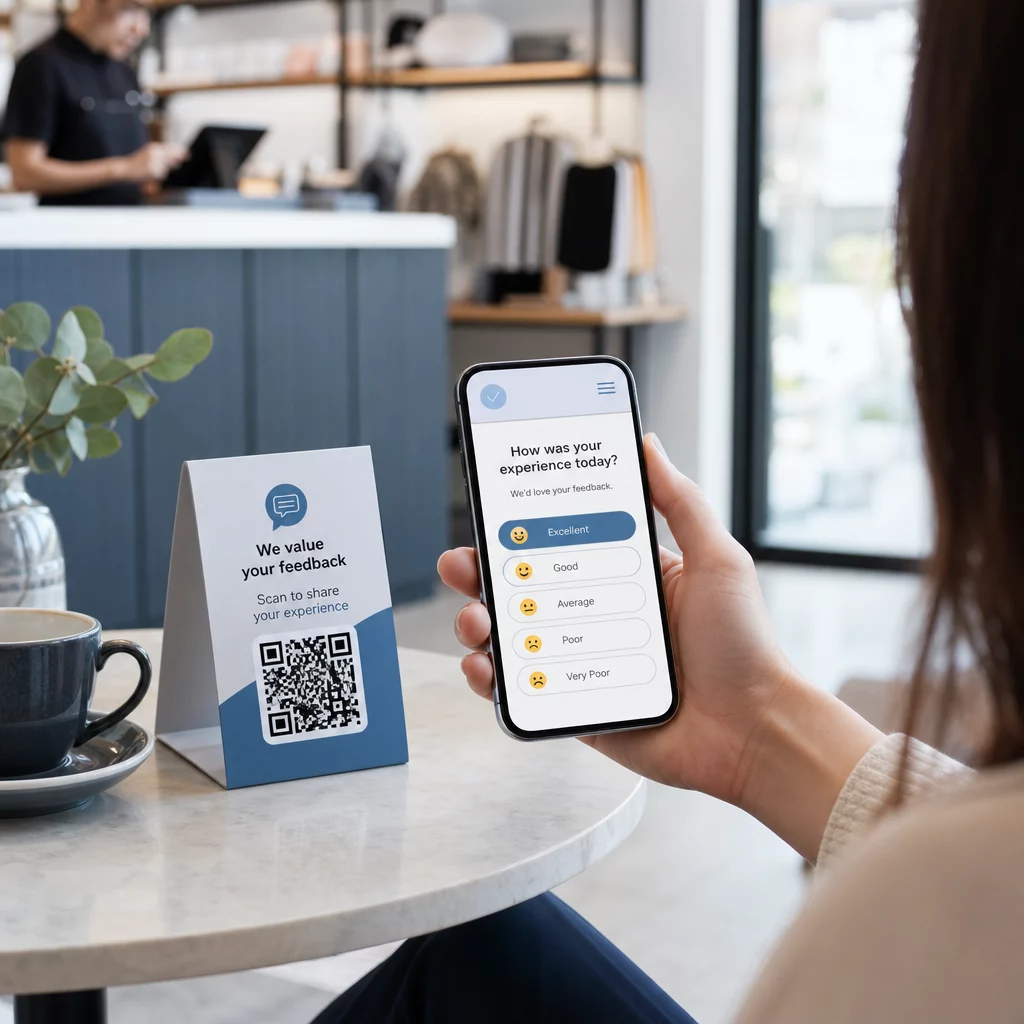
Kas teil on raskusi tagasiside kogumisega klientidelt, kes seisavad otse teie ees? Paberivormid jäävad tähelepanuta ja pikki küsitluste URL-e ei sisestata kunagi. See juhend näitab teile, kuidas luua QR-koodi küsitlus nullist – hõlmates platvormi valikut, koodi genereerimist, disaini, paigutust ja jälgimist – et saaksite kohe vastuseid koguma hakata.
Miks QR-koodi küsitlused toimivad võrguühenduseta ja mobiilsete sihtrühmade puhul
Traditsiooniliste küsitluste põhiprobleem on hõõrdumine. URL-i sisestamine mobiilse klaviatuuriga on piisavalt tüütu, et enamik inimesi jätab selle vahele. QR-kood eemaldab selle takistuse täielikult – üks skaneering avab küsitluse otse brauseris, rakendust pole vaja.
See on eriti oluline füüsilistes keskkondades: restoranides, jaekauplustes, üritustel, kliinikutes ja klassiruumides. Teie sihtrühm on juba kohal ja kaasatud. Hästi paigutatud QR-kood tabab selle hetke enne, kui see möödub.
Mõned põhjused, miks QR-koodi küsitlused ületavad järjepidevalt paberi- ja e-posti alternatiive:
- Kiirus: Küsitluste täitmise ajad on märgatavalt kiiremad, kuna puudub käsitsi URL-i sisestamise või vormi levitamise samm.
- Ulatus: QR-koodide kasutamine jätkab USA-s kasvu, skaneerimismahud suurenevad aasta-aastalt – mis tähendab, et teie sihtrühm teab juba, kuidas nendega suhelda.
- Reaalajas andmed: Vastused saabuvad koheselt, nii et saate tagasisidele reageerida samal päeval, selle asemel et oodata partii eksporti.
- Jälgitavus: Dünaamilised QR-koodid salvestada skaneerimiste arvu, seadmetüüpe, geograafilisi asukohti ja ajatempleid, andes teile käitumusliku konteksti lisaks küsitluse vastustele endile.
Kuidas luua QR-koodi küsitlus: samm-sammult
1. samm: Määrake oma küsitluse eesmärgid
Enne millegi loomist selgitage välja, mida soovite teada saada ja kuidas edu mõõdate. Ebamäärased eesmärgid toovad kaasa ebamäärased küsimused. Küsige endalt:
- Kas mõõdate rahulolu pärast ostu või teenuse interaktsiooni?
- Kas kogute arvamusi sündmuse ajal või pärast seda?
- Kas teete tooteuuringuid, et teavitada tulevast otsust?
Teie eesmärk kujundab ka küsitluse ajastust ja formaati. Ostujärgne küsitlus kviitungil vajab teistsuguseid küsimusi kui ekraanile projitseeritud otseülekande küsitlus. Otsustage eelnevalt, milline näeb välja edukas vastamismäär või ülevaade, et saaksite kampaaniat hiljem hinnata.
2. samm: Koostage küsitlus küsitlusplatvormil
Kasutage oma küsimuste koostamiseks usaldusväärset küsitlusplatvormi. Google'i vormid on lihtne ja tasuta valik, mis integreerub Google Sheetsiga andmete hõlpsaks ülevaatamiseks. Keerukama loogika, kohandatud brändingu või vormitasandi üksikasjaliku analüüsi jaoks on Typeform või SurveyMonkey tugevad alternatiivid.
Küsimusi kujundades pidage silmas mobiilikasutajaid – mis on peaaegu kõik, kes koodi skaneerivad. Järgige neid põhimõtteid:
- Hoidke see lühike. Eesmärk on täita see alla kahe minuti. Pikemad küsitlused kaotavad mobiilis vastajaid enne, kui nad lõpuni jõuavad.
- Üks idee küsimuse kohta. Vältige kahekordseid küsimusi, mis küsivad kahte asja korraga (näiteks “Kas meie teenindus oli kiire ja sõbralik?” peaks olema kaks eraldi küsimust).
- Kasutage lihtsat keelt. Vähendage iga küsimuse sõnade arvu, ohverdamata tähendust.
- Jääge neutraalseks. Vältige sõnastust, mis suunab vastajaid kindla vastuse poole.
- Tasakaalustage oma skaalasid. Kui kasutate hindamisskaalasid, lisage võrdne arv positiivseid ja negatiivseid valikuid ja selgelt määratletud keskpunkt.
Kui küsitlus on lõppenud, looge jagatav link. Google Formsis klõpsake Saada, seejärel valige lingi ikoon URL-i kopeerimiseks.
3. samm: Teisendage küsitluse link QR-koodiks
Kui teie küsitluse URL on valmis, kleepige see QR-koodi generaatorisse. Pageloot'i Lingi QR-koodi generaator teeb seda sekunditega – kleepige URL ja skaneeritav kood ilmub kohe.
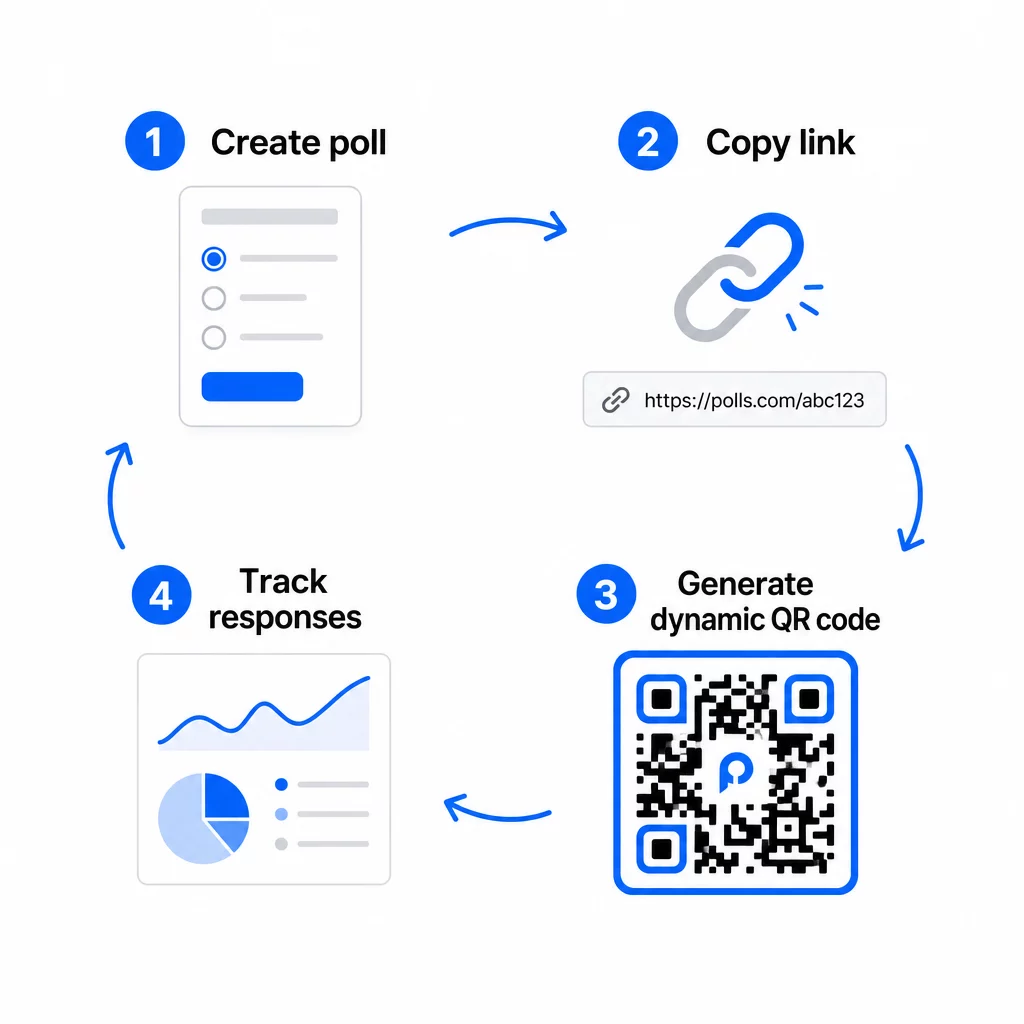
Selles etapis peate samuti otsustama staatilise ja dünaamilise QR-koodi vahel.
| FUNKTSIOON | Staatilised QR-koodid | Dünaamilised QR-koodid |
|---|---|---|
| Muudetav pärast loomist | Ei | Jah |
| Skannide jälgimine ja analüüs | Ei | Jah |
| URL-i pikkus mustris | Pikk, tihe | Lühike, puhas |
| Skaneerimiskiirus | Aeglasem | Kiirem |
| Kampaania uuendused | Nõuab uut koodi | Uuenda sihtkohta igal ajal |
Enamiku küsitluskampaaniate jaoks, on dünaamilised QR-koodid parem valik. Saate siht-URL-i värskendada pärast koodi printimist – see on kasulik, kui teil on vaja vahetada suletud küsitlus uue vastu, pikendada tähtaega või suunata järelküsitlusele. Dünaamilised koodid avavad ka skaneerimisanalüütika sealhulgas skannimiste arv, asukoht, seadme tüüp ja skannimise aeg.
Jälgige iga skannimist oma QR-koodi küsitlusest Kas soovite näha, millised asukohad toovad kõige rohkem vastuseid ja millal kaasamine haripunkti jõuab? Kasutage Pagelooti QR-koodi generaator dünaamilise küsitluskoodi loomiseks sisseehitatud jälgimise ja tsentraliseeritud analüüsi armatuurlauaga.
4. samm: kohandage QR-koodi oma brändile
Lihtne mustvalge QR-kood töötab, kuid bränditud kood toimib paremini. Oma logo ja brändivärvide lisamine annab märku, et kood on legitiimne, mis suurendab tõenäosust, et keegi selle tegelikult skannib.
Praktilised disainijuhised:
- Kasuta tumeda esiplaaniga heledal taustal. Must valgel on kõige usaldusväärsem. Tumesinine või tumeroheline valgel töötavad samuti hästi. Ärge kunagi seda pöörake – hele tumedal põhjustab skannimisvigu.
- Säilitage kõrge kontrastsus läbi. Madal kontrastsus on üks levinumaid põhjuseid, miks QR-koodid ei skaneeri.
- Lisage oma ettevõtte logo koodi keskele. See loob usaldust esmapilgul, mõjutamata skannitavust, eeldusel, et logo ei kata rohkem kui umbes 30% mustrist.
- Lisage üleskutse tegevusele koodi lähedal (mitte sees) – midagi sellist nagu “Skaneeri, et jagada oma tagasisidet” või “Osale meie 60-sekundilises küsitluses”. See ütleb inimestele, miks nad peaksid skaneerima ja mida oodata.
- Trükimaterjalide puhul hoidke kood vähemalt 0,8 × 0,8 tolli (2 × 2 cm) lähiskaneerimiseks. Plakatite või kaugemalt vaadatavate siltide puhul rakendage 10:1 reeglit: koodi laius peaks olema vähemalt üks kümnendik eeldatavast skaneerimiskaugusest.
- Säilitage vaikne tsoon – vähemalt neli tühja moodulit koodi kõikidel külgedel. Ükski tekst, logo ega värvi ülevool ei tohiks seda piiri rikkuda.
Paigutuse ja suuruse kohta leiate lisateavet QR-koodi paigutamise juhend turunduseks käsitleb üksikasjalikult iga peamist formaati.
5. samm: Testige koodi enne kasutuselevõttu
Testimine on vältimatu. QR-kood, mis ei skaneeri kohapeal, raiskab teie trükieelarvet ja frustreerib inimesi, keda proovite tabada.
Testige järgmiste tingimuste korral:
- Mitu seadet: Nii iOS-i kui ka Androidi ning vähemalt üks vanem nutitelefoni mudel.
- Mitu rakendust: Sisseehitatud kaamerarakendused ja kolmanda osapoole skannerirakendused.
- Mitu tingimust: Erinev valgustus (sh välispeegeldus), erinevad kaugused ja erinevad nurgad.
- Mitu brauserit: Kinnitage, et küsitlus laadib ja kuvatakse õigesti Safaris, Chrome'is ja teistes levinud brauserites.
Kui kasutate dünaamilist koodi, kontrollige, et siht-URL on aktiivne ja et vorm esitatakse edukalt mobiilibrauserist enne juurutamist.
6. samm: Juurutage õigetes kohtades
Kuhu te QR-koodi paigutate, määrab otseselt, kui palju vastuseid te kogute. QR-koodid klientide tagasiside jaoks töötavad kõige paremini, kui need ilmuvad loomulikes peatumispunktides kliendi teekonnal – hetkedel, kui kellelgi on aega, konteksti ja motivatsiooni vastata.
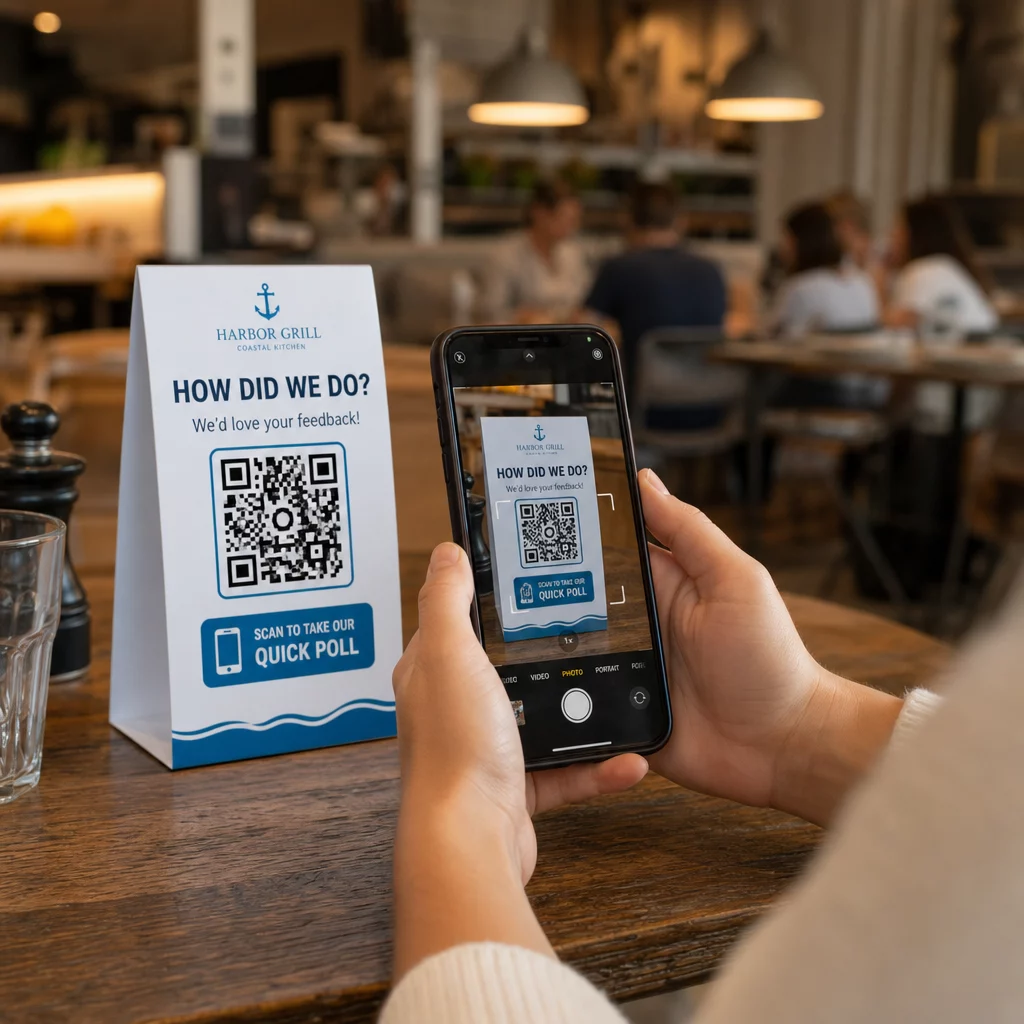
Tugevad paigutuse näited:
- Lauatelgid või lauamatid restoranides, paigutatud sinna, kuhu sööjad loomulikult vaatavad söögi ajal või pärast seda
- Kviitungid või pakendid lisatud ostuga, paludes tagasisidet, kui kogemus on värske
- Sildid väljapääsude lähedal jaekauplustes või ürituste toimumiskohtades, kogudes muljeid väljumisel
- Registreerimislauad või sisseregistreerimisalad üritustel, kus osalejatel on hetk enne edasi liikumist
- Esitlusslaidid konverentsidel, kuvatakse 15–20 sekundit koos suulise palvega skannida
Hoidke koode silmade kõrgusel (umbes 1–1,7 meetrit maapinnast) ja eemal peegeldavatest või kumeratest pindadest, mis skannimist moonutavad. Vältige koodide paigutamist hämaratesse kohtadesse, klaasi taha või ebamugavate nurkade alla. Iga paigutuskoht peaks sisaldama lühikest selgitust küsitluse eesmärgi kohta ja ausat hinnangut selle täitmiseks kuluva aja kohta.
Privaatsus ja andmete nõusolek
Kui teie küsitlus kogub isikuandmeid – nimesid, e-kirju või mis tahes vastuseid, mis võiksid isikut tuvastada –, on teil juriidilised ja eetilised kohustused. USA privaatsusõigus on föderaalsete ja osariikide määruste kogum, kuid levinud nõuded hõlmavad nõusoleku saamist enne andmete kogumist, selgitamist, kuidas neid kasutatakse, ja nende asjakohast turvamist.
Praktilised sammud vastavuse tagamiseks:
- Lisage küsitluse algusesse nõusolekuküsimus, mis selgitab, milliseid andmeid kogutakse, miks, kui kaua neid säilitatakse ja kellega küsimuste korral ühendust võtta. Suunake keeldumised nii, et keeldunutelt andmeid ei koguta.
- Kasutage ainult HTTPS-linke. Eesliide “https://” kinnitab, et andmed edastatakse SSL/TLS-krüpteeringuga.
- Valige küsitlusplatvormid ja QR-koodi generaatorid, mis ei salvesta ebavajalikke kasutajaandmeid.
- Kui teie küsitlus on avalikult kuvatud, kontrollige koode perioodiliselt, et veenduda, et neid pole rikutud või asendatud.
- Tundlike teemade puhul kaaluge küsitluse parooliga kaitsmist või juurdepääsukontrolli kasutamist. Dünaamilised QR-koodid võimaldavad teil neid sätteid värskendada ilma materjale uuesti printimata.
Küsitluse tulemuslikkuse mõõtmine
Kui teie kampaania on aktiivne, kasutage analüütikat, et mõista, mis töötab ja mis vajab kohandamist. Dünaamilised QR-koodid annavad teile juurdepääsu mõõdikutele, mis ulatuvad kaugemale lihtsast vastuste arvust.
Peamised jälgitavad mõõdikud:
- Skannimiste koguarv vs. unikaalsed skannimised: Suur vahe nende vahel viitab korduvatele külastajatele või juhuslikele kordusskannimistele, mitte uutele vastajatele.
- Skannimisest täitmiseni määr: Kui skannimismäärad on kõrged, kuid küsitluse täitmised madalad, võib teie küsitlus olla liiga pikk või esimene küsimus põhjustab loobumist.
- Tippskannimise ajad: Ajatemplid näitavad, millal kaasatus on kõige kõrgem, mis annab teavet tulevaste kampaaniate käivitamise või järelvastuste mehitamise kohta.
- Geograafiline jaotus: Kui enamik skaneeringuid pärineb ühest asukohast, kuid sihtite mitut kohta, kohandage paigutust või märgistust alatoimivates asukohtades.
- Seadme andmed: Kinnitab, kas teie mobiilipõhine disain teenindab teie tegelikku sihtrühma õigesti.
UTM-parameetrite lisamine küsitluse URL-ile enne koodi genereerimist võimaldab teil need andmed Google Analyticsi tõmmata koos laiemate turundusmõõdikutega, ühendades QR-küsitluse kaasatuse ülejäänud kampaania aruandlusega.
Kui käivitate mitu paigutust samaaegselt, käsitlege neid loomuliku A/B-testina. Võrrelge skaneerimis- ja täitmismäärasid asukohtade lõikes, et tuvastada, millised kontekstid soodustavad tugevaimat osalust, ja seejärel koondage tulevased jõupingutused sinna.
Ühendage küsitluse andmed oma turundusvirnaga Kasutage Pagelooti jälgimis- ja analüüsifunktsioonid et jälgida skaneerimiskäitumist kõigis teie QR-koodi paigutustes, seejärel kohandada kampaaniaid reaalajas – ilma ühtegi materjali uuesti trükkimata.
Kõik kokku pannes
QR-koodi küsitlused on kõige tõhusamad, kui iga element on tahtlik: keskendunud eesmärk, lühike ja mobiilisõbralik vorm, hästi disainitud dünaamiline kood, paigutus, mis sobib kliendi teekonnaga, ja analüütika, mis ütleb teile, kuidas järgmist kampaaniat parandada.
See Pageloot QR-koodi generaator annab teile kõik vajaliku ühel platvormil – dünaamilised koodid, brändinguvalikud ja reaalajas skaneerimisandmed. Alustage tasuta kontoga ja teie esimene küsitlus on otseülekandes vähem kui viieteistkümne minutiga.
Korduma kippuvad küsimused
Staatiline QR-kood manustab sihtkoha URL-i püsivalt koodimustrisse. Pärast printimist ei saa seda muuta ja see ei jälgi skaneeringuid. Dünaamiline QR-kood kasutab lühikest ümbersuunamise URL-i, mis tähendab, et saate küsitluse sihtkohta igal ajal värskendada – isegi pärast materjalide printimist – ja pääsete ligi analüütikale, nagu skaneeringute arv, asukoht, seadme tüüp ja skaneerimise aeg. Enamiku küsitluskampaaniate puhul on dünaamilised koodid parem valik, sest need võimaldavad muudatusi ja pakuvad andmeid, mida vajate jõudluse mõõtmiseks ja parandamiseks.
Kasutage ainult HTTPS-turvatud küsitluslinke, tagamaks andmete krüpteerimise edastamise ajal. Lisage küsitluse algusesse nõusolekuküsimus, selgitades, milliseid andmeid kogutakse, miks ja kui kaua neid säilitatakse. Valige küsitlusplatvormid ja QR-koodi generaatorid, mis minimeerivad ebavajalikku andmesalvestust. Kui küsitlus on avalikus ruumis kuvatud, kontrollige perioodiliselt, et koodi poleks rikutud. Tundlike teemade küsitluste puhul kasutage paroolikaitset või juurdepääsukontrolle – dünaamilised QR-koodid võimaldavad teil neid seadeid värskendada ilma uuesti printimata.
Minimaalne soovitatav suurus lähiskaneerimiseks on 0,8 × 0,8 tolli (2 × 2 cm). Suuremalt kauguselt vaadatavate materjalide puhul kasutage 10:1 reeglit: QR-koodi laius peaks olema vähemalt üks kümnendik eeldatavast skaneerimiskaugusest. Viie jala kauguselt vaadatav kood peaks olema vähemalt kuus tolli lai. Hoidke alati koodi kõikidel külgedel vähemalt nelja tühja mooduli vaikset tsooni ja testige skaneerimist reaalsetes tingimustes enne laiaulatuslikku kasutuselevõttu.