Etkinlik katılımını manuel olarak yönetmek yavaş, hataya açık ve önemli sistemlerden kopuktur. Bu kılavuz, check-in verilerini doğrudan CRM'inize aktaran, manuel girişi ortadan kaldıran ve her kişi için gerçek zamanlı bir katılım kaydı sağlayan dinamik QR kodlarını nasıl oluşturacağınızı gösterir.
Dinamik QR Kodları CRM Check-In'leri İçin Neden İşe Yarar?
Statik bir QR kodu sabit bir URL'yi kodlar ve basıldıktan sonra izlenemez veya değiştirilemez. Bir dinamik QR kodu, aksine, aracı olarak kısa bir yönlendirme bağlantısı kullanır. Bu hedefi yeniden yazdırmadan istediğiniz zaman güncelleyebilir ve her tarama zaman damgası, cihaz türü ve coğrafi konum dahil verilerle kaydedilir.
CRM check-in'leri için bu ayrım son derece önemlidir. Her katılımcı, kendi kişi kaydına bağlı benzersiz bir dinamik kod aldığında, kapıda taramak aynı anda üç şey yapar: kimliği doğrular, katılımı işaretler ve verileri CRM'inize aktarır – tüm bunlar bir personel üyesinin hiçbir şey yazmasına gerek kalmadan gerçekleşir.
HubSpot gibi platformlar, pazarlama etkinlikleri araçları aracılığıyla bireysel kişi kayıtlarına karşı kayıt durumunu, katılım durumunu, iptalleri ve gelmeyen göstergelerini izler. Form tabanlı check-in'leri kullanan sistemler, kişinin benzersiz kimliğini form URL'sine ekleyerek mevcut bir kişi kaydını güncelleyebilir, böylece gönderim doğru profille birleşir ve bir kopya oluşturulmaz. Aynı mantık, özel bir etkinlik platformu veya form entegrasyonlarına sahip genel amaçlı bir CRM kullanıyor olsanız da geçerlidir.
İş akışınızı oluşturmadan önce kod türleri arasındaki tüm farkı anlamak için, karşılaştırmasına bakın: statik ve dinamik QR kodları.
Dakikalar İçinde İzlenebilir Check-In Kodları Oluşturun Kullan Dinamik QR Kod Oluşturucu etkinlik formlarınıza ve CRM iş akışlarınıza doğrudan bağlanan düzenlenebilir, analize hazır QR kodları oluşturmak için.
Başlamadan Önce İhtiyacınız Olanlar
Tek bir kod oluşturmadan önce, üç şeyin hazır olduğundan emin olun:
- URL parametrelerini kabul eden bir CRM web formu. Çoğu CRM ve form aracı – Google Forms, HubSpot formları ve benzeri platformlar dahil – URL'deki sorgu dizeleri aracılığıyla değerler geçirerek alanları önceden doldurmanıza olanak tanır (örn. `?email=değer&first_name=değer`). İş akışını oluşturmadan önce formunuzun bunu desteklediğini onaylayın.
- Birleştirme alanlarına sahip kişi kayıtları. CRM'inizin mevcut kişi kayıtlarından e-posta, ad ve soyad gibi verileri çekebilmesi ve bu değerleri dinamik olarak bir URL şablonuna ekleyebilmesi gerekir.
- Analiz özellikli dinamik bir QR kod oluşturucu. Kişi başına benzersiz kodlar üreten, her taramayı takip eden ve yeniden yazdırmadan hedefleri güncellemenizi sağlayan bir platforma ihtiyacınız var. Bu katılım QR kod aracı tam olarak bu kullanım durumu için tasarlanmıştır.
Adım Adım: CRM Girişleri İçin Dinamik QR Kodları Oluşturma
Giriş Formunuzu Kurun
CRM'inizde veya form aracınızda, giriş sırasında ihtiyacınız olan verileri yakalayan alanlarla bir web formu oluşturun: minimumda, e-posta adresi, ad ve soyadı. Google Formlar kullanıyorsanız, bu Google Form QR Kod Oluşturucu formunuza doğrudan bağlantı kurmanızı ve gönderimlerle birlikte taramaları takip etmenizi sağlar.
Formunuz ayrıca yeni bir kayıt oluşturmak yerine mevcut bir kişi kaydını güncelleyecek şekilde yapılandırılmalıdır. Buna izin veren sistemlerde, URL'ye bir kişi tanımlayıcısı eklemek – örneğin `?contact_id={{contact.id}}` gibi – form gönderimini doğru CRM kaydına otomatik olarak bağlar.
Birleştirme Alanlarıyla Dinamik URL'yi Oluşturun
Dinamik bir giriş URL'si, her bir kişinin verilerini sorgu parametreleri olarak eklemek için CRM'inizin birleştirme alanı sözdizimini kullanır. Bir şablon şöyle görünür:
“`
https://yourform.com/checkin?email=[Contact.Email]&firstname=[Contact.FirstName]&lastname=[Contact.LastName]
“`
CRM'iniz bu şablonu bireysel bir kişi için işlediğinde, yer tutucular gerçek değerlerle değiştirilir:
“`
https://yourform.com/[email protected]&firstname=Jane&lastname=Smith
“`
Kesin birleştirme alanı sözdizimi CRM'inize bağlıdır. Keep/Infusionsoft köşeli parantez stili etiketler kullanır; HubSpot kendi kişiselleştirme belirteci formatını kullanır. Doğru sözdizimi için platformunuzun belgelerini kontrol edin.
URL'yi Doğru Şekilde Kodlayın
URL'ler, kodlanmamış özel karakterler içerdiğinde bozulur. Parametre içindeki boşluklar, '&' işaretleri ve eşittir işaretleri değerleri tarayıcıların ve QR kod okuyucularının bunları doğru yorumlaması için yüzde ile kodlanmalıdır. Yaygın dönüşümler şunları içerir:
- Space → `%20`
- Ampersand (`&`) → `%26`
- Equal sign (`=`) → `%3D`
Çoğu CRM platformu, birleştirme alanı çıktısına uygulayabileceğiniz bir URL kodlama işlevi içerir. Kullanın. Bir kişinin adındaki tek bir kodlanmamış karakter – örneğin bir şirket adındaki ampersan işareti gibi – o katılımcı için tüm giriş akışını sessizce bozabilir.
Kişi Başına Benzersiz Dinamik Bir QR Kodu Oluşturun
Kodlanmış URL şablonu hazır olduğunda, her katılımcı için bir dinamik QR kodu oluşturun. Her kod, o kişinin önceden doldurulmuş form URL'sine işaret eder. Bunlar dinamik kodlar olduğu için, hedefinizi daha sonra güncelleme yeteneğini korursunuz – bu, kodlar dağıtıldıktan sonra form URL'niz değişirse faydalıdır.
Büyük etkinlikler için çoğu CRM platformu ve e-posta otomasyon aracı toplu kod oluşturmayı destekler: URL şablonunu birleştirin, kodlayın ve bir dizi halinde her kişi için QR kodu oluşturmayı tetikleyin. Ortaya çıkan kod daha sonra katılımcının kayıt detaylarıyla birlikte onay e-postasına dahil edilir.
Bu Etkinlik QR Kod Oluşturucu bu iş akışını destekler ve dağıtımdan önce kodun görünümünü – etkinlik markanızı, logonuzu veya renk şemanızı ekleyerek – özelleştirmenize olanak tanır.
Dağıtın ve Kapıda Uygulayın
Her katılımcıya benzersiz QR kodunu onay e-postalarında gönderin. Etkinlik girişinde, bir personel üyesi kodu herhangi bir standart akıllı telefon kamerası kullanarak tarar. Tarama, önceden doldurulmuş formu açar, katılımcı onaylar veya gönderir ve CRM kaydı katılım zaman damgası ile güncellenir.
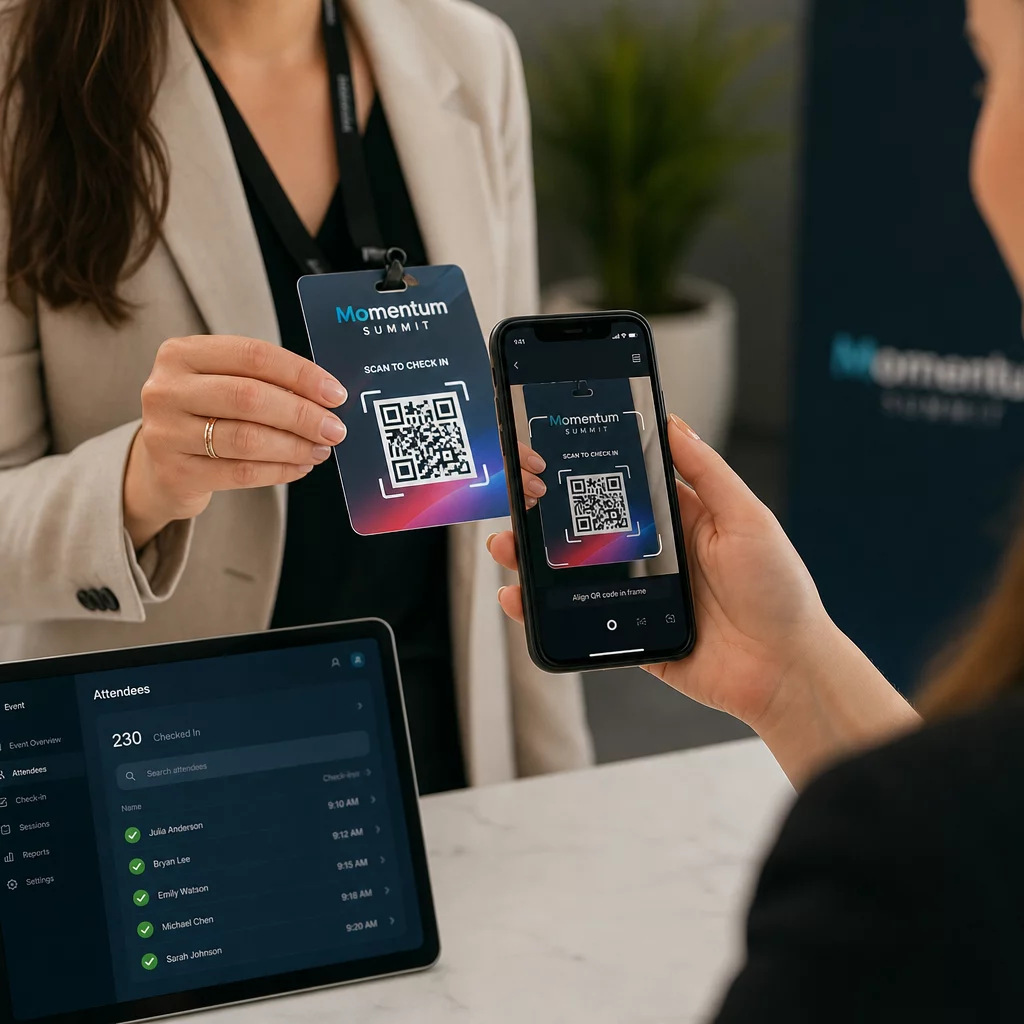
Daha büyük etkinlikler için özel tarama istasyonları kurmayı düşünün. Personeli, tarama cihazını koddan yaklaşık 30 cm uzakta tutmaları ve düşük ışıklı ortamlarda kamera flaşını etkinleştirmeleri konusunda eğitin. Kodları rozetlere veya bilekliklere basıyorsanız, taramayı engelleyebilecek parlamayı önlemek için parlak yüzeyler yerine mat malzemeler kullanın. Fiziksel dağıtım en iyi uygulamaları hakkında daha fazla ayrıntı şurada mevcuttur: etkinlik girişleri için QR kodlarına nihai rehber.
Katılım Verileri CRM'inize Nasıl Akar
Giriş taraması, güncellenmiş bir kişi kaydıyla sonuçlanan bir olay zincirini tetikler. Her adımda olanlar şunlardır:
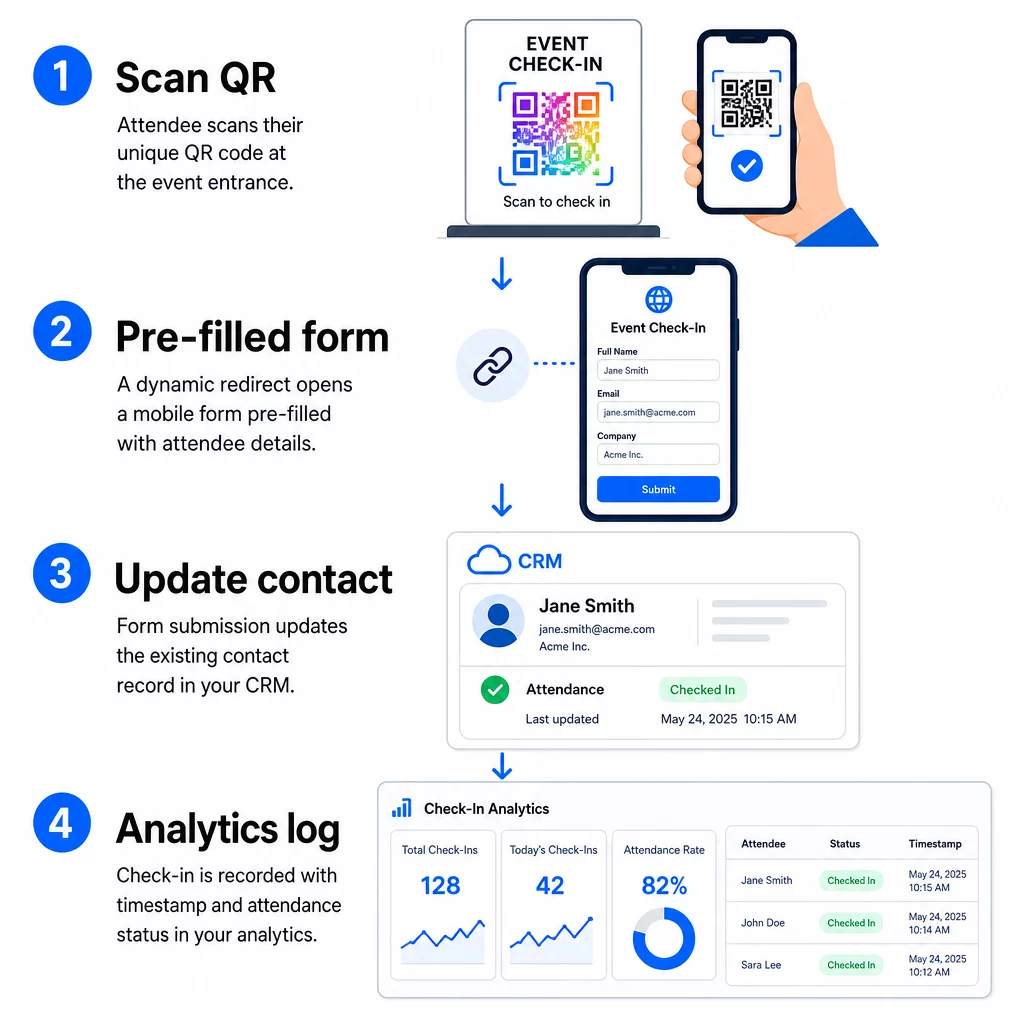
- Katılımcının benzersiz QR kodu girişte taranır.
- Dinamik yönlendirme, önceden doldurulmuş check-in formunu katılımcının tarayıcısında yükler.
- Katılımcı formu gönderir (veya kısa bir onayın ardından form otomatik olarak gönderilir).
- İletişim kişisinin benzersiz kimliğine bağlı form gönderimi, mevcut CRM kaydını check-in durumu, zaman damgası ve yakalanan ek alanlarla günceller.
- CRM'iniz webhook tabanlı otomasyonu destekliyorsa, gönderim aynı anda sonraki eylemleri tetikleyebilir: bir takip görevi atama, etkinlik sonrası e-posta gönderme veya kampanya durumunu güncelleme.
HubSpot gibi platformlar, katılım durumlarını – Kayıtlı, Katıldı, Gelmedi, İptal Edildi – doğrudan iletişim kişisinin pazarlama etkinlikleri kartında saklar ve ekibinize her iletişim kişisi için manuel mutabakat olmaksızın tam bir katılım geçmişi sunar. Taramaları otomatik CRM eylemlerine daha geniş bir şekilde nasıl bağlayacağınızı öğrenmek için şu kılavuza bakın: QR kodu tarama iş akışı otomasyonu.
Analizlerle Check-In Performansını İzleme
Dinamik kodlar kullandığınız için, her tarama yalnızca tamamlanmış bir form değil, analiz verileri de üretir. QR kod panonuz şunları yakalar:
- Toplam tarama sayısı ve benzersiz tarama sayısı – birinin kodunu birden fazla tarayıp taramadığını belirlemek için kullanışlıdır
- Tarama zaman damgaları – varış modellerini yeniden oluşturmanıza ve yoğun check-in dönemlerini belirlemenize olanak tanır
- Cihaz türü ve işletim sistemi – check-in formunuzun mobil deneyimini optimize etmenize yardımcı olur
- Coğrafi konum – taramaların beklenen mekanda gerçekleştiğini doğrular
Bu veriler, CRM katılım kayıtlarınızın yanında yer alır ve size ikinci bir doğrulama katmanı sunar. Bir iletişim kişisinin form gönderimi başarısız olduysa ancak QR taraması kaydedildiyse, araştırabileceğiniz bir kaydınız olur. Ne ölçüleceği ve buna göre nasıl hareket edileceği hakkında daha derinlemesine bir bakış için şu kılavuz: kurumsal QR kod analizi ve temel metrikler tüm resmi kapsar.
Ayrıca şunları yapabilirsiniz QR kodu taramalarını ve analizlerini takip edin kampanya düzeyinde, birden fazla giriş noktasındaki performansı karşılaştırmak için etkinliğe, tarih aralığına veya bireysel koda göre segmentlere ayırın.
Katılımı Gerçek Zamanlı İzleyin Kimlerin, ne zaman ve hangi konumdan taradığını tam olarak görün. Şunu kullanın: Katılım QR Kodu aracı tam tarama analiziyle birlikte giriş kodlarını dağıtmak için.
Yaygın Sorunlar ve Bunları Nasıl Giderebilirsiniz
Birleştirme alanı ikamesinden sonra bozuk URL'ler. Katılımcılara kod göndermeden önce kodlanmış URL'nizi her zaman gerçek kişi verileriyle test edin. Adları veya e-posta adresleri özel karakterler içeren kişilere özellikle dikkat edin.
Girişte oluşturulan yinelenen CRM kayıtları. Bu, form URL'sinin kişi tanımlayıcısını taşımaması durumunda meydana gelir. URL şablonunuza kişi kimliği parametresini ekleyin ve CRM'inizin yeni bir kayıt oluşturmak yerine o alana göre eşleşecek şekilde yapılandırıldığını onaylayın.
Dağıtımdan sonra çalışmayı durduran QR kodları. Dinamik kodların değerini kanıtladığı yer burasıdır. Form URL'niz değişirse – form araçlarını değiştirdiğiniz veya alan adınızı güncellediğiniz için – QR kodu yönetim panonuzdaki hedefi, katılımcılara yeni kodlar dağıtmadan güncelleyebilirsiniz.
Doğru tarayan ancak formu önceden doldurmayan kodlar. Form aracınızın belirli sorgu parametre adları gerektirip gerektirmediğini kontrol edin. Bazı platformlar `email` kullanırken, diğerleri `entry.12345` (Google Formlar) veya özel bir alan anahtarı gerektirir. URL şablonunuzu form aracınızın beklenen parametre adlarıyla hizalayın.
Girişte düşük ışıkta tarama hataları. Basılı QR kodlarınızın 10:1 boyut-mesafe oranını karşıladığından emin olun: 10 inç uzaktan taranan bir kod en az 1 inç genişliğinde olmalıdır. Yüksek kontrastlı baskı kullanın – beyaz bir arka plan üzerinde koyu modüller – ve parlak kağıt veya laminattan kaçının.
Önemli Çıkarımlar
CRM girişleri için dinamik QR kodları, her kodun hedef URL'sinde kodlanmış bir kişinin kimliğini taşıması, bu verileri mevcut bir kayda bağlı bir forma yönlendirmesi ve taramanın kendisini ayrı bir analiz olayı olarak kaydetmesi nedeniyle çalışır. Sonuç, doğru, zaman damgalı ve herhangi bir manuel veri girişi olmadan CRM'inize bağlı bir katılım kaydıdır.
Teknik gereksinimler basittir: birleştirme alanlarına ve URL parametrelerini kabul eden web formlarına sahip bir CRM, düzgün kodlanmış dinamik URL'ler ve kişi başına kod oluşturmayı ve tarama takibini destekleyen bir QR kod platformu. Bu üç öğeyi doğru bir şekilde ayarladığınızda, giriş iş akışı büyük ölçüde kendi kendine çalışır.
Giriş sisteminizi şununla oluşturmaya başlayın: Dinamik QR Kod Oluşturucu – 14 günlük deneme için kredi kartı gerekmez.
Sıkça sorulan sorular
Statik bir QR kodu, sabit bir URL'yi doğrudan desenine kodlar ve basıldıktan sonra değiştirilemez veya izlenemez. Dinamik bir QR kodu, kontrol panelinizden istediğiniz zaman güncelleyebileceğiniz kısa bir yönlendirme bağlantısı kullanır ve her tarama, zaman damgası, cihaz türü ve konum dahil verilerle kaydedilir. CRM girişleri için dinamik kodlar çok önemlidir çünkü kişi başına URL kişiselleştirmesine olanak tanır ve katılımı doğrulamak için gereken analizleri sağlar.
Kişinizin benzersiz CRM tanımlayıcısını giriş URL'sine bir sorgu parametresi olarak ekleyin – örneğin, `?contact_id={{contact.id}}`. Form gönderildiğinde, CRM'iniz bu tanımlayıcıyı gönderimi yeni bir kayıt oluşturmak yerine mevcut kayıtla eşleştirmek için kullanır. Çoğu CRM platformu, bir kişi kimliği bulunmadığında e-posta adresine göre birleştirme yapmak için bir yedek ayarına da sahiptir.
Evet. Kodlar dinamik olduğu için, QR kod yönetim panonuzda hedef URL'yi istediğiniz zaman değiştirebilirsiniz. Basılı veya dağıtılmış kod tamamen aynı kalır – yalnızca yönlendirme hedefi değişir. Bu, onay e-postaları gönderildikten sonra form URL'niz değişse bile, orijinal kodlara sahip katılımcıların yine de doğru forma ulaşacağı anlamına gelir.