Ručno upravljanje prisutnošću na događajima je sporo, sklono pogreškama i odvojeno od sustava koji su važni. Ovaj vodič pokazuje kako izraditi dinamičke QR kodove koji podatke o prijavi unose izravno u vaš CRM, eliminirajući ručni unos i pružajući vam evidenciju prisutnosti u stvarnom vremenu za svaki kontakt.
Zašto dinamički QR kodovi funkcioniraju za prijave u CRM
Statički QR kod kodira fiksni URL i ne može se pratiti niti mijenjati nakon ispisa. A dinamički QR kod, nasuprot tome, koristi kratku vezu za preusmjeravanje kao posrednika. To odredište možete ažurirati u bilo kojem trenutku bez ponovnog ispisa, a svako skeniranje bilježi se podacima uključujući vremensku oznaku, vrstu uređaja i geografsku lokaciju.
Za prijave u CRM, ta je razlika iznimno važna. Kada svaki sudionik primi jedinstveni dinamički kod povezan s njegovim kontakt podacima, skeniranje na ulazu istovremeno radi tri stvari: provjerava identitet, bilježi prisutnost i unosi podatke u vaš CRM – sve to bez da osoblje išta tipka.
Platforme poput HubSpota prate status registracije, stanje prisutnosti, otkazivanja i pokazatelje nedolaska za pojedinačne kontakt podatke putem svojih alata za marketinške događaje. Sustavi koji koriste prijave temeljene na obrascima mogu ažurirati postojeći kontakt podatak dodavanjem jedinstvenog ID-a kontakta URL-u obrasca, tako da se podnesak spaja s ispravnim profilom umjesto da stvara duplikat. Ista logika vrijedi bez obzira koristite li namjensku platformu za događaje ili CRM opće namjene s integracijama obrazaca.
Da biste razumjeli potpunu razliku između vrsta kodova prije izrade vašeg radnog tijeka, pogledajte usporedbu statičkih i dinamičkih QR kodova.
Izradite QR kodove za prijavu koji se mogu pratiti u nekoliko minuta Koristiti Dinamični QR kod generator za izradu QR kodova koji se mogu uređivati i spremni su za analitiku, a koji se izravno povezuju s vašim obrascima događaja i CRM radnim tijekovima.
Što vam je potrebno prije nego počnete
Prije generiranja ijednog koda, provjerite jesu li tri stvari na mjestu:
- CRM web obrazac koji prihvaća URL parametre. Većina CRM i alata za obrasce – uključujući Google obrasce, HubSpot obrasce i slične platforme – omogućuju vam unaprijed popunjavanje polja prosljeđivanjem vrijednosti putem upitnih nizova u URL-u (npr., `?email=value&first_name=value`). Potvrdite da vaš obrazac podržava ovo prije izrade radnog tijeka.
- Kontakt podaci s poljima za spajanje. Vaš CRM mora biti u mogućnosti povući podatke poput e-pošte, imena i prezimena iz postojećih kontakt podataka i dinamički umetnuti te vrijednosti u predložak URL-a.
- Generator dinamičkih QR kodova s analitikom. Potrebna vam je platforma koja generira jedinstvene kodove po kontaktu, prati svako skeniranje i omogućuje vam ažuriranje odredišta bez ponovnog ispisa. The 15. za QR kod za prisutnost je izgrađen upravo za ovaj slučaj upotrebe.
Korak po korak: Izgradnja dinamičkih QR kodova za CRM prijave
Postavite svoj obrazac za prijavu
Izradite web obrazac u svom CRM-u ili alatu za obrasce s poljima koja prikupljaju podatke koji su vam potrebni prilikom prijave: minimalno, adresa e-pošte, ime i prezime. Ako koristite Google obrasce, the Google obrazac QR kod generator omogućuje vam izravno povezivanje s obrascem i praćenje skeniranja uz podnošenje.
Vaš obrazac bi također trebao biti konfiguriran za ažuriranje postojećeg zapisa kontakta, a ne za stvaranje novog. U sustavima koji to dopuštaju, dodavanje identifikatora kontakta URL-u – kao što je `?contact_id={{contact.id}}` – automatski povezuje podnošenje obrasca s ispravnim CRM zapisom.
Izgradite dinamički URL s poljima za spajanje
Dinamički URL za prijavu koristi sintaksu polja za spajanje vašeg CRM-a za umetanje podataka svakog kontakta kao parametara upita. Predložak izgleda ovako:
“`
https://yourform.com/checkin?email=[Contact.Email]&firstname=[Contact.FirstName]&lastname=[Contact.LastName]
“`
Kada vaš CRM obrađuje ovaj predložak za pojedinačni kontakt, zamjenska mjesta se zamjenjuju stvarnim vrijednostima:
“`
https://yourform.com/[email protected]&firstname=Jane&lastname=Smith
“`
Točna sintaksa polja za spajanje ovisi o vašem CRM-u. Keep/Infusionsoft koristi oznake u stilu zagrada; HubSpot koristi vlastiti format tokena za personalizaciju. Provjerite dokumentaciju svoje platforme za ispravnu sintaksu.
Ispravno kodirajte URL
URLs se prekidaju kada sadrže nekodirane posebne znakove. Razmaci, ampersandi i znakovi jednakosti unutar parametra vrijednosti moraju biti postotno kodirani kako bi ih preglednici i čitači QR kodova ispravno interpretirali. Uobičajene konverzije uključuju:
- Space → `%20`
- Ampersand (`&`) → `%26`
- Equal sign (`=`) → `%3D`
Većina CRM platformi uključuje funkciju URL kodiranja koju možete primijeniti na izlaz spojenog polja. Koristite je. Jedan nekodirani znak u imenu kontakta – poput ampersanda u nazivu tvrtke – može tiho prekinuti cijeli proces prijave za tog sudionika.
Generirajte jedinstveni dinamički QR kod po kontaktu
S pripremljenim kodiranim predloškom URL-a, generirajte jedan dinamički QR kod po sudioniku. Svaki kod upućuje na URL obrasca te osobe s unaprijed popunjenim podacima. Budući da su to dinamički kodovi, zadržavate mogućnost ažuriranja odredišta kasnije – korisno ako se URL vašeg obrasca promijeni nakon što su kodovi već distribuirani.
Za velike događaje, većina CRM platformi i alata za automatizaciju e-pošte podržava masovno generiranje kodova: spojite predložak URL-a, kodirajte ga i pokrenite stvaranje QR koda za svaki kontakt u nizu. Dobiveni kod se zatim uključuje u e-poštu potvrde sudionika zajedno s njihovim podacima o registraciji.
The QR kod generator za događaje podržava ovaj tijek rada i omogućuje vam prilagodbu izgleda koda – dodavanje brendiranja vašeg događaja, logotipa ili sheme boja – prije distribucije.
Distribuirajte i implementirajte na ulazu
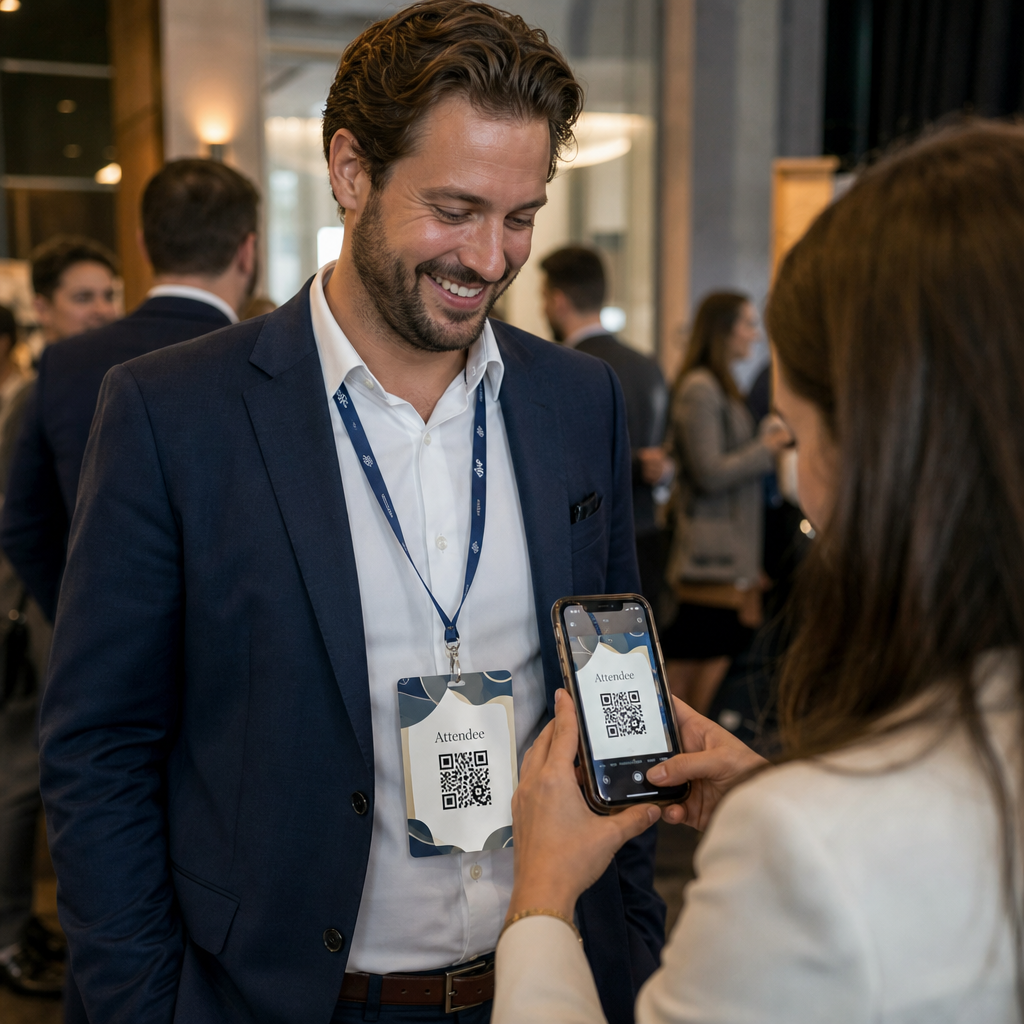
Pošaljite svakom sudioniku njihov jedinstveni QR kod u e-pošti potvrde. Na ulazu u događaj, član osoblja skenira kod koristeći bilo koju standardnu kameru pametnog telefona. Skeniranje otvara unaprijed popunjeni obrazac, sudionik potvrđuje ili šalje, a CRM zapis se ažurira s vremenskom oznakom prisutnosti.
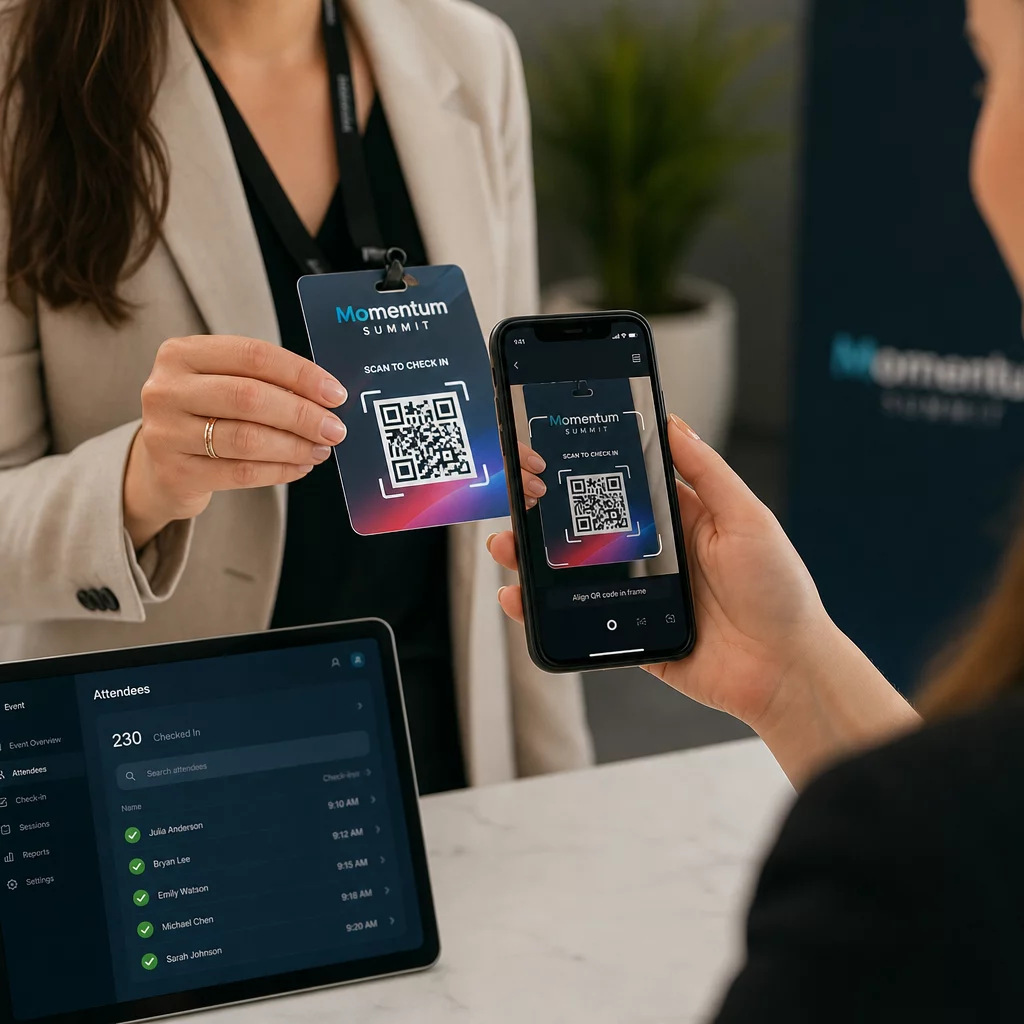
Za veće događaje, razmislite o postavljanju namjenskih stanica za skeniranje. Obučite osoblje da drži uređaj za skeniranje približno 30 cm od koda i da omogući bljeskalicu kamere u uvjetima slabog osvjetljenja. Ako ispisujete kodove na bedževima ili narukvicama, koristite mat materijale umjesto sjajnih završnih obrada kako biste spriječili odsjaj koji bi mogao ometati skeniranje. Više detalja o najboljim praksama fizičke implementacije dostupno je u ultimativni vodič za QR kodove za prijave na događaje.
Kako podaci o prisutnosti ulaze u vaš CRM
Skeniranje prijave pokreće lanac događaja koji završava ažuriranim zapisom kontakta. Evo što se događa u svakom koraku:
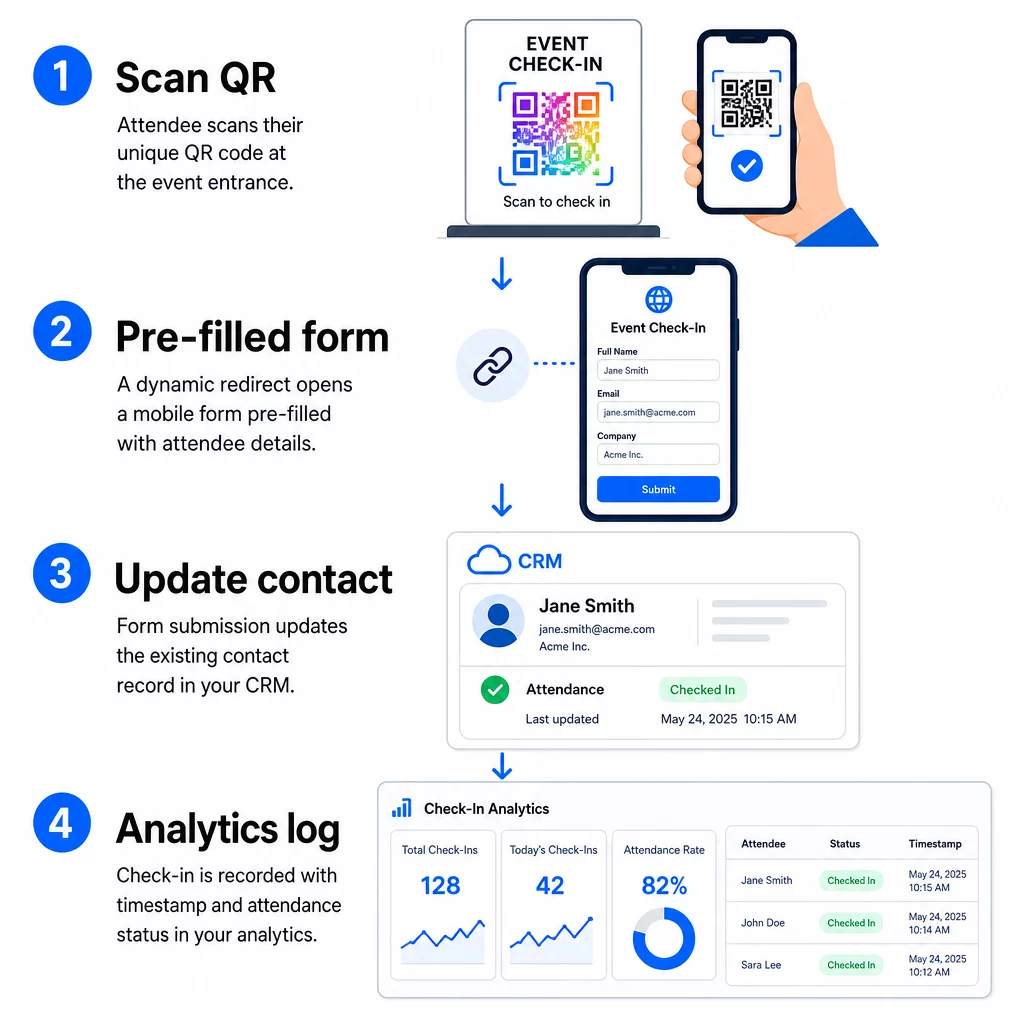
- Jedinstveni QR kod sudionika skenira se na ulazu.
- Dinamičko preusmjeravanje učitava unaprijed ispunjeni obrazac za prijavu u preglednik sudionika.
- Sudionik podnosi obrazac (ili se obrazac automatski podnosi nakon kratke potvrde).
- Podnošenje obrasca, povezano s jedinstvenim ID-om kontakta, ažurira postojeći CRM zapis sa statusom prijave, vremenskom oznakom i svim dodatnim prikupljenim poljima.
- Ako vaš CRM podržava automatizaciju temeljenu na webhookovima, podnošenje može istovremeno pokrenuti naknadne radnje: dodjeljivanje zadatka za praćenje, slanje e-pošte nakon događaja ili ažuriranje statusa kampanje.
Platforme poput HubSpota pohranjuju statuse sudjelovanja – Registriran, Prisutan, Nije se pojavio, Otkazano – izravno na kartici marketinških događaja kontakta, dajući vašem timu potpunu povijest prisutnosti za svaki kontakt bez ikakvog ručnog usklađivanja. Da biste saznali kako šire povezati skeniranja s automatiziranim CRM radnjama, pogledajte vodič o Automatizacija radnog procesa skeniranja QR koda.
Praćenje učinka prijave s analitikom
Budući da koristite dinamičke kodove, svako skeniranje generira analitičke podatke – ne samo ispunjen obrazac. Vaša nadzorna ploča QR kodova bilježi:
- Ukupna skeniranja naspram jedinstvenih skeniranja – korisno za prepoznavanje je li netko skenirao svoj kod više puta
- Vremenske oznake skeniranja – omogućuje vam rekonstrukciju obrazaca dolazaka i prepoznavanje razdoblja najveće prijave
- 6. Vrsta uređaja i operativni sustav – pomaže vam optimizirati mobilno iskustvo vašeg obrasca za prijavu
- Geografska lokacija – potvrđuje da se skeniranja događaju na očekivanom mjestu
Ti se podaci nalaze uz vaše CRM zapise o prisutnosti i daju vam drugi sloj provjere. Ako je podnošenje obrasca kontakta propalo, ali je njihovo QR skeniranje zabilježeno, imate zapis za istraživanje. Za dublji uvid u to što mjeriti i kako postupiti, vodič o analitici QR kodova za poduzeća i ključnim metrikama pokriva cijelu sliku.
Također možete pratite skeniranja QR kodova i analitiku na razini kampanje, segmentirajući po događaju, rasponu datuma ili pojedinačnom kodu kako biste usporedili izvedbu na više točaka prijave.
Pratite prisutnost u stvarnom vremenu Pogledajte tko je točno skenirao, kada i s koje lokacije. Koristite alat za QR kod za prisutnost za implementaciju kodova za prijavu s ugrađenom potpunom analitikom skeniranja.
Uobičajeni problemi i kako ih riješiti
Neispravni URL-ovi nakon zamjene polja za spajanje. Uvijek testirajte svoj kodirani URL sa stvarnim podacima o kontaktu prije slanja kodova sudionicima. Posebnu pozornost obratite na kontakte čija imena ili adrese e-pošte sadrže posebne znakove.
Duplicirani CRM zapisi stvoreni prilikom prijave. To se događa kada URL obrasca ne sadrži identifikator kontakta. Dodajte parametar ID-a kontakta u predložak URL-a i potvrdite da je vaš CRM konfiguriran da se podudara s tim poljem umjesto da stvara novi zapis.
QR kodovi koji prestaju raditi nakon distribucije. Ovdje dinamički kodovi dokazuju svoju vrijednost. Ako se URL vašeg obrasca promijeni – jer ste promijenili alate za obrasce ili ažurirali svoju domenu – možete ažurirati odredište na svojoj nadzornoj ploči za upravljanje QR kodovima bez ponovne distribucije novih kodova sudionicima.
Kodovi koji se ispravno skeniraju, ali ne popunjavaju obrazac unaprijed. Provjerite zahtijeva li vaš alat za obrasce određene nazive parametara upita. Neke platforme koriste `email`, dok druge zahtijevaju `entry.12345` (Google Forms) ili prilagođeni ključ polja. Uskladite svoj predložak URL-a s očekivanim nazivima parametara vašeg alata za obrasce.
Neuspjesi skeniranja pri slabom osvjetljenju na ulazu. Osigurajte da vaši ispisani QR kodovi zadovoljavaju omjer veličine i udaljenosti 10:1: kod skeniran s udaljenosti od 10 inča trebao bi biti širok najmanje 1 inč. Koristite ispis visokog kontrasta – tamne module na bijeloj pozadini – i izbjegavajte sjajni papir ili laminat.
Ključne spoznaje
Dinamički QR kodovi za prijave u CRM funkcioniraju jer svaki kod nosi identitet kontakta kodiran u svojoj odredišnoj URL adresi, usmjerava te podatke u obrazac povezan s postojećim zapisom i bilježi samo skeniranje kao zaseban analitički događaj. Rezultat je evidencija prisutnosti koja je točna, s vremenskom oznakom i povezana s vašim CRM-om bez ikakvog ručnog unosa podataka.
Tehnički zahtjevi su jednostavni: CRM s poljima za spajanje i web obrascima koji prihvaćaju URL parametre, pravilno kodirane dinamičke URL adrese i platforma za QR kodove koja podržava generiranje kodova po kontaktu i praćenje skeniranja. Ako ta tri elementa postavite ispravno, proces prijave uglavnom se odvija sam od sebe.
Započnite izgradnju svog sustava za prijavu s Dinamični QR kod generator – kreditna kartica nije potrebna za 14-dnevnu probu.
Često postavljana pitanja
Statični QR kod kodira fiksni URL izravno u svoj uzorak i ne može se mijenjati niti pratiti nakon ispisa. Dinamični QR kod koristi kratku preusmjeravajuću vezu koju možete ažurirati u bilo kojem trenutku s vaše nadzorne ploče, a svako skeniranje se bilježi s podacima uključujući vremensku oznaku, vrstu uređaja i lokaciju. Za CRM prijave, dinamični kodovi su ključni jer omogućuju personalizaciju URL-a po kontaktu i pružaju analitiku potrebnu za provjeru prisutnosti.
Dodajte jedinstveni CRM identifikator vašeg kontakta kao parametar upita u URL adresi za prijavu – na primjer, `?contact_id={{contact.id}}`. Kada se obrazac pošalje, vaš CRM koristi taj identifikator za podudaranje prijave s postojećim zapisom umjesto stvaranja novog. Većina CRM platformi također ima postavku za spajanje na temelju adrese e-pošte kao rezervnu opciju kada identifikator kontakta nije prisutan.
Da. Budući da su kodovi dinamični, možete promijeniti odredišni URL na svojoj nadzornoj ploči za upravljanje QR kodovima u bilo kojem trenutku. Ispisani ili distribuirani kod ostaje potpuno isti – mijenja se samo cilj preusmjeravanja. To znači da ako se URL vašeg obrasca promijeni nakon što su poslane e-poruke s potvrdom, sudionici s izvornim kodovima i dalje će doći do ispravnog obrasca.