Gestire manualmente la partecipazione agli eventi è lento, soggetto a errori e scollegato dai sistemi importanti. Questa guida ti mostra come creare codici QR dinamici che alimentano i dati di check-in direttamente nel tuo CRM, eliminando l'inserimento manuale e fornendoti un registro presenze in tempo reale per ogni contatto.
Perché i codici QR dinamici funzionano per i check-in CRM
Un codice QR statico codifica un URL fisso e non può essere tracciato o modificato dopo la stampa. Un codice QR dinamico, al contrario, utilizza un breve link di reindirizzamento come intermediario. Puoi aggiornare quella destinazione in qualsiasi momento senza ristampare, e ogni scansione viene registrata con dati che includono timestamp, tipo di dispositivo e posizione geografica.
Per i check-in CRM, questa distinzione è enormemente importante. Quando ogni partecipante riceve un codice dinamico unico legato al proprio record di contatto, la scansione alla porta fa tre cose contemporaneamente: verifica l'identità, segna la presenza e invia i dati al tuo CRM – tutto senza che un membro dello staff digiti nulla.
Piattaforme come HubSpot tracciano lo stato di registrazione, lo stato di partecipazione, le cancellazioni e gli indicatori di mancata presentazione rispetto ai singoli record di contatto tramite i loro strumenti per eventi di marketing. I sistemi che utilizzano check-in basati su moduli possono aggiornare un record di contatto esistente aggiungendo l'ID unico del contatto all'URL del modulo, in modo che l'invio si unisca al profilo corretto anziché crearne un duplicato. La stessa logica si applica sia che tu stia utilizzando una piattaforma eventi dedicata o un CRM generico con integrazioni di moduli.
Per comprendere la differenza completa tra i tipi di codice prima di costruire il tuo flusso di lavoro, vedi il confronto di codici QR statici vs dinamici.
Crea codici di check-in tracciabili in pochi minuti Utilizzare il Generatore di QR code dinamici per creare codici QR modificabili e pronti per l'analisi che si collegano direttamente ai tuoi moduli evento e ai flussi di lavoro CRM.
Cosa ti serve prima di iniziare
Prima di generare un singolo codice, assicurati che siano presenti tre cose:
- Un modulo web CRM che accetta parametri URL. La maggior parte degli strumenti CRM e dei moduli – inclusi Google Forms, moduli HubSpot e piattaforme simili – ti consente di precompilare i campi passando valori tramite stringhe di query nell'URL (es. `?email=value&first_name=value`). Conferma che il tuo modulo supporti questo prima di costruire il flusso di lavoro.
- Record di contatto con campi di unione. Il tuo CRM deve essere in grado di estrarre dati come email, nome e cognome dai record di contatto esistenti e inserire tali valori dinamicamente in un modello di URL.
- Un generatore di codici QR dinamici con analisi. Hai bisogno di una piattaforma che generi codici unici per contatto, tracci ogni scansione e ti permetta di aggiornare le destinazioni senza ristampare. La strumento codice QR per la presenza è costruita esattamente per questo caso d'uso.
Passo dopo passo: Creazione di codici QR dinamici per i check-in CRM
Configura il tuo modulo di check-in
Crea un modulo web nel tuo CRM o strumento per moduli con campi che acquisiscano i dati di cui hai bisogno al check-in: minimo, indirizzo email, nome e cognome. Se stai usando Google Forms, il Generatore di QR code per Google Form ti permette di collegarti direttamente al tuo modulo e tracciare le scansioni insieme alle sottomissioni.
Il tuo modulo dovrebbe anche essere configurato per aggiornare un record di contatto esistente piuttosto che crearne uno nuovo. Nei sistemi che lo permettono, l'aggiunta di un identificatore di contatto all'URL – come `?contact_id={{contact.id}}` – collega automaticamente l'invio del modulo al record CRM corretto.
Costruisci l'URL dinamico con i campi di unione
Un URL di check-in dinamico utilizza la sintassi dei campi di unione del tuo CRM per inserire i dati di ogni contatto come parametri di query. Un modello assomiglia a questo:
“`
https://yourform.com/checkin?email=[Contact.Email]&firstname=[Contact.FirstName]&lastname=[Contact.LastName]
“`
Quando il tuo CRM elabora questo modello per un singolo contatto, i segnaposto vengono sostituiti con valori reali:
“`
https://yourform.com/[email protected]&firstname=Jane&lastname=Smith
“`
La sintassi esatta dei campi di unione dipende dal tuo CRM. Keep/Infusionsoft usa tag in stile parentesi quadre; HubSpot usa il proprio formato di token di personalizzazione. Controlla la documentazione della tua piattaforma per la sintassi corretta.
Codifica correttamente l'URL
Gli URL si rompono quando contengono caratteri speciali non codificati. Spazi, e commerciali e segni di uguale all'interno dei parametri valori devono essere codificati in percentuale affinché i browser e i lettori di codici QR li interpretino correttamente. Le conversioni comuni includono:
- Space → `%20`
- Ampersand (`&`) → `%26`
- Equal sign (`=`) → `%3D`
La maggior parte delle piattaforme CRM include una funzione di codifica URL che puoi applicare all'output del campo di unione. Usala. Un singolo carattere non codificato nel nome di un contatto – come una e commerciale nel nome di un'azienda – può silenziosamente interrompere l'intero flusso di check-in per quel partecipante.
Genera un Codice QR Dinamico Unico per Contatto
Con il modello URL codificato pronto, genera un codice QR dinamico per ogni partecipante. Ogni codice punta all'URL del modulo precompilato di quella persona. Poiché si tratta di codici dinamici, mantieni la possibilità di aggiornare la destinazione in seguito – utile se l'URL del tuo modulo cambia dopo che i codici sono già stati distribuiti.
Per eventi di grandi dimensioni, la maggior parte delle piattaforme CRM e degli strumenti di automazione e-mail supportano la generazione di codici in blocco: unisci il modello URL, codificalo e attiva la creazione del codice QR per ogni contatto in una sequenza. Il codice risultante viene quindi incluso nell'e-mail di conferma del partecipante insieme ai dettagli della sua registrazione.
Il sito Generatore di QR code per eventi supporta questo flusso di lavoro e ti consente di personalizzare l'aspetto del codice – aggiungendo il branding del tuo evento, il logo o la combinazione di colori – prima della distribuzione.
Distribuisci e Implementa all'Ingresso
Invia a ogni partecipante il proprio codice QR unico nella loro e-mail di conferma. All'ingresso dell'evento, un membro dello staff scansiona il codice utilizzando qualsiasi fotocamera standard di smartphone. La scansione apre il modulo precompilato, il partecipante conferma o invia, e il record CRM viene aggiornato con il timestamp di presenza.
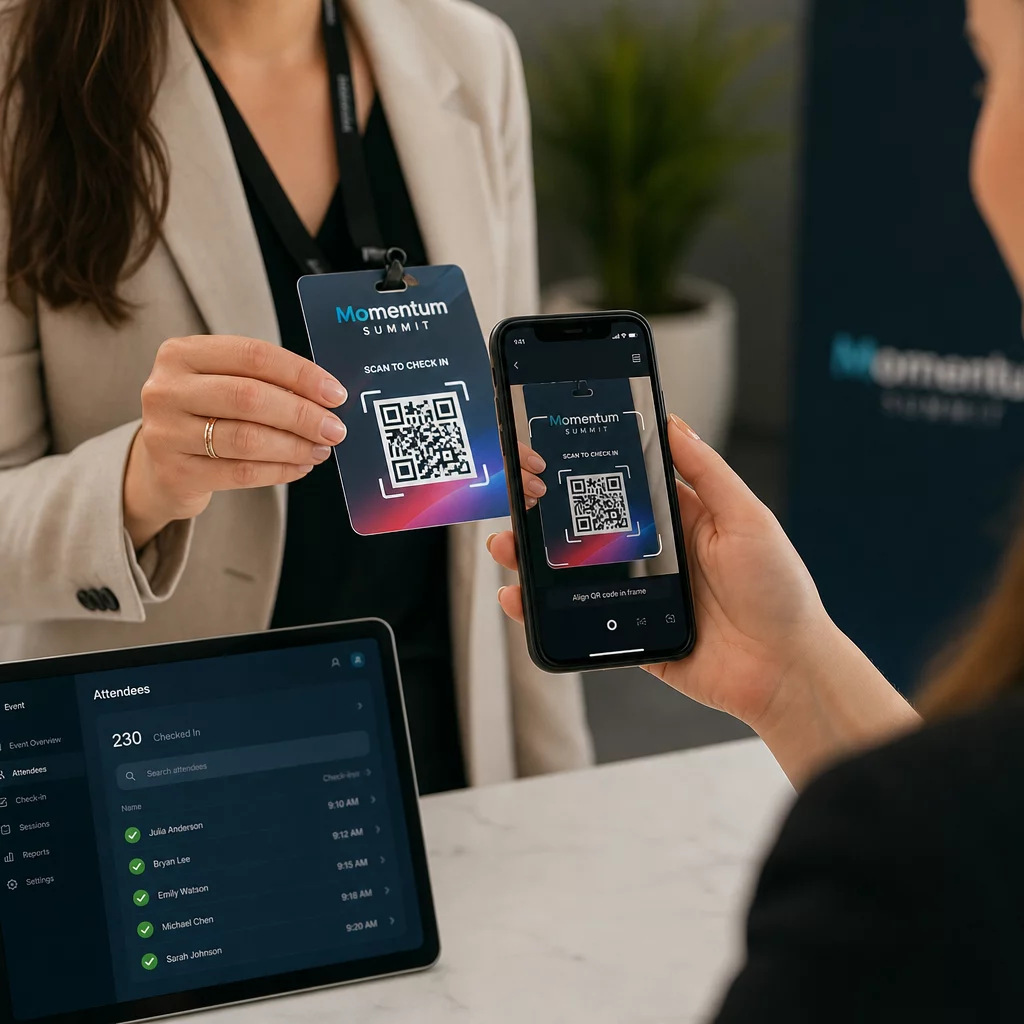
Per eventi più grandi, considera di allestire stazioni di scansione dedicate. Addestra il personale a tenere il dispositivo di scansione a circa 30 cm dal codice e ad abilitare il flash della fotocamera in ambienti con poca luce. Se stai stampando codici su badge o braccialetti, usa materiali opachi piuttosto che finiture lucide per evitare che il riflesso interferisca con la scansione. Maggiori dettagli sulle migliori pratiche di implementazione fisica sono disponibili in guida definitiva ai codici QR per il check-in degli eventi.
Come i Dati di Presenza Fluiscono nel Tuo CRM
La scansione del check-in innesca una catena di eventi che si conclude con un record di contatto aggiornato. Ecco cosa succede a ogni passaggio:
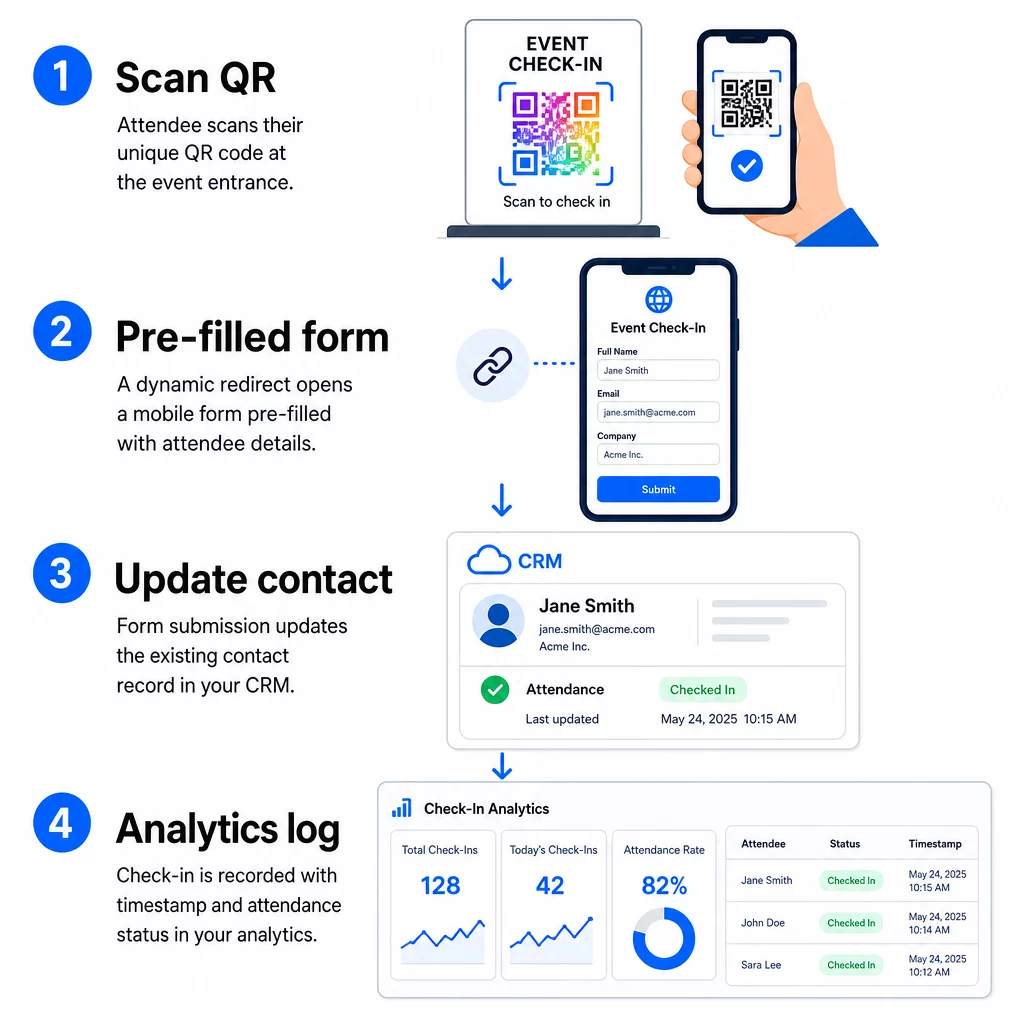
- Il codice QR unico del partecipante viene scansionato all'ingresso.
- Il reindirizzamento dinamico carica il modulo di check-in precompilato nel browser del partecipante.
- Il partecipante invia il modulo (o il modulo si invia automaticamente dopo una breve conferma).
- L'invio del modulo, collegato all'ID unico del contatto, aggiorna il record CRM esistente con lo stato del check-in, il timestamp e qualsiasi campo aggiuntivo acquisito.
- Se il tuo CRM supporta l'automazione basata su webhook, l'invio può contemporaneamente attivare azioni a valle: assegnare un'attività di follow-up, inviare un'e-mail post-evento o aggiornare lo stato di una campagna.
Piattaforme come HubSpot memorizzano gli stati di partecipazione – Registrato, Presente, Non Presente, Annullato – direttamente sulla scheda degli eventi di marketing del contatto, fornendo al tuo team una cronologia completa delle presenze per ogni contatto senza alcuna riconciliazione manuale. Per sapere come collegare le scansioni ad azioni CRM automatizzate in modo più ampio, consulta la guida su Automazione del flusso di lavoro di scansione dei codici QR.
Monitoraggio delle prestazioni del check-in con l'analisi
Poiché utilizzi codici dinamici, ogni scansione genera dati analitici, non solo un modulo compilato. La tua dashboard del codice QR acquisisce:
- Scansioni totali vs. scansioni uniche – utile per identificare se qualcuno ha scansionato il proprio codice più volte
- Timestamp delle scansioni – ti consente di ricostruire i modelli di arrivo e identificare i periodi di punta del check-in
- 6. Tipo di dispositivo e sistema operativo – ti aiuta a ottimizzare l'esperienza mobile del tuo modulo di check-in
- Posizione geografica – conferma che le scansioni avvengono nella sede prevista
Questi dati si affiancano ai tuoi record di presenze CRM e ti offrono un secondo livello di verifica. Se l'invio del modulo di un contatto è fallito ma la sua scansione QR è stata registrata, hai un record da indagare. Per uno sguardo più approfondito su cosa misurare e come agire, la guida su analisi dei codici QR aziendali e metriche chiave copre il quadro completo.
Puoi anche tracciare le scansioni dei codici QR e le analisi a livello di campagna, segmentando per evento, intervallo di date o codice individuale per confrontare le prestazioni tra più punti di check-in.
Monitora la Partecipazione in Tempo Reale Vedi esattamente chi ha scansionato, quando e da quale posizione. Usa lo strumento Codice QR di Partecipazione per distribuire codici di check-in con analisi complete delle scansioni integrate.
Problemi Comuni e Come Risolverli
URL interrotti dopo la sostituzione del campo di unione. Testa sempre il tuo URL codificato con dati di contatto reali prima di inviare i codici ai partecipanti. Presta particolare attenzione ai contatti i cui nomi o indirizzi email includono caratteri speciali.
Record CRM duplicati creati al check-in. Ciò accade quando l'URL del modulo non contiene l'identificatore del contatto. Aggiungi il parametro ID contatto al tuo modello di URL e conferma che il tuo CRM sia configurato per corrispondere a quel campo anziché creare un nuovo record.
Codici QR che smettono di funzionare dopo la distribuzione. È qui che i codici dinamici dimostrano il loro valore. Se l'URL del tuo modulo cambia – perché hai cambiato strumenti per i moduli o aggiornato il tuo dominio – puoi aggiornare la destinazione nella tua dashboard di gestione dei codici QR senza ridistribuire nuovi codici ai partecipanti.
Codici che scansionano correttamente ma non pre-compilano il modulo. Verifica se il tuo strumento per i moduli richiede nomi di parametri di query specifici. Alcune piattaforme usano `email` mentre altre richiedono `entry.12345` (Google Forms) o una chiave di campo personalizzata. Allinea il tuo modello di URL con i nomi dei parametri previsti dal tuo strumento per i moduli.
Errori di scansione in condizioni di scarsa illuminazione all'ingresso. Assicurati che i tuoi codici QR stampati rispettino il rapporto dimensione-distanza di 10:1: un codice scansionato da 10 pollici di distanza dovrebbe essere largo almeno 1 pollice. Utilizza una stampa ad alto contrasto – moduli scuri su sfondo bianco – ed evita carta lucida o laminata.
Punti chiave
I codici QR dinamici per i check-in CRM funzionano perché ogni codice porta l'identità di un contatto codificata nella sua URL di destinazione, instrada quei dati in un modulo collegato a un record esistente e registra la scansione stessa come un evento di analisi separato. Il risultato è un registro delle presenze accurato, con data e ora, e collegato al tuo CRM senza alcuna immissione manuale di dati.
I requisiti tecnici sono semplici: un CRM con campi di unione e moduli web che accettano parametri URL, URL dinamici correttamente codificati e una piattaforma di codici QR che supporta la generazione di codici per contatto e il tracciamento delle scansioni. Ottieni questi tre elementi correttamente, e il flusso di lavoro del check-in si gestirà in gran parte da solo.
Inizia a costruire il tuo sistema di check-in con il Generatore di QR code dinamici – nessuna carta di credito richiesta per la prova di 14 giorni.
Domande frequenti
Un codice QR statico codifica un URL fisso direttamente nel suo schema e non può essere modificato o tracciato dopo la stampa. Un codice QR dinamico utilizza un breve link di reindirizzamento che puoi aggiornare in qualsiasi momento dalla tua dashboard, e ogni scansione viene registrata con dati che includono timestamp, tipo di dispositivo e posizione. Per i check-in CRM, i codici dinamici sono essenziali perché consentono la personalizzazione dell'URL per contatto e forniscono gli analytics necessari per verificare la partecipazione.
Aggiungi l'identificatore CRM unico del tuo contatto come parametro di query nell'URL di check-in – ad esempio, `?contact_id={{contact.id}}`. Quando il modulo viene inviato, il tuo CRM utilizza quell'identificatore per abbinare l'invio al record esistente anziché crearne uno nuovo. La maggior parte delle piattaforme CRM ha anche un'impostazione per unire sull'indirizzo email come fallback quando non è presente alcun ID contatto.
Sì. Poiché i codici sono dinamici, puoi cambiare l'URL di destinazione nella tua dashboard di gestione dei codici QR in qualsiasi momento. Il codice stampato o distribuito rimane esattamente lo stesso – cambia solo l'obiettivo di reindirizzamento. Ciò significa che se l'URL del tuo modulo cambia dopo che le email di conferma sono state inviate, i partecipanti con i codici originali raggiungeranno comunque il modulo corretto.