Η χειροκίνητη διαχείριση της προσέλευσης σε εκδηλώσεις είναι αργή, επιρρεπής σε σφάλματα και αποσυνδεδεμένη από τα συστήματα που έχουν σημασία. Αυτός ο οδηγός σάς δείχνει πώς να δημιουργήσετε δυναμικούς κωδικούς QR που τροφοδοτούν δεδομένα check-in απευθείας στο CRM σας, εξαλείφοντας τη χειροκίνητη καταχώριση και παρέχοντάς σας ένα αρχείο προσέλευσης σε πραγματικό χρόνο για κάθε επαφή.
Γιατί οι Δυναμικοί Κωδικοί QR Λειτουργούν για Check-Ins CRM
Ένας στατικός κωδικός QR κωδικοποιεί μια σταθερή διεύθυνση URL και δεν μπορεί να παρακολουθηθεί ή να αλλάξει μετά την εκτύπωση. Ένας δυναμικός κωδικός QR, αντίθετα, χρησιμοποιεί έναν σύντομο σύνδεσμο ανακατεύθυνσης ως ενδιάμεσο. Μπορείτε να ενημερώσετε αυτόν τον προορισμό ανά πάσα στιγμή χωρίς επανεκτύπωση, και κάθε σάρωση καταγράφεται με δεδομένα που περιλαμβάνουν χρονική σήμανση, τύπο συσκευής και γεωγραφική τοποθεσία.
Για τα check-ins CRM, αυτή η διάκριση έχει τεράστια σημασία. Όταν κάθε παρευρισκόμενος λαμβάνει έναν μοναδικό δυναμικό κωδικό συνδεδεμένο με την καρτέλα επαφής του, η σάρωσή του στην είσοδο κάνει τρία πράγματα ταυτόχρονα: επαληθεύει την ταυτότητα, σημειώνει την προσέλευση και ωθεί δεδομένα στο CRM σας – όλα αυτά χωρίς κανένα μέλος του προσωπικού να πληκτρολογεί τίποτα.
Πλατφόρμες όπως το HubSpot παρακολουθούν την κατάσταση εγγραφής, την κατάσταση προσέλευσης, τις ακυρώσεις και τους δείκτες μη εμφάνισης έναντι μεμονωμένων καρτελών επαφών μέσω των εργαλείων μάρκετινγκ εκδηλώσεών τους. Τα συστήματα που χρησιμοποιούν check-ins βάσει φόρμας μπορούν να ενημερώσουν μια υπάρχουσα καρτέλα επαφής προσθέτοντας το μοναδικό αναγνωριστικό της επαφής στη διεύθυνση URL της φόρμας, έτσι ώστε η υποβολή να συγχωνεύεται με το σωστό προφίλ αντί να δημιουργεί ένα αντίγραφο. Η ίδια λογική ισχύει είτε χρησιμοποιείτε μια ειδική πλατφόρμα εκδηλώσεων είτε ένα CRM γενικής χρήσης με ενσωματώσεις φόρμας.
Για να κατανοήσετε την πλήρη διαφορά μεταξύ των τύπων κωδικών πριν δημιουργήσετε τη ροή εργασίας σας, δείτε τη σύγκριση των στατικών έναντι δυναμικών κωδικών QR.
Δημιουργήστε Κωδικούς Check-In με Δυνατότητα Παρακολούθησης σε Λεπτά Χρησιμοποιήστε το Δημιουργία dynamic QR code για να δημιουργήσετε επεξεργάσιμους, έτοιμους για ανάλυση κωδικούς QR που συνδέονται απευθείας με τις φόρμες εκδηλώσεων και τις ροές εργασίας CRM σας.
Τι Χρειάζεστε Πριν Ξεκινήσετε
Πριν δημιουργήσετε έναν μόνο κωδικό, βεβαιωθείτε ότι ισχύουν τρία πράγματα:
- Μια φόρμα ιστού CRM που δέχεται παραμέτρους URL. Τα περισσότερα εργαλεία CRM και φόρμας – συμπεριλαμβανομένων των Google Forms, HubSpot forms και παρόμοιων πλατφορμών – σας επιτρέπουν να προ-συμπληρώνετε πεδία περνώντας τιμές μέσω συμβολοσειρών ερωτήματος στη διεύθυνση URL (π.χ., `?email=value&first_name=value`). Επιβεβαιώστε ότι η φόρμα σας υποστηρίζει αυτό πριν δημιουργήσετε τη ροή εργασίας.
- Καρτέλες επαφών με πεδία συγχώνευσης. Το CRM σας πρέπει να μπορεί να αντλεί δεδομένα όπως email, όνομα και επώνυμο από υπάρχουσες καρτέλες επαφών και να εισάγει αυτές τις τιμές δυναμικά σε ένα πρότυπο URL.
- Ένας δυναμικός δημιουργός κωδικών QR με αναλυτικά στοιχεία. Χρειάζεστε μια πλατφόρμα που να δημιουργεί μοναδικούς κωδικούς ανά επαφή, να παρακολουθεί κάθε σάρωση, και να σας επιτρέπει να ενημερώνετε προορισμούς χωρίς επανεκτύπωση. Η εργαλείο κωδικού QR παρακολούθησης είναι φτιαγμένη ακριβώς για αυτήν την περίπτωση χρήσης.
Βήμα-βήμα: Δημιουργία Δυναμικών Κωδικών QR για Check-Ins CRM
Ρύθμιση της Φόρμας Check-In σας
Δημιουργήστε μια φόρμα ιστού στο CRM ή το εργαλείο φόρμας σας με πεδία που καταγράφουν τα δεδομένα που χρειάζεστε κατά το check-in: τουλάχιστον, διεύθυνση email, όνομα και επώνυμο. Εάν χρησιμοποιείτε τις Φόρμες Google, η Δημιουργία QR code Google Form σας επιτρέπει να συνδέεστε απευθείας με τη φόρμα σας και να παρακολουθείτε σαρώσεις παράλληλα με τις υποβολές.
Η φόρμα σας θα πρέπει επίσης να είναι ρυθμισμένη ώστε να ενημερώνει μια υπάρχουσα εγγραφή επαφής αντί να δημιουργεί μια νέα. Σε συστήματα που το επιτρέπουν, η προσθήκη ενός αναγνωριστικού επαφής στο URL – όπως `?contact_id={{contact.id}}` – συνδέει αυτόματα την υποβολή της φόρμας με τη σωστή εγγραφή CRM.
Δημιουργία της Δυναμικής URL με Πεδία Συγχώνευσης
Μια δυναμική URL check-in χρησιμοποιεί τη σύνταξη πεδίου συγχώνευσης του CRM σας για να εισάγει τα δεδομένα κάθε επαφής ως παραμέτρους ερωτήματος. Ένα πρότυπο μοιάζει με αυτό:
“`
https://yourform.com/checkin?email=[Contact.Email]&firstname=[Contact.FirstName]&lastname=[Contact.LastName]
“`
Όταν το CRM σας επεξεργάζεται αυτό το πρότυπο για μια μεμονωμένη επαφή, οι θέσεις κράτησης αντικαθίστανται με πραγματικές τιμές:
“`
https://yourform.com/[email protected]&firstname=Jane&lastname=Smith
“`
Η ακριβής σύνταξη πεδίου συγχώνευσης εξαρτάται από το CRM σας. Το Keep/Infusionsoft χρησιμοποιεί ετικέτες σε στυλ αγκύλης. Το HubSpot χρησιμοποιεί τη δική του μορφή διακριτικού εξατομίκευσης. Ελέγξτε την τεκμηρίωση της πλατφόρμας σας για τη σωστή σύνταξη.
Κωδικοποιήστε σωστά το URL
Οι διευθύνσεις URL διακόπτονται όταν περιέχουν μη κωδικοποιημένους ειδικούς χαρακτήρες. Κενά, εμπορικά και ίσον μέσα σε παραμέτρους τιμές πρέπει να κωδικοποιούνται με ποσοστό, ώστε τα προγράμματα περιήγησης και οι αναγνώστες κωδικών QR να τα ερμηνεύουν σωστά. Οι κοινές μετατροπές περιλαμβάνουν:
- Space → `%20`
- Ampersand (`&`) → `%26`
- Equal sign (`=`) → `%3D`
Οι περισσότερες πλατφόρμες CRM περιλαμβάνουν μια λειτουργία κωδικοποίησης URL που μπορείτε να εφαρμόσετε στην έξοδο πεδίου συγχώνευσης. Χρησιμοποιήστε την. Ένας μόνο μη κωδικοποιημένος χαρακτήρας στο όνομα μιας επαφής – όπως ένα εμπορικό σήμα σε ένα όνομα εταιρείας – μπορεί να διακόψει σιωπηλά ολόκληρη τη ροή check-in για αυτόν τον συμμετέχοντα.
Δημιουργήστε έναν Μοναδικό Δυναμικό Κωδικό QR ανά Επαφή
Με το κωδικοποιημένο πρότυπο URL έτοιμο, δημιουργήστε έναν δυναμικό κωδικό QR ανά συμμετέχοντα. Κάθε κωδικός παραπέμπει στη διεύθυνση URL της προ-συμπληρωμένης φόρμας αυτού του ατόμου. Επειδή πρόκειται για δυναμικούς κωδικούς, διατηρείτε τη δυνατότητα να ενημερώσετε τον προορισμό αργότερα – χρήσιμο εάν η διεύθυνση URL της φόρμας σας αλλάξει αφού έχουν ήδη διανεμηθεί οι κωδικοί.
Για μεγάλες εκδηλώσεις, οι περισσότερες πλατφόρμες CRM και εργαλεία αυτοματοποίησης email υποστηρίζουν τη μαζική δημιουργία κωδικών: συγχωνεύστε το πρότυπο URL, κωδικοποιήστε το και ενεργοποιήστε τη δημιουργία κωδικού QR για κάθε επαφή σε μια ακολουθία. Ο προκύπτων κωδικός περιλαμβάνεται στη συνέχεια στο email επιβεβαίωσης του συμμετέχοντα μαζί με τα στοιχεία εγγραφής του.
ο Δημιουργία QR code για εκδήλωση υποστηρίζει αυτή τη ροή εργασίας και σας επιτρέπει να προσαρμόσετε την εμφάνιση του κωδικού – προσθέτοντας την επωνυμία, το λογότυπο ή το χρωματικό σας σχέδιο της εκδήλωσης – πριν από τη διανομή.
Διανομή και Ανάπτυξη στην Είσοδο
Στείλτε σε κάθε συμμετέχοντα τον μοναδικό του κωδικό QR στο email επιβεβαίωσης. Στην είσοδο της εκδήλωσης, ένα μέλος του προσωπικού σαρώνει τον κωδικό χρησιμοποιώντας οποιαδήποτε τυπική κάμερα smartphone. Η σάρωση ανοίγει την προ-συμπληρωμένη φόρμα, ο συμμετέχων επιβεβαιώνει ή υποβάλλει, και η εγγραφή CRM ενημερώνεται με τη χρονική σήμανση παρουσίας.
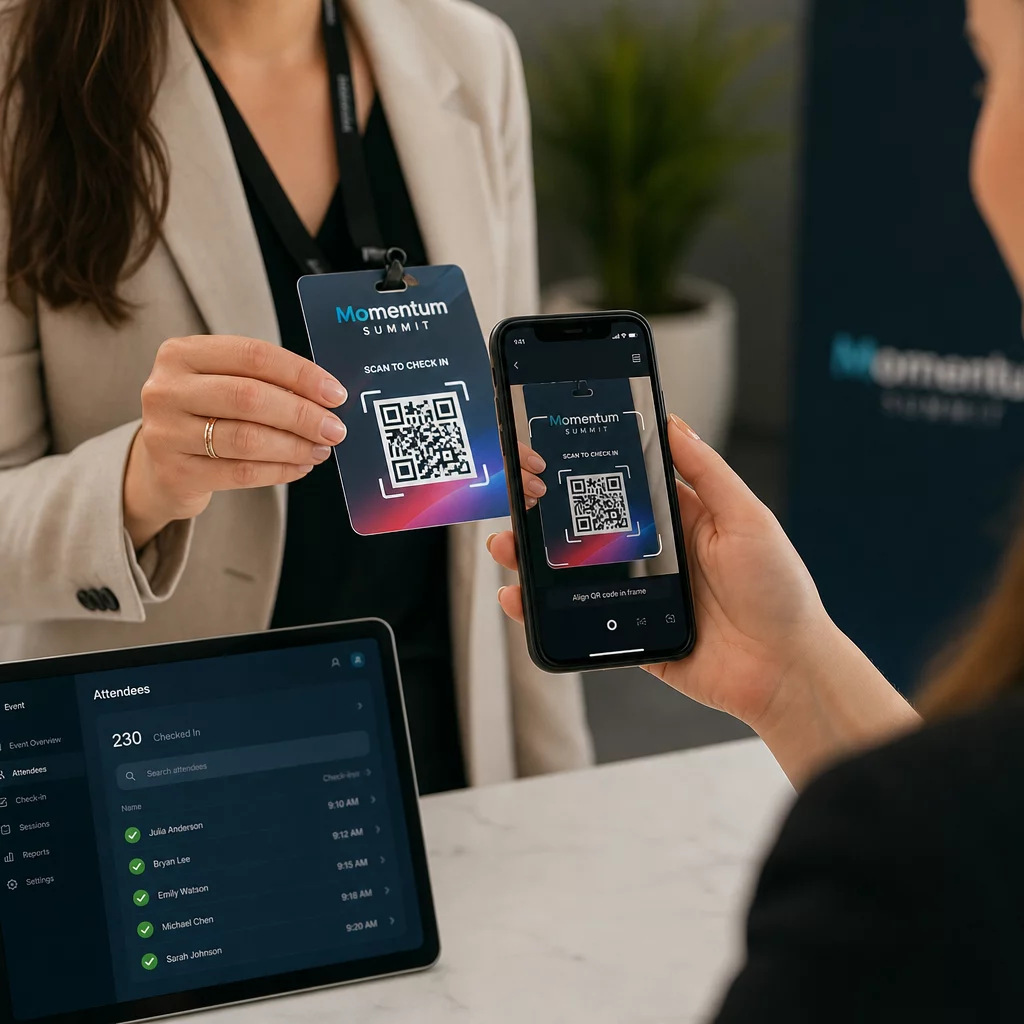
Για μεγαλύτερες εκδηλώσεις, εξετάστε το ενδεχόμενο να δημιουργήσετε ειδικούς σταθμούς σάρωσης. Εκπαιδεύστε το προσωπικό να κρατά τη συσκευή σάρωσης περίπου 30 cm από τον κωδικό και να ενεργοποιεί το φλας της κάμερας σε περιβάλλοντα χαμηλού φωτισμού. Εάν εκτυπώνετε κωδικούς σε κονκάρδες ή βραχιόλια, χρησιμοποιήστε ματ υλικά αντί για γυαλιστερές επιφάνειες για να αποτρέψετε την αντανάκλαση από το να παρεμβαίνει στη σάρωση. Περισσότερες λεπτομέρειες σχετικά με τις βέλτιστες πρακτικές φυσικής ανάπτυξης είναι διαθέσιμες στο απόλυτο οδηγό για τους κωδικούς QR για check-in εκδηλώσεων.
Πώς τα Δεδομένα Παρουσίας Ρέουν στο CRM σας
Η σάρωση check-in ενεργοποιεί μια αλυσίδα γεγονότων που καταλήγει σε μια ενημερωμένη εγγραφή επαφής. Δείτε τι συμβαίνει σε κάθε βήμα:
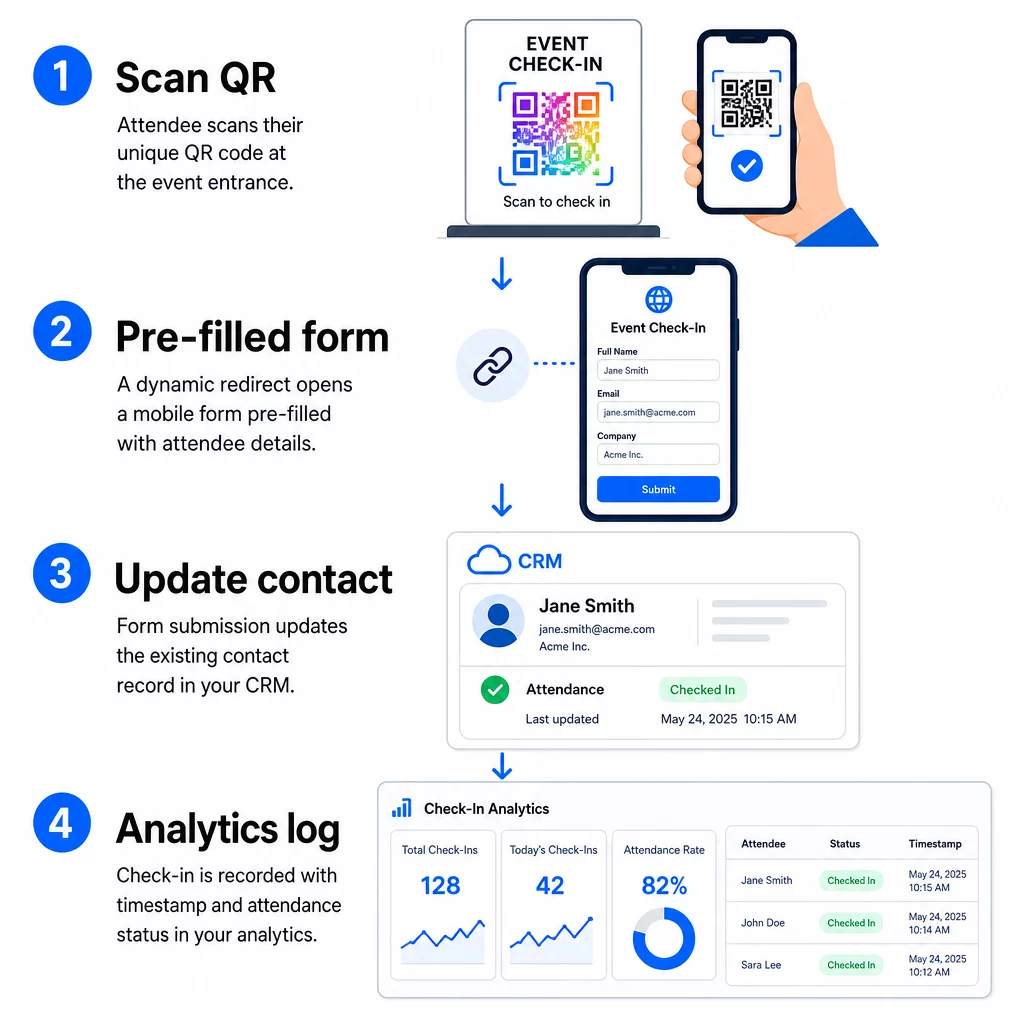
- Ο μοναδικός κωδικός QR του συμμετέχοντα σαρώνεται στην είσοδο.
- Η δυναμική ανακατεύθυνση φορτώνει την προ-συμπληρωμένη φόρμα check-in στο πρόγραμμα περιήγησης του συμμετέχοντα.
- Ο συμμετέχων υποβάλλει τη φόρμα (ή η φόρμα υποβάλλεται αυτόματα μετά από μια σύντομη επιβεβαίωση).
- Η υποβολή της φόρμας, συνδεδεμένη με το μοναδικό αναγνωριστικό του επαφής, ενημερώνει την υπάρχουσα εγγραφή CRM με την κατάσταση check-in, τη χρονική σήμανση και τυχόν πρόσθετα πεδία που καταγράφηκαν.
- Εάν το CRM σας υποστηρίζει αυτοματοποίηση βάσει webhook, η υποβολή μπορεί ταυτόχρονα να ενεργοποιήσει ενέργειες: ανάθεση εργασίας παρακολούθησης, αποστολή email μετά την εκδήλωση ή ενημέρωση της κατάστασης μιας καμπάνιας.
Πλατφόρμες όπως το HubSpot αποθηκεύουν καταστάσεις συμμετοχής – Εγγεγραμμένος, Παρευρέθηκε, Δεν Εμφανίστηκε, Ακυρώθηκε – απευθείας στην κάρτα εκδηλώσεων μάρκετινγκ της επαφής, παρέχοντας στην ομάδα σας ένα πλήρες ιστορικό παρακολούθησης για κάθε επαφή χωρίς καμία χειροκίνητη συμφωνία. Για να μάθετε πώς να συνδέετε σαρώσεις με αυτοματοποιημένες ενέργειες CRM ευρύτερα, ανατρέξτε στον οδηγό για Αυτοματοποίηση ροής εργασίας σάρωσης κωδικών QR.
Παρακολούθηση της Απόδοσης του Check-In με Αναλύσεις
Επειδή χρησιμοποιείτε δυναμικούς κωδικούς, κάθε σάρωση δημιουργεί δεδομένα αναλύσεων – όχι απλώς μια συμπληρωμένη φόρμα. Ο πίνακας ελέγχου του κωδικού QR σας καταγράφει:
- Συνολικές σαρώσεις έναντι μοναδικών σαρώσεων – χρήσιμο για τον εντοπισμό του εάν κάποιος σάρωσε τον κωδικό του πολλές φορές
- Χρονοσφραγίδες σάρωσης – σας επιτρέπει να ανασυνθέσετε μοτίβα άφιξης και να εντοπίσετε περιόδους αιχμής check-in
- Τύπος συσκευής και λειτουργικό σύστημα – σας βοηθά να βελτιστοποιήσετε την εμπειρία χρήσης της φόρμας check-in σας σε κινητά
- Γεωγραφική τοποθεσία – επιβεβαιώνει ότι οι σαρώσεις πραγματοποιούνται στον αναμενόμενο χώρο
Αυτά τα δεδομένα βρίσκονται παράλληλα με τα αρχεία παρακολούθησης του CRM σας και σας παρέχουν ένα δεύτερο επίπεδο επαλήθευσης. Εάν η υποβολή της φόρμας μιας επαφής απέτυχε, αλλά η σάρωση του QR της καταγράφηκε, έχετε ένα αρχείο για διερεύνηση. Για μια βαθύτερη ματιά στο τι να μετρήσετε και πώς να ενεργήσετε, ο οδηγός για αναλύσεις κωδικών QR επιχειρήσεων και βασικές μετρήσεις καλύπτει την πλήρη εικόνα.
Μπορείτε επίσης παρακολούθηση σαρώσεων κωδικών QR και αναλύσεων σε επίπεδο καμπάνιας, τμηματοποιώντας ανά εκδήλωση, εύρος ημερομηνιών ή μεμονωμένο κωδικό για σύγκριση απόδοσης σε πολλαπλά σημεία check-in.
Παρακολούθηση Συμμετοχής σε Πραγματικό Χρόνο Δείτε ακριβώς ποιος σάρωσε, πότε και από ποια τοποθεσία. Χρησιμοποιήστε το εργαλείο κωδικών QR παρακολούθησης για την ανάπτυξη κωδικών check-in με ενσωματωμένες πλήρεις αναλύσεις σάρωσης.
Κοινά Ζητήματα και Πώς να τα Διορθώσετε
Κατεστραμμένες διευθύνσεις URL μετά την αντικατάσταση πεδίου συγχώνευσης. Πάντα να δοκιμάζετε την κωδικοποιημένη διεύθυνση URL σας με πραγματικά δεδομένα επαφών πριν στείλετε κωδικούς στους συμμετέχοντες. Δώστε ιδιαίτερη προσοχή σε επαφές των οποίων τα ονόματα ή οι διευθύνσεις email περιλαμβάνουν ειδικούς χαρακτήρες.
Διπλά εγγραφές CRM που δημιουργήθηκαν κατά το check-in. Αυτό συμβαίνει όταν η διεύθυνση URL της φόρμας δεν φέρει το αναγνωριστικό επαφής. Προσθέστε την παράμετρο αναγνωριστικού επαφής στο πρότυπο URL σας και επιβεβαιώστε ότι το CRM σας είναι διαμορφωμένο να αντιστοιχεί σε αυτό το πεδίο αντί να δημιουργεί μια νέα εγγραφή.
Κωδικοί QR που σταματούν να λειτουργούν μετά τη διανομή. Εδώ οι δυναμικοί κωδικοί αποδεικνύουν την αξία τους. Εάν η διεύθυνση URL της φόρμας σας αλλάξει – επειδή αλλάξατε εργαλεία φόρμας ή ενημερώσατε τον τομέα σας – μπορείτε να ενημερώσετε τον προορισμό στον πίνακα ελέγχου διαχείρισης κωδικών QR σας χωρίς να αναδιανείμετε νέους κωδικούς στους συμμετέχοντες.
Κωδικοί που σαρώνουν σωστά αλλά δεν προ-συμπληρώνουν τη φόρμα. Ελέγξτε αν το εργαλείο φόρμας σας απαιτεί συγκεκριμένα ονόματα παραμέτρων ερωτήματος. Ορισμένες πλατφόρμες χρησιμοποιούν `email` ενώ άλλες απαιτούν `entry.12345` (Φόρμες Google) ή ένα προσαρμοσμένο κλειδί πεδίου. Ευθυγραμμίστε το πρότυπο URL σας με τα αναμενόμενα ονόματα παραμέτρων του εργαλείου φόρμας σας.
Αποτυχίες σάρωσης σε χαμηλό φωτισμό στην είσοδο. Βεβαιωθείτε ότι οι εκτυπωμένοι κωδικοί QR σας πληρούν την αναλογία μεγέθους προς απόσταση 10:1: ένας κωδικός που σαρώνεται από απόσταση 10 ιντσών θα πρέπει να έχει πλάτος τουλάχιστον 1 ίντσα. Χρησιμοποιήστε εκτύπωση υψηλής αντίθεσης – σκούρες μονάδες σε λευκό φόντο – και αποφύγετε το γυαλιστερό χαρτί ή την πλαστικοποίηση.
Βασικά Συμπεράσματα
Οι δυναμικοί κωδικοί QR για check-in CRM λειτουργούν επειδή κάθε κωδικός φέρει την ταυτότητα μιας επαφής κωδικοποιημένη στη διεύθυνση URL προορισμού του, δρομολογεί αυτά τα δεδομένα σε μια φόρμα συνδεδεμένη με μια υπάρχουσα εγγραφή και καταγράφει την ίδια τη σάρωση ως ξεχωριστό συμβάν ανάλυσης. Το αποτέλεσμα είναι ένα αρχείο παρακολούθησης που είναι ακριβές, με χρονοσφραγίδα και συνδεδεμένο με το CRM σας χωρίς καμία μη αυτόματη εισαγωγή δεδομένων.
Οι τεχνικές απαιτήσεις είναι απλές: ένα CRM με πεδία συγχώνευσης και φόρμες ιστού που δέχονται παραμέτρους URL, σωστά κωδικοποιημένες δυναμικές διευθύνσεις URL και μια πλατφόρμα κωδικών QR που υποστηρίζει τη δημιουργία κωδικών ανά επαφή και την παρακολούθηση σαρώσεων. Εάν αυτά τα τρία στοιχεία είναι σωστά, η ροή εργασιών του check-in λειτουργεί σε μεγάλο βαθμό αυτόματα.
Ξεκινήστε να δημιουργείτε το σύστημα check-in σας με το Δημιουργία dynamic QR code – δεν απαιτείται πιστωτική κάρτα για τη δοκιμαστική περίοδο 14 ημερών.
Συχνές ερωτήσεις
Ένας στατικός κωδικός QR κωδικοποιεί μια σταθερή διεύθυνση URL απευθείας στο μοτίβο του και δεν μπορεί να αλλάξει ή να παρακολουθηθεί μετά την εκτύπωση. Ένας δυναμικός κωδικός QR χρησιμοποιεί έναν σύντομο σύνδεσμο ανακατεύθυνσης τον οποίο μπορείτε να ενημερώσετε ανά πάσα στιγμή από τον πίνακα ελέγχου σας, και κάθε σάρωση καταγράφεται με δεδομένα συμπεριλαμβανομένων της χρονικής σήμανσης, του τύπου συσκευής και της τοποθεσίας. Για τα check-in CRM, οι δυναμικοί κωδικοί είναι απαραίτητοι επειδή επιτρέπουν την εξατομίκευση διεύθυνσης URL ανά επαφή και παρέχουν τα αναλυτικά στοιχεία που απαιτούνται για την επαλήθευση της παρουσίας.
Προσθέστε το μοναδικό αναγνωριστικό CRM της επαφής σας ως παράμετρο ερωτήματος στη διεύθυνση URL του check-in – για παράδειγμα, `?contact_id={{contact.id}}`. Όταν υποβληθεί η φόρμα, το CRM σας χρησιμοποιεί αυτό το αναγνωριστικό για να αντιστοιχίσει την υποβολή με την υπάρχουσα εγγραφή αντί να δημιουργήσει μια νέα. Οι περισσότερες πλατφόρμες CRM έχουν επίσης μια ρύθμιση για συγχώνευση βάσει διεύθυνσης email ως εφεδρική λύση όταν δεν υπάρχει αναγνωριστικό επαφής.
Ναι. Επειδή οι κωδικοί είναι δυναμικοί, μπορείτε να αλλάξετε τη διεύθυνση URL προορισμού στον πίνακα ελέγχου διαχείρισης κωδικών QR ανά πάσα στιγμή. Ο εκτυπωμένος ή διανεμημένος κωδικός παραμένει ακριβώς ο ίδιος – μόνο ο στόχος ανακατεύθυνσης αλλάζει. Αυτό σημαίνει ότι εάν η διεύθυνση URL της φόρμας σας αλλάξει αφού έχουν σταλεί τα email επιβεβαίωσης, οι συμμετέχοντες με τους αρχικούς κωδικούς θα εξακολουθούν να φτάνουν στη σωστή φόρμα.