Manuálne riadenie účasti na podujatiach je pomalé, náchylné na chyby a odpojené od dôležitých systémov. Táto príručka vám ukáže, ako vytvoriť dynamické QR kódy, ktoré vkladajú údaje o registrácii priamo do vášho CRM, čím eliminujú manuálne zadávanie a poskytujú vám záznam o účasti v reálnom čase pre každý kontakt.
Prečo dynamické QR kódy fungujú pre registrácie v CRM
Statický QR kód kóduje pevnú URL adresu a po vytlačení ho nemožno sledovať ani meniť. A dynamický QR kód, naopak, používa krátky presmerovací odkaz ako sprostredkovateľa. Cieľ môžete kedykoľvek aktualizovať bez opätovnej tlače a každé skenovanie sa zaznamenáva s údajmi vrátane časovej pečiatky, typu zariadenia a geografickej polohy.
Pre registrácie v CRM je tento rozdiel nesmierne dôležitý. Keď každý účastník dostane jedinečný dynamický kód spojený s jeho záznamom kontaktu, jeho naskenovanie pri vstupe vykoná tri veci súčasne: overí identitu, zaznamená účasť a odošle údaje do vášho CRM – to všetko bez toho, aby zamestnanec čokoľvek zadával.
Platformy ako HubSpot sledujú stav registrácie, stav účasti, zrušenia a indikátory neúčasti voči jednotlivým záznamom kontaktov prostredníctvom svojich nástrojov pre marketingové podujatia. Systémy, ktoré používajú registrácie založené na formulároch, môžu aktualizovať existujúci záznam kontaktu pripojením jedinečného ID kontaktu k URL adrese formulára, takže odoslanie sa zlúči so správnym profilom namiesto vytvorenia duplikátu. Rovnaká logika platí, či už používate špecializovanú platformu pre podujatia alebo všeobecné CRM s integráciami formulárov.
Ak chcete pochopiť celý rozdiel medzi typmi kódov pred vytvorením vášho pracovného postupu, pozrite si porovnanie statickými a dynamickými QR kódmi.
Vytvorte sledovateľné registračné kódy za pár minút Použi Dynamický QR kód generátor na vytvorenie upraviteľných QR kódov pripravených na analýzu, ktoré sa pripájajú priamo k vašim formulárom udalostí a pracovným postupom CRM.
Čo potrebujete, než začnete
Pred vygenerovaním jediného kódu sa uistite, že sú splnené tri veci:
- Webový formulár CRM, ktorý akceptuje parametre URL. Väčšina nástrojov CRM a formulárov – vrátane Google Forms, HubSpot formulárov a podobných platforiem – vám umožňuje predvyplniť polia odovzdávaním hodnôt prostredníctvom reťazcov dotazov v URL (napr. `?email=value&first_name=value`). Pred vytvorením pracovného postupu potvrďte, že váš formulár toto podporuje.
- Záznamy kontaktov s poliami na zlúčenie. Vaše CRM musí byť schopné načítať údaje ako e-mail, meno a priezvisko z existujúcich záznamov kontaktov a dynamicky vložiť tieto hodnoty do šablóny URL.
- Generátor dynamických QR kódov s analytikou. Potrebujete platformu, ktorá generuje jedinečné kódy pre každý kontakt, sleduje každé skenovanie a umožňuje vám aktualizovať destinácie bez predtlače. Táto na QR kód pre dochádzku je vytvorená presne pre tento prípad použitia.
Krok za krokom: Vytváranie dynamických QR kódov pre prihlásenie do CRM
Nastavte si svoj prihlasovací formulár
Vytvorte webový formulár vo vašom CRM alebo nástroji na formuláre s poľami, ktoré zachytávajú údaje, ktoré potrebujete pri prihlásení: minimálne e-mailovú adresu, meno a priezvisko. Ak používate Google Forms, Formulár Google ako QR kód: generátor vám umožňuje priamo prepojiť sa s vaším formulárom a sledovať skenovania spolu s odoslanými údajmi.
Váš formulár by mal byť tiež nakonfigurovaný tak, aby aktualizoval existujúci záznam kontaktu namiesto vytvárania nového. V systémoch, ktoré to umožňujú, pripojenie identifikátora kontaktu k URL – ako napríklad `?contact_id={{contact.id}}` – automaticky prepojí odoslanie formulára so správnym záznamom v CRM.
Vytvorte dynamickú URL s poliami pre zlúčenie
Dynamická URL pre prihlásenie používa syntax polí pre zlúčenie vášho CRM na vloženie údajov každého kontaktu ako parametrov dotazu. Šablóna vyzerá takto:
“`
https://yourform.com/checkin?email=[Contact.Email]&firstname=[Contact.FirstName]&lastname=[Contact.LastName]
“`
Keď vaše CRM spracuje túto šablónu pre jednotlivý kontakt, zástupné symboly sú nahradené skutočnými hodnotami:
“`
https://yourform.com/[email protected]&firstname=Jane&lastname=Smith
“`
Presná syntax polí pre zlúčenie závisí od vášho CRM. Keep/Infusionsoft používa značky v hranatých zátvorkách; HubSpot používa vlastný formát personalizačných tokenov. Skontrolujte dokumentáciu vašej platformy pre správnu syntax.
Správne zakódujte URL
URL adresy sa poškodia, ak obsahujú nekódované špeciálne znaky. Medzery, ampersandy a znamienka rovnosti vo vnútri parametrov hodnôt musia byť percentuálne zakódované, aby ich prehliadače a čítačky QR kódov interpretovali správne. Bežné konverzie zahŕňajú:
- Space → `%20`
- Ampersand (`&`) → `%26`
- Equal sign (`=`) → `%3D`
Väčšina CRM platforiem obsahuje funkciu URL kódovania, ktorú môžete použiť na výstup zlúčeného poľa. Použite ju. Jediný nekódovaný znak v mene kontaktu – ako napríklad ampersand v názve spoločnosti – môže potichu narušiť celý proces registrácie pre tohto účastníka.
Vygenerujte jedinečný dynamický QR kód pre každý kontakt
Keď je šablóna zakódovanej URL adresy pripravená, vygenerujte jeden dynamický QR kód pre každého účastníka. Každý kód odkazuje na URL adresu predvyplneného formulára danej osoby. Pretože ide o dynamické kódy, zachovávate si možnosť aktualizovať cieľ neskôr – čo je užitočné, ak sa URL adresa vášho formulára zmení po tom, čo už boli kódy distribuované.
Pre veľké podujatia väčšina CRM platforiem a nástrojov na automatizáciu e-mailov podporuje hromadné generovanie kódov: zlúčte šablónu URL adresy, zakódujte ju a spustite vytvorenie QR kódu pre každý kontakt v sekvencii. Výsledný kód je potom zahrnutý v potvrdzujúcom e-maile účastníka spolu s jeho registračnými údajmi.
Ten Generátor QR kódov na podujatie podporuje tento pracovný postup a umožňuje vám prispôsobiť vzhľad kódu – pridať branding vašej udalosti, logo alebo farebnú schému – pred distribúciou.
Distribuujte a nasaďte pri vstupe
Pošlite každému účastníkovi jeho jedinečný QR kód v potvrdzujúcom e-maile. Pri vstupe na podujatie zamestnanec naskenuje kód pomocou akéhokoľvek štandardného fotoaparátu smartfónu. Sken otvorí predvyplnený formulár, účastník potvrdí alebo odošle, a záznam v CRM sa aktualizuje časovou pečiatkou účasti.
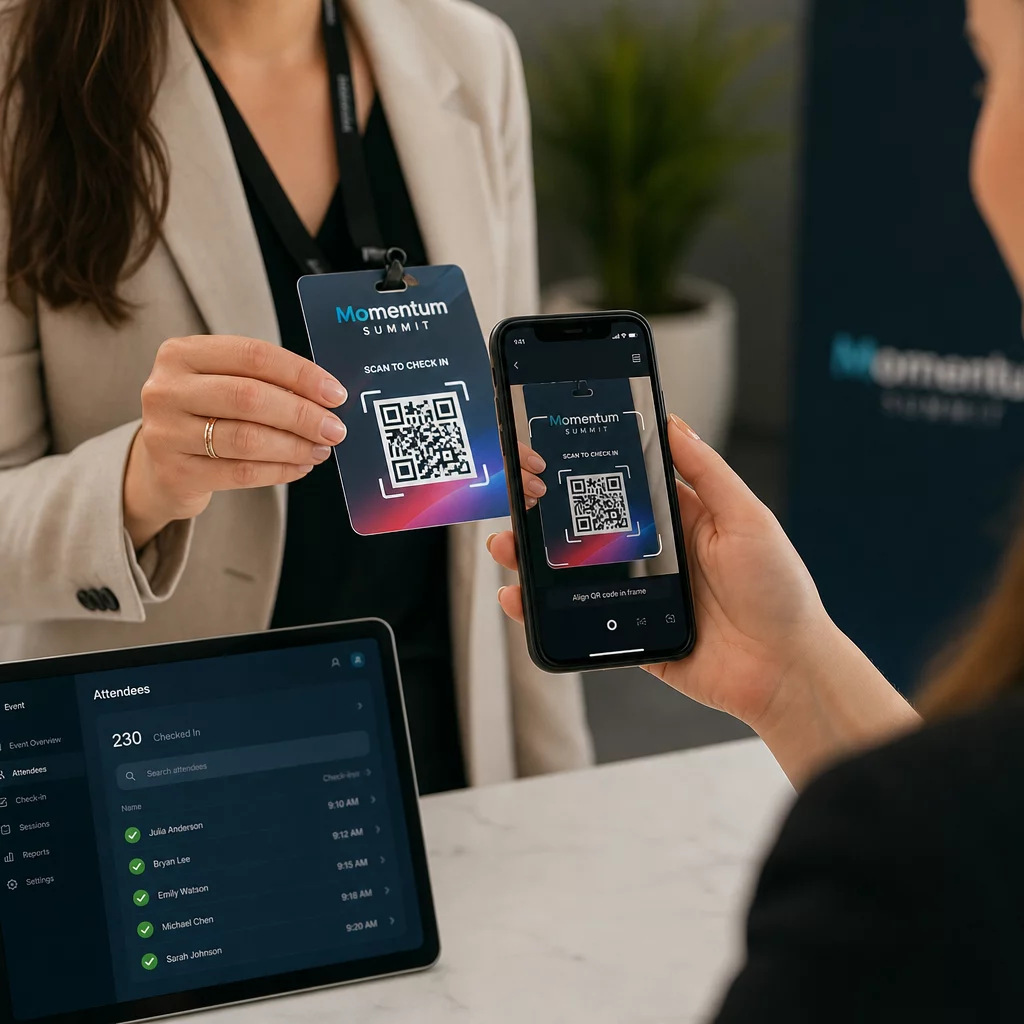
Pre väčšie podujatia zvážte zriadenie vyhradených skenovacích staníc. Vyškolte personál, aby držal skenovacie zariadenie približne 30 cm od kódu a aby zapol blesk fotoaparátu v prostredí so slabým osvetlením. Ak tlačíte kódy na odznaky alebo náramky, použite matné materiály namiesto lesklých povrchov, aby ste predišli odleskom, ktoré by mohli rušiť skenovanie. Viac podrobností o osvedčených postupoch fyzického nasadenia nájdete v kompletného sprievodcu QR kódmi pre registráciu na podujatia.
Ako údaje o účasti prúdia do vášho CRM
Skenovanie pri registrácii spustí reťazec udalostí, ktorý končí aktualizovaným záznamom kontaktu. Tu je to, čo sa deje v každom kroku:
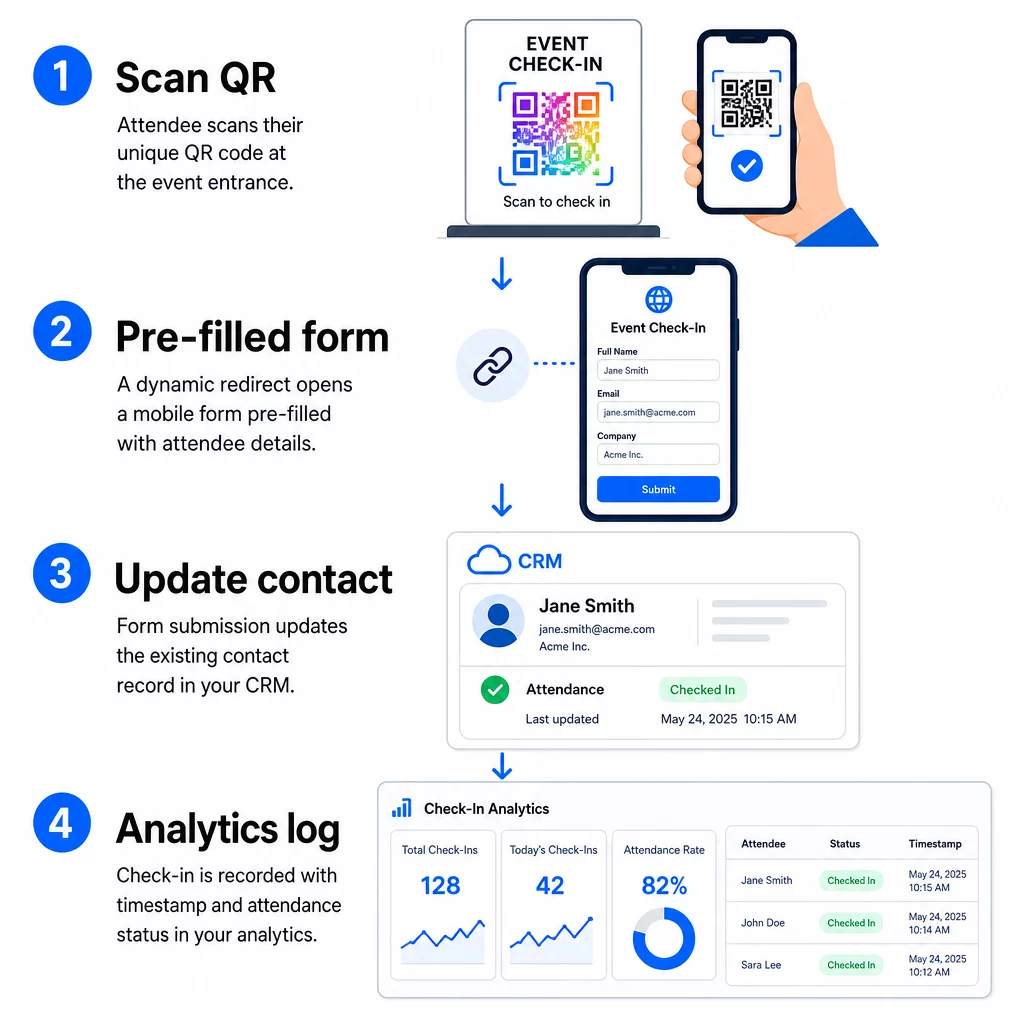
- Jedinečný QR kód účastníka sa naskenuje pri vstupe.
- Dynamické presmerovanie načíta vopred vyplnený registračný formulár v prehliadači účastníka.
- Účastník odošle formulár (alebo sa formulár automaticky odošle po krátkom potvrdení).
- Odoslanie formulára, spojené s jedinečným ID kontaktu, aktualizuje existujúci záznam v CRM o stav registrácie, časovú pečiatku a akékoľvek ďalšie zachytené polia.
- Ak vaše CRM podporuje automatizáciu založenú na webhookoch, odoslanie môže súčasne spustiť následné akcie: priradenie úlohy na sledovanie, odoslanie e-mailu po udalosti alebo aktualizáciu stavu kampane.
Platformy ako HubSpot ukladajú stavy účasti – Registrovaný, Zúčastnil sa, Neprišiel, Zrušený – priamo na karte marketingových udalostí kontaktu, čo vášmu tímu poskytuje kompletnú históriu účasti pre každý kontakt bez akejkoľvek manuálnej rekoncilácie. Ak sa chcete dozvedieť, ako širšie prepojiť skeny s automatizovanými akciami CRM, pozrite si príručku o Automatizácia pracovného postupu skenovania QR kódu.
Sledovanie výkonu registrácie pomocou analýzy
Pretože používate dynamické kódy, každý sken generuje analytické údaje – nielen vyplnený formulár. Váš panel QR kódov zachytáva:
- Celkový počet skenov vs. jedinečné skeny – užitočné na zistenie, či niekto naskenoval svoj kód viackrát
- Časové pečiatky skenovania – umožňuje rekonštruovať vzorce príchodov a identifikovať špičkové obdobia registrácie
- Typ zariadenia a operačný systém – pomáha optimalizovať mobilné prostredie vášho registračného formulára
- Geografická poloha – potvrdzuje, že skeny sa vykonávajú na očakávanom mieste
Tieto údaje sú vedľa vašich záznamov o účasti v CRM a poskytujú vám druhú vrstvu overenia. Ak odoslanie formulára kontaktu zlyhalo, ale jeho QR sken bol zaznamenaný, máte záznam na prešetrenie. Pre hlbší pohľad na to, čo merať a ako na to reagovať, príručka o analýze QR kódov pre podniky a kľúčových metrikách pokrýva celý obraz.
Môžete tiež sledovať skeny QR kódov a analytiku na úrovni kampane, segmentovanie podľa udalosti, rozsahu dátumov alebo individuálneho kódu na porovnanie výkonu naprieč viacerými kontrolnými bodmi.
Monitorujte účasť v reálnom čase Presne uvidíte, kto skenoval, kedy a z akého miesta. Použite nástroj QR kódu pre dochádzku na nasadenie prihlasovacích kódov s plnou analytikou skenovania.
Bežné problémy a ako ich vyriešiť
Nefunkčné URL po nahradení zlúčeného poľa. Vždy otestujte svoju zakódovanú URL s reálnymi kontaktnými údajmi predtým, ako odošlete kódy účastníkom. Venujte osobitnú pozornosť kontaktom, ktorých mená alebo e-mailové adresy obsahujú špeciálne znaky.
Duplicitné záznamy CRM vytvorené pri prihlásení. K tomu dochádza, keď URL formulára neobsahuje identifikátor kontaktu. Pridajte parameter ID kontaktu do šablóny URL a potvrďte, že vaše CRM je nakonfigurované tak, aby sa zhodovalo s týmto poľom, namiesto vytvárania nového záznamu.
QR kódy, ktoré prestanú fungovať po distribúcii. Tu dynamické kódy preukazujú svoju hodnotu. Ak sa zmení URL vášho formulára – pretože ste prešli na iné nástroje pre formuláre alebo aktualizovali svoju doménu – môžete aktualizovať cieľ v ovládacom paneli správy QR kódov bez opätovnej distribúcie nových kódov účastníkom.
Kódy, ktoré sa správne naskenujú, ale nevyplnia formulár vopred. Skontrolujte, či váš nástroj pre formuláre vyžaduje špecifické názvy parametrov dotazu. Niektoré platformy používajú `email`, zatiaľ čo iné vyžadujú `entry.12345` (Google Forms) alebo vlastný kľúč poľa. Zosúlaďte šablónu URL s očakávanými názvami parametrov vášho nástroja pre formuláre.
Zlyhania skenovania pri slabom osvetlení pri vstupe. Uistite sa, že vaše vytlačené QR kódy spĺňajú pomer veľkosti k vzdialenosti 10:1: kód skenovaný z 10 palcov by mal byť široký aspoň 1 palec. Používajte vysokokontrastnú tlač – tmavé moduly na bielom pozadí – a vyhnite sa lesklému papieru alebo laminátu.
Kľúčové poznatky
Dynamické QR kódy pre prihlásenie do CRM fungujú, pretože každý kód obsahuje identitu kontaktu zakódovanú v jeho cieľovej URL adrese, smeruje tieto údaje do formulára prepojeného s existujúcim záznamom a zaznamenáva samotné skenovanie ako samostatnú analytickú udalosť. Výsledkom je záznam o dochádzke, ktorý je presný, s časovou pečiatkou a pripojený k vášmu CRM bez akéhokoľvek manuálneho zadávania údajov.
Technické požiadavky sú jednoduché: CRM so zlučovacími poľami a webovými formulármi, ktoré akceptujú parametre URL, správne zakódované dynamické URL adresy a platforma QR kódov, ktorá podporuje generovanie kódov pre jednotlivé kontakty a sledovanie skenovania. Ak tieto tri prvky správne nastavíte, proces prihlásenia sa do značnej miery spustí sám.
Začnite budovať svoj systém prihlásenia s Dynamický QR kód generátor – na 14-dňovú skúšobnú verziu nie je potrebná kreditná karta.
Často kladené otázky
Statický QR kód kóduje pevnú URL priamo do svojho vzoru a po vytlačení ho nemožno zmeniť ani sledovať. Dynamický QR kód používa krátky presmerovací odkaz, ktorý môžete kedykoľvek aktualizovať z vášho ovládacieho panela, a každé skenovanie je zaznamenané s údajmi vrátane časovej pečiatky, typu zariadenia a polohy. Pre prihlásenia do CRM sú dynamické kódy nevyhnutné, pretože umožňujú personalizáciu URL pre každý kontakt a poskytujú analýzy potrebné na overenie účasti.
Pripojte jedinečný identifikátor CRM vášho kontaktu ako parameter dotazu do URL adresy prihlásenia – napríklad, `?contact_id={{contact.id}}`. Keď je formulár odoslaný, vaše CRM použije tento identifikátor na priradenie odoslania k existujúcemu záznamu namiesto vytvorenia nového. Väčšina platforiem CRM má tiež nastavenie na zlúčenie podľa e-mailovej adresy ako záložnú možnosť, ak nie je prítomné ID kontaktu.
Áno. Pretože kódy sú dynamické, môžete kedykoľvek zmeniť cieľovú URL adresu vo vašom paneli správy QR kódov. Vytlačený alebo distribuovaný kód zostáva úplne rovnaký – mení sa iba cieľ presmerovania. To znamená, že ak sa zmení URL adresa vášho formulára po odoslaní potvrdzovacích e-mailov, účastníci s pôvodnými kódmi sa stále dostanú k správnemu formuláru.