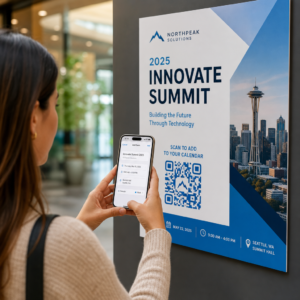
Pasākumu apmeklējuma manuāla pārvaldība ir lēna, pakļauta kļūdām un atvienota no svarīgākajām sistēmām. Šī rokasgrāmata parāda, kā izveidot dinamiskus QR kodus, kas ievada reģistrācijas datus tieši jūsu CRM, novēršot manuālu ievadi un nodrošinot reāllaika apmeklējuma ierakstu katram kontaktam.
Kāpēc dinamiskie QR kodi darbojas CRM reģistrācijai
Statiskais QR kods kodē fiksētu URL un to nevar izsekot vai mainīt pēc izdrukāšanas. A dinamiskais QR kods, turpretim izmanto īsu novirzīšanas saiti kā starpnieku. Jūs varat atjaunināt šo galamērķi jebkurā laikā bez atkārtotas drukāšanas, un katra skenēšana tiek reģistrēta ar datiem, tostarp laika zīmogu, ierīces tipu un ģeogrāfisko atrašanās vietu.
CRM reģistrācijai šai atšķirībai ir milzīga nozīme. Kad katrs apmeklētājs saņem unikālu dinamisku kodu, kas saistīts ar viņa kontakta ierakstu, tā skenēšana pie durvīm vienlaikus veic trīs lietas: tā pārbauda identitāti, atzīmē apmeklējumu un ievada datus jūsu CRM – viss bez personāla darbinieka ievadīšanas.
Tādas platformas kā HubSpot izseko reģistrācijas statusu, apmeklējuma stāvokli, atcelšanas un neierašanās rādītājus pret individuāliem kontaktu ierakstiem, izmantojot savus mārketinga pasākumu rīkus. Sistēmas, kas izmanto uz veidlapām balstītas reģistrācijas, var atjaunināt esošu kontakta ierakstu, pievienojot kontakta unikālo ID veidlapas URL, lai iesniegums apvienotos ar pareizo profilu, nevis izveidotu dublikātu. Tā pati loģika attiecas neatkarīgi no tā, vai izmantojat īpašu pasākumu platformu vai vispārējas nozīmes CRM ar veidlapu integrācijām.
Lai saprastu pilnu atšķirību starp kodu veidiem pirms darba plūsmas izveides, skatiet salīdzinājumu statiskajiem un dinamiskajiem QR kodiem.
Izveidojiet izsekojamus reģistrācijas kodus dažu minūšu laikā Izmantojiet Dinamisks QR kodu ģenerators lai izveidotu rediģējamus, analīzei gatavus QR kodus, kas tieši savienojas ar jūsu pasākumu veidlapām un CRM darba plūsmām.
Kas jums nepieciešams pirms sākat
Pirms viena koda ģenerēšanas pārliecinieties, ka ir pieejamas trīs lietas:
- CRM tīmekļa veidlapa, kas pieņem URL parametrus. Lielākā daļa CRM un veidlapu rīku – tostarp Google Forms, HubSpot veidlapas un līdzīgas platformas – ļauj iepriekš aizpildīt laukus, nododot vērtības, izmantojot vaicājuma virknes URL (piemēram, `?email=value&first_name=value`). Pirms darba plūsmas izveides pārliecinieties, ka jūsu veidlapa to atbalsta.
- Kontaktu ieraksti ar sapludināšanas laukiem. Jūsu CRM jāspēj iegūt datus, piemēram, e-pastu, vārdu un uzvārdu, no esošajiem kontaktu ierakstiem un dinamiski ievietot šīs vērtības URL veidnē.
- Dinamisks QR kodu ģenerators ar analītiku. Jums ir nepieciešama platforma, kas ģenerē unikālus kodus katram kontaktam, izseko katru skenēšanu un ļauj atjaunināt galamērķus bez atkārtotas drukāšanas. Šī apmeklējuma QR kodu rīks ir veidota tieši šim lietošanas gadījumam.
Soli pa solim: Dinamisku QR kodu veidošana CRM reģistrācijai
Iestatiet savu reģistrācijas veidlapu
Izveidojiet tīmekļa veidlapu savā CRM vai veidlapu rīkā ar laukiem, kas apkopo datus, kas jums nepieciešami reģistrācijai: vismaz e-pasta adrese, vārds un uzvārds. Ja izmantojat Google Forms, tad Google Form QR koda ģenerators ļauj jums tieši saistīt ar jūsu veidlapu un izsekot skenēšanu kopā ar iesniegumiem.
Jūsu veidlapa ir jākonfigurē tā, lai atjauninātu esošu kontakta ierakstu, nevis izveidotu jaunu. Sistēmās, kas to atļauj, kontakta identifikatora pievienošana URL – piemēram, `?contact_id={{contact.id}}` – automātiski saista veidlapas iesniegumu ar pareizo CRM ierakstu.
Izveidojiet dinamisku URL ar sapludināšanas laukiem
Dinamisks reģistrācijas URL izmanto jūsu CRM sapludināšanas lauku sintaksi, lai ievietotu katra kontakta datus kā vaicājuma parametrus. Veidne izskatās šādi:
“```
https://yourform.com/checkin?email=[Contact.Email]&firstname=[Contact.FirstName]&lastname=[Contact.LastName]
“```
Kad jūsu CRM apstrādā šo veidni individuālam kontaktam, vietturi tiek aizstāti ar reālām vērtībām:
“```
https://yourform.com/[email protected]&firstname=Jane&lastname=Smith
“```
Precīza sapludināšanas lauku sintakse ir atkarīga no jūsu CRM. Keep/Infusionsoft izmanto iekavu stila tagus; HubSpot izmanto savu personalizācijas marķieru formātu. Pārbaudiet savas platformas dokumentāciju, lai uzzinātu pareizo sintaksi.
Pareizi kodējiet URL
URL adreses sabojājas, ja tās satur nekodētus speciālos simbolus. Atstarpes, ampersandi un vienādības zīmes parametru vērtībām jābūt procentuāli kodētām, lai pārlūkprogrammas un QR kodu lasītāji tās interpretētu pareizi. Biežākās konversijas ietver:
- Space → `%20`
- Ampersand (`&`) → `%26`
- Equal sign (`=`) → `%3D`
Lielākā daļa CRM platformu ietver URL kodēšanas funkciju, ko varat lietot sapludināto lauku izvadei. Izmantojiet to. Viens nekodēts simbols kontakta vārdā – piemēram, ampersands uzņēmuma nosaukumā – var klusi sabojāt visu reģistrācijas plūsmu šim apmeklētājam.
Ģenerējiet unikālu dinamisku QR kodu katram kontaktam
Kad kodētā URL veidne ir gatava, ģenerējiet vienu dinamisku QR kodu katram apmeklētājam. Katrs kods norāda uz šīs personas iepriekš aizpildītās veidlapas URL. Tā kā tie ir dinamiski kodi, jūs saglabājat iespēju vēlāk atjaunināt galamērķi – tas ir noderīgi, ja jūsu veidlapas URL mainās pēc tam, kad kodi jau ir izplatīti.
Lieliem pasākumiem lielākā daļa CRM platformu un e-pasta automatizācijas rīku atbalsta masveida kodu ģenerēšanu: sapludiniet URL veidni, kodējiet to un iedarbiniet QR koda izveidi katram kontaktam secībā. Iegūtais kods pēc tam tiek iekļauts apmeklētāja apstiprinājuma e-pastā kopā ar viņa reģistrācijas informāciju.
Portāls Pasākuma QR koda ģenerators atbalsta šo darbplūsmu un ļauj pielāgot koda izskatu – pievienojot jūsu pasākuma zīmolu, logotipu vai krāsu shēmu – pirms izplatīšanas.
Izplatīt un izvietot pie ieejas
Nosūtiet katram apmeklētājam viņa unikālo QR kodu apstiprinājuma e-pastā. Pasākuma ieejā darbinieks skenē kodu, izmantojot jebkuru standarta viedtālruņa kameru. Skenēšana atver iepriekš aizpildīto veidlapu, apmeklētājs apstiprina vai iesniedz, un CRM ieraksts tiek atjaunināts ar apmeklējuma laika zīmogu.
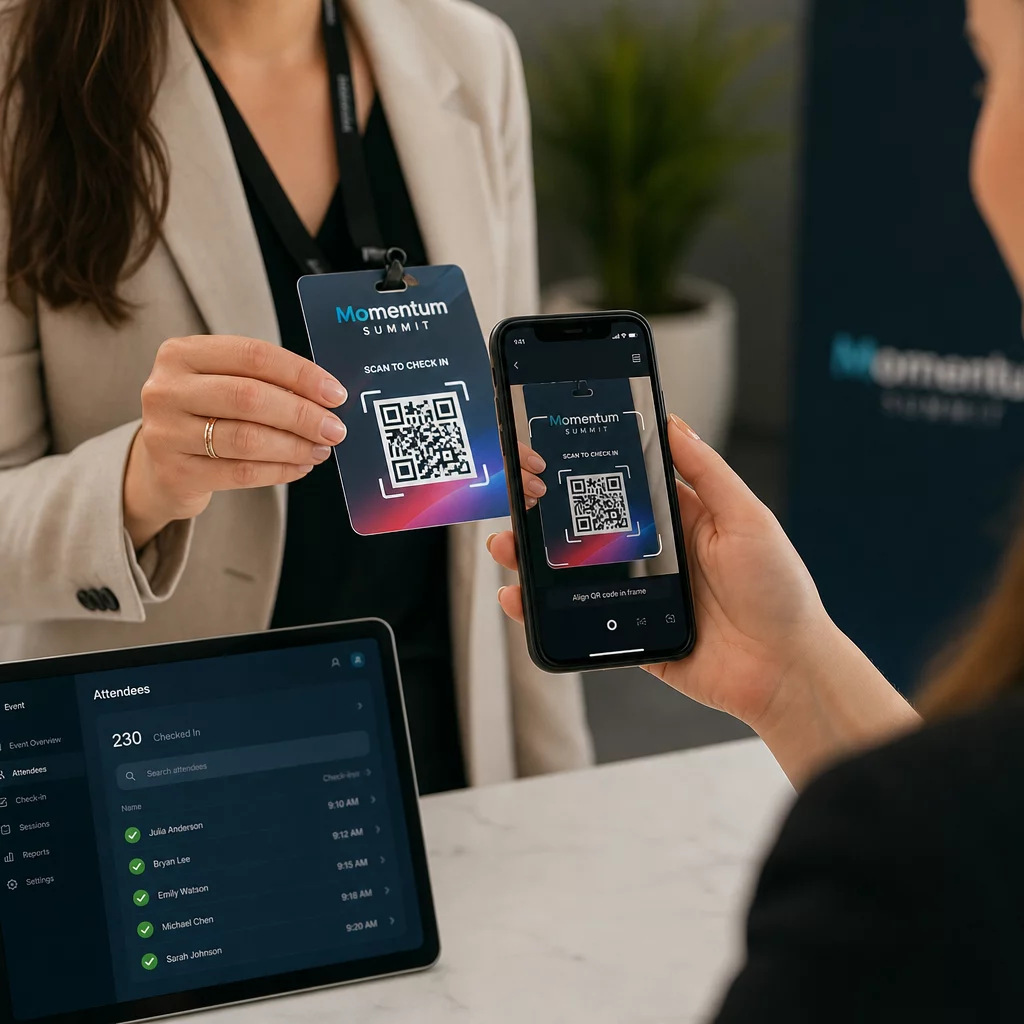
Lielākiem pasākumiem apsveriet iespēju izveidot īpašas skenēšanas stacijas. Apmāciet personālu turēt skenēšanas ierīci aptuveni 30 cm attālumā no koda un ieslēgt kameras zibspuldzi vāja apgaismojuma apstākļos. Ja drukājat kodus uz nozīmītēm vai aprocēm, izmantojiet matētus materiālus, nevis glancētas virsmas, lai novērstu atspīdumu, kas traucē skenēšanu. Sīkāka informācija par fiziskās izvietošanas labāko praksi ir pieejama galīgo ceļvedi par QR kodiem pasākumu reģistrācijai.
Kā apmeklējuma dati nonāk jūsu CRM
Reģistrācijas skenēšana iedarbina notikumu ķēdi, kas beidzas ar atjauninātu kontakta ierakstu. Lūk, kas notiek katrā posmā:
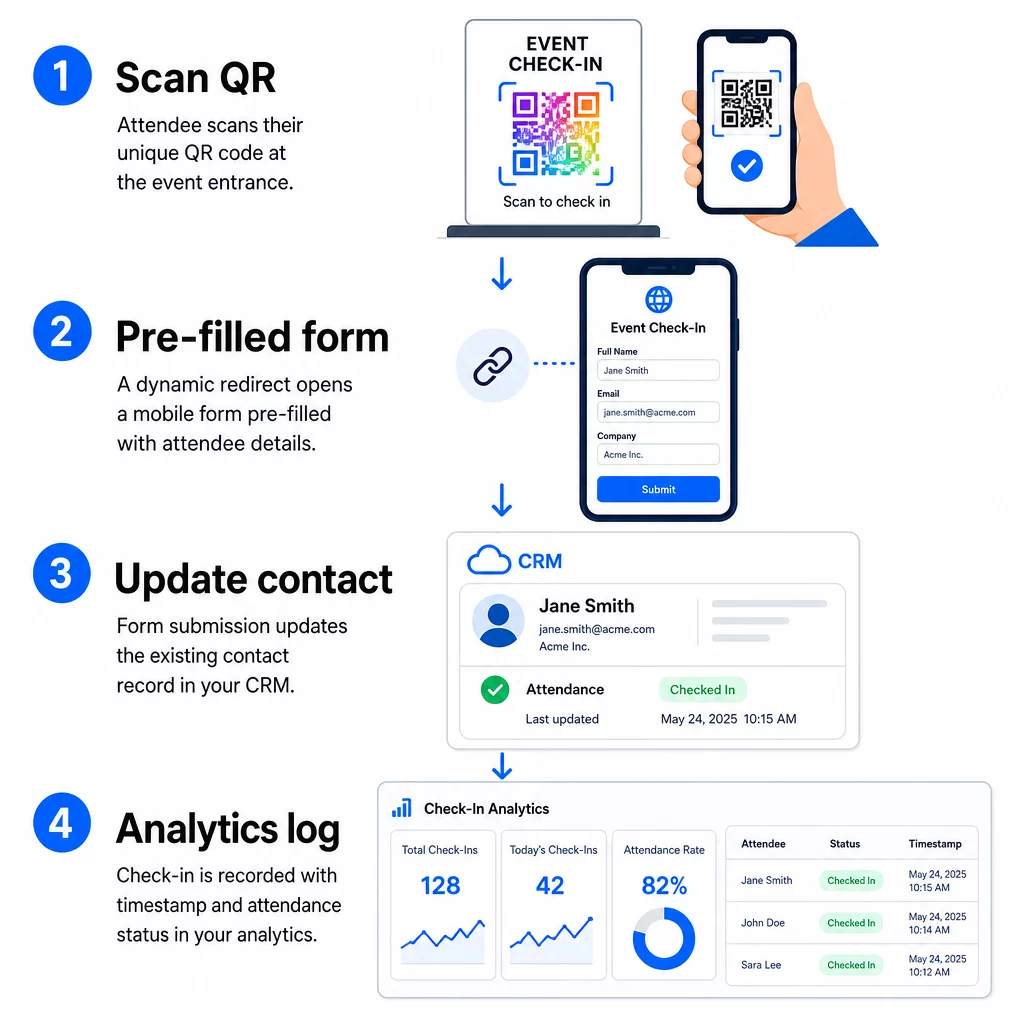
- Dalībnieka unikālais QR kods tiek skenēts pie ieejas.
- Dinamiskā pāradresācija ielādē iepriekš aizpildītu reģistrācijas veidlapu dalībnieka pārlūkprogrammā.
- Dalībnieks iesniedz veidlapu (vai veidlapa tiek automātiski iesniegta pēc īsas apstiprināšanas).
- Veidlapas iesniegšana, kas saistīta ar kontakta unikālo ID, atjaunina esošo CRM ierakstu ar reģistrācijas statusu, laika zīmogu un visiem papildu fiksētajiem laukiem.
- Ja jūsu CRM atbalsta uz tīmekļa āķiem balstītu automatizāciju, iesniegšana var vienlaikus iedarbināt turpmākās darbības: pēcpārbaudes uzdevuma piešķiršanu, pēcpasākuma e-pasta nosūtīšanu vai kampaņas statusa atjaunināšanu.
Tādas platformas kā HubSpot saglabā dalības statusus – Reģistrēts, Apmeklējis, Neieradās, Atcelts – tieši kontakta mārketinga pasākumu kartītē, nodrošinot jūsu komandai pilnu apmeklējumu vēsturi katram kontaktam bez manuālas saskaņošanas. Lai uzzinātu, kā plašāk savienot skenēšanu ar automatizētām CRM darbībām, skatiet ceļvedi par QR kodu skenēšanas darbplūsmas automatizācija.
Reģistrācijas veiktspējas izsekošana ar analītiku
Tā kā jūs izmantojat dinamiskos kodus, katra skenēšana ģenerē analītikas datus – ne tikai aizpildītu veidlapu. Jūsu QR koda informācijas panelis fiksē:
- Kopējās skenēšanas reizes pret unikālajām skenēšanas reizēm – noderīgi, lai noteiktu, vai kāds ir skenējis savu kodu vairākas reizes
- Skenēšanas laika zīmogi – ļauj rekonstruēt ierašanās modeļus un identificēt maksimālos reģistrācijas periodus
- Ierīces tips un operētājsistēma – palīdz optimizēt jūsu reģistrācijas veidlapas mobilo pieredzi
- Ģeogrāfiskā atrašanās vieta – apstiprina, ka skenēšana notiek paredzētajā vietā
Šie dati atrodas blakus jūsu CRM apmeklējumu ierakstiem un nodrošina jums otru verifikācijas slāni. Ja kontakta veidlapas iesniegšana neizdevās, bet viņa QR skenēšana tika reģistrēta, jums ir ieraksts, ko izpētīt. Lai dziļāk aplūkotu, ko mērīt un kā rīkoties, ceļvedis par uzņēmuma QR kodu analītiku un galvenajiem rādītājiem aptver pilnu ainu.
Jūs varat arī izsekot QR kodu skenēšanai un analīzei kampaņas līmenī, segmentējot pēc pasākuma, datumu diapazona vai individuāla koda, lai salīdzinātu veiktspēju vairākos reģistrācijas punktos.
Uzraudzīt apmeklējumu reāllaikā Precīzi redziet, kurš skenēja, kad un no kuras vietas. Izmantojiet Apmeklējuma QR koda rīku lai izvietotu reģistrācijas kodus ar iebūvētu pilnu skenēšanas analīzi.
Biežākās problēmas un kā tās novērst
Bojātas URL adreses pēc sapludināšanas lauka aizstāšanas. Vienmēr pārbaudiet savu kodēto URL ar reāliem kontaktpersonu datiem, pirms nosūtāt kodus apmeklētājiem. Īpašu uzmanību pievērsiet kontaktpersonām, kuru vārdos vai e-pasta adresēs ir speciālās rakstzīmes.
Dublēti CRM ieraksti, kas izveidoti reģistrējoties. Tas notiek, ja veidlapas URL nesatur kontaktpersonas identifikatoru. Pievienojiet kontaktpersonas ID parametru savai URL veidnei un pārliecinieties, ka jūsu CRM ir konfigurēts, lai saskaņotu ar šo lauku, nevis izveidotu jaunu ierakstu.
QR kodi, kas pārstāj darboties pēc izplatīšanas. Šeit dinamiskie kodi pierāda savu vērtību. Ja jūsu veidlapas URL mainās – jo jūs nomainījāt veidlapu rīkus vai atjauninājāt savu domēnu – jūs varat atjaunināt galamērķi savā QR kodu pārvaldības panelī, nepārdalot jaunus kodus apmeklētājiem.
Kodi, kas skenē pareizi, bet neaizpilda veidlapu. Pārbaudiet, vai jūsu veidlapas rīks prasa specifiskus vaicājuma parametru nosaukumus. Dažas platformas izmanto `email`, kamēr citas prasa `entry.12345` (Google Forms) vai pielāgotu lauka atslēgu. Saskaņojiet savu URL veidni ar jūsu veidlapas rīka paredzētajiem parametru nosaukumiem.
Skenēšanas kļūmes vājā apgaismojumā pie ieejas. Pārliecinieties, vai jūsu drukātie QR kodi atbilst attiecībai 10:1 starp izmēru un attālumu: kods, kas skenēts no 10 collu attāluma, nedrīkst būt mazāks par 1 collu platumā. Izmantojiet augsta kontrasta druku – tumšus moduļus uz balta fona – un izvairieties no glancēta papīra vai lamināta.
Galvenie secinājumi
Dinamiskie QR kodi CRM reģistrācijai darbojas, jo katrs kods satur kontakta identitāti, kas kodēta tā galamērķa URL, novirza šos datus veidlapā, kas saistīta ar esošu ierakstu, un reģistrē pašu skenēšanu kā atsevišķu analītisku notikumu. Rezultāts ir apmeklējumu ieraksts, kas ir precīzs, ar laika zīmogu un savienots ar jūsu CRM bez manuālas datu ievades.
Tehniskās prasības ir vienkāršas: CRM ar sapludināšanas laukiem un tīmekļa veidlapām, kas pieņem URL parametrus, pareizi kodēti dinamiski URL un QR kodu platforma, kas atbalsta kodu ģenerēšanu katram kontaktam un skenēšanas izsekošanu. Ja šie trīs elementi ir pareizi, reģistrācijas darba plūsma lielā mērā darbojas pati.
Sāciet veidot savu reģistrācijas sistēmu ar Dinamisks QR kodu ģenerators – nav nepieciešama kredītkarte 14 dienu izmēģinājuma periodam.
Biežāk uzdotie jautājumi
Statisks QR kods kodē fiksētu URL tieši savā rakstā un to nevar mainīt vai izsekot pēc izdrukāšanas. Dinamisks QR kods izmanto īsu novirzīšanas saiti, ko varat atjaunināt jebkurā laikā no sava vadības paneļa, un katra skenēšana tiek reģistrēta ar datiem, tostarp laika zīmogu, ierīces veidu un atrašanās vietu. CRM reģistrācijai dinamiskie kodi ir būtiski, jo tie nodrošina URL personalizāciju katram kontaktam un nodrošina nepieciešamo analīzi, lai pārbaudītu apmeklējumu.
Pievienojiet sava kontakta unikālo CRM identifikatoru kā vaicājuma parametru reģistrācijas URL – piemēram, `?contact_id={{contact.id}}`. Kad veidlapa tiek iesniegta, jūsu CRM izmanto šo identifikatoru, lai saskaņotu iesniegumu ar esošo ierakstu, nevis izveidotu jaunu. Lielākajai daļai CRM platformu ir arī iestatījums, lai sapludinātu pēc e-pasta adreses kā rezerves variantu, ja nav norādīts kontakta ID.
Jā. Tā kā kodi ir dinamiski, jūs varat jebkurā laikā mainīt galamērķa URL savā QR kodu pārvaldības panelī. Izdrukātais vai izplatītais kods paliek tieši tāds pats – mainās tikai novirzīšanas mērķis. Tas nozīmē, ka, ja jūsu veidlapas URL mainās pēc tam, kad ir izsūtīti apstiprinājuma e-pasti, dalībnieki ar oriģinālajiem kodiem joprojām sasniegs pareizo veidlapu.