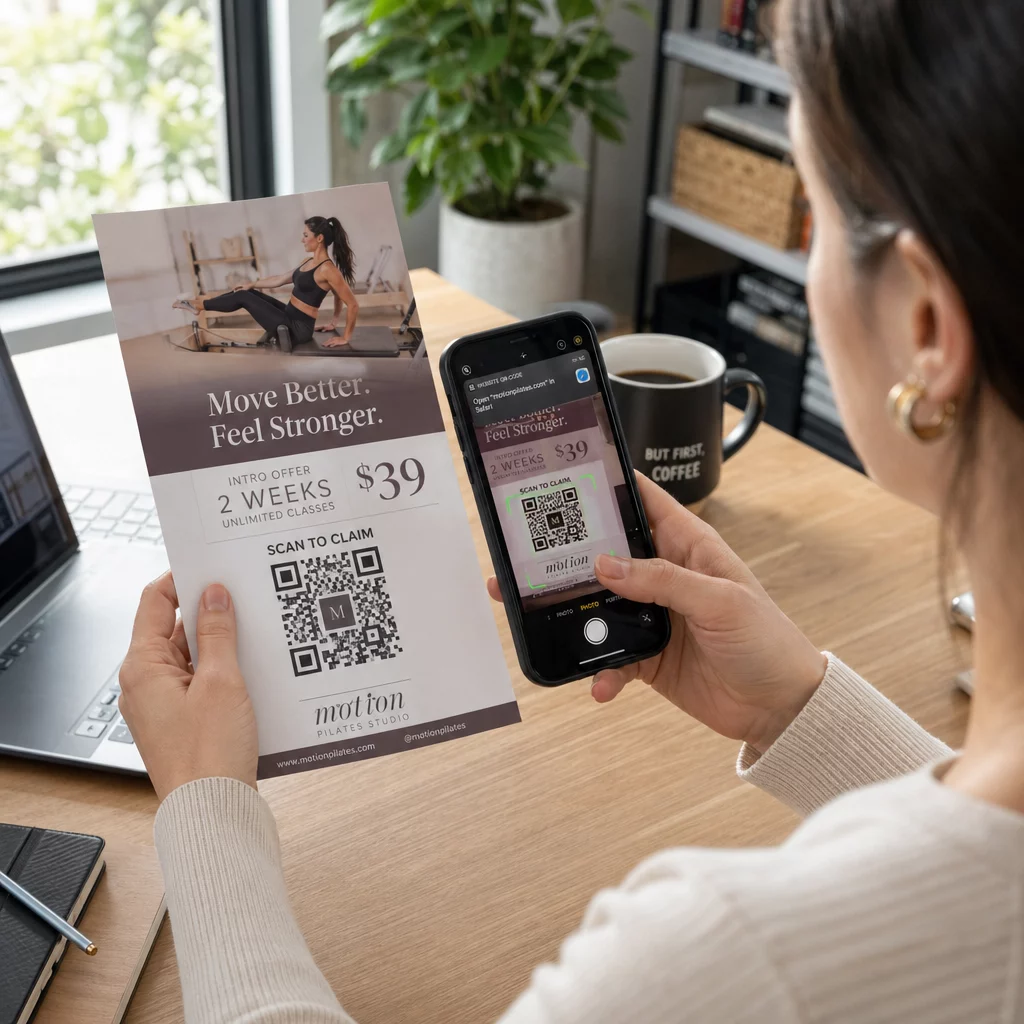
Kode QR selebaran adalah kode pada selebaran cetak Anda yang membuka halaman web, formulir, atau file saat pembaca memindainya. Untuk membuatnya, buat kode di a generator kode QR, unduh sebagai SVG atau PDF, letakkan di tata letak Anda minimal 0,8 inci (2 cm) lebarnya dengan batas putih yang jelas, dan tambahkan ajakan bertindak singkat di sampingnya. Uji dengan dua ponsel sebelum dicetak. Langkah-langkah, ukuran, dan aturan penempatan ada di bawah.
Mengapa Kode QR Harus Ada di Pamflet
Selebaran memiliki sedikit ruang. Jika Anda mencoba menempatkan setiap detail produk atau jadwal acara di dalamnya, desain akan menjadi ramai dan sulit dibaca. Kode QR memberi pembaca akses sekali ketuk ke menu digital, formulir pendaftaran, kupon, atau katalog lengkap, sementara selebaran tetap bersih. Beginilah cara kode QR menghubungkan pemasaran cetak dan digital: selebaran mendapat perhatian, dan pemindaian menggerakkan pembaca ke langkah berikutnya.
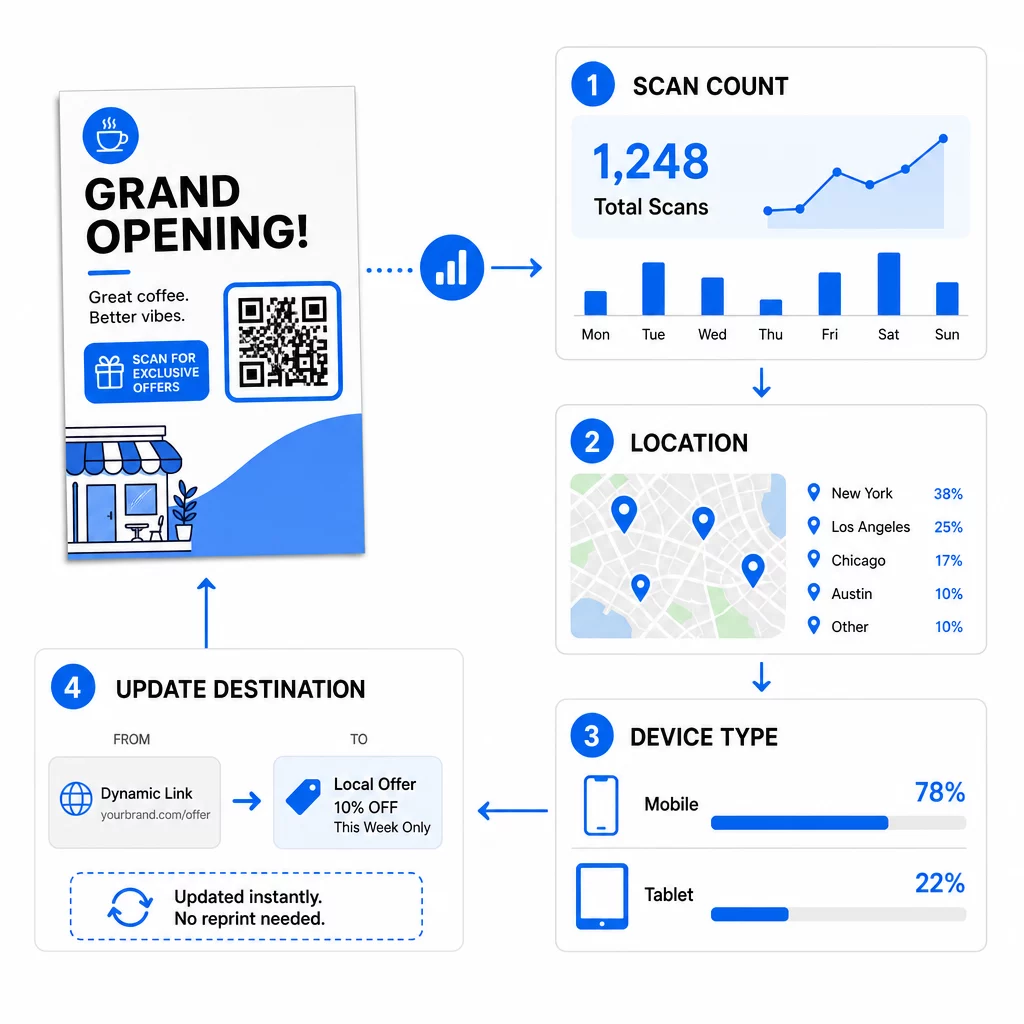
Kode QR juga memungkinkan Anda mengukur kampanye cetak. Dengan kode dinamis Anda dapat melihat kapan, di mana, dan di perangkat mana setiap pemindaian terjadi, sehingga Anda tahu selebaran dan lokasi mana yang menarik orang.
Kode QR Statis vs. Dinamis: Mana yang Harus Anda Gunakan?
Pilih jenisnya sebelum Anda mendesain selebaran. Kode QR statis dan dinamis berperilaku berbeda setelah dicetak.
Kode QR statis menyimpan tujuan langsung dalam pola. Tujuan tidak dapat diubah setelah dicetak, dan kode tidak pernah kedaluwarsa. Statis sudah cukup jika tautan tidak akan berubah, misalnya login Wi-Fi atau halaman situs web permanen, dan ketika Anda tidak memerlukan jumlah pemindaian.
Kode QR dinamis menunjuk ke tautan pengalihan singkat yang Anda kelola dalam sebuah akun. Anda dapat mengubah tujuan setelah selebaran didistribusikan, tanpa perlu mencetak ulang. Jika Anda mempromosikan acara mingguan, Anda menukar halaman pendaftaran setiap minggu. Kode dinamis juga mengandung lebih sedikit data, sehingga polanya lebih sederhana dan seringkali lebih mudah dipindai dalam cahaya redup.
Untuk selebaran yang berjalan di lebih dari satu tempat atau selama lebih dari satu minggu, dinamis biasanya sepadan karena Anda mendapatkan Pelacakan kode QR dengan jumlah pemindaian, lokasi, dan perangkat. Kode dinamis dilengkapi dengan uji coba gratis 14 hari, dan paket-paketnya tercantum di halaman harga Pageloot. Pemindaian tidak terbatas, dan ada jaminan uang kembali 30 hari untuk paket. Kode dinamis berhenti berfungsi saat paket bulanan atau tahunan berakhir, jadi pastikan paket tetap aktif selama pamflet beredar.
Cara Membuat Kode QR Pamflet dalam 5 Langkah
Ikuti langkah-langkah ini untuk menambahkan kode QR ke pamflet:
- Pilih apa yang dibuka oleh kode. Pilih satu tujuan yang berfungsi di ponsel: URL situs web, sebuah dokumen PDF, sebuah Google Form, atau halaman kontak vCard. Gunakan generator yang sesuai dengan konten.
- Hasilkan dan sesuaikan. Buka generator kode QR dan tempel tautan Anda. Jika Anda ingin merek Anda ada di kode, gunakan Generator QR Code dengan Logo. Pastikan logo kecil dan warna gelap pada latar terang.
- Unduh untuk dicetak. Unduh SVG atau PDF jika tersedia, karena file vektor tetap tajam pada ukuran berapa pun. Jika Anda hanya memiliki PNG, unduh dalam ukuran besar (penggeser generator mencapai 2000 px) dan jangan memperbesarnya dalam tata letak Anda.
- Tempatkan di alat desain Anda. Impor file ke Canva, Adobe Illustrator, atau aplikasi tata letak lainnya. Atur ukurannya, sisakan batas putih di sekelilingnya, dan letakkan ajakan bertindak Anda di sebelahnya.
- Uji sebelum mencetak. Cetak satu salinan dalam ukuran akhir. Pindai dengan iPhone dan ponsel Android, dalam cahaya ruangan normal, dari jarak pembaca akan memegang pamflet.
Buat Kode QR Kustom Anda Siap menambahkan kode QR bermerek dan dapat dilacak ke selebaran Anda berikutnya? Gunakan Generator QR Code dengan Logo untuk mendesain kode yang sesuai dengan identitas merek Anda.
Standar Desain untuk Pemindaian yang Andal
Pamflet yang dirancang dengan baik tetap gagal jika kodenya sulit dipindai. Ikuti pedoman ukuran kode QR untuk bahan cetak dan periksa ketiga poin ini.
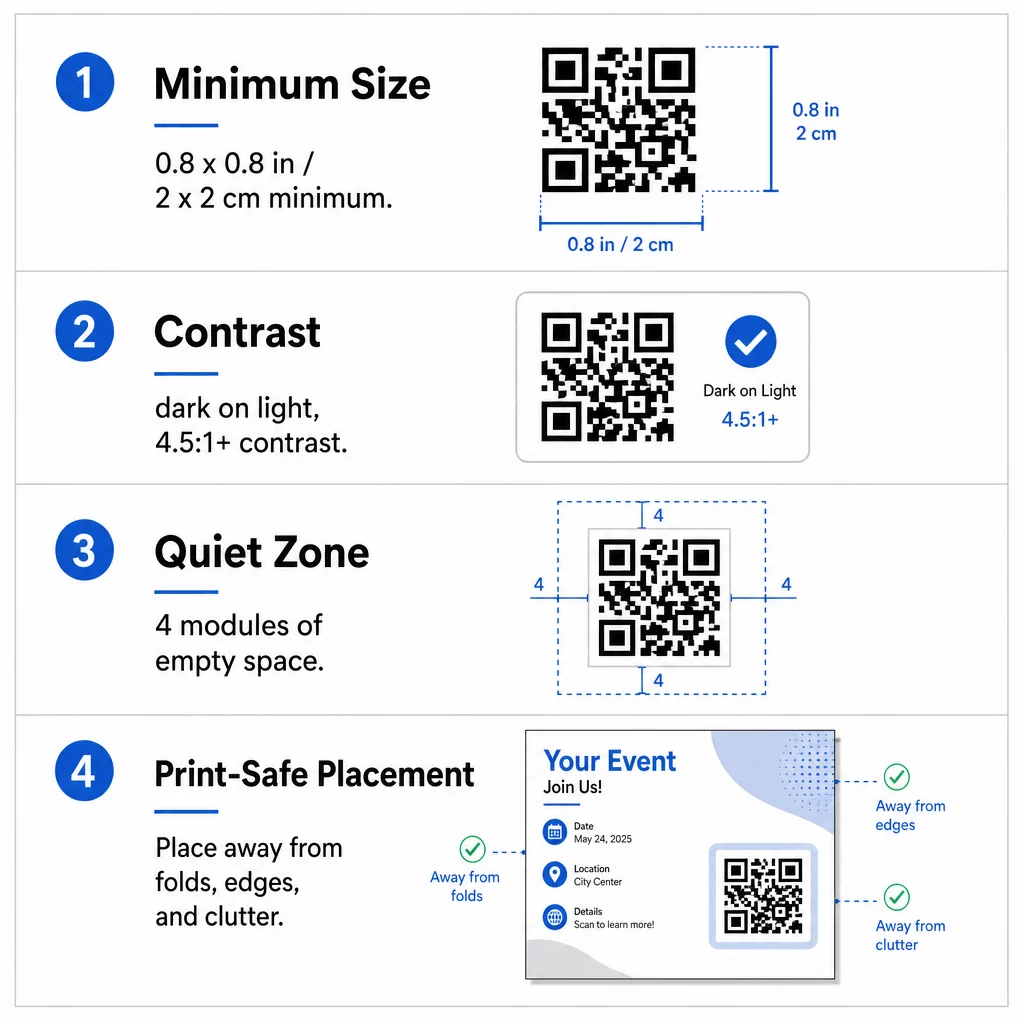
Ukuran: Pada pamflet genggam (A5, A4, atau US Letter), buat kode minimal 0,8 × 0,8 inci (2 × 2 cm). Kode yang lebih besar, sekitar 1 hingga 1,5 inci, lebih mudah dipindai dan hanya membutuhkan sedikit ruang. Untuk pamflet yang dipindai orang dari jarak lebih jauh, gunakan aturan 10:1: lebar kode satu inci untuk setiap sepuluh inci jarak pemindaian. Pamflet di dinding yang dipindai dari jarak 20 inci membutuhkan kode setidaknya selebar 2 inci.
Kontras: Gunakan modul gelap pada latar belakang terang. Rasio rasio kontras setidaknya 4.5:1 direkomendasikan untuk pemindaian yang andal, dan 7:1 atau lebih tinggi lebih baik. Jangan membalikkan warna (kode terang pada latar belakang gelap) dan jangan meletakkan kode di atas foto.
Zona tenang: Sisakan batas yang jelas minimal empat modul (kotak kecil) di keempat sisi. Teks, garis, atau gambar di dalam batas ini dapat menghentikan pemindai menemukan kode.
Penempatan Strategis dan Penulisan CTA yang Jelas
Penempatan kode dan tulisan di sampingnya memengaruhi jumlah pemindaian. kode QR dalam pemasaran mengikuti beberapa aturan praktis.
Pada selebaran A4 atau A5, tempat yang baik adalah pojok kanan bawah, tengah bawah, atau langsung di bawah penawaran utama. Hindari tempat-tempat ini:
- Lipatan, kerutan, dan tepi melengkung, yang membengkokkan pola
- Kertas mengilap atau bertekstur di mana silau atau serat mengurangi kontras
- Tempat di mana elemen desain lain memenuhi zona tenang
- Bagian belakang selebaran yang mungkin tidak pernah dibalik orang
Kode saja jarang mendorong tindakan. Tambahkan ajakan bertindak (CTA) yang menyatakan apa yang pembaca dapatkan: “Pindai untuk diskon 20%”, “Pindai untuk RSVP”, “Pindai untuk melihat menu”. Tambahkan petunjuk singkat seperti “Arahkan kamera ponsel Anda ke kode” untuk pembaca yang baru mengenal kode QR. Letakkan CTA tepat di atas atau di samping kode. Ini praktik terbaik untuk keterbacaan kode QR membantu semua kelompok usia. Pastikan juga halaman yang dibuka kode ramah seluler dan memuat dengan cepat.
Melacak dan Menganalisis Kinerja Selebaran
Untuk melihat selebaran mana yang berhasil, berikan setiap saluran distribusi kodenya sendiri atau parameter UTM. Misalnya, gunakan satu kode untuk pameran dagang dan kode lainnya untuk konter toko. Google Analytics kemudian akan menunjukkan lalu lintas per selebaran, sehingga Anda dapat membandingkan lokasi.
Dengan kode dinamis, Anda juga bisa melacak pemindaian kode QR secara real-time dan melihat waktu, lokasi, serta jenis perangkat. Jika satu area berkinerja buruk, ubah tujuan kode tersebut ke penawaran lokal yang lebih relevan. Selebaran yang dicetak tetap sama.
Pantau Kinerja Kampanye Anda Ingin melihat selebaran mana yang menghasilkan lalu lintas terbanyak? Gunakan Generator Kode QR untuk membuat kode dinamis yang dapat dilacak dan melihat data pemindaian di dasbor Anda.
Kode QR pada Selebaran Tidak Memindai? Periksa Ini
- Terlalu kecil: Di bawah 0,8 inci (2 cm), banyak ponsel gagal. Perbesar kodenya.
- Kontras rendah atau warna terbalik: Gunakan kode gelap pada latar belakang terang.
- Tanpa batas putih: Pulihkan zona tenang empat modul.
- Cetak buram: PNG kecil yang diregangkan akan tercetak buram. Gunakan SVG atau PDF, atau PNG yang lebih besar.
- Terlalu banyak data: Tautan tujuan yang sangat panjang membuat pola menjadi padat. Gunakan tautan pendek atau kode dinamis.
- Tujuan rusak: Buka tautannya sendiri. Halaman yang dihapus atau kode dinamis yang kedaluwarsa akan menghasilkan kesalahan pemindaian meskipun kodenya baik-baik saja.
Menambahkan kode QR ke selebaran hanya membutuhkan beberapa menit dan memberikan hasil yang terukur. Pilih jenis kode yang tepat, ikuti aturan ukuran dan kontras, letakkan kode di tempat yang akan terlihat oleh orang, dan tulis CTA yang jelas.
Pertanyaan yang sering diajukan
Untuk selebaran genggam standar, kode QR harus berukuran setidaknya 0,8 × 0,8 inci (2 × 2 cm). Jika selebaran dimaksudkan untuk dipindai dari jarak jauh, terapkan rasio 10:1: buat kode selebar satu inci untuk setiap sepuluh inci jarak pemindaian yang diharapkan.
Ya, tetapi hanya jika Anda menggunakan kode QR dinamis. Kode dinamis mengarahkan melalui URL pengalihan singkat yang dapat Anda perbarui dari dasbor Anda kapan saja. Kode statis menyematkan tujuan langsung ke dalam pola dan tidak dapat diubah setelah dicetak.
Kode QR Dinamis menyertakan dasbor analitik yang menunjukkan total pemindaian, pengguna unik, lokasi geografis, dan keterlibatan berbasis waktu. Anda juga bisa melampirkan parameter UTM ke URL tujuan Anda untuk melacak interaksi ini langsung di dalam Google Analytics.
SVG atau PDF, karena file vektor tetap tajam pada ukuran cetak berapa pun. Jika Anda menggunakan PNG, unduh yang besar dan jangan perbesar di tata letak Anda.
Kode QR Statis tidak pernah kedaluwarsa. Kode dinamis berhenti berfungsi saat paket bulanan atau tahunan yang membuatnya berakhir, jadi pastikan paket tetap aktif selama pamflet tersebut beredar.