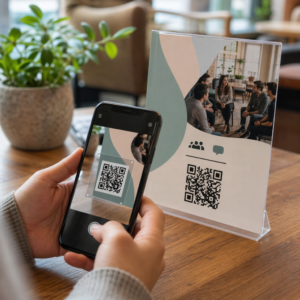
Haluatko muuttaa paperisen onnittelukortin joksikin, mitä vastaanottaja todella soittaa, katsoo tai kuuntelee? Staattiset kortit pannaan syrjään, mutta kortti, jossa on QR-koodi, joka avaa henkilökohtaisen videon tai ääniviestin, luo hetken, jonka ihmiset muistavat. Tämä sivu selittää, miten QR-koodit toimivat onnittelukorteissa ja miten niitä luodaan tai mukautetaan Pagelootin työkaluilla.
Miksi QR-koodit tekevät onnittelukorteista kiinnostavampia
Amerikkalaiset ostavat vuosittain noin 6,5 miljardia onnittelukorttia, ja syntymäpäiväkortit yksinään muodostavat yli puolet kaikista myydyistä korteista. Muoto on kaikkialla läsnä, ja juuri siksi erottuminen on tärkeää.
Kortin sisälle tai kanteen painettu QR-koodi linkittää mihin tahansa valitsemaasi digitaaliseen sisältöön – YouTube-videoon, tallennettuun ääniviestiin, kappaleeseen, valokuvagalleriaan tai henkilökohtaiseen aloitussivuun. Kun vastaanottaja avaa kortin ja skannaa koodin puhelimensa kameralla, sisältö latautuu välittömästi, eikä sovelluksen lataamista tarvita.
Avainero jatkuvassa käytössä on staattiset ja dynaamiset QR-koodit. Staattinen koodi koodaa kohteen suoraan, eikä sitä voi muuttaa tulostuksen jälkeen. Dynaaminen koodi käyttää lyhyttä uudelleenohjaus-URL-osoitetta, mikä tarkoittaa, että voit päivittää, mihin koodi osoittaa, milloin tahansa tulostamatta korttia uudelleen. Kertaluonteisiin henkilökohtaisiin kortteihin staattinen toimii hyvin. Yrityksille, jotka lähettävät brändättyjä kortteja suuria määriä, dynaamiset koodit antavat joustavuutta ja mahdollisuuden seurata sitoutumista.
Mitä sisältöä voit linkittää onnittelukortin QR-koodista
Sisältömahdollisuudet vaihtelevat yksinkertaisista monipuolisiin. Tässä ovat yleisimmät käyttötapaukset:
- Henkilökohtainen videoviesti – Tallenna video, lataa se YouTubeen ja linkitä se käyttämällä YouTube QR-koodi generaattori. Koodi avaa videon suoraan YouTube-sovelluksessa tai selaimessa.
- Ääni- tai äänitallenne – Muunna MP3- tai äänitiedosto skannattavaksi koodiksi käyttämällä MP3 QR-koodi generaattori. Voit mukauttaa brändätyn äänialoitussivun otsikolla, kansikuvalla ja brändiväreillä.
- Valokuvagalleria – Linkitä kuratoituun kuvagalleriaan käyttämällä QR-koodi kuvasta -generaattori, hyödyllinen valokuvalahjoihin, tapahtumien yhteenvetoihin tai vuosipäiväkortteihin.
- Kappale tai soittolista – Jaa merkityksellinen kappale tai soittolista käyttämällä Spotify QR-koodi generaattori, joka linkittää suoraan kappaleeseen, albumiin tai soittolistaan Spotifyssa.
- Mukautettu linkki tai aloitussivu – Käytä Linkki QR-koodigeneraattori osoittamaan mihin tahansa URL-osoitteeseen – verkkosivustoon, lomakkeeseen, tapahtumasivuun tai henkilökohtaiseen digitaaliseen viestiin.
Jokainen näistä generaattoreista antaa sinun mukauttaa QR-koodin värejä, lisätä logon, valita kehystyylin ja ladata tulostusvalmiin tiedoston.
Luo QR-koodi onnittelukorttiisi Valitse sisältötyyppisi ja luo täysin brändätty, skannattava QR-koodi minuuteissa. Aloita Pageloot QR-koodigeneraattori – ilmainen 14 päivän kokeilu, luottokorttia ei tarvita.
Miten luoda QR-koodi onnittelukorttiin
Prosessi kestää alle viisi minuuttia:
- Valitse sisältötyyppisi. Päätä, mitä haluat kortin toimittavan – videon, äänen, kuvia, linkin tai kappaleen.
- Valmistele sisältösi. Lataa videosi YouTubeen, vie äänesi MP3-tiedostona, kerää kuvasi tai kopioi URL-osoite, jota haluat käyttää.
- Avaa oikea generaattori. Siirry asiaankuuluvaan Pageloot-generaattoriin sisältötyyppisi perusteella.
- Syötä sisältösi tiedot. Liitä URL-osoitteesi tai lataa tiedostosi.
- Mukauta QR-koodi. Säädä värejä, lisää logo, valitse kehys tai muoto ja lisää lyhyt toimintakehotus, kuten “Skannaa kuullaksesi viestin”.”
- Lataa koodisi. Vie tulostusvalmiissa muodossa – SVG, EPS tai PDF – parhaan laadun saavuttamiseksi.
- Aseta se korttiin. Tulosta QR-koodi suoraan kortin suunnitteluun tai tulosta se tarraan kiinnitettäväksi sisäpuolelle.
- Testaa ennen massatulostusta. Skannaa koodi vähintään kahdella eri älypuhelimella varmistaaksesi, että se toimii oikein.
QR-koodin suunnitteluohjeet korteille
Onnittelukortit ovat pieniä, joten koon ja sijoittelun oikeellisuus on kriittistä luotettavan skannauksen kannalta.

Koko: QR-koodin vähimmäissuosituskoko painomateriaaleissa on 0,8 × 0,8 tuumaa (20 × 20 mm). Vakiokokoisella onnittelukortilla, joka skannataan käsivarren etäisyydeltä, tämä riittää. Jos lisäät logon koodin sisään, suurenna kokoa 20–30 % kompensoidaksesi logon viemää tilaa. Täydellisen erittelyn materiaalityypin mukaan löydät oppaasta QR-koodin koon määrittäminen eri painomateriaaleille.
Kontrasti: Käytä tummia moduuleja vaalealla taustalla äläkä koskaan käännä tätä suhdetta. Korkea kontrasti on yksittäinen tärkein tekijä luotettavalle skannaukselle eri puhelinmalleissa ja valaistusolosuhteissa. Yksityiskohtaisen ohjeistuksen löydät parhaita käytäntöjä QR-koodin luettavuudelle opas kattaa kontrastisuhteet, väriyhdistelmät ja yleiset virheet, joita kannattaa välttää.
Hiljainen vyöhyke: Jätä selkeä, painamaton reunus QR-koodin ympärille kaikille neljälle sivulle – vähintään neljä moduulia leveä. Tämä puskurivyöhyke auttaa skannereita havaitsemaan koodin reunat. Älä sijoita tekstiä, kuvioita tai koriste-elementtejä tämän reunuksen sisään.
Sijoitus: Sillä, mihin sijoitat koodin kortilla, on yhtä suuri merkitys kuin sillä, miten suunnittelet sen.
- Aseta QR-koodi tasaiselle, heijastamattomalle pinnalle ja vältä sen sijoittamista kortin taitteen yli, mikä voi vääristää kuviota, kun kortti avataan tai sitä käsitellään.
- Kortin sisäpuoli on usein turvallisin vaihtoehto – tasainen, suojattu käsittelyltä ja näkyvissä sillä hetkellä, kun kortti avataan.
- Kortin takapaneeli on toinen luotettava sijoituspaikka, jos pinta on matta ja tausta on selkeä ja siisti.
- Vältä voimakkaasti kuvioituja, kiiltäviä tai kohokuvioituja pintoja, jotka voivat hajottaa valoa ja estää tarkan skannauksen.
Laajempaa sijoittelustrategiaa varten, joka soveltuu painokampanjoihin, opas QR-koodien sijoitteluun markkinoinnissa käsitellään yksityiskohtaisesti pintatyyppejä, silmän korkeudella tapahtuvaa sijoittelua ja toimintakehotuksen kehystystä.
Tulostuslaatu: Vie QR-koodisi vektoritiedostona (SVG tai EPS) mieluummin kuin matalaresoluutioisena PNG-tiedostona aina kun mahdollista. Tämä pitää koodin terävänä tulostuskoosta riippumatta. Jos työskentelet kaupallisen painotalon kanssa, tarkista miten tulostustekniikat vaikuttavat QR-koodin skannattavuuteen ymmärtääksesi, miten menetelmä, alusta ja musteen valinta vaikuttavat lopputulokseen.
Dynaamisten QR-koodien käyttö suurissa erissä lähetettävissä korteissa
Jos olet yritys, joka lähettää brändättyjä onnittelukortteja juhlapyhinä, asiakkaiden arvostukseen tai markkinointikampanjoihin, dynaamiset QR-koodit tuovat merkittäviä etuja staattisiin verrattuna.

Dynaamisella koodilla voit:
- Päivittää linkitetyn sisällön tulostuksen jälkeen. Jos videon URL-osoite muuttuu tai haluat vaihtaa kohdesivun uuteen kampanjaan, teet päivityksen Pageloot-hallintapaneelissa ja painettu koodi pysyy voimassa – uudelleenpainatusta ei tarvita.
- Seuraa skannaussuorituskykyä. Näet kokonaisskannaukset, yksilölliset skannaukset, skannausajat, sijainnit kaupungin tai alueen mukaan ja laitetyypit, kaikki yhdestä hallintapaneelista.
- Käytä samaa korttimallia uudelleen eri vuodenaikoina. Päivitä kohdesivu jokaisen kampanjasyklin aikana ilman korttipohjan uudelleensuunnittelua tai uudelleenpainatusta.
Tällä on merkitystä suuressa mittakaavassa. Jouluna ostetaan Yhdysvalloissa vuosittain noin 1,3 miljardia onnittelukorttia, jota seuraavat ystävänpäivä 145 miljoonalla ja äitienpäivä 113 miljoonalla kappaleella. Näillä volyymeilla toimiville yrityksille kyky muokata kohdesivuja ja seurata sitoutumista ilman uudelleenpainatusta tarkoittaa suoraan pienempiä kustannuksia ja toimivampaa kampanjadataa.
Seuraa, kuka skannaa onnittelukorttisi Käytä Pagelootin QR-koodigeneraattori luodaksesi päivitettäviä, seurattavia koodeja korttikampanjoihisi ja seurataksesi skannaussuorituskykyä yhdestä hallintapaneelista.
Huomioitavaa korttien postittamisesta QR-koodien kanssa
QR-koodin lisääminen korttiin ei vaikuta sen postitusluokitukseen, edellyttäen, että kortti itsessään täyttää USPS:n standardimitat. Kirjekoon minimit ovat 3,5 × 5 tuumaa ja maksimit 6,125 × 11,5 tuumaa. Näiden mittojen sisällä olevat kortit, jotka painavat alle 3,5 unssia, postitetaan tavallisilla First-Class-kirjehinnoilla.
Yksi poikkeus, joka on syytä huomioida: neliönmuotoiset onnittelukortit voivat olla koneellisesti käsittelemättömän lisämaksun alaisia tavallisen First-Class-postimaksun lisäksi, riippumatta siitä, sisältävätkö ne QR-koodin. Jos postituskustannukset ovat tekijä, pysy tavallisissa suorakaiteen muotoisissa mitoissa.
QR-koodin lisääminen onnittelukorttiin on suoraviivainen päivitys, joka muuttaa kertakäyttöisen esineen interaktiiviseksi hetkeksi. Pidä koodi vähintään 0,8 tuumaa leveänä, sijoita se tasaiselle mattapinnalle poispäin taitteista ja testaa se aina useilla laitteilla ennen tulostusta. Yrityskäytössä dynaamiset koodit antavat sinun päivittää linkitetyn sisällön ja mitata sitoutumista koskematta korttiin. Käytä Pageloot QR-koodigeneraattori rakentaaksesi ensimmäisen korttivalmiin koodisi minuuteissa.
Usein kysytyt kysymykset
Se riippuu tilaisuudesta. Henkilökohtaisilla videoviesteillä ja äänitallenteilla on yleensä vahvin emotionaalinen vaikutus yksittäisiin kortteihin. Yritysten onnittelukorteissa linkittäminen lyhyeen videoviestiin, kuratoituun laskeutumissivuun tai asiaankuuluvaan soittolistaan toimii hyvin. Pagelootin YouTube QR-koodigeneraattori, MP3 QR-koodigeneraattori ja Linkki QR-koodigeneraattori kattavat yleisimmät formaatit.
Kyllä. Luo QR-koodisi Pagelootissa, lataa se PNG- tai SVG-tiedostona ja lataa se sitten Canva-suunnitelmaasi. Vaiheittaisten ohjeiden saamiseksi katso Canvan QR-koodigeneraattorin opas. Varmista, että koodi on vähintään 0,8 × 0,8 tuumaa lopullisessa painetussa tulosteessa varmistaaksesi luotettavan skannauksen.
Vain jos käytit dynaamista QR-koodia. Dynaamiset koodit käyttävät pysyvää lyhyttä uudelleenohjaus-URL-osoitetta, joka voi osoittaa mihin tahansa valitsemaasi kohteeseen, jopa sen jälkeen kun kortti on painettu ja postitettu. Staattiset koodit koodaavat kohteen suoraan eivätkä voi muuttua. Mihin tahansa korttikampanjaan, jossa sisältö voi kehittyä tai jossa haluat skannausanalytiikkaa, dynaaminen koodi Pagelootin kautta on oikea valinta.