Ovatko offline-yleisön jäsenten muuttaminen aktiivisiksi Discord-tilaajiksi vaikeaa ilman, että heidän tarvitsee kirjoittaa pitkiä palvelin-URL-osoitteita? Monimutkaiset linkit luovat kirjoituskitkaa, mikä saa potentiaaliset jäsenet luopumaan palvelimellesi liittymisestä ennen kuin he edes aloittavat. Discord-kutuslinkkisi muuntaminen skannattavaksi QR-koodiksi tarjoaa välittömän, yhden kosketuksen perehdytyskokemuksen fyysisille materiaaleille ja digitaalisille näytöille.
Luo pysyvä Discord-kutulinkki
Ennen QR-koodin luomista sinun on hankittava toimiva kutulinkki Discord-palvelimeltasi. Oletuksena Discord-kutulinkit vanhenevat 7 päivän kuluttua tai kun ne ovat saavuttaneet rajoitetun määrän käyttökertoja. Välttääksesi rikkoutuneet QR-koodit fyysisissä painomateriaaleissa, määritä ensin pysyvä linkki.
- Avaa Discord-sovelluksesi työpöydällä tai mobiililaitteella ja siirry palvelimellesi.
- Etsi kohdekanavallesi, vie hiiren osoitin kanavan nimen päälle ja valitse Luo kutsu.
- Napsauta päällä Muokkaa kutsu-linkkiä ponnahdusikkunan alareunassa.
- Muutos se Vanhenee pudotusvalikon asetukseksi Ei koskaan.
- Muutos se Käyttökertojen enimmäismäärä pudotusvalikon asetukseksi Ei rajaa.
- Kopioi juuri luotu pysyvä URL leikepöydällesi.
Muunna linkkisi QR-koodigeneraattorilla
Kun olet kopioinut pysyvän palvelin-URL-osoitteesi, voit muuttaa sen skannattavaksi kuvaksi. Samoin kuin asennat QR-koodit Telegram-ryhmille, Discord-koodin luominen vaatii yksinkertaisen verkkosivun osoitteen muuntamista visuaaliseksi kuvioksi, jonka mobiilikamerat voivat tulkita.
- Siirry online-palveluun linkin QR-koodigeneraattori.
- Valitse URL-syöttövaihtoehtoon generaattorin käyttöliittymässä.
- Liitä pysyvä Discord-kutulinkkisi verkkosivun osoitekenttään.
- Luo visuaalisen koodikuvasi yhdellä napsautuksella.
Luo mukautettu Discord QR-koodi Muuta pitkät palvelinkutsulinkit korkearesoluutioisiksi, skannattaviksi grafiikoiksi julisteisiin, kortteihin ja striimien näyttöihin käyttämällä linkin QR-koodigeneraattori tänään.
Mukauta suunnittelua brändin tunnistettavuuden parantamiseksi
Geneerinen mustavalkoinen QR-koodi voi näyttää epäpaikallaan mukautetuissa markkinointigrafiikoissa tai striiminäytöissä. Suunnittelun mukauttaminen rakentaa välitöntä luottamusta ja viestii potentiaalisille jäsenille, minne koodi heidät vie.
Käyttämällä ominaisuuksiltaan täydellistä QR-koodigeneraattori, voit muokata visuaalisia parametreja yhteisösi identiteetin mukaisiksi:
- Käytä brändivärejä käyttämällä tummia ensisijaisia sävyjä koodin moduuleille pitäen samalla taustan vaaleana luettavuuden optimoimiseksi.
- Upota logo tai Discord-kuvake suunnittelun keskelle luodaksesi välittömän visuaalisen kohdeluottamuksen.
- Lisää toimintakehotuskehys kuten “Skannaa liittyäksesi” ohjaamaan potentiaalisia jäseniä siihen, mitä toimenpiteitä heidän tulee tehdä.
Parhaat käytännöt QR-koodin skannattavuuden varmistamiseksi
Huonosti muotoiltu QR-koodi ei skannaa, mikä luo turhauttavan kokemuksen potentiaalisille jäsenille. Teknisten painatus- ja renderöintistandardien noudattaminen varmistaa nopean kameratunnistuksen kaikilla mobiililaitteistoilla.
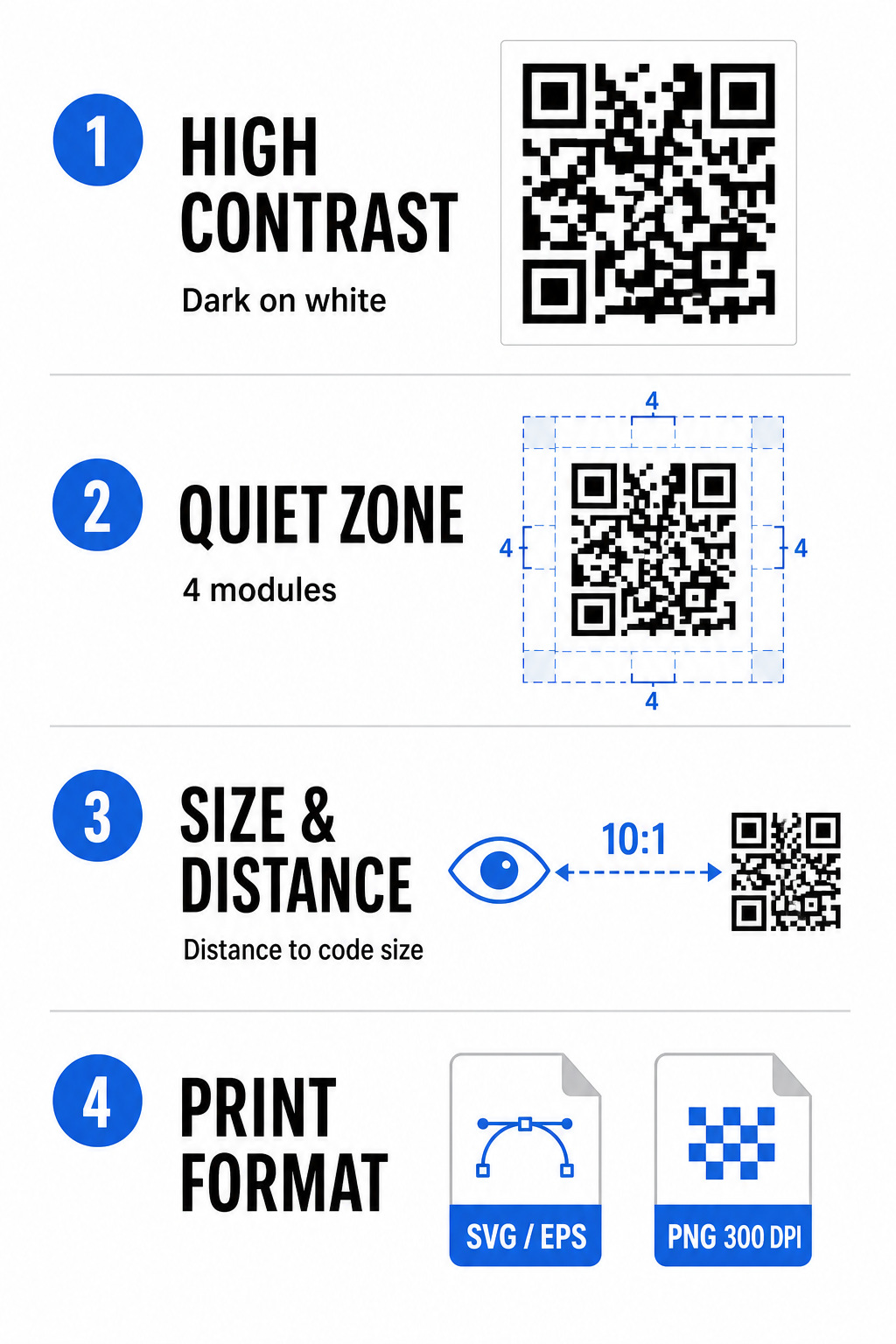
Säilytä korkea värikontrasti
Skannerit luottavat kontrastiin tummien kuvioiden (moduulien) ja taustatilojen välillä datan tulkitsemiseksi. Tummemmat värit imevät valoa, kun taas vaaleammat värit heijastavat sitä, jolloin kameran anturit voivat erottaa datapisteet helposti. Pyri vähintään 4:1 kontrastisuhteeseen koodimoduulien ja taustan välillä. Luotettavin yhdistelmä on mustat tai tummansiniset moduulit valkoista taustaa vasten. Vältä käänteisiä värimaailmoja vaaleilla moduuleilla tummilla taustoilla, sillä monet kamerasovellukset eivät pysty tulkitsemaan käänteisiä kuvioita.
Säilytä hiljainen vyöhyke
Hiljainen vyöhyke on tyhjä reunus, joka ympäröi QR-koodimatriisin kaikkia neljää ulkoreunaa. Tämän marginaalin on oltava vähintään neljä moduulia leveä ja täysin vapaa tekstistä, grafiikasta tai kehysten koristeista. Ilman puhdasta hiljaista vyöhykettä mobiilikamerat eivät voi määrittää, mistä QR-koodin rajat alkavat ja päättyvät.
Laske oikea koko skannausetäisyydelle
Tulostaessa materiaaleja, laske QR-koodisi mitat käyttämällä 10:1 etäisyys-kokosuhdetta. Tämä tarkoittaa, että koodisi fyysisen leveyden tulisi olla noin yksi kymmenesosa odotetusta skannausetäisyydestä. Tarkempia teknisiä tietoja varten katso täydellinen opas osoitteessa parhaita käytäntöjä QR-koodin luettavuudelle.
| Sijoitusskenaario | Odotettu skannausetäisyys | Vähimmäissuositeltu QR-koodin koko |
|---|---|---|
| Tapahtumamerkit ja käyntikortit | 10 tuumaa (25 cm) | 1,0 x 1,0 tuumaa (2,5 x 2,5 cm) |
| Pöytätelinet ja työpöytänäytöt | 20 tuumaa (50 cm) | 2,0 x 2,0 tuumaa (5,0 x 5,0 cm) |
| Seinäjulisteet ja striimibannerit | 5 jalkaa (1,5 metriä) | 6,0 x 6,0 tuumaa (15 x 15 cm) |
| Tapahtumalavojen näytöt ja opasteet | 10 jalkaa (3,0 metriä) | 12,0 x 12,0 tuumaa (30 x 30 cm) |
Vie vektorimuodoissa
Fyysistä tulostusta varten vie tiedostosi korkearesoluutioisina vektorimuotoina, kuten SVG tai EPS. Vektoriedostot skaalautuvat loputtomasti menettämättä terävyyttä tai aiheuttamatta epätarkkuutta. Jos käytät rasterimuotoja, kuten PNG, varmista, että tiedoston resoluutio on vähintään 300 DPI korkealaatuista tulostusta varten.
Discord QR-koodin testaus ja validointi
Älä koskaan tulosta markkinointimateriaaleja tai julkaise grafiikkaa tarkistamatta QR-koodin toimivuutta useilla alustoilla. Kameran anturit, ohjelmistoalgoritmit ja näytön resoluutiot vaihtelevat suuresti laitteiden välillä.
- Testaa käyttöjärjestelmien välillä skannaamalla kuva sekä iOS- että Android-natiivikamerasovelluksilla.
- Tarkista skannauskulmat testaamalla koodia kirkkaassa valaistuksessa, hämärissä ympäristöissä ja eri kulmissa.
- Käytä verkkotyökalua kuten verkkopohjaista QR-koodin lukija varmistaaksesi, että upotettu URL-osoite puretaan puhtaasti.
- Tarkista perehdytysprosessi varmistaaksesi, että skannaus avaa suoraan Discord-sovelluksen tai ohjaa sujuvasti palvelinruutuun.
Laajemman yleiskatsauksen laitteistoyhteensopivuudesta löydät tästä oppaasta QR-koodien skannaaminen älypuhelimilla.
Käytännön tapoja jakaa Discord QR-koodisi
Skannattavan kutsulinkin näyttäminen offline- ja digitaalisissa kosketuspisteissä auttaa rakentamaan aktiivista palvelinpopulaatiota.
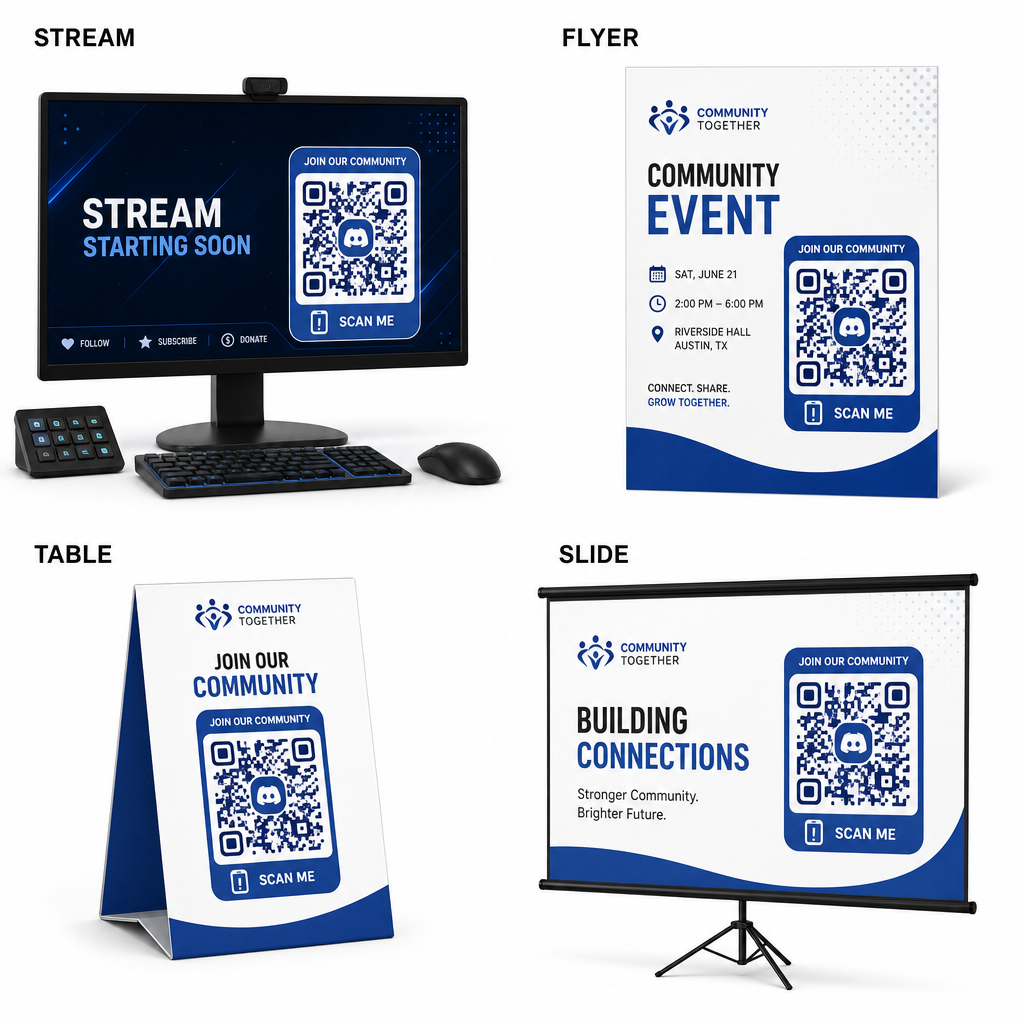
- Lisää striimipeittokuvia lähetysnäytöissä, jotta katsojat voivat liittyä samalla kun katsovat live-videota.
- Tulosta tapahtumamateriaalit fyysisiin merkkeihin, lentolehtisiin, pöytätelinoihin ja bannereihin tapaamisten aikana.
- Sisällytä pakkauslisäykset tuotelaatikoihin, vaatteiden tunnisteisiin tai ostajille lähetettäviin kiitoskortteihin.
- Upota esityskalvot työpajojen lopetusnäyttöön muuttaaksesi osallistujat yhteisön jäseniksi.
Rakenna yhteisösi nopealla mobiiliperehdytyksellä
Discord-kutsulinkin muuttaminen skannattavaksi QR-koodiksi poistaa manuaalisen kirjoittamisen esteet, antaen fanien, osallistujien ja asiakkaiden päästä palvelimellesi sekunneissa. Pysyvien kutsuasetusten käyttäminen, vahvan värikontrastin varmistaminen, asianmukaisten kokosuhteiden ylläpitäminen ja useiden laitteiden välillä testaaminen tarjoaa luotettavan perehdytyspolun jokaiselle uudelle jäsenelle.
Valmis kasvattamaan verkkoyhteisöäsi? Luo korkearesoluutioinen, mukautettu Discord QR-koodi Pagelootin luontityökaluilla tänään.
Usein kysytyt kysymykset
Kyllä. Kun luot kutsulinkkiä Discordissa, valitse “Muokkaa kutsulinkkiä” ja aseta “Vanhenee” arvoksi “Ei koskaan” ja “Käyttökertojen enimmäismäärä” arvoksi “Ei rajaa” ennen QR-koodin luomista.
Lataa vektorigrafiikkaformaatteja, kuten SVG tai EPS, julisteiden, bannerien ja lentolehtisten painamiseen. Jos käytät PNG-tiedostoja, varmista, että ne on renderöity korkealla 300 DPI:n tai sitä korkeammalla resoluutiolla epäterävyyden välttämiseksi.
Kyllä. Dynaamisen QR-koodin luominen mahdollistaa reaaliaikaisten skannausanalytiikkojen keräämisen, konversiosuorituskyvyn seurannan ajan mittaan ja kohde-URL:n päivittämisen aina tarvittaessa ilman fyysisten materiaalien uudelleentulostusta.