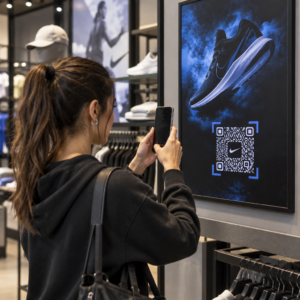
Miten jaat 40-sivuisen aineiston tai täydellisen lähdeluettelon jollekin, joka seisoo julisteesi edessä 90 sekuntia? Paperiset jaettavat loppuvat, URL-osoitteet ovat liian pitkiä kirjoitettavaksi, ja sovellukset vaativat latauksia, joita kukaan ei halua. QR-koodit ratkaisevat kaikki kolme ongelmaa yhdellä skannauksella – tämä opas selittää, miten niitä käytetään tehokkaasti tutkimusjulisteissa ja konferenssiesityksissä.
Mihin QR-koodisi linkitetään
Ennen kuin luot koodin, päätä, mitä sen tulisi todella tehdä skannaavalle henkilölle. Hyödyllisimmät linkit tieteellisissä konferensseissa kuuluvat muutamaan selkeään kategoriaan.
Tutkimusmateriaalit ja täydentävät tiedot ovat yleisin käyttötapaus. Julisteessa on rajallisesti tilaa, joten QR-koodi voi ohjata koko artikkeliisi, lähdeluetteloon, lisäkuviin, raaka-aineistoihin tai korkearesoluutioisiin versioihin kaavioista, joita on vaikea lukea painettuna. Yliopistokirjastojen oppaat huomauttavat, että QR-koodit ovat erityisen käytännöllisiä, kun viitteitä on liikaa lueteltavaksi suoraan julisteessa – koodi yksinkertaisesti ohjaa katsojat täydelliseen online-luetteloon.
Käytä PDF QR-koodi isännöidä paperisi tai täydentävän tiedostosi suoraan, jotta osallistujat saavat välittömän pääsyn ilman, että heidän tarvitsee etsiä tietokannasta tai kirjoittaa DOI:ta.
Yhteystiedot ovat yhtä tärkeitä. Konferenssiverkostoituminen tapahtuu nopeasti, ja vCard QR-koodi antaa jonkun skannata merkkisi tai julisteesi ja tallentaa nimesi, laitoksesi, sähköpostiosoitteesi ja verkkosivustosi suoraan puhelimensa yhteystietoihin – ei käyntikortteja tarvita eikä transkriptiovirheitä.
Palaute ja kyselyt laajentavat keskustelua julistesession ulkopuolelle. Upottamalla linkin lyhyeen Google-lomakkeeseen osallistujat voivat lähettää kysymyksiä tai arvioida työsi sekunneissa. Google Form QR-koodi tekee lomakkeen saataville mistä tahansa painetusta materiaalista ilman, että kenenkään tarvitsee kirjoittaa URL-osoitetta.
Esityskalvot ja multimedia toimivat hyvin, kun ne upotetaan esityskalvoihin. QR-koodin sijoittaminen puheen alkuun tai loppuun antaa yleisön ladata kalvot, käyttää tallennetta tai vierailla liittyvissä resursseissa keskeyttämättä istuntoa.
Jaa tutkimusmateriaaleja välittömästi Lataa paperisi, julisteesi tai täydentävä tiedostosi ja luo skannattava koodi minuuteissa käyttämällä PDF QR-koodi generaattori.
Staattiset vs. dynaamiset QR-koodit: Kumpi valita
A staattinen QR-koodi koodaa kohde-URL-osoitteen suoraan kuvioon. Kun se on tulostettu, sitä ei voi muuttaa – jos linkitetty sivu siirtyy tai tiedosto päivitetään, koodista tulee hyödytön.
A dynaaminen QR-koodi koodaa sen sijaan lyhyen uudelleenohjaus-URL-osoitteen. Voit päivittää kohteen milloin tahansa hallintapaneelista tulostamatta mitään uudelleen. Tämä on erityisen arvokasta konferenssikäytössä, jossa aikataulumuutokset ja viime hetken tiedostopäivitykset ovat rutiinia. Dynaamiset koodit tuottavat myös analytiikkaa: voit nähdä kokonaisskannaukset, yksilölliset skannaukset, laitetyypit, maantieteelliset tiedot ja aikaleimat, mikä antaa todellisen mittarin siitä, kuinka moni ihminen todella käytti materiaalejasi.
Kaikkeen, mitä aiot tulostaa etukäteen – julisteet, nimikyltit, kokousasiakirjat – dynaamiset QR-koodit ovat turvallisempi valinta. Dynaaminen QR-koodi generaattori antaa sinun muuntaa minkä tahansa URL-osoitteen dynaamiseksi koodiksi, muokata kohdetta tulostuksen jälkeen ja seurata sitoutumista yhdestä hallintapaneelista.
DARPA:n rahoittama tutkimusryhmä Kalifornian yliopistosta, Santa Cruzista, käytti dynaamisia QR-koodeja laadunvalvonnan seuraamiseen viidessä yliopistossa bioelektronisten laitteiden tuotannon aikana. Seuraamalla skannaustietoja he havaitsivat, että yhden tuotantovaiheen liimaus onnistui vain 59%:n onnistumisasteella – löydös, jota olisi ollut vaikea havaita ilman upotettua seurantaa. Kuten tutkija Cristian Hernandez totesi: “QR-koodin seurantajärjestelmä on antanut tiimillemme mahdollisuuden määrittää, että vaiheen 6 liimaus onnistui vain 59%:n onnistumisasteella… näiden tietojen avulla on paikannettu bioelektronisen laitteen vikatilan perimmäinen syy.”
QR-koodien suunnittelu luotettavaa skannausta varten
QR-koodi, joka näyttää hyvältä mutta ei skannaa, on pahempi kuin ei koodia ollenkaan. Nämä suunnitteluperiaatteet varmistavat, että omasi toimii todellisen konferenssiympäristön olosuhteissa.
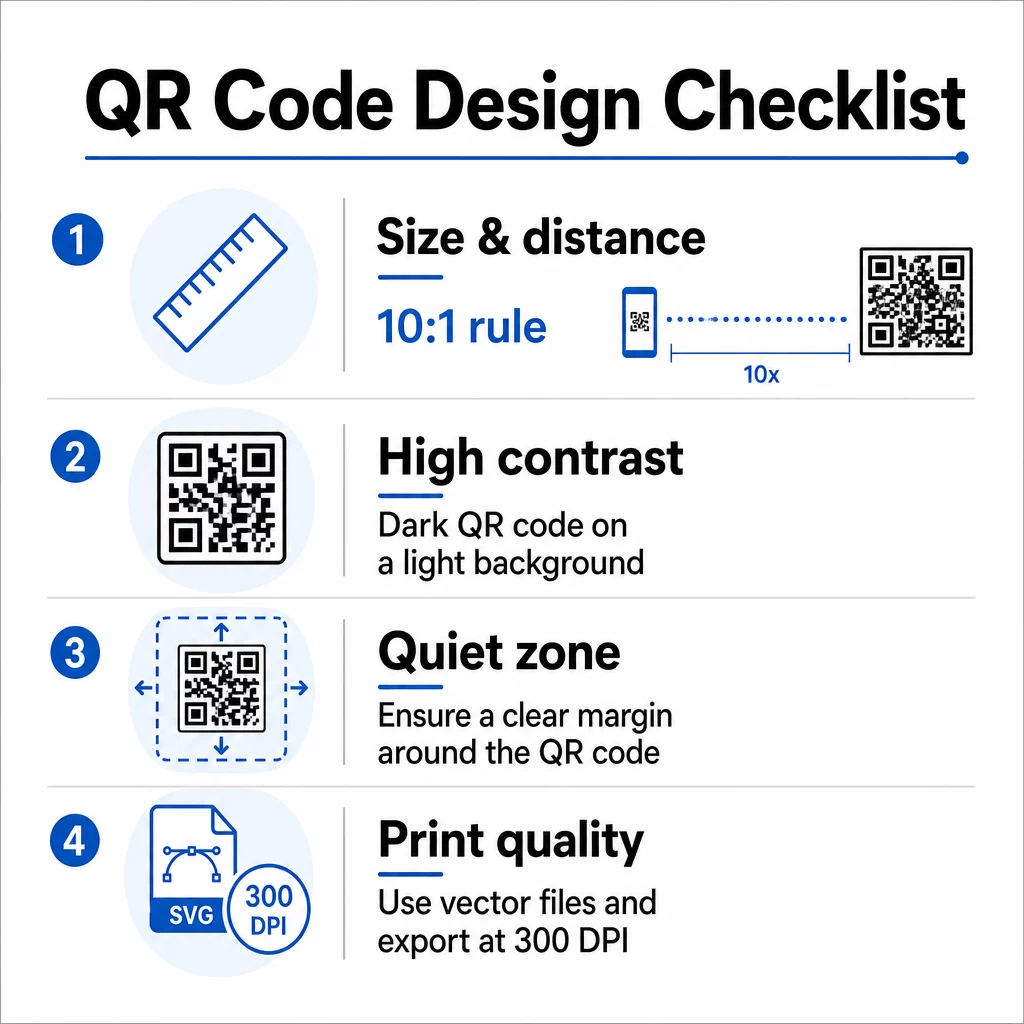
Koko ja skannausetäisyys
Noudata 10:1-sääntöä: koodin leveyden tulisi olla noin yksi kymmenesosa odotetusta skannausetäisyydestä. Tutkimusjulisteessa, jota katsotaan noin 50 cm:n (20 tuuman) etäisyydeltä, koodin tulisi olla vähintään 5 cm (2 tuumaa) leveä. Pagelootin kokosuositukset painomateriaaleille suosittelevat vähintään 3 × 3 cm:n kokoa julisteille, ja 6 × 6 cm on ihanteellinen tavoite. Jotkut yliopisto-oppaat ehdottavat vähintään noin 5 × 5 tuuman kokoa julistekoodeille, jotka on luettava seisomaetäisyydeltä.
Esityskalvoilla koodin on oltava riittävän suuri skannattavaksi istuimelta. Testaa se todellisella projektioetäisyydellä ennen istuntoa.
Kontrasti ja väri
Skannerit lukevat QR-koodeja havaitsemalla tummien moduulien ja vaalean taustan välisen kontrastin. Riittämätön kontrasti on yksi ensisijaisista skannausvirheiden syistä. Käytä tummia koodikuvioita vaalealla tai valkoisella taustalla ja pyri vähintään 4.5:1 kontrastisuhteeseen. Vältä käänteisiä järjestelmiä (vaalea koodi tummalla taustalla), gradientteja tai kuvioituja taustoja koodin takana.
Jos haluat käyttää brändi- tai institutionaalisia värejä, voit – edellyttäen, että kontrastisuhde pysyy riittävän korkeana. Lisätietoja siitä, mitkä väriyhdistelmät toimivat ja mitkä epäonnistuvat, katso Pagelootin QR-koodin värikontrastin parhaita käytäntöjä.
Hiljainen alue
Hiljainen vyöhyke on koodia ympäröivä selkeä marginaali. ISO/IEC 18004 määrittää vähintään neljän moduulin tyhjän tilan kaikilla neljällä sivulla. Älä sijoita tekstiä, logoja, reunoja tai taustakuvioita tähän marginaaliin. Julisteessa tämä tarkoittaa näkyvän valkoisen tilan jättämistä koodin ympärille – käsittele sitä osana suunnittelua, ei hukkatilana.
Tiedostomuoto ja tulostuslaatu
Vie QR-koodisi vektoritiedostona (SVG tai EPS) suurikokoista tulostusta varten. Rasterimuodot, kuten PNG, voivat pikselöityä suurennettaessa, mikä vaikeuttaa yksittäisten moduulien erottamista ja heikentää skannattavuutta. Vakiotulostusresoluutioissa 300 DPI on käytännön minimistandardi.
Hanki tulostusvalmiit QR-kooditiedostot Lataa koodisi SVG-, EPS- tai PDF-muodossa korkearesoluutioista julistetulostusta varten QR-koodigeneraattori.
Sijoittelu julisteisiin ja dioihin
Se, mihin koodin sijoitat, vaikuttaa siihen, skannaavatko ihmiset sen todella. Tieteellisen viestinnän lähteet suosittelevat QR-koodin sijoittamista julisteen lukupolun loppupuolelle – johtopäätösten tai pääviestin kohdalle – jotta se ilmestyy sen jälkeen, kun katsoja on jo sitoutunut sisältöön. Tämä on looginen hetki tarjota lisää: “Haluatko koko aineiston? Skannaa tästä.”
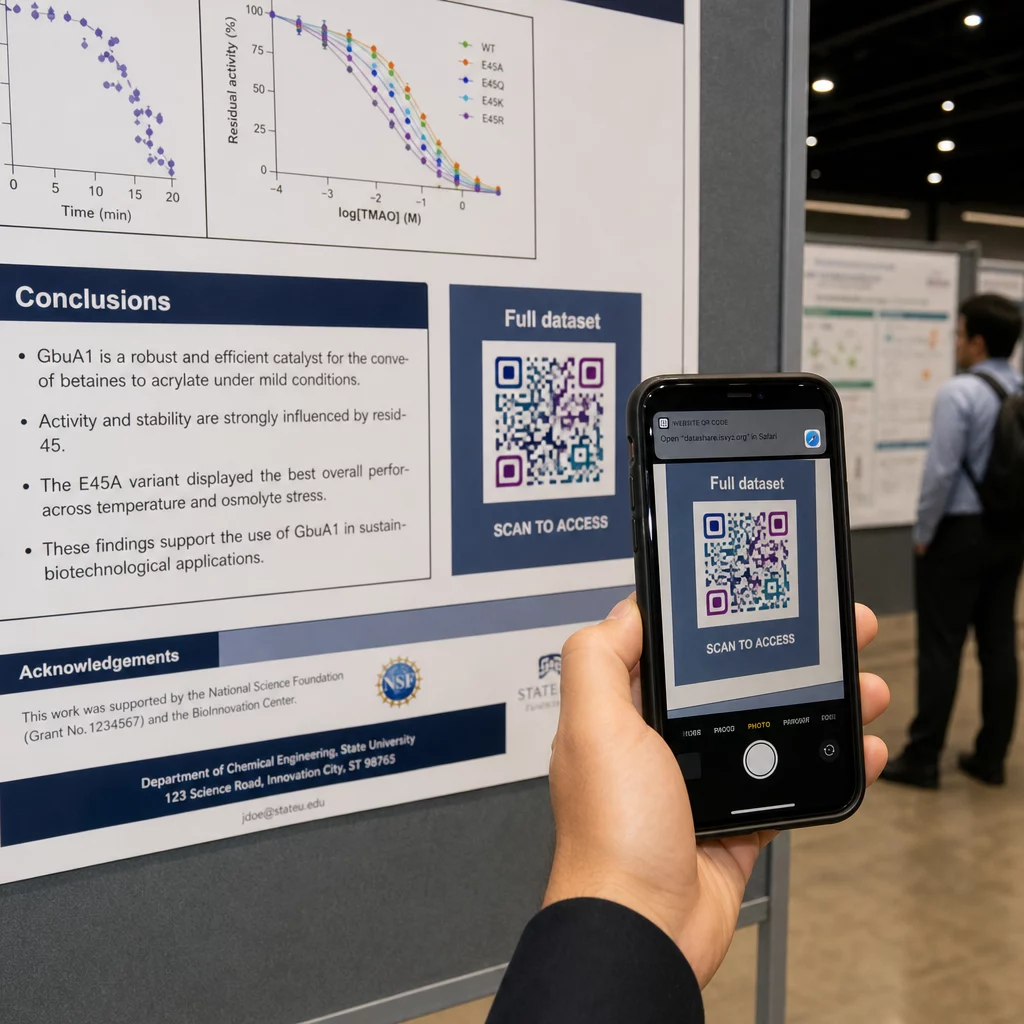
Pystysuorassa julisteessa oikea alakulma on luonnollinen silmän lepopiste lukemisen jälkeen. Vaakasuorassa asettelussa oikea puoli toimii samoin. QR-koodit julisteissa, sijoittelu silmien tasolle (noin 107–168 cm lattiasta) antaa osallistujien skannata mukavasti kumartumatta.
Yhdistä koodi aina lyhyeen toimintakehotukseen, joka kertoo ihmisille, mitä he saavat:
- “Skannaa koko artikkeli”
- “Käytä lisätietoja”
- “Tallenna yhteystietoni”
- “Lataa esitysmateriaali”
Ilman toimintakehotusta monet osallistujat jättävät koodin kokonaan huomiotta – he eivät tiedä, kannattaako sitä skannata.
Esitysdioissa näytä QR-koodia vähintään 15–20 sekunnin ajan ja mainitse se suullisesti. Sen sijoittaminen dian oikeaan alakulmaan pitää sen näkyvissä kilpailematta pääsisältösi kanssa. Dynaamiset koodit ovat tässä erityisen hyödyllisiä: jos kohde muuttuu esitysten tai konferenssipäivien välillä, voit päivittää linkin koskematta diatiedostoon.
Ohjeita sijoitteluun eri yhteyksissä löydät Pagelootin QR-koodin sijoitteluopas käsittelee silmien tasolla sijoittelua, taustavalintoja ja sitä, miten sijoittelu sovitetaan käyttäjän tarkoitukseen.
Testaus ennen painatusta
Testaa koodi ennen julisteen lähettämistä painoon tai diojen viimeistelyä. Erityisesti:
- Skannaa todelliselta etäisyydeltä, jolla yleisö seisoo tai istuu
- Testaa vähintään kahdella eri laitteella (iOS ja Android)
- Kokeile erilaisissa valaistusolosuhteissa, mukaan lukien konferenssisaleissa yleiset loisteputkivalot
- Varmista, että linkitetty kohde latautuu oikein, myös mobiiliyhteydellä (ei vain Wi-Fi:llä)
- Tarkista, että PDF-tiedostot ja muut tiedostot avautuvat mobiililaitteella ilman työpöytäsovellusta
Jos käytät dynaamista koodia, varmista, että uudelleenohjaus toimii oikein kohdepäivitysten jälkeen. Täydellisen suunnittelu- ja testauskriteeriluettelon löydät Pagelootin sivuilta. QR-koodin luettavuuden parhaisiin käytäntöihin.
QR-koodien käyttö julisteen ulkopuolella
Tieteelliset konferenssit tarjoavat useita kosketuspisteitä, joissa QR-koodit tuovat käytännön lisäarvoa julistetaulun ulkopuolella.
Konferenssimerkit vCard QR-koodeilla antavat kenen tahansa osallistujan tallentaa yhteystietosi käytäväkeskustelujen aikana – puhelinnumeroiden vaihtoa ei tarvita, eikä korttia, joka katoaa laukkuun.
Istunnon jaettavat materiaalit QR-koodilla linkitetyt korvaavat paperipinot. Yksi koodi painetussa tiivistelmässä voi yhdistää osallistujat täydellisiin julkaisuihin, niihin liittyviin julkaisuihin tai istunnon jälkeiseen palautelomakkeeseen.
Rekisteröinti ja sisäänkirjautuminen prosessit hyötyvät osallistumisen QR-koodeista, jotka varmistavat henkilöllisyyden ja seuraavat osallistumista, antaen järjestäjille reaaliaikaiset osallistujamäärät istunnoittain.
Verkostoitumismateriaalit voi käyttää linkin QR-koodi yhdistääkseen laboratorion verkkosivustoon, Google Scholar -profiiliin tai LinkedIn-sivuun – antaen kiinnostuneille kollegoille useita tapoja jatkaa keskustelua konferenssin päätyttyä.
IASCON 2022 -konferenssi osoitti, miltä tämä näyttää laajassa mittakaavassa. Järjestäjät sijoittivat QR-koodeja ilmoittautumispisteelle, kokoushuoneiden ulkopuolelle ja esityskalvoihin, korvaten kokonaan paperiset aikataulut ja jaettavat materiaalit. Osallistujat pääsivät käsiksi istuntojen tietoihin, puhujaprofiileihin ja esitysten latauksiin skannaamalla koodeja jokaisessa paikassa. QR-koodeilla käynnistetty mobiilivastausjärjestelmä mahdollisti live-kyselyt ja Q&A:n ilman sovelluslatauksia, saavuttaen perinteisiin paperilomakkeisiin verrattavissa olevat osallistumisasteet. Tapahtuman analytiikka paljasti korkeamman sitoutumisen aamupäivän istuntojen aikana ja mitattavissa olevan laskun lounaan jälkeen – tietoa, joka vaikutti suoraan tuleviin aikataulupäätöksiin.
QR-koodit toimivat kaikenkokoisissa konferensseissa samasta syystä: ne poistavat kitkaa uteliaan osallistujan ja haluamansa tiedon väliltä. Hyvin sijoitettu, oikean kokoinen, korkeakontrastinen QR-koodi selkeällä toimintakehotuksella tekee jotain, mitä pelkkä painettu juliste ei voi – se pitää keskustelun käynnissä istunnon päätyttyä. Aloita dynaamisilla koodeilla, jotta säilytät joustavuuden päivittää kohteita, seurata kuka sitoutuu materiaaleihisi ja tehdä muutoksia ilman uudelleenpainatusta. Kaikissa näissä, Pageloot QR-koodigeneraattori tarjoaa työkalut koodien luomiseen, mukauttamiseen ja hallintaan yhdestä hallintapaneelista.
Usein kysytyt kysymykset
Ei. Nykyaikaiset älypuhelimet sekä iOS- että Android-käyttöjärjestelmissä voivat skannata QR-koodeja suoraan sisäänrakennetun kamerasovelluksen kautta, ilman lisäohjelmistoja. Osallistujat yksinkertaisesti avaavat kameransa, osoittavat sen koodiin ja napauttavat ilmoitusta avatakseen linkitetyn sisällön selaimessaan.
Staattinen QR-koodi koodaa kohde-URL:n suoraan kuvioon – kun se on kerran painettu, sitä ei voi muuttaa. Dynaaminen QR-koodi koodaa lyhyen uudelleenohjaus-URL:n, joten voit päivittää kohteen milloin tahansa hallintapaneelista ilman uudelleenpainatusta. Dynaamiset koodit tarjoavat myös analytiikkaa, kuten skannausmäärät, laitetyypit ja aikaleimat, mitä staattiset koodit eivät. Konferenssijulisteisiin ja ennakkoon painettuihin materiaaleihin dynaamisia koodeja suositellaan vahvasti.
Noudata 10:1-sääntöä: koodin leveyden tulisi olla noin yksi kymmenesosa skannausetäisyydestä. Noin 50 cm:n (20 tuuman) etäisyydeltä katsottavalle julisteelle tämä tarkoittaa vähintään 5 cm:n (2 tuuman) leveyttä. Käytännöllinen tavoite julistekäyttöön on 6 × 6 cm, mikä antaa mukavan skannausvaran useimmille osallistujille. Testaa aina painettu koodi todelliselta katseluetäisyydeltä ennen konferenssia.