Worstelt u met het converteren van offline publieksleden naar actieve Discord-abonnees zonder dat ze lange server-URL's hoeven te typen? Complexe links creëren typfrictie, waardoor potentiële leden afhaken voordat ze zelfs maar beginnen. Het converteren van uw Discord-uitnodigingslink naar een scanbare QR-code biedt een directe, one-touch onboardingervaring voor fysieke materialen en digitale displays.
Genereer een permanente Discord-uitnodigingslink
Voordat u een QR-code genereert, moet u een functionele uitnodigingslink van uw Discord-server verkrijgen. Standaard verlopen Discord-uitnodigingslinks na 7 dagen of nadat een beperkt aantal keren is gebruikt. Om kapotte QR-codes op fysieke printmaterialen te voorkomen, configureert u eerst een permanente link.
- Openen uw Discord-app op desktop of mobiel en navigeer naar uw server.
- Zoek uw doel-landingskanaal, ga met de muis over de kanaalnaam en selecteer Uitnodiging maken.
- Klik op op Bewerk uitnodigingslink onderaan het pop-upvenster.
- Verandering de Vervalt na vervolgkeuzemenu-instelling naar Nooit.
- Verandering de Maximaal aantal keren gebruiken vervolgkeuzemenu-instelling naar Geen limiet.
- Kopiëren de nieuw gegenereerde permanente URL naar uw klembord.
Converteer uw link met een QR-code generator
Zodra u uw permanente server-URL hebt gekopieerd, kunt u deze transformeren in een scanbare grafiek. Net als bij het instellen van QR-codes voor Telegram-groepen, vereist het maken van een Discord-code het converteren van een eenvoudig webadres naar een visueel patroon dat mobiele camera's kunnen decoderen.
- Navigeer naar een online link QR-codegenerator.
- Selecteer de URL-invoeroptie binnen de generatorinterface.
- Plakken uw permanente Discord-uitnodigingslink in het webadresveld.
- genereren uw visuele code-afbeelding met één klik.
Maak uw aangepaste Discord QR-code Verander lange server-uitnodigingslinks in hoogwaardige, scanbare grafieken voor posters, kaarten en streamdisplays met behulp van de link QR-codegenerator vandaag.
Pas uw ontwerp aan voor merkherkenning
Een generieke zwart-witte QR-code kan misplaatst lijken op aangepaste marketingafbeeldingen of schermen. Het aanpassen van het ontwerp bouwt onmiddellijk vertrouwen op en geeft potentiële leden aan waar de code hen naartoe zal leiden.
Met een complete QR-codegenerator, kunt u visuele parameters aanpassen om aan te sluiten bij de identiteit van uw community:
- Pas merk kleuren toe door donkere primaire tinten te gebruiken voor de codemodules, terwijl de achtergrond licht blijft om de leesbaarheid te optimaliseren.
- Voeg een logo in of het Discord-icoon in het midden van het ontwerp om direct visueel bestemmingsvertrouwen op te bouwen.
- Voeg een call-to-action kader toe zoals “Scan om deel te nemen” om potentiële leden te begeleiden bij de te nemen actie.
Best practices om de scanbaarheid van QR-codes te garanderen
Een slecht opgemaakte QR-code zal niet scannen, wat leidt tot een frustrerende ervaring voor potentiële leden. Het volgen van technische print- en renderstandaarden zorgt voor snelle cameraherkenning op alle mobiele hardware.
Handhaaf een hoog kleurcontrast
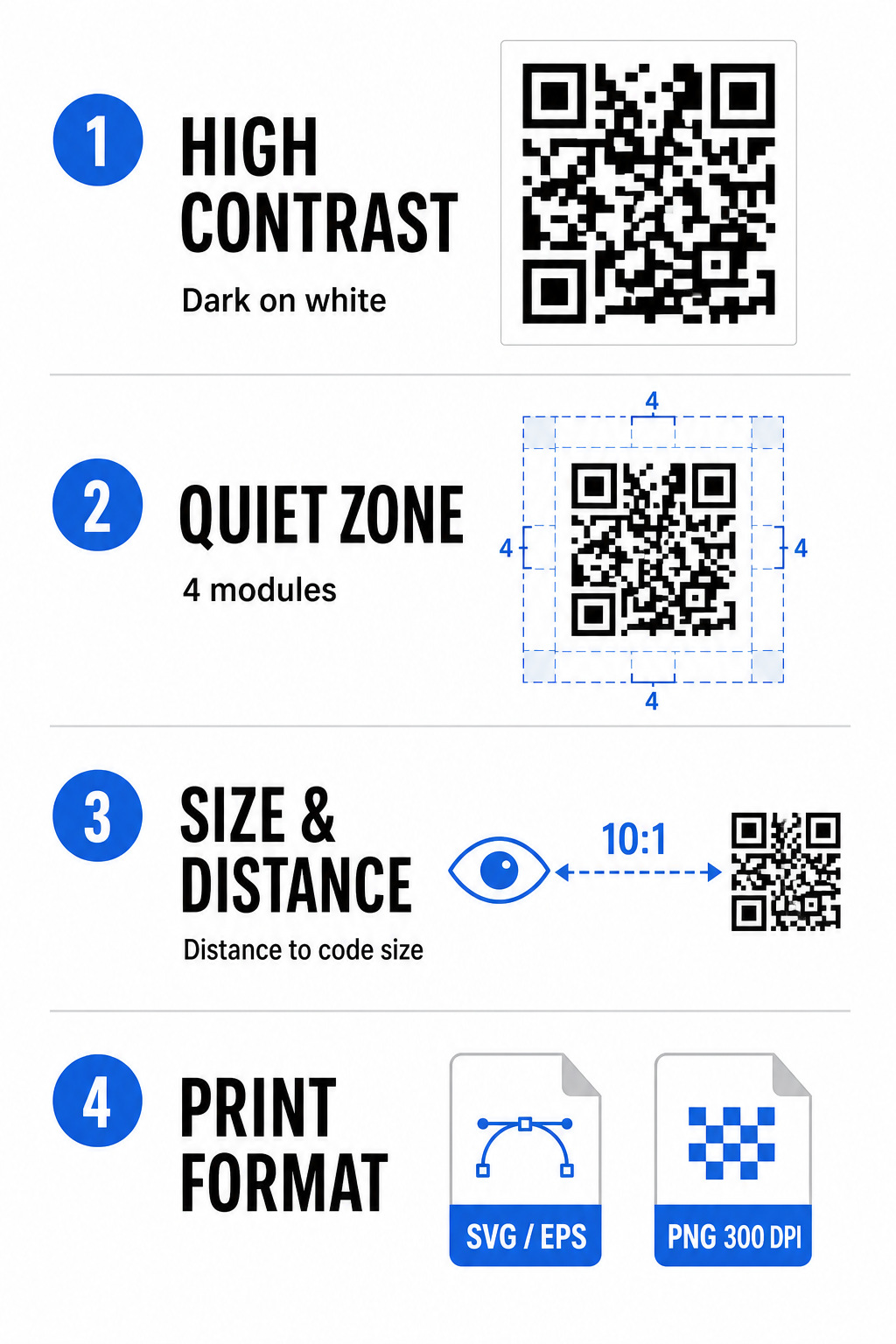
Scanners zijn afhankelijk van contrast tussen donkere patronen (modules) en achtergrondruimtes om gegevens te decoderen. Donkere kleuren absorberen licht, terwijl lichtere kleuren het reflecteren, waardoor camerasensoren gemakkelijk datapunten kunnen onderscheiden. Streef naar een contrastverhouding van ten minste 4:1 tussen uw codemodules en de achtergrond. De meest betrouwbare combinatie is zwarte of donkerblauwe modules tegen een witte achtergrond. Vermijd omgekeerde kleurenschema's met lichte modules op donkere achtergronden, aangezien veel camera-apps omgekeerde patronen niet kunnen decoderen.
Behoud de Rustzone
De stille zone is een lege rand rond alle vier de buitenste randen van de QR-codematrix. Deze marge moet minimaal vier modules breed zijn en volledig vrij van tekst, afbeeldingen of frameversieringen. Zonder een schone stille zone kunnen mobiele camera's niet bepalen waar de grenzen van de QR-code beginnen en eindigen.
Bereken de juiste maat voor de scanafstand
Bij het afdrukken van materialen berekent u de afmetingen van uw QR-code met een afstand-tot-grootte-verhouding van 10:1. Dit betekent dat de fysieke breedte van uw code ongeveer een tiende van de verwachte scanafstand moet zijn. Raadpleeg voor diepere technische specificaties de volledige handleiding over best practices voor de leesbaarheid van QR-codes.
| Plaatsingsscenario | Verwachte scanafstand | Minimale aanbevolen QR-code grootte |
|---|---|---|
| Evenement badges & visitekaartjes | 10 inch (25 cm) | 1,0 x 1,0 inch (2,5 x 2,5 cm) |
| Tafeldisplays & desktopdisplays | 20 inch (50 cm) | 2,0 x 2,0 inch (5,0 x 5,0 cm) |
| Wandposters & stream banners | 5 voet (1,5 meter) | 6,0 x 6,0 inch (15 x 15 cm) |
| Evenement podium displays & bewegwijzering | 10 voet (3,0 meter) | 12,0 x 12,0 inch (30 x 30 cm) |
Exporteren in vectorformaten
Voor fysieke printproductie, exporteer uw bestand in vectorformaten met hoge resolutie, zoals SVG of EPS. Vectorbestanden schalen eindeloos zonder scherpte te verliezen of wazigheid te introduceren. Als u rasterformaten zoals PNG gebruikt, controleer dan of de bestandsresolutie is ingesteld op minimaal 300 DPI voor afdrukken van hoge kwaliteit.
Testen en valideren van uw Discord QR-code
Druk nooit marketingmateriaal af of publiceer afbeeldingen zonder de functionaliteit van de QR-code op meerdere platforms te verifiëren. Camerasensoren, software-algoritmen en schermresoluties variëren sterk tussen apparaten.
- Testen op besturingssystemen door de afbeelding te scannen met zowel native camera-apps van iOS als Android.
- Scanhoeken verifiëren door de code te testen onder fel licht, in schemerige omgevingen en onder verschillende hoeken.
- Gebruik een online tool zoals een webgebaseerde QR-code scanner om te bevestigen dat de ingesloten URL schoon wordt gedecodeerd.
- Onboarding workflow beoordelen om te bevestigen dat het scannen direct de Discord-app opent of soepel naar het server-scherm leidt.
Voor een breder overzicht van hardwarecompatibiliteit, raadpleeg deze gids over het scannen van QR-codes op smartphones.
Praktische manieren om uw Discord QR-code te delen
Het weergeven van uw scanbare uitnodigingslink op offline en digitale contactpunten helpt bij het opbouwen van een actieve serverpopulatie.
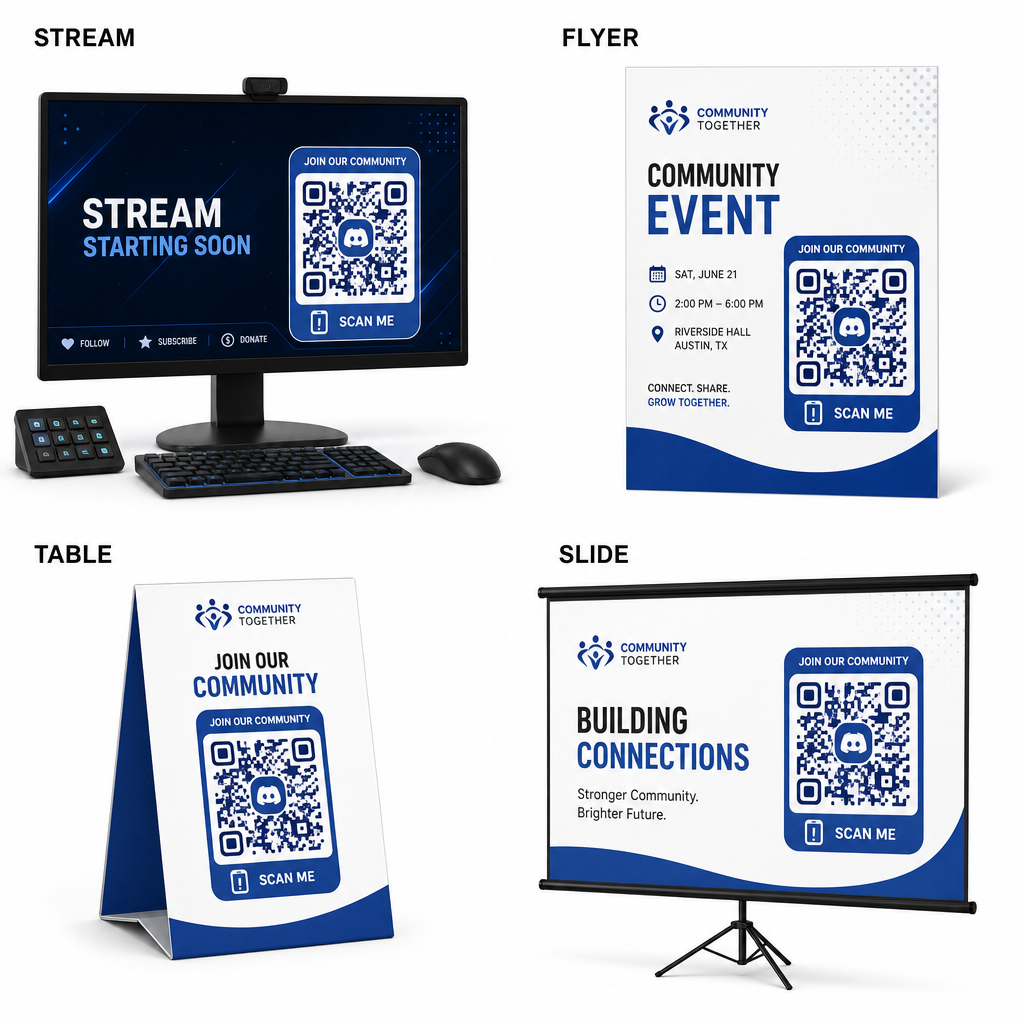
- Stream overlays toevoegen op uitzendschermen zodat kijkers kunnen deelnemen tijdens het bekijken van live video.
- Evenementmaterialen printen op fysieke badges, flyers, tafeldisplays en banners tijdens bijeenkomsten.
- Verpakkingsinvoegingen opnemen op productdozen, kledinglabels of bedankkaartjes die naar kopers worden verzonden.
- Presentatieslides insluiten op het afsluitende scherm van workshops om deelnemers om te zetten in communityleden.
Bouw uw community op met snelle mobiele onboarding
Het omzetten van uw Discord-uitnodigingslink naar een scanbare QR-code verwijdert handmatige typefouten, waardoor fans, deelnemers en klanten binnen enkele seconden uw server kunnen betreden. Het gebruik van permanente uitnodigingsinstellingen, het waarborgen van sterk kleurcontrast, het handhaven van geschikte grootteverhoudingen en het testen op meerdere apparaten biedt een betrouwbaar onboardingpad voor elk nieuw lid.
Klaar om uw online community te laten groeien? Maak vandaag nog een aangepaste Discord QR-code met hoge resolutie met de generatietools van Pageloot.
Veelgestelde vragen
Ja. Wanneer u de uitnodigingslink in Discord maakt, selecteert u “Uitnodigingslink bewerken” en stelt u “Vervalt na” in op “Nooit” en “Maximaal aantal keren gebruiken” op “Geen limiet” voordat u uw QR-code genereert.
Download vectorformaten zoals SVG of EPS voor het printen van posters, banners en flyers. Als u PNG-bestanden gebruikt, zorg er dan voor dat deze op een hoge resolutie van 300 DPI of hoger worden weergegeven om wazigheid te voorkomen.
Ja. Het genereren van een dynamische QR-code stelt u in staat om scananalyses in realtime te verzamelen, de conversieprestaties in de loop van de tijd te volgen en de bestemmings-URL indien nodig bij te werken zonder fysieke materialen opnieuw af te drukken.